-
Vue(四)——全局事件总线, 消息订阅与发布 ,nextTick
💻 博主主页: 👉🏻 👉🏻 👉🏻 糖 -O-
🚩🚩🚩vue专栏:Vue全家桶
🌞🌞🌞 上一篇: Vue(三)——脚手架,自定义事件,插槽
👍👍👍 希望各位博主多多支持!!!🌹 🌹 🌹
2.4. 全局事件总线
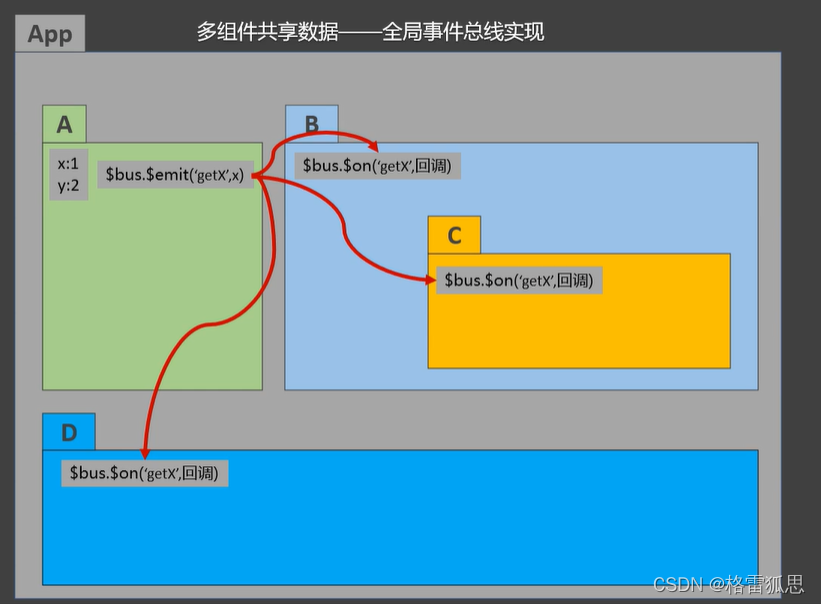
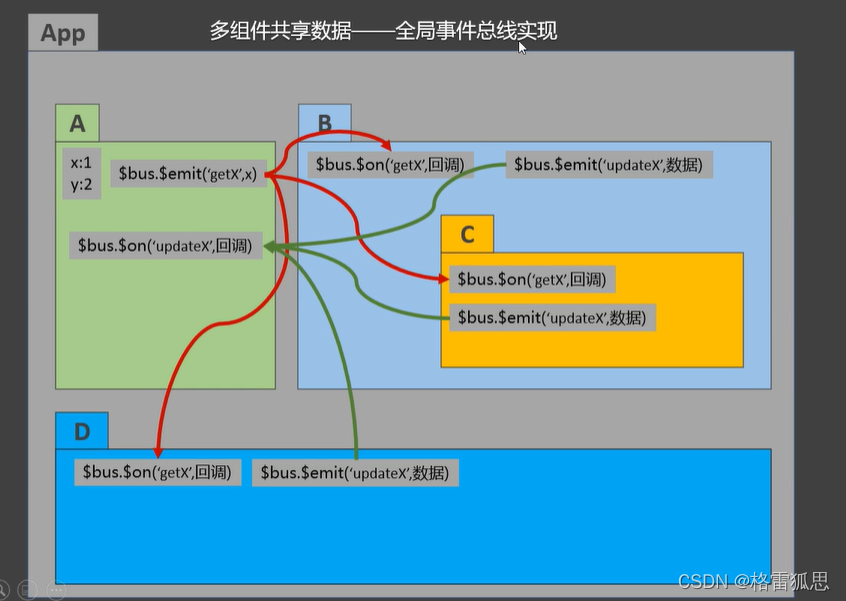
一种组件间通信的方式,适用于任意组件间通信。
-
安装全局事件总线:
new Vue({ ...... beforeCreate() { Vue.prototype.$bus = this //安装全局事件总线,$bus就是当前应用的vm }, ...... })- 1
- 2
- 3
- 4
- 5
- 6
- 7
-
使用事件总线:
-
接收数据:A组件想接收数据,则在A组件中给$bus绑定自定义事件,事件的回调留在A组件自身。
methods(){ demo(data){......} } ...... mounted() { this.$bus.$on('xxxx',this.demo) }- 1
- 2
- 3
- 4
- 5
- 6
- 7
-
提供数据:
this.$bus.$emit('xxxx',数据) -
最好在beforeDestroy钩子中,用$off去解绑当前组件所用到的事件。
School.vue
<template> <div class="school"> <h2>学校名称:{{name}}h2> <h2>学校地址:{{address}}h2> div> template> <script> export default { name:'School', data() { return { name:'尚硅谷', address:'北京', } }, methods: { demo(data) { console.log('我是School组件,收到了数据',data) } } mounted() { // console.log('School',this) this.$bus.$on('hello',this.demo) }, beforeDestroy() { this.$bus.$off('hello') }, } script> <style scoped> .school{ background-color: skyblue; padding: 5px; } style>- 1
- 2
- 3
- 4
- 5
- 6
- 7
- 8
- 9
- 10
- 11
- 12
- 13
- 14
- 15
- 16
- 17
- 18
- 19
- 20
- 21
- 22
- 23
- 24
- 25
- 26
- 27
- 28
- 29
- 30
- 31
- 32
- 33
- 34
- 35
- 36
- 37
Student.vue
<template> <div class="student"> <h2>学生姓名:{{name}}h2> <h2>学生性别:{{sex}}h2> <button @click="sendStudentName">把学生名给School组件button> div> template> <script> export default { name:'Student', data() { return { name:'张三', sex:'男', } }, mounted() { // console.log('Student',this.x) }, methods: { sendStudentName(){ this.$bus.$emit('hello',this.name) } }, } script> <style lang="less" scoped> .student{ background-color: pink; padding: 5px; margin-top: 30px; } style>- 1
- 2
- 3
- 4
- 5
- 6
- 7
- 8
- 9
- 10
- 11
- 12
- 13
- 14
- 15
- 16
- 17
- 18
- 19
- 20
- 21
- 22
- 23
- 24
- 25
- 26
- 27
- 28
- 29
- 30
- 31
- 32
- 33
- 34
- 35
- 36
2.5. 消息订阅与发布
一种组件间通信的方式,适用于任意组件间通信。
-
安装pubsub:
npm i pubsub-js -
引入:
import pubsub from 'pubsub-js' -
接收数据:A组件想接收数据,则在A组件中订阅消息,订阅的回调留在A组件自身。
methods:{ demo(data){......} } ...... mounted() { this.pid = pubsub.subscribe('xxx',this.demo) //订阅消息 }- 1
- 2
- 3
- 4
- 5
- 6
- 7
-
提供数据:
pubsub.publish('xxx',数据) -
最好在beforeDestroy钩子中,用
PubSub.unsubscribe(pid)去取消订阅。
School.vue
<template> <div class="school"> <h2>学校名称:{{name}}h2> <h2>学校地址:{{address}}h2> div> template> <script> import pubsub from 'pubsub-js' export default { name:'School', data() { return { name:'尚硅谷', address:'北京', } }, mounted() { // console.log('School',this) /* this.$bus.$on('hello',(data)=>{ console.log('我是School组件,收到了数据',data) }) */ this.pubId = pubsub.subscribe('hello',(msgName,data)=>{ console.log(this) // console.log('有人发布了hello消息,hello消息的回调执行了',msgName,data) }) }, beforeDestroy() { // this.$bus.$off('hello') pubsub.unsubscribe(this.pubId) }, } script> <style scoped> .school{ background-color: skyblue; padding: 5px; } style>- 1
- 2
- 3
- 4
- 5
- 6
- 7
- 8
- 9
- 10
- 11
- 12
- 13
- 14
- 15
- 16
- 17
- 18
- 19
- 20
- 21
- 22
- 23
- 24
- 25
- 26
- 27
- 28
- 29
- 30
- 31
- 32
- 33
- 34
- 35
- 36
- 37
- 38
- 39
- 40
2.6. nextTick
this.$nextTick(回调函数)- 在下一次 DOM 更新结束后执行其指定的回调。
- 当改变数据后,要基于更新后的新DOM进行某些操作时,要在nextTick所指定的回调函数中执行。
this.$nextTick(function(){ this.$refs.inputTitle.focus() }- 1
- 2
- 3
2.7. Vue封装的过度与动画
-
在插入、更新或移除 DOM元素时,在合适的时候给元素添加样式类名。
- 元素进入的样式:
1. v-enter:进入的起点
2. v-enter-active:进入过程中
3. v-enter-to:进入的终点 - 元素离开的样式:
- v-leave:离开的起点
- v-leave-active:离开过程中
- v-leave-to:离开的终点
-
使用
<transition name="hello"> <h1 v-show="isShow">你好啊!h1> transition>- 1
- 2
- 3
-
备注:若有多个元素需要过度,则需要使用:
key值。
- 元素进入的样式:
<template> <div> <button @click="isShow = !isShow">显示/隐藏button> <transition-group name="hello" appear> <h1 v-show="!isShow" key="1">你好啊!h1> <h1 v-show="isShow" key="2">尚硅谷!h1> transition-group> div> template> <script> export default { name:'Test', data() { return { isShow:true } }, } script> <style scoped> h1{ background-color: orange; } /* 进入的起点、离开的终点 */ .hello-enter,.hello-leave-to{ transform: translateX(-100%); } .hello-enter-active,.hello-leave-active{ transition: 0.5s linear; } /* 进入的终点、离开的起点 */ .hello-enter-to,.hello-leave{ transform: translateX(0); } style>- 1
- 2
- 3
- 4
- 5
- 6
- 7
- 8
- 9
- 10
- 11
- 12
- 13
- 14
- 15
- 16
- 17
- 18
- 19
- 20
- 21
- 22
- 23
- 24
- 25
- 26
- 27
- 28
- 29
- 30
- 31
- 32
- 33
- 34
- 35
- 36
- 37
使用第三库的具体案例(随便看看,这个不重要)
库的名称:Animate.css
安装:npm i animate.css
引入:import ‘animate.css’<template> <div> <button @click="isShow = !isShow">显示/隐藏button> <transition-group appear name="animate__animated animate__bounce" enter-active-class="animate__swing" leave-active-class="animate__backOutUp" > <h1 v-show="!isShow" key="1">你好啊!h1> <h1 v-show="isShow" key="2">尚硅谷!h1> transition-group> div> template> <script> import 'animate.css' export default { name:'Test', data() { return { isShow:true } }, } script> <style scoped> h1{ background-color: orange; } style>- 1
- 2
- 3
- 4
- 5
- 6
- 7
- 8
- 9
- 10
- 11
- 12
- 13
- 14
- 15
- 16
- 17
- 18
- 19
- 20
- 21
- 22
- 23
- 24
- 25
- 26
- 27
- 28
- 29
- 30
- 31
- 32
-
-
相关阅读:
AIGC ChatGPT 4 与 Python 进行数据分析与可视化
Day20_9 前端入门之CSS样式
Java计算机网络篇-HTTP
UVa10537 The Toll! Revisited(Dijkstra)
MySQL实现的一点总结(三)
GoLang之如何比较两个对象完全相同(5)
老板加薪!看我做的WPF Loading!!!
React源码分析1-jsx转换及React.createElement
【Python3】基本数据类型、数据类型转换
vue3导出表格(导出成Execl表)
- 原文地址:https://blog.csdn.net/m0_61016904/article/details/126840722
