-
40、jenkins部署vue项目
前言
前面我们已经学习了jenkin的持续集成与部署,接下来我们将使用jenkin来部署我们之前已经完成的微服务项目
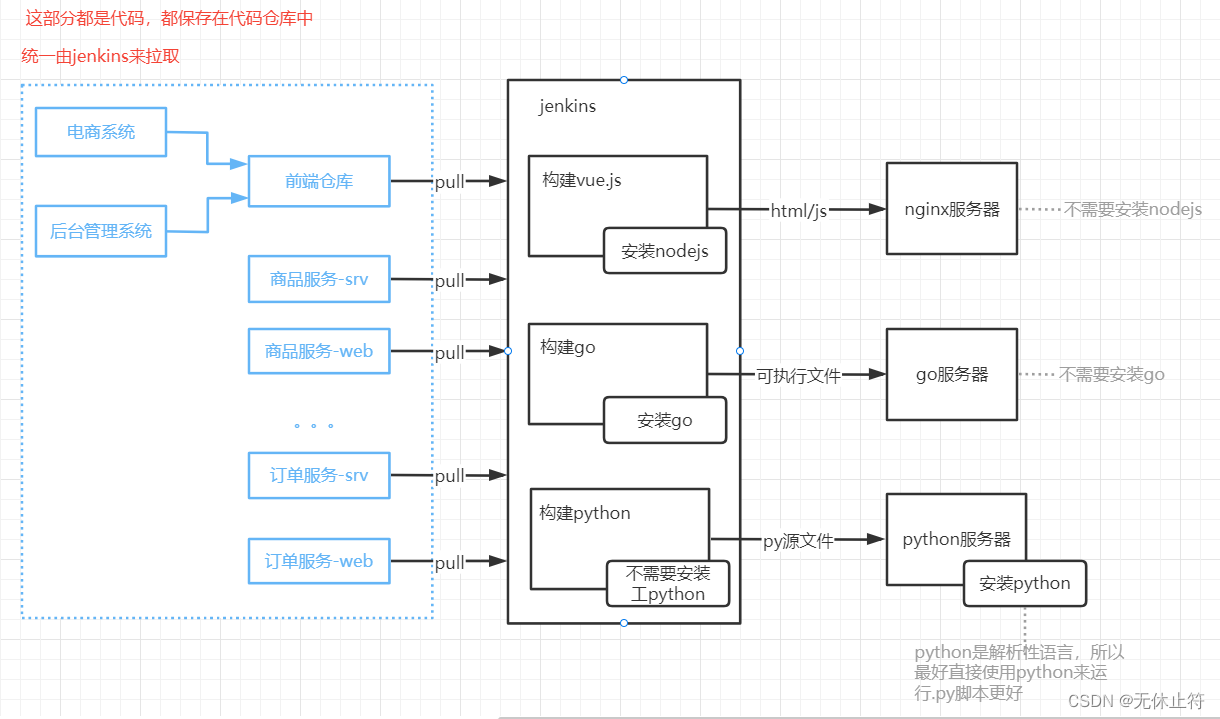
一、服务器部署分析
- PS特殊说明:ng服务器、go服务器和py服务器,如图所示是各要部署在不同的服务器中的;因为电脑原因,就不分别部署了,都部署到一台服务器中,跟图示的区别是IP地址的不同,其他没有区别;之后的说明我们会以jenkins服务器、测试服务器来区分
二、手动部署vue项目
先了解如何手动部署vue项目,这样后面才知道如何在jenkins中部署vue项目
因为之前的部署分析,我们在jenkins中就需要部署vue项目
所以我们直接在jenkin的服务器中安装nodejs1 - gitee操作
-
gitee新建仓库


-
本地电脑新建一个目录:ec_project,右键git bash;
-
设置Git账户
- git config --global user.name “账户名”(设置全局账户名)
- git config --global user.email “邮箱”(设置全局邮箱)
-
生成SSH公钥
- 生成命令: ssh-keygen -t rsa -C “邮箱” ( 注意:这里需要敲3次回车)
- 查看命令: cat ~/.ssh/id_rsa.pub
-
设置账户公钥


-
测试公钥:
ssh -T git@gitee.com -
克隆项目:先
git init,然后git clone XXXXX

-
将电商系统的源码拷贝到目录中:然后右键 TortoiseGit -> 添加 -> 选中全部 -> 确定


-
回到git刷新下我们可以看到代码已经上传好了

2 - 启动项目
-
这时候到jenkins的服务器clone代码:

-
nodejs安装参考:https://blog.csdn.net/qq23001186/article/details/125698420
-
因为我们是root账户,所以需要:
npm i --unsafe-perm
cd online-store npm i --unsafe-perm npm run dev- 1
- 2
- 3
- 这里还需要修改package.json:否则无法访问,因为不配置默认为localhost无法在局域网外访问
vim package.json:添加上,--host 0.0.0.0

三、nginx中部署vuejs
1 - 静态html生成
- 使用了nginx后,我们就不需要使用
npm run dev来运行了:使用命令npm run build将工程build成静态文件,路径在dist目录下

- 将生成的dist目录get到本机电脑上运行index.html:结论是可以访问,也就说部署vuejs项目,我们只需要将生成的这些文件发送对应的服务器上就可以了

2 - 在测试服务器上安装nginx
- 测试服务器使用docker安装nginx:
docker run --name nginx -d -p 80:80 nginx:latest

- 浏览器直接访问:http://192.168.124.51/,因为nginx是80端口,所以不需要带端口

3 - 挂载nginx的配置
- 进入nginx容器:
docker exec -it 容器id /bin/bash - 查看配置:
cat /etc/nginx/nginx.conf

- 查看配置:
cat /etc/nginx/conf.d/default.conf;

- 新建目录docker用来存放nginx映射挂载的文件:
mkdir docker

- 拷贝配置:因为我们需要把配置挂载到容器外,需要从之前可以运行的nginx容器中将配置文件复制到宿主机
- 在宿主机中运行以下命令
docker cp nginx:/etc/nginx /docker/nginx/config/docker cp nginx:/usr/share/nginx/html /docker/nginx/data/docker cp nginx:/var/log/nginx /docker/nginx/logs/
- 在宿主机中运行以下命令

- 关闭并删除之前的nginx容器:也可以使用
docker -rm -f nginx来删除

- 使用挂载目录安装nginx
docker run --name nginx -p 80:80 \ -v /docker/nginx/config/nginx:/etc/nginx \ -v /docker/nginx/data/html:/usr/share/nginx/html \ -v /docker/nginx/logs/:/var/log/nginx \ -d nginx:latest- 1
- 2
- 3
- 4
- 5
- 重新访问:http://192.168.124.51/,没有问题

4 - 拷贝项目到nginx下
-
首先我们需要知道静态文件需要保存在nginx的html目录

-
将之前生成的静态文件全部上传到该目录下

- 重新访问:http://192.168.124.51/,我们可以看到已经是我们自己的项目了

四、jenkins部署vuejs
1 - free style构建
- 新建任务

- 源码管理 -> git

- 构建添加shell脚本
echo "运行 npm install" npm i --unsafe-perm echo "运行 run build" npm run build echo "构建成功"- 1
- 2
- 3
- 4
- 5

-
如果kenkins控制台报错npm command not find,就是jenkins的用户权限问题
-
修改jenkins的用户组为root:
gpasswd -a jenkins root;这一步很重要groups jenkins:查看jenkins所在的用户组

-
全局添加一个SSH配置:登录后的远程目录为根目录

-
添加构建后操作


-
构建运行

2 - pipeline构建
- 新建pipeline任务

- git流水线脚本:
git credentialsId: 'online-store', url: 'https://gitee.com/justoso/online-store.git'

- shell 流水线脚本
sh '''echo "运行 npm install" npm i --unsafe-perm echo "运行 run build" npm run build echo "构建成功"'''- 1
- 2
- 3
- 4
- 5

- deploy 流水线脚本

sshPublisher(publishers: [sshPublisherDesc(configName: '192.168.124.51-root', transfers: [sshTransfer(cleanRemote: false, excludes: '', execCommand: 'echo “success”', execTimeout: 120000, flatten: false, makeEmptyDirs: false, noDefaultExcludes: false, patternSeparator: '[, ]+', remoteDirectory: 'docker/nginx/data/html', remoteDirectorySDF: false, removePrefix: 'dist', sourceFiles: 'dist/**')], usePromotionTimestamp: false, useWorkspaceInPromotion: false, verbose: false)])- 1
- 这里先使用下面的pipeline脚本运行下流水线的Pepeline script模式:成功之后我们再转换成SCM模式
pipeline { agent any stages { stage('pull code') { steps { git credentialsId: 'online-store', url: 'https://gitee.com/justoso/online-store.git' } } stage('build project') { steps { sh '''echo "运行 npm install" npm i --unsafe-perm echo "运行 run build" npm run build echo "构建成功"''' } } stage('deploy project') { steps { sshPublisher(publishers: [sshPublisherDesc(configName: '192.168.124.51-root', transfers: [sshTransfer(cleanRemote: false, excludes: '', execCommand: 'echo “success”', execTimeout: 120000, flatten: false, makeEmptyDirs: false, noDefaultExcludes: false, patternSeparator: '[, ]+', remoteDirectory: 'docker/nginx/data/html', remoteDirectorySDF: false, removePrefix: 'dist', sourceFiles: 'dist/**')], usePromotionTimestamp: false, useWorkspaceInPromotion: false, verbose: false)]) } } } }- 1
- 2
- 3
- 4
- 5
- 6
- 7
- 8
- 9
- 10
- 11
- 12
- 13
- 14
- 15
- 16
- 17
- 18
- 19
- 20
- 21
- 22
- 23
- 24
- 25
- 26
- 27
- 28
- 在本地项目根目录中添加Jenkinsfile:并将上面的pipeline脚本保存到Jenkinsfile中,add、提交、推送到online-store的仓库中

- Pipeline SCM实现


- PS特殊说明:ng服务器、go服务器和py服务器,如图所示是各要部署在不同的服务器中的;因为电脑原因,就不分别部署了,都部署到一台服务器中,跟图示的区别是IP地址的不同,其他没有区别;之后的说明我们会以jenkins服务器、测试服务器来区分
-
相关阅读:
Flutter 08 三棵树(Widgets、Elements和RenderObjects)
SparkStreaming 消费Kafka数据的两种方式(Receiver,Direct)~
Python 实现个人博客系统(附零基础python学习资料)
【C++】C/C++内存管理
[附源码]java毕业设计个性化新闻推荐系统
【SQLite】二、SQLite 和 HeidiSQL 的安装
2. 对 HTML 语义化的理解?
YOLOv8-seg改进:SEAM、MultiSEAM分割物与物相互遮挡、分割小目标性能
easyexcel导入导出百万条数据思路分析
Flutter笔记:桌面应用 窗口定制库 bitsdojo_window
- 原文地址:https://blog.csdn.net/qq23001186/article/details/126377469

