-
体验OceanBase OBD V2.5.0 组件内扩容和组件变更
背景
OBD 是OceanBase的命令行部署工具,在 obd V2.5.0 版本之前,其主要功能主要是部署各类组件,例如 oceanbase-ce,obproxy-ce,obagent 等。然而,它并不支持组件的变更操作以及组件内部的扩缩容调整。具体来说:
1、若用户希望使用 obd 来扩容 oceanbase-ce,必须手动将新增节点的信息复制到对应组件的精确位置,这一过程繁琐且易出错,因此备受用户诟病。
2、obd 不具备删除通过其部署的组件的功能。
3、可以通过创建新的 deploy_name 来添加新组件,但新部署的组件配置无法与其他组件的配置合并统一进行管理。
因此,很开心在 OBD V2.5.0 开始支持:
•组件内扩容:⽀持除了 ocp-server 以外的全部组件扩容
•组件变更:⽀持添加和删除组件
组件内扩容体验
将 observer 从单节点扩容为 1-1-1的集群
扩容前配置
obd cluster edit-config ob421
- user:
- username: admin
- key_file: /home/admin/.ssh/id_rsa
- oceanbase-ce:
- package_hash: b2ccb524f200a9ef0fad2cddf59d309ddaa2e3e4
- servers:
- - name: server1
- ip: 172.24.255.93
- global:
- cluster_id: 1
- mysql_port: 12881
- rpc_port: 12882
- home_path: /home/admin/ob421
- data_dir: /home/admin/ob421_data
- redo_dir: /home/admin/ob421_clog
- memory_limit: 7G
- system_memory: 0M
- datafile_size: 6G
- datafile_next: 2G
- log_disk_size: 20G
- cpu_count: 16
- production_mode: false
- enable_syslog_wf: false
- enable_syslog_recycle: true
- max_syslog_file_count: 40
- appname: obcluster
- root_password: aaAA11__
- proxyro_password: aaAA11__
- server1:
- zone: zone1
- local_ip: 172.24.255.93
obd cluster display ob421
- Get local repositories and plugins ok
- Open ssh connection ok
- Cluster status check ok
- Connect to observer 172.24.255.93:12881 ok
- Wait for observer init ok
- +--------------------------------------------------+
- | observer |
- +---------------+---------+-------+-------+--------+
- | ip | version | port | zone | status |
- +---------------+---------+-------+-------+--------+
- | 172.24.255.93 | 4.2.1.2 | 12881 | zone1 | ACTIVE |
- +---------------+---------+-------+-------+--------+
- obclient -h172.24.255.93 -P12881 -uroot -p'aaAA11__' -Doceanbase -A
- Trace ID: 74eb3f54-a91d-11ee-b841-00163e04608d
- If you want to view detailed obd logs, please run: obd display-trace 74eb3f54-a91d-11ee-b841-00163e04608d
准备扩容文件
cat scale_out_zone2_zone3.yaml
- oceanbase-ce:
- servers:
- - name: server2
- ip: 172.24.255.94
- - name: server3
- ip: 172.24.255.95
- server2:
- zone: zone2
- local_ip: 172.24.255.94
- server3:
- zone: zone3
- local_ip: 172.24.255.95
执行扩容操作obd cluster scale_out ob421 -c scale_out_zone2_zone3.yaml -v
扩容后确认
obd cluster display ob421
- obd cluster display ob421
- Get local repositories and plugins ok
- Open ssh connection ok
- Cluster status check ok
- Connect to observer 172.24.255.93:12881 ok
- Wait for observer init ok
- +--------------------------------------------------+
- | observer |
- +---------------+---------+-------+-------+--------+
- | ip | version | port | zone | status |
- +---------------+---------+-------+-------+--------+
- | 172.24.255.93 | 4.2.1.2 | 12881 | zone1 | ACTIVE |
- | 172.24.255.94 | 4.2.1.2 | 12881 | zone2 | ACTIVE |
- | 172.24.255.95 | 4.2.1.2 | 12881 | zone3 | ACTIVE |
- +---------------+---------+-------+-------+--------+
- obclient -h172.24.255.93 -P12881 -uroot -p'aaAA11__' -Doceanbase -A
- Trace ID: 392afd82-a91e-11ee-8391-00163e04608d
- If you want to view detailed obd logs, please run: obd display-trace 392afd82-a91e-11ee-8391-00163e04608d
组件变更体验
新增 obproxy-ce 组件
1、准备新增组件的配置文件
cat obproxy1.yaml
- obproxy-ce:
- package_hash: 0aed4b782120e4248b749f67be3d2cc82cdcb70d
- depends:
- - oceanbase-ce
- servers:
- - 172.24.255.94
- global:
- listen_port: 22883
- prometheus_listen_port: 22884
- home_path: /home/admin/obproxy421
- enable_cluster_checkout: false
- skip_proxy_sys_private_check: true
- enable_strict_kernel_release: false
- obproxy_sys_password: aaAA11__
- observer_sys_password: aaAA11__
2、执行添加组件操作
obd cluster component add ob421 -c obproxy1.yaml
- Get local repositories and plugins ok
- Cluster status check ok
- Get added repositories and plugins ok
- Open ssh connection ok
- Connect to observer 172.24.255.93:12881 ok
- +---------------------------------------------------------------------------+
- | Packages |
- +------------+---------+---------+------------------------------------------+
- | Repository | Version | Release | Md5 |
- +------------+---------+---------+------------------------------------------+
- | obproxy-ce | 4.2.1.0 | 11.el7 | 0aed4b782120e4248b749f67be3d2cc82cdcb70d |
- +------------+---------+---------+------------------------------------------+
- Repository integrity check ok
- Parameter check ok
- Initializes obproxy work home ok
- Remote obproxy-ce-4.2.1.0-11.el7-0aed4b782120e4248b749f67be3d2cc82cdcb70d repository install ok
- Remote obproxy-ce-4.2.1.0-11.el7-0aed4b782120e4248b749f67be3d2cc82cdcb70d repository lib check ok
- Search plugins ok
- Load cluster param plugin ok
- Check before start obproxy ok
- [WARN] OBD-4521: The config observer_sys_password in obproxy-ce did not take effect, please config it in oceanbase-ce
- Start obproxy ok
- obproxy program health check ok
- Connect to obproxy ok
- Initialize obproxy-ce ok
- +--------------------------------------------------+
- | obproxy |
- +---------------+-------+-----------------+--------+
- | ip | port | prometheus_port | status |
- +---------------+-------+-----------------+--------+
- | 172.24.255.94 | 22883 | 22884 | active |
- +---------------+-------+-----------------+--------+
- obclient -h172.24.255.94 -P22883 -uroot -p'aaAA11__' -Doceanbase -A
- ob421 running
- Trace ID: 1d33bdde-a938-11ee-bc57-00163e04608d
- If you want to view detailed obd logs, please run: obd display-trace 1d33bdde-a938-11ee-bc57-00163e04608d
3、添加组件后确认
确认新组件 (obproxy-ce) 已添加成功且可以和已有的组件(oceanbase-ce) 一起管理
obd cluster display ob421
- Get local repositories and plugins ok
- Open ssh connection ok
- Cluster status check ok
- Connect to observer 172.24.255.93:12881 ok
- Wait for observer init ok
- +--------------------------------------------------+
- | observer |
- +---------------+---------+-------+-------+--------+
- | ip | version | port | zone | status |
- +---------------+---------+-------+-------+--------+
- | 172.24.255.93 | 4.2.1.2 | 12881 | zone1 | ACTIVE |
- | 172.24.255.94 | 4.2.1.2 | 12881 | zone2 | ACTIVE |
- | 172.24.255.95 | 4.2.1.2 | 12881 | zone3 | ACTIVE |
- +---------------+---------+-------+-------+--------+
- obclient -h172.24.255.93 -P12881 -uroot -p'aaAA11__' -Doceanbase -A
- Connect to obproxy ok
- +--------------------------------------------------+
- | obproxy |
- +---------------+-------+-----------------+--------+
- | ip | port | prometheus_port | status |
- +---------------+-------+-----------------+--------+
- | 172.24.255.94 | 22883 | 22884 | active |
- +---------------+-------+-----------------+--------+
- obclient -h172.24.255.94 -P22883 -uroot -p'aaAA11__' -Doceanbase -A
- Trace ID: 54f29ef2-a938-11ee-86dc-00163e04608d
- If you want to view detailed obd logs, please run: obd display-trace 54f29ef2-a938-11ee-86dc-00163e04608d
4、obproxy 组件内扩容
上面的操作执行后,只有一个 obproxy 节点,这里再次体验一下通过 obd 来扩容组件(obprxoy-ce) 的节点:
cat obproxy2.yaml
- obproxy-ce:
- servers:
- - 172.24.255.95
obd cluster scale_out ob421 -c obproxy2.yaml
非常赞,扩容就是这么简单。
- ...
- Connect to obproxy ok
- +--------------------------------------------------+
- | obproxy |
- +---------------+-------+-----------------+--------+
- | ip | port | prometheus_port | status |
- +---------------+-------+-----------------+--------+
- | 172.24.255.94 | 22883 | 22884 | active |
- | 172.24.255.95 | 22883 | 22884 | active |
- +---------------+-------+-----------------+--------+
- ...
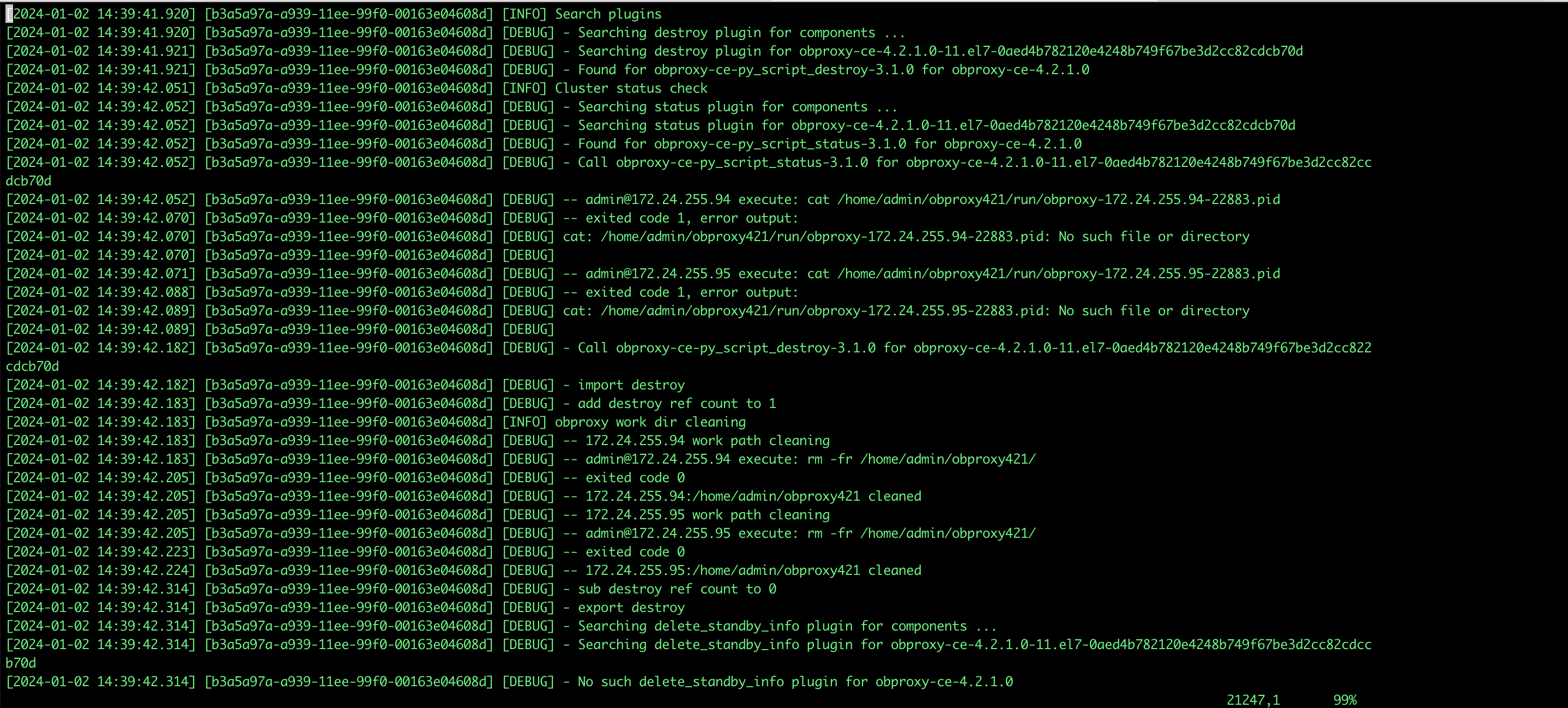
删除 obproxy-ce 组件
obd cluster component del ob421 obproxy-ce
注意事项
1、组件内扩容的配置文件里不允许出现 depends,global 对应的配置,否则会出现类似的报错
[ERROR] OBD-1023: Failed to merge config: depends is not allowed to be set
2、新增组件时 deploy_name 需要填写已有的 deploy_name ,比如(ob421),填写不存在的名字会有如下类似的报错
[ERROR] No such deploy: ob421_obproxy.
PS: 在 obd250 之前的版本新增组件是需要填写一个不存在 deploy_name 名字。
3、obd 组件内扩容 oceanbase-ce 后,不会自动扩容租户的 unit_num,需要手动执行 sql 命令行进行扩容。
4、不支持组件内的缩容操作。
-
相关阅读:
工程项目管理的主要内容都是什么?
Javascript知识【JS-全局函数对象&JS-事件】
什么是深拷贝;深拷贝和浅拷贝有什么区别;深拷贝和浅拷贝有哪些方法(详解)
2022版:Gitee在Android studio上的使用
【cocos2dx】学习记录,Node的自动释放(autorelease)
力扣 2454. 下一个更大元素 IV
Java中的队列Queue
ThreadLocal 是什么?它的实现原理呢?
【游戏建模全流程】使用ZBrush制作龙模型
ubuntu使用docker拉取环境,并对环境进行优化
- 原文地址:https://blog.csdn.net/OceanBaseGFBK/article/details/136650706
