Python 集成 Nacos 配置中心
下载 Nacos 官方 pyhton 库
pip install nacos-sdk-python
pip3 install nacos-sdk-python -i http://mirrors.aliyun.com/pypi/simple/ --trusted-host mirrors.aliyun.com
配置 Nacos 相关信息
Global:
  nacos:
    port: '8848'
    ip: '127.0.0.1'
    username: 'nacos'
    password: '123456'
    namespace: 'test'
    group: 'test'
    data_id: 'test'
- 这里通过
env.yaml 指定相关配置信息
代码逻辑
from nacos import NacosClient
import yaml
import os
import json
def get_config():
config = load_config('../config/env.yaml')
client = NacosClient(config['Global']['nacos']['ip'] + ':' + config['Global']['nacos']['port'],
namespace=config['Global']['nacos']['namespace'],
username=config['Global']['nacos']['username'],
password=config['Global']['nacos']['password'])
data_id = config['Global']['nacos']['data_id']
group = config['Global']['nacos']['group']
config_info = client.get_config(data_id, group)
if isinstance(config_info,bytes):
str_config_info = config_info.decode()
else:
str_config_info = config_info
dict_config_info = yaml.load(str_config_info,Loader=yaml.FullLoader)
json_data = json.dumps(dict_config_info)
print(json_data)
return json_data
def load_config(file_path):
"""
Load config from yml/yaml file.
Args:
file_path (str): Path of the config file to be loaded.
Returns: global config
"""
_, ext = os.path.splitext(file_path)
assert ext in ['.yml', '.yaml'], "only support yaml files for now"
config = yaml.load(open(file_path, 'rb'), Loader=yaml.Loader)
return config
if __name__ == '__main__':
get_config()

- 1
- 2
- 3
- 4
- 5
- 6
- 7
- 8
- 9
- 10
- 11
- 12
- 13
- 14
- 15
- 16
- 17
- 18
- 19
- 20
- 21
- 22
- 23
- 24
- 25
- 26
- 27
- 28
- 29
- 30
- 31
- 32
- 33
- 34
- 35
- 36
- 37
- 38
- 39
- 40
- 41
- 42
- 43
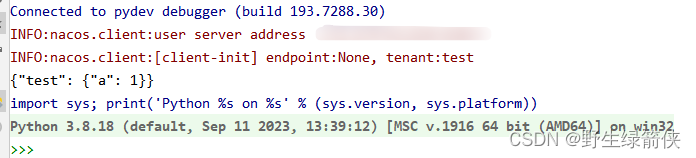
运行结果