-
Centos7 + Apache Ranger 2.4.0 部署
一、Ranger简介
Apache Ranger提供一个集中式安全管理框架, 并解决授权和审计。它可以对Hadoop生态的组件如HDFS、Yarn、Hive、Hbase等进行细粒度的数据访问控制。通过操作Ranger控制台,管理员可以轻松的通过配置策略来控制用户访问权限。
1、组件列表
#
Service Name
Listen Port
Core Ranger Service
1 ranger 6080/tcp Y (ranger engine - 3.0.0-SNAPSHOT version) 2 ranger-postgres 5432/tcp Y (ranger datastore) 3 ranger-solr 8983/tcp Y (audit store) 4 ranger-zk 2181/tcp Y (used by solr) 5 ranger-usersync - Y (user/group synchronization from Local Linux/Mac) 6 ranger-kms 9292/tcp N (needed only for Encrypted Storage / TDE) 7 ranger-tagsync - N (needed only for Tag Based Policies to be sync from ATLAS) 2、支持的数据引擎服务
#
Service Name
Listen Port
Service Description
1 Hadoop 8088/tcp
9000/tcpApache Hadoop 3.3.0
Protected by Apache Ranger's Hadoop Plugin2 HBase 16000/tcp
16010/tcp
16020/tcp
16030/tcpApache HBase 2.4.6
Protected by Apache Ranger's HBase Plugin3 10000/tcp Apache Hive 3.1.2
Protected by Apache Ranger's Hive Plugin4 Kafka 6667/tcp Apache Kafka 2.8.1
Protected by Apache Ranger's Kafka Plugin5 Knox 8443/tcp Apache Knox 1.4.0
Protected by Apache Ranger's Knox Plugin3、技术架构

说明:
Ranger Admin:该模块是Ranger的核心,它内置了一个Web管理界面,用户可以通过这个Web管理界面或者REST接口来制定安全策略;
Agent Plugin:该模块是嵌入到Hadoop生态圈组件的插件,它定期从Ranger Admin拉取策略并执行,同时记录操作以供审计使用;
User Sync:该模块是将操作系统用户/组的权限数据同步到Ranger数据库中。4、工作流程
Ranger Admin是Apache Ranger和用户交互的主要界面,用户登录Ranger Admin后可以针对不同的Hadoop组件定制不同的安全策略,当策略制定并保存后,Agent Plugin会定期从Ranger Admin拉取该组件配置的所有策略,并缓存到本地。当有用户请求Hadoop组件时,Agent Plugin提供鉴权服务,并将鉴权结果反馈给相应的组件,从而实现了数据服务的权限控制功能。当用户在Ranger Admin中修改了配置策略后,Agent Plugin会拉取新策略并更新,如果用户在Ranger Admin中删除了配置策略,那么Agent Plugin的鉴权服务也无法继续使用。
以Hive为例子,具体流程如下所示:

二、集群规划
本次测试采用2台虚拟机,操作系统版本为centos7.6
Ranger版本为2.4.0,官网没有安装包,必须通过源码进行编译,过程可参考:
Centos7.6 + Apache Ranger 2.4.0编译(docker方式)_snipercai的博客-CSDN博客
Mysql版本5.7.43,KDC版本1.15.1,Hadoop版本为3.3.4IP地址 主机名 Hadoop Ranger 192.168.121.101 node101.cc.local NN1
DNRanger Admin 192.168.121.102 node102.cc.local NN2
DN192.168.121.103 node103.cc.local DN Ranger Admin
MYSQL三、安装Mysql
1、下载安装mysql
wget http://dev.mysql.com/get/mysql57-community-release-el7-8.noarch.rpm
rpm -ivh mysql57-community-release-el7-8.noarch.rpm
rpm --import https://repo.mysql.com/RPM-GPG-KEY-mysql-2022
yum install -y mysql-server2、配置/etc/my.cnf
# For advice on how to change settings please see
# http://dev.mysql.com/doc/refman/5.7/en/server-configuration-defaults.html[mysqld]
#
# Remove leading # and set to the amount of RAM for the most important data
# cache in MySQL. Start at 70% of total RAM for dedicated server, else 10%.
# innodb_buffer_pool_size = 128M
#
# Remove leading # to turn on a very important data integrity option: logging
# changes to the binary log between backups.
# log_bin
#
# Remove leading # to set options mainly useful for reporting servers.
# The server defaults are faster for transactions and fast SELECTs.
# Adjust sizes as needed, experiment to find the optimal values.
# join_buffer_size = 128M
# sort_buffer_size = 2M
# read_rnd_buffer_size = 2M
datadir=/opt/mysql/data
socket=/opt/mysql/data/mysql.sock# Disabling symbolic-links is recommended to prevent assorted security risks
symbolic-links=0log-error=/var/log/mysqld.log
pid-file=/var/run/mysqld/mysqld.pid
[mysql]
socket=/opt/mysql/data/mysql.sock
3、启动服务
systemctl start mysqld
systemctl status mysqld● mysqld.service - MySQL Server
Loaded: loaded (/usr/lib/systemd/system/mysqld.service; enabled; vendor preset: disabled)
Active: active (running) since Fri 2023-08-11 15:16:50 CST; 5s ago
Docs: man:mysqld(8)
http://dev.mysql.com/doc/refman/en/using-systemd.html
Process: 8875 ExecStart=/usr/sbin/mysqld --daemonize --pid-file=/var/run/mysqld/mysqld.pid $MYSQLD_OPTS (code=exited, status=0/SUCCESS)
Process: 8822 ExecStartPre=/usr/bin/mysqld_pre_systemd (code=exited, status=0/SUCCESS)
Main PID: 8878 (mysqld)
CGroup: /system.slice/mysqld.service
└─8878 /usr/sbin/mysqld --daemonize --pid-file=/var/run/mysqld/mysqld.pidAug 11 15:16:46 node103.cc.local systemd[1]: Starting MySQL Server...
Aug 11 15:16:50 node103.cc.local systemd[1]: Started MySQL Server.4、获得临时密码
grep password /var/log/mysqld.log
2023-08-11T07:16:48.014862Z 1 [Note] A temporary password is generated for root@localhost: x5/dgr.?sasI
5、修改root密码及刷新权限
mysql_secure_installation
Securing the MySQL server deployment.
Enter password for user root: x5/dgr.?sasI
The existing password for the user account root has expired. Please set a new password.
New password: Mysql@103!
Re-enter new password: Mysql@103!
The 'validate_password' plugin is installed on the server.
The subsequent steps will run with the existing configuration of the plugin.
Using existing password for root.Estimated strength of the password: 100
Change the password for root ? ((Press y|Y for Yes, any other key for No) : yNew password: Mysql@103!
Re-enter new password: Mysql@103!
Estimated strength of the password: 100
Do you wish to continue with the password provided?(Press y|Y for Yes, any other key for No) : y
By default, a MySQL installation has an anonymous user,allowing anyone to log into MySQL without having to havea user account created for them. This is intended only for testing, and to make the installation go a bit smoother.You should remove them before moving into a production
environment.Remove anonymous users? (Press y|Y for Yes, any other key for No) : y
Success.Normally, root should only be allowed to connect from'localhost'. This ensures that someone cannot guess at the root password from the network.
Disallow root login remotely? (Press y|Y for Yes, any other key for No) : n
Success.By default, MySQL comes with a database named 'test' that anyone can access. This is also intended only for testing, and should be removed before moving into a production environment.
Remove test database and access to it? (Press y|Y for Yes, any other key for No) : y
- Dropping test database...
Success.- Removing privileges on test database...
Success.Reloading the privilege tables will ensure that all changes made so far will take effect immediately.
Reload privilege tables now? (Press y|Y for Yes, any other key for No) : y
Success.All done!
6、测试登录
mysql -uroot -p
Enter password: Mysql@103!
Welcome to the MySQL monitor. Commands end with ; or \g.
Your MySQL connection id is 6
Server version: 5.7.43 MySQL Community Server (GPL)Copyright (c) 2000, 2023, Oracle and/or its affiliates.
Oracle is a registered trademark of Oracle Corporation and/or its
affiliates. Other names may be trademarks of their respective
owners.Type 'help;' or '\h' for help. Type '\c' to clear the current input statement.
mysql>
四、安装Ranger Admin
1、解压编译后的程序包
tar -zxvf ranger-2.4.0-admin.tar.gz
2、创建ranger用户
groupadd -g 1025 ranger
useradd -g ranger -u 1025 -d /home/ranger ranger
echo ranger:rangerpwd | chpasswd
mkdir -p /opt/ranger
su - ranger配置install.properties
# Licensed to the Apache Software Foundation (ASF) under one or more
# contributor license agreements. See the NOTICE file distributed with
# this work for additional information regarding copyright ownership.
# The ASF licenses this file to You under the Apache License, Version 2.0
# (the "License"); you may not use this file except in compliance with
# the License. You may obtain a copy of the License at
#
# http://www.apache.org/licenses/LICENSE-2.0
#
# Unless required by applicable law or agreed to in writing, software
# distributed under the License is distributed on an "AS IS" BASIS,
# WITHOUT WARRANTIES OR CONDITIONS OF ANY KIND, either express or implied.
# See the License for the specific language governing permissions and
# limitations under the License.#
# This file provides a list of the deployment variables for the Policy Manager Web Application
##------------------------- DB CONFIG - BEGIN ----------------------------------
# Uncomment the below if the DBA steps need to be run separately
#setup_mode=SeparateDBAPYTHON_COMMAND_INVOKER=python3
#DB_FLAVOR=MYSQL|ORACLE|POSTGRES|MSSQL|SQLA
DB_FLAVOR=MYSQL
##
# Location of DB client library (please check the location of the jar file)
#
#SQL_CONNECTOR_JAR=/usr/share/java/ojdbc6.jar
#SQL_CONNECTOR_JAR=/usr/share/java/mysql-connector-java.jar
#SQL_CONNECTOR_JAR=/usr/share/java/postgresql.jar
#SQL_CONNECTOR_JAR=/usr/share/java/sqljdbc4.jar
#SQL_CONNECTOR_JAR=/opt/sqlanywhere17/java/sajdbc4.jar
SQL_CONNECTOR_JAR=/usr/share/java/mysql-connector-java.jar
#
# DB password for the DB admin user-id
# **************************************************************************
# ** If the password is left empty or not-defined here,
# ** it will try with blank password during installation process
# **************************************************************************
#
#db_root_user=root|SYS|postgres|sa|dba
#db_host=host:port # for DB_FLAVOR=MYSQL|POSTGRES|SQLA|MSSQL #for example: db_host=localhost:3306
#db_host=host:port:SID # for DB_FLAVOR=ORACLE #for SID example: db_host=localhost:1521:ORCL
#db_host=host:port/ServiceName # for DB_FLAVOR=ORACLE #for Service example: db_host=localhost:1521/XE
db_root_user=root
db_root_password=Mysql@103!
db_host=192.168.121.103
#SSL config
db_ssl_enabled=false
db_ssl_required=false
db_ssl_verifyServerCertificate=false
#db_ssl_auth_type=1-way|2-way, where 1-way represents standard one way ssl authentication and 2-way represents mutual ssl authentication
db_ssl_auth_type=2-way
javax_net_ssl_keyStore=
javax_net_ssl_keyStorePassword=
javax_net_ssl_trustStore=
javax_net_ssl_trustStorePassword=
javax_net_ssl_trustStore_type=jks
javax_net_ssl_keyStore_type=jks# For postgresql db
db_ssl_certificate_file=#
# DB UserId used for the Ranger schema
#
db_name=ranger
db_user=rangeradmin
db_password=Ranger@103!
#For over-riding the jdbc url.
is_override_db_connection_string=false
db_override_connection_string=
# change password. Password for below mentioned users can be changed only once using this property.
#PLEASE NOTE :: Password should be minimum 8 characters with min one alphabet and one numeric.
rangerAdmin_password=Admin@103!
rangerTagsync_password=Tag@103!
rangerUsersync_password=User@103!
keyadmin_password=Key@103!
#Source for Audit Store. Currently solr, elasticsearch and cloudwatch logs are supported.
# * audit_store is solr
#audit_store=solr
# * audit_solr_url Elasticsearch Host(s). E.g. 127.0.0.1
audit_elasticsearch_urls=
audit_elasticsearch_port=
audit_elasticsearch_protocol=
audit_elasticsearch_user=
audit_elasticsearch_password=
audit_elasticsearch_index=
audit_elasticsearch_bootstrap_enabled=true
# * audit_solr_url URL to Solr. E.g. http://:6083/solr/ranger_audits
audit_solr_urls=
audit_solr_user=
audit_solr_password=
audit_solr_zookeepers=audit_solr_collection_name=ranger_audits
#solr Properties for cloud mode
audit_solr_config_name=ranger_audits
audit_solr_configset_location=
audit_solr_no_shards=1
audit_solr_no_replica=1
audit_solr_max_shards_per_node=1
audit_solr_acl_user_list_sasl=solr,infra-solr
audit_solr_bootstrap_enabled=true# * audit to amazon cloudwatch properties
audit_cloudwatch_region=
audit_cloudwatch_log_group=
audit_cloudwatch_log_stream_prefix=#------------------------- DB CONFIG - END ----------------------------------
#
# ------- PolicyManager CONFIG ----------------
#policymgr_external_url=http://192.168.121.103:6080
policymgr_http_enabled=true
policymgr_https_keystore_file=
policymgr_https_keystore_keyalias=rangeradmin
policymgr_https_keystore_password=#Add Supported Components list below separated by semi-colon, default value is empty string to support all components
#Example : policymgr_supportedcomponents=hive,hbase,hdfs
policymgr_supportedcomponents=#
# ------- PolicyManager CONFIG - END ---------------
#
#
# ------- UNIX User CONFIG ----------------
#
unix_user=ranger
unix_user_pwd=557TJy
unix_group=ranger#
# ------- UNIX User CONFIG - END ----------------
#
##
# UNIX authentication service for Policy Manager
#
# PolicyManager can authenticate using UNIX username/password
# The UNIX server specified here as authServiceHostName needs to be installed with ranger-unix-ugsync package.
# Once the service is installed on authServiceHostName, the UNIX username/password from the hostcan be used to login into policy manager
#
# ** The installation of ranger-unix-ugsync package can be installed after the policymanager installation is finished.
#
#LDAP|ACTIVE_DIRECTORY|UNIX|NONE
authentication_method=NONE
remoteLoginEnabled=true
authServiceHostName=localhost
authServicePort=5151
ranger_unixauth_keystore=keystore.jks
ranger_unixauth_keystore_password=password
ranger_unixauth_truststore=cacerts
ranger_unixauth_truststore_password=changeit####LDAP settings - Required only if have selected LDAP authentication ####
#
# Sample Settings
#
#xa_ldap_url=ldap://127.0.0.1:389
#xa_ldap_userDNpattern=uid={0},ou=users,dc=xasecure,dc=net
#xa_ldap_groupSearchBase=ou=groups,dc=xasecure,dc=net
#xa_ldap_groupSearchFilter=(member=uid={0},ou=users,dc=xasecure,dc=net)
#xa_ldap_groupRoleAttribute=cn
#xa_ldap_base_dn=dc=xasecure,dc=net
#xa_ldap_bind_dn=cn=admin,ou=users,dc=xasecure,dc=net
#xa_ldap_bind_password=
#xa_ldap_referral=follow|ignore
#xa_ldap_userSearchFilter=(uid={0})xa_ldap_url=
xa_ldap_userDNpattern=
xa_ldap_groupSearchBase=
xa_ldap_groupSearchFilter=
xa_ldap_groupRoleAttribute=
xa_ldap_base_dn=
xa_ldap_bind_dn=
xa_ldap_bind_password=
xa_ldap_referral=
xa_ldap_userSearchFilter=
####ACTIVE_DIRECTORY settings - Required only if have selected AD authentication ####
#
# Sample Settings
#
#xa_ldap_ad_domain=xasecure.net
#xa_ldap_ad_url=ldap://127.0.0.1:389
#xa_ldap_ad_base_dn=dc=xasecure,dc=net
#xa_ldap_ad_bind_dn=cn=administrator,ou=users,dc=xasecure,dc=net
#xa_ldap_ad_bind_password=
#xa_ldap_ad_referral=follow|ignore
#xa_ldap_ad_userSearchFilter=(sAMAccountName={0})xa_ldap_ad_domain=
xa_ldap_ad_url=
xa_ldap_ad_base_dn=
xa_ldap_ad_bind_dn=
xa_ldap_ad_bind_password=
xa_ldap_ad_referral=
xa_ldap_ad_userSearchFilter=#------------ Kerberos Config -----------------
spnego_principal=
spnego_keytab=
token_valid=30
cookie_domain=
cookie_path=/
admin_principal=
admin_keytab=
lookup_principal=
lookup_keytab=
hadoop_conf=/opt/hadoop/hadoop-3.3.4/etc/hadoop/
#
#-------- SSO CONFIG - Start ------------------
#
sso_enabled=false
sso_providerurl=https://127.0.0.1:8443/gateway/knoxsso/api/v1/websso
sso_publickey=#
#-------- SSO CONFIG - END ------------------# Custom log directory path
RANGER_ADMIN_LOG_DIR=$PWD
RANGER_ADMIN_LOGBACK_CONF_FILE=# PID file path
RANGER_PID_DIR_PATH=/var/run/ranger# ################# DO NOT MODIFY ANY VARIABLES BELOW #########################
#
# --- These deployment variables are not to be modified unless you understand the full impact of the changes
#
################################################################################
XAPOLICYMGR_DIR=$PWD
app_home=$PWD/ews/webapp
TMPFILE=$PWD/.fi_tmp
LOGFILE=$PWD/logfile
LOGFILES="$LOGFILE"JAVA_BIN='java'
JAVA_VERSION_REQUIRED='1.8'
JAVA_ORACLE='Java(TM) SE Runtime Environment'ranger_admin_max_heap_size=1g
#retry DB and Java patches after the given time in seconds.
PATCH_RETRY_INTERVAL=120
STALE_PATCH_ENTRY_HOLD_TIME=10#mysql_create_user_file=${PWD}/db/mysql/create_dev_user.sql
mysql_core_file=db/mysql/optimized/current/ranger_core_db_mysql.sql
mysql_audit_file=db/mysql/xa_audit_db.sql
#mysql_asset_file=${PWD}/db/mysql/reset_asset.sql#oracle_create_user_file=${PWD}/db/oracle/create_dev_user_oracle.sql
oracle_core_file=db/oracle/optimized/current/ranger_core_db_oracle.sql
oracle_audit_file=db/oracle/xa_audit_db_oracle.sql
#oracle_asset_file=${PWD}/db/oracle/reset_asset_oracle.sql
#
postgres_core_file=db/postgres/optimized/current/ranger_core_db_postgres.sql
postgres_audit_file=db/postgres/xa_audit_db_postgres.sql
#
sqlserver_core_file=db/sqlserver/optimized/current/ranger_core_db_sqlserver.sql
sqlserver_audit_file=db/sqlserver/xa_audit_db_sqlserver.sql
#
sqlanywhere_core_file=db/sqlanywhere/optimized/current/ranger_core_db_sqlanywhere.sql
sqlanywhere_audit_file=db/sqlanywhere/xa_audit_db_sqlanywhere.sql
cred_keystore_filename=$app_home/WEB-INF/classes/conf/.jceks/rangeradmin.jceks3、创建Ranger数据库
mysql> create database ranger;
Query OK, 1 row affected (0.00 sec)mysql> GRANT ALL PRIVILEGES ON *.* TO 'rangeradmin'@'192.168.121.103' identified by 'Ranger@103!';
Query OK, 0 rows affected, 1 warning (0.00 sec)
mysql> GRANT ALL PRIVILEGES ON *.* TO 'rangeradmin'@'localhost' identified by 'Ranger@103!';
Query OK, 0 rows affected, 1 warning (0.00 sec)
mysql> GRANT ALL PRIVILEGES ON *.* TO 'ranger'@'%' identified by 'Ranger@103!';
Query OK, 0 rows affected, 1 warning (0.00 sec)
mysql> GRANT ALL PRIVILEGES ON *.* TO 'rangeradmin'@'node103.cc.local' identified by 'Ranger@103!';
Query OK, 0 rows affected, 1 warning (0.00 sec)mysql> flush privileges;
Query OK, 0 rows affected (0.00 sec)4、初始化Ranger admin
yum install -y mysql-connector-java
yum install -y python3./setup.sh
Installation of Ranger PolicyManager Web Application is completed.
说明:
1、如果如错如下
2023-08-17 18:19:34,671 [I] Env filename : /etc/ranger/admin/conf/ranger-admin-env-hadoopconfdir.sh
Traceback (most recent call last):
File "db_setup.py", line 1451, in
main(sys.argv)
File "db_setup.py", line 1418, in main
run_env_file(env_file_path)
File "db_setup.py", line 163, in run_env_file
set_env_val(command)
File "db_setup.py", line 152, in set_env_val
(key, _, value) = line.partition("=")
TypeError: a bytes-like object is required, not 'str'
是因为python3中对于与line是bytes类型的字符串对象,并对该bytes类型的字符串对象进行按照str类型进行了操作,所以需要将line使用decode转化成str类型。在db_setup.py的152行,增加line = line.decode('ascii')即可2、如果数据库日志报错Access denied for user 'rangeradmin'@'node103.cc.local' (using password: YES),如果数据库授权和密码都正常,则检查一下conf/ranger-admin-site.xml文件,可能是配置文件里没有自动填写数据库密码。
./set_globals.sh
usermod: no changes
[2023/08/11 18:03:29]: [I] Soft linking /etc/ranger/admin/conf to ews/webapp/WEB-INF/classes/conf5、启动Ranger admin
ranger-admin start
Starting Apache Ranger Admin Service
Apache Ranger Admin Service with pid 18756 has started.6、登录网页
输入网址:http://192.168.121.103:6080/login.jsp
默认用户:admin
如没有配置rangerAdmin_password,则默认密码为admin

五、安装usersync
1、解压编译后的程序包
tar -zxvf ranger-2.4.0-usersync.tar.gz
2、配置install.properties
# Licensed to the Apache Software Foundation (ASF) under one or more
# contributor license agreements. See the NOTICE file distributed with
# this work for additional information regarding copyright ownership.
# The ASF licenses this file to You under the Apache License, Version 2.0
# (the "License"); you may not use this file except in compliance with
# the License. You may obtain a copy of the License at
#
# http://www.apache.org/licenses/LICENSE-2.0
#
# Unless required by applicable law or agreed to in writing, software
# distributed under the License is distributed on an "AS IS" BASIS,
# WITHOUT WARRANTIES OR CONDITIONS OF ANY KIND, either express or implied.
# See the License for the specific language governing permissions and
# limitations under the License.# The base path for the usersync process
ranger_base_dir = /etc/ranger#
# The following URL should be the base URL for connecting to the policy manager web application
# For example:
#
# POLICY_MGR_URL = http://policymanager.xasecure.net:6080
#
POLICY_MGR_URL = http://192.168.121.103:6080# sync source, only unix and ldap are supported at present
# defaults to unix
SYNC_SOURCE = unix#
# Minimum Unix User-id to start SYNC.
# This should avoid creating UNIX system-level users in the Policy Manager
#
MIN_UNIX_USER_ID_TO_SYNC = 500# Minimum Unix Group-id to start SYNC.
# This should avoid creating UNIX system-level users in the Policy Manager
#
MIN_UNIX_GROUP_ID_TO_SYNC = 500# sync interval in minutes
# user, groups would be synced again at the end of each sync interval
# defaults to 5 if SYNC_SOURCE is unix
# defaults to 360 if SYNC_SOURCE is ldap
SYNC_INTERVAL =#User and group for the usersync process
unix_user=ranger
unix_group=ranger#change password of rangerusersync user. Please note that this password should be as per rangerusersync user in ranger
rangerUsersync_password=User@103!#Set to run in kerberos environment
usersync_principal=
usersync_keytab=
hadoop_conf=/opt/hadoop/hadoop-3.3.4/etc/hadoop/
#
# The file where all credential is kept in cryptic format
#
CRED_KEYSTORE_FILENAME=/etc/ranger/usersync/conf/rangerusersync.jceks# SSL Authentication
AUTH_SSL_ENABLED=false
AUTH_SSL_KEYSTORE_FILE=/etc/ranger/usersync/conf/cert/unixauthservice.jks
AUTH_SSL_KEYSTORE_PASSWORD=UnIx529p
AUTH_SSL_TRUSTSTORE_FILE=
AUTH_SSL_TRUSTSTORE_PASSWORD=# ---------------------------------------------------------------
# The following properties are relevant only if SYNC_SOURCE = ldap
# ---------------------------------------------------------------# The below properties ROLE_ASSIGNMENT_LIST_DELIMITER, USERS_GROUPS_ASSIGNMENT_LIST_DELIMITER, USERNAME_GROUPNAME_ASSIGNMENT_LIST_DELIMITER,
#and GROUP_BASED_ROLE_ASSIGNMENT_RULES can be used to assign role to LDAP synced users and groups
#NOTE all the delimiters should have different values and the delimiters should not contain characters that are allowed in userName or GroupName# default value ROLE_ASSIGNMENT_LIST_DELIMITER = &
ROLE_ASSIGNMENT_LIST_DELIMITER = &#default value USERS_GROUPS_ASSIGNMENT_LIST_DELIMITER = :
USERS_GROUPS_ASSIGNMENT_LIST_DELIMITER = :#default value USERNAME_GROUPNAME_ASSIGNMENT_LIST_DELIMITER = ,
USERNAME_GROUPNAME_ASSIGNMENT_LIST_DELIMITER = ,# with above mentioned delimiters a sample value would be ROLE_SYS_ADMIN:u:userName1,userName2&ROLE_SYS_ADMIN:g:groupName1,groupName2&ROLE_KEY_ADMIN:u:userName&ROLE_KEY_ADMIN:g:groupName&ROLE_USER:u:userName3,userName4&ROLE_USER:g:groupName3
#&ROLE_ADMIN_AUDITOR:u:userName&ROLE_KEY_ADMIN_AUDITOR:u:userName&ROLE_KEY_ADMIN_AUDITOR:g:groupName&ROLE_ADMIN_AUDITOR:g:groupName
GROUP_BASED_ROLE_ASSIGNMENT_RULES =# URL of source ldap
# a sample value would be: ldap://ldap.example.com:389
# Must specify a value if SYNC_SOURCE is ldap
SYNC_LDAP_URL =# ldap bind dn used to connect to ldap and query for users and groups
# a sample value would be cn=admin,ou=users,dc=hadoop,dc=apache,dc=org
# Must specify a value if SYNC_SOURCE is ldap
SYNC_LDAP_BIND_DN =# ldap bind password for the bind dn specified above
# please ensure read access to this file is limited to root, to protect the password
# Must specify a value if SYNC_SOURCE is ldap
# unless anonymous search is allowed by the directory on users and group
SYNC_LDAP_BIND_PASSWORD =# ldap delta sync flag used to periodically sync users and groups based on the updates in the server
# please customize the value to suit your deployment
# default value is set to true when is SYNC_SOURCE is ldap
SYNC_LDAP_DELTASYNC =# search base for users and groups
# sample value would be dc=hadoop,dc=apache,dc=org
SYNC_LDAP_SEARCH_BASE =# search base for users
# sample value would be ou=users,dc=hadoop,dc=apache,dc=org
# overrides value specified in SYNC_LDAP_SEARCH_BASE
SYNC_LDAP_USER_SEARCH_BASE =# search scope for the users, only base, one and sub are supported values
# please customize the value to suit your deployment
# default value: sub
SYNC_LDAP_USER_SEARCH_SCOPE = sub# objectclass to identify user entries
# please customize the value to suit your deployment
# default value: person
SYNC_LDAP_USER_OBJECT_CLASS = person# optional additional filter constraining the users selected for syncing
# a sample value would be (dept=eng)
# please customize the value to suit your deployment
# default value is empty
SYNC_LDAP_USER_SEARCH_FILTER =# attribute from user entry that would be treated as user name
# please customize the value to suit your deployment
# default value: cn
SYNC_LDAP_USER_NAME_ATTRIBUTE = cn# attribute from user entry whose values would be treated as
# group values to be pushed into Policy Manager database
# You could provide multiple attribute names separated by comma
# default value: memberof, ismemberof
SYNC_LDAP_USER_GROUP_NAME_ATTRIBUTE = memberof,ismemberof
#
# UserSync - Case Conversion Flags
# possible values: none, lower, upper
SYNC_LDAP_USERNAME_CASE_CONVERSION=lower
SYNC_LDAP_GROUPNAME_CASE_CONVERSION=lower#user sync log path
logdir=logs
#/var/log/ranger/usersync# PID DIR PATH
USERSYNC_PID_DIR_PATH=/var/run/ranger# do we want to do ldapsearch to find groups instead of relying on user entry attributes
# valid values: true, false
# any value other than true would be treated as false
# default value: false
SYNC_GROUP_SEARCH_ENABLED=# do we want to do ldapsearch to find groups instead of relying on user entry attributes and
# sync memberships of those groups
# valid values: true, false
# any value other than true would be treated as false
# default value: false
SYNC_GROUP_USER_MAP_SYNC_ENABLED=# search base for groups
# sample value would be ou=groups,dc=hadoop,dc=apache,dc=org
# overrides value specified in SYNC_LDAP_SEARCH_BASE, SYNC_LDAP_USER_SEARCH_BASE
# if a value is not specified, takes the value of SYNC_LDAP_SEARCH_BASE
# if SYNC_LDAP_SEARCH_BASE is also not specified, takes the value of SYNC_LDAP_USER_SEARCH_BASE
SYNC_GROUP_SEARCH_BASE=# search scope for the groups, only base, one and sub are supported values
# please customize the value to suit your deployment
# default value: sub
SYNC_GROUP_SEARCH_SCOPE=# objectclass to identify group entries
# please customize the value to suit your deployment
# default value: groupofnames
SYNC_GROUP_OBJECT_CLASS=# optional additional filter constraining the groups selected for syncing
# a sample value would be (dept=eng)
# please customize the value to suit your deployment
# default value is empty
SYNC_LDAP_GROUP_SEARCH_FILTER=# attribute from group entry that would be treated as group name
# please customize the value to suit your deployment
# default value: cn
SYNC_GROUP_NAME_ATTRIBUTE=# attribute from group entry that is list of members
# please customize the value to suit your deployment
# default value: member
SYNC_GROUP_MEMBER_ATTRIBUTE_NAME=# do we want to use paged results control during ldapsearch for user entries
# valid values: true, false
# any value other than true would be treated as false
# default value: true
# if the value is false, typical AD would not return more than 1000 entries
SYNC_PAGED_RESULTS_ENABLED=# page size for paged results control
# search results would be returned page by page with the specified number of entries per page
# default value: 500
SYNC_PAGED_RESULTS_SIZE=
#LDAP context referral could be ignore or follow
SYNC_LDAP_REFERRAL =ignore# if you want to enable or disable jvm metrics for usersync process
# valid values: true, false
# any value other than true would be treated as false
# default value: false
# if the value is false, jvm metrics is not created
JVM_METRICS_ENABLED=# filename of jvm metrics created for usersync process
# default value: ranger_usersync_metric.json
JVM_METRICS_FILENAME=#file directory for jvm metrics
# default value : logdir
JVM_METRICS_FILEPATH=#frequency for jvm metrics to be updated
# default value : 10000 milliseconds
JVM_METRICS_FREQUENCY_TIME_IN_MILLIS=3、安装usersync模块
./setup.sh
Creating ranger-usersync-env-logdir.sh file
Creating ranger-usersync-env-hadoopconfdir.sh file
Creating ranger-usersync-env-piddir.sh file
Creating ranger-usersync-env-confdir.sh file4、开启自动同步
配置/opt/ranger/ranger-2.4.0-usersync/conf/ranger-ugsync-site.xml
ranger.usersync.credstore.filename
/etc/ranger/usersync/conf/rangerusersync.jceks
ranger.usersync.enabled
true
ranger.usersync.group.memberattributename
ranger.usersync.group.nameattribute
ranger.usersync.group.objectclass
ranger.usersync.group.searchbase
ranger.usersync.group.searchenabled
ranger.usersync.group.searchfilter
ranger.usersync.group.searchscope
ranger.usersync.ldap.binddn
ranger.usersync.ldap.groupname.caseconversion
lower
ranger.usersync.ldap.ldapbindpassword
_
ranger.usersync.ldap.searchBase
ranger.usersync.ldap.url
ranger.usersync.ldap.deltasync
ranger.usersync.ldap.user.groupnameattribute
memberof,ismemberof
ranger.usersync.ldap.user.nameattribute
cn
ranger.usersync.ldap.user.objectclass
person
ranger.usersync.ldap.user.searchbase
ranger.usersync.ldap.user.searchfilter
ranger.usersync.ldap.user.searchscope
sub
ranger.usersync.ldap.username.caseconversion
lower
ranger.usersync.logdir
logs
ranger.usersync.pagedresultsenabled
ranger.usersync.pagedresultssize
ranger.usersync.passwordvalidator.path
./native/credValidator.uexe
ranger.usersync.policymanager.baseURL
http://192.168.121.103:6080
ranger.usersync.policymanager.maxrecordsperapicall
1000
ranger.usersync.policymanager.mockrun
false
ranger.usersync.port
5151
ranger.usersync.sink.impl.class
org.apache.ranger.unixusersync.process.PolicyMgrUserGroupBuilder
ranger.usersync.sleeptimeinmillisbetweensynccycle
300000
ranger.usersync.source.impl.class
org.apache.ranger.unixusersync.process.UnixUserGroupBuilder
ranger.usersync.ssl
true
ranger.usersync.unix.minUserId
500
ranger.usersync.unix.minGroupId
500
ranger.usersync.keystore.file
/etc/ranger/usersync/conf/cert/unixauthservice.jks
ranger.usersync.truststore.file
ranger.usersync.policymgr.username
rangerusersync
ranger.usersync.policymgr.alias
ranger.usersync.policymgr.password
ranger.usersync.policymgr.keystore
/etc/ranger/usersync/conf/rangerusersync.jceks
ranger.usersync.sync.source
unix
ranger.usersync.ldap.referral
ignore
ranger.usersync.kerberos.principal
ranger.usersync.kerberos.keytab
ranger.usersync.keystore.password
_
ranger.usersync.truststore.password 5、启动usersync模块
ranger-usersync start
Starting Apache Ranger Usersync Service
Apache Ranger Usersync Service with pid 10537 has started.6、查看用户同步
当启动usersync模块之后,会自动同步当前Linux系统中的用户
注意:这里只会同步除了root和虚拟用户外的用户,即UID和GID号较小的不同步

六、安装hdfs-plugin
1、解压编译后的程序包
tar -zxvf ranger-2.4.0-hdfs-plugin.tar.gz
2、配置install.properties
# Licensed to the Apache Software Foundation (ASF) under one or more
# contributor license agreements. See the NOTICE file distributed with
# this work for additional information regarding copyright ownership.
# The ASF licenses this file to You under the Apache License, Version 2.0
# (the "License"); you may not use this file except in compliance with
# the License. You may obtain a copy of the License at
#
# http://www.apache.org/licenses/LICENSE-2.0
#
# Unless required by applicable law or agreed to in writing, software
# distributed under the License is distributed on an "AS IS" BASIS,
# WITHOUT WARRANTIES OR CONDITIONS OF ANY KIND, either express or implied.
# See the License for the specific language governing permissions and
# limitations under the License.#
# Location of Policy Manager URL
#
# Example:
# POLICY_MGR_URL=http://policymanager.xasecure.net:6080
#
POLICY_MGR_URL=http://192.168.121.103:6080#
# This is the repository name created within policy manager
#
# Example:
# REPOSITORY_NAME=hadoopdev
#
REPOSITORY_NAME=hdfs_repo#
# Set hadoop home when hadoop program and Ranger HDFS Plugin are not in the
# same path.
#
COMPONENT_INSTALL_DIR_NAME=/opt/hadoop/hadoop-3.3.4/
# AUDIT configuration with V3 properties
# Enable audit logs to Solr
#Example
#XAAUDIT.SOLR.ENABLE=true
#XAAUDIT.SOLR.URL=http://localhost:6083/solr/ranger_audits
#XAAUDIT.SOLR.ZOOKEEPER=
#XAAUDIT.SOLR.FILE_SPOOL_DIR=/var/log/hadoop/hdfs/audit/solr/spoolXAAUDIT.SOLR.ENABLE=false
XAAUDIT.SOLR.URL=NONE
XAAUDIT.SOLR.USER=NONE
XAAUDIT.SOLR.PASSWORD=NONE
XAAUDIT.SOLR.ZOOKEEPER=NONE
XAAUDIT.SOLR.FILE_SPOOL_DIR=/var/log/hadoop/hdfs/audit/solr/spool# Enable audit logs to ElasticSearch
#Example
#XAAUDIT.ELASTICSEARCH.ENABLE=true
#XAAUDIT.ELASTICSEARCH.URL=localhost
#XAAUDIT.ELASTICSEARCH.INDEX=auditXAAUDIT.ELASTICSEARCH.ENABLE=false
XAAUDIT.ELASTICSEARCH.URL=NONE
XAAUDIT.ELASTICSEARCH.USER=NONE
XAAUDIT.ELASTICSEARCH.PASSWORD=NONE
XAAUDIT.ELASTICSEARCH.INDEX=NONE
XAAUDIT.ELASTICSEARCH.PORT=NONE
XAAUDIT.ELASTICSEARCH.PROTOCOL=NONE# Enable audit logs to HDFS
#Example
#XAAUDIT.HDFS.ENABLE=true
#XAAUDIT.HDFS.HDFS_DIR=hdfs://node-1.example.com:8020/ranger/audit
#XAAUDIT.HDFS.FILE_SPOOL_DIR=/var/log/hadoop/hdfs/audit/hdfs/spool
# If using Azure Blob Storage
#XAAUDIT.HDFS.HDFS_DIR=wasb[s]://@ .blob.core.windows.net/
#XAAUDIT.HDFS.HDFS_DIR=wasb://ranger_audit_container@my-azure-account.blob.core.windows.net/ranger/auditXAAUDIT.HDFS.ENABLE=false
XAAUDIT.HDFS.HDFS_DIR=hdfs://__REPLACE__NAME_NODE_HOST:8020/ranger/audit
XAAUDIT.HDFS.FILE_SPOOL_DIR=/var/log/hadoop/hdfs/audit/hdfs/spool# Following additional propertis are needed When auditing to Azure Blob Storage via HDFS
# Get these values from your /etc/hadoop/conf/core-site.xml
#XAAUDIT.HDFS.HDFS_DIR=wasb[s]://@ .blob.core.windows.net/
XAAUDIT.HDFS.AZURE_ACCOUNTNAME=__REPLACE_AZURE_ACCOUNT_NAME
XAAUDIT.HDFS.AZURE_ACCOUNTKEY=__REPLACE_AZURE_ACCOUNT_KEY
XAAUDIT.HDFS.AZURE_SHELL_KEY_PROVIDER=__REPLACE_AZURE_SHELL_KEY_PROVIDER
XAAUDIT.HDFS.AZURE_ACCOUNTKEY_PROVIDER=__REPLACE_AZURE_ACCOUNT_KEY_PROVIDER#Log4j Audit Provider
XAAUDIT.LOG4J.ENABLE=false
XAAUDIT.LOG4J.IS_ASYNC=false
XAAUDIT.LOG4J.ASYNC.MAX.QUEUE.SIZE=10240
XAAUDIT.LOG4J.ASYNC.MAX.FLUSH.INTERVAL.MS=30000
XAAUDIT.LOG4J.DESTINATION.LOG4J=true
XAAUDIT.LOG4J.DESTINATION.LOG4J.LOGGER=xaaudit# Enable audit logs to Amazon CloudWatch Logs
#Example
#XAAUDIT.AMAZON_CLOUDWATCH.ENABLE=true
#XAAUDIT.AMAZON_CLOUDWATCH.LOG_GROUP=ranger_audits
#XAAUDIT.AMAZON_CLOUDWATCH.LOG_STREAM={instance_id}
#XAAUDIT.AMAZON_CLOUDWATCH.FILE_SPOOL_DIR=/var/log/hive/audit/amazon_cloudwatch/spoolXAAUDIT.AMAZON_CLOUDWATCH.ENABLE=false
XAAUDIT.AMAZON_CLOUDWATCH.LOG_GROUP=NONE
XAAUDIT.AMAZON_CLOUDWATCH.LOG_STREAM_PREFIX=NONE
XAAUDIT.AMAZON_CLOUDWATCH.FILE_SPOOL_DIR=NONE
XAAUDIT.AMAZON_CLOUDWATCH.REGION=NONE# End of V3 properties
#
# Audit to HDFS Configuration
#
# If XAAUDIT.HDFS.IS_ENABLED is set to true, please replace tokens
# that start with __REPLACE__ with appropriate values
# XAAUDIT.HDFS.IS_ENABLED=true
# XAAUDIT.HDFS.DESTINATION_DIRECTORY=hdfs://__REPLACE__NAME_NODE_HOST:8020/ranger/audit/%app-type%/%time:yyyyMMdd%
# XAAUDIT.HDFS.LOCAL_BUFFER_DIRECTORY=__REPLACE__LOG_DIR/hadoop/%app-type%/audit
# XAAUDIT.HDFS.LOCAL_ARCHIVE_DIRECTORY=__REPLACE__LOG_DIR/hadoop/%app-type%/audit/archive
#
# Example:
# XAAUDIT.HDFS.IS_ENABLED=true
# XAAUDIT.HDFS.DESTINATION_DIRECTORY=hdfs://namenode.example.com:8020/ranger/audit/%app-type%/%time:yyyyMMdd%
# XAAUDIT.HDFS.LOCAL_BUFFER_DIRECTORY=/var/log/hadoop/%app-type%/audit
# XAAUDIT.HDFS.LOCAL_ARCHIVE_DIRECTORY=/var/log/hadoop/%app-type%/audit/archive
#
XAAUDIT.HDFS.IS_ENABLED=false
XAAUDIT.HDFS.DESTINATION_DIRECTORY=hdfs://__REPLACE__NAME_NODE_HOST:8020/ranger/audit/%app-type%/%time:yyyyMMdd%
XAAUDIT.HDFS.LOCAL_BUFFER_DIRECTORY=__REPLACE__LOG_DIR/hadoop/%app-type%/audit
XAAUDIT.HDFS.LOCAL_ARCHIVE_DIRECTORY=__REPLACE__LOG_DIR/hadoop/%app-type%/audit/archiveXAAUDIT.HDFS.DESTINTATION_FILE=%hostname%-audit.log
XAAUDIT.HDFS.DESTINTATION_FLUSH_INTERVAL_SECONDS=900
XAAUDIT.HDFS.DESTINTATION_ROLLOVER_INTERVAL_SECONDS=86400
XAAUDIT.HDFS.DESTINTATION_OPEN_RETRY_INTERVAL_SECONDS=60
XAAUDIT.HDFS.LOCAL_BUFFER_FILE=%time:yyyyMMdd-HHmm.ss%.log
XAAUDIT.HDFS.LOCAL_BUFFER_FLUSH_INTERVAL_SECONDS=60
XAAUDIT.HDFS.LOCAL_BUFFER_ROLLOVER_INTERVAL_SECONDS=600
XAAUDIT.HDFS.LOCAL_ARCHIVE_MAX_FILE_COUNT=10#Solr Audit Provider
XAAUDIT.SOLR.IS_ENABLED=false
XAAUDIT.SOLR.MAX_QUEUE_SIZE=1
XAAUDIT.SOLR.MAX_FLUSH_INTERVAL_MS=1000
XAAUDIT.SOLR.SOLR_URL=http://localhost:6083/solr/ranger_audits# End of V2 properties
#
# SSL Client Certificate Information
#
# Example:
# SSL_KEYSTORE_FILE_PATH=/etc/hadoop/conf/ranger-plugin-keystore.jks
# SSL_KEYSTORE_PASSWORD=none
# SSL_TRUSTSTORE_FILE_PATH=/etc/hadoop/conf/ranger-plugin-truststore.jks
# SSL_TRUSTSTORE_PASSWORD=none
#
# You do not need use SSL between agent and security admin tool, please leave these sample value as it is.
#
SSL_KEYSTORE_FILE_PATH=/etc/hadoop/conf/ranger-plugin-keystore.jks
SSL_KEYSTORE_PASSWORD=myKeyFilePassword
SSL_TRUSTSTORE_FILE_PATH=/etc/hadoop/conf/ranger-plugin-truststore.jks
SSL_TRUSTSTORE_PASSWORD=changeit#
# Custom component user
# CUSTOM_COMPONENT_USER=
# keep blank if component user is default
CUSTOM_USER=hadoop
#
# Custom component group
# CUSTOM_COMPONENT_GROUP=
# keep blank if component group is default
CUSTOM_GROUP=hadoop3、开启HDFS-Plugin
//需要在每个hdfs节点上配置
./enable-hdfs-plugin.shCustom user and group is available, using custom user and group.
+ Fri Aug 18 10:22:34 CST 2023 : hadoop: lib folder=/opt/hadoop/hadoop-3.3.4/share/hadoop/hdfs/lib conf folder=/opt/hadoop/hadoop-3.3.4/etc/hadoop
+ Fri Aug 18 10:22:34 CST 2023 : Saving current config file: /opt/hadoop/hadoop-3.3.4/etc/hadoop/hdfs-site.xml to /opt/hadoop/hadoop-3.3.4/etc/hadoop/.hdfs-site.xml.20230818-102234 ...
+ Fri Aug 18 10:22:35 CST 2023 : Saving current config file: /opt/hadoop/hadoop-3.3.4/etc/hadoop/ranger-hdfs-audit.xml to /opt/hadoop/hadoop-3.3.4/etc/hadoop/.ranger-hdfs-audit.xml.20230818-102234 ...
+ Fri Aug 18 10:22:35 CST 2023 : Saving current config file: /opt/hadoop/hadoop-3.3.4/etc/hadoop/ranger-hdfs-security.xml to /opt/hadoop/hadoop-3.3.4/etc/hadoop/.ranger-hdfs-security.xml.20230818-102234 ...
+ Fri Aug 18 10:22:35 CST 2023 : Saving current config file: /opt/hadoop/hadoop-3.3.4/etc/hadoop/ranger-policymgr-ssl.xml to /opt/hadoop/hadoop-3.3.4/etc/hadoop/.ranger-policymgr-ssl.xml.20230818-102234 ...
+ Fri Aug 18 10:22:36 CST 2023 : Saving current JCE file: /etc/ranger/hadoopdev/cred.jceks to /etc/ranger/hadoopdev/.cred.jceks.20230818102236 ...
Ranger Plugin for hadoop has been enabled. Please restart hadoop to ensure that changes are effective.4、重启HDFS
su - hadoop
stop_dfs.sh
start-dfs.sh5、页面配置HDFS服务

Service Name:要与REPOSITORY_NAME保持一致
Username:hadoop用户
Password:hadoop用户密码
Namenode URL:HDFS的namenode的rpc地址,非web地址,如果是HA架构,多个nn节点地址用逗号分割
填写完成后,先点Test Connection测试一下连接。

如果连接测试成功,可以添加完成

6、验证权限控制
su - hadoop
hdfs dfs -mkdir /rangertest
echo 'hello!!!' > test.txt
hdfs dfs -put /test.txt /rangertest/

使用test用户读取rangertest数据和上传文件,但无法上传文件到rangertest目录下
su - test
hdfs dfs -cat /rangertest/test.txt
hdfs dfs -put test11.txt /rangertest/

使用ranger配置策略,允许test用户可以操作rangertest目录

配置后test用户可以操作上传文件到rangertest目录


七、安装Yarn-plugin
1、解压编译后的程序包
tar -zxvf ranger-2.4.0-yarn-plugin.tar.gz
2、配置install.properties
# Licensed to the Apache Software Foundation (ASF) under one or more
# contributor license agreements. See the NOTICE file distributed with
# this work for additional information regarding copyright ownership.
# The ASF licenses this file to You under the Apache License, Version 2.0
# (the "License"); you may not use this file except in compliance with
# the License. You may obtain a copy of the License at
#
# http://www.apache.org/licenses/LICENSE-2.0
#
# Unless required by applicable law or agreed to in writing, software
# distributed under the License is distributed on an "AS IS" BASIS,
# WITHOUT WARRANTIES OR CONDITIONS OF ANY KIND, either express or implied.
# See the License for the specific language governing permissions and
# limitations under the License.#
# Location of Policy Manager URL
#
# Example:
# POLICY_MGR_URL=http://policymanager.xasecure.net:6080
#
POLICY_MGR_URL=http://192.168.121.103:6080#
# This is the repository name created within policy manager
#
# Example:
# REPOSITORY_NAME=yarndev
#
REPOSITORY_NAME=yarn_repo#
# Name of the directory where the component's lib and conf directory exist.
# This location should be relative to the parent of the directory containing
# the plugin installation files.
#
COMPONENT_INSTALL_DIR_NAME=/opt/hadoop/hadoop-3.3.4/# Enable audit logs to Solr
#Example
#XAAUDIT.SOLR.ENABLE=true
#XAAUDIT.SOLR.URL=http://localhost:6083/solr/ranger_audits
#XAAUDIT.SOLR.ZOOKEEPER=
#XAAUDIT.SOLR.FILE_SPOOL_DIR=/var/log/hadoop/yarn/audit/solr/spoolXAAUDIT.SOLR.ENABLE=false
XAAUDIT.SOLR.URL=NONE
XAAUDIT.SOLR.USER=NONE
XAAUDIT.SOLR.PASSWORD=NONE
XAAUDIT.SOLR.ZOOKEEPER=NONE
XAAUDIT.SOLR.FILE_SPOOL_DIR=/var/log/hadoop/yarn/audit/solr/spool# Enable audit logs to ElasticSearch
#Example
#XAAUDIT.ELASTICSEARCH.ENABLE=true
#XAAUDIT.ELASTICSEARCH.URL=localhost
#XAAUDIT.ELASTICSEARCH.INDEX=auditXAAUDIT.ELASTICSEARCH.ENABLE=false
XAAUDIT.ELASTICSEARCH.URL=NONE
XAAUDIT.ELASTICSEARCH.USER=NONE
XAAUDIT.ELASTICSEARCH.PASSWORD=NONE
XAAUDIT.ELASTICSEARCH.INDEX=NONE
XAAUDIT.ELASTICSEARCH.PORT=NONE
XAAUDIT.ELASTICSEARCH.PROTOCOL=NONE# Enable audit logs to HDFS
#Example
#XAAUDIT.HDFS.ENABLE=true
#XAAUDIT.HDFS.HDFS_DIR=hdfs://node-1.example.com:8020/ranger/audit
# If using Azure Blob Storage
#XAAUDIT.HDFS.HDFS_DIR=wasb[s]://@ .blob.core.windows.net/
#XAAUDIT.HDFS.HDFS_DIR=wasb://ranger_audit_container@my-azure-account.blob.core.windows.net/ranger/audit
#XAAUDIT.HDFS.FILE_SPOOL_DIR=/var/log/hadoop/yarn/audit/hdfs/spoolXAAUDIT.HDFS.ENABLE=false
XAAUDIT.HDFS.HDFS_DIR=hdfs://__REPLACE__NAME_NODE_HOST:8020/ranger/audit
XAAUDIT.HDFS.FILE_SPOOL_DIR=/var/log/hadoop/yarn/audit/hdfs/spool# Following additional propertis are needed When auditing to Azure Blob Storage via HDFS
# Get these values from your /etc/hadoop/conf/core-site.xml
#XAAUDIT.HDFS.HDFS_DIR=wasb[s]://@ .blob.core.windows.net/
XAAUDIT.HDFS.AZURE_ACCOUNTNAME=__REPLACE_AZURE_ACCOUNT_NAME
XAAUDIT.HDFS.AZURE_ACCOUNTKEY=__REPLACE_AZURE_ACCOUNT_KEY
XAAUDIT.HDFS.AZURE_SHELL_KEY_PROVIDER=__REPLACE_AZURE_SHELL_KEY_PROVIDER
XAAUDIT.HDFS.AZURE_ACCOUNTKEY_PROVIDER=__REPLACE_AZURE_ACCOUNT_KEY_PROVIDER#Log4j Audit Provider
XAAUDIT.LOG4J.ENABLE=false
XAAUDIT.LOG4J.IS_ASYNC=false
XAAUDIT.LOG4J.ASYNC.MAX.QUEUE.SIZE=10240
XAAUDIT.LOG4J.ASYNC.MAX.FLUSH.INTERVAL.MS=30000
XAAUDIT.LOG4J.DESTINATION.LOG4J=true
XAAUDIT.LOG4J.DESTINATION.LOG4J.LOGGER=xaaudit# Enable audit logs to Amazon CloudWatch Logs
#Example
#XAAUDIT.AMAZON_CLOUDWATCH.ENABLE=true
#XAAUDIT.AMAZON_CLOUDWATCH.LOG_GROUP=ranger_audits
#XAAUDIT.AMAZON_CLOUDWATCH.LOG_STREAM={instance_id}
#XAAUDIT.AMAZON_CLOUDWATCH.FILE_SPOOL_DIR=/var/log/hive/audit/amazon_cloudwatch/spoolXAAUDIT.AMAZON_CLOUDWATCH.ENABLE=false
XAAUDIT.AMAZON_CLOUDWATCH.LOG_GROUP=NONE
XAAUDIT.AMAZON_CLOUDWATCH.LOG_STREAM_PREFIX=NONE
XAAUDIT.AMAZON_CLOUDWATCH.FILE_SPOOL_DIR=NONE
XAAUDIT.AMAZON_CLOUDWATCH.REGION=NONE# End of V3 properties
#
# Audit to HDFS Configuration
#
# If XAAUDIT.HDFS.IS_ENABLED is set to true, please replace tokens
# that start with __REPLACE__ with appropriate values
# XAAUDIT.HDFS.IS_ENABLED=true
# XAAUDIT.HDFS.DESTINATION_DIRECTORY=hdfs://__REPLACE__NAME_NODE_HOST:8020/ranger/audit/%app-type%/%time:yyyyMMdd%
# XAAUDIT.HDFS.LOCAL_BUFFER_DIRECTORY=__REPLACE__LOG_DIR/yarn/audit
# XAAUDIT.HDFS.LOCAL_ARCHIVE_DIRECTORY=__REPLACE__LOG_DIR/yarn/audit/archive
#
# Example:
# XAAUDIT.HDFS.IS_ENABLED=true
# XAAUDIT.HDFS.DESTINATION_DIRECTORY=hdfs://namenode.example.com:8020/ranger/audit/%app-type%/%time:yyyyMMdd%
# XAAUDIT.HDFS.LOCAL_BUFFER_DIRECTORY=/var/log/yarn/audit
# XAAUDIT.HDFS.LOCAL_ARCHIVE_DIRECTORY=/var/log/yarn/audit/archive
#
XAAUDIT.HDFS.IS_ENABLED=false
XAAUDIT.HDFS.DESTINATION_DIRECTORY=hdfs://__REPLACE__NAME_NODE_HOST:8020/ranger/audit/%app-type%/%time:yyyyMMdd%
XAAUDIT.HDFS.LOCAL_BUFFER_DIRECTORY=__REPLACE__LOG_DIR/yarn/audit
XAAUDIT.HDFS.LOCAL_ARCHIVE_DIRECTORY=__REPLACE__LOG_DIR/yarn/audit/archiveXAAUDIT.HDFS.DESTINTATION_FILE=%hostname%-audit.log
XAAUDIT.HDFS.DESTINTATION_FLUSH_INTERVAL_SECONDS=900
XAAUDIT.HDFS.DESTINTATION_ROLLOVER_INTERVAL_SECONDS=86400
XAAUDIT.HDFS.DESTINTATION_OPEN_RETRY_INTERVAL_SECONDS=60
XAAUDIT.HDFS.LOCAL_BUFFER_FILE=%time:yyyyMMdd-HHmm.ss%.log
XAAUDIT.HDFS.LOCAL_BUFFER_FLUSH_INTERVAL_SECONDS=60
XAAUDIT.HDFS.LOCAL_BUFFER_ROLLOVER_INTERVAL_SECONDS=600
XAAUDIT.HDFS.LOCAL_ARCHIVE_MAX_FILE_COUNT=10#Solr Audit Provider
XAAUDIT.SOLR.IS_ENABLED=false
XAAUDIT.SOLR.MAX_QUEUE_SIZE=1
XAAUDIT.SOLR.MAX_FLUSH_INTERVAL_MS=1000
XAAUDIT.SOLR.SOLR_URL=http://localhost:6083/solr/ranger_audits# End of V2 properties
#
# SSL Client Certificate Information
#
# Example:
# SSL_KEYSTORE_FILE_PATH=/etc/hadoop/conf/ranger-plugin-keystore.jks
# SSL_KEYSTORE_PASSWORD=none
# SSL_TRUSTSTORE_FILE_PATH=/etc/hadoop/conf/ranger-plugin-truststore.jks
# SSL_TRUSTSTORE_PASSWORD=none
#
# You do not need use SSL between agent and security admin tool, please leave these sample value as it is.
#
SSL_KEYSTORE_FILE_PATH=/etc/hadoop/conf/ranger-plugin-keystore.jks
SSL_KEYSTORE_PASSWORD=myKeyFilePassword
SSL_TRUSTSTORE_FILE_PATH=/etc/hadoop/conf/ranger-plugin-truststore.jks
SSL_TRUSTSTORE_PASSWORD=changeit#
# Custom component user
# CUSTOM_COMPONENT_USER=
# keep blank if component user is default
CUSTOM_USER=hadoop
#
# Custom component group
# CUSTOM_COMPONENT_GROUP=
# keep blank if component group is default
CUSTOM_GROUP=hadoop3、开启HDFS-Plugin
//需要在每个yarn节点上配置
./enable-hdfs-plugin.shCustom user and group is available, using custom user and group.
+ Wed Aug 30 17:29:26 CST 2023 : yarn: lib folder=/opt/hadoop/hadoop-3.3.4/share/hadoop/hdfs/lib conf folder=/opt/hadoop/hadoop-3.3.4/etc/hadoop
+ Wed Aug 30 17:29:26 CST 2023 : Saving /opt/hadoop/hadoop-3.3.4/etc/hadoop/ranger-policymgr-ssl.xml to /opt/hadoop/hadoop-3.3.4/etc/hadoop/.ranger-policymgr-ssl.xml.20230830-172926 ...
+ Wed Aug 30 17:29:26 CST 2023 : Saving /opt/hadoop/hadoop-3.3.4/etc/hadoop/ranger-yarn-audit.xml to /opt/hadoop/hadoop-3.3.4/etc/hadoop/.ranger-yarn-audit.xml.20230830-172926 ...
+ Wed Aug 30 17:29:26 CST 2023 : Saving /opt/hadoop/hadoop-3.3.4/etc/hadoop/ranger-yarn-security.xml to /opt/hadoop/hadoop-3.3.4/etc/hadoop/.ranger-yarn-security.xml.20230830-172926 ...
+ Wed Aug 30 17:29:26 CST 2023 : Saving current config file: /opt/hadoop/hadoop-3.3.4/etc/hadoop/ranger-policymgr-ssl.xml to /opt/hadoop/hadoop-3.3.4/etc/hadoop/.ranger-policymgr-ssl.xml.20230830-172926 ...
+ Wed Aug 30 17:29:26 CST 2023 : Saving current config file: /opt/hadoop/hadoop-3.3.4/etc/hadoop/ranger-yarn-audit.xml to /opt/hadoop/hadoop-3.3.4/etc/hadoop/.ranger-yarn-audit.xml.20230830-172926 ...
+ Wed Aug 30 17:29:27 CST 2023 : Saving current config file: /opt/hadoop/hadoop-3.3.4/etc/hadoop/ranger-yarn-security.xml to /opt/hadoop/hadoop-3.3.4/etc/hadoop/.ranger-yarn-security.xml.20230830-172926 ...
+ Wed Aug 30 17:29:27 CST 2023 : Saving current config file: /opt/hadoop/hadoop-3.3.4/etc/hadoop/yarn-site.xml to /opt/hadoop/hadoop-3.3.4/etc/hadoop/.yarn-site.xml.20230830-172926 ...
+ Wed Aug 30 17:29:27 CST 2023 : Saving lib file: /opt/hadoop/hadoop-3.3.4/share/hadoop/hdfs/lib/ranger-plugin-classloader-2.4.0.jar to /opt/hadoop/hadoop-3.3.4/share/hadoop/hdfs/lib/.ranger-plugin-classloader-2.4.0.jar.20230830172927 ...
+ Wed Aug 30 17:29:27 CST 2023 : Saving lib file: /opt/hadoop/hadoop-3.3.4/share/hadoop/hdfs/lib/ranger-yarn-plugin-impl to /opt/hadoop/hadoop-3.3.4/share/hadoop/hdfs/lib/.ranger-yarn-plugin-impl.20230830172927 ...
+ Wed Aug 30 17:29:27 CST 2023 : Saving lib file: /opt/hadoop/hadoop-3.3.4/share/hadoop/hdfs/lib/ranger-yarn-plugin-shim-2.4.0.jar to /opt/hadoop/hadoop-3.3.4/share/hadoop/hdfs/lib/.ranger-yarn-plugin-shim-2.4.0.jar.20230830172927 ...
+ Wed Aug 30 17:29:27 CST 2023 : Saving current JCE file: /etc/ranger/yarn_repo/cred.jceks to /etc/ranger/yarn_repo/.cred.jceks.20230830172927 ...
+ Wed Aug 30 17:29:29 CST 2023 : Saving current JCE file: /etc/ranger/yarn_repo/cred.jceks to /etc/ranger/yarn_repo/.cred.jceks.20230830172929 ...
Ranger Plugin for yarn has been enabled. Please restart yarn to ensure that changes are effective.说明:
如果报错如下:
Exception in thread "main" java.lang.NoClassDefFoundError: org/apache/commons/logging/LogFactory,原因是yarn-plugin缺少jar,可以从/opt/ranger/ranger-2.4.0-hdfs-plugin/install/lib中拷贝commons-logging-XXX.jar到/opt/ranger/ranger-2.4.0-yarn-plugin/install/lib/下。
同理,如果是Exception in thread "main" java.lang.NoClassDefFoundError: org/apache/commons/lang3/StringUtils,则需要拷贝commons-lang3-XXX.jar
同理,如果Exception in thread "main" java.lang.NoClassDefFoundError: org/apache/htrace/core/Tracer$Builder,则需要拷贝htrace-core4-4.1.0-incubating.jar
同理,如果Exception in thread "main" java.lang.NoClassDefFoundError: org/apache/commons/compress/archivers/tar/TarArchiveInputStream,则需要拷贝commons-compress-XXX.jar4、重启HDFS
su - hadoop
stop_yarn.sh
start-yarn.sh5、页面配置YARN服务
 Service Name:要与REPOSITORY_NAME保持一致
Username:hadoop用户
Password:hadoop用户密码
YARN REST URL *:yarn的resourcemanager的地址,如果是HA架构,多个rm节点地址用逗号或分号分割
填写完成后,先点Test Connection测试一下连接。
如果连接测试成功,可以添加完成

6、验证权限控制
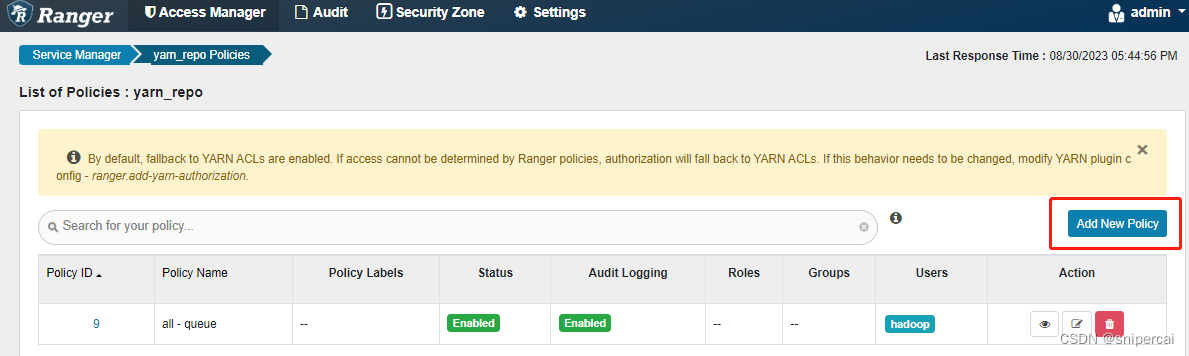
配置新的策略,如下,yarn上的队列Queue默认为root.default,以此为例,允许hadoop用户在队列root.default上提交,拒绝test用户在队列root.default上提交


说明:策略配置后,生效时间为30秒
使用hadoop用户,运行计算任务:
hadoop jar hadoop-mapreduce-examples-3.3.4.jar pi 3 3Number of Maps = 3
Samples per Map = 3
Wrote input for Map #0
Wrote input for Map #1
Wrote input for Map #2
Starting Job
2023-08-30 18:22:27,786 INFO client.ConfiguredRMFailoverProxyProvider: Failing over to rm2
2023-08-30 18:22:27,911 INFO mapreduce.JobResourceUploader: Disabling Erasure Coding for path: /tmp/hadoop-yarn/staging/hadoop/.staging/job_1693388094495_0006
2023-08-30 18:22:28,118 INFO input.FileInputFormat: Total input files to process : 3
2023-08-30 18:22:28,243 INFO mapreduce.JobSubmitter: number of splits:3
2023-08-30 18:22:28,579 INFO mapreduce.JobSubmitter: Submitting tokens for job: job_1693388094495_0006
2023-08-30 18:22:28,581 INFO mapreduce.JobSubmitter: Executing with tokens: []
2023-08-30 18:22:28,856 INFO conf.Configuration: resource-types.xml not found
2023-08-30 18:22:28,862 INFO resource.ResourceUtils: Unable to find 'resource-types.xml'.
2023-08-30 18:22:29,083 INFO impl.YarnClientImpl: Submitted application application_1693388094495_0006
2023-08-30 18:22:29,208 INFO mapreduce.Job: The url to track the job: http://node102.cc.local:8088/proxy/application_1693388094495_0006/
2023-08-30 18:22:29,209 INFO mapreduce.Job: Running job: job_1693388094495_0006
2023-08-30 18:22:39,549 INFO mapreduce.Job: Job job_1693388094495_0006 running in uber mode : false
2023-08-30 18:22:39,552 INFO mapreduce.Job: map 0% reduce 0%
2023-08-30 18:22:59,558 INFO mapreduce.Job: map 100% reduce 0%
2023-08-30 18:23:07,782 INFO mapreduce.Job: map 100% reduce 100%
2023-08-30 18:23:08,807 INFO mapreduce.Job: Job job_1693388094495_0006 completed successfully
2023-08-30 18:23:08,991 INFO mapreduce.Job: Counters: 54
File System Counters
FILE: Number of bytes read=72
FILE: Number of bytes written=1121844
FILE: Number of read operations=0
FILE: Number of large read operations=0
FILE: Number of write operations=0
HDFS: Number of bytes read=768
HDFS: Number of bytes written=215
HDFS: Number of read operations=17
HDFS: Number of large read operations=0
HDFS: Number of write operations=3
HDFS: Number of bytes read erasure-coded=0
Job Counters
Launched map tasks=3
Launched reduce tasks=1
Data-local map tasks=3
Total time spent by all maps in occupied slots (ms)=54819
Total time spent by all reduces in occupied slots (ms)=5732
Total time spent by all map tasks (ms)=54819
Total time spent by all reduce tasks (ms)=5732
Total vcore-milliseconds taken by all map tasks=54819
Total vcore-milliseconds taken by all reduce tasks=5732
Total megabyte-milliseconds taken by all map tasks=56134656
Total megabyte-milliseconds taken by all reduce tasks=5869568
Map-Reduce Framework
Map input records=3
Map output records=6
Map output bytes=54
Map output materialized bytes=84
Input split bytes=414
Combine input records=0
Combine output records=0
Reduce input groups=2
Reduce shuffle bytes=84
Reduce input records=6
Reduce output records=0
Spilled Records=12
Shuffled Maps =3
Failed Shuffles=0
Merged Map outputs=3
GC time elapsed (ms)=366
CPU time spent (ms)=3510
Physical memory (bytes) snapshot=693649408
Virtual memory (bytes) snapshot=10972426240
Total committed heap usage (bytes)=436482048
Peak Map Physical memory (bytes)=194879488
Peak Map Virtual memory (bytes)=2741276672
Peak Reduce Physical memory (bytes)=110477312
Peak Reduce Virtual memory (bytes)=2748796928
Shuffle Errors
BAD_ID=0
CONNECTION=0
IO_ERROR=0
WRONG_LENGTH=0
WRONG_MAP=0
WRONG_REDUCE=0
File Input Format Counters
Bytes Read=354
File Output Format Counters
Bytes Written=97
Job Finished in 41.735 seconds
Estimated value of Pi is 3.55555555555555555556使用test用户,运行计算任务:
hadoop jar /opt/hadoop/hadoop-3.3.4/share/hadoop/mapreduce/hadoop-mapreduce-examples-3.3.4.jar pi 3 3Number of Maps = 3
Samples per Map = 3
Wrote input for Map #0
Wrote input for Map #1
Wrote input for Map #2
Starting Job
2023-08-30 18:48:58,861 INFO client.ConfiguredRMFailoverProxyProvider: Failing over to rm2
2023-08-30 18:48:59,045 INFO mapreduce.JobResourceUploader: Disabling Erasure Coding for path: /tmp/hadoop-yarn/staging/test/.staging/job_1693392487740_0001
2023-08-30 18:48:59,260 INFO input.FileInputFormat: Total input files to process : 3
2023-08-30 18:48:59,444 INFO mapreduce.JobSubmitter: number of splits:3
2023-08-30 18:48:59,834 INFO mapreduce.JobSubmitter: Submitting tokens for job: job_1693392487740_0001
2023-08-30 18:48:59,835 INFO mapreduce.JobSubmitter: Executing with tokens: []
2023-08-30 18:49:00,093 INFO conf.Configuration: resource-types.xml not found
2023-08-30 18:49:00,094 INFO resource.ResourceUtils: Unable to find 'resource-types.xml'.
2023-08-30 18:49:00,295 INFO mapreduce.JobSubmitter: Cleaning up the staging area /tmp/hadoop-yarn/staging/test/.staging/job_1693392487740_0001
java.io.IOException: org.apache.hadoop.yarn.exceptions.YarnException: org.apache.hadoop.security.AccessControlException: User test does not have permission to submit application_1693392487740_0001 to queue default -
相关阅读:
提升采购订单管理效率的五个最佳实践
C++ OpenCV手动截取图像做透视变换
差点送外卖!双非普本的我刷完P8大佬的性能调优手册,终面进阿里
2 资源关系 | 到底什么是”局“-- 清华宁向东的管理学课总结
【开题报告】基于SpringBoot的膳食营养健康网站的设计与实现
Rockland检测开发丨Rockland 免疫分析开发方案
Hbase原理与实践(学习笔记一:基本概念):
《自卑与超越》爱情篇
Neo4j 创建关系
最近的一些杂感-20220921
- 原文地址:https://blog.csdn.net/snipercai/article/details/132227718