-
Materials Studio8.0
Env:centos7.9
检查主机名:

检查环境:
[root@master conf]# rpm -qa|grep glibc; rpm -qa|grep libgcc; rpm -qa|grep libstdc++ ;rpm -qa|grep redhat-lsb
Materials Studio8.0软件包
链接:百度网盘 请输入提取码
提取码:fomg
软件包是rar,解压需要下载rar包
- wget http://www.rarlab.com/rar/rarlinux-x64-5.3.0.tar.gz
- tar xf rarlinux-x64-5.3.0.tar.gz
- make
- 查看到一下内容安装成功
- mkdir -p /usr/local/bin
- mkdir -p /usr/local/lib
- cp rar unrar /usr/local/bin
- cp rarfiles.lst /etc
- cp default.sfx /usr/local/lib
解压:
- rar x linux.rar
- rar x ceAcMaSt80Lin.part1.rar
- mv Accelrys\ Materials\ Studio\ 8.0\ Linux/ Accelrys #更改解压包目录名
- cd Accelrys/
- cd _SolidSQUAD_/ #license目录
- [root@master _SolidSQUAD_]# ls
- msi.lic readme.txt

tar xf MaterialsStudio80.tgz #解压软件包安装:
切换为普通用户qiao
cd /share/Materials_Studio_8/install/linux/Accelrys/Linux/MaterialsStudio80
./install #安装
安装过程中遇到了报错,提示JRE版本过低了,更新一下原来的JRE即可
- yum install glibc.i686
- export JAVA_HOME=/usr/java/latest
重新执行./install
./install #安装[qiao@master MaterialsStudio80]$ ./install
Performing per-user installation of Materials Studio 8.0. Restart this
installation as root if you wish to perform an RPM-based installation.
Please enter the location in which to install Materials Studio 8.0
The location where Materials Studio will be installed is
[/home/qiao/Accelrys]
#是否要在/home/qiao/Accelrys下安装?选择是,那么就直接回车;否则,自行输入一个文件夹,我是回车,就会在我的目录下安装
The Accelrys License Pack is required in order to run Materials Studio 8.0.
Please enter the location of a License Pack installation, or an empty directory
into which the License Pack will be installed.
[/home/qiao/Accelrys]
#是否要把LicensePack安装在/home/qiao/Accelrys下?我这里也是直接回车了,选择默认。暂时不安装license,只建立一个空文件夹。待会儿再安装license。
/home/qiao/Accelrys does not appear to contain a supported License Pack installation. Would you like to
install it to that location? [Y/n]
[Y]
#直接回车,安装完再安装license。
Do you wish to start the Gateway service after installation? Answer no here if
you wish to configure security settings before starting. (Y/n)
[Y]
#启动Gateway,继续回车。
Running LicensePack installation...
Initializing InstallShield Wizard........
Launching InstallShield Wizard........
/share/Materials_Studio_8/install/linux/Accelrys/Linux/MaterialsStudio80/LicensePack/lp_setup_linux.sh: line 1735: warning: here-document at line 1735 delimited by end-of-file (wanted `/dev/null')
-------------------------------------------------------------------------------
Accelrys License Pack 7.6.11 - InstallShield Wizard
Welcome to the InstallShield Wizard for Accelrys License Pack 7.6.11
The InstallShield Wizard will install Accelrys License Pack 7.6.11 on your
computer.
To continue, choose Next.
Accelrys License Pack 7.6.11
Accelrys Software Inc.
Model the Biosphere | BIOVIA – Dassault Systèmes
Press 1 for Next, 3 to Cancel or 5 to Redisplay [1]
#选择默认,继续回车,NEXT。
-------------------------------------------------------------------------------
Accelrys License Pack 7.6.11 - InstallShield Wizard
Accelrys License Pack 7.6.11 Install Location
Please specify a directory or press Enter to accept the default directory.
Destination Directory [/home/qiao/Accelrys]
#选择默认,继续回车,同意默认文件夹。
Press 1 for Next, 2 for Previous, 3 to Cancel or 5 to Redisplay [1]
#选择默认,继续回车,NEXT。
-------------------------------------------------------------------------------
Accelrys License Pack 7.6.11 - InstallShield Wizard
Select the features for "Accelrys License Pack 7.6.11" you would like to
install:
Accelrys License Pack 7.6.11
To select/deselect a feature or to view its children, type its number:
1. [x] LicensePack
2. [ ] Compatibility LicensePack
The Compatibility LicensePack is required for supporting Accelrys software
shipped with License Packs 6.x or lower and to support IRIX and Solaris
platforms. See License Pack documentation for complete list of Accelrys
software supported by this License Pack.
Other options:
0. Continue installing
Enter command [0]
#选择默认,直接回车,CONTINUE。
Press 1 for Next, 2 for Previous, 3 to Cancel or 5 to Redisplay [1]
#选择默认,继续回车,NEXT。
-------------------------------------------------------------------------------
Accelrys License Pack 7.6.11 - InstallShield Wizard
Accelrys License Pack 7.6.11 will be installed in the following location:
/home/qiao/Accelrys/LicensePack
with the following features:
LicensePack
for a total size:
157.7 MB
Press 1 for Next, 2 for Previous, 3 to Cancel or 5 to Redisplay [1]
-------------------------------------------------------------------------------
#选择默认,继续回车,NEXT。
Accelrys License Pack 7.6.11 - InstallShield Wizard
Installing Accelrys License Pack 7.6.11. Please wait...
|-----------|-----------|-----------|------------|
0% 25% 50% 75% 100%
||||||||||||||||||||||||||||||||||||||||||||||||||
Creating uninstaller...
Finalizing the Vital Product Data Registry. Please wait...
Configuring License Pack
-------------------------------------------------------------------------------
Accelrys License Pack 7.6.11 - InstallShield Wizard
The InstallShield Wizard has successfully installed Accelrys License Pack
7.6.11. Choose Finish to exit the wizard.
Press 3 to Finish or 5 to Redisplay [3]
#选择默认,直接回车,FINISH。
Running installation ...
Running ConfigureMaterialsStudio.pl
/usr/bin/free: invalid option -- 'o'
Usage:
free [options]
Options:
-b, --bytes show output in bytes
-k, --kilo show output in kilobytes
-m, --mega show output in megabytes
-g, --giga show output in gigabytes
--tera show output in terabytes
--peta show output in petabytes
-h, --human show human-readable output
--si use powers of 1000 not 1024
-l, --lohi show detailed low and high memory statistics
-t, --total show total for RAM + swap
-s N, --seconds N repeat printing every N seconds
-c N, --count N repeat printing N times, then exit
-w, --wide wide output
--help display this help and exit
-V, --version output version information and exit
For more details see free(1).
Gateway configuration...
Port 18888 appears to be available right now...
Starting gateway at:
/home/qiao/Accelrys/MaterialsStudio8.0/etc/Gateway/root_default/httpd/bin/apachectl start: httpd started
Gateway start succeeded - running as process 15973.
Testing gateway installation for script u/dsd_test.pl
Running GET for url http://master:18888/dsd/commands/u/dsd_test.pl
It works! ...
This is the simple cgi test output ...
Test succeeded, it appears!
1) Enter temporary license password
2) Set connection to license server
3) List command line license administration tools
99) Finished with license configuration
#输入99,回车。MS本体安装完毕。
Choose one of the above options: 99
Exiting program
安装license
上面我们已经将msi.lic文件,把this_host替换为master
- [qiao@master _SolidSQUAD_]$ cp msi.lic /home/qiao/Accelrys/LicensePack/linux/bin
- [qiao@master _SolidSQUAD_]$ cp msi.lic /home/qiao/Accelrys/LicensePack/share/data
- [qiao@master _SolidSQUAD_]$ cp msi.lic /home/qiao/Accelrys/LicensePack/Licenses
- 把Gateway放在开机启动列表中,换到root账户去
- [root@master MaterialsStudio80]# cd /home/qiao/Accelrys/MaterialsStudio8.0/etc/Gateway
- [root@master Gateway]# cp msgateway_control_18888 /etc/rc.d/init.d/
- [root@master Gateway]# chkconfig --add msgateway_control_18888
启动license
- cd /home/qiao/Accelrys/LicensePack/etc
- [root@master etc]# . lp_profile
- [root@master etc]# lp_server -s
遇到报错:error while loading shared libraries: libstdc++.so.6: cannot open shared object file: No such file or directory

解决缺少libstdc++.so.6库
[root@master etc]# yum whatprovides libstdc++.so.6
[root@master etc]# yum install libstdc++-4.8.5-44.el7.i686
重新启动:
[root@master etc]# lp_server -s
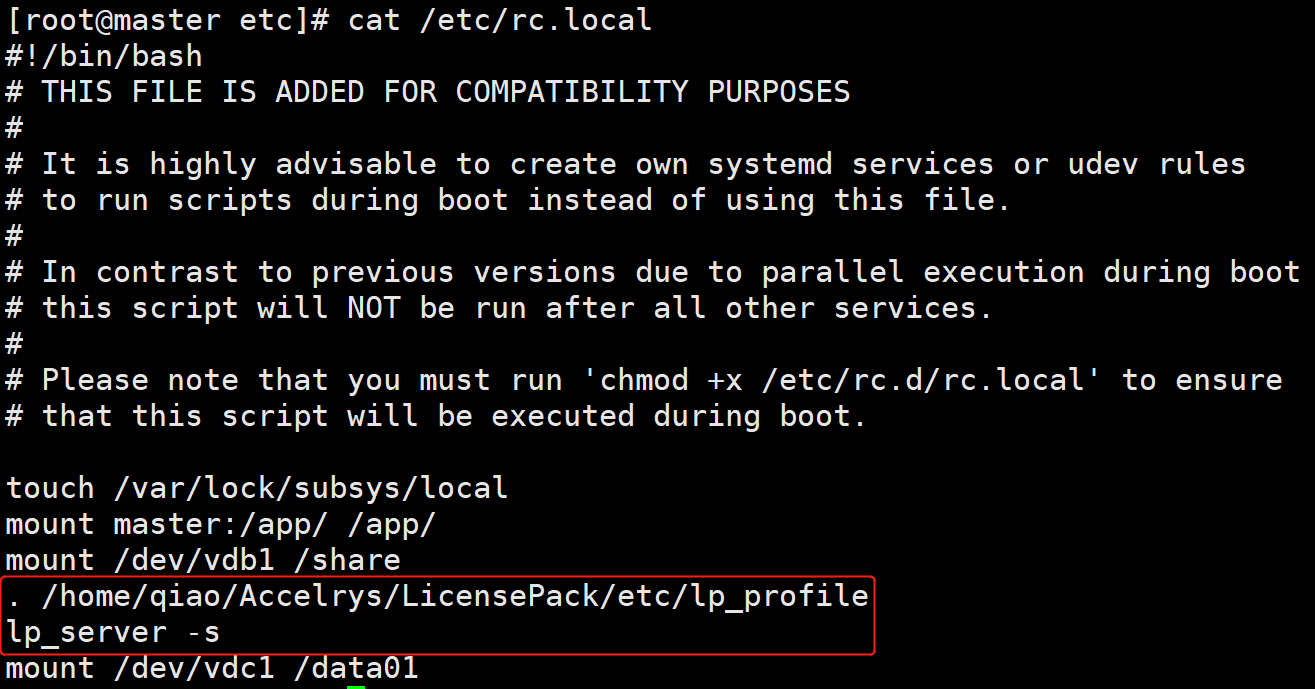
导入到开机启动里,为了正常启动我写进了/etc/rc.local
- echo ". /home/qiao/Accelrys/LicensePack/etc/lp_profile" >> /etc/rc.local
- echo "lp_server -s" >> /etc/rc.local
通过web访问 http://16.16.17.230:18888

-
相关阅读:
国际商务概论
第十九章总结(绘制图片)
干货分享 | 一文了解TSMaster中Seed&key的两种处理方法
19 螺旋矩阵
算法设计与分析 SCAU17964 水桶打水
区块链技术介绍和用法
【Linux】六、进程控制
计算机体系结构实验二——DLX/MIPS/RISC-V指令格式
PyTorch项目源码学习(3)——Module类初步学习
让充电器秒供多个快充口,乐得瑞推出1拖2功率分配快充线方案
- 原文地址:https://blog.csdn.net/dacming/article/details/127919344