-
.Net Redis的秒杀Dome和异步执行
1.先到官网下载Redis部署好 Redis 教程 | 菜鸟教程
2.创建一个上游业务项目(这里用控制台项目了,Framwork4.7.2)
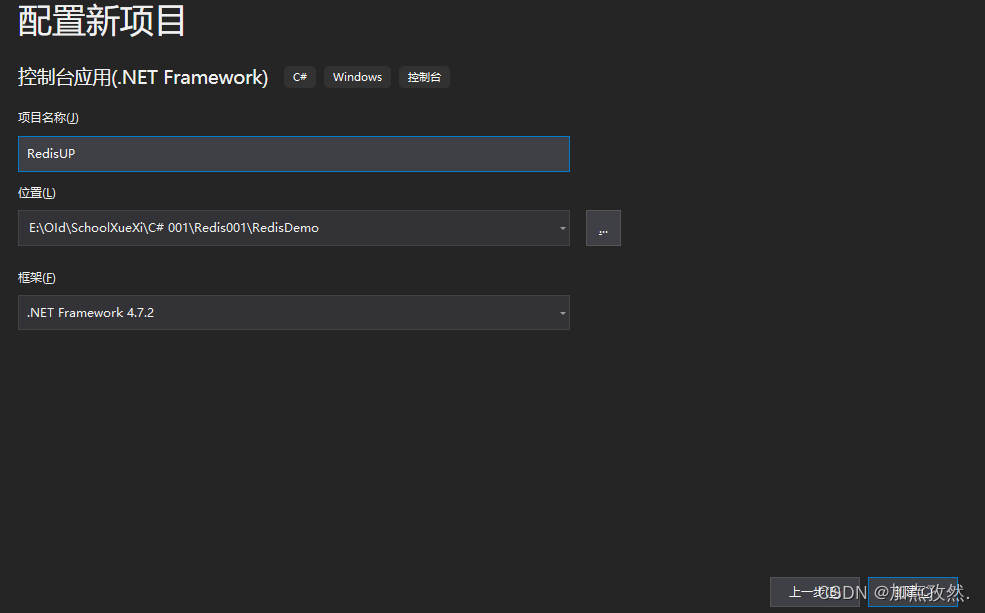
NuGet包下载SerivceStack.Redis

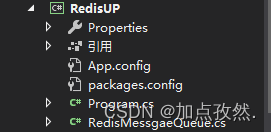
创建一个RedisMessgaeQueue(Redis连接帮助类)
- using ServiceStack.Redis;
- using System;
- namespace RedisUP
- {
- class RedisMessgaeQueue:IDisposable
- {
- private RedisClient redisClient { get; }
- /// <summary>
- /// 构造函数
- /// </summary>
- /// <param name="redisHost"></param>
- public RedisMessgaeQueue(string redisHost)
- {
- redisClient = new RedisClient(redisHost);
- }
- /// <summary>
- /// 入队
- /// </summary>
- /// <param name="QKey"></param>
- /// <param name="QMessgae"></param>
- /// <returns></returns>
- public long EnQueue(string QKey,string QMessgae) {
- //1.编码字符串
- byte[] bytes = System.Text.Encoding.UTF8.GetBytes(QMessgae);
- //2.redis消息队列入队
- long count = redisClient.LPush(QKey, bytes);
- return count;
- }
- /// <summary>
- /// 出队(非阻塞)==拉
- /// </summary>
- /// <param name="QKey"></param>
- /// <returns></returns>
- public string DeQueue(string QKey)
- {
- //1.redis消息出队
- byte[] bytes = redisClient.RPop(QKey);
- string QMessgae = null;
- //2.字节转string
- if (bytes==null)
- {
- Console.WriteLine("队列中数据为空");
- }
- else
- {
- QMessgae = System.Text.Encoding.UTF8.GetString(bytes);
- }
- return QMessgae;
- }
- /// <summary>
- /// 出队(阻塞)==推
- /// </summary>
- /// <param name="QKey"></param>
- /// <param name="timeSpan">阻塞超时时间(根据时间自动解除阻塞)</param>
- /// <returns></returns>
- public string BDeQueue(string QKey,TimeSpan? timeSpan)
- {
- //1.redis消息出队
- string QMessgae = redisClient.BlockingPopItemFromList(QKey, timeSpan);
- return QMessgae;
- }
- /// <summary>
- /// 获取队列数
- /// </summary>
- /// <param name="QKey">队列key</param>
- /// <returns></returns>
- public long GetQueueCount(string QKey)
- {
- //1.获取队列数
- return redisClient.GetListCount(QKey);
- }
- /// <summary>
- /// 关闭redis
- /// </summary>
- public void Dispose() {
- //1.关闭redis
- redisClient.Dispose();
- }
- }
- }
Program
- using System;
- using System.Threading;
- namespace RedisUP
- {
- class Program
- {
- static void Main(string[] args)
- {
- using (RedisMessgaeQueue redisClient = new RedisMessgaeQueue("localhost:6379"))
- {
- Console.WriteLine("秒杀上游消息....");
- while (true)
- {
- string rm_sum=redisClient.BDeQueue("rm_skills", TimeSpan.FromSeconds(60));
- Console.WriteLine("************************开始秒杀下游业务调用****************************");
- //消费秒杀上游消息
- //秒杀业务处理
- HandlerRequest(rm_sum);
- Console.WriteLine("************************开始秒杀业务调用完成****************************");
- }
- }
- }
- /// <summary>
- /// 处理请求
- /// </summary>
- /// <param name="requestCount"></param>
- public static void HandlerRequest(string requestCount)
- {
- Thread.Sleep(20);
- //创建订单
- Console.WriteLine("秒杀订单创建成功");
- //扣减库存
- Console.WriteLine("秒杀订单库存扣减生成");
- //扣减余额
- Console.WriteLine("用户余额扣减成功");
- Console.WriteLine($"处理的请求数:{requestCount}");
- }
- }
- }
3.创建一个下游业务项目(这里用控制台项目了,Framwork4.7.2)

NuGet包下载SerivceStack.Redis
创建一个RedisMessgaeQueue(Redis连接帮助类)- using ServiceStack.Redis;
- using System;
- namespace RedisDown
- {
- class RedisMessgaeQueue:IDisposable
- {
- private RedisClient redisClient { get; }
- /// <summary>
- /// 构造函数
- /// </summary>
- /// <param name="redisHost"></param>
- public RedisMessgaeQueue(string redisHost)
- {
- redisClient = new RedisClient(redisHost);
- }
- /// <summary>
- /// 入队
- /// </summary>
- /// <param name="QKey"></param>
- /// <param name="QMessgae"></param>
- /// <returns></returns>
- public long EnQueue(string QKey,string QMessgae) {
- //1.编码字符串
- byte[] bytes = System.Text.Encoding.UTF8.GetBytes(QMessgae);
- //2.redis消息队列入队
- long count = redisClient.LPush(QKey, bytes);
- return count;
- }
- /// <summary>
- /// 出队(非阻塞)==拉
- /// </summary>
- /// <param name="QKey"></param>
- /// <returns></returns>
- public string DeQueue(string QKey)
- {
- //1.redis消息出队
- byte[] bytes = redisClient.RPop(QKey);
- string QMessgae = null;
- //2.字节转string
- if (bytes==null)
- {
- Console.WriteLine("队列中数据为空");
- }
- else
- {
- QMessgae = System.Text.Encoding.UTF8.GetString(bytes);
- }
- return QMessgae;
- }
- /// <summary>
- /// 出队(阻塞)==推
- /// </summary>
- /// <param name="QKey"></param>
- /// <param name="timeSpan">阻塞超时时间(根据时间自动解除阻塞)</param>
- /// <returns></returns>
- public string BDeQueue(string QKey,TimeSpan? timeSpan)
- {
- //1.redis消息出队
- string QMessgae = redisClient.BlockingPopItemFromList(QKey, timeSpan);
- return QMessgae;
- }
- /// <summary>
- /// 获取队列数
- /// </summary>
- /// <param name="QKey">队列key</param>
- /// <returns></returns>
- public long GetQueueCount(string QKey)
- {
- //1.获取队列数
- return redisClient.GetListCount(QKey);
- }
- /// <summary>
- /// 关闭redis
- /// </summary>
- public void Dispose() {
- //1.关闭redis
- redisClient.Dispose();
- }
- }
- }
Program
- using System;
- namespace RedisDown
- {
- class Program
- {
- static void Main(string[] args)
- {
- CreateSkillOrder(5000);
- Console.ReadKey();
- }
- /// <summary>
- /// 秒杀方法
- /// </summary>
- /// <param name="RequestCount">请求的数量</param>
- public static void CreateSkillOrder(int RequestCount) {
- using (RedisMessgaeQueue redisClient = new RedisMessgaeQueue("localhost:6379"))
- {
- int HandlerRequestCounts = 2000;//允许请求的数量
- for (int i = 0; i < RequestCount; i++)
- {
- long count = redisClient.GetQueueCount("rm_skills");//当前的请求数量为多少
- if (count > HandlerRequestCounts)//判断当前的请求数量是否大于允许请求的数量
- {
- Console.WriteLine("系统繁忙请稍后....");
- }
- else
- {
- //当前请求数量小于允许请求数量,代表还能请求
- Console.WriteLine("入队成功");
- redisClient.EnQueue("rm_skills", i + "Test");
- }
- }
- }
- }
- }
- }
启动下游服务


启动上游服务

秒杀服务dome结束
4.异步执行
4.1先创建一个控制台FramWork项目RedisOne(命名随意)>NuGet包下载ServiceStack.Redis>添加RedisMessgaeQueue(Redis连接帮助类)>这个类代码在上面

Program
- using System;
- namespace RedisOne
- {
- class Program
- {
- static void Main(string[] args)
- {
- using (RedisMessgaeQueue redisClient = new RedisMessgaeQueue("localhost:6379"))
- {
- string order_sn = "123456";
- redisClient.EnQueue("Messgar1", order_sn);
- redisClient.EnQueue("Messgar2", order_sn);
- Console.WriteLine("写入成功");
- }
- Console.ReadKey();
- }
- }
- }
4.2跟上面一样再创建两个控制台项目分别为Messgae1和Messgae2
4.3两个项目都NuGet包下载ServiceStack.Redis
4.4两个项目都添加RedisMessgaeQueue(Redis连接帮助类)>这个类代码在上面

Messgae1的Program
- using System;
- namespace Messgae1
- {
- class Program
- {
- static void Main(string[] args)
- {
- using (RedisMessgaeQueue redisClient = new RedisMessgaeQueue("localhost:6379"))
- {
- Console.WriteLine("Message1.....");
- while (true)
- {
- string mesg1 = redisClient.BDeQueue("Messgar1", TimeSpan.FromSeconds(60));
- if (mesg1!=null)
- {
- //消费Message1
- Console.WriteLine($"消费成功:{mesg1}");
- }
- else
- {
- Console.WriteLine($"消费失败!");
- }
- }
- }
- }
- }
- }
Messgae2的Program
- using System;
- namespace Messgae2
- {
- class Program
- {
- static void Main(string[] args)
- {
- using (RedisMessgaeQueue redisClient = new RedisMessgaeQueue("localhost:6379"))
- {
- Console.WriteLine("Message2.....");
- while (true)
- {
- string mesg2 = redisClient.BDeQueue("Messgar2", TimeSpan.FromSeconds(60));
- if (mesg2 != null)
- {
- //消费Message2
- Console.WriteLine($"消费成功:{mesg2}");
- }
- else
- {
- Console.WriteLine($"消费失败!");
- }
- }
- }
- }
- }
- }
4.5代码部署完成后分别给项目Messgae1,Messgae2,RedisOne重新生成

4.6生成完后打开Messgae1,Messgae2项目的路径>运行Messgae1.exe,Messgae2.exe


运行

4.7开启RedisOne.exe

完结
-
相关阅读:
Spring Bean的生命周期
论文解读(BGRL)《Large-Scale Representation Learning on Graphs via Bootstrapping》
YOLOv8改进RepVGG结构:简单但功能强大的卷积神经网络架构
Qt之sendEvent
创新案例|实现YouTube超速增长的3大敏捷组织运营机制(上)
LCR 146.螺旋遍历数组
docker 安装mysql、canal、redis实现redis和mysql缓存一致性
算法试题——每日一练
国庆假期买哪款耳机好?国庆假期必备蓝牙耳机推荐
Linux网络-DHCP原理与配置
- 原文地址:https://blog.csdn.net/weixin_45381269/article/details/127069242