-
夜莺n9ev5,categraf自定义采集数据
一、下载categraf
GitHub - flashcatcloud/categraf: one-stop telemetry collector for nightingale
go环境自己搭建
用mtail采集日志参考:
二、新建inputs/mtail文件

mtail文件内容如下:本例只返回:999,小伙伴可以重写gatherOnce方法,返回自己想要的内容
- package mtail
- import (
- "sync"
- "sync/atomic"
- "flashcat.cloud/categraf/config"
- "flashcat.cloud/categraf/inputs"
- "flashcat.cloud/categraf/types"
- "github.com/toolkits/pkg/container/list"
- )
- const inputName = "mtail"
- type Mtail struct {
- config.Interval
- counter uint64
- waitgrp sync.WaitGroup
- Instances []*Instance `toml:"instances"`
- }
- func init() {
- inputs.Add(inputName, func() inputs.Input {
- return &Mtail{}
- })
- }
- func (r *Mtail) Prefix() string {
- return inputName
- }
- func (r *Mtail) Init() error {
- if len(r.Instances) == 0 {
- return types.ErrInstancesEmpty
- }
- for i := 0; i < len(r.Instances); i++ {
- if err := r.Instances[i].Init(); err != nil {
- return err
- }
- }
- return nil
- }
- func (r *Mtail) Drop() {}
- func (r *Mtail) Gather(slist *list.SafeList) {
- atomic.AddUint64(&r.counter, 1)
- for i := range r.Instances {
- ins := r.Instances[i]
- r.waitgrp.Add(1)
- go func(slist *list.SafeList, ins *Instance) {
- defer r.waitgrp.Done()
- if ins.IntervalTimes > 0 {
- counter := atomic.LoadUint64(&r.counter)
- if counter%uint64(ins.IntervalTimes) != 0 {
- return
- }
- }
- ins.gatherOnce(ins.TargetUrl, slist)
- }(slist, ins)
- }
- r.waitgrp.Wait()
- }
- type Instance struct {
- Labels map[string]string `toml:"labels"`
- IntervalTimes int64 `toml:"interval_times"`
- TargetUrl string `toml:"target_url"`
- }
- func (ins *Instance) Init() error {
- return nil
- }
- func (ins *Instance) gatherOnce(TargetUrl string, slist *list.SafeList) {
- fields := map[string]interface{}{
- "send_error": "999",
- }
- inputs.PushSamples(slist, fields)
- }
三、新建conf/input.mtail/mtail.toml文件

mtail.toml文件自己定义内容
- [[instances]]
- labels = "hlw"
- interval_times = 1
- target_url = "http://192.168.1.44:3903/metrics"
四、注册
在agent/agent.go注册


五、打包测试
- # export GO111MODULE=on
- # export GOPROXY=https://goproxy.cn
- go build
如果打包成linux下运行的程序
$Env:GOARCH="amd64";$Env:GOOS="linux"
go build
- PS D:\workspace_go\categraf> .\categraf --test --inputs mtail
- 2022/08/13 09:38:09 main.go:110: I! runner.binarydir: D:\workspace_go\categraf
- 2022/08/13 09:38:09 main.go:111: I! runner.hostname: LAPTOP-4O62U4N3
- 2022/08/13 09:38:09 main.go:112: I! runner.fd_limits: N/A
- 2022/08/13 09:38:09 main.go:113: I! runner.vm_limits: N/A
- 2022/08/13 09:38:09 config.go:33: I! tracing disabled
- 2022/08/13 09:38:09 agent.go:62: I! agent starting
- 2022/08/13 09:38:09 metrics_agent.go:64: I! input: mtail started
- 2022/08/13 09:38:09 agent.go:67: I! agent started
- 23291
- 2022/08/13 09:38:38 main.go:90: I! received signal: interrupt
- 2022/08/13 09:38:38 agent.go:71: I! agent stopping
- 2022/08/13 09:38:38 agent.go:76: I! agent stopped
- 2022/08/13 09:38:38 main.go:105: I! exited
- PS D:\workspace_go\categraf> go build
- PS D:\workspace_go\categraf> .\categraf.exe --test --inputs mtail
- 2022/08/13 09:39:38 main.go:110: I! runner.binarydir: D:\workspace_go\categraf
- 2022/08/13 09:39:38 main.go:111: I! runner.hostname: LAPTOP-4O62U4N3
- 2022/08/13 09:39:38 main.go:112: I! runner.fd_limits: N/A
- 2022/08/13 09:39:38 main.go:113: I! runner.vm_limits: N/A
- 2022/08/13 09:39:38 config.go:33: I! tracing disabled
- 2022/08/13 09:39:38 agent.go:62: I! agent starting
- 2022/08/13 09:39:38 metrics_agent.go:64: I! input: mtail started
- 2022/08/13 09:39:38 agent.go:67: I! agent started
- 09:39:53 mtail_send_error agent_hostname=LAPTOP-4O62U4N3 999
- 09:40:08 mtail_send_error agent_hostname=LAPTOP-4O62U4N3 999
- 09:40:23 mtail_send_error agent_hostname=LAPTOP-4O62U4N3 999
- 2022/08/13 09:40:25 main.go:90: I! received signal: interrupt
- 2022/08/13 09:40:25 agent.go:71: I! agent stopping
- 2022/08/13 09:40:25 agent.go:76: I! agent stopped
- 2022/08/13 09:40:25 main.go:105: I! exited
六、部署
1、选择在linux上生成docker镜像
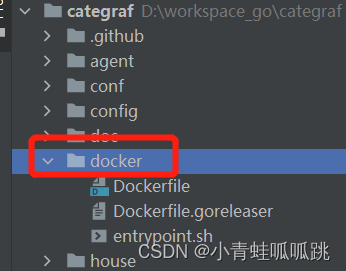
2、 将categraf和conf文件赋值到docker文件夹中
- [root@localhost docker]# ll
- -rwxrwxrwx 1 root root 131276085 Aug 12 17:50 categraf
- drwxrwxrwx 39 root root 4096 Aug 12 17:21 conf
- -rwxrwxrwx 1 root root 247 Aug 12 17:17 Dockerfile
- -rwxrwxrwx 1 root root 279 Aug 12 17:17 Dockerfile.goreleaser
- -rwxrwxrwx 1 root root 277 Aug 12 17:40 entrypoint.sh
- #打包镜像
- [root@localhost docker]# docker build -t categraf:v1 .
- Sending build context to Docker daemon 131.4MB
- Step 1/7 : FROM ubuntu:22.10
- ---> 15a38249db7a
- Step 2/7 : RUN echo 'hosts: files dns' >> /etc/nsswitch.conf
- ---> Using cache
- ---> 6b369085d262
- Step 3/7 : RUN set -ex && mkdir -p /usr/bin /etc/categraf
- ---> Using cache
- ---> 76630541bbf9
- Step 4/7 : COPY categraf /usr/bin/categraf
- ---> Using cache
- ---> 7ac37851e65f
- Step 5/7 : COPY conf /etc/categraf/conf
- ---> Using cache
- ---> 326db080659e
- Step 6/7 : COPY entrypoint.sh /entrypoint.sh
- ---> Using cache
- ---> 3f66ddcb98a8
- Step 7/7 : CMD ["/entrypoint.sh"]
- ---> Using cache
- ---> 6549372b42a3
- Successfully built 6549372b42a3
- Successfully tagged categraf:v1
- [root@localhost docker]# docker images
- REPOSITORY TAG IMAGE ID CREATED SIZE
- categraf v1 6549372b42a3 16 hours ago 202MB
3、修改夜莺docker-compose.yaml
categraf:
  #image: "flashcatcloud/categraf:latest"
  image: "categraf:v1"
注意:将自己写的toml文件,赋值到 nightingale-main\docker\categraf
因为categraf容器的conf映射到这里。

4、重新启动categraf容器
七、夜莺查看
1、在即时查询
输入 mtail_send_error


2、快捷试图

剩余的操作可自行定制告警了
-
相关阅读:
为什么C++中的继承比Java设计的要复杂,原因竟出在这儿?
Linux三剑客:awk的基本用法
pulsar简介
18、Flink的SQL 支持的操作和语法
基于nodejs的疫情大数据展示与政策查询系统
数据结构c语言版第二版(严蔚敏)第二章笔记
Spark 安装与启动
来自中科院的一次java技术面经历
MYSQL中LIKE(模糊查询)
3D激光slam:ALOAM---后端lasermapping最终篇地图更新及消息发布
- 原文地址:https://blog.csdn.net/xiaohanshasha/article/details/126314902