-
3D激光slam:ALOAM---后端lasermapping最终篇地图更新及消息发布
前言
在之前的博客中对ALOAM的前端和后端做了代码详细的梳理
这里先对前几篇后端的内容做一个总结
- 这篇博客中,首先对订阅的前端的数据做了处理
- 这篇博客中,对地图进行栅格处理并根据当前帧位姿提取局部地图
- 这篇博客中,对当前帧中的角点和面点与局部地图的角点和面点构建Ceres约束
- 这篇博客中,通过Ceres进行位姿优化
- 这篇博客中,进行里程计到地图位姿更新维护
本篇为ALOAM后端的最终篇,地图更新及消息发布。
地图更新原因:
- 当地图调整之后,栅格有些空着的,需要进行填充
- 保障地图的实时更新
- 当前帧的点云加到地图中去,下帧会有更多的匹配点
代码解析
for (int i = 0; i < laserCloudCornerStackNum; i++) {- 1
- 2
遍历角点
pointAssociateToMap(&laserCloudCornerStack->points[i], &pointSel);- 1
将该点转到地图坐标系下
int cubeI = int((pointSel.x + 25.0) / 50.0) + laserCloudCenWidth; int cubeJ = int((pointSel.y + 25.0) / 50.0) + laserCloudCenHeight; int cubeK = int((pointSel.z + 25.0) / 50.0) + laserCloudCenDepth; //负数的四舍五入 if (pointSel.x + 25.0 < 0) cubeI--; if (pointSel.y + 25.0 < 0) cubeJ--; if (pointSel.z + 25.0 < 0) cubeK--;- 1
- 2
- 3
- 4
- 5
- 6
- 7
- 8
- 9
- 10
计算该点的栅格索引
if (cubeI >= 0 && cubeI < laserCloudWidth && cubeJ >= 0 && cubeJ < laserCloudHeight && cubeK >= 0 && cubeK < laserCloudDepth) {- 1
- 2
- 3
- 4
判断索引满足条件后
int cubeInd = cubeI + laserCloudWidth * cubeJ + laserCloudWidth * laserCloudHeight * cubeK;- 1
根据 xyz 的索引计算一维数组中的索引
laserCloudCornerArray[cubeInd]->push_back(pointSel);- 1
将该点加入 角点的 地图 对应的栅格索引 的 数组中
for (int i = 0; i < laserCloudSurfStackNum; i++) { pointAssociateToMap(&laserCloudSurfStack->points[i], &pointSel); int cubeI = int((pointSel.x + 25.0) / 50.0) + laserCloudCenWidth; int cubeJ = int((pointSel.y + 25.0) / 50.0) + laserCloudCenHeight; int cubeK = int((pointSel.z + 25.0) / 50.0) + laserCloudCenDepth; if (pointSel.x + 25.0 < 0) cubeI--; if (pointSel.y + 25.0 < 0) cubeJ--; if (pointSel.z + 25.0 < 0) cubeK--; if (cubeI >= 0 && cubeI < laserCloudWidth && cubeJ >= 0 && cubeJ < laserCloudHeight && cubeK >= 0 && cubeK < laserCloudDepth) { int cubeInd = cubeI + laserCloudWidth * cubeJ + laserCloudWidth * laserCloudHeight * cubeK; laserCloudSurfArray[cubeInd]->push_back(pointSel); } }- 1
- 2
- 3
- 4
- 5
- 6
- 7
- 8
- 9
- 10
- 11
- 12
- 13
- 14
- 15
- 16
- 17
- 18
- 19
- 20
- 21
- 22
- 23
对于面点也是同样的操作
printf("add points time %f ms\n", t_add.toc());- 1
终端输出 添加点的时间
下面要做的是把 当前帧涉及到的局部地图的栅格做一个下采样
for (int i = 0; i < laserCloudValidNum; i++) { int ind = laserCloudValidInd[i];//栅格索引 // 对该栅格索引内的角点点云进行 体素 滤波 pcl::PointCloud<PointType>::Ptr tmpCorner(new pcl::PointCloud<PointType>()); downSizeFilterCorner.setInputCloud(laserCloudCornerArray[ind]); downSizeFilterCorner.filter(*tmpCorner); laserCloudCornerArray[ind] = tmpCorner; // 对该栅格索引内的面点点云进行 体素 滤波 pcl::PointCloud<PointType>::Ptr tmpSurf(new pcl::PointCloud<PointType>()); downSizeFilterSurf.setInputCloud(laserCloudSurfArray[ind]); downSizeFilterSurf.filter(*tmpSurf); laserCloudSurfArray[ind] = tmpSurf; }- 1
- 2
- 3
- 4
- 5
- 6
- 7
- 8
- 9
- 10
- 11
- 12
- 13
- 14
遍历当前帧涉及的栅格个数
laserCloudValidNum 就是当前帧涉及的栅格个数,在上面通过取局部地图栅格的时候在for循环里做的累加
局部地图的选取规则就是通过判断当前帧位置的索引,然后在I和J方向前后取2个,K方向前后1个

当前帧所在栅格和局部地图,局部地图为了方便看在J方向上前后取了1个,实际为2个因为当前帧大概率会落在这几个栅格中,所以仅对这几个栅格做滤波处理即可,在这几个栅格之外的点是很稀疏的,可以不处理,这样提高计算效率
printf("filter time %f ms \n", t_filter.toc());//终端输出滤波时间- 1
终端输出滤波时间
至此完成了整体的地图更新
下面要做的就是点云地图的发布
局部地图每隔5帧进行要给发布//后端每处理5帧发布一个 if (frameCount % 5 == 0) { laserCloudSurround->clear();//局部地图清空 for (int i = 0; i < laserCloudSurroundNum; i++) { int ind = laserCloudSurroundInd[i]; //把 局部地图 角点和面点 都加入局部地图中 *laserCloudSurround += *laserCloudCornerArray[ind]; *laserCloudSurround += *laserCloudSurfArray[ind]; } // 转成ROS的格式发布 sensor_msgs::PointCloud2 laserCloudSurround3; pcl::toROSMsg(*laserCloudSurround, laserCloudSurround3); laserCloudSurround3.header.stamp = ros::Time().fromSec(timeLaserOdometry); laserCloudSurround3.header.frame_id = "/camera_init"; pubLaserCloudSurround.publish(laserCloudSurround3); }- 1
- 2
- 3
- 4
- 5
- 6
- 7
- 8
- 9
- 10
- 11
- 12
- 13
- 14
- 15
- 16
- 17
- 18
局部地图清空
把 局部地图 角点和面点 都加入局部地图中
转成ROS的格式发布//每隔 20帧 发布全量地图 if (frameCount % 20 == 0) { pcl::PointCloud<PointType> laserCloudMap; // 21*21*11 for (int i = 0; i < 4851; i++) { laserCloudMap += *laserCloudCornerArray[i]; laserCloudMap += *laserCloudSurfArray[i]; } sensor_msgs::PointCloud2 laserCloudMsg; pcl::toROSMsg(laserCloudMap, laserCloudMsg); laserCloudMsg.header.stamp = ros::Time().fromSec(timeLaserOdometry); laserCloudMsg.header.frame_id = "/camera_init"; pubLaserCloudMap.publish(laserCloudMsg); }- 1
- 2
- 3
- 4
- 5
- 6
- 7
- 8
- 9
- 10
- 11
- 12
- 13
- 14
- 15
- 16
每隔 20帧 发布全量地图
//当前帧发布 int laserCloudFullResNum = laserCloudFullRes->points.size(); for (int i = 0; i < laserCloudFullResNum; i++) { pointAssociateToMap(&laserCloudFullRes->points[i], &laserCloudFullRes->points[i]); } sensor_msgs::PointCloud2 laserCloudFullRes3; pcl::toROSMsg(*laserCloudFullRes, laserCloudFullRes3); laserCloudFullRes3.header.stamp = ros::Time().fromSec(timeLaserOdometry); laserCloudFullRes3.header.frame_id = "/camera_init"; pubLaserCloudFullRes.publish(laserCloudFullRes3);- 1
- 2
- 3
- 4
- 5
- 6
- 7
- 8
- 9
- 10
- 11
- 12
当前帧转到地图坐标系后发布
nav_msgs::Odometry odomAftMapped; odomAftMapped.header.frame_id = "/camera_init"; odomAftMapped.child_frame_id = "/aft_mapped"; odomAftMapped.header.stamp = ros::Time().fromSec(timeLaserOdometry); odomAftMapped.pose.pose.orientation.x = q_w_curr.x(); odomAftMapped.pose.pose.orientation.y = q_w_curr.y(); odomAftMapped.pose.pose.orientation.z = q_w_curr.z(); odomAftMapped.pose.pose.orientation.w = q_w_curr.w(); odomAftMapped.pose.pose.position.x = t_w_curr.x(); odomAftMapped.pose.pose.position.y = t_w_curr.y(); odomAftMapped.pose.pose.position.z = t_w_curr.z(); pubOdomAftMapped.publish(odomAftMapped);- 1
- 2
- 3
- 4
- 5
- 6
- 7
- 8
- 9
- 10
- 11
- 12
建图后里程计的发布
geometry_msgs::PoseStamped laserAfterMappedPose; laserAfterMappedPose.header = odomAftMapped.header; laserAfterMappedPose.pose = odomAftMapped.pose.pose; laserAfterMappedPath.header.stamp = odomAftMapped.header.stamp; laserAfterMappedPath.header.frame_id = "/camera_init"; laserAfterMappedPath.poses.push_back(laserAfterMappedPose); pubLaserAfterMappedPath.publish(laserAfterMappedPath);- 1
- 2
- 3
- 4
- 5
- 6
- 7
建图后path的发布
static tf::TransformBroadcaster br; tf::Transform transform; tf::Quaternion q; transform.setOrigin(tf::Vector3(t_w_curr(0), t_w_curr(1), t_w_curr(2))); q.setW(q_w_curr.w()); q.setX(q_w_curr.x()); q.setY(q_w_curr.y()); q.setZ(q_w_curr.z()); transform.setRotation(q); br.sendTransform(tf::StampedTransform(transform, odomAftMapped.header.stamp, "/camera_init", "/aft_mapped"));- 1
- 2
- 3
- 4
- 5
- 6
- 7
- 8
- 9
- 10
- 11
- 12
建图后tf的发布
总结
后端的地图更新总结
- 将该帧的所有角点转到地图坐标系下根据位置计算栅格索引,存入该栅格的点云数组中
- 将该帧的所有面点转到地图坐标系下根据位置计算栅格索引,存入该栅格的点云数组中
- 对添加点后的局部地图进行下采用
- 发布ROS的消息格式
后端消息发布总结
这时候可以根据main函数里面的advertise进行一个总结
pubLaserCloudSurround = nh.advertise<sensor_msgs::PointCloud2>("/laser_cloud_surround", 100);- 1
- 局部地图 后端没处理 5 帧发布一次,当前帧的栅格索引的I、J方向前后2个,K方向前后一个
pubLaserCloudMap = nh.advertise<sensor_msgs::PointCloud2>("/laser_cloud_map", 100);- 1
- 整体的栅格地图 后端每处理20帧发布一次。21 * 21 * 11的栅格尺寸,一个格子边长50m
pubOdomAftMapped = nh.advertise<nav_msgs::Odometry>("/aft_mapped_to_init", 100);- 1
- 发布当前帧到map 下的位姿 这个位姿是 准确的 是通过 优化 求得的 频率是 后端处理完一帧后即分布一帧的频率
pubOdomAftMappedHighFrec = nh.advertise<nav_msgs::Odometry>("/aft_mapped_to_init_high_frec", 100);- 1
- 发布当前帧转到map坐标系下的位姿 高频率的位姿 通过上一帧的优化值,估计的
pubLaserAfterMappedPath = nh.advertise<nav_msgs::Path>("/aft_mapped_path", 100);- 1
- 发布 path ,该 路径是准确的,通过 优化后求得的, 频率是 后端处理完一帧后即分布一帧的频率
通过在以往博客中搭建的仿真场景,进行相关消息的可视化

gazebo场景


频率为 大约 2hz
整体栅格地图

频率大约为 0.5hz 也就是2s更新一次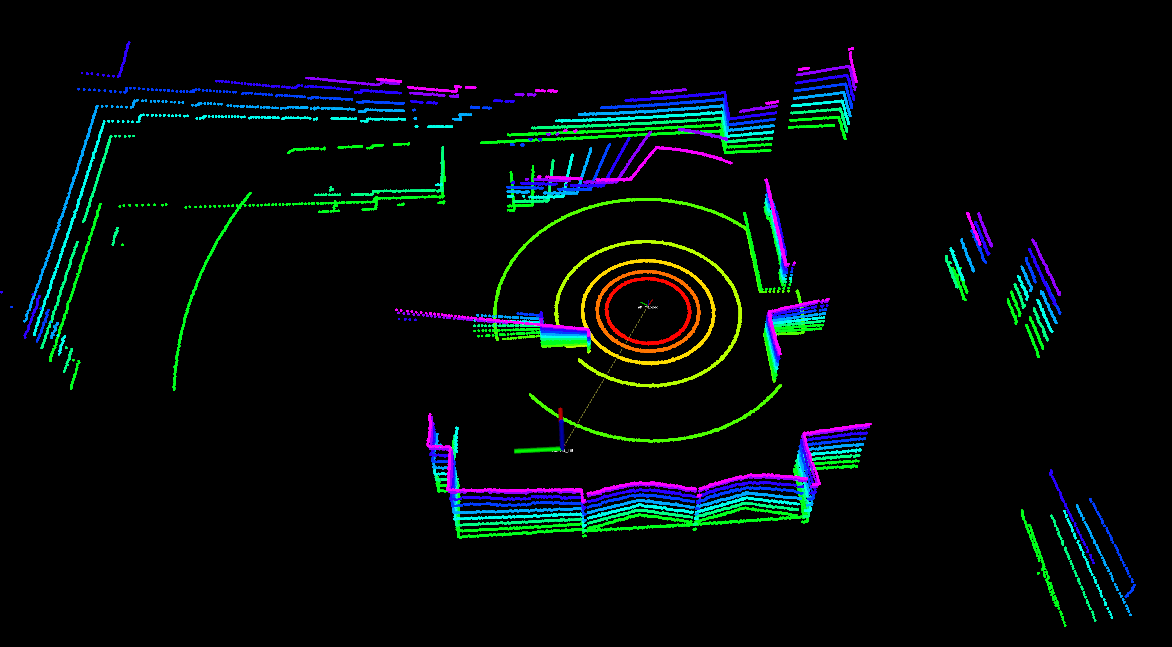
当前帧转到地图坐标系的 -
相关阅读:
Java core——java四种引用详解
居然可以像玩游戏一样学Git
最佳开源DEM全国、省、市、县DEM数据分享
JavaScript的数组、函数的两种定义方式、js中的函数不允许重载
客户端和服务器不支持常用的SSL协议版本或密码套件
VMware Explore 大会解读:VMware 要做多云时代核心技术玩家
Android 11.0 默认开启开发者模式和开启usb调试模式
WPF CommunityToolkit.Mvvm Messenger通讯
从大数据中看人工智能机器人的教育模式
nvm 基础安装与坑点
- 原文地址:https://blog.csdn.net/qq_32761549/article/details/125936743