-
07-app端文章搜索-黑马头条
app端文章搜索
1) 今日内容介绍
1.1)App端搜索-效果图

1.2)今日内容
-
文章搜索
-
ElasticSearch环境搭建
-
索引库创建
-
文章搜索多条件复合查询
-
索引数据同步
-
-
搜索历史记录
-
Mongodb环境搭建
-
异步保存搜索历史
-
查看搜索历史列表
-
删除搜索历史
-
-
联想词查询
-
联想词的来源
-
联想词功能实现
-
2) 搭建ElasticSearch环境
2.1) 拉取镜像
docker pull elasticsearch:7.4.0- 1
2.2) 创建容器
docker run -id --name elasticsearch -d --restart=always -p 9200:9200 -p 9300:9300 -v /usr/share/elasticsearch/plugins:/usr/share/elasticsearch/plugins -e "discovery.type=single-node" elasticsearch:7.4.0- 1
2.3) 配置中文分词器 ik
因为在创建elasticsearch容器的时候,映射了目录,所以可以在宿主机上进行配置ik中文分词器
在去选择ik分词器的时候,需要与elasticsearch的版本好对应上
把资料中的
elasticsearch-analysis-ik-7.4.0.zip上传到服务器上,放到对应目录(plugins)解压#切换目录 cd /usr/share/elasticsearch/plugins #新建目录 mkdir analysis-ik cd analysis-ik #root根目录中拷贝文件 mv elasticsearch-analysis-ik-7.4.0.zip /usr/share/elasticsearch/plugins/analysis-ik #解压文件 cd /usr/share/elasticsearch/plugins/analysis-ik unzip elasticsearch-analysis-ik-7.4.0.zip- 1
- 2
- 3
- 4
- 5
- 6
- 7
- 8
- 9
- 10
2.4) 使用postman测试

3) app端文章搜索
3.1) 需求分析
-
用户输入关键可搜索文章列表
-
关键词高亮显示
-
文章列表展示与home展示一样,当用户点击某一篇文章,可查看文章详情

3.2) 思路分析
为了加快检索的效率,在查询的时候不会直接从数据库中查询文章,需要在elasticsearch中进行高速检索。

3.3) 创建索引和映射
使用postman添加映射
put请求 : http://192.168.200.130:9200/app_info_article
{ "mappings":{ "properties":{ "id":{ "type":"long" }, "publishTime":{ "type":"date" }, "layout":{ "type":"integer" }, "images":{ "type":"keyword", "index": false }, "staticUrl":{ "type":"keyword", "index": false }, "authorId": { "type": "long" }, "authorName": { "type": "text" }, "title":{ "type":"text", "analyzer":"ik_smart" }, "content":{ "type":"text", "analyzer":"ik_smart" } } } }- 1
- 2
- 3
- 4
- 5
- 6
- 7
- 8
- 9
- 10
- 11
- 12
- 13
- 14
- 15
- 16
- 17
- 18
- 19
- 20
- 21
- 22
- 23
- 24
- 25
- 26
- 27
- 28
- 29
- 30
- 31
- 32
- 33
- 34
- 35
- 36
- 37

GET请求查询映射:http://192.168.200.130:9200/app_info_article
DELETE请求,删除索引及映射:http://192.168.200.130:9200/app_info_article
GET请求,查询所有文档:http://192.168.200.130:9200/app_info_article/_search
3.4) 数据初始化到索引库
3.4.1)导入es-init到heima-leadnews-test工程下
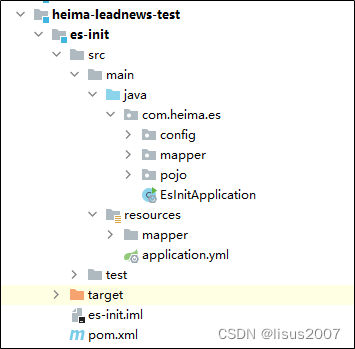
3.4.1)查询所有的文章信息,批量导入到es索引库中
package com.heima.es; import com.alibaba.fastjson.JSON; import com.heima.es.mapper.ApArticleMapper; import com.heima.es.pojo.SearchArticleVo; import org.elasticsearch.action.bulk.BulkRequest; import org.elasticsearch.action.index.IndexRequest; import org.elasticsearch.client.RequestOptions; import org.elasticsearch.client.RestHighLevelClient; import org.elasticsearch.common.xcontent.XContentType; import org.junit.Test; import org.junit.runner.RunWith; import org.springframework.beans.factory.annotation.Autowired; import org.springframework.boot.test.context.SpringBootTest; import org.springframework.test.context.junit4.SpringRunner; import java.util.List; @SpringBootTest @RunWith(SpringRunner.class) public class ApArticleTest { @Autowired private ApArticleMapper apArticleMapper; @Autowired private RestHighLevelClient restHighLevelClient; /** * 注意:数据量的导入,如果数据量过大,需要分页导入 * @throws Exception */ @Test public void init() throws Exception { //1.查询所有符合条件的文章数据 List<SearchArticleVo> searchArticleVos = apArticleMapper.loadArticleList(); //2.批量导入到es索引库 BulkRequest bulkRequest = new BulkRequest("app_info_article"); for (SearchArticleVo searchArticleVo : searchArticleVos) { IndexRequest indexRequest = new IndexRequest().id(searchArticleVo.getId().toString()) .source(JSON.toJSONString(searchArticleVo), XContentType.JSON); //批量添加数据 bulkRequest.add(indexRequest); } restHighLevelClient.bulk(bulkRequest, RequestOptions.DEFAULT); } }- 1
- 2
- 3
- 4
- 5
- 6
- 7
- 8
- 9
- 10
- 11
- 12
- 13
- 14
- 15
- 16
- 17
- 18
- 19
- 20
- 21
- 22
- 23
- 24
- 25
- 26
- 27
- 28
- 29
- 30
- 31
- 32
- 33
- 34
- 35
- 36
- 37
- 38
- 39
- 40
- 41
- 42
- 43
- 44
- 45
- 46
- 47
- 48
- 49
- 50
- 51
- 52
- 53
- 54
- 55
- 56
- 57
- 58
3.4.3)测试
postman查询所有的es中数据 GET请求: http://192.168.200.130:9200/app_info_article/_search

3.5) 文章搜索功能实现
3.5.1)搭建搜索微服务
(1)导入 heima-leadnews-search

(2)在heima-leadnews-service的pom中添加依赖
<dependency> <groupId>org.elasticsearch.clientgroupId> <artifactId>elasticsearch-rest-high-level-clientartifactId> <version>7.4.0version> dependency> <dependency> <groupId>org.elasticsearch.clientgroupId> <artifactId>elasticsearch-rest-clientartifactId> <version>7.4.0version> dependency> <dependency> <groupId>org.elasticsearchgroupId> <artifactId>elasticsearchartifactId> <version>7.4.0version> dependency>- 1
- 2
- 3
- 4
- 5
- 6
- 7
- 8
- 9
- 10
- 11
- 12
- 13
- 14
- 15
- 16
(3)nacos配置中心leadnews-search
spring: autoconfigure: exclude: org.springframework.boot.autoconfigure.jdbc.DataSourceAutoConfiguration elasticsearch: host: 192.168.200.130 port: 9200- 1
- 2
- 3
- 4
- 5
- 6
3.5.2) 搜索接口定义
package com.heima.search.controller.v1; import com.heima.model.common.dtos.ResponseResult; import com.heima.model.search.dtos.UserSearchDto; import org.springframework.web.bind.annotation.PostMapping; import org.springframework.web.bind.annotation.RequestBody; import org.springframework.web.bind.annotation.RequestMapping; import org.springframework.web.bind.annotation.RestController; import java.io.IOException; @RestController @RequestMapping("/api/v1/article/search") public class ArticleSearchController { @PostMapping("/search") public ResponseResult search(@RequestBody UserSearchDto dto) throws IOException { return null; } }- 1
- 2
- 3
- 4
- 5
- 6
- 7
- 8
- 9
- 10
- 11
- 12
- 13
- 14
- 15
- 16
- 17
- 18
- 19
- 20
- 21
- 22
UserSearchDto
package com.heima.model.search.dtos; import lombok.Data; import java.util.Date; @Data public class UserSearchDto { /** * 搜索关键字 */ String searchWords; /** * 当前页 */ int pageNum; /** * 分页条数 */ int pageSize; /** * 最小时间 */ Date minBehotTime; public int getFromIndex(){ if(this.pageNum<1)return 0; if(this.pageSize<1) this.pageSize = 10; return this.pageSize * (pageNum-1); } }- 1
- 2
- 3
- 4
- 5
- 6
- 7
- 8
- 9
- 10
- 11
- 12
- 13
- 14
- 15
- 16
- 17
- 18
- 19
- 20
- 21
- 22
- 23
- 24
- 25
- 26
- 27
- 28
- 29
- 30
- 31
- 32
- 33
3.5.3) 业务层实现
创建业务层接口:ApArticleSearchService
package com.heima.search.service; import com.heima.model.search.dtos.UserSearchDto; import com.heima.model.common.dtos.ResponseResult; import java.io.IOException; public interface ArticleSearchService { /** ES文章分页搜索 @return */ ResponseResult search(UserSearchDto userSearchDto) throws IOException; }- 1
- 2
- 3
- 4
- 5
- 6
- 7
- 8
- 9
- 10
- 11
- 12
- 13
- 14
- 15
实现类:
package com.heima.search.service.impl; import com.alibaba.fastjson.JSON; import com.heima.model.common.dtos.ResponseResult; import com.heima.model.common.enums.AppHttpCodeEnum; import com.heima.model.search.dtos.UserSearchDto; import com.heima.model.user.pojos.ApUser; import com.heima.search.service.ArticleSearchService; import com.heima.utils.thread.AppThreadLocalUtil; import lombok.extern.slf4j.Slf4j; import org.apache.commons.lang3.StringUtils; import org.elasticsearch.action.search.SearchRequest; import org.elasticsearch.action.search.SearchResponse; import org.elasticsearch.client.RequestOptions; import org.elasticsearch.client.RestHighLevelClient; import org.elasticsearch.common.text.Text; import org.elasticsearch.index.query.*; import org.elasticsearch.search.SearchHit; import org.elasticsearch.search.builder.SearchSourceBuilder; import org.elasticsearch.search.fetch.subphase.highlight.HighlightBuilder; import org.elasticsearch.search.sort.SortOrder; import org.springframework.beans.factory.annotation.Autowired; import org.springframework.stereotype.Service; import java.io.IOException; import java.util.ArrayList; import java.util.List; import java.util.Map; @Service @Slf4j public class ArticleSearchServiceImpl implements ArticleSearchService { @Autowired private RestHighLevelClient restHighLevelClient; /** * es文章分页检索 * * @param dto * @return */ @Override public ResponseResult search(UserSearchDto dto) throws IOException { //1.检查参数 if(dto == null || StringUtils.isBlank(dto.getSearchWords())){ return ResponseResult.errorResult(AppHttpCodeEnum.PARAM_INVALID); } //2.设置查询条件 SearchRequest searchRequest = new SearchRequest("app_info_article"); SearchSourceBuilder searchSourceBuilder = new SearchSourceBuilder(); //布尔查询 BoolQueryBuilder boolQueryBuilder = QueryBuilders.boolQuery(); //关键字的分词之后查询 QueryStringQueryBuilder queryStringQueryBuilder = QueryBuilders.queryStringQuery(dto.getSearchWords()).field("title").field("content").defaultOperator(Operator.OR); boolQueryBuilder.must(queryStringQueryBuilder); //查询小于mindate的数据 RangeQueryBuilder rangeQueryBuilder = QueryBuilders.rangeQuery("publishTime").lt(dto.getMinBehotTime().getTime()); boolQueryBuilder.filter(rangeQueryBuilder); //分页查询 searchSourceBuilder.from(0); searchSourceBuilder.size(dto.getPageSize()); //按照发布时间倒序查询 searchSourceBuilder.sort("publishTime", SortOrder.DESC); //设置高亮 title HighlightBuilder highlightBuilder = new HighlightBuilder(); highlightBuilder.field("title"); highlightBuilder.preTags(""); highlightBuilder.postTags(""); searchSourceBuilder.highlighter(highlightBuilder); searchSourceBuilder.query(boolQueryBuilder); searchRequest.source(searchSourceBuilder); SearchResponse searchResponse = restHighLevelClient.search(searchRequest, RequestOptions.DEFAULT); //3.结果封装返回 List<Map> list = new ArrayList<>(); SearchHit[] hits = searchResponse.getHits().getHits(); for (SearchHit hit : hits) { String json = hit.getSourceAsString(); Map map = JSON.parseObject(json, Map.class); //处理高亮 if(hit.getHighlightFields() != null && hit.getHighlightFields().size() > 0){ Text[] titles = hit.getHighlightFields().get("title").getFragments(); String title = StringUtils.join(titles); //高亮标题 map.put("h_title",title); }else { //原始标题 map.put("h_title",map.get("title")); } list.add(map); } return ResponseResult.okResult(list); } }- 1
- 2
- 3
- 4
- 5
- 6
- 7
- 8
- 9
- 10
- 11
- 12
- 13
- 14
- 15
- 16
- 17
- 18
- 19
- 20
- 21
- 22
- 23
- 24
- 25
- 26
- 27
- 28
- 29
- 30
- 31
- 32
- 33
- 34
- 35
- 36
- 37
- 38
- 39
- 40
- 41
- 42
- 43
- 44
- 45
- 46
- 47
- 48
- 49
- 50
- 51
- 52
- 53
- 54
- 55
- 56
- 57
- 58
- 59
- 60
- 61
- 62
- 63
- 64
- 65
- 66
- 67
- 68
- 69
- 70
- 71
- 72
- 73
- 74
- 75
- 76
- 77
- 78
- 79
- 80
- 81
- 82
- 83
- 84
- 85
- 86
- 87
- 88
- 89
- 90
- 91
- 92
- 93
- 94
- 95
- 96
- 97
- 98
- 99
- 100
- 101
- 102
- 103
- 104
- 105
- 106
- 107
- 108
- 109
- 110
3.5.4) 控制层实现
新建控制器ArticleSearchController
package com.heima.search.controller.v1; import com.heima.model.common.dtos.ResponseResult; import com.heima.model.search.dtos.UserSearchDto; import com.heima.search.service.ArticleSearchService; import org.springframework.beans.factory.annotation.Autowired; import org.springframework.web.bind.annotation.PostMapping; import org.springframework.web.bind.annotation.RequestBody; import org.springframework.web.bind.annotation.RequestMapping; import org.springframework.web.bind.annotation.RestController; import java.io.IOException; @RestController @RequestMapping("/api/v1/article/search") public class ArticleSearchController { @Autowired private ArticleSearchService articleSearchService; @PostMapping("/search") public ResponseResult search(@RequestBody UserSearchDto dto) throws IOException { return articleSearchService.search(dto); } }- 1
- 2
- 3
- 4
- 5
- 6
- 7
- 8
- 9
- 10
- 11
- 12
- 13
- 14
- 15
- 16
- 17
- 18
- 19
- 20
- 21
- 22
- 23
- 24
- 25
3.5.5) 测试
需要在app的网关中添加搜索微服务的路由配置
#搜索微服务 - id: leadnews-search uri: lb://leadnews-search predicates: - Path=/search/** filters: - StripPrefix= 1- 1
- 2
- 3
- 4
- 5
- 6
- 7
启动项目进行测试,至少要启动文章微服务,用户微服务,搜索微服务,app网关微服务,app前端工程
3.6) 文章自动审核构建索引
3.6.1)思路分析

3.6.2)文章微服务发送消息
1.把SearchArticleVo放到model工程下
package com.heima.model.search.vos; import lombok.Data; import java.util.Date; @Data public class SearchArticleVo { // 文章id private Long id; // 文章标题 private String title; // 文章发布时间 private Date publishTime; // 文章布局 private Integer layout; // 封面 private String images; // 作者id private Long authorId; // 作者名词 private String authorName; //静态url private String staticUrl; //文章内容 private String content; }- 1
- 2
- 3
- 4
- 5
- 6
- 7
- 8
- 9
- 10
- 11
- 12
- 13
- 14
- 15
- 16
- 17
- 18
- 19
- 20
- 21
- 22
- 23
- 24
- 25
- 26
- 27
- 28
- 29
2.文章微服务的ArticleFreemarkerService中的buildArticleToMinIO方法中收集数据并发送消息
完整代码如下:
package com.heima.article.service.impl; import com.alibaba.fastjson.JSON; import com.alibaba.fastjson.JSONArray; import com.baomidou.mybatisplus.core.toolkit.Wrappers; import com.heima.article.mapper.ApArticleContentMapper; import com.heima.article.service.ApArticleService; import com.heima.article.service.ArticleFreemarkerService; import com.heima.common.constants.ArticleConstants; import com.heima.file.service.FileStorageService; import com.heima.model.article.pojos.ApArticle; import com.heima.model.search.vos.SearchArticleVo; import freemarker.template.Configuration; import freemarker.template.Template; import lombok.extern.slf4j.Slf4j; import org.apache.commons.lang3.StringUtils; import org.springframework.beans.BeanUtils; import org.springframework.beans.factory.annotation.Autowired; import org.springframework.kafka.core.KafkaTemplate; import org.springframework.scheduling.annotation.Async; import org.springframework.stereotype.Service; import org.springframework.transaction.annotation.Transactional; import java.io.ByteArrayInputStream; import java.io.InputStream; import java.io.StringWriter; import java.util.HashMap; import java.util.Map; @Service @Slf4j @Transactional public class ArticleFreemarkerServiceImpl implements ArticleFreemarkerService { @Autowired private ApArticleContentMapper apArticleContentMapper; @Autowired private Configuration configuration; @Autowired private FileStorageService fileStorageService; @Autowired private ApArticleService apArticleService; /** * 生成静态文件上传到minIO中 * @param apArticle * @param content */ @Async @Override public void buildArticleToMinIO(ApArticle apArticle, String content) { //已知文章的id //4.1 获取文章内容 if(StringUtils.isNotBlank(content)){ //4.2 文章内容通过freemarker生成html文件 Template template = null; StringWriter out = new StringWriter(); try { template = configuration.getTemplate("article.ftl"); //数据模型 Map<String,Object> contentDataModel = new HashMap<>(); contentDataModel.put("content", JSONArray.parseArray(content)); //合成 template.process(contentDataModel,out); } catch (Exception e) { e.printStackTrace(); } //4.3 把html文件上传到minio中 InputStream in = new ByteArrayInputStream(out.toString().getBytes()); String path = fileStorageService.uploadHtmlFile("", apArticle.getId() + ".html", in); //4.4 修改ap_article表,保存static_url字段 apArticleService.update(Wrappers.<ApArticle>lambdaUpdate().eq(ApArticle::getId,apArticle.getId()) .set(ApArticle::getStaticUrl,path)); //发送消息,创建索引 createArticleESIndex(apArticle,content,path); } } @Autowired private KafkaTemplate<String,String> kafkaTemplate; /** * 送消息,创建索引 * @param apArticle * @param content * @param path */ private void createArticleESIndex(ApArticle apArticle, String content, String path) { SearchArticleVo vo = new SearchArticleVo(); BeanUtils.copyProperties(apArticle,vo); vo.setContent(content); vo.setStaticUrl(path); kafkaTemplate.send(ArticleConstants.ARTICLE_ES_SYNC_TOPIC, JSON.toJSONString(vo)); } }- 1
- 2
- 3
- 4
- 5
- 6
- 7
- 8
- 9
- 10
- 11
- 12
- 13
- 14
- 15
- 16
- 17
- 18
- 19
- 20
- 21
- 22
- 23
- 24
- 25
- 26
- 27
- 28
- 29
- 30
- 31
- 32
- 33
- 34
- 35
- 36
- 37
- 38
- 39
- 40
- 41
- 42
- 43
- 44
- 45
- 46
- 47
- 48
- 49
- 50
- 51
- 52
- 53
- 54
- 55
- 56
- 57
- 58
- 59
- 60
- 61
- 62
- 63
- 64
- 65
- 66
- 67
- 68
- 69
- 70
- 71
- 72
- 73
- 74
- 75
- 76
- 77
- 78
- 79
- 80
- 81
- 82
- 83
- 84
- 85
- 86
- 87
- 88
- 89
- 90
- 91
- 92
- 93
- 94
- 95
- 96
- 97
- 98
- 99
- 100
- 101
- 102
- 103
- 104
- 105
- 106
在ArticleConstants类中添加新的常量,完整代码如下
package com.heima.common.constants; public class ArticleConstants { public static final Short LOADTYPE_LOAD_MORE = 1; public static final Short LOADTYPE_LOAD_NEW = 2; public static final String DEFAULT_TAG = "__all__"; public static final String ARTICLE_ES_SYNC_TOPIC = "article.es.sync.topic"; public static final Integer HOT_ARTICLE_LIKE_WEIGHT = 3; public static final Integer HOT_ARTICLE_COMMENT_WEIGHT = 5; public static final Integer HOT_ARTICLE_COLLECTION_WEIGHT = 8; public static final String HOT_ARTICLE_FIRST_PAGE = "hot_article_first_page_"; }- 1
- 2
- 3
- 4
- 5
- 6
- 7
- 8
- 9
- 10
- 11
- 12
- 13
- 14
- 15
3.文章微服务集成kafka发送消息
在文章微服务的nacos的配置中心添加如下配置
kafka: bootstrap-servers: 192.168.200.130:9092 producer: retries: 10 key-serializer: org.apache.kafka.common.serialization.StringSerializer value-serializer: org.apache.kafka.common.serialization.StringSerializer- 1
- 2
- 3
- 4
- 5
- 6
3.6.3)搜索微服务接收消息并创建索引
1.搜索微服务中添加kafka的配置,nacos配置如下
spring: kafka: bootstrap-servers: 192.168.200.130:9092 consumer: group-id: ${spring.application.name} key-deserializer: org.apache.kafka.common.serialization.StringDeserializer value-deserializer: org.apache.kafka.common.serialization.StringDeserializer- 1
- 2
- 3
- 4
- 5
- 6
- 7
2.定义监听接收消息,保存索引数据
package com.heima.search.listener; import com.alibaba.fastjson.JSON; import com.heima.common.constants.ArticleConstants; import com.heima.model.search.vos.SearchArticleVo; import lombok.extern.slf4j.Slf4j; import org.apache.commons.lang3.StringUtils; import org.elasticsearch.action.index.IndexRequest; import org.elasticsearch.client.RequestOptions; import org.elasticsearch.client.RestHighLevelClient; import org.elasticsearch.common.xcontent.XContentType; import org.springframework.beans.factory.annotation.Autowired; import org.springframework.kafka.annotation.KafkaListener; import org.springframework.stereotype.Component; import java.io.IOException; @Component @Slf4j public class SyncArticleListener { @Autowired private RestHighLevelClient restHighLevelClient; @KafkaListener(topics = ArticleConstants.ARTICLE_ES_SYNC_TOPIC) public void onMessage(String message){ if(StringUtils.isNotBlank(message)){ log.info("SyncArticleListener,message={}",message); SearchArticleVo searchArticleVo = JSON.parseObject(message, SearchArticleVo.class); IndexRequest indexRequest = new IndexRequest("app_info_article"); indexRequest.id(searchArticleVo.getId().toString()); indexRequest.source(message, XContentType.JSON); try { restHighLevelClient.index(indexRequest, RequestOptions.DEFAULT); } catch (IOException e) { e.printStackTrace(); log.error("sync es error={}",e); } } } }- 1
- 2
- 3
- 4
- 5
- 6
- 7
- 8
- 9
- 10
- 11
- 12
- 13
- 14
- 15
- 16
- 17
- 18
- 19
- 20
- 21
- 22
- 23
- 24
- 25
- 26
- 27
- 28
- 29
- 30
- 31
- 32
- 33
- 34
- 35
- 36
- 37
- 38
- 39
- 40
- 41
- 42
- 43
- 44
4) app端搜索-搜索记录
4.1) 需求分析

- 展示用户的搜索记录10条,按照搜索关键词的时间倒序
- 可以删除搜索记录
- 保存历史记录,保存10条,多余的则删除最久的历史记录
4.2)数据存储说明
用户的搜索记录,需要给每一个用户都保存一份,数据量较大,要求加载速度快,通常这样的数据存储到mongodb更合适,不建议直接存储到关系型数据库中

4.3)MongoDB安装及集成
4.3.1)安装MongoDB
拉取镜像
docker pull mongo- 1
创建容器
docker run -di --name mongo-service --restart=always -p 27017:27017 -v ~/data/mongodata:/data mongo- 1
4.3.2)导入资料中的mongo-demo项目到heima-leadnews-test中
其中有三项配置比较关键:
第一:mongo依赖
<dependency> <groupId>org.springframework.bootgroupId> <artifactId>spring-boot-starter-data-mongodbartifactId> dependency>- 1
- 2
- 3
- 4
第二:mongo配置
server: port: 9998 spring: data: mongodb: host: 192.168.200.130 port: 27017 database: leadnews-history- 1
- 2
- 3
- 4
- 5
- 6
- 7
- 8
第三:映射
package com.itheima.mongo.pojo; import lombok.Data; import org.springframework.data.mongodb.core.mapping.Document; import java.io.Serializable; import java.util.Date; /** ** 联想词表 *
* * @author itheima */ @Data @Document("ap_associate_words") public class ApAssociateWords implements Serializable { private static final long serialVersionUID = 1L; private String id; /** * 联想词 */ private String associateWords; /** * 创建时间 */ private Date createdTime; }- 1
- 2
- 3
- 4
- 5
- 6
- 7
- 8
- 9
- 10
- 11
- 12
- 13
- 14
- 15
- 16
- 17
- 18
- 19
- 20
- 21
- 22
- 23
- 24
- 25
- 26
- 27
- 28
- 29
- 30
- 31
- 32
- 33
- 34
4.3.3)核心方法
package com.itheima.mongo.test; import com.itheima.mongo.MongoApplication; import com.itheima.mongo.pojo.ApAssociateWords; import org.junit.Test; import org.junit.runner.RunWith; import org.springframework.beans.factory.annotation.Autowired; import org.springframework.boot.test.context.SpringBootTest; import org.springframework.data.domain.Sort; import org.springframework.data.mongodb.core.MongoTemplate; import org.springframework.data.mongodb.core.query.Criteria; import org.springframework.data.mongodb.core.query.Query; import org.springframework.test.context.junit4.SpringRunner; import java.util.Date; import java.util.List; @SpringBootTest(classes = MongoApplication.class) @RunWith(SpringRunner.class) public class MongoTest { @Autowired private MongoTemplate mongoTemplate; //保存 @Test public void saveTest(){ /*for (int i = 0; i < 10; i++) { ApAssociateWords apAssociateWords = new ApAssociateWords(); apAssociateWords.setAssociateWords("黑马头条"); apAssociateWords.setCreatedTime(new Date()); mongoTemplate.save(apAssociateWords); }*/ ApAssociateWords apAssociateWords = new ApAssociateWords(); apAssociateWords.setAssociateWords("黑马直播"); apAssociateWords.setCreatedTime(new Date()); mongoTemplate.save(apAssociateWords); } //查询一个 @Test public void saveFindOne(){ ApAssociateWords apAssociateWords = mongoTemplate.findById("60bd973eb0c1d430a71a7928", ApAssociateWords.class); System.out.println(apAssociateWords); } //条件查询 @Test public void testQuery(){ Query query = Query.query(Criteria.where("associateWords").is("黑马头条")) .with(Sort.by(Sort.Direction.DESC,"createdTime")); List<ApAssociateWords> apAssociateWordsList = mongoTemplate.find(query, ApAssociateWords.class); System.out.println(apAssociateWordsList); } @Test public void testDel(){ mongoTemplate.remove(Query.query(Criteria.where("associateWords").is("黑马头条")),ApAssociateWords.class); } }- 1
- 2
- 3
- 4
- 5
- 6
- 7
- 8
- 9
- 10
- 11
- 12
- 13
- 14
- 15
- 16
- 17
- 18
- 19
- 20
- 21
- 22
- 23
- 24
- 25
- 26
- 27
- 28
- 29
- 30
- 31
- 32
- 33
- 34
- 35
- 36
- 37
- 38
- 39
- 40
- 41
- 42
- 43
- 44
- 45
- 46
- 47
- 48
- 49
- 50
- 51
- 52
- 53
- 54
- 55
- 56
- 57
- 58
- 59
- 60
- 61
- 62
- 63
4.4)保存搜索记录
4.4.1)实现思路

用户输入关键字进行搜索的异步记录关键字
用户搜索记录对应的集合,对应实体类:
package com.heima.search.pojos; import lombok.Data; import org.springframework.data.mongodb.core.mapping.Document; import java.io.Serializable; import java.util.Date; /** ** APP用户搜索信息表 *
* @author itheima */ @Data @Document("ap_user_search") public class ApUserSearch implements Serializable { private static final long serialVersionUID = 1L; /** * 主键 */ private String id; /** * 用户ID */ private Integer userId; /** * 搜索词 */ private String keyword; /** * 创建时间 */ private Date createdTime; }- 1
- 2
- 3
- 4
- 5
- 6
- 7
- 8
- 9
- 10
- 11
- 12
- 13
- 14
- 15
- 16
- 17
- 18
- 19
- 20
- 21
- 22
- 23
- 24
- 25
- 26
- 27
- 28
- 29
- 30
- 31
- 32
- 33
- 34
- 35
- 36
- 37
- 38
- 39
- 40
- 41
4.4.2)实现步骤
1.搜索微服务集成mongodb
①:pom依赖
<dependency> <groupId>org.springframework.bootgroupId> <artifactId>spring-boot-starter-data-mongodbartifactId> dependency>- 1
- 2
- 3
- 4
②:nacos配置
spring: data: mongodb: host: 192.168.200.130 port: 27017 database: leadnews-history- 1
- 2
- 3
- 4
- 5
- 6
③:在当天资料中找到对应的实体类拷贝到搜索微服务下
2.创建ApUserSearchService新增insert方法
public interface ApUserSearchService { /** * 保存用户搜索历史记录 * @param keyword * @param userId */ public void insert(String keyword,Integer userId); }- 1
- 2
- 3
- 4
- 5
- 6
- 7
- 8
- 9
实现类:
@Service @Slf4j public class ApUserSearchServiceImpl implements ApUserSearchService { @Autowired private MongoTemplate mongoTemplate; /** * 保存用户搜索历史记录 * @param keyword * @param userId */ @Override @Async public void insert(String keyword, Integer userId) { //1.查询当前用户的搜索关键词 Query query = Query.query(Criteria.where("userId").is(userId).and("keyword").is(keyword)); ApUserSearch apUserSearch = mongoTemplate.findOne(query, ApUserSearch.class); //2.存在 更新创建时间 if(apUserSearch != null){ apUserSearch.setCreatedTime(new Date()); mongoTemplate.save(apUserSearch); return; } //3.不存在,判断当前历史记录总数量是否超过10 apUserSearch = new ApUserSearch(); apUserSearch.setUserId(userId); apUserSearch.setKeyword(keyword); apUserSearch.setCreatedTime(new Date()); Query query1 = Query.query(Criteria.where("userId").is(userId)); query1.with(Sort.by(Sort.Direction.DESC,"createdTime")); List<ApUserSearch> apUserSearchList = mongoTemplate.find(query1, ApUserSearch.class); if(apUserSearchList == null || apUserSearchList.size() < 10){ mongoTemplate.save(apUserSearch); }else { ApUserSearch lastUserSearch = apUserSearchList.get(apUserSearchList.size() - 1); mongoTemplate.findAndReplace(Query.query(Criteria.where("id").is(lastUserSearch.getId())),apUserSearch); } } }- 1
- 2
- 3
- 4
- 5
- 6
- 7
- 8
- 9
- 10
- 11
- 12
- 13
- 14
- 15
- 16
- 17
- 18
- 19
- 20
- 21
- 22
- 23
- 24
- 25
- 26
- 27
- 28
- 29
- 30
- 31
- 32
- 33
- 34
- 35
- 36
- 37
- 38
- 39
- 40
- 41
- 42
- 43
3.参考自媒体相关微服务,在搜索微服务中获取当前登录的用户
4.在ArticleSearchService的search方法中调用保存历史记录
完整代码如下:
package com.heima.search.service.impl; import com.alibaba.fastjson.JSON; import com.heima.model.common.dtos.ResponseResult; import com.heima.model.common.enums.AppHttpCodeEnum; import com.heima.model.search.dtos.UserSearchDto; import com.heima.model.user.pojos.ApUser; import com.heima.search.service.ApUserSearchService; import com.heima.search.service.ArticleSearchService; import com.heima.utils.thread.AppThreadLocalUtil; import lombok.extern.slf4j.Slf4j; import org.apache.commons.lang3.StringUtils; import org.elasticsearch.action.search.SearchRequest; import org.elasticsearch.action.search.SearchResponse; import org.elasticsearch.client.RequestOptions; import org.elasticsearch.client.RestHighLevelClient; import org.elasticsearch.common.text.Text; import org.elasticsearch.index.query.*; import org.elasticsearch.search.SearchHit; import org.elasticsearch.search.builder.SearchSourceBuilder; import org.elasticsearch.search.fetch.subphase.highlight.HighlightBuilder; import org.elasticsearch.search.sort.SortOrder; import org.springframework.beans.factory.annotation.Autowired; import org.springframework.stereotype.Service; import java.io.IOException; import java.util.ArrayList; import java.util.List; import java.util.Map; @Service @Slf4j public class ArticleSearchServiceImpl implements ArticleSearchService { @Autowired private RestHighLevelClient restHighLevelClient; @Autowired private ApUserSearchService apUserSearchService; /** * es文章分页检索 * * @param dto * @return */ @Override public ResponseResult search(UserSearchDto dto) throws IOException { //1.检查参数 if(dto == null || StringUtils.isBlank(dto.getSearchWords())){ return ResponseResult.errorResult(AppHttpCodeEnum.PARAM_INVALID); } ApUser user = AppThreadLocalUtil.getUser(); //异步调用 保存搜索记录 if(user != null && dto.getFromIndex() == 0){ apUserSearchService.insert(dto.getSearchWords(), user.getId()); } //2.设置查询条件 SearchRequest searchRequest = new SearchRequest("app_info_article"); SearchSourceBuilder searchSourceBuilder = new SearchSourceBuilder(); //布尔查询 BoolQueryBuilder boolQueryBuilder = QueryBuilders.boolQuery(); //关键字的分词之后查询 QueryStringQueryBuilder queryStringQueryBuilder = QueryBuilders.queryStringQuery(dto.getSearchWords()).field("title").field("content").defaultOperator(Operator.OR); boolQueryBuilder.must(queryStringQueryBuilder); //查询小于mindate的数据 RangeQueryBuilder rangeQueryBuilder = QueryBuilders.rangeQuery("publishTime").lt(dto.getMinBehotTime().getTime()); boolQueryBuilder.filter(rangeQueryBuilder); //分页查询 searchSourceBuilder.from(0); searchSourceBuilder.size(dto.getPageSize()); //按照发布时间倒序查询 searchSourceBuilder.sort("publishTime", SortOrder.DESC); //设置高亮 title HighlightBuilder highlightBuilder = new HighlightBuilder(); highlightBuilder.field("title"); highlightBuilder.preTags(""); highlightBuilder.postTags(""); searchSourceBuilder.highlighter(highlightBuilder); searchSourceBuilder.query(boolQueryBuilder); searchRequest.source(searchSourceBuilder); SearchResponse searchResponse = restHighLevelClient.search(searchRequest, RequestOptions.DEFAULT); //3.结果封装返回 List<Map> list = new ArrayList<>(); SearchHit[] hits = searchResponse.getHits().getHits(); for (SearchHit hit : hits) { String json = hit.getSourceAsString(); Map map = JSON.parseObject(json, Map.class); //处理高亮 if(hit.getHighlightFields() != null && hit.getHighlightFields().size() > 0){ Text[] titles = hit.getHighlightFields().get("title").getFragments(); String title = StringUtils.join(titles); //高亮标题 map.put("h_title",title); }else { //原始标题 map.put("h_title",map.get("title")); } list.add(map); } return ResponseResult.okResult(list); } }- 1
- 2
- 3
- 4
- 5
- 6
- 7
- 8
- 9
- 10
- 11
- 12
- 13
- 14
- 15
- 16
- 17
- 18
- 19
- 20
- 21
- 22
- 23
- 24
- 25
- 26
- 27
- 28
- 29
- 30
- 31
- 32
- 33
- 34
- 35
- 36
- 37
- 38
- 39
- 40
- 41
- 42
- 43
- 44
- 45
- 46
- 47
- 48
- 49
- 50
- 51
- 52
- 53
- 54
- 55
- 56
- 57
- 58
- 59
- 60
- 61
- 62
- 63
- 64
- 65
- 66
- 67
- 68
- 69
- 70
- 71
- 72
- 73
- 74
- 75
- 76
- 77
- 78
- 79
- 80
- 81
- 82
- 83
- 84
- 85
- 86
- 87
- 88
- 89
- 90
- 91
- 92
- 93
- 94
- 95
- 96
- 97
- 98
- 99
- 100
- 101
- 102
- 103
- 104
- 105
- 106
- 107
- 108
- 109
- 110
- 111
- 112
- 113
- 114
- 115
- 116
- 117
- 118
- 119
- 120
- 121
- 122
5.保存历史记录中开启异步调用,添加注解@Async
6.在搜索微服务引导类上开启异步调用

7.测试,搜索后查看结果
4.5) 加载搜索记录列表
4.5.1) 思路分析
按照当前用户,按照时间倒序查询
说明 接口路径 /api/v1/history/load 请求方式 POST 参数 无 响应结果 ResponseResult 4.5.2) 接口定义
/** ** APP用户搜索信息表 前端控制器 *
* * @author itheima */ @Slf4j @RestController @RequestMapping("/api/v1/history") public class ApUserSearchController{ @PostMapping("/load") @Override public ResponseResult findUserSearch() { return null; } }- 1
- 2
- 3
- 4
- 5
- 6
- 7
- 8
- 9
- 10
- 11
- 12
- 13
- 14
- 15
- 16
- 17
- 18
- 19
- 20
4.5.3) mapper
已定义
4.5.4) 业务层
在ApUserSearchService中新增方法
/** 查询搜索历史 @return */ ResponseResult findUserSearch();- 1
- 2
- 3
- 4
- 5
实现方法
/** * 查询搜索历史 * * @return */ @Override public ResponseResult findUserSearch() { //获取当前用户 ApUser user = AppThreadLocalUtil.getUser(); if(user == null){ return ResponseResult.errorResult(AppHttpCodeEnum.NEED_LOGIN); } //根据用户查询数据,按照时间倒序 List<ApUserSearch> apUserSearches = mongoTemplate.find(Query.query(Criteria.where("userId").is(user.getId())).with(Sort.by(Sort.Direction.DESC, "createdTime")), ApUserSearch.class); return ResponseResult.okResult(apUserSearches); }- 1
- 2
- 3
- 4
- 5
- 6
- 7
- 8
- 9
- 10
- 11
- 12
- 13
- 14
- 15
- 16
- 17
4.5.5) 控制器
/** ** APP用户搜索信息表 前端控制器 *
* @author itheima */ @Slf4j @RestController @RequestMapping("/api/v1/history") public class ApUserSearchController{ @Autowired private ApUserSearchService apUserSearchService; @PostMapping("/load") public ResponseResult findUserSearch() { return apUserSearchService.findUserSearch(); } }- 1
- 2
- 3
- 4
- 5
- 6
- 7
- 8
- 9
- 10
- 11
- 12
- 13
- 14
- 15
- 16
- 17
- 18
- 19
- 20
4.5.6) 测试
打开app的搜索页面,可以查看搜索记录列表
4.6) 删除搜索记录
4.6.1) 思路分析
按照搜索历史id删除
说明 接口路径 /api/v1/history/del 请求方式 POST 参数 HistorySearchDto 响应结果 ResponseResult 4.6.2) 接口定义
在ApUserSearchController接口新增方法
@PostMapping("/del") public ResponseResult delUserSearch(@RequestBody HistorySearchDto historySearchDto) { return null; }- 1
- 2
- 3
- 4
HistorySearchDto
@Data public class HistorySearchDto { /** * 接收搜索历史记录id */ String id; }- 1
- 2
- 3
- 4
- 5
- 6
- 7
4.6.3) 业务层
在ApUserSearchService中新增方法
/** 删除搜索历史 @param historySearchDto @return */ ResponseResult delUserSearch(HistorySearchDto historySearchDto);- 1
- 2
- 3
- 4
- 5
- 6
实现方法
/** * 删除历史记录 * * @param dto * @return */ @Override public ResponseResult delUserSearch(HistorySearchDto dto) { //1.检查参数 if(dto.getId() == null){ return ResponseResult.errorResult(AppHttpCodeEnum.PARAM_INVALID); } //2.判断是否登录 ApUser user = AppThreadLocalUtil.getUser(); if(user == null){ return ResponseResult.errorResult(AppHttpCodeEnum.NEED_LOGIN); } //3.删除 mongoTemplate.remove(Query.query(Criteria.where("userId").is(user.getId()).and("id").is(dto.getId())),ApUserSearch.class); return ResponseResult.okResult(AppHttpCodeEnum.SUCCESS); }- 1
- 2
- 3
- 4
- 5
- 6
- 7
- 8
- 9
- 10
- 11
- 12
- 13
- 14
- 15
- 16
- 17
- 18
- 19
- 20
- 21
- 22
- 23
4.6.4) 控制器
修改ApUserSearchController,补全方法
@PostMapping("/del") public ResponseResult delUserSearch(@RequestBody HistorySearchDto historySearchDto) { return apUserSearchService.delUserSearch(historySearchDto); }- 1
- 2
- 3
- 4
4.6.5) 测试
打开app可以删除搜索记录
5) app端搜索-关键字联想词
5.1 需求分析
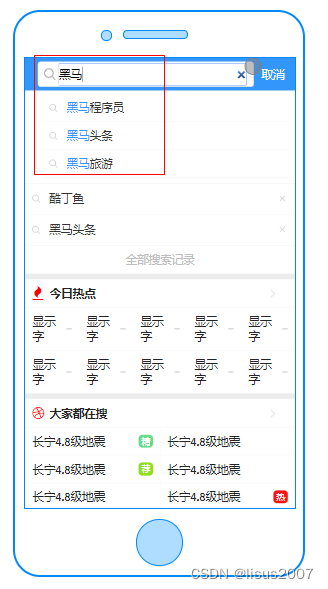
- 根据用户输入的关键字展示联想词
对应实体类
package com.heima.search.pojos; import lombok.Data; import org.springframework.data.mongodb.core.mapping.Document; import java.io.Serializable; import java.util.Date; /** ** 联想词表 *
* * @author itheima */ @Data @Document("ap_associate_words") public class ApAssociateWords implements Serializable { private static final long serialVersionUID = 1L; private String id; /** * 联想词 */ private String associateWords; /** * 创建时间 */ private Date createdTime; }- 1
- 2
- 3
- 4
- 5
- 6
- 7
- 8
- 9
- 10
- 11
- 12
- 13
- 14
- 15
- 16
- 17
- 18
- 19
- 20
- 21
- 22
- 23
- 24
- 25
- 26
- 27
- 28
- 29
- 30
- 31
- 32
- 33
- 34
5.2)搜索词-数据来源
通常是网上搜索频率比较高的一些词,通常在企业中有两部分来源:
第一:自己维护搜索词
通过分析用户搜索频率较高的词,按照排名作为搜索词
第二:第三方获取
关键词规划师(百度)、5118、爱站网

导入资料中的ap_associate_words.js脚本到mongo中
5.3 功能实现
5.3.1 接口定义
说明 接口路径 /api/v1/associate/search 请求方式 POST 参数 UserSearchDto 响应结果 ResponseResult 新建接口
package com.heima.search.controller.v1; import com.heima.model.common.dtos.ResponseResult; import com.heima.model.search.dtos.UserSearchDto; import org.springframework.web.bind.annotation.PostMapping; import org.springframework.web.bind.annotation.RequestBody; import org.springframework.web.bind.annotation.RequestMapping; import org.springframework.web.bind.annotation.RestController; @RestController @RequestMapping("/api/v1/associate") public class ApAssociateWordsController { @PostMapping("/search") public ResponseResult search(@RequestBody UserSearchDto userSearchDto) { return null; } }- 1
- 2
- 3
- 4
- 5
- 6
- 7
- 8
- 9
- 10
- 11
- 12
- 13
- 14
- 15
- 16
- 17
- 18
- 19
- 20
5.3.3 业务层
新建联想词业务层接口
package com.heima.search.service; import com.heima.model.common.dtos.ResponseResult; import com.heima.model.search.dtos.UserSearchDto; /** ** 联想词表 服务类 *
* * @author itheima */ public interface ApAssociateWordsService { /** 联想词 @param userSearchDto @return */ ResponseResult findAssociate(UserSearchDto userSearchDto); }- 1
- 2
- 3
- 4
- 5
- 6
- 7
- 8
- 9
- 10
- 11
- 12
- 13
- 14
- 15
- 16
- 17
- 18
- 19
- 20
- 21
- 22
实现类
package com.heima.search.service.impl; import com.heima.model.common.dtos.ResponseResult; import com.heima.model.common.enums.AppHttpCodeEnum; import com.heima.model.search.dtos.UserSearchDto; import com.heima.search.pojos.ApAssociateWords; import com.heima.search.service.ApAssociateWordsService; import org.apache.commons.lang3.StringUtils; import org.springframework.beans.factory.annotation.Autowired; import org.springframework.data.mongodb.core.MongoTemplate; import org.springframework.data.mongodb.core.query.Criteria; import org.springframework.data.mongodb.core.query.Query; import org.springframework.stereotype.Service; import java.util.List; /** * @Description: * @Version: V1.0 */ @Service public class ApAssociateWordsServiceImpl implements ApAssociateWordsService { @Autowired MongoTemplate mongoTemplate; /** * 联想词 * @param userSearchDto * @return */ @Override public ResponseResult findAssociate(UserSearchDto userSearchDto) { //1 参数检查 if(userSearchDto == null || StringUtils.isBlank(userSearchDto.getSearchWords())){ return ResponseResult.errorResult(AppHttpCodeEnum.PARAM_INVALID); } //分页检查 if (userSearchDto.getPageSize() > 20) { userSearchDto.setPageSize(20); } //3 执行查询 模糊查询 Query query = Query.query(Criteria.where("associateWords").regex(".*?\\" + userSearchDto.getSearchWords() + ".*")); query.limit(userSearchDto.getPageSize()); List<ApAssociateWords> wordsList = mongoTemplate.find(query, ApAssociateWords.class); return ResponseResult.okResult(wordsList); } }- 1
- 2
- 3
- 4
- 5
- 6
- 7
- 8
- 9
- 10
- 11
- 12
- 13
- 14
- 15
- 16
- 17
- 18
- 19
- 20
- 21
- 22
- 23
- 24
- 25
- 26
- 27
- 28
- 29
- 30
- 31
- 32
- 33
- 34
- 35
- 36
- 37
- 38
- 39
- 40
- 41
- 42
- 43
- 44
- 45
- 46
- 47
- 48
- 49
- 50
5.3.4 控制器
新建联想词控制器
package com.heima.search.controller.v1; import com.heima.model.common.dtos.ResponseResult; import com.heima.model.search.dtos.UserSearchDto; import com.heima.search.service.ApAssociateWordsService; import lombok.extern.slf4j.Slf4j; import org.springframework.beans.factory.annotation.Autowired; import org.springframework.web.bind.annotation.PostMapping; import org.springframework.web.bind.annotation.RequestBody; import org.springframework.web.bind.annotation.RequestMapping; import org.springframework.web.bind.annotation.RestController; /** ** 联想词表 前端控制器 *
* @author itheima */ @Slf4j @RestController @RequestMapping("/api/v1/associate") public class ApAssociateWordsController{ @Autowired private ApAssociateWordsService apAssociateWordsService; @PostMapping("/search") public ResponseResult findAssociate(@RequestBody UserSearchDto userSearchDto) { return apAssociateWordsService.findAssociate(userSearchDto); } }- 1
- 2
- 3
- 4
- 5
- 6
- 7
- 8
- 9
- 10
- 11
- 12
- 13
- 14
- 15
- 16
- 17
- 18
- 19
- 20
- 21
- 22
- 23
- 24
- 25
- 26
- 27
- 28
- 29
- 30
- 31
5.3.5 测试
同样,打开前端联调测试效果
-
-
相关阅读:
cpu设计和实现(流水线暂停)
计算机视觉系列-YOLOX 在 MMDetection 中复现全流程解析(五)
路由进阶:route-policy实验配置
痞子衡嵌入式:浅谈i.MXRT1xxx系列MCU时钟相关功能引脚的作用
Spring之控制反转(IoC)
无损以太网的ROCE革命,队列的缓存空间优化分析
ai智能写作软件哪个好-AI智能写作软件的类型标准
扫地机器人还能创新吗?云鲸给了个Yes
【数据结构与算法】| 链表练习
分布式存储--类Redis存储
- 原文地址:https://blog.csdn.net/lisus2007/article/details/136715347
