-
threejs(4)-纹理材质高级操作
一、纹理重复_缩放_旋转_位移操作

// 导入threejs import * as THREE from "three"; // 导入轨道控制器 import { OrbitControls } from "three/examples/jsm/controls/OrbitControls.js"; // 导入lil.gui import { GUI } from "three/examples/jsm/libs/lil-gui.module.min.js"; // 导入hdr加载器 import { RGBELoader } from "three/examples/jsm/loaders/RGBELoader.js"; // 创建场景 const scene = new THREE.Scene(); // 创建相机 const camera = new THREE.PerspectiveCamera( 45, // 视角 window.innerWidth / window.innerHeight, // 宽高比 0.1, // 近平面 1000 // 远平面 ); // 创建渲染器 const renderer = new THREE.WebGLRenderer(); renderer.setSize(window.innerWidth, window.innerHeight); document.body.appendChild(renderer.domElement); // 设置相机位置 camera.position.z = 5; camera.position.y = 2; camera.position.x = 2; camera.lookAt(0, 0, 0); // 添加世界坐标辅助器 const axesHelper = new THREE.AxesHelper(5); scene.add(axesHelper); // 添加轨道控制器 const controls = new OrbitControls(camera, renderer.domElement); // 设置带阻尼的惯性 controls.enableDamping = true; // 设置阻尼系数 controls.dampingFactor = 0.05; // 设置旋转速度 // controls.autoRotate = true; // 渲染函数 function animate() { controls.update(); requestAnimationFrame(animate); // 渲染 renderer.render(scene, camera); } animate(); // 监听窗口变化 window.addEventListener("resize", () => { // 重置渲染器宽高比 renderer.setSize(window.innerWidth, window.innerHeight); // 重置相机宽高比 camera.aspect = window.innerWidth / window.innerHeight; // 更新相机投影矩阵 camera.updateProjectionMatrix(); }); let params = {}; // 创建GUI const gui = new GUI(); // 创建纹理加载器 let textureLoader = new THREE.TextureLoader(); // 加载纹理 let texture = textureLoader.load("./texture/amber/base_color.jpg"); let planeGeometry = new THREE.PlaneGeometry(1, 1); let planeMaterial = new THREE.MeshBasicMaterial({ color: 0xffffff, map: texture, // 允许透明 // transparent: true, }); // planeMaterial.map = texture; let plane = new THREE.Mesh(planeGeometry, planeMaterial); scene.add(plane); // texture.repeat.set(4, 4); // 重复 复制,和backgeroub repeat 一样 // // 设置水平重复 // // texture.wrapS = THREE.RepeatWrapping; // // 设置水平的重复方式为镜像重复 // texture.wrapS = THREE.MirroredRepeatWrapping; // // 设置垂直重复 // texture.wrapT = THREE.RepeatWrapping; // 纹理偏移 // texture.offset.set(0.5, 0.5); // 纹理旋转 texture.center.set(0.5, 0.5); texture.rotation = Math.PI / 4;- 1
- 2
- 3
- 4
- 5
- 6
- 7
- 8
- 9
- 10
- 11
- 12
- 13
- 14
- 15
- 16
- 17
- 18
- 19
- 20
- 21
- 22
- 23
- 24
- 25
- 26
- 27
- 28
- 29
- 30
- 31
- 32
- 33
- 34
- 35
- 36
- 37
- 38
- 39
- 40
- 41
- 42
- 43
- 44
- 45
- 46
- 47
- 48
- 49
- 50
- 51
- 52
- 53
- 54
- 55
- 56
- 57
- 58
- 59
- 60
- 61
- 62
- 63
- 64
- 65
- 66
- 67
- 68
- 69
- 70
- 71
- 72
- 73
- 74
- 75
- 76
- 77
- 78
- 79
- 80
- 81
- 82
- 83
- 84
- 85
- 86
- 87
- 88
- 89
- 90
- 91
- 92
- 93
- 94
- 95
- 96
- 97
- 98
- 99
二、纹理纵向翻转与预乘alpha生成颜色


缺点: 会产生描边。// 导入threejs import * as THREE from "three"; // 导入轨道控制器 import { OrbitControls } from "three/examples/jsm/controls/OrbitControls.js"; // 导入lil.gui import { GUI } from "three/examples/jsm/libs/lil-gui.module.min.js"; // 导入hdr加载器 import { RGBELoader } from "three/examples/jsm/loaders/RGBELoader.js"; // 创建场景 const scene = new THREE.Scene(); // 创建相机 const camera = new THREE.PerspectiveCamera( 45, // 视角 window.innerWidth / window.innerHeight, // 宽高比 0.1, // 近平面 1000 // 远平面 ); // 创建渲染器 const renderer = new THREE.WebGLRenderer({ antialias: true, // 抗锯齿 }); renderer.setSize(window.innerWidth, window.innerHeight); document.body.appendChild(renderer.domElement); // 设置相机位置 camera.position.z = 5; camera.position.y = 2; camera.position.x = 2; camera.lookAt(0, 0, 0); // 添加世界坐标辅助器 const axesHelper = new THREE.AxesHelper(5); scene.add(axesHelper); // 添加轨道控制器 const controls = new OrbitControls(camera, renderer.domElement); // 设置带阻尼的惯性 controls.enableDamping = true; // 设置阻尼系数 controls.dampingFactor = 0.05; // 设置旋转速度 // controls.autoRotate = true; // 渲染函数 function animate() { controls.update(); requestAnimationFrame(animate); // 渲染 renderer.render(scene, camera); } animate(); // 监听窗口变化 window.addEventListener("resize", () => { // 重置渲染器宽高比 renderer.setSize(window.innerWidth, window.innerHeight); // 重置相机宽高比 camera.aspect = window.innerWidth / window.innerHeight; // 更新相机投影矩阵 camera.updateProjectionMatrix(); }); let params = {}; // 创建GUI const gui = new GUI(); // 创建纹理加载器 let textureLoader = new THREE.TextureLoader(); // 加载纹理 // let texture = textureLoader.load("./texture/uv_grid_opengl.jpg"); let texture = textureLoader.load("./texture/rain.png"); let planeGeometry = new THREE.PlaneGeometry(1, 1); let planeMaterial = new THREE.MeshBasicMaterial({ color: 0xffffff, map: texture, // 允许透明 transparent: true, }); // planeMaterial.map = texture; let plane = new THREE.Mesh(planeGeometry, planeMaterial); scene.add(plane); // texture.flipY = false; // texture.flipY = true; // 场景背景 scene.background = new THREE.Color(0xffffff); // gui 设置 premultiplyAlpha gui .add(texture, "premultiplyAlpha") .name("premultiplyAlpha") .onChange(() => { texture.needsUpdate = true; });- 1
- 2
- 3
- 4
- 5
- 6
- 7
- 8
- 9
- 10
- 11
- 12
- 13
- 14
- 15
- 16
- 17
- 18
- 19
- 20
- 21
- 22
- 23
- 24
- 25
- 26
- 27
- 28
- 29
- 30
- 31
- 32
- 33
- 34
- 35
- 36
- 37
- 38
- 39
- 40
- 41
- 42
- 43
- 44
- 45
- 46
- 47
- 48
- 49
- 50
- 51
- 52
- 53
- 54
- 55
- 56
- 57
- 58
- 59
- 60
- 61
- 62
- 63
- 64
- 65
- 66
- 67
- 68
- 69
- 70
- 71
- 72
- 73
- 74
- 75
- 76
- 77
- 78
- 79
- 80
- 81
- 82
- 83
- 84
- 85
- 86
- 87
- 88
- 89
- 90
- 91
- 92
- 93
- 94
- 95
- 96
- 97
- 98
- 99
- 100
三、纹理映射之放大过滤和缩小过滤-mipmap解决摩尔纹条纹以及各项异性anisotropy解决倾斜模糊问题


设置各项异性之后

条纹清晰了一些// 导入threejs import * as THREE from "three"; // 导入轨道控制器 import { OrbitControls } from "three/examples/jsm/controls/OrbitControls.js"; // 导入lil.gui import { GUI } from "three/examples/jsm/libs/lil-gui.module.min.js"; // 导入hdr加载器 import { RGBELoader } from "three/examples/jsm/loaders/RGBELoader.js"; // 创建场景 const scene = new THREE.Scene(); // 创建相机 const camera = new THREE.PerspectiveCamera( 45, // 视角 window.innerWidth / window.innerHeight, // 宽高比 0.1, // 近平面 1000 // 远平面 ); // 创建渲染器 const renderer = new THREE.WebGLRenderer({ antialias: true, // 抗锯齿 }); renderer.setSize(window.innerWidth, window.innerHeight); document.body.appendChild(renderer.domElement); // 设置相机位置 camera.position.z = 5; camera.position.y = 2; camera.position.x = 2; camera.lookAt(0, 0, 0); // 添加世界坐标辅助器 const axesHelper = new THREE.AxesHelper(5); scene.add(axesHelper); // 添加轨道控制器 const controls = new OrbitControls(camera, renderer.domElement); // 设置带阻尼的惯性 controls.enableDamping = true; // 设置阻尼系数 controls.dampingFactor = 0.05; // 设置旋转速度 // controls.autoRotate = true; // 渲染函数 function animate() { controls.update(); requestAnimationFrame(animate); // 渲染 renderer.render(scene, camera); } animate(); // 监听窗口变化 window.addEventListener("resize", () => { // 重置渲染器宽高比 renderer.setSize(window.innerWidth, window.innerHeight); // 重置相机宽高比 camera.aspect = window.innerWidth / window.innerHeight; // 更新相机投影矩阵 camera.updateProjectionMatrix(); }); let params = {}; // 创建GUI const gui = new GUI(); // 创建纹理加载器 let textureLoader = new THREE.TextureLoader(); // 加载纹理 // let texture = textureLoader.load("./texture/filter/minecraft.png"); let texture = textureLoader.load("./texture/brick/brick_diffuse.jpg"); // let texture = textureLoader.load("./texture/rain.png"); let planeGeometry = new THREE.PlaneGeometry(1, 1); let planeMaterial = new THREE.MeshBasicMaterial({ color: 0xffffff, map: texture, // 允许透明 transparent: true, }); // planeMaterial.map = texture; let plane = new THREE.Mesh(planeGeometry, planeMaterial); scene.add(plane); // texture.flipY = false; // texture.flipY = true; texture.colorSpace = THREE.SRGBColorSpace; // 场景背景 // scene.background = new THREE.Color(0xffffff); // 直接取映射到的最近的像素 // texture.magFilter = THREE.NearestFilter; // 取映射到的最近的四个像素的平均值 // texture.magFilter = THREE.LinearFilter; // texture.minFilter = THREE.NearestFilter; // texture.minFilter = THREE.LinearFilter; texture.minFilter = THREE.LinearMipMapLinearFilter; // texture.minFilter = THREE.LinearMipMapNearestFilter; // texture.minFilter = THREE.NearestMipMapLinearFilter; // texture.minFilter = THREE.NearestMipMapNearestFilter; // texture.generateMipmaps = false; // 获取各项异性的最大值 let maxAnisotropy = renderer.capabilities.getMaxAnisotropy(); texture.anisotropy = 4; console.log(maxAnisotropy);- 1
- 2
- 3
- 4
- 5
- 6
- 7
- 8
- 9
- 10
- 11
- 12
- 13
- 14
- 15
- 16
- 17
- 18
- 19
- 20
- 21
- 22
- 23
- 24
- 25
- 26
- 27
- 28
- 29
- 30
- 31
- 32
- 33
- 34
- 35
- 36
- 37
- 38
- 39
- 40
- 41
- 42
- 43
- 44
- 45
- 46
- 47
- 48
- 49
- 50
- 51
- 52
- 53
- 54
- 55
- 56
- 57
- 58
- 59
- 60
- 61
- 62
- 63
- 64
- 65
- 66
- 67
- 68
- 69
- 70
- 71
- 72
- 73
- 74
- 75
- 76
- 77
- 78
- 79
- 80
- 81
- 82
- 83
- 84
- 85
- 86
- 87
- 88
- 89
- 90
- 91
- 92
- 93
- 94
- 95
- 96
- 97
- 98
- 99
- 100
- 101
- 102
- 103
- 104
- 105
- 106
- 107
- 108
- 109
- 110
- 111
- 112
四、jpg_png_webp_dds_ktx_hdr_exr格式纹理贴图
JPG(或JPEG):这是一种有损压缩的图像格式,能够通过压缩冗余的图像和彩色数据,以极高效率地存储丰富的、生动的图像。对于色彩丰富的写实图片有着很好的显示效果,但是文件相对较大,且放大和缩小会失真。
PNG(Portable Network Graphics):这种格式的图片是一种无损压缩的图像格式,它可以提供长度比GIF小30%的无损压缩图像文件,同时支持24位和48位真彩色图像。PNG非常新,所以并不是所有的程序都可以用它来存储图像文件,但Photoshop可以处理PNG图像文件。另外,PNG有一个特殊的特性就是可以保存背景为透明。
WebP:这是由Google开发的一种现代光栅Web图形格式,它提供了有损压缩和无损压缩两种模式,旨在提供更好的网络图像传输体验。
DDS、KTX:这两种格式通常用于3D图形和渲染,它们是一种纹理映射文件格式,支持多种压缩方式和多层纹理过滤。
HDR(高动态范围):这是一种图像格式,它通过在亮部和暗部区域提供更多的细节来改善照片的质量与视觉效果。
EXR:这是一种高级的图像文件格式,它支持OpenEXR的文件格式,可以包含32位浮点数的RGBA每个通道,以及深度和Z缓冲区信息。
五、使用NVIDIA_Texture_Tools软件导出优化压缩

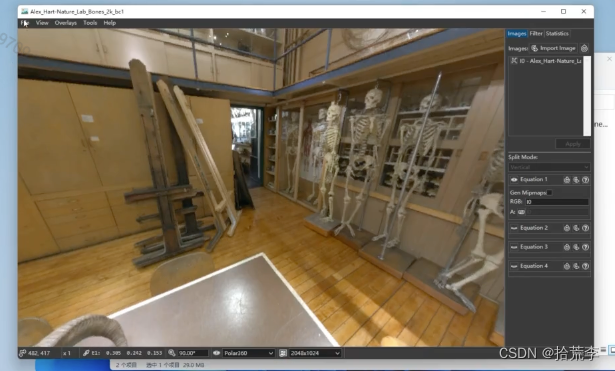
NVIDIA压缩工具官网下载地址:
https://developer.nvidia.cn/nvidia-texture-tools-exporter?eqid=aa29fd1b0009cdb6000000046458827a目前只看到了windows版本

图片查看器 imageviewer
六、threejs中使用KTX2_DDS_TGA纹理
// 导入threejs import * as THREE from "three"; // 导入轨道控制器 import { OrbitControls } from "three/examples/jsm/controls/OrbitControls.js"; // 导入lil.gui import { GUI } from "three/examples/jsm/libs/lil-gui.module.min.js"; // 导入hdr加载器 import { RGBELoader } from "three/examples/jsm/loaders/RGBELoader.js"; // 导入dds格式加载器 import { DDSLoader } from "three/examples/jsm/loaders/DDSLoader.js"; // ktx2格式加载器 import { KTX2Loader } from "three/examples/jsm/loaders/KTX2Loader.js"; // 导入tga import { TGALoader } from "three/addons/loaders/TGALoader.js"; // 创建场景 const scene = new THREE.Scene(); // 创建相机 const camera = new THREE.PerspectiveCamera( 45, // 视角 window.innerWidth / window.innerHeight, // 宽高比 0.1, // 近平面 1000 // 远平面 ); // 创建渲染器 const renderer = new THREE.WebGLRenderer({ antialias: true, // 抗锯齿 }); renderer.setSize(window.innerWidth, window.innerHeight); document.body.appendChild(renderer.domElement); // 设置相机位置 camera.position.z = 5; camera.position.y = 2; camera.position.x = 2; camera.lookAt(0, 0, 0); // 添加世界坐标辅助器 const axesHelper = new THREE.AxesHelper(5); scene.add(axesHelper); // 添加轨道控制器 const controls = new OrbitControls(camera, renderer.domElement); // 设置带阻尼的惯性 controls.enableDamping = true; // 设置阻尼系数 controls.dampingFactor = 0.05; // 设置旋转速度 // controls.autoRotate = true; // 渲染函数 function animate() { controls.update(); requestAnimationFrame(animate); // 渲染 renderer.render(scene, camera); } animate(); // 监听窗口变化 window.addEventListener("resize", () => { // 重置渲染器宽高比 renderer.setSize(window.innerWidth, window.innerHeight); // 重置相机宽高比 camera.aspect = window.innerWidth / window.innerHeight; // 更新相机投影矩阵 camera.updateProjectionMatrix(); }); let params = {}; // 创建GUI const gui = new GUI(); // 创建纹理加载器 let textureLoader = new THREE.TextureLoader(); // 加载纹理 // let texture = textureLoader.load("./texture/filter/minecraft.png"); let texture = textureLoader.load("./texture/brick/brick_diffuse.jpg"); // let texture = textureLoader.load("./texture/rain.png"); let planeGeometry = new THREE.PlaneGeometry(1, 1); let planeMaterial = new THREE.MeshBasicMaterial({ color: 0xffffff, map: texture, // 允许透明 transparent: true, }); // planeMaterial.map = texture; let plane = new THREE.Mesh(planeGeometry, planeMaterial); scene.add(plane); // texture.flipY = false; // texture.flipY = true; texture.colorSpace = THREE.SRGBColorSpace; // 场景背景 // scene.background = new THREE.Color(0xffffff); // 直接取映射到的最近的像素 // texture.magFilter = THREE.NearestFilter; // 取映射到的最近的四个像素的平均值 // texture.magFilter = THREE.LinearFilter; // texture.minFilter = THREE.NearestFilter; // texture.minFilter = THREE.LinearFilter; texture.minFilter = THREE.LinearMipMapLinearFilter; // texture.minFilter = THREE.LinearMipMapNearestFilter; // texture.minFilter = THREE.NearestMipMapLinearFilter; // texture.minFilter = THREE.NearestMipMapNearestFilter; // texture.generateMipmaps = false; // 获取各项异性的最大值 let maxAnisotropy = renderer.capabilities.getMaxAnisotropy(); texture.anisotropy = 4; console.log(maxAnisotropy); // jpg/png纹理加载 // textureLoader.load( // "./texture/opt/env/Alex_Hart-Nature_Lab_Bones_2k.jpg", // (texture) => { // texture.mapping = THREE.EquirectangularReflectionMapping; // console.log("jpg/png", texture); // scene.background = texture; // scene.environment = texture; // plane.material.map = texture; // texture.magFilter = THREE.LinearFilter; // texture.minFilter = THREE.LinearMipMapLinearFilter; // texture.anisotropy = 16; // } // ); // ktx2加载器; // let ktx2Loader = new KTX2Loader() // .setTranscoderPath("basis/") // .detectSupport(renderer); // let ktx2Texture = ktx2Loader.load( // "./texture/opt/ktx2/Alex_Hart-Nature_Lab_Bones_2k_uastc-mip-triangle.ktx2", // (texture) => { // console.log("ktx2", texture); // texture.mapping = THREE.EquirectangularReflectionMapping; // // texture.magFilter = THREE.LinearFilter; // // texture.minFilter = THREE.LinearMipMapLinearFilter; // texture.anisotropy = 16; // // 不起效果texture.flipY = true; // texture.needsUpdate = true; // scene.background = texture; // scene.environment = texture; // plane.material.map = texture; // } // ); // dds加载器 // let ddsLoader = new DDSLoader(); // let ddsTexture = ddsLoader.load( // "./texture/opt/env/Alex_Hart-Nature_Lab_Bones_2k_bc3_nomip.dds", // (texture) => { // console.log("dds", texture); // texture.mapping = THREE.EquirectangularReflectionMapping; // texture.flipY = true; // texture.needsUpdate = true; // scene.background = texture; // scene.environment = texture; // plane.material.map = texture; // texture.center = new THREE.Vector2(0.5, 0.5); // texture.rotation = Math.PI; // texture.magFilter = THREE.LinearFilter; // texture.minFilter = THREE.LinearMipMapLinearFilter; // texture.anisotropy = 16; // } // ); // Alex_Hart - Nature_Lab_Bones_2k_bc7.tga; // tga加载纹理; // let tgaLoader = new TGALoader(); // tgaLoader.load( // "./texture/opt/env/Alex_Hart-Nature_Lab_Bones_2k-mipmap.tga", // (texture) => { // texture.mapping = THREE.EquirectangularReflectionMapping; // console.log("tga", texture); // scene.background = texture; // scene.environment = texture; // plane.material.map = texture; // } // );- 1
- 2
- 3
- 4
- 5
- 6
- 7
- 8
- 9
- 10
- 11
- 12
- 13
- 14
- 15
- 16
- 17
- 18
- 19
- 20
- 21
- 22
- 23
- 24
- 25
- 26
- 27
- 28
- 29
- 30
- 31
- 32
- 33
- 34
- 35
- 36
- 37
- 38
- 39
- 40
- 41
- 42
- 43
- 44
- 45
- 46
- 47
- 48
- 49
- 50
- 51
- 52
- 53
- 54
- 55
- 56
- 57
- 58
- 59
- 60
- 61
- 62
- 63
- 64
- 65
- 66
- 67
- 68
- 69
- 70
- 71
- 72
- 73
- 74
- 75
- 76
- 77
- 78
- 79
- 80
- 81
- 82
- 83
- 84
- 85
- 86
- 87
- 88
- 89
- 90
- 91
- 92
- 93
- 94
- 95
- 96
- 97
- 98
- 99
- 100
- 101
- 102
- 103
- 104
- 105
- 106
- 107
- 108
- 109
- 110
- 111
- 112
- 113
- 114
- 115
- 116
- 117
- 118
- 119
- 120
- 121
- 122
- 123
- 124
- 125
- 126
- 127
- 128
- 129
- 130
- 131
- 132
- 133
- 134
- 135
- 136
- 137
- 138
- 139
- 140
- 141
- 142
- 143
- 144
- 145
- 146
- 147
- 148
- 149
- 150
- 151
- 152
- 153
- 154
- 155
- 156
- 157
- 158
- 159
- 160
- 161
- 162
- 163
- 164
- 165
- 166
- 167
- 168
- 169
- 170
- 171
- 172
- 173
- 174
- 175
- 176
- 177
- 178
- 179
- 180
- 181
- 182
- 183
- 184
- 185
- 186
- 187
七、设置高动态范围全景背景色调映射和色调曝光

// 导入threejs import * as THREE from "three"; // 导入轨道控制器 import { OrbitControls } from "three/examples/jsm/controls/OrbitControls.js"; // 导入lil.gui import { GUI } from "three/examples/jsm/libs/lil-gui.module.min.js"; // 导入hdr加载器 import { RGBELoader } from "three/examples/jsm/loaders/RGBELoader.js"; // 导入dds格式加载器 import { DDSLoader } from "three/examples/jsm/loaders/DDSLoader.js"; // ktx2格式加载器 import { KTX2Loader } from "three/examples/jsm/loaders/KTX2Loader.js"; // 导入tga import { TGALoader } from "three/addons/loaders/TGALoader.js"; // 创建场景 const scene = new THREE.Scene(); // 创建相机 const camera = new THREE.PerspectiveCamera( 45, // 视角 window.innerWidth / window.innerHeight, // 宽高比 0.1, // 近平面 1000 // 远平面 ); // 创建渲染器 const renderer = new THREE.WebGLRenderer({ antialias: true, // 抗锯齿 }); renderer.setSize(window.innerWidth, window.innerHeight); document.body.appendChild(renderer.domElement); // 设置相机位置 camera.position.z = 5; camera.position.y = 2; camera.position.x = 2; camera.lookAt(0, 0, 0); // 添加世界坐标辅助器 const axesHelper = new THREE.AxesHelper(5); scene.add(axesHelper); // 添加轨道控制器 const controls = new OrbitControls(camera, renderer.domElement); // 设置带阻尼的惯性 controls.enableDamping = true; // 设置阻尼系数 controls.dampingFactor = 0.05; // 设置旋转速度 // controls.autoRotate = true; // 渲染函数 function animate() { controls.update(); requestAnimationFrame(animate); // 渲染 renderer.render(scene, camera); } animate(); // 监听窗口变化 window.addEventListener("resize", () => { // 重置渲染器宽高比 renderer.setSize(window.innerWidth, window.innerHeight); // 重置相机宽高比 camera.aspect = window.innerWidth / window.innerHeight; // 更新相机投影矩阵 camera.updateProjectionMatrix(); }); let params = {}; // 创建GUI const gui = new GUI(); // 创建纹理加载器 let textureLoader = new THREE.TextureLoader(); // 加载纹理 // let texture = textureLoader.load("./texture/filter/minecraft.png"); let texture = textureLoader.load("./texture/brick/brick_diffuse.jpg"); // let texture = textureLoader.load("./texture/rain.png"); let planeGeometry = new THREE.PlaneGeometry(1, 1); let planeMaterial = new THREE.MeshBasicMaterial({ color: 0xffffff, map: texture, // 允许透明 transparent: true, }); // planeMaterial.map = texture; let plane = new THREE.Mesh(planeGeometry, planeMaterial); scene.add(plane); // texture.flipY = false; // texture.flipY = true; texture.colorSpace = THREE.SRGBColorSpace; // 场景背景 // scene.background = new THREE.Color(0xffffff); // 直接取映射到的最近的像素 // texture.magFilter = THREE.NearestFilter; // 取映射到的最近的四个像素的平均值 // texture.magFilter = THREE.LinearFilter; // texture.minFilter = THREE.NearestFilter; // texture.minFilter = THREE.LinearFilter; texture.minFilter = THREE.LinearMipMapLinearFilter; // texture.minFilter = THREE.LinearMipMapNearestFilter; // texture.minFilter = THREE.NearestMipMapLinearFilter; // texture.minFilter = THREE.NearestMipMapNearestFilter; // texture.generateMipmaps = false; // 获取各项异性的最大值 let maxAnisotropy = renderer.capabilities.getMaxAnisotropy(); texture.anisotropy = 4; console.log(maxAnisotropy); // rgbeLoader 加载hdr贴图 // let rgbeLoader = new RGBELoader(); // rgbeLoader.load( // "./texture/opt/memorial/Alex_Hart-Nature_Lab_Bones_2k.hdr", // (envMap) => { // // 设置球形贴图 // envMap.mapping = THREE.EquirectangularReflectionMapping; // // 设置环境贴图 // scene.background = envMap; // // 设置环境贴图 // scene.environment = envMap; // plane.material.map = envMap; // } // ); // ktx2加载器; let ktx2Loader = new KTX2Loader() .setTranscoderPath("basis/") .detectSupport(renderer); let ktx2Texture = ktx2Loader.load( "./texture/opt/memorial/Alex_Hart-Nature_Lab_Bones_2k_uastc_flipY_nomipmap.ktx2", (texture) => { console.log("ktx2", texture); texture.mapping = THREE.EquirectangularReflectionMapping; scene.background = texture; scene.environment = texture; plane.material.map = texture; } ); // 设置色调映射 renderer.toneMapping = THREE.ACESFilmicToneMapping; // 设置色调映射曝光度 renderer.toneMappingExposure = 1; gui.add(renderer, "toneMapping", { // 无色调映射 No: THREE.NoToneMapping, // 线性色调映射 Linear: THREE.LinearToneMapping, // Reinhard色调映射。这是一种更复杂的色调映射方式,可以更好地处理高亮度的区域。它根据整个图像的平均亮度来调整每个像素的亮度。 Reinhard: THREE.ReinhardToneMapping, // Cineon色调映射。这种方法起源于电影行业,尝试模仿电影胶片的颜色响应,使得图像在颜色上看起来更富有电影感。 Cineon: THREE.CineonToneMapping, // ACES Filmic色调映射。这是一种模仿电影行业中常用的色调映射算法,可以产生类似于电影的视觉效果。 ACESFilmic: THREE.ACESFilmicToneMapping, }); gui.add(renderer, "toneMappingExposure", 0, 3, 0.1);- 1
- 2
- 3
- 4
- 5
- 6
- 7
- 8
- 9
- 10
- 11
- 12
- 13
- 14
- 15
- 16
- 17
- 18
- 19
- 20
- 21
- 22
- 23
- 24
- 25
- 26
- 27
- 28
- 29
- 30
- 31
- 32
- 33
- 34
- 35
- 36
- 37
- 38
- 39
- 40
- 41
- 42
- 43
- 44
- 45
- 46
- 47
- 48
- 49
- 50
- 51
- 52
- 53
- 54
- 55
- 56
- 57
- 58
- 59
- 60
- 61
- 62
- 63
- 64
- 65
- 66
- 67
- 68
- 69
- 70
- 71
- 72
- 73
- 74
- 75
- 76
- 77
- 78
- 79
- 80
- 81
- 82
- 83
- 84
- 85
- 86
- 87
- 88
- 89
- 90
- 91
- 92
- 93
- 94
- 95
- 96
- 97
- 98
- 99
- 100
- 101
- 102
- 103
- 104
- 105
- 106
- 107
- 108
- 109
- 110
- 111
- 112
- 113
- 114
- 115
- 116
- 117
- 118
- 119
- 120
- 121
- 122
- 123
- 124
- 125
- 126
- 127
- 128
- 129
- 130
- 131
- 132
- 133
- 134
- 135
- 136
- 137
- 138
- 139
- 140
- 141
- 142
- 143
- 144
- 145
- 146
- 147
- 148
- 149
- 150
- 151
- 152
- 153
- 154
- 155
- 156
- 157
- 158
- 159
- 160
- 161
- 162
- 163
- 164
- 165
八、高动态范围图片EXR_TIF_PNG加载使用
// 导入threejs import * as THREE from "three"; // 导入轨道控制器 import { OrbitControls } from "three/examples/jsm/controls/OrbitControls.js"; // 导入lil.gui import { GUI } from "three/examples/jsm/libs/lil-gui.module.min.js"; // 导入hdr加载器 import { RGBELoader } from "three/examples/jsm/loaders/RGBELoader.js"; // 导入dds格式加载器 import { DDSLoader } from "three/examples/jsm/loaders/DDSLoader.js"; // ktx2格式加载器 import { KTX2Loader } from "three/examples/jsm/loaders/KTX2Loader.js"; // 导入tga import { TGALoader } from "three/addons/loaders/TGALoader.js"; // 导入exrloader import { EXRLoader } from "three/addons/loaders/EXRLoader.js"; // 导入tif import { LogLuvLoader } from "three/addons/loaders/LogLuvLoader.js"; // 导入rgbmloader import { RGBMLoader } from "three/addons/loaders/RGBMLoader.js"; // 创建场景 const scene = new THREE.Scene(); // 创建相机 const camera = new THREE.PerspectiveCamera( 45, // 视角 window.innerWidth / window.innerHeight, // 宽高比 0.1, // 近平面 1000 // 远平面 ); // 创建渲染器 const renderer = new THREE.WebGLRenderer({ antialias: true, // 抗锯齿 }); renderer.setSize(window.innerWidth, window.innerHeight); document.body.appendChild(renderer.domElement); // 设置相机位置 camera.position.z = 5; camera.position.y = 2; camera.position.x = 2; camera.lookAt(0, 0, 0); // 添加世界坐标辅助器 const axesHelper = new THREE.AxesHelper(5); scene.add(axesHelper); // 添加轨道控制器 const controls = new OrbitControls(camera, renderer.domElement); // 设置带阻尼的惯性 controls.enableDamping = true; // 设置阻尼系数 controls.dampingFactor = 0.05; // 设置旋转速度 // controls.autoRotate = true; // 渲染函数 function animate() { controls.update(); requestAnimationFrame(animate); // 渲染 renderer.render(scene, camera); } animate(); // 监听窗口变化 window.addEventListener("resize", () => { // 重置渲染器宽高比 renderer.setSize(window.innerWidth, window.innerHeight); // 重置相机宽高比 camera.aspect = window.innerWidth / window.innerHeight; // 更新相机投影矩阵 camera.updateProjectionMatrix(); }); let params = {}; // 创建GUI const gui = new GUI(); // 创建纹理加载器 let textureLoader = new THREE.TextureLoader(); // 加载纹理 // let texture = textureLoader.load("./texture/filter/minecraft.png"); let texture = textureLoader.load("./texture/brick/brick_diffuse.jpg"); // let texture = textureLoader.load("./texture/rain.png"); let planeGeometry = new THREE.PlaneGeometry(1, 1); let planeMaterial = new THREE.MeshBasicMaterial({ color: 0xffffff, map: texture, // 允许透明 transparent: true, }); // planeMaterial.map = texture; let plane = new THREE.Mesh(planeGeometry, planeMaterial); scene.add(plane); // texture.flipY = false; // texture.flipY = true; texture.colorSpace = THREE.SRGBColorSpace; // 场景背景 // scene.background = new THREE.Color(0xffffff); // 直接取映射到的最近的像素 // texture.magFilter = THREE.NearestFilter; // 取映射到的最近的四个像素的平均值 // texture.magFilter = THREE.LinearFilter; // texture.minFilter = THREE.NearestFilter; // texture.minFilter = THREE.LinearFilter; texture.minFilter = THREE.LinearMipMapLinearFilter; // texture.minFilter = THREE.LinearMipMapNearestFilter; // texture.minFilter = THREE.NearestMipMapLinearFilter; // texture.minFilter = THREE.NearestMipMapNearestFilter; // texture.generateMipmaps = false; // 获取各项异性的最大值 let maxAnisotropy = renderer.capabilities.getMaxAnisotropy(); texture.anisotropy = 4; console.log(maxAnisotropy); // rgbeLoader 加载hdr贴图 // let rgbeLoader = new RGBELoader(); // rgbeLoader.load( // "./texture/opt/memorial/Alex_Hart-Nature_Lab_Bones_2k.hdr", // (envMap) => { // // 设置球形贴图 // envMap.mapping = THREE.EquirectangularReflectionMapping; // // 设置环境贴图 // scene.background = envMap; // // 设置环境贴图 // scene.environment = envMap; // plane.material.map = envMap; // } // ); // ktx2加载器; // let ktx2Loader = new KTX2Loader() // .setTranscoderPath("basis/") // .detectSupport(renderer); // let ktx2Texture = ktx2Loader.load( // "./texture/opt/memorial/Alex_Hart-Nature_Lab_Bones_2k_uastc_flipY_nomipmap.ktx2", // (texture) => { // console.log("ktx2", texture); // texture.mapping = THREE.EquirectangularReflectionMapping; // scene.background = texture; // scene.environment = texture; // plane.material.map = texture; // } // ); // 设置色调映射 renderer.toneMapping = THREE.ACESFilmicToneMapping; // 设置色调映射曝光度 renderer.toneMappingExposure = 1; gui.add(renderer, "toneMapping", { // 无色调映射 No: THREE.NoToneMapping, // 线性色调映射 Linear: THREE.LinearToneMapping, // Reinhard色调映射。这是一种更复杂的色调映射方式,可以更好地处理高亮度的区域。它根据整个图像的平均亮度来调整每个像素的亮度。 Reinhard: THREE.ReinhardToneMapping, // Cineon色调映射。这种方法起源于电影行业,尝试模仿电影胶片的颜色响应,使得图像在颜色上看起来更富有电影感。 Cineon: THREE.CineonToneMapping, // ACES Filmic色调映射。这是一种模仿电影行业中常用的色调映射算法,可以产生类似于电影的视觉效果。 ACESFilmic: THREE.ACESFilmicToneMapping, }); gui.add(renderer, "toneMappingExposure", 0, 3, 0.1); // exrLoader 加载hdr贴图 // let exrLoader = new EXRLoader(); // exrLoader.load( // "./texture/opt/memorial/Alex_Hart-Nature_Lab_Bones_2k.exr", // (texture) => { // console.log("exr", texture); // texture.mapping = THREE.EquirectangularReflectionMapping; // scene.background = texture; // scene.environment = texture; // plane.material.map = texture; // } // ); // tif logLuv 加载hdr贴图 // let logLuvLoader = new LogLuvLoader(); // logLuvLoader.load("./texture/opt/memorial/memorial.tif", (texture) => { // console.log("exr", texture); // // texture.mapping = THREE.EquirectangularReflectionMapping; // scene.background = texture; // scene.environment = texture; // plane.material.map = texture; // }); // rgbmloader let rgbmLoader = new RGBMLoader(); rgbmLoader.load("./texture/opt/memorial/memorial.png", (texture) => { scene.background = texture; scene.environment = texture; plane.material.map = texture; });- 1
- 2
- 3
- 4
- 5
- 6
- 7
- 8
- 9
- 10
- 11
- 12
- 13
- 14
- 15
- 16
- 17
- 18
- 19
- 20
- 21
- 22
- 23
- 24
- 25
- 26
- 27
- 28
- 29
- 30
- 31
- 32
- 33
- 34
- 35
- 36
- 37
- 38
- 39
- 40
- 41
- 42
- 43
- 44
- 45
- 46
- 47
- 48
- 49
- 50
- 51
- 52
- 53
- 54
- 55
- 56
- 57
- 58
- 59
- 60
- 61
- 62
- 63
- 64
- 65
- 66
- 67
- 68
- 69
- 70
- 71
- 72
- 73
- 74
- 75
- 76
- 77
- 78
- 79
- 80
- 81
- 82
- 83
- 84
- 85
- 86
- 87
- 88
- 89
- 90
- 91
- 92
- 93
- 94
- 95
- 96
- 97
- 98
- 99
- 100
- 101
- 102
- 103
- 104
- 105
- 106
- 107
- 108
- 109
- 110
- 111
- 112
- 113
- 114
- 115
- 116
- 117
- 118
- 119
- 120
- 121
- 122
- 123
- 124
- 125
- 126
- 127
- 128
- 129
- 130
- 131
- 132
- 133
- 134
- 135
- 136
- 137
- 138
- 139
- 140
- 141
- 142
- 143
- 144
- 145
- 146
- 147
- 148
- 149
- 150
- 151
- 152
- 153
- 154
- 155
- 156
- 157
- 158
- 159
- 160
- 161
- 162
- 163
- 164
- 165
- 166
- 167
- 168
- 169
- 170
- 171
- 172
- 173
- 174
- 175
- 176
- 177
- 178
- 179
- 180
- 181
- 182
- 183
- 184
- 185
- 186
- 187
- 188
- 189
- 190
- 191
- 192
- 193
- 194
- 195
- 196
- 197
- 198
- 199
- 200
- 201
- 202
九、透明冰块_透明液体_透明杯子多个透明物体混和渲染

// 导入threejs import * as THREE from "three"; // 导入轨道控制器 import { OrbitControls } from "three/examples/jsm/controls/OrbitControls.js"; // 导入lil.gui import { GUI } from "three/examples/jsm/libs/lil-gui.module.min.js"; // 导入hdr加载器 import { RGBELoader } from "three/examples/jsm/loaders/RGBELoader.js"; // 导入顶点法向量辅助器 import { VertexNormalsHelper } from "three/examples/jsm/helpers/VertexNormalsHelper.js"; // 导入gltf加载器 import { GLTFLoader } from "three/examples/jsm/loaders/GLTFLoader.js"; // 导入draco解码器 import { DRACOLoader } from "three/examples/jsm/loaders/DRACOLoader.js"; // 创建场景 const scene = new THREE.Scene(); // 创建相机 const camera = new THREE.PerspectiveCamera( 45, // 视角 window.innerWidth / window.innerHeight, // 宽高比 0.1, // 近平面 1000 // 远平面 ); // 创建渲染器 const renderer = new THREE.WebGLRenderer({ antialias: true, // 开启抗锯齿 }); renderer.shadowMap.enabled = true; renderer.setSize(window.innerWidth, window.innerHeight); document.body.appendChild(renderer.domElement); // 设置相机位置 camera.position.z = 5; camera.position.y = 4; camera.position.x = 2; camera.lookAt(0, 0, 0); // 添加世界坐标辅助器 const axesHelper = new THREE.AxesHelper(5); scene.add(axesHelper); // 添加轨道控制器 const controls = new OrbitControls(camera, renderer.domElement); // 设置带阻尼的惯性 controls.enableDamping = true; // 设置阻尼系数 controls.dampingFactor = 0.05; // 设置旋转速度 // controls.autoRotate = true; // 渲染函数 function animate() { controls.update(); requestAnimationFrame(animate); // 渲染 renderer.render(scene, camera); } animate(); // 监听窗口变化 window.addEventListener("resize", () => { // 重置渲染器宽高比 renderer.setSize(window.innerWidth, window.innerHeight); // 重置相机宽高比 camera.aspect = window.innerWidth / window.innerHeight; // 更新相机投影矩阵 camera.updateProjectionMatrix(); }); let eventObj = { Fullscreen: function () { // 全屏 document.body.requestFullscreen(); console.log("全屏"); }, ExitFullscreen: function () { document.exitFullscreen(); console.log("退出全屏"); }, }; // 创建GUI const gui = new GUI(); // 添加按钮 gui.add(eventObj, "Fullscreen").name("全屏"); gui.add(eventObj, "ExitFullscreen").name("退出全屏"); // 控制立方体的位置 // gui.add(cube.position, "x", -5, 5).name("立方体x轴位置"); // rgbeLoader 加载hdr贴图 let rgbeLoader = new RGBELoader(); rgbeLoader.load("./texture/Alex_Hart-Nature_Lab_Bones_2k.hdr", (envMap) => { // 设置球形贴图 // envMap.mapping = THREE.EquirectangularReflectionMapping; envMap.mapping = THREE.EquirectangularRefractionMapping; // 设置环境贴图 scene.background = envMap; // 设置环境贴图 scene.environment = envMap; let params = { aoMap: true, }; // 实例化加载器gltf const gltfLoader = new GLTFLoader(); // 实例化加载器draco const dracoLoader = new DRACOLoader(); // 设置draco路径 dracoLoader.setDecoderPath("./draco/"); // 设置gltf加载器draco解码器 gltfLoader.setDRACOLoader(dracoLoader); // 加载模型 gltfLoader.load( // 模型路径 "./model/cup.glb", // 加载完成回调 (gltf) => { let cup = gltf.scene.getObjectByName("copo_low_01_vidro_0"); let water = gltf.scene.getObjectByName("copo_low_02_agua_0"); let ice = gltf.scene.getObjectByName("copo_low_04_vidro_0"); ice.scale.set(0.86, 0.86, 0.86); water.position.z = -1; ice.renderOrder = 1; water.renderOrder = 2; cup.renderOrder = 3; // cup.visible = false; // water.visible = false; console.log("ice", ice); console.log("water", water); let iceMaterial = ice.material; ice.material = new THREE.MeshPhysicalMaterial({ normalMap: iceMaterial.normalMap, metalnessMap: iceMaterial.metalnessMap, roughness: 0, color: 0xffffff, transmission: 0.95, transparent: true, thickness: 10, ior: 2, // opacity: 0.5, }); // console.log("iceMaterial", iceMaterial); let waterMaterial = water.material; water.material = new THREE.MeshPhysicalMaterial({ map: waterMaterial.map, normalMap: waterMaterial.normalMap, metalnessMap: waterMaterial.metalnessMap, roughnessMap: waterMaterial.roughnessMap, transparent: true, transmission: 0.95, roughness: 0.1, thickness: 10, ior: 2, // opacity: 0.6, }); // water.visible = false; cup.material = new THREE.MeshPhysicalMaterial({ map: cup.material.map, normalMap: cup.material.normalMap, metalnessMap: cup.material.metalnessMap, roughnessMap: cup.material.roughnessMap, transparent: true, transmission: 0.95, roughness: 0.3, thickness: 10, ior: 2, opacity: 0.6, }); // cup.material = material; let material = water.material; material.blending = THREE.CustomBlending; material.blendEquation = THREE.AddEquation; material.blendSrc = THREE.SrcAlphaFactor; material.blendDst = THREE.SrcColorFactor; cup.material.blending = THREE.CustomBlending; cup.material.blendEquation = THREE.AddEquation; cup.material.blendSrc = THREE.SrcAlphaFactor; cup.material.blendDst = THREE.SrcColorFactor; gui .add(material, "blendEquation", { AddEquation: THREE.AddEquation, SubtractEquation: THREE.SubtractEquation, ReverseSubtractEquation: THREE.ReverseSubtractEquation, MinEquation: THREE.MinEquation, MaxEquation: THREE.MaxEquation, }) .name("blendEquation"); gui .add(material, "blendSrc", { ZeroFactor: THREE.ZeroFactor, OneFactor: THREE.OneFactor, SrcColorFactor: THREE.SrcColorFactor, OneMinusSrcColorFactor: THREE.OneMinusSrcColorFactor, SrcAlphaFactor: THREE.SrcAlphaFactor, OneMinusSrcAlphaFactor: THREE.OneMinusSrcAlphaFactor, DstAlphaFactor: THREE.DstAlphaFactor, OneMinusDstAlphaFactor: THREE.OneMinusDstAlphaFactor, DstColorFactor: THREE.DstColorFactor, OneMinusDstColorFactor: THREE.OneMinusDstColorFactor, SrcAlphaSaturateFactor: THREE.SrcAlphaSaturateFactor, }) .name("blendSrc"); gui .add(cup.material, "blendDst", { ZeroFactor: THREE.ZeroFactor, OneFactor: THREE.OneFactor, SrcColorFactor: THREE.SrcColorFactor, OneMinusSrcColorFactor: THREE.OneMinusSrcColorFactor, SrcAlphaFactor: THREE.SrcAlphaFactor, OneMinusSrcAlphaFactor: THREE.OneMinusSrcAlphaFactor, DstAlphaFactor: THREE.DstAlphaFactor, OneMinusDstAlphaFactor: THREE.OneMinusDstAlphaFactor, DstColorFactor: THREE.DstColorFactor, OneMinusDstColorFactor: THREE.OneMinusDstColorFactor, // SrcAlphaSaturateFactor: THREE.SrcAlphaSaturateFactor, }) .name("blendDst"); gui .add(material, "blendEquationAlpha", { AddEquation: THREE.AddEquation, SubtractEquation: THREE.SubtractEquation, ReverseSubtractEquation: THREE.ReverseSubtractEquation, MinEquation: THREE.MinEquation, MaxEquation: THREE.MaxEquation, }) .name("blendEquationAlpha"); gui .add(material, "blendSrcAlpha", { ZeroFactor: THREE.ZeroFactor, OneFactor: THREE.OneFactor, SrcColorFactor: THREE.SrcColorFactor, OneMinusSrcColorFactor: THREE.OneMinusSrcColorFactor, SrcAlphaFactor: THREE.SrcAlphaFactor, OneMinusSrcAlphaFactor: THREE.OneMinusSrcAlphaFactor, DstAlphaFactor: THREE.DstAlphaFactor, OneMinusDstAlphaFactor: THREE.OneMinusDstAlphaFactor, DstColorFactor: THREE.DstColorFactor, OneMinusDstColorFactor: THREE.OneMinusDstColorFactor, SrcAlphaSaturateFactor: THREE.SrcAlphaSaturateFactor, }) .name("blendSrcAlpha"); gui.add(material, "blendDstAlpha", { ZeroFactor: THREE.ZeroFactor, OneFactor: THREE.OneFactor, SrcColorFactor: THREE.SrcColorFactor, OneMinusSrcColorFactor: THREE.OneMinusSrcColorFactor, SrcAlphaFactor: THREE.SrcAlphaFactor, OneMinusSrcAlphaFactor: THREE.OneMinusSrcAlphaFactor, DstAlphaFactor: THREE.DstAlphaFactor, OneMinusDstAlphaFactor: THREE.OneMinusDstAlphaFactor, DstColorFactor: THREE.DstColorFactor, OneMinusDstColorFactor: THREE.OneMinusDstColorFactor, // SrcAlphaSaturateFactor: THREE.SrcAlphaSaturateFactor, }); scene.add(gltf.scene); } ); });- 1
- 2
- 3
- 4
- 5
- 6
- 7
- 8
- 9
- 10
- 11
- 12
- 13
- 14
- 15
- 16
- 17
- 18
- 19
- 20
- 21
- 22
- 23
- 24
- 25
- 26
- 27
- 28
- 29
- 30
- 31
- 32
- 33
- 34
- 35
- 36
- 37
- 38
- 39
- 40
- 41
- 42
- 43
- 44
- 45
- 46
- 47
- 48
- 49
- 50
- 51
- 52
- 53
- 54
- 55
- 56
- 57
- 58
- 59
- 60
- 61
- 62
- 63
- 64
- 65
- 66
- 67
- 68
- 69
- 70
- 71
- 72
- 73
- 74
- 75
- 76
- 77
- 78
- 79
- 80
- 81
- 82
- 83
- 84
- 85
- 86
- 87
- 88
- 89
- 90
- 91
- 92
- 93
- 94
- 95
- 96
- 97
- 98
- 99
- 100
- 101
- 102
- 103
- 104
- 105
- 106
- 107
- 108
- 109
- 110
- 111
- 112
- 113
- 114
- 115
- 116
- 117
- 118
- 119
- 120
- 121
- 122
- 123
- 124
- 125
- 126
- 127
- 128
- 129
- 130
- 131
- 132
- 133
- 134
- 135
- 136
- 137
- 138
- 139
- 140
- 141
- 142
- 143
- 144
- 145
- 146
- 147
- 148
- 149
- 150
- 151
- 152
- 153
- 154
- 155
- 156
- 157
- 158
- 159
- 160
- 161
- 162
- 163
- 164
- 165
- 166
- 167
- 168
- 169
- 170
- 171
- 172
- 173
- 174
- 175
- 176
- 177
- 178
- 179
- 180
- 181
- 182
- 183
- 184
- 185
- 186
- 187
- 188
- 189
- 190
- 191
- 192
- 193
- 194
- 195
- 196
- 197
- 198
- 199
- 200
- 201
- 202
- 203
- 204
- 205
- 206
- 207
- 208
- 209
- 210
- 211
- 212
- 213
- 214
- 215
- 216
- 217
- 218
- 219
- 220
- 221
- 222
- 223
- 224
- 225
- 226
- 227
- 228
- 229
- 230
- 231
- 232
- 233
- 234
- 235
- 236
- 237
- 238
- 239
- 240
- 241
- 242
- 243
- 244
- 245
- 246
- 247
- 248
- 249
- 250
- 251
- 252
- 253
- 254
- 255
- 256
- 257
- 258
- 259
- 260
- 261
- 262
- 263
- 264
- 265
- 266
- 267
- 268
- 269
- 270
- 271
- 272
- 273
- 274
十、裁剪平面对物体裁剪

// 导入threejs import * as THREE from "three"; // 导入轨道控制器 import { OrbitControls } from "three/examples/jsm/controls/OrbitControls.js"; // 导入lil.gui import { GUI } from "three/examples/jsm/libs/lil-gui.module.min.js"; // 导入hdr加载器 import { RGBELoader } from "three/examples/jsm/loaders/RGBELoader.js"; // 导入顶点法向量辅助器 import { VertexNormalsHelper } from "three/examples/jsm/helpers/VertexNormalsHelper.js"; // 导入gltf加载器 import { GLTFLoader } from "three/examples/jsm/loaders/GLTFLoader.js"; // 导入draco解码器 import { DRACOLoader } from "three/examples/jsm/loaders/DRACOLoader.js"; // 创建场景 const scene = new THREE.Scene(); // 创建相机 const camera = new THREE.PerspectiveCamera( 45, // 视角 window.innerWidth / window.innerHeight, // 宽高比 0.1, // 近平面 1000 // 远平面 ); // 创建渲染器 const renderer = new THREE.WebGLRenderer({ antialias: true, // 开启抗锯齿 }); renderer.shadowMap.enabled = true; renderer.setSize(window.innerWidth, window.innerHeight); document.body.appendChild(renderer.domElement); // 设置相机位置 camera.position.z = 50; camera.position.y = 4; camera.position.x = 2; camera.lookAt(0, 0, 0); // 添加世界坐标辅助器 const axesHelper = new THREE.AxesHelper(5); scene.add(axesHelper); // 添加轨道控制器 const controls = new OrbitControls(camera, renderer.domElement); // 设置带阻尼的惯性 controls.enableDamping = true; // 设置阻尼系数 controls.dampingFactor = 0.05; // 设置旋转速度 // controls.autoRotate = true; // 渲染函数 function animate() { controls.update(); requestAnimationFrame(animate); // 渲染 renderer.render(scene, camera); } animate(); // 监听窗口变化 window.addEventListener("resize", () => { // 重置渲染器宽高比 renderer.setSize(window.innerWidth, window.innerHeight); // 重置相机宽高比 camera.aspect = window.innerWidth / window.innerHeight; // 更新相机投影矩阵 camera.updateProjectionMatrix(); }); // 创建GUI const gui = new GUI(); // rgbeLoader 加载hdr贴图 let rgbeLoader = new RGBELoader(); rgbeLoader.load("./texture/Alex_Hart-Nature_Lab_Bones_2k.hdr", (envMap) => { // 设置球形贴图 // envMap.mapping = THREE.EquirectangularReflectionMapping; envMap.mapping = THREE.EquirectangularRefractionMapping; // 设置环境贴图 scene.background = envMap; // 设置环境贴图 scene.environment = envMap; }); const geometry = new THREE.TorusKnotGeometry(10, 3, 100, 16); const material = new THREE.MeshPhysicalMaterial({ side: THREE.DoubleSide, }); const torusKnot = new THREE.Mesh(geometry, material); scene.add(torusKnot); // 创建裁剪平面 const plane = new THREE.Plane(new THREE.Vector3(0, 1, 0), 0); // 创建第2个平面 const plane2 = new THREE.Plane(new THREE.Vector3(1, 0, 0), 0); // material.clippingPlanes = [plane, plane2]; // // 设置裁剪为并集 // material.clipIntersection = false; // // 设置渲染器的localClippingEnabled属性为true // renderer.localClippingEnabled = true; // // 设置裁剪阴影 // // material.clipShadows = true; // plane.constant = 0; renderer.clippingPlanes = [plane, plane2]; // 创建一个gui const folder = gui.addFolder("裁剪平面"); // 添加一个滑块 folder.add(plane, "constant", -10, 10).name("位置"); // // 设置plane的normal属性 folder.add(plane.normal, "x", -1, 1).name("法向量x"); folder.add(plane.normal, "y", -1, 1).name("法向量y"); folder.add(plane.normal, "z", -1, 1).name("法向量z");- 1
- 2
- 3
- 4
- 5
- 6
- 7
- 8
- 9
- 10
- 11
- 12
- 13
- 14
- 15
- 16
- 17
- 18
- 19
- 20
- 21
- 22
- 23
- 24
- 25
- 26
- 27
- 28
- 29
- 30
- 31
- 32
- 33
- 34
- 35
- 36
- 37
- 38
- 39
- 40
- 41
- 42
- 43
- 44
- 45
- 46
- 47
- 48
- 49
- 50
- 51
- 52
- 53
- 54
- 55
- 56
- 57
- 58
- 59
- 60
- 61
- 62
- 63
- 64
- 65
- 66
- 67
- 68
- 69
- 70
- 71
- 72
- 73
- 74
- 75
- 76
- 77
- 78
- 79
- 80
- 81
- 82
- 83
- 84
- 85
- 86
- 87
- 88
- 89
- 90
- 91
- 92
- 93
- 94
- 95
- 96
- 97
- 98
- 99
- 100
- 101
- 102
- 103
- 104
- 105
- 106
- 107
- 108
- 109
- 110
- 111
- 112
- 113
- 114
- 115
- 116
- 117
十一、剪裁场景-1个物体同时渲染多种材质效果
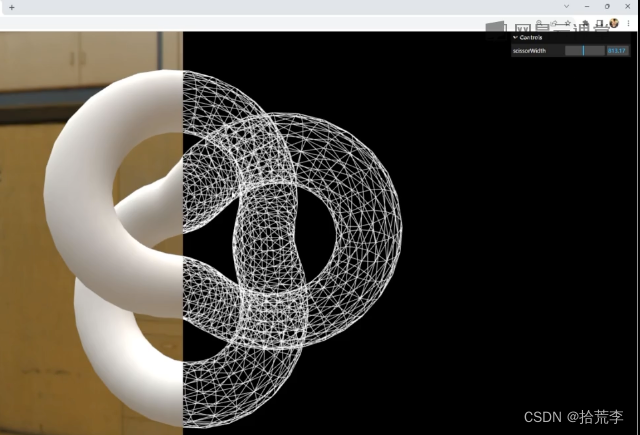
// 导入threejs import * as THREE from "three"; // 导入轨道控制器 import { OrbitControls } from "three/examples/jsm/controls/OrbitControls.js"; // 导入lil.gui import { GUI } from "three/examples/jsm/libs/lil-gui.module.min.js"; // 导入hdr加载器 import { RGBELoader } from "three/examples/jsm/loaders/RGBELoader.js"; // 导入顶点法向量辅助器 import { VertexNormalsHelper } from "three/examples/jsm/helpers/VertexNormalsHelper.js"; // 导入gltf加载器 import { GLTFLoader } from "three/examples/jsm/loaders/GLTFLoader.js"; // 导入draco解码器 import { DRACOLoader } from "three/examples/jsm/loaders/DRACOLoader.js"; // 创建场景 const scene = new THREE.Scene(); // 创建相机 const camera = new THREE.PerspectiveCamera( 45, // 视角 window.innerWidth / window.innerHeight, // 宽高比 0.1, // 近平面 1000 // 远平面 ); // 创建渲染器 const renderer = new THREE.WebGLRenderer({ antialias: true, // 开启抗锯齿 }); renderer.shadowMap.enabled = true; renderer.setSize(window.innerWidth, window.innerHeight); document.body.appendChild(renderer.domElement); // 设置相机位置 camera.position.z = 50; camera.position.y = 4; camera.position.x = 2; camera.lookAt(0, 0, 0); // 添加世界坐标辅助器 const axesHelper = new THREE.AxesHelper(5); scene.add(axesHelper); // 添加轨道控制器 const controls = new OrbitControls(camera, renderer.domElement); // 设置带阻尼的惯性 controls.enableDamping = true; // 设置阻尼系数 controls.dampingFactor = 0.05; // 设置旋转速度 // controls.autoRotate = true; // 创建新场景 const newScene = new THREE.Scene(); const geometry1 = new THREE.TorusKnotGeometry(10, 3, 100, 16); const material1 = new THREE.MeshBasicMaterial({ wireframe: true, }); const torusKnot1 = new THREE.Mesh(geometry1, material1); newScene.add(torusKnot1); // scissorWidth let params = { scissorWidth: window.innerWidth / 2, }; // 渲染函数 function animate() { controls.update(); requestAnimationFrame(animate); // 渲染 renderer.setScissorTest(true); renderer.setScissor(0, 0, params.scissorWidth, window.innerHeight); renderer.render(scene, camera); renderer.setScissor( params.scissorWidth, 0, window.innerWidth - params.scissorWidth, window.innerHeight ); renderer.render(newScene, camera); renderer.setScissorTest(false); } animate(); // 监听窗口变化 window.addEventListener("resize", () => { // 重置渲染器宽高比 renderer.setSize(window.innerWidth, window.innerHeight); // 重置相机宽高比 camera.aspect = window.innerWidth / window.innerHeight; // 更新相机投影矩阵 camera.updateProjectionMatrix(); }); // 创建GUI const gui = new GUI(); gui.add(params, "scissorWidth", 0, window.innerWidth); // rgbeLoader 加载hdr贴图 let rgbeLoader = new RGBELoader(); rgbeLoader.load("./texture/Alex_Hart-Nature_Lab_Bones_2k.hdr", (envMap) => { // 设置球形贴图 // envMap.mapping = THREE.EquirectangularReflectionMapping; envMap.mapping = THREE.EquirectangularRefractionMapping; // 设置环境贴图 scene.background = envMap; // 设置环境贴图 scene.environment = envMap; newScene.background = envMap; newScene.environment = envMap; }); const geometry = new THREE.TorusKnotGeometry(10, 3, 100, 16); const material = new THREE.MeshPhysicalMaterial({ side: THREE.DoubleSide, }); const torusKnot = new THREE.Mesh(geometry, material); scene.add(torusKnot);- 1
- 2
- 3
- 4
- 5
- 6
- 7
- 8
- 9
- 10
- 11
- 12
- 13
- 14
- 15
- 16
- 17
- 18
- 19
- 20
- 21
- 22
- 23
- 24
- 25
- 26
- 27
- 28
- 29
- 30
- 31
- 32
- 33
- 34
- 35
- 36
- 37
- 38
- 39
- 40
- 41
- 42
- 43
- 44
- 45
- 46
- 47
- 48
- 49
- 50
- 51
- 52
- 53
- 54
- 55
- 56
- 57
- 58
- 59
- 60
- 61
- 62
- 63
- 64
- 65
- 66
- 67
- 68
- 69
- 70
- 71
- 72
- 73
- 74
- 75
- 76
- 77
- 78
- 79
- 80
- 81
- 82
- 83
- 84
- 85
- 86
- 87
- 88
- 89
- 90
- 91
- 92
- 93
- 94
- 95
- 96
- 97
- 98
- 99
- 100
- 101
- 102
- 103
- 104
- 105
- 106
- 107
- 108
- 109
- 110
- 111
- 112
- 113
- 114
- 115
- 116
- 117
- 118
- 119
- 120
十二、模板渲染
将小球只渲染在某一模版范围内

// 导入threejs import * as THREE from "three"; // 导入轨道控制器 import { OrbitControls } from "three/examples/jsm/controls/OrbitControls.js"; // 导入lil.gui import { GUI } from "three/examples/jsm/libs/lil-gui.module.min.js"; // 导入hdr加载器 import { RGBELoader } from "three/examples/jsm/loaders/RGBELoader.js"; // 导入顶点法向量辅助器 import { VertexNormalsHelper } from "three/examples/jsm/helpers/VertexNormalsHelper.js"; // 导入gltf加载器 import { GLTFLoader } from "three/examples/jsm/loaders/GLTFLoader.js"; // 导入draco解码器 import { DRACOLoader } from "three/examples/jsm/loaders/DRACOLoader.js"; // 创建场景 const scene = new THREE.Scene(); // 创建相机 const camera = new THREE.PerspectiveCamera( 45, // 视角 window.innerWidth / window.innerHeight, // 宽高比 0.1, // 近平面 1000 // 远平面 ); // 创建渲染器 const renderer = new THREE.WebGLRenderer({ antialias: true, // 开启抗锯齿 }); renderer.shadowMap.enabled = true; renderer.setSize(window.innerWidth, window.innerHeight); document.body.appendChild(renderer.domElement); // 设置相机位置 camera.position.z = 40; camera.position.y = 4; camera.position.x = 2; camera.lookAt(0, 0, 0); // 添加世界坐标辅助器 const axesHelper = new THREE.AxesHelper(5); scene.add(axesHelper); // 添加轨道控制器 const controls = new OrbitControls(camera, renderer.domElement); // 设置带阻尼的惯性 controls.enableDamping = true; // 设置阻尼系数 controls.dampingFactor = 0.05; // 设置旋转速度 // controls.autoRotate = true; // 渲染函数 function animate() { controls.update(); requestAnimationFrame(animate); // 渲染 renderer.render(scene, camera); } animate(); // 监听窗口变化 window.addEventListener("resize", () => { // 重置渲染器宽高比 renderer.setSize(window.innerWidth, window.innerHeight); // 重置相机宽高比 camera.aspect = window.innerWidth / window.innerHeight; // 更新相机投影矩阵 camera.updateProjectionMatrix(); }); // 创建GUI const gui = new GUI(); // rgbeLoader 加载hdr贴图 let rgbeLoader = new RGBELoader(); rgbeLoader.load("./texture/Alex_Hart-Nature_Lab_Bones_2k.hdr", (envMap) => { // 设置球形贴图 // envMap.mapping = THREE.EquirectangularReflectionMapping; envMap.mapping = THREE.EquirectangularRefractionMapping; // 设置环境贴图 scene.background = envMap; // 设置环境贴图 scene.environment = envMap; }); // 创建1个平面 // 1、2个物体都设置模板缓冲区的写入和测试 // 2、设置模板缓冲的基准值 // 3、设置允许写入的掩码0xff // 4、在小球上设置模板比较函数THREE.EqualStencilFunc // 5、设置当函数比较通过时候,设置为replace替换 const plane = new THREE.PlaneGeometry(8, 8); const planeMaterial = new THREE.MeshPhysicalMaterial({ stencilWrite: true, // stencilWriteMask: 0xff, //0-255 stencilRef: 2, stencilZPass: THREE.ReplaceStencilOp, }); const planeMesh = new THREE.Mesh(plane, planeMaterial); scene.add(planeMesh); // 创建1个球 const sphere = new THREE.SphereGeometry(1, 20, 20); const sphereMaterial = new THREE.MeshPhysicalMaterial({ color: 0xffcccc, stencilWrite: true, stencilRef: 2, stencilFunc: THREE.EqualStencilFunc, depthTest: false, }); const sphereMesh = new THREE.Mesh(sphere, sphereMaterial); sphereMesh.position.z = -10; scene.add(sphereMesh);- 1
- 2
- 3
- 4
- 5
- 6
- 7
- 8
- 9
- 10
- 11
- 12
- 13
- 14
- 15
- 16
- 17
- 18
- 19
- 20
- 21
- 22
- 23
- 24
- 25
- 26
- 27
- 28
- 29
- 30
- 31
- 32
- 33
- 34
- 35
- 36
- 37
- 38
- 39
- 40
- 41
- 42
- 43
- 44
- 45
- 46
- 47
- 48
- 49
- 50
- 51
- 52
- 53
- 54
- 55
- 56
- 57
- 58
- 59
- 60
- 61
- 62
- 63
- 64
- 65
- 66
- 67
- 68
- 69
- 70
- 71
- 72
- 73
- 74
- 75
- 76
- 77
- 78
- 79
- 80
- 81
- 82
- 83
- 84
- 85
- 86
- 87
- 88
- 89
- 90
- 91
- 92
- 93
- 94
- 95
- 96
- 97
- 98
- 99
- 100
- 101
- 102
- 103
- 104
- 105
- 106
- 107
- 108
- 109
- 110
- 111
- 112
- 113
- 114
- 115
- 116
十三、模板渲染实现金属剖切面


// 导入threejs import * as THREE from "three"; // 导入轨道控制器 import { OrbitControls } from "three/examples/jsm/controls/OrbitControls.js"; // 导入lil.gui import { GUI } from "three/examples/jsm/libs/lil-gui.module.min.js"; // 导入hdr加载器 import { RGBELoader } from "three/examples/jsm/loaders/RGBELoader.js"; // 导入顶点法向量辅助器 import { VertexNormalsHelper } from "three/examples/jsm/helpers/VertexNormalsHelper.js"; // 导入gltf加载器 import { GLTFLoader } from "three/examples/jsm/loaders/GLTFLoader.js"; // 导入draco解码器 import { DRACOLoader } from "three/examples/jsm/loaders/DRACOLoader.js"; // 创建场景 const scene = new THREE.Scene(); // 创建相机 const camera = new THREE.PerspectiveCamera( 45, // 视角 window.innerWidth / window.innerHeight, // 宽高比 0.1, // 近平面 1000 // 远平面 ); // 创建渲染器 const renderer = new THREE.WebGLRenderer({ antialias: true, // 开启抗锯齿 }); renderer.shadowMap.enabled = true; renderer.setSize(window.innerWidth, window.innerHeight); document.body.appendChild(renderer.domElement); // 设置相机位置 camera.position.z = 50; camera.position.y = 24; camera.position.x = 2; camera.lookAt(0, 0, 0); // 添加世界坐标辅助器 const axesHelper = new THREE.AxesHelper(5); scene.add(axesHelper); // 添加轨道控制器 const controls = new OrbitControls(camera, renderer.domElement); // 设置带阻尼的惯性 controls.enableDamping = true; // 设置阻尼系数 controls.dampingFactor = 0.05; // 设置旋转速度 // controls.autoRotate = true; // 渲染函数 function animate() { controls.update(); requestAnimationFrame(animate); // 渲染 renderer.render(scene, camera); } animate(); // 监听窗口变化 window.addEventListener("resize", () => { // 重置渲染器宽高比 renderer.setSize(window.innerWidth, window.innerHeight); // 重置相机宽高比 camera.aspect = window.innerWidth / window.innerHeight; // 更新相机投影矩阵 camera.updateProjectionMatrix(); }); // 创建GUI const gui = new GUI(); // rgbeLoader 加载hdr贴图 let rgbeLoader = new RGBELoader(); rgbeLoader.load("./texture/Alex_Hart-Nature_Lab_Bones_2k.hdr", (envMap) => { // 设置球形贴图 // envMap.mapping = THREE.EquirectangularReflectionMapping; envMap.mapping = THREE.EquirectangularRefractionMapping; // 设置环境贴图 scene.background = envMap; // 设置环境贴图 scene.environment = envMap; }); const geometry = new THREE.TorusKnotGeometry(10, 3, 100, 16); const material = new THREE.MeshPhysicalMaterial({ // side: THREE.DoubleSide, side: THREE.FrontSide, }); const torusKnot = new THREE.Mesh(geometry, material); scene.add(torusKnot); const material1 = new THREE.MeshBasicMaterial({ side: THREE.BackSide, color: 0xffcccc, stencilWrite: true, stencilRef: 1, stencilWriteMask: 0xff, stencilZPass: THREE.ReplaceStencilOp, }); const torusKnot1 = new THREE.Mesh(geometry, material1); scene.add(torusKnot1); // 创建裁剪平面 const plane = new THREE.Plane(new THREE.Vector3(0, -1, 0), 0); material.clippingPlanes = [plane]; material1.clippingPlanes = [plane]; renderer.localClippingEnabled = true; // // 设置裁剪阴影 // 创建一个gui const folder = gui.addFolder("裁剪平面"); // 添加一个滑块 folder.add(plane, "constant", -10, 10).name("位置"); // // 设置plane的normal属性 folder.add(plane.normal, "x", -1, 1).name("法向量x"); folder.add(plane.normal, "y", -1, 1).name("法向量y"); folder.add(plane.normal, "z", -1, 1).name("法向量z"); // 创建平面 let planeGeometry = new THREE.PlaneGeometry(40, 40, 1, 1); let planeMaterial = new THREE.MeshPhysicalMaterial({ color: 0xccccff, metalness: 0.95, roughness: 0.1, stencilWrite: true, stencilRef: 1, stencilFunc: THREE.EqualStencilFunc, }); let planeMesh = new THREE.Mesh(planeGeometry, planeMaterial); planeMesh.rotation.x = -Math.PI / 2; scene.add(planeMesh);- 1
- 2
- 3
- 4
- 5
- 6
- 7
- 8
- 9
- 10
- 11
- 12
- 13
- 14
- 15
- 16
- 17
- 18
- 19
- 20
- 21
- 22
- 23
- 24
- 25
- 26
- 27
- 28
- 29
- 30
- 31
- 32
- 33
- 34
- 35
- 36
- 37
- 38
- 39
- 40
- 41
- 42
- 43
- 44
- 45
- 46
- 47
- 48
- 49
- 50
- 51
- 52
- 53
- 54
- 55
- 56
- 57
- 58
- 59
- 60
- 61
- 62
- 63
- 64
- 65
- 66
- 67
- 68
- 69
- 70
- 71
- 72
- 73
- 74
- 75
- 76
- 77
- 78
- 79
- 80
- 81
- 82
- 83
- 84
- 85
- 86
- 87
- 88
- 89
- 90
- 91
- 92
- 93
- 94
- 95
- 96
- 97
- 98
- 99
- 100
- 101
- 102
- 103
- 104
- 105
- 106
- 107
- 108
- 109
- 110
- 111
- 112
- 113
- 114
- 115
- 116
- 117
- 118
- 119
- 120
- 121
- 122
- 123
- 124
- 125
- 126
- 127
- 128
- 129
- 130
- 131
- 132
- 133
- 134
-
相关阅读:
Expo项目 通过EAS update发布
addEventListener与useeffect相撞的火花
前端工程师笔试题【校招】
【数据结构初阶】单链表补充内容+又双叒叕刷链表题
IV implied volatility surf
妹子天天要换新头像?没问题,通过爬虫爬取精美头像
【相同数字的积木游戏1】python实现-附ChatGPT解析
C#:枚举是命名的整形常量的集合
mybatis分页插件PageHelper导致自定义拦截器失效
JVM crashes with error=‘Cannot allocate memory‘ (errno=12)
- 原文地址:https://blog.csdn.net/woyebuzhidao321/article/details/133978971