-
Android Handler/Looper视角看UI线程的原理
概述
Handler/Looper机制是android系统非重要且基础的机制,即使在rtos或者linux操作系统上开发应用框架时,也经常借鉴这个机制。通过该机制机制可以让一个线程循环处理事件,事件处理逻辑即在Handler的handleMessge种。本文建议android8.1源码分析这套机制的实现原理。
Handler/Looper

Handler:顾名思义,处理消息message的类,Handler也可以发送消息。
Looper:顾名思义,一个循环体,这个循环体本质上就是不断取出Queue种的Message,分发给特定的目标,具体分发给哪个目标要具体情况具体分析。并且Looper内部含有一个Thread对象,很好理解,就是Looper这个循环体是在该线程中执行的。
MessageQueue:消息队列,通过Handler发送的Message加入到该队列中,并且被Looper运行在Thread线程中不断取出,又被Handler执行。
执行流程图:
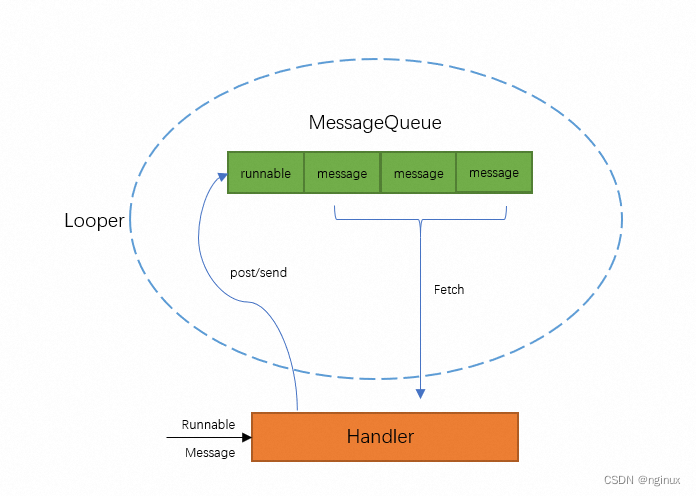
应用程序使用Looper
应用程序使用Looper分为两种情况,主线程和普通线程:
普通线程
- *
This is a typical example of the implementation of a Looper thread,
- * using the separation of {@link #prepare} and {@link #loop} to create an
- * initial Handler to communicate with the Looper.
- *
- * class LooperThread extends Thread {
- * public Handler mHandler;
- *
- * public void run() {
- * Looper.prepare();
- *
- * mHandler = new Handler() {
- * public void handleMessage(Message msg) {
- * // process incoming messages here
- * }
- * };
- *
- * Looper.loop();
- * }
- * }
这段代码在Android源码中非常典型,使用步骤有三:
- Looper.prepare创建线程私有的Looper对象。
- 创建处理消息的Handler。
- Looper.loop开始运作:线程一直循环取消息,处理消息,如果没有消息处理将休眠。
上面代码看似简单,越是简单的代码有时候越是难以理解,我们要理解上面三个步骤是怎么把Thread,MessageQueue,Handler和Looper联系起来的。
Looper.prepare源码
- private static void prepare(boolean quitAllowed) {
- if (sThreadLocal.get() != null) {
- throw new RuntimeException("Only one Looper may be created per thread");
- }
- sThreadLocal.set(new Looper(quitAllowed));
- }
- private Looper(boolean quitAllowed) {
- mQueue = new MessageQueue(quitAllowed);
- mThread = Thread.currentThread();
- }
可以看到prepare就给调用prepare的当前线程创建一个Looper对象,Looper对象创建的时候,内部新建了MessageQueue和Thread对象,特别注意,mThread是调用prepare的线程。
Handler对象创建
- *
- * mHandler = new Handler() {
- * public void handleMessage(Message msg) {
- * // process incoming messages here
- * }
- * };
可以想象,这里Handler必须要跟前面prepare创建的Looper产生联系才对,这个就要看Handler的构造函数:
- public Handler();
- public Handler(Callback callback);
- public Handler(Looper looper);
- public Handler(Looper looper, Callback callback);
我们要看下上面Handler()构造函数:
- public Handler() {
- this(null, false);
- }
- public Handler(Callback callback, boolean async) {
- mLooper = Looper.myLooper();
- if (mLooper == null) {
- throw new RuntimeException(
- "Can't create handler inside thread that has not called Looper.prepare()");
- }
- mQueue = mLooper.mQueue;
- mCallback = callback;
- mAsynchronous = async;
- }
可以看到默认构造函数中非常重要的一句,Looper.myLooper,会取得当前线程的Looper对象,也就是Looper.prepare创建的线程私有的对象,同时Handler's MessageQueue来自瑜当前线程Looper's MessageQueue。
注意:Thread和Handler是1:N关系。比如UI线程就可以有多个Handler对象。
Handler发送和处理消息
按照上面分析,调用mHandler可以发送消息,然后处理消息在该Handler的handleMessage函数,我们看看上述流程是如何实现的。
Looper从MessageQueue中取得一个Message后,首先会调用Handler.dispatchMessage进行消息分发,后者再根据具体的策略将Message分发给相应的责任人源码如下:
Handler.java:
- /**
- * Subclasses must implement this to receive messages.
- */
- public void handleMessage(Message msg) {
- }
- /**
- * Handle system messages here.
- */
- public void dispatchMessage(Message msg) {
- if (msg.callback != null) {
- handleCallback(msg);
- } else {
- if (mCallback != null) {
- if (mCallback.handleMessage(msg)) {
- return;
- }
- }
- handleMessage(msg);
- }
- }
- private static void handleCallback(Message message) {
- message.callback.run();
- }
分发策略:
1. Meesage.callback对象不为空优先分发给message.callback。这种情况对应mHandler.post接口发送的runable对象:这种情况下Message.callback就是post的runnable对象
- public final boolean post(Runnable r);
- public final boolean postAtTime(Runnable r, long uptimeMillis);
- public final boolean post(Runnable r)
- {
- return sendMessageDelayed(getPostMessage(r), 0);
- }
- private static Message getPostMessage(Runnable r) {
- Message m = Message.obtain();
- m.callback = r;
- return m;
- }
2. Handler.mCallback不为空,分发给mCallback.handleMessage
3. 前两个都不存在,则调用handleMessage,比如我们当前普通线程场景,override了这个方法,就会调用我们自己Handler.handleMessage。这种情况主要对应是Handler send系列接口使用:
- public boolean sendMessageAtTime(Message msg, long uptimeMillis);
- public final boolean sendMessageDelayed(Message msg, long delayMillis);
- 比如如下使用:
- Message msg = mHandler.obtainMessage();
- mHandler.sendMessageAtTime(msg,xxxx);
- public final Message obtainMessage()
- {
- return Message.obtain(this);
- }
- public static Message obtain(Handler h) {
- Message m = obtain();
- m.target = h;
- return m;
- }
可以看到这种情况下Message.target = mHandler,而Looper在loop中分发代码:
- */
- public static void loop() {
- final Looper me = myLooper();
- if (me == null) {
- throw new RuntimeException("No Looper; Looper.prepare() wasn't called on this thread.");
- }
- final MessageQueue queue = me.mQueue;
- // Make sure the identity of this thread is that of the local process,
- // and keep track of what that identity token actually is.
- Binder.clearCallingIdentity();
- final long ident = Binder.clearCallingIdentity();
- for (;;) {
- Message msg = queue.next(); // might block
- ...
- final long start = (slowDispatchThresholdMs == 0) ? 0 : SystemClock.uptimeMillis();
- final long end;
- try {
- msg.target.dispatchMessage(msg);
- end = (slowDispatchThresholdMs == 0) ? 0 : SystemClock.uptimeMillis();
- } finally {
- if (traceTag != 0) {
- Trace.traceEnd(traceTag);
- }
- }
- ...
- msg.recycleUnchecked();
- }
- }
loop循环从Looper's MessageQueue取得消息,然后调用Message.target.dispatchMessage,正如上面的分析Message.target = mHandler,所以调用到了Handler.dispatchMessage方法。
总结:
1. Handler.post(runnable),在Handler.dispatchMessage方法由于优先分发给runnable对象,所以这个runnable对象被执行,而不是Handler.handleMessage。
2. 如果使用sendMessage接口,那么Handler.dispatchMessage分发给Handler override的handleMessage接口,也就是普通线程使用代码中Handler's handleMessage函数。
UI线程
我们知道ActivityThread是主线程的入口点,我们看看android UI线程中Looper的使用源码:
- public static void main(String[] args) {
- Looper.prepareMainLooper();
- ActivityThread thread = new ActivityThread();
- thread.attach(false);
- if (sMainThreadHandler == null) {
- sMainThreadHandler = thread.getHandler();
- }
- Looper.loop();
- throw new RuntimeException("Main thread loop unexpectedly exited");
- }
与普通线程使用Looper类似,也分3个步骤:
1.准备Looper: Looper.prepareMainLooper
2.创建主线程私有的Handler:sMainThreadHandler = thread.getHandler
3.开始工作:Looper.loop
与普通线程的不同点:
1. 普通线程使用Looper.prepare,而主线程需要使用Looper.prepareMainLooper
2.Handler不同:普通线程生成一个与Looper绑定的Handler即可,而主线程是从当前线程总获取
我们分别分析下上面两个不同点
prepareMainLooper
- public static void prepareMainLooper() {
- prepare(false);
- synchronized (Looper.class) {
- sMainLooper = myLooper();
- }
- }
- private static void prepare(boolean quitAllowed) {
- if (sThreadLocal.get() != null) {
- throw new RuntimeException("Only one Looper may be created per thread");
- }
- sThreadLocal.set(new Looper(quitAllowed));
- }
可以看到,prepareMainLooper也使用了prepare,不过参数false代表ui线程不能退出,并且创建的Looper要赋值给sMainLooper,这样其他线程可以通过调用getMainLooper获取该对象。
MainThreadHandler
ActivityThread对象创建时候,会在内部同时生成一个Handler对象:
final H mH = new H();
thread.getHandler获取的就是该mH,也就是说ActivityThread中主线程处理消息的Handler之一就是该Handler mH。
loop
分析loop函数之前,我们提一下一个图形窗口典型的main函数如下:
- main() {
- initialize()//初始化
- CreateWindow();//创建窗口
- ShowWindow();
- while(GetMessage()) {
- //不断分发处理
- DispatchMessage();
- }
- }
那么根据前面loop函数的分析,其实UI线程的loop函数也是在循环中不断取消息,处理消息,符合上述模型。
ViewRootImpl
我们知道ViewRootImpl也属于UI线程的范围,因为ViewRootImpl创建就是在UI线程中创建,那么根据Handler创建的默认构造函数我们知道,这个Handler()这个默认的构造函数,适合当前线程的Looper绑定的,那么ViewRootImpl中Handler()形式构建的Handler也是处理UI线程的相关消息。
- final ViewRootHandler mHandler = new ViewRootHandler();
- final class ViewRootHandler extends Handler {
- public void handleMessage(Message msg) {
- switch (msg.what) {
- case MSG_INVALIDATE:
- ((View) msg.obj).invalidate();
- break;
- case MSG_INVALIDATE_RECT:
- final View.AttachInfo.InvalidateInfo info = (View.AttachInfo.InvalidateInfo) msg.obj;
- info.target.invalidate(info.left, info.top, info.right, info.bottom);
- info.recycle();
- break;
- case MSG_PROCESS_INPUT_EVENTS:
- mProcessInputEventsScheduled = false;
- doProcessInputEvents();
- break;
- case MSG_DISPATCH_APP_VISIBILITY:
- handleAppVisibility(msg.arg1 != 0);
- break;
- case MSG_DISPATCH_GET_NEW_SURFACE:
- handleGetNewSurface();
- break;
- ....
Choreographer
Choreographer也是工作在UI主线程的一个重要的类,跟Vsync有关,我们通过源码看看这个类为什么工作在UI主线程。
看是否是主线程,我们要看下Choreographer中的Handler/Looper是基于哪个Thread来创建,看下Choreographer的构造函数如下:
- private Choreographer(Looper looper, int vsyncSource) {
- mLooper = looper;
- mHandler = new FrameHandler(looper);
- mDisplayEventReceiver = USE_VSYNC
- ? new FrameDisplayEventReceiver(looper, vsyncSource)
- : null;
- mLastFrameTimeNanos = Long.MIN_VALUE;
- mFrameIntervalNanos = (long)(1000000000 / getRefreshRate());
- mCallbackQueues = new CallbackQueue[CALLBACK_LAST + 1];
- for (int i = 0; i <= CALLBACK_LAST; i++) {
- mCallbackQueues[i] = new CallbackQueue();
- }
- }
所以重点就是构建函数中Looper是哪里构建的,Choreographer是个单例类,所以看下其初始化的代码:
- // Thread local storage for the choreographer.
- private static final ThreadLocal
sThreadInstance = - new ThreadLocal
() { - @Override
- protected Choreographer initialValue() {
- Looper looper = Looper.myLooper();
- if (looper == null) {
- throw new IllegalStateException("The current thread must have a looper!");
- }
- return new Choreographer(looper, VSYNC_SOURCE_APP);
- }
- };
也就是说最终Looper.myLooper获取的是当前线程私有的Looper对象,而Choreographer的getInstance是在public ViewRootImpl(Context context, Display display) 构造函数中调用的,根据ViewRootImpl小节我们知道,ViewRootImpl在主线程构建,所以Choreographer是主线程的

Vsync信号处理
我们都知道vsync信号处理的实际逻辑是在ui主线程当中,我们看下具体实现,首先要看下vsync信号接受和处理的地方,这个在Choreographer当中:
- private final class FrameDisplayEventReceiver extends DisplayEventReceiver
- implements Runnable {
- private boolean mHavePendingVsync;
- private long mTimestampNanos;
- private int mFrame;
- public FrameDisplayEventReceiver(Looper looper, int vsyncSource) {
- super(looper, vsyncSource);
- }
- @Override
- public void onVsync(long timestampNanos, int builtInDisplayId, int frame) {
- ...
- mTimestampNanos = timestampNanos;
- mFrame = frame;
- Message msg = Message.obtain(mHandler, this);
- msg.setAsynchronous(true);
- mHandler.sendMessageAtTime(msg, timestampNanos / TimeUtils.NANOS_PER_MS);
- }
- @Override
- public void run() {
- mHavePendingVsync = false;
- doFrame(mTimestampNanos, mFrame);
- }
可以看到接收到vsync信号之后,使用mHandler向该Handler所在的线程发送消息,根据Choreographer小节我们知道,这里mHandler和其Looper是UI线程的,所以上面代码中发送的消息在主线程中处理,而FrameDisplayEventReceiver是个runnable对象,所以最终主线程收到这消息的处理函数是:doFrame函数:
- Trace.traceBegin(Trace.TRACE_TAG_VIEW, "Choreographer#doFrame");
- AnimationUtils.lockAnimationClock(frameTimeNanos / TimeUtils.NANOS_PER_MS);
- mFrameInfo.markInputHandlingStart();
- doCallbacks(Choreographer.CALLBACK_INPUT, frameTimeNanos);
- mFrameInfo.markAnimationsStart();
- doCallbacks(Choreographer.CALLBACK_ANIMATION, frameTimeNanos);
- mFrameInfo.markPerformTraversalsStart();
- doCallbacks(Choreographer.CALLBACK_TRAVERSAL, frameTimeNanos);
- doCallbacks(Choreographer.CALLBACK_COMMIT, frameTimeNanos);
vsync信号过来在主线程处理, 最终处理函数是doFrame->doCallbacks,而doCallbacks就是要处理应用已经请求,且记录到queue里面的各种事件,比如应用请求渲染的时候调用invalidate调用栈:
- invalidate() : ViewRootImpl.java
- --->scheduleTraversals() : ViewRootImpl.java
- --->mChoreographer.postCallback(Choreographer.CALLBACK_TRAVERSAL, mTraversalRunnable, null);
最终postCallback的实现:
- private void postCallbackDelayedInternal(int callbackType,
- Object action, Object token, long delayMillis) {
- synchronized (mLock) {
- final long now = SystemClock.uptimeMillis();
- final long dueTime = now + delayMillis;
- //将要执行的回调封装成CallbackRecord对象,保存到mCallbackQueues数组中
- mCallbackQueues[callbackType].addCallbackLocked(dueTime, action, token);
- //函数执行时间到
- if (dueTime <= now) {
- scheduleFrameLocked(now);
- } else {//通过异步消息方式实现函数延时执行
- Message msg = mHandler.obtainMessage(MSG_DO_SCHEDULE_CALLBACK, action);
- msg.arg1 = callbackType;
- msg.setAsynchronous(true);
- mHandler.sendMessageAtTime(msg, dueTime);
- }
- }
1.将请求的事件保存在mCallbackQueue,等到vsync信号来到,doFrame中取出执行。
2. 发送MSG_DO_SCHEDULE_CALLBACK消息,最终调用native层的mDisplayEventReceiver.scheduleVsync();请求接收下一次vsync信号
-
相关阅读:
杀毒软件如何识别病毒43.240.74.X
Java 主要三大程序流程控制
基于Apache部署虚拟主机网站
基于STM32和ESP8266的WIFI信号检测仪
JZ4 二维数组中的查找
会议OA项目之我的审批
Java的IO流-转换流
ChatGPT 入门指南:与 AI 进行愉快互动的秘诀大揭秘!
opencv c++ 图像梯度、边缘、锐化
备战蓝桥杯Day22 - 计数排序
- 原文地址:https://blog.csdn.net/GetNextWindow/article/details/133819195