-
[Rust GUI]eframe(egui框架)代码示例
-2、eframe代替品
你可以使用egui的其他绑定,例如:egui-miniquad,bevy_egui,egui_sdl2_gl 等。
-1、注意
egui库相当于核心库,需要借助eframe框架写界面。
eframe使用egui_glow渲染,而egui_glow需要opengl2.0+。0、准备
1、安装Visual Studio C++ Build tools
1、访问微软官网下载生成工具
2、勾选这个

3、对比勾选细节

4、点击安装
5、安装完成

6、关闭Visual Studio Installer
7、重启电脑2、安装Rust
访问Rust官网下载
RUSTUP-INIT.EXE(64位)
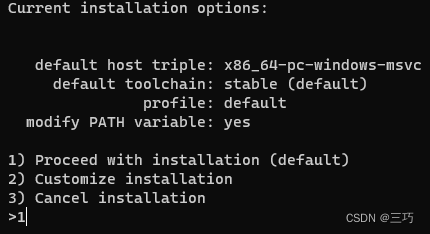
在 PowerShell 中运行$ENV:RUSTUP_DIST_SERVER='https://mirrors.ustc.edu.cn/rust-static';$ENV:RUSTUP_UPDATE_ROOT='https://mirrors.ustc.edu.cn/rust-static/rustup';.\rustup-init.exe,输入1并回车
3、设置cargo镜像
运行
powershell -command ii (where.exe cargo).substring(0,(where.exe cargo).Length-'\bin\cargo.exe'.Length)
在.cargo目录下新建文件,名为config,无后缀名,保存为以下内容[source.crates-io] registry = "https://github.com/rust-lang/crates.io-index" replace-with = 'ustc' [source.ustc] registry = "git://mirrors.ustc.edu.cn/crates.io-index"- 1
- 2
- 3
- 4
- 5
4、安装VSCode
访问这个👉链接:如何下载安装VSCode
安装插件:简体中文、rust-analyzer(中英双语版)5、下载字体文件
访问kose-font仓库下载小赖字体,使用其中的
XiaolaiMonoSC-Regular.ttf文件,提取出来备用0、编程
1、使用cargo创建项目
运行
cargo new eframe-hello;cd eframe-hello2、添加板条箱eframe
运行
cargo add eframe(此时版本为v0.22.0)3、使用VSCode打开项目
运行
code .
选中.\eframe-hello\src\main.rs文件,将激活插件,等待插件加载完毕。4、运行
运行
cargo run,等待编译完成,正常输出Hello, world!

5、添加字体文件
打开
.\eframe-hello\src路径
将XiaolaiMonoSC-Regular.ttf放入该路径6、编辑
.\eframe-hello\src\main.rs6.1 添加属性指令
// 在Windows平台运行时不会弹出控制台框 #![windows_subsystem = "windows"]- 1
- 2
6.2 导入
use eframe::egui; use eframe::epaint::Color32; use egui::FontFamily::Proportional; use egui::FontId; use egui::TextStyle::*;- 1
- 2
- 3
- 4
- 5
6.3 加载字体
// 参考:https://github.com/xuxiaowei-com-cn/cargo_egui/blob/main/src/main.rs fn load_fonts(ctx: &egui::Context) { // 参考(废弃):https://github.com/emilk/egui/blob/0.17.0/eframe/examples/custom_font.rs // 参考(推荐):https://github.com/emilk/egui/blob/0.18.1/examples/custom_font/src/main.rs // 从默认字体开始(我们将添加而不是替换它们)。 let mut fonts = egui::FontDefinitions::default(); // 安装我自己的字体(也许支持非拉丁字符)。 // 支持 .ttf 和 .otf 文件。 // XiaolaiMonoSC-Regular.ttf 来自 https://gitee.com/lxgw2020/kose-font fonts.font_data.insert( "my_font".to_owned(), egui::FontData::from_static(include_bytes!("XiaolaiMonoSC-Regular.ttf")), ); // 将我的字体放在首位(最高优先级)用于比例文本: fonts .families .entry(egui::FontFamily::Proportional) .or_default() .insert(0, "my_font".to_owned()); // 将我的字体作为等宽字体的最后后备: fonts .families .entry(egui::FontFamily::Monospace) .or_default() .push("my_font".to_owned()); // 告诉 egui 使用这些字体 // 新字体将在下一帧开始时激活。 // https://docs.rs/egui/latest/egui/struct.Context.html#method.set_fonts ctx.set_fonts(fonts); }- 1
- 2
- 3
- 4
- 5
- 6
- 7
- 8
- 9
- 10
- 11
- 12
- 13
- 14
- 15
- 16
- 17
- 18
- 19
- 20
- 21
- 22
- 23
- 24
- 25
- 26
- 27
- 28
- 29
- 30
- 31
- 32
- 33
- 34
- 35
- 36
6.4 实例
// 人 struct People { name: String, age: u32, }- 1
- 2
- 3
- 4
- 5
6.5 默认值
// 默认值 impl Default for People { fn default() -> Self { // 创建一个 People 结构体的默认实例 Self { name: "刘北辰".to_owned(), age: 20, } } }- 1
- 2
- 3
- 4
- 5
- 6
- 7
- 8
- 9
- 10
6.6 实现
impl People { // 创建一个新的 People 实例 fn new(cc: &eframe::CreationContext<'_>) -> Self { load_fonts(&cc.egui_ctx); // 加载字体 Self::default() // 使用默认值创建 People 实例 } }- 1
- 2
- 3
- 4
- 5
- 6
- 7
6.7 Trait
impl eframe::App for People { fn update(&mut self, ctx: &egui::Context, _frame: &mut eframe::Frame) { let mut style = (*ctx.style()).clone(); // 重新定义文本样式 style.text_styles = [ (Heading, FontId::new(60.0, Proportional)), // 标题字体 (Name("Heading2".into()), FontId::new(50.0, Proportional)), // 标题2字体 (Name("Context".into()), FontId::new(50.0, Proportional)), // 上下文字体 (Body, FontId::new(36.0, Proportional)), // 正文字体 (Monospace, FontId::new(28.0, Proportional)), // 等宽字体 (Button, FontId::new(28.0, Proportional)), // 按钮字体 (Small, FontId::new(20.0, Proportional)), // 小号字体 ] .into(); // 使用上述更改,修改全局样式 ctx.set_style(style); let frame = egui::containers::Frame { // 外边距 outer_margin: egui::vec2(5.0, 5.0).into(), // 圆角 rounding: egui::Rounding::same(4.0), // 填充颜色 fill: Color32::DARK_GRAY, ..Default::default() }; egui::CentralPanel::default().frame(frame).show(ctx, |ui| { // 默认文字颜色 ui.visuals_mut().override_text_color = Some(egui::Color32::from_rgb(255, 128, 0)); // 默认滑块宽度 ui.style_mut().spacing.slider_width = 285.0; // 显示大文本 ui.heading("修改年龄"); // 使用水平布局启动 ui ui.horizontal(|ui| { // 显示姓名标签文本 let name_label = ui.label("姓名: "); // 单行文本编辑框,由姓名标签标识 ui.text_edit_singleline(&mut self.name) .labelled_by(name_label.id); }); // 滑块 ui.add(egui::Slider::new(&mut self.age, 20..=79).text("岁")); // 按钮 if ui.button("点击增加年龄").clicked() { if self.age < 79 { self.age += 1; } } // 显示文本 ui.label("修改结果:"); // 显示姓名和年龄 ui.label(format!("姓名:{}, 年龄:{}", self.name, self.age)); // 显示作者信息 https://blog.csdn.net/qq_39124701/article/details/132836150 ui.label("作者: CSDN - 三巧"); }); } }- 1
- 2
- 3
- 4
- 5
- 6
- 7
- 8
- 9
- 10
- 11
- 12
- 13
- 14
- 15
- 16
- 17
- 18
- 19
- 20
- 21
- 22
- 23
- 24
- 25
- 26
- 27
- 28
- 29
- 30
- 31
- 32
- 33
- 34
- 35
- 36
- 37
- 38
- 39
- 40
- 41
- 42
- 43
- 44
- 45
- 46
- 47
- 48
- 49
- 50
- 51
- 52
- 53
- 54
- 55
- 56
- 57
- 58
6.8 main
fn main() { // 设置原生应用程序选项 let options = eframe::NativeOptions { initial_window_size: Some(egui::vec2(414.0, 314.0)), // 设置初始窗口大小 ..Default::default() }; let _ = eframe::run_native( "egui修改年龄 - CSDN三巧", // 设置应用程序窗口标题 options, Box::new(|cc| Box::new(People::new(cc))), // 创建并返回实现 eframe::App 特征的 People 对象 ); }- 1
- 2
- 3
- 4
- 5
- 6
- 7
- 8
- 9
- 10
- 11
- 12
7、运行
运行
cargo run,等待编译完成,显示窗口

输入框输入姓名,姓名同步修改
滑动滑块,年龄变动
点击滑块右侧输入具体数值,年龄同步修改
点击增加年龄按钮,年龄增加1岁,数值最高798、构建
运行命令:
cargo build
生成位置:.\eframe-hello\target\debug\eframe-hello.exe9、其他
egui在Github的仓库
egui-doc-cn
https://docs.rs/eframe/latest/eframe/
https://crates.io/crates/eframe

-
相关阅读:
外卖项目05---套餐管理业务开发
数据挖掘与分析课程笔记(Chapter 15)
【C语言】浮点数在内存中的存储
springboot:整合redis解决缓存击穿,缓存雪崩,缓存穿透
快速安装JDK以及配置环境变量
Zabbix使用手册
js将base64图片处理成背景透明png
技术选型思考:分库分表和分布式DB(TiDB/OceanBase) 的权衡与抉择
动态SQL
手写商用Java虚拟机HotSpot,疯狂磨练技术中
- 原文地址:https://blog.csdn.net/qq_39124701/article/details/132836150
