-
SpringCloud:Nacos注册中心和服务消费方式
目录
③在application.yml中添加nacos服务的地址
一、nacos环境搭建
我们已经可以实现微服务之间的调用。但是我们把服务提供者的网络地址 (ip,端口)等硬编码到了代码中,这种做法存在许多问题:
-
一旦服务提供者地址变化,就需要手工修改代码
-
一旦是多个服务提供者,无法实现负载均衡功能
-
一旦服务变得越来越多,人工维护调用关系困难
那么应该怎么解决呢, 这时候就需要通过注册中心动态的实现服务治理。
什么是服务治理 服务治理是微服务架构中最核心最基本的模块。用于实现各个微服务的 自动化注册
nacos简介
Nacos 致力于帮助您发现、配置和管理微服务。Nacos 提供了一组简单易用的特性集,帮助您快速 实现动态服务发现、服务配置、服务元数据及流量管理。 从上面的介绍就可以看出,nacos的作用就是一个注册中心,用来管理注册上来的各个微服务。
步骤1:安装nacos
下载地址: https://github.com/alibaba/nacos/releases
下载zip格式的安装包,然后进行解压缩操作下载以及解压后
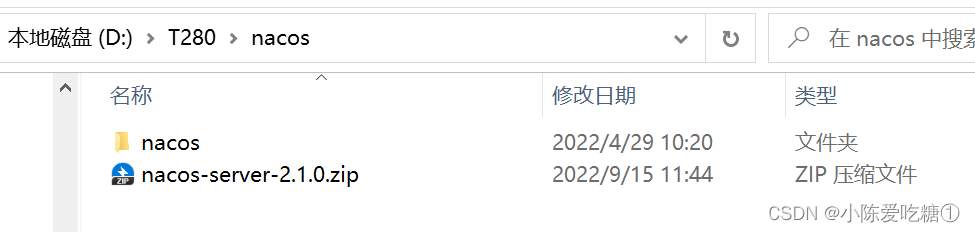
步骤2:启动nacos
#切换目录
cd nacos/bin
#命令启动
startup.cmd -m standalone或者直接修改startup.cmd文件:
set MODE="standalone修改前

修改后

启动


步骤3:访问nacos
打开浏览器输入http://localhost:8848/nacos,即可访问服务, 账户和默认密码是nacos/nacos

二、nacos的微服务注册
将商品微服务注册到nacos
①导入pom依赖
接下来开始修改shop-product 模块的代码, 将其注册到nacos服务上 1 在shop-common模块的pom.xml中添加nacos的依赖
    com.alibaba.cloud
    spring-cloud-starter-alibaba-nacos-discovery
注意在父模块中是否导入了alibaba
- <dependencyManagement>
- <dependencies>
- <dependency>
- <groupId>org.springframework.cloudgroupId>
- <artifactId>spring-cloud-dependenciesartifactId>
- <version>${spring-cloud.version}version>
- <type>pomtype>
- <scope>importscope>
- dependency>
- <dependency>
- <groupId>com.alibaba.cloudgroupId>
- <artifactId>spring-cloud-alibaba-dependenciesartifactId>
- <version>${spring-cloud-alibaba.version}version>
- <type>pomtype>
- <scope>importscope>
- dependency>
- dependencies>
- dependencyManagement>
shop-common的pom.xml
- "1.0" encoding="UTF-8"?>
- <project xmlns="http://maven.apache.org/POM/4.0.0"
- xmlns:xsi="http://www.w3.org/2001/XMLSchema-instance"
- xsi:schemaLocation="http://maven.apache.org/POM/4.0.0 http://maven.apache.org/xsd/maven-4.0.0.xsd">
- <parent>
- <artifactId>spcloud-shopartifactId>
- <groupId>com.cdlgroupId>
- <version>1.0-SNAPSHOTversion>
- parent>
- <modelVersion>4.0.0modelVersion>
- <artifactId>shop-commonartifactId>
- <dependencies>
- <dependency>
- <groupId>org.projectlombokgroupId>
- <artifactId>lombokartifactId>
- dependency>
- <dependency>
- <groupId>com.alibabagroupId>
- <artifactId>fastjsonartifactId>
- <version>1.2.56version>
- dependency>
- <dependency>
- <groupId>mysqlgroupId>
- <artifactId>mysql-connector-javaartifactId>
- <version>5.1.44version>
- dependency>
- <dependency>
- <groupId>com.alibaba.cloudgroupId>
- <artifactId>spring-cloud-starter-alibaba-nacos-discoveryartifactId>
- dependency>
- dependencies>
- project>
父工程的pom
- "1.0" encoding="UTF-8"?>
- <project xmlns="http://maven.apache.org/POM/4.0.0"
- xmlns:xsi="http://www.w3.org/2001/XMLSchema-instance"
- xsi:schemaLocation="http://maven.apache.org/POM/4.0.0 http://maven.apache.org/xsd/maven-4.0.0.xsd">
- <modelVersion>4.0.0modelVersion>
- <groupId>com.cdlgroupId>
- <artifactId>spcloud-shopartifactId>
- <version>1.0-SNAPSHOTversion>
- <modules>
- <module>shop-commonmodule>
- <module>shop-ordermodule>
- <module>shop-productmodule>
- <module>shop-usermodule>
- modules>
- <packaging>pompackaging>
- <properties>
- <java.version>1.8java.version>
- <project.build.sourceEncoding>UTF-8project.build.sourceEncoding>
- <project.reporting.outputEncoding>UTF-8project.reporting.outputEncoding>
- <spring-boot.version>2.3.2.RELEASEspring-boot.version>
- <spring-cloud.version>Hoxton.SR9spring-cloud.version>
- <spring-cloud-alibaba.version>2.2.6.RELEASEspring-cloud-alibaba.version>
- properties>
- <dependencyManagement>
- <dependencies>
- <dependency>
- <groupId>org.springframework.bootgroupId>
- <artifactId>spring-boot-dependenciesartifactId>
- <version>${spring-boot.version}version>
- <type>pomtype>
- <scope>importscope>
- dependency>
- <dependency>
- <groupId>org.springframework.cloudgroupId>
- <artifactId>spring-cloud-dependenciesartifactId>
- <version>${spring-cloud.version}version>
- <type>pomtype>
- <scope>importscope>
- dependency>
- <dependency>
- <groupId>com.alibaba.cloudgroupId>
- <artifactId>spring-cloud-alibaba-dependenciesartifactId>
- <version>${spring-cloud-alibaba.version}version>
- <type>pomtype>
- <scope>importscope>
- dependency>
- dependencies>
- dependencyManagement>
- project>
②加注解
在主类上添加@EnableDiscoveryClient(用于开启远程连接)注解

③在application.yml中添加nacos服务的地址
spring:
cloud:
nacos:
discovery:
server-addr: localhost:8848
④启动服务
观察nacos的控制面板中是否有注册上来的商品微服务
运行订单


再运行一个商品

三、负载均衡实现
第一种:DiscoveryClient
创建集群

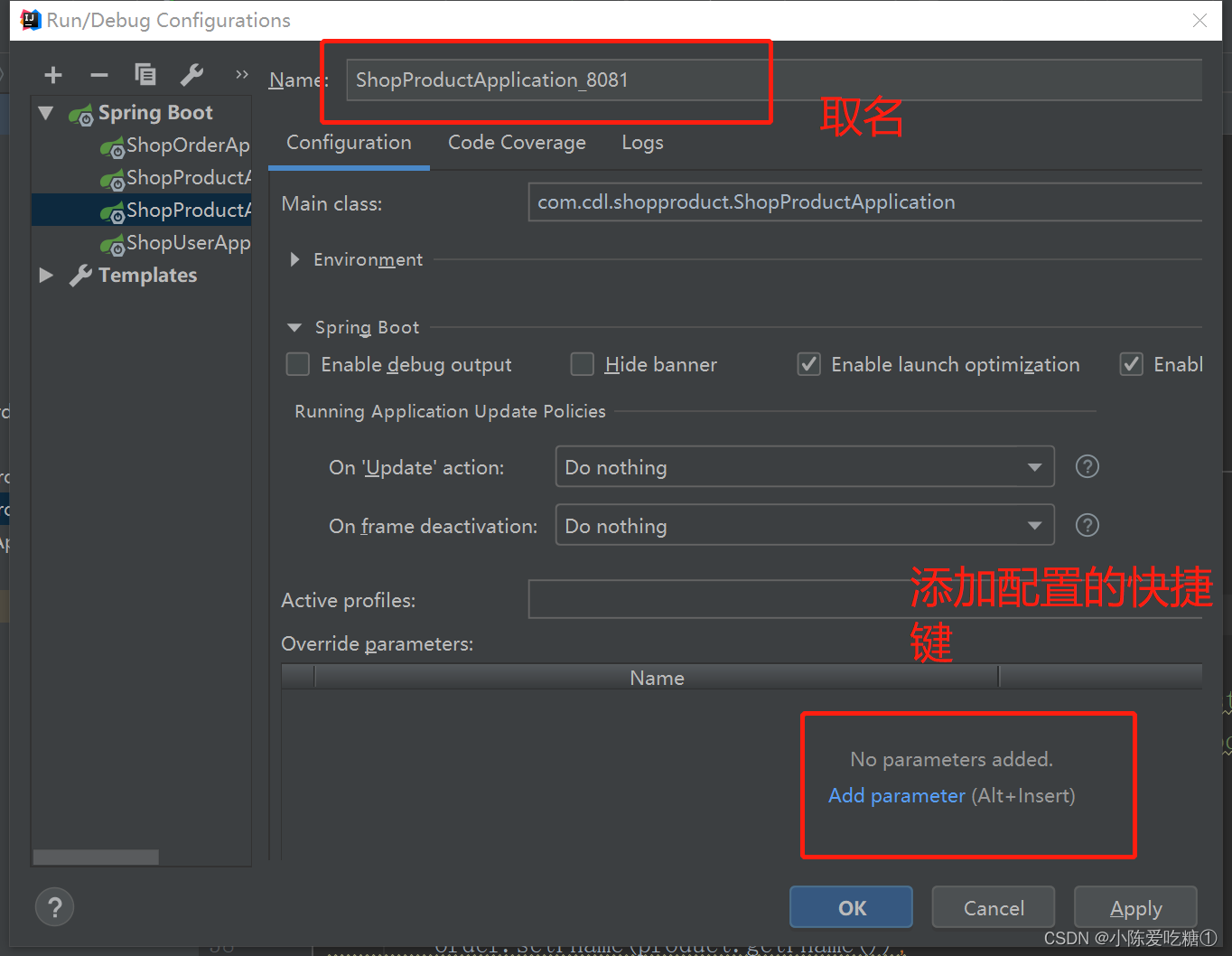

运行8081


将启动类都运行


对应的端口号:

刷新页面
对应的端口号:

OrderCtroller_DiscoveryClient
- package com.cdl.shoporder.Controller;
- import com.cdl.model.Order;
- import com.cdl.model.Product;
- import com.cdl.model.User;
- import org.springframework.beans.factory.annotation.Autowired;
- import org.springframework.cloud.client.ServiceInstance;
- import org.springframework.cloud.client.discovery.DiscoveryClient;
- import org.springframework.http.HttpRequest;
- import org.springframework.web.bind.annotation.PathVariable;
- import org.springframework.web.bind.annotation.RequestMapping;
- import org.springframework.web.bind.annotation.RestController;
- import org.springframework.web.client.RestTemplate;
- import java.util.List;
- import java.util.Random;
- /**
- * @author cdl
- * @site www.cdl.com
- * @create 2022-11-25 15:43
- */
- @RestController
- @RequestMapping("/order")
- public class OrderCtroller_DiscoveryClient {
- @Autowired
- private RestTemplate restTemplate;
- @Autowired
- private DiscoveryClient discoveryClient;
- @RequestMapping("/get/{uid}/{pid}")
- public Order get(@PathVariable("uid") Integer uid,
- @PathVariable("pid") Integer pid
- ){
- //我们可以通过服务名拿到多个节点的信息
- List
instances = discoveryClient.getInstances("shop-product"); - // 随机产生0或者1的整数
- int index = new Random().nextInt(instances.size());
- ServiceInstance serviceInstance = instances.get(index);
- String url = serviceInstance.getHost() + ":" +
- serviceInstance.getPort();
- //通过restTemplate调用商品微服务
- User user = restTemplate.getForObject("http://localhost:8070/user/get/" + uid, User.class);
- Product product = restTemplate.getForObject("http://" + url +
- "/product/get/" + pid, Product.class);
- Order order = new Order();
- order.setUsername(user.getUsername());
- order.setUid(user.getUid());
- order.setPprice(product.getPprice());
- order.setPname(product.getPname());
- order.setPid(product.getPid());
- order.setOid(System.currentTimeMillis());
- order.setNumber(product.getStock());
- return order;
- }
- }
第二种:Ribbon
Ribbon是Spring Cloud的一个组件, 它可以让我们使用一个注解就能轻松的搞定负载均衡
在RestTemplate 的生成方法上添加@LoadBalanced注解
ShopOrderApplication
- package com.cdl.shoporder;
- import org.springframework.boot.SpringApplication;
- import org.springframework.boot.autoconfigure.SpringBootApplication;
- import org.springframework.cloud.client.discovery.EnableDiscoveryClient;
- import org.springframework.cloud.client.loadbalancer.LoadBalanced;
- import org.springframework.context.annotation.Bean;
- import org.springframework.web.client.RestTemplate;
- @EnableDiscoveryClient
- @SpringBootApplication
- public class ShopOrderApplication {
- public static void main(String[] args) {
- SpringApplication.run(ShopOrderApplication.class, args);
- }
- @LoadBalanced //ribbon负载均衡添加
- @Bean
- public RestTemplate restTemplate(){
- return new RestTemplate();
- }
- }
OrderCtroller_Ribbon
- package com.cdl.shoporder.Controller;
- import com.cdl.model.Order;
- import com.cdl.model.Product;
- import com.cdl.model.User;
- import org.springframework.beans.factory.annotation.Autowired;
- import org.springframework.web.bind.annotation.PathVariable;
- import org.springframework.web.bind.annotation.RequestMapping;
- import org.springframework.web.bind.annotation.RestController;
- import org.springframework.web.client.RestTemplate;
- /**
- * @author cdl
- * @site www.cdl.com
- * @create 2022-11-25 15:43
- */
- @RestController
- @RequestMapping("/order")
- public class OrderCtroller_Ribbon {
- @Autowired
- private RestTemplate restTemplate;
- @RequestMapping("/get/{uid}/{pid}")
- public Order get(@PathVariable("uid") Integer uid,
- @PathVariable("pid") Integer pid){
- //要在订单微服务中调用 用户微服务、商品微服务 跨项目调用
- // 当采用http:/shop-user/user/get/访问第三方服务,那么http://localhost:8070/user/get/就用不了了
- User user = restTemplate.getForObject("http://shop-user/user/get/" + uid, User.class);
- Product product = restTemplate.getForObject("http://shop-product/product/get/" + pid, Product.class);
- Order order = new Order();
- order.setUsername(user.getUsername());
- order.setUid(user.getUid());
- order.setPprice(product.getPprice());
- order.setPname(product.getPname());
- order.setPid(product.getPid());
- order.setOid(System.currentTimeMillis());
- order.setNumber(product.getStock());
- return order;
- }
- }
启动项目

页面访问 也能访问到
第三种:Feign
什么是Feign
Feign是Spring Cloud提供的一个声明式的伪Http客户端, 它使得调用远程服务就像调用本地服务 一样简单, 只需要创建一个接口并添加一个注解即可。 Nacos很好的兼容了Feign, Feign默认集成了 Ribbon, 所以在Nacos下使用Fegin默认就实现了负 载均衡的效果。
①加入Fegin的依赖
org.springframework.cloud
spring-cloud-starter-openfeign
shop-common的pom
- "1.0" encoding="UTF-8"?>
- <project xmlns="http://maven.apache.org/POM/4.0.0"
- xmlns:xsi="http://www.w3.org/2001/XMLSchema-instance"
- xsi:schemaLocation="http://maven.apache.org/POM/4.0.0 http://maven.apache.org/xsd/maven-4.0.0.xsd">
- <parent>
- <artifactId>spcloud-shopartifactId>
- <groupId>com.cdlgroupId>
- <version>1.0-SNAPSHOTversion>
- parent>
- <modelVersion>4.0.0modelVersion>
- <artifactId>shop-commonartifactId>
- <dependencies>
- <dependency>
- <groupId>org.projectlombokgroupId>
- <artifactId>lombokartifactId>
- dependency>
- <dependency>
- <groupId>com.alibabagroupId>
- <artifactId>fastjsonartifactId>
- <version>1.2.56version>
- dependency>
- <dependency>
- <groupId>mysqlgroupId>
- <artifactId>mysql-connector-javaartifactId>
- <version>5.1.44version>
- dependency>
- <dependency>
- <groupId>com.alibaba.cloudgroupId>
- <artifactId>spring-cloud-starter-alibaba-nacos-discoveryartifactId>
- dependency>
- <dependency>
- <groupId>org.springframework.cloudgroupId>
- <artifactId>spring-cloud-starter-openfeignartifactId>
- dependency>
- dependencies>
- project>
②在主类上添加Fegin的注解
@SpringBootApplication
@EnableDiscoveryClient
@EnableFeignClients//开启Fegin
public class OrderApplication {}ShopOrderApplication
- package com.cdl.shoporder;
- import org.springframework.boot.SpringApplication;
- import org.springframework.boot.autoconfigure.SpringBootApplication;
- import org.springframework.cloud.client.discovery.EnableDiscoveryClient;
- import org.springframework.cloud.client.loadbalancer.LoadBalanced;
- import org.springframework.cloud.openfeign.EnableFeignClients;
- import org.springframework.context.annotation.Bean;
- import org.springframework.web.client.RestTemplate;
- @EnableFeignClients//开启Fegin
- @EnableDiscoveryClient
- @SpringBootApplication
- public class ShopOrderApplication {
- public static void main(String[] args) {
- SpringApplication.run(ShopOrderApplication.class, args);
- }
- @LoadBalanced //ribbon负载均衡添加
- @Bean
- public RestTemplate restTemplate(){
- return new RestTemplate();
- }
- }
③创建一个service, 并使用Fegin实现微服务调用
ProductService
- package com.cdl.shoporder.service;
- import com.cdl.model.Product;
- import org.springframework.cloud.openfeign.FeignClient;
- import org.springframework.web.bind.annotation.GetMapping;
- import org.springframework.web.bind.annotation.PathVariable;
- import org.springframework.web.bind.annotation.RequestMapping;
- import javax.servlet.http.HttpServletRequest;
- /**
- * @author cdl
- * @site www.cdl.com
- * @create 2022-11-28 12:14
- *
- * 帮助消费者 shop-order 调用生产者 shop-product
- */
- @FeignClient("shop-product")//声明调用的提供者的name
- public interface ProductService {
- //接口定义:完全遵守restful接口规范 controller怎么写 这里就怎么写
- // 注意:记得加上载化路径
- @RequestMapping("/product/get/{pid}")
- public Product get(@PathVariable("pid") Integer pid);
- }
OrderCtroller_Fegin
- package com.cdl.shoporder.Controller;
- import com.cdl.model.Order;
- import com.cdl.model.Product;
- import com.cdl.model.User;
- import com.cdl.shoporder.service.ProductService;
- import org.springframework.beans.factory.annotation.Autowired;
- import org.springframework.web.bind.annotation.PathVariable;
- import org.springframework.web.bind.annotation.RequestMapping;
- import org.springframework.web.bind.annotation.RestController;
- import org.springframework.web.client.RestTemplate;
- /**
- * @author cdl
- * @site www.cdl.com
- * @create 2022-11-25 15:43
- */
- @RestController
- @RequestMapping("/order")
- public class OrderCtroller_Fegin {
- @Autowired
- private ProductService productService;
- @Autowired
- private RestTemplate restTemplate;
- @RequestMapping("/get/{uid}/{pid}")
- public Order get(@PathVariable("uid") Integer uid,
- @PathVariable("pid") Integer pid){
- User user = restTemplate.getForObject("http://shop-user/user/get/" + uid, User.class);
- Product product = productService.get(pid);
- Order order = new Order();
- order.setUsername(user.getUsername());
- order.setUid(user.getUid());
- order.setPprice(product.getPprice());
- order.setPname(product.getPname());
- order.setPid(product.getPid());
- order.setOid(System.currentTimeMillis());
- order.setNumber(product.getStock());
- return order;
- }
- }
启动项目

四、Feign传参
FeignServerController
- package com.cdl.shopproduct.Controller;
- import com.cdl.model.Product;
- import lombok.extern.slf4j.Slf4j;
- import org.springframework.web.bind.annotation.PathVariable;
- import org.springframework.web.bind.annotation.RequestBody;
- import org.springframework.web.bind.annotation.RequestMapping;
- import org.springframework.web.bind.annotation.RequestParam;
- import org.springframework.web.bind.annotation.RestController;
- @Slf4j
- @RestController
- @RequestMapping("/feignServer")
- public class FeignServerController {
- @RequestMapping("/findByParameter")
- public String findByParameter(String name,Double price){
- log.info("服务提供者日志:{}",name);
- return "hello:"+name;
- }
- @RequestMapping("/findByParameter2")
- public String findByParameter2(
- @RequestParam("name") String name,
- @RequestParam("price") Double price){
- log.info("服务提供者日志:{},{}",name,price);
- return "hello:"+name+price;
- }
- @RequestMapping("/findByPathVariable/{name}")
- public String findByPathVariable(@PathVariable("name") String name){
- log.info("服务提供者日志:{}",name);
- return "hello:"+name;
- }
- @RequestMapping("/findByRequestBody")
- public Product findByRequestBody(@RequestBody Product product){
- log.info("服务提供者日志:{}",product.getPname());
- return product;
- }
- }
ProductService
- package com.cdl.shoporder.service;
- import com.cdl.model.Product;
- import org.springframework.cloud.openfeign.FeignClient;
- import org.springframework.web.bind.annotation.GetMapping;
- import org.springframework.web.bind.annotation.PathVariable;
- import org.springframework.web.bind.annotation.RequestBody;
- import org.springframework.web.bind.annotation.RequestMapping;
- import org.springframework.web.bind.annotation.RequestParam;
- import javax.servlet.http.HttpServletRequest;
- /**
- * @author cdl
- * @site www.cdl.com
- * @create 2022-11-28 12:14
- *
- * 帮助消费者 shop-order 调用生产者 shop-product
- */
- @FeignClient("shop-product")//声明调用的提供者的name
- public interface ProductService {
- //接口定义:完全遵守restful接口规范 controller怎么写 这里就怎么写
- // 注意:记得加上载化路径
- @RequestMapping("/product/get/{pid}")
- public Product get(@PathVariable("pid") Integer pid);
- @RequestMapping("/feignServer/findByParameter")
- public String findByParameter( @RequestParam("name") String name,@RequestParam("price") Double price);
- @RequestMapping("/feignServer/findByParameter2")
- public String findByParameter2(
- @RequestParam("name") String name,
- @RequestParam("price") Double price);
- @RequestMapping("/feignServer/findByPathVariable/{name}")
- public String findByPathVariable(@PathVariable("name") String name);
- @RequestMapping("/feignServer/findByRequestBody")
- public Product findByRequestBody(@RequestBody Product product);
- }
FeignClintController
- package com.cdl.shoporder.Controller;
- import com.cdl.model.Product;
- import com.cdl.shoporder.service.ProductService;
- import lombok.extern.slf4j.Slf4j;
- import org.checkerframework.checker.units.qual.A;
- import org.springframework.beans.factory.annotation.Autowired;
- import org.springframework.web.bind.annotation.PathVariable;
- import org.springframework.web.bind.annotation.RequestBody;
- import org.springframework.web.bind.annotation.RequestMapping;
- import org.springframework.web.bind.annotation.RequestParam;
- import org.springframework.web.bind.annotation.RestController;
- @Slf4j
- @RestController
- @RequestMapping("/feignClint")
- public class FeignClintController {
- @Autowired
- private ProductService productService;
- @RequestMapping("/findByParameter")
- public String findByParameter(@RequestParam("name")String name,@RequestParam("price") Double price){
- log.info("服务消费者日志:{}",name);
- return productService.findByParameter(name,price);
- }
- @RequestMapping("/findByParameter2")
- public String findByParameter2(
- @RequestParam("name") String name,
- @RequestParam("price") Double price){
- log.info("服务消费者日志:{},{}",name,price);
- return productService.findByParameter2(name,price);
- }
- @RequestMapping("/findByPathVariable/{name}")
- public String findByPathVariable(@PathVariable("name") String name){
- log.info("服务消费者日志:{}",name);
- return productService.findByPathVariable(name);
- }
- @RequestMapping("/findByRequestBody")
- public Product findByRequestBody(@RequestBody Product product){
- log.info("服务消费者日志:{}",product.getPname());
- return product;
- }
- }


-
-
相关阅读:
linux 容量调整
如何批量上传Maven仓库jar包到Nexus3.x私服
微信小程序连接后端案例
基于混合模型磁链观测器的异步电机矢量控制的学习
5G投资下降,遥遥领先的主流5G或被运营商抛弃,“假5G”更获青睐
Unity基于Text的快捷键修改组件
解决Python无法写入Mongodb数据仓库方法汇总
微信小程序新版隐私协议弹窗实现最新版
C语言入门Day_18 判断和循坏的小结
java通过socket实现https get 请求网页
- 原文地址:https://blog.csdn.net/weixin_62735525/article/details/128073882
