1. 首先要初始化ssl context
 SSLContext context = SSLContext.getDefault();
socket = (SSLSocket) context.getSocketFactory().createSocket();
socket.setHandshakeApplicationProtocolSelector((sslSocket, strings) -> "TLSv1.1");
2. 我们要做一个简单的get请求,所以要了解下http协议
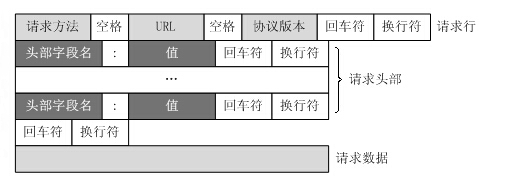
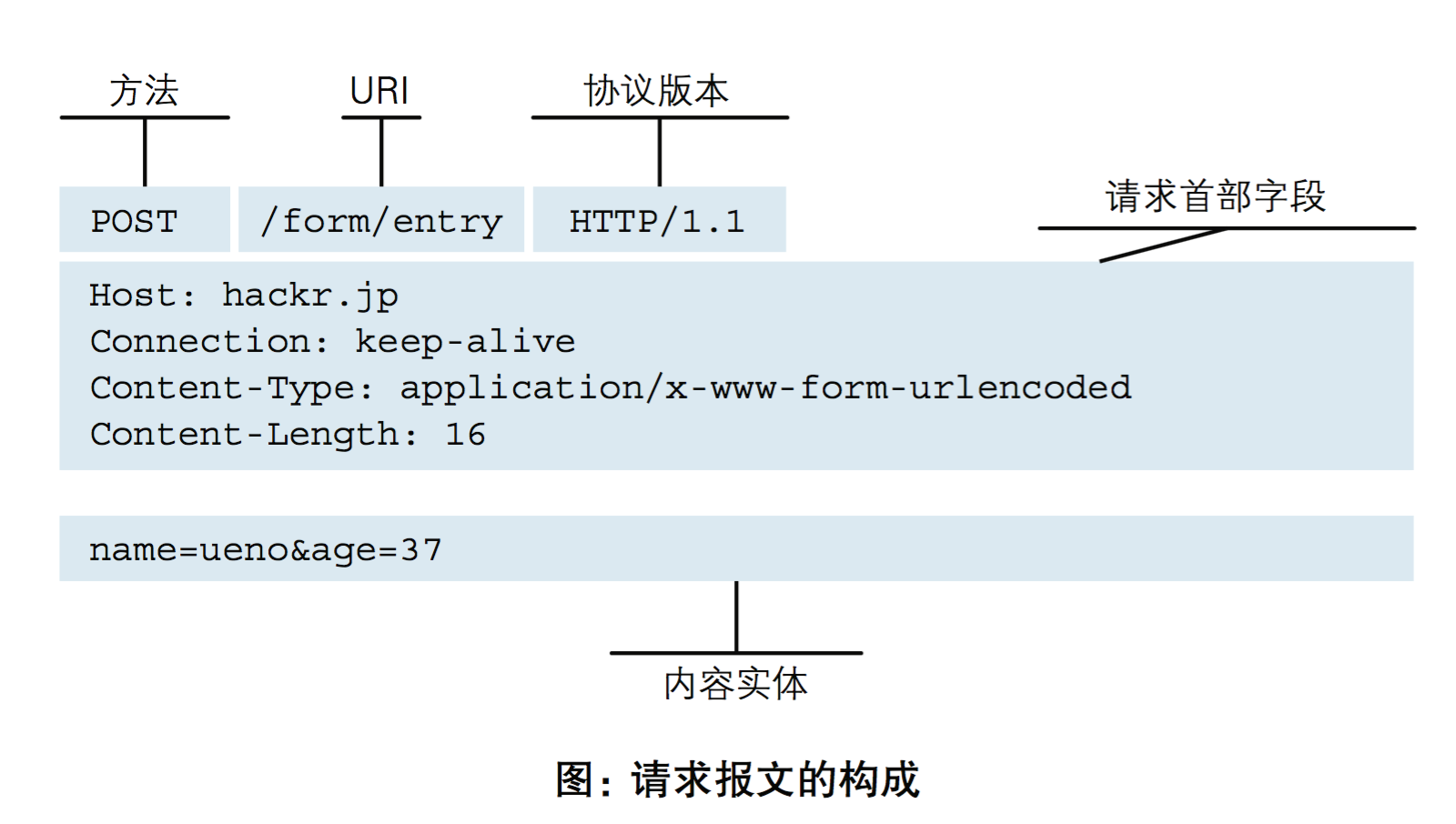
比如我们要获取 https://www.cnblogs.com/tomj2ee/p/16153238.html 的内容
那么http格式就是如下格式
GET /tomj2ee/p/16153238.html HTTP/1.0
HOST:www.cnblogs.com
包装http请求
private String createRequestHeader(URL url) throws MalformedURLException {
        StringBuilder sb = new StringBuilder();
        String path = "/";
        if (url.getPath() != null && url.getPath().length() > 0) {
            path = url.getPath();
        }
        sb.append("GET " + path + " HTTP/1.0" + BR);
        sb.append("HOST: " + url.getHost() + BR);
        sb.append("User-Agent: Mozilla/5.0 (Windows NT 10.0; Win64; x64) " + BR);
        sb.append(BR);

        return sb.toString();
    }
3. socket 写入http 请求数据
 //连接到http请求服务器
            socket.connect(new InetSocketAddress(address, port), 10 * 1000);
            //写入http请求头部
            out = socket.getOutputStream();
            String req = createRequestHeader(url);
            out.write(req.getBytes());
            out.flush();
4. socket 读取网页返回内容
 in = socket.getInputStream();
            byte[] buf = new byte[1024];
            int len = 0;
            StringBuilder ret = new StringBuilder();
            while ((len = in.read(buf)) >= 0) {
                ret.append(new String(buf, 0, len));
            }
            return ret.toString();
5.完整源码
package myhttp;

import javax.net.ssl.SSLContext;
import javax.net.ssl.SSLSocket;
import javax.net.ssl.TrustManager;
import java.io.IOException;
import java.io.InputStream;
import java.io.OutputStream;
import java.net.InetAddress;
import java.net.InetSocketAddress;
import java.net.MalformedURLException;
import java.net.URL;
import java.security.SecureRandom;

public class MyHttpClient {

    private static String BR = "\r\n";

    /**
     * 通过 socket 获取 http get请求
     *
     * @param host
     * @return
     * @throws IOException
     */
    public String getUrl(String host) {
        InputStream in = null;
        OutputStream out = null;
        SSLSocket socket=null;
        try {
            SSLContext context = SSLContext.getDefault();
            socket = (SSLSocket) context.getSocketFactory().createSocket();
            socket.setHandshakeApplicationProtocolSelector((sslSocket, strings) -> "TLSv1.1");
            URL url = new URL(host);
            InetAddress address = InetAddress.getByName(url.getHost());
            int port = 443;
            if (url.getPort() > 0) {
                port = url.getPort();
            }
            //连接到http请求服务器
            socket.connect(new InetSocketAddress(address, port), 10 * 1000);
            //写入http请求头部
            out = socket.getOutputStream();
            String req = createRequestHeader(url);
            out.write(req.getBytes());
            out.flush();
            in = socket.getInputStream();
            byte[] buf = new byte[1024];
            int len = 0;
            StringBuilder ret = new StringBuilder();
            while ((len = in.read(buf)) >= 0) {
                ret.append(new String(buf, 0, len));
            }
            return ret.toString();
        } catch (Exception ex) {
            ex.printStackTrace();
            return "";
        } finally {
            if (in != null) {
                try {
                    in.close();
                } catch (IOException e) {
                    //do nothing
                }
            }
            if (out != null) {
                try {
                    out.close();
                } catch (IOException e) {
                    //do nothing
                }
            }
            if(socket!=null){
                try{
                    socket.close();
                }catch (IOException ex){
                    //do nothing
                }
            }
        }
    }

    /**
     * 创建http的请求头
     * @param url
     * @return
     * @throws MalformedURLException
     */
    private String createRequestHeader(URL url) throws MalformedURLException {
        StringBuilder sb = new StringBuilder();
        String path = "/";
        if (url.getPath() != null && url.getPath().length() > 0) {
            path = url.getPath();
        }
        sb.append("GET " + path + " HTTP/1.0" + BR);
        sb.append("HOST: " + url.getHost() + BR);
        sb.append("User-Agent: Mozilla/5.0 (Windows NT 10.0; Win64; x64) " + BR);
        sb.append(BR);

        return sb.toString();
    }


    public static void main(String[] args) {
        String ret = new MyHttpClient().getUrl("https://www.runoob.com/java/java-networking.html");
        System.out.println(ret);
    }

}