-
python基础(五)----时间模块
最近在公司给出的的需求,写代码的时候,用到了一些时间模块的函数。由于时间模块有点多,所以这里慢慢介绍一下。
一、time模块
time 模块提供了很多与时间相关的类和函数,下面我们介绍一些常用的。其他的遇到了自行百度也是可以解决需求的。大家可以自行百度了解。
1. struct_time 类
time 模块的 struct_time 类代表一个时间对象,可以通过索引和属性名访问值。对应关系如下所示:

tm_sec 范围为 0 ~ 61,值 60 表示在闰秒的时间戳中有效,并且由于历史原因支持值 61。localtime() 表示当前时间,返回类型为 struct_time 对象,示例如下所示:
import time t = time.localtime() print('t-->', t) print('tm_year-->', t.tm_year) print('tm_year-->', t[0]) 结果 t--> time.struct_time(tm_year=2022, tm_mon=12, tm_mday=1, tm_hour=19, tm_min=49, tm_sec=54, tm_wday=6, tm_yday=335, tm_isdst=0) tm_year--> 2019 tm_year--> 2019- 1
- 2
- 3
- 4
- 5
- 6
- 7
- 8
- 9
- 10
- 11
2. 常用函数
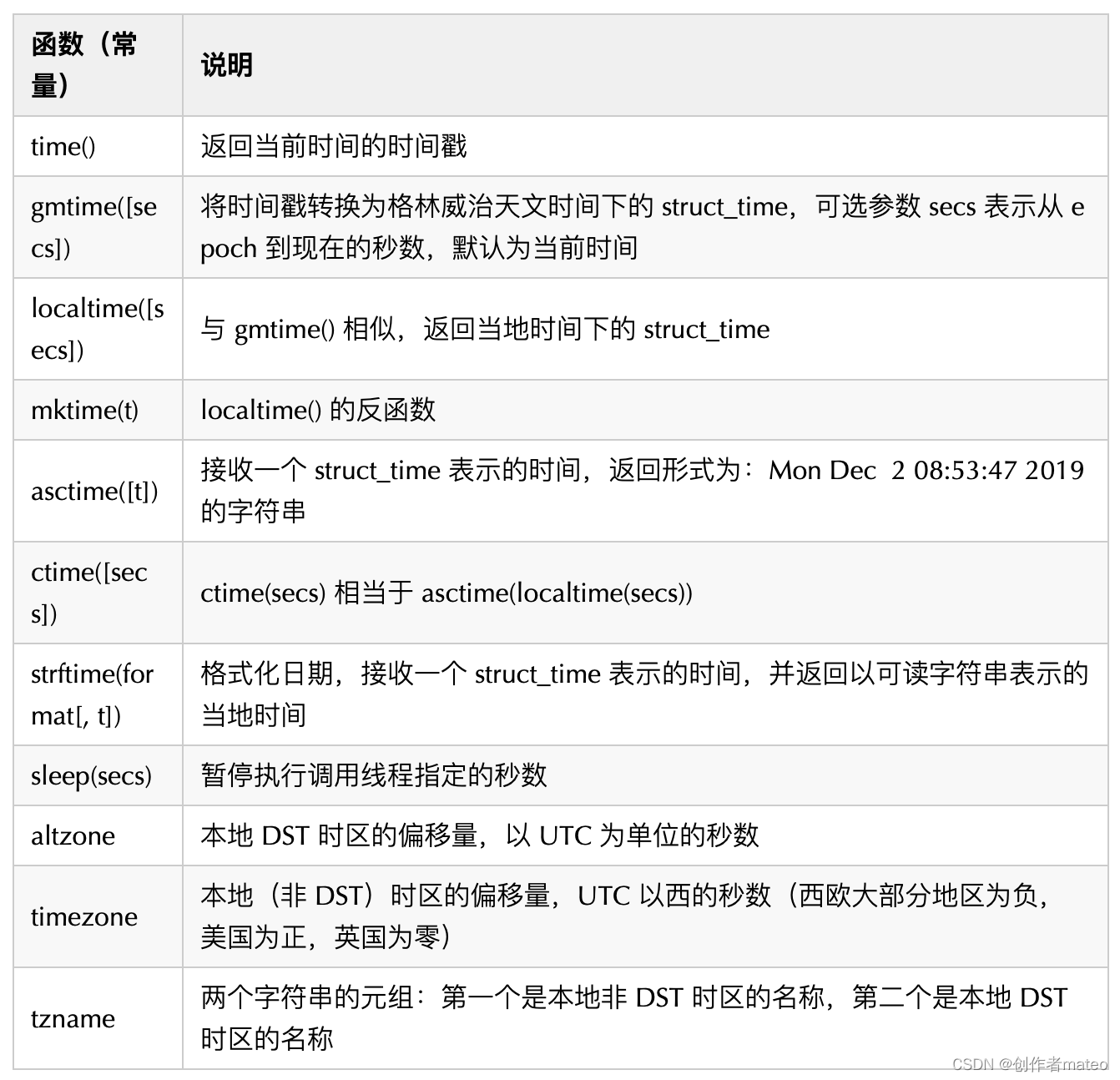
epoch:1970-01-01 00:00:00 UTC
基本使用如下所示:
import time print(time.time()) print(time.gmtime()) print(time.localtime()) print(time.asctime(time.localtime())) print(time.tzname) # strftime 使用 print(time.strftime('%Y-%m-%d %H:%M:%S', time.localtime()))- 1
- 2
- 3
- 4
- 5
- 6
- 7
- 8
- 9
strftime 函数日期格式化符号说明如下所示:
2. datetime 模块
datatime 模块重新封装了 time 模块,提供了更多接口,变得更加直观和易于调用。
2.1 date 类
date 类表示一个由年、月、日组成的日期,格式为:datetime.date(year, month, day)。
- year 范围为:[1, 9999]
- month 范围为:[1, 12]
- day 范围为 [1, 给定年月对应的天数]。
类方法和属性如下所示:

使用方法:import datetime import time print(datetime.date.today()) print(datetime.date.fromtimestamp(time.time())) print(datetime.date.min) print(datetime.date.max)- 1
- 2
- 3
- 4
- 5
- 6
- 7
实例方法和属性如下所示:
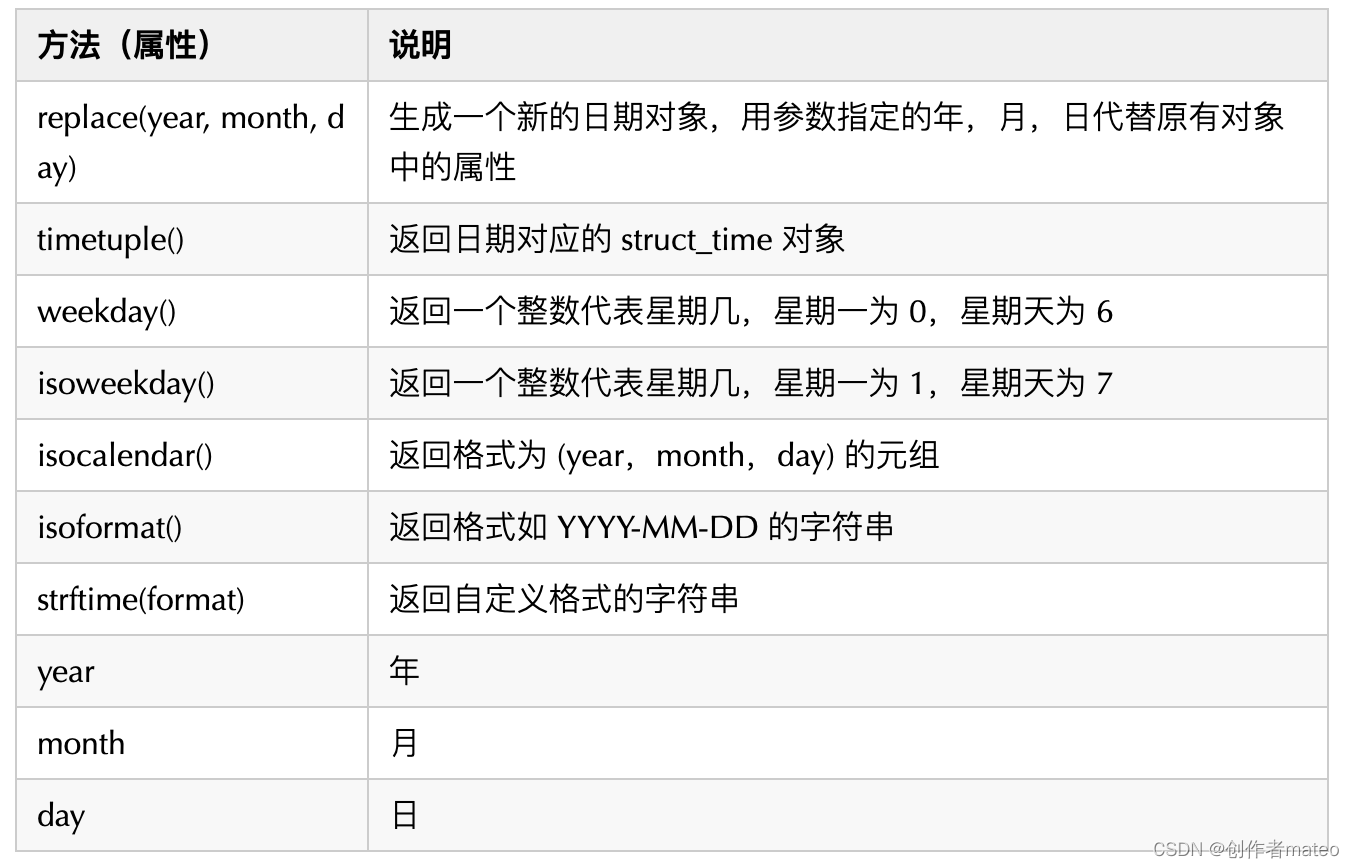
import datetime td = datetime.date.today() print(td.replace(year=1945, month=8, day=15)) print(td.timetuple()) print(td.weekday()) print(td.isoweekday()) print(td.isocalendar()) print(td.isoformat()) print(td.strftime('%Y %m %d %H:%M:%S %f')) print(td.year) print(td.month) print(td.day)- 1
- 2
- 3
- 4
- 5
- 6
- 7
- 8
- 9
- 10
- 11
- 12
- 13
2.2 time 类
time 类表示由时、分、秒、微秒组成的时间,格式为:time(hour=0, minute=0, second=0, microsecond=0, tzinfo=None, *, fold=0)。
- hour 范围为:[0, 24)
- minute 范围为:[0, 60)
- second 范围为:[0, 60)
- microsecond 范围为:[0, 1000000)
- fold 范围为:[0, 1]

使用示例如下所示:
import datetime t = datetime.time(10, 10, 10) print(t.isoformat()) print(t.replace(hour=9, minute=9)) print(t.strftime('%I:%M:%S %p')) print(t.hour) print(t.minute) print(t.second) print(t.microsecond) print(t.tzinfo)- 1
- 2
- 3
- 4
- 5
- 6
- 7
- 8
- 9
- 10
- 11
2.3 datetime 类
datetime 包括了 date 与 time 的所有信息,格式为:datetime(year, month, day, hour=0, minute=0, second=0, microsecond=0, tzinfo=None, *, fold=0),参数范围值参考 date 类与 time 类。

使用方式如下:
import datetime print(datetime.datetime.today()) print(datetime.datetime.now()) print(datetime.datetime.utcnow()) print(datetime.datetime.fromtimestamp(time.time())) print(datetime.datetime.utcfromtimestamp(time.time())) print(datetime.datetime.combine(datetime.date(2019, 12, 1), datetime.time(10, 10, 10))) print(datetime.datetime.min) print(datetime.datetime.max)- 1
- 2
- 3
- 4
- 5
- 6
- 7
- 8
- 9
- 10
实例方法和属性如下所示:

使用方法:import datetime td = datetime.datetime.today() print(td.date()) print(td.time()) print(td.replace(day=11, second=10)) print(td.weekday()) print(td.isoweekday()) print(td.isocalendar()) print(td.isoformat()) print(td.strftime('%Y-%m-%d %H:%M:%S .%f')) print(td.year) print(td.month) print(td.month) print(td.hour) print(td.minute) print(td.second) print(td.microsecond) print(td.tzinfo)- 1
- 2
- 3
- 4
- 5
- 6
- 7
- 8
- 9
- 10
- 11
- 12
- 13
- 14
- 15
- 16
- 17
- 18
- 19
三、calendar 模块
calendar 模块提供了很多可以处理日历的函数。
1. 常用函数

使用示例如下所示:import calendar calendar.setfirstweekday(1) print(calendar.firstweekday()) print(calendar.isleap(2019)) print(calendar.leapdays(1945, 2019)) print(calendar.weekday(2019, 12, 1)) print(calendar.monthrange(2019, 12)) print(calendar.month(2019, 12)) print(calendar.prcal(2019))- 1
- 2
- 3
- 4
- 5
- 6
- 7
- 8
- 9
- 10
2. Calendar 类

使用方式:from calendar import Calendar c = Calendar() print(list(c.iterweekdays())) for i in c.itermonthdates(2019, 12): print(i)- 1
- 2
- 3
- 4
- 5
- 6
3. TextCalendar 类

from calendar import TextCalendar tc = TextCalendar() print(tc.formatmonth(2019, 12)) print(tc.formatyear(2019))- 1
- 2
- 3
- 4
- 5
4. HTMLCalendar类

from calendar import HTMLCalendar hc = HTMLCalendar() print(hc.formatmonth(2019, 12)) print(hc.formatyear(2019)) print(hc.formatyearpage(2019))- 1
- 2
- 3
- 4
- 5
- 6
-
相关阅读:
10分钟掌握Go泛型
考研复习之数据结构笔记(十四)查找(中)(动态查找树表:二叉排序树、平衡二叉树、B树、B+树)
typora+github+picgo搭建图床401
maven 无法下载依赖 poi-scratchpad
新版Logcat体验与分享—NEW Logcat in Android Studio Dolphin
git 记录
React源码解读之React Fiber
arm 体系架构前沿p5
Gradle【扫盲】使用简易教程
SSM整合_年轻人的第一个增删改查_新增
- 原文地址:https://blog.csdn.net/Kayleigh520/article/details/127300865