-
国庆七天乐,写博也快乐之微信小程序天气预报+根据天气自动变换背景图实战(使用和风天气API)

hello,大家好,这里是X大魔王,先提前祝各位国庆节快乐😽😽
这里还是继续带来微信小程序的一些内容,是我之前做项目的一个内容,这里给各位分享一下,我觉得还蛮不错的~🍊🍊🍊效果图🏙️
图比较多,我这里就直接全部弄一起了😎可以看到背景是变了但是头像下方的字全是“晴”,当时是为了得到效果,因为这个字是要你当前的城市真正的天气而得到的,比如:“晴”、“阴”这种,由于现在我要给各位看一下背景图,这个字各位可以先不用管,这里效果比较多,图片我就只放了部分哈,毕竟这个天气太多了😶🌫️😶🌫️😶🌫️
这里只是背景颜色的变换,不是下面的小程序的全部噢注意一下~下面的是我当时写项目的个人中心截图,这篇博文只是分享背景颜色的变换,不过喜欢的朋友可以评论留言,我后续可以出教程🐶🐶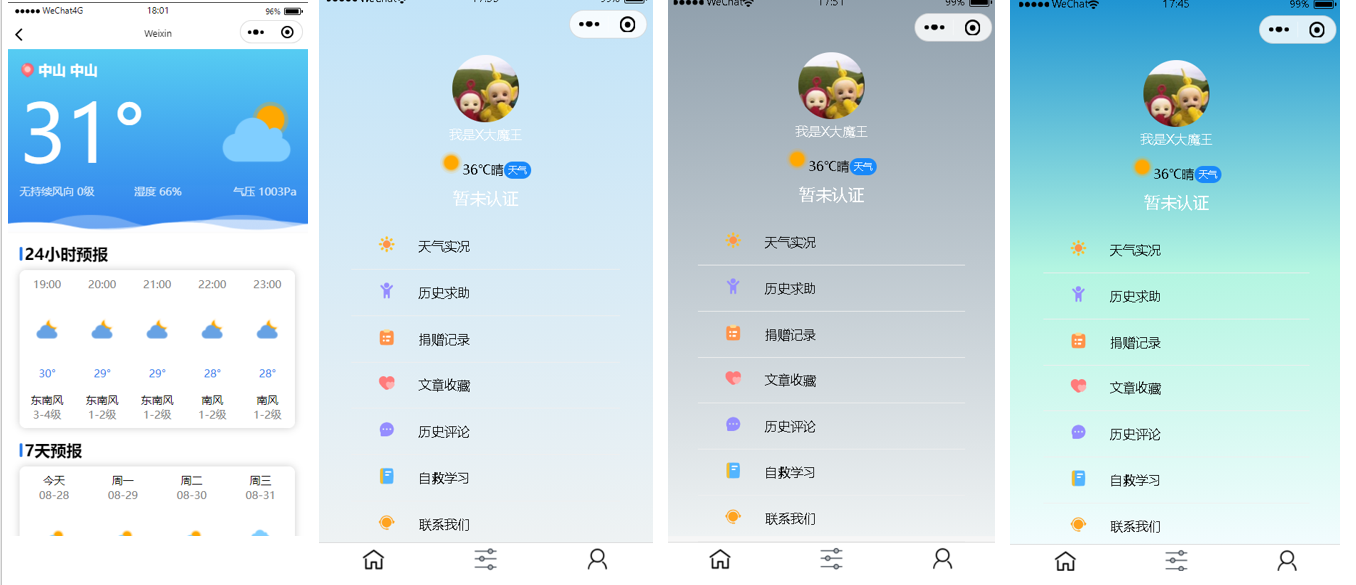
当时我所在的城市是阴天,刚好就截了这张图~~

夜晚的都是统一的噢,不管是下雨还是下雪,夜晚都是一个背景颜色,细心的朋友可能发现了,这个背景是变了,并且这个“字体颜色”也变了噢🐶🐶

和风天气开发者😏
打住!!可能有朋友看到这里就撤退了!但是这一部分真的非常非常简单!
各位不妨继续往下看😏😏

玩过高德地图开发者或者腾讯地图开发者的朋友肯定就很有经验,因为流程都是一样的😏
注册或者登录好之后,进入控制台:
创建应用->选择免费开发版本->应用名称随便填->类型选择Web API,创建好之后就可以得到key
这样和风天气这一块我们就搞定了,接下来的难点就在小程序上了,就是要调用和风天气的API😏😏😏
小程序开发🐶
app.wcss ⭐
我们先对天气背景颜色进行全局的配置
/* 全局变量定义 设置主题颜色,字体大小等 */ page{ /* 主题颜色 */ --themeColor:#FF5700; /* 字体大小 rpx自适应大小 */ font-size: 28rpx; --sunny:-webkit-linear-gradient(top,#1c92d2,#b3f5e1,#f2fcfe); --cloudy: -webkit-linear-gradient(top,#c1e3f8,#eef2f3); --overcast: -webkit-linear-gradient(top,#8e9eab,#eef2f3); --rainny: -webkit-linear-gradient(top,#1f2429,#bdc3c7); --night: -webkit-linear-gradient(top,#bdc3c7,#2c3e50); --white: #fff; --blick: #000; }- 1
- 2
- 3
- 4
- 5
- 6
- 7
- 8
- 9
- 10
- 11
- 12
- 13
- 14
天气预报⛅🌤️
注意事项🍐
天气预报这一块不全是我做的,我是参考了别人的😏😏😏做样式这一块我是真的不太行🥸🥸我是在它的基础之上增删改查,望见谅😶🌫️😶🌫️
在河源 源城旁边的那个绿色logo是我从icon-font下来的,如果你们复制代码过去之后是看不见的,你们可以自行修改
在js文件里,你们将APIKEY换成刚刚你们申请的key即可,一般将这个key值保存在constants里
wxml<view class="header-modular" wx:if="{{now}}"> <image class="bg-wave" src="https://codermoyv.gitee.io/coder-moyv/assets/images/wechat/bg_wave.gif">image> <view class="row"> <view class="row location-wrap" bindtap="selectLocation"> <iconfont name="22location" size="30" style="margin-right: 10rpx;" /> <view class="title">{{City}} {{County}}view> view> view> <view class="row"> <view class="tmp">{{now.temp}}°view> <image class="icon-weather" src="https://codermoyv.gitee.io/coder-moyv/assets/images/wechat/weather_custom/{{now.icon}}.png">image> view> <view class="tips-wrap"> <view class="tips ">{{now.windDir}} {{now.windScale}}级view> <view class="tips ">湿度 {{now.humidity}}%view> <view class="tips ">气压 {{now.pressure}}Paview> view> view> <view class="card-modular " wx:if="{{hourly}}"> <view class="title">24小时预报view> <view class="card-wrap"> <block wx:for="{{hourly}}" wx:key="index"> <view class="item hourly"> <view class="text-gray">{{item.time}}view> <image class="icon" src="https://codermoyv.gitee.io/coder-moyv/assets/images/wechat/weather_custom/{{item.icon}}.png">image> <view class="text-primary mb-32">{{item.temp}}°view> <view>{{item.windDir}}view> <view class="text-gray">{{item.windScale}}级view> view> block> view> view> <view class="card-modular" wx:if="{{daily}}"> <view class="title">7天预报view> <view class="card-wrap"> <block wx:for="{{daily}}" wx:key="index"> <view class="item daily"> <view>{{item.dateToString}}view> <view class="text-gray">{{item.date}}view> <image class="icon" src="https://codermoyv.gitee.io/coder-moyv/assets/images/wechat/weather_custom/{{item.iconDay}}.png">image> <view class="text-primary ">{{item.tempMin}}°~{{item.tempMax}}°view> <image class="icon" src="https://codermoyv.gitee.io/coder-moyv/assets/images/wechat/weather_custom/{{item.iconNight}}.png">image> <view>{{item.windDirDay}}view> <view class="text-gray">{{item.windScaleDay}}级view> view> block> view> view>- 1
- 2
- 3
- 4
- 5
- 6
- 7
- 8
- 9
- 10
- 11
- 12
- 13
- 14
- 15
- 16
- 17
- 18
- 19
- 20
- 21
- 22
- 23
- 24
- 25
- 26
- 27
- 28
- 29
- 30
- 31
- 32
- 33
- 34
- 35
- 36
- 37
- 38
- 39
- 40
- 41
- 42
- 43
- 44
- 45
- 46
- 47
- 48
- 49
- 50
- 51
- 52
wcss
page { background-color: linear-gradient(to bottom, #ffffff,#ffffff, #F6F6F6); padding-bottom: 60rpx; } /* 工具类 */ .row { display: flex; align-items: center; } .mb-32{ margin-bottom: 32rpx; } /* 页面样式 */ .header-modular { height: 400rpx; background-color: #64C8FA; background: linear-gradient(to bottom, #56CCF2, #2F80ED); position: relative; padding: 30rpx; } .header-modular .bg-wave { width: 100vw; position: absolute; bottom: -2px; left: 0; right: 0; height: 120rpx; mix-blend-mode: screen; } .header-modular .location-wrap { color: #ffffff; font-weight: bold; font-size: 36rpx; } .header-modular .location-wrap .icon { width: 40rpx; height: 40rpx; margin-right: 8rpx; } .header-modular .tmp { font-size: 200rpx; /* font-weight: bold; */ color: #ffffff; margin-right: auto; } .header-modular .icon-weather { width: 200rpx; height: 200rpx; } .header-modular .tips-wrap { display: flex; justify-content: space-between; } .header-modular .tips { font-size: 28rpx; opacity: 0.8; color: #ffffff; flex: 1; } .header-modular .tips:nth-child(3) { text-align: right; } .header-modular .tips:nth-child(2) { text-align: center; } .card-modular { padding:0 30rpx; margin-top: 30rpx; } .card-modular>.title { font-size: 40rpx; font-weight: bold; position: relative; margin-left: 14rpx; margin-bottom: 16rpx; } .card-modular>.title::before { content: ""; position: absolute; left: -14rpx; top: 10rpx; bottom: 10rpx; width: 8rpx; border-radius: 10rpx; background-color: #2F80ED; } .card-modular .card-wrap { width: 690rpx; border-radius: 18rpx; background-color: #ffffff; box-shadow: 0 0 20rpx 0 rgba(0, 0, 0, 0.2); overflow-x: auto; white-space: nowrap; } .card-modular .card-wrap .item { display: inline-flex; flex-direction: column; align-items: center; font-size: 28rpx; padding: 18rpx 0; } .card-modular .card-wrap .item.hourly{ width: 138rpx; } .card-modular .card-wrap .item.daily{ width: 172.5rpx; } .card-modular .card-wrap .item .icon { width: 60rpx; height: 60rpx; margin: 64rpx 0; } .card-modular .card-wrap .item .text-gray { color: gray; } .card-modular .card-wrap .item .text-primary { color: #2F80ED; }- 1
- 2
- 3
- 4
- 5
- 6
- 7
- 8
- 9
- 10
- 11
- 12
- 13
- 14
- 15
- 16
- 17
- 18
- 19
- 20
- 21
- 22
- 23
- 24
- 25
- 26
- 27
- 28
- 29
- 30
- 31
- 32
- 33
- 34
- 35
- 36
- 37
- 38
- 39
- 40
- 41
- 42
- 43
- 44
- 45
- 46
- 47
- 48
- 49
- 50
- 51
- 52
- 53
- 54
- 55
- 56
- 57
- 58
- 59
- 60
- 61
- 62
- 63
- 64
- 65
- 66
- 67
- 68
- 69
- 70
- 71
- 72
- 73
- 74
- 75
- 76
- 77
- 78
- 79
- 80
- 81
- 82
- 83
- 84
- 85
- 86
- 87
- 88
- 89
- 90
- 91
- 92
- 93
- 94
- 95
- 96
- 97
- 98
- 99
- 100
- 101
- 102
- 103
- 104
- 105
- 106
- 107
- 108
- 109
- 110
- 111
- 112
- 113
- 114
- 115
- 116
- 117
- 118
- 119
- 120
- 121
- 122
- 123
- 124
- 125
- 126
- 127
- 128
- 129
- 130
- 131
- 132
- 133
- 134
- 135
- 136
- 137
import {APIKEY} from '../../utils/config'; Page({ /** * 页面的初始数据 */ data: { location:"", }, /** * 生命周期函数--监听页面加载 */ onLoad: function (options) { this.getLocation() }, //选择定位 selectLocation() { var that = this wx.chooseLocation({ success(res) { //console.log(res) that.setData({ location: res.longitude + "," + res.latitude }) that.getWeather() that.getCityByLoaction() } , fail() { wx.getLocation({ type: 'gcj02', fail() { wx.showModal({ title: '获取地图位置失败', content: '为了给您提供准确的天气预报服务,请在设置中授权【位置信息】', success(mRes) { if (mRes.confirm) { wx.openSetting({ success: function (data) { if (data.authSetting["scope.userLocation"] === true) { that.selectLocation() } else { wx.showToast({ title: '授权失败', icon: 'none', duration: 1000 }) } }, fail(err) { console.log(err) wx.showToast({ title: '唤起设置页失败,请手动打开', icon: 'none', duration: 1000 }) } }) } } }) } }) } }) }, /** * 获取定位 */ getLocation() { var that = this wx.getLocation({ type: 'gcj02', success(res) { that.setData({ location: res.longitude + "," + res.latitude }) that.getWeather() that.getCityByLoaction() }, fail(err) { wx.showModal({ title: '获取定位信息失败', content: '为了给您提供准确的天气预报服务,请在设置中授权【位置信息】', success(mRes) { if (mRes.confirm) { wx.openSetting({ success: function (data) { if (data.authSetting["scope.userLocation"] === true) { wx.showToast({ title: '授权成功', icon: 'success', duration: 1000 }) that.getLocation() } else { wx.showToast({ title: '授权失败', icon: 'none', duration: 1000 }) that.setData({ location: "116.41,39.92" }) that.getWeather() that.getCityByLoaction() } }, fail(err) { console.log(err) wx.showToast({ title: '唤起设置页失败,请手动打开', icon: 'none', duration: 1000 }) that.setData({ location: "116.41,39.92" }) that.getWeather() that.getCityByLoaction() } }) } else if (mRes.cancel) { that.setData({ location: "116.41,39.92" }) that.getWeather() that.getCityByLoaction() } } }) } }) }, /** * 根据坐标获取城市信息 */ getCityByLoaction() { var that = this wx.request({ url: 'https://geoapi.qweather.com/v2/city/lookup?key=' + APIKEY + "&location=" + that.data.location, success(result) { var res = result.data if (res.code == "200") { var data = res.location[0] that.setData({ City: data.adm2, County: data.name }) console.log(" res.location[0] "+JSON.stringify(res.location[0]) ); wx.setStorageSync('City', data.adm2); wx.setStorageSync('County', data.name); wx.setStorageSync('location', that.data.location); wx.setStorageSync('locationId', res.location[0].id); } else { wx.showToast({ title: '获取城市信息失败', icon: 'none' }) } } }) }, /** * 获取天气 */ getWeather() { var that = this wx.showLoading({ title: '加载中', }) wx.request({ url: 'https://devapi.qweather.com/v7/weather/now?key=' + APIKEY + "&location=" + that.data.location, success(result) { var res = result.data //console.log(res) that.setData({ now: res.now }) } }) wx.request({ url: 'https://devapi.qweather.com/v7/weather/24h?key=' + APIKEY + "&location=" + that.data.location, success(result) { var res = result.data //console.log(res) res.hourly.forEach(function (item) { item.time = that.formatTime(new Date(item.fxTime)).hourly }) that.setData({ hourly: res.hourly }) } }) wx.request({ url: 'https://devapi.qweather.com/v7/weather/7d?key=' + APIKEY + "&location=" + that.data.location, success(result) { var res = result.data //console.log(res) res.daily.forEach(function (item) { item.date = that.formatTime(new Date(item.fxDate)).daily item.dateToString = that.formatTime(new Date(item.fxDate)).dailyToString }) that.setData({ daily: res.daily }) wx.hideLoading() } }) }, // 格式时间 formatTime(date) { const year = date.getFullYear() const month = date.getMonth() + 1 const day = date.getDate() const hour = date.getHours() const minute = date.getMinutes() const second = date.getSeconds() const weekArray = ["周日", "周一", "周二", "周三", "周四", "周五", "周六"] const isToday = date.setHours(0, 0, 0, 0) == new Date().setHours(0, 0, 0, 0) return { hourly: [hour, minute].map(this.formatNumber).join(":"), daily: [month, day].map(this.formatNumber).join("-"), dailyToString: isToday ? "今天" : weekArray[date.getDay()] } }, // 补零 formatNumber(n) { n = n.toString() return n[1] ? n : '0' + n }, /** * 生命周期函数--监听页面初次渲染完成 */ onReady: function () { }, /** * 生命周期函数--监听页面显示 */ onShow: function () { }, /** * 生命周期函数--监听页面隐藏 */ onHide: function () { }, /** * 生命周期函数--监听页面卸载 */ onUnload: function () { }, /** * 页面相关事件处理函数--监听用户下拉动作 */ onPullDownRefresh: function () { }, /** * 页面上拉触底事件的处理函数 */ onReachBottom: function () { }, /** * 用户点击右上角分享 */ onShareAppMessage: function () { } })- 1
- 2
- 3
- 4
- 5
- 6
- 7
- 8
- 9
- 10
- 11
- 12
- 13
- 14
- 15
- 16
- 17
- 18
- 19
- 20
- 21
- 22
- 23
- 24
- 25
- 26
- 27
- 28
- 29
- 30
- 31
- 32
- 33
- 34
- 35
- 36
- 37
- 38
- 39
- 40
- 41
- 42
- 43
- 44
- 45
- 46
- 47
- 48
- 49
- 50
- 51
- 52
- 53
- 54
- 55
- 56
- 57
- 58
- 59
- 60
- 61
- 62
- 63
- 64
- 65
- 66
- 67
- 68
- 69
- 70
- 71
- 72
- 73
- 74
- 75
- 76
- 77
- 78
- 79
- 80
- 81
- 82
- 83
- 84
- 85
- 86
- 87
- 88
- 89
- 90
- 91
- 92
- 93
- 94
- 95
- 96
- 97
- 98
- 99
- 100
- 101
- 102
- 103
- 104
- 105
- 106
- 107
- 108
- 109
- 110
- 111
- 112
- 113
- 114
- 115
- 116
- 117
- 118
- 119
- 120
- 121
- 122
- 123
- 124
- 125
- 126
- 127
- 128
- 129
- 130
- 131
- 132
- 133
- 134
- 135
- 136
- 137
- 138
- 139
- 140
- 141
- 142
- 143
- 144
- 145
- 146
- 147
- 148
- 149
- 150
- 151
- 152
- 153
- 154
- 155
- 156
- 157
- 158
- 159
- 160
- 161
- 162
- 163
- 164
- 165
- 166
- 167
- 168
- 169
- 170
- 171
- 172
- 173
- 174
- 175
- 176
- 177
- 178
- 179
- 180
- 181
- 182
- 183
- 184
- 185
- 186
- 187
- 188
- 189
- 190
- 191
- 192
- 193
- 194
- 195
- 196
- 197
- 198
- 199
- 200
- 201
- 202
- 203
- 204
- 205
- 206
- 207
- 208
- 209
- 210
- 211
- 212
- 213
- 214
- 215
- 216
- 217
- 218
- 219
- 220
- 221
- 222
- 223
- 224
- 225
- 226
- 227
- 228
- 229
- 230
- 231
- 232
- 233
- 234
- 235
- 236
- 237
- 238
- 239
- 240
- 241
- 242
- 243
- 244
- 245
- 246
- 247
- 248
- 249
- 250
- 251
- 252
- 253
- 254
- 255
- 256
- 257
- 258
- 259
- 260
- 261
- 262
- 263
- 264
- 265
- 266
- 267
- 268
- 269
- 270
- 271
- 272
- 273
- 274
- 275
- 276
- 277
- 278
- 279
背景变换🏵️
终于来到了我们今天的重点内容~其实经历过上面的天气预报,貌似大家都有感觉该怎么做了吧,因为很多东西都已经放入到缓存中了,我们要做的就是拿来用!当然了,在这之前还差一些数据我们需要调用API的,会了上面的,我相信已经不难了😎😎
但是这里要注意的就是对“时间点”的判断问题,因为我们是分成了白天和黑夜状态的😏这里我直接展示js方法啦,在这之前,大家先在data里定义好that.setData里的变量噢😏
async getWeather(){ var that = this; // 1.先从缓存中获取 var locationId = wx.getStorageSync('locationId'); if(locationId!=null){ var url = 'https://devapi.qweather.com/v7/weather/now?location='+locationId+'&key='+APIKEY; console.log(url); wx.request({ url: 'https://devapi.qweather.com/v7/weather/now?location='+locationId+'&key='+APIKEY, success(result) { var res = result.data.now var bgColor =""; var textColor = ""; var d = parseInt(new Date().getHours()); //得到当前 小时 // 先做时间点的判断 if(18<d){ //晚间皮肤 bgColor="night"; textColor = "white"; } else { if (res.text == "晴") { bgColor = "sunny"; textColor = "black"; } else if (res.text == "多云") { bgColor = "cloudy"; textColor = "black"; } else if (res.text == "阴") { bgColor = "overcast"; textColor = "black"; } else { bgColor = "rainny"; textColor = "white"; } } that.setData({ nowWeather: res, conditionBtn:false, conditionWeather: true, //显示天气 bgColor:bgColor, textColor: textColor }) } }) }else{ return; } },- 1
- 2
- 3
- 4
- 5
- 6
- 7
- 8
- 9
- 10
- 11
- 12
- 13
- 14
- 15
- 16
- 17
- 18
- 19
- 20
- 21
- 22
- 23
- 24
- 25
- 26
- 27
- 28
- 29
- 30
- 31
- 32
- 33
- 34
- 35
- 36
- 37
- 38
- 39
- 40
- 41
- 42
- 43
- 44
- 45
- 46
- 47
wxml
这里在你需要使用的地方直接使用就好😏😏😏😏😏
<view class="userInfo {{bgColor == 'sunny' ? 'sunny' : bgColor == 'cloudy' ? 'cloudy' : bgColor == 'overcast' ? 'overcast' : bgColor == 'rainny' ? 'rainny' : 'night'}} {{textColor =='white' ? 'white' : 'black'}}">view>- 1
结语🔆
这次的实战有一个蛮不好的地方,就是你必须先有一个按钮的跳转到天气预报界面,然后退出来你的背景颜色才会改变🍊🍊可以修改一下我的代码,在onLoad的时候自动加载,都是可以的~好啦,今天的分享到这里结束啦,欢迎关注、点赞、评论,我们下期再见😆😆

-
相关阅读:
自动驾驶仿真-测试标准与测试用例设计
基于python下django框架 实现校园教室图书馆座位预约系统详细设计
计算机毕业设计Java读书笔记共享平台(源码+系统+mysql数据库+lw文档)
双重循环及break,continue,return的运用
一个故事看懂CPU的SIMD技术
kubernetes 实战学习
【500强 Kubernetes 课程】第4章 dockerfile基础篇-基本语法
GhostNet原理解析及pytorch实现
Linux下Qt启、停“.sh”脚本文件及获取终端打印信息
本身您无功而有过,如何天赐百福?
- 原文地址:https://blog.csdn.net/Xmumu_/article/details/127135480
