-
DBeaver manual
快捷键
1.Ctrl+Alt+Shift+D
to add the selected elements into your bookmarks
2.Ctrl+\
To open query results in a new tab, use the following
shortcut:
3.Ctrl+Alt+Shift+B
To monitor database health you can open dashboard view using main toolbar4.Ctrl+7
You can turn on/off the right panels。
5.Ctrl+Alt+'.
To execute the selected SQL expression and print the results
6.Alt+X
To run the current SQL script use the following
7.DBeaver Mock Data Generator
when you need to create a huge quantities of realistic sample data for testing purposes and want to avoid tedious and time-consuming work of entering test data by hand.8.F2
to rename the selected element.9.F5
To refresh query results in SQL Editor
9. Ctrl+Shift+F
In order to format SQL statements.
10.Ctrl+Alt+Space
To see available templates of SQL statements
11.Ctrl+Shift+Y
can convert the selected text into lowercase
12. Ctrl+Shift+X
convert the selected text into uppercase
12.Ctrl+Alt+Shift+X
To execute queries of current script simultaneously and display the results in separate tabs
13. Alt+Down
To jump to the next query in the current SQL scrip
14.Alt+Up
To jump to the previous query in the current SQL script
15. Ctrl+F7
iterate through the view windows of DBeaver interface.
Ctrl+Enter
.To execute current queryCtrl+F11
to filter table rows by column value in
Data Editor,use the following shortcut: Ctrl+F11. You can also open filter menu by pressing F11.F7
You can turn on/off the right panels by pressing
Ctrl+1
If you want to open foreign keys menu in Data Editor
Ctrl(Cmd) + Left click.Choose the fully qualified name of the object in the SQL Editor and use Ctrl(Cmd) + Left click. This will take you to the object's tab. Works with tables, columns and procedures.
F4
In Database Navigator, press to edit properties of the selected element.
Ctrl+Alt+Enter
You can open SQL Console with the Ctrl+Alt+Enter shortcut. It's great for executing a query that you don't want to save in a file.
Ctrl+Shift+E 执行计划
To see the execution plan for the current query
Ctrl+Fto search for data in the current table.
语法
1.If you are not much familiar with SQL scripting, use Visual Query Builder tool.
2.DBeaver allows viewing diagrams of existing tables and whole database schemas, see
ER diagrams article.3.All the errors that occur when running SQL scripts in DBeaver, can be observed in the
Error Log view.The error log tracks SQL, permission and configuration errors.4.Charts let you quickly and easily turn your SELECT queries' output into a colorized bar chart.
Note: this feature is available only in DBeaver Enterprise Edition.5.You can group several tasks into one composite task to easily execute a set of actions in one click. Note: this feature is available only in DBeaver Enterprise Edition
6.In SQL Editor you can press Ctrl/Option+Space after asterisk in a query like "SELECT * FROM tableName" or like "INSERT INTO tableName (*)" (brackets are important) and the asterisk will be replaced with a list of all
table columns.6.You can generate SQL statements (SELECT/INSERT/UPDATE/DELETE) based on selected rows. To generate SQL, right-click the selected rows ,then click Generate SQL and select one of the SQL commands you see.
7.In Data Editor, you can iterate through the view modes using the following shortcut: Ctrl+~
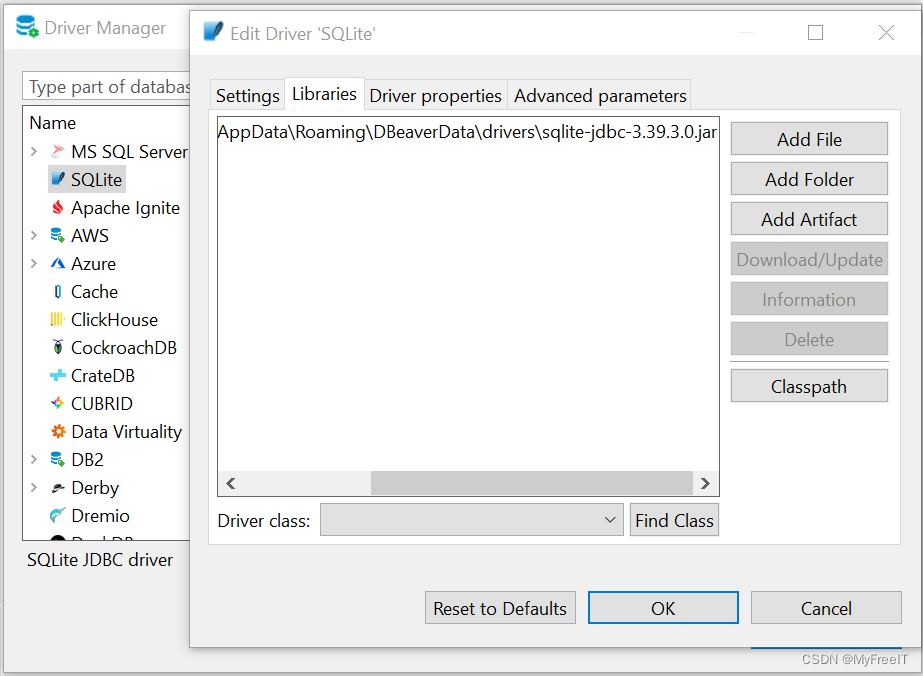
连接到SQLite, can't load driver class 'org.sqlite.JDBC' Error
C:\Users\appuser\AppData\Roaming\DBeaverData\driversNetwork unavailable: javax.net.ssl.SSLHandshakeException:PKIX path building failed: sun.security.provider.certpath.SunCertPathBuilderException: unable to find valid certification path to requested target.
Can't create driver instance Error creating driver 'SQLite' instance.Most likely required jar files are missing.You should configure jars in driver settings.Reason: can't load driver class 'org.sqlite.JDBC' Error creating driver 'SQLite' instance. Most likely required jar files are missing.
You should configure jars in driver settings.Reason: can't load driver class 'org.sqlite.JDBC'.下载最新的
sqlite-jdbc-3.39.3.0.jar,并在DBeaver加载。
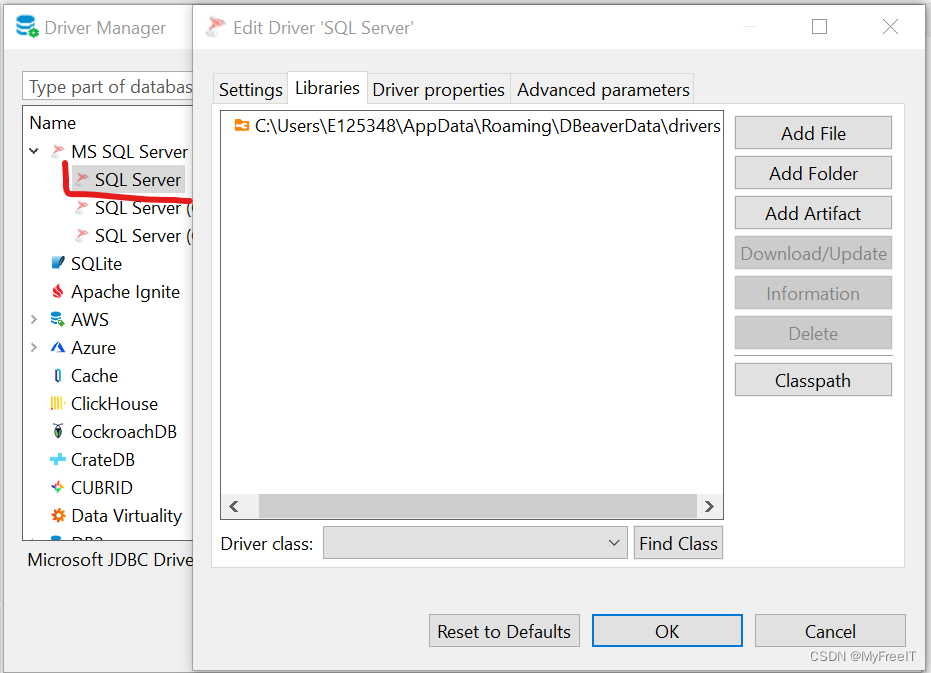
连接到MS SQL Server, 更换驱动程序
-
相关阅读:
producer参数---Kafka从入门到精通(七)
还在手动包裹产品吗?—机器已逐步取代人工,导电滑环厂家解析
会话控制学习
c语言编程指针、结构、结合和布列
Mysql与Oracle分页查询差异
Ubuntu 20.04.05安装ceres-1.14.0
大数据开发(HBase面试真题-卷二)
配置网络设备的密码设置以及忘记密码的恢复方式以及实现全网互通
08.04. Power Set LCCI 幂集(C++ 位运算)
SPA项目开发(CRUD&表单验证)
- 原文地址:https://blog.csdn.net/MyFreeIT/article/details/127122440