-
数据湖技术之数据中心 Hudi案例实战
数据湖技术之数据中心Hudi案例实战
7.1 案例架构
本案例基于Flink SQL 与Hudi整合,将MySQL数据库业务数据,实时采集存储到Hudi表中,使用Presto和Flink SQL分别进行离线查询分析和流式查询数据,最后报表存储到MySQL数据库,使用FineBI整合进行可视化展示。
1、MySQL数据库:
传智教育客户业务数据存储及离线实时分析报表结果存储,对接可视化FineBI工具展示。2、Flink SQL 引擎
使用Flink SQL中CDC实时采集MySQL数据库表数据到Hudi表,此外基于Flink SQL Connector整合Hudi与MySQL,数据存储和查询。3、Apache Hudi:数据湖框架
传智教育业务数据,最终存储到Hudi表(底层存储:HDFS分布式文件系统),统一管理数据文件,后期与Spark和Hive集成,进行业务指标分析。4、Presto 分析引擎
一个Facebook开源的分布式SQL查询引擎,适用于交互式分析查询,数据量支持GB到PB字节。
本案例中直接从Hudi表加载数据,其中依赖Hive MetaStore管理元数据。其中Presto可以集成多数据源,方便数据交互处理。7.2 业务数据
本次案例实战业务数据,来源于实际的客户Customer产生业务数据(咨询、访问、报名、浏览等),存储在MySQL数据库:itcast_nev,使用业务表:
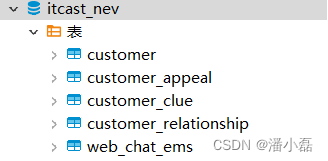
启动MySQL数据库,命令行方式登录,先创建数据库,再创建表,最后导入数据。[root@node1 ~]# mysql -uroot -p123456 CREATE DATABASE IF NOT EXISTS itcast_nev; USE itcast_nev;7.2.1 客户信息表
客户信息表:customer,创建表DDL语句:
CREATE TABLE IF NOT EXISTS itcast_nev.customer (
  `id` int(11) NOT NULL AUTO_INCREMENT,
  `customer_relationship_id` int(11) DEFAULT NULL COMMENT '当前意向id',
  `create_date_time` datetime NOT NULL DEFAULT CURRENT_TIMESTAMP COMMENT '创建时间',
  `update_date_time` timestamp NOT NULL DEFAULT CURRENT_TIMESTAMP ON UPDATE CURRENT_TIMESTAMP COMMENT '最后更新时间',
  `deleted` bit(1) NOT NULL DEFAULT b'0' COMMENT '是否被删除(禁用)',
  `name` varchar(128) CHARACTER SET utf8 COLLATE utf8_bin NOT NULL DEFAULT '' COMMENT '姓名',
  `idcard` varchar(24) CHARACTER SET utf8 COLLATE utf8_bin DEFAULT '' COMMENT '身份证号',
  `birth_year` int(5) DEFAULT NULL COMMENT '出生年份',
  `gender` varchar(8) CHARACTER SET utf8 COLLATE utf8_bin DEFAULT 'MAN' COMMENT '性别',
  `phone` varchar(24) CHARACTER SET utf8 COLLATE utf8_bin NOT NULL DEFAULT '' COMMENT '手机号',
  `wechat` varchar(32) CHARACTER SET utf8 COLLATE utf8_bin DEFAULT '' COMMENT '微信',
  `qq` varchar(32) CHARACTER SET utf8 COLLATE utf8_bin DEFAULT '' COMMENT 'qq号',
  `email` varchar(56) CHARACTER SET utf8 COLLATE utf8_bin DEFAULT '' COMMENT '邮箱',
  `area` varchar(128) COLLATE utf8mb4_unicode_ci DEFAULT '' COMMENT '所在区域',
  `leave_school_date` date DEFAULT NULL COMMENT '离校时间',
  `graduation_date` date DEFAULT NULL COMMENT '毕业时间',
  `bxg_student_id` varchar(64) COLLATE utf8mb4_unicode_ci DEFAULT NULL COMMENT '博学谷学员ID,可能未关联到,不存在',
  `creator` int(11) DEFAULT NULL COMMENT '创建人ID',
  `origin_type` varchar(32) CHARACTER SET utf8 COLLATE utf8_bin DEFAULT NULL COMMENT '数据来源',
  `origin_channel` varchar(32) CHARACTER SET utf8 COLLATE utf8_bin DEFAULT NULL COMMENT '来源渠道',
  `tenant` int(11) NOT NULL DEFAULT '0',
  `md_id` int(11) DEFAULT '0' COMMENT '中台id',
  PRIMARY KEY (`id`)
) ENGINE=InnoDB DEFAULT CHARSET=utf8mb4 COLLATE=utf8mb4_unicode_ci;
预先导入客户信息数据至表中,使用命令:source
mysql> source /root/1-customer.sql ;
7.2.2 客户意向表
客户意向表:customer_relationship,创建表DDL语句:
CREATE TABLE IF NOT EXISTS itcast_nev.customer_relationship(
  `id` int(11) NOT NULL AUTO_INCREMENT,
  `create_date_time` datetime NOT NULL DEFAULT CURRENT_TIMESTAMP,
  `update_date_time` timestamp NOT NULL DEFAULT CURRENT_TIMESTAMP ON UPDATE CURRENT_TIMESTAMP COMMENT '最后更新时间',
  `deleted` bit(1) NOT NULL DEFAULT b'0' COMMENT '是否被删除(禁用)',
  `customer_id` int(11) NOT NULL DEFAULT '0' COMMENT '所属客户id',
  `first_id` int(11) DEFAULT NULL COMMENT '第一条客户关系id',
  `belonger` int(11) DEFAULT NULL COMMENT '归属人',
  `belonger_name` varchar(10) DEFAULT NULL COMMENT '归属人姓名',
  `initial_belonger` int(11) DEFAULT NULL COMMENT '初始归属人',
  `distribution_handler` int(11) DEFAULT NULL COMMENT '分配处理人',
  `business_scrm_department_id` int(11) DEFAULT '0' COMMENT '归属部门',
  `last_visit_time` datetime DEFAULT NULL COMMENT '最后回访时间',
  `next_visit_time` datetime DEFAULT NULL COMMENT '下次回访时间',
  `origin_type` varchar(32) CHARACTER SET utf8 COLLATE utf8_bin DEFAULT NULL COMMENT '数据来源',
  `itcast_school_id` int(11) DEFAULT NULL COMMENT '校区Id',
  `itcast_subject_id` int(11) DEFAULT NULL COMMENT '学科Id',
  `intention_study_type` varchar(32) CHARACTER SET utf8 COLLATE utf8_bin DEFAULT NULL COMMENT '意向学习方式',
  `anticipat_signup_date` date DEFAULT NULL COMMENT '预计报名时间',
  `level` varchar(8) DEFAULT NULL COMMENT '客户级别',
  `creator` int(11) DEFAULT NULL COMMENT '创建人',
  `current_creator` int(11) DEFAULT NULL COMMENT '当前创建人:初始==创建人,当在公海拉回时为 拉回人',
  `creator_name` varchar(32) DEFAULT '' COMMENT '创建者姓名',
  `origin_channel` varchar(32) CHARACTER SET utf8 COLLATE utf8_bin DEFAULT NULL COMMENT '来源渠道',
  `comment` varchar(255) CHARACTER SET utf8 COLLATE utf8_bin DEFAULT '' COMMENT '备注',
  `first_customer_clue_id` int(11) DEFAULT '0' COMMENT '第一条线索id',
  `last_customer_clue_id` int(11) DEFAULT '0' COMMENT '最后一条线索id',
  `process_state` varchar(32) DEFAULT NULL COMMENT '处理状态',
  `process_time` datetime DEFAULT NULL COMMENT '处理状态变动时间',
  `payment_state` varchar(32) DEFAULT NULL COMMENT '支付状态',
  `payment_time` datetime DEFAULT NULL COMMENT '支付状态变动时间',
  `signup_state` varchar(32) CHARACTER SET utf8 COLLATE utf8_bin DEFAULT NULL COMMENT '报名状态',
  `signup_time` datetime DEFAULT NULL COMMENT '报名时间',
  `notice_state` varchar(32) DEFAULT NULL COMMENT '通知状态',
  `notice_time` datetime DEFAULT NULL COMMENT '通知状态变动时间',
  `lock_state` bit(1) DEFAULT b'0' COMMENT '锁定状态',
  `lock_time` datetime DEFAULT NULL COMMENT '锁定状态修改时间',
  `itcast_clazz_id` int(11) DEFAULT NULL COMMENT '所属ems班级id',
  `itcast_clazz_time` datetime DEFAULT NULL COMMENT '报班时间',
  `payment_url` varchar(1024) DEFAULT '' COMMENT '付款链接',
  `payment_url_time` datetime DEFAULT NULL COMMENT '支付链接生成时间',
  `ems_student_id` int(11) DEFAULT NULL COMMENT 'ems的学生id',
  `delete_reason` varchar(64) DEFAULT NULL COMMENT '删除原因',
  `deleter` int(11) DEFAULT NULL COMMENT '删除人',
  `deleter_name` varchar(32) DEFAULT NULL COMMENT '删除人姓名',
  `delete_time` datetime DEFAULT NULL COMMENT '删除时间',
  `course_id` int(11) DEFAULT NULL COMMENT '课程ID',
  `course_name` varchar(64) DEFAULT NULL COMMENT '课程名称',
  `delete_comment` varchar(255) DEFAULT '' COMMENT '删除原因说明',
  `close_state` varchar(32) DEFAULT NULL COMMENT '关闭装填',
  `close_time` datetime DEFAULT NULL COMMENT '关闭状态变动时间',
  `appeal_id` int(11) DEFAULT NULL COMMENT '申诉id',
  `tenant` int(11) NOT NULL DEFAULT '0' COMMENT '租户',
  `total_fee` decimal(19,0) DEFAULT NULL COMMENT '报名费总金额',
  `belonged` int(11) DEFAULT NULL COMMENT '小周期归属人',
  `belonged_time` datetime DEFAULT NULL COMMENT '归属时间',
  `belonger_time` datetime DEFAULT NULL COMMENT '归属时间',
  `transfer` int(11) DEFAULT NULL COMMENT '转移人',
  `transfer_time` datetime DEFAULT NULL COMMENT '转移时间',
  `follow_type` int(4) DEFAULT '0' COMMENT '分配类型,0-自动分配,1-手动分配,2-自动转移,3-手动单个转移,4-手动批量转移,5-公海领取',
  `transfer_bxg_oa_account` varchar(64) DEFAULT NULL COMMENT '转移到博学谷归属人OA账号',
  `transfer_bxg_belonger_name` varchar(64) DEFAULT NULL COMMENT '转移到博学谷归属人OA姓名',
  PRIMARY KEY (`id`)
) ENGINE=InnoDB  DEFAULT CHARSET=utf8;
预先导入客户意向数据至表中,使用命令:source
mysql> source /root/2-customer_relationship.sql ;7.2.3 客户线索表
客户线索表:customer_clue,创建表DDL语句:
CREATE TABLE IF NOT EXISTS itcast_nev.customer_clue(
  `id` int(11) NOT NULL AUTO_INCREMENT,
  `create_date_time` datetime NOT NULL DEFAULT CURRENT_TIMESTAMP COMMENT '创建时间',
  `update_date_time` timestamp NOT NULL DEFAULT CURRENT_TIMESTAMP ON UPDATE CURRENT_TIMESTAMP COMMENT '最后更新时间',
  `deleted` bit(1) NOT NULL DEFAULT b'0' COMMENT '是否被删除(禁用)',
  `customer_id` int(11) DEFAULT NULL COMMENT '客户id',
  `customer_relationship_id` int(11) DEFAULT NULL COMMENT '客户关系id',
  `session_id` varchar(48) COLLATE utf8_bin DEFAULT '' COMMENT '七陌会话id',
  `sid` varchar(48) COLLATE utf8_bin DEFAULT '' COMMENT '访客id',
  `status` varchar(16) COLLATE utf8_bin DEFAULT '' COMMENT '状态(undeal待领取 deal 已领取 finish 已关闭 changePeer 已流转)',
  `user` varchar(16) COLLATE utf8_bin DEFAULT '' COMMENT '所属坐席',
  `create_time` datetime DEFAULT NULL COMMENT '七陌创建时间',
  `platform` varchar(16) COLLATE utf8_bin DEFAULT '' COMMENT '平台来源 (pc-网站咨询|wap-wap咨询|sdk-app咨询|weixin-微信咨询)',
  `s_name` varchar(32) COLLATE utf8_bin DEFAULT '' COMMENT '用户名称',
  `seo_source` varchar(255) COLLATE utf8_bin DEFAULT '' COMMENT '搜索来源',
  `seo_keywords` varchar(255) COLLATE utf8_bin DEFAULT '' COMMENT '关键字',
  `ip` varchar(48) COLLATE utf8_bin DEFAULT '' COMMENT 'IP地址',
  `referrer` text COLLATE utf8_bin COMMENT '上级来源页面',
  `from_url` text COLLATE utf8_bin COMMENT '会话来源页面',
  `landing_page_url` text COLLATE utf8_bin COMMENT '访客着陆页面',
  `url_title` varchar(1024) COLLATE utf8_bin DEFAULT '' COMMENT '咨询页面title',
  `to_peer` varchar(255) COLLATE utf8_bin DEFAULT '' COMMENT '所属技能组',
  `manual_time` datetime DEFAULT NULL COMMENT '人工开始时间',
  `begin_time` datetime DEFAULT NULL COMMENT '坐席领取时间 ',
  `reply_msg_count` int(11) DEFAULT '0' COMMENT '客服回复消息数',
  `total_msg_count` int(11) DEFAULT '0' COMMENT '消息总数',
  `msg_count` int(11) DEFAULT '0' COMMENT '客户发送消息数',
  `comment` varchar(1024) COLLATE utf8_bin DEFAULT '' COMMENT '备注',
  `finish_reason` varchar(255) COLLATE utf8_bin DEFAULT '' COMMENT '结束类型',
  `finish_user` varchar(32) COLLATE utf8_bin DEFAULT '' COMMENT '结束坐席',
  `end_time` datetime DEFAULT NULL COMMENT '会话结束时间',
  `platform_description` varchar(255) COLLATE utf8_bin DEFAULT '' COMMENT '客户平台信息',
  `browser_name` varchar(255) COLLATE utf8_bin DEFAULT '' COMMENT '浏览器名称',
  `os_info` varchar(255) COLLATE utf8_bin DEFAULT '' COMMENT '系统名称',
  `area` varchar(255) COLLATE utf8_bin DEFAULT NULL COMMENT '区域',
  `country` varchar(16) COLLATE utf8_bin DEFAULT '' COMMENT '所在国家',
  `province` varchar(16) COLLATE utf8_bin DEFAULT '' COMMENT '省',
  `city` varchar(255) COLLATE utf8_bin DEFAULT '' COMMENT '城市',
  `creator` int(11) DEFAULT '0' COMMENT '创建人',
  `name` varchar(64) COLLATE utf8_bin DEFAULT '' COMMENT '客户姓名',
  `idcard` varchar(24) COLLATE utf8_bin DEFAULT '' COMMENT '身份证号',
  `phone` varchar(24) COLLATE utf8_bin DEFAULT '' COMMENT '手机号',
  `itcast_school_id` int(11) DEFAULT NULL COMMENT '校区Id',
  `itcast_school` varchar(128) COLLATE utf8_bin DEFAULT '' COMMENT '校区',
  `itcast_subject_id` int(11) DEFAULT NULL COMMENT '学科Id',
  `itcast_subject` varchar(128) COLLATE utf8_bin DEFAULT '' COMMENT '学科',
  `wechat` varchar(32) COLLATE utf8_bin DEFAULT '' COMMENT '微信',
  `qq` varchar(32) COLLATE utf8_bin DEFAULT '' COMMENT 'qq号',
  `email` varchar(56) COLLATE utf8_bin DEFAULT '' COMMENT '邮箱',
  `gender` varchar(8) COLLATE utf8_bin DEFAULT 'MAN' COMMENT '性别',
  `level` varchar(8) COLLATE utf8_bin DEFAULT NULL COMMENT '客户级别',
  `origin_type` varchar(32) COLLATE utf8_bin DEFAULT '' COMMENT '数据来源渠道',
  `information_way` varchar(32) COLLATE utf8_bin DEFAULT NULL COMMENT '资讯方式',
  `working_years` date DEFAULT NULL COMMENT '开始工作时间',
  `technical_directions` varchar(255) COLLATE utf8_bin DEFAULT '' COMMENT '技术方向',
  `customer_state` varchar(32) COLLATE utf8_bin DEFAULT '' COMMENT '当前客户状态',
  `valid` bit(1) DEFAULT b'0' COMMENT '该线索是否是网资有效线索',
  `anticipat_signup_date` date DEFAULT NULL COMMENT '预计报名时间',
  `clue_state` varchar(32) COLLATE utf8_bin DEFAULT 'NOT_SUBMIT' COMMENT '线索状态',
  `scrm_department_id` int(11) DEFAULT NULL COMMENT 'SCRM内部部门id',
  `superior_url` text COLLATE utf8_bin COMMENT '诸葛获取上级页面URL',
  `superior_source` varchar(1024) COLLATE utf8_bin DEFAULT NULL COMMENT '诸葛获取上级页面URL标题',
  `landing_url` text COLLATE utf8_bin COMMENT '诸葛获取着陆页面URL',
  `landing_source` varchar(1024) COLLATE utf8_bin DEFAULT NULL COMMENT '诸葛获取着陆页面URL来源',
  `info_url` text COLLATE utf8_bin COMMENT '诸葛获取留咨页URL',
  `info_source` varchar(255) COLLATE utf8_bin DEFAULT NULL COMMENT '诸葛获取留咨页URL标题',
  `origin_channel` varchar(32) COLLATE utf8_bin DEFAULT '' COMMENT '投放渠道',
  `course_id` int(32) DEFAULT NULL,
  `course_name` varchar(255) COLLATE utf8_bin DEFAULT NULL,
  `zhuge_session_id` varchar(500) COLLATE utf8_bin DEFAULT NULL,
  `is_repeat` int(4) NOT NULL DEFAULT '0' COMMENT '是否重复线索(手机号维度) 0:正常 1:重复',
  `tenant` int(11) NOT NULL DEFAULT '0' COMMENT '租户id',
  `activity_id` varchar(16) COLLATE utf8_bin DEFAULT NULL COMMENT '活动id',
  `activity_name` varchar(64) COLLATE utf8_bin DEFAULT NULL COMMENT '活动名称',
  `follow_type` int(4) DEFAULT '0' COMMENT '分配类型,0-自动分配,1-手动分配,2-自动转移,3-手动单个转移,4-手动批量转移,5-公海领取',
  `shunt_mode_id` int(11) DEFAULT NULL COMMENT '匹配到的技能组id',
  `shunt_employee_group_id` int(11) DEFAULT NULL COMMENT '所属分流员工组',
  PRIMARY KEY (`id`)
) ENGINE=InnoDB  DEFAULT CHARSET=utf8 COLLATE=utf8_bin;
预先导入客户线索表数据至表中,使用命令:source
mysql> source /root/3-customer_clue.sql;7.2.4 线索申诉表
线索申诉表:customer_appeal,创建表DDL语句:
CREATE TABLE IF NOT EXISTS itcast_nev.customer_appeal
(
  id int auto_increment primary key COMMENT '主键',
  customer_relationship_first_id int not NULL COMMENT '第一条客户关系id',
  employee_id int NULL COMMENT '申诉人',
  employee_name varchar(64) NULL COMMENT '申诉人姓名',
  employee_department_id int NULL COMMENT '申诉人部门',
  employee_tdepart_id int NULL COMMENT '申诉人所属部门',
  appeal_status int(1) not NULL COMMENT '申诉状态,0:待稽核 1:无效 2:有效',
  audit_id int NULL COMMENT '稽核人id',
  audit_name varchar(255) NULL COMMENT '稽核人姓名',
  audit_department_id int NULL COMMENT '稽核人所在部门',
  audit_department_name varchar(255) NULL COMMENT '稽核人部门名称',
  audit_date_time datetime NULL COMMENT '稽核时间',
  create_date_time datetime DEFAULT CURRENT_TIMESTAMP NULL COMMENT '创建时间(申诉时间)',
  update_date_time timestamp DEFAULT CURRENT_TIMESTAMP NULL ON UPDATE CURRENT_TIMESTAMP COMMENT '更新时间',
  deleted bit DEFAULT b'0'  not NULL COMMENT '删除标志位',
  tenant int DEFAULT 0 not NULL
)ENGINE=InnoDB DEFAULT CHARSET=utf8mb4 COLLATE=utf8mb4_unicode_ci;
预先导入线索申诉数据至表中,使用命令:source
mysql> source /root/4-customer_appeal.sql ;7.2.5 客户访问咨询记录表
客户访问咨询记录表:web_chat_ems,创建表DDL语句:
create table IF NOT EXISTS itcast_nev.web_chat_ems(
  id int auto_increment primary key comment '主键' ,
  create_date_time timestamp null comment '数据创建时间',
  session_id varchar(48) default '' not null comment '七陌sessionId',
  sid varchar(48) collate utf8_bin  default '' not null comment '访客id',
  create_time datetime null comment '会话创建时间',
  seo_source varchar(255) collate utf8_bin default '' null comment '搜索来源',
  seo_keywords varchar(512) collate utf8_bin default '' null comment '关键字',
  ip varchar(48) collate utf8_bin  default '' null comment 'IP地址',
  area varchar(255) collate utf8_bin default '' null comment '地域',
  country varchar(16) collate utf8_bin  default '' null comment '所在国家',
  province varchar(16) collate utf8_bin  default '' null comment '省',
  city varchar(255) collate utf8_bin default '' null comment '城市',
  origin_channel varchar(32) collate utf8_bin  default '' null comment '投放渠道',
  user varchar(255) collate utf8_bin default '' null comment '所属坐席',
  manual_time datetime null comment '人工开始时间',
  begin_time datetime null comment '坐席领取时间 ',
  end_time datetime null comment '会话结束时间',
  last_customer_msg_time_stamp datetime null comment '客户最后一条消息的时间',
  last_agent_msg_time_stamp datetime null comment '坐席最后一下回复的时间',
  reply_msg_count int(12) default 0  null comment '客服回复消息数',
  msg_count int(12) default 0  null comment '客户发送消息数',
  browser_name varchar(255) collate utf8_bin default '' null comment '浏览器名称',
  os_info varchar(255) collate utf8_bin default '' null comment '系统名称'
);
预先导入访问咨询记录至表中,使用命令:source
mysql> source /root/5-web_chat_ems.sql;7.3 Flink CDC 实时数据采集
Flink 1.11 引入了 Flink SQL CDC,方便将RDBMS表数据,实时采集到存储系统,比如Hudi表等,其中MySQL CDC连接器允许从MySQL数据库读取快照数据和增量数据。
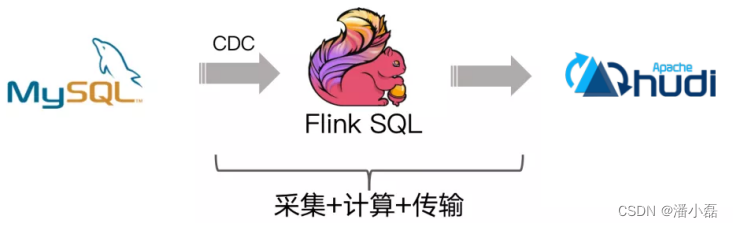
7.3.1 开启MySQL binlog
MySQL CDC,需要首先开启MySQL数据库binlog日志,再重启MySQL数据库服务。
第一步、开启MySQL binlog日志[root@node1 ~]# vim /etc/my.cnf 在[mysqld]下面添加内容: server-id=2 log-bin=mysql-bin binlog_format=row expire_logs_days=15 binlog_row_image=full第二步、重启MySQL Server
service mysqld restart
登录MySQL Client命令行,查看是否生效。
第三步、下载Flink CDC MySQL Jar包
由于使用Flink 1.12.2版本,目前支持Flink CDC 版本:1.3.0,添加maven 依赖:<!-- https://mvnrepository.com/artifact/com.alibaba.ververica/flink-connector-mysql-cdc --> <dependency> <groupId>com.alibaba.ververica</groupId> <artifactId>flink-connector-mysql-cdc</artifactId> <version>1.3.0</version> </dependency>如果使用Flink SQL Client,需要将jar包放到 $FLINK_HOME/lib 目录中:
7.3.2 环境准备
实时数据采集,既可以编写Java程序,又可以直接运行DDL语句。
方式一:启动Flink SQL Client,执行编写DDL语句,Flink Job提交到Standalone集群
– 启动HDFS服务hadoop-daemon.sh start namenode
hadoop-daemon.sh start datanode– 启动Flink Standalone集群
export HADOOP_CLASSPATH=
/export/server/hadoop/bin/hadoop classpath
/export/server/flink/bin/start-cluster.sh– 启动SQL Client
/export/server/flink/bin/sql-client.sh embedded
-j /export/server/flink/lib/hudi-flink-bundle_2.12-0.9.0.jar shell– 设置属性
set execution.result-mode=tableau; set
execution.checkpointing.interval=3sec;
SET execution.runtime-mode =streaming;方式二:使用IDEA创建Maven工程,添加相关依赖,编写程序,执行DDL语句。
依赖pom.xml添内容如下:<repositories> <repository> <id>nexus-aliyun</id> <name>Nexus aliyun</name> <url>http://maven.aliyun.com/nexus/content/groups/public</url> </repository> <repository> <id>central_maven</id> <name>central maven</name> <url>https://repo1.maven.org/maven2</url> </repository> <repository> <id>cloudera</id> <url>https://repository.cloudera.com/artifactory/cloudera-repos/</url> </repository> <repository> <id>apache.snapshots</id> <name>Apache Development Snapshot Repository</name> <url>https://repository.apache.org/content/repositories/snapshots/</url> <releases> <enabled>false</enabled> </releases> <snapshots> <enabled>true</enabled> </snapshots> </repository> </repositories> <properties> <project.build.sourceEncoding>UTF-8</project.build.sourceEncoding> <maven.compiler.source>${java.version}</maven.compiler.source> <maven.compiler.target>${java.version}</maven.compiler.target> <java.version>1.8</java.version> <scala.binary.version>2.12</scala.binary.version> <flink.version>1.12.2</flink.version> <hadoop.version>2.7.3</hadoop.version> <mysql.version>8.0.16</mysql.version> </properties> <dependencies> <!-- Flink Client --> <dependency> <groupId>org.apache.flink</groupId> <artifactId>flink-clients_${scala.binary.version}</artifactId> <version>${flink.version}</version> </dependency> <dependency> <groupId>org.apache.flink</groupId> <artifactId>flink-java</artifactId> <version>${flink.version}</version> </dependency> <dependency> <groupId>org.apache.flink</groupId> <artifactId>flink-streaming-java_${scala.binary.version}</artifactId> <version>${flink.version}</version> </dependency> <dependency> <groupId>org.apache.flink</groupId> <artifactId>flink-runtime-web_${scala.binary.version}</artifactId> <version>${flink.version}</version> </dependency> <!-- Flink Table API & SQL --> <dependency> <groupId>org.apache.flink</groupId> <artifactId>flink-table-common</artifactId> <version>${flink.version}</version> </dependency> <dependency> <groupId>org.apache.flink</groupId> <artifactId>flink-table-planner-blink_${scala.binary.version}</artifactId> <version>${flink.version}</version> </dependency> <dependency> <groupId>org.apache.flink</groupId> <artifactId>flink-table-api-java-bridge_${scala.binary.version}</artifactId> <version>${flink.version}</version> </dependency> <dependency> <groupId>org.apache.flink</groupId> <artifactId>flink-connector-kafka_${scala.binary.version}</artifactId> <version>${flink.version}</version> </dependency> <dependency> <groupId>org.apache.flink</groupId> <artifactId>flink-json</artifactId> <version>${flink.version}</version> </dependency> <dependency> <groupId>org.apache.hudi</groupId> <artifactId>hudi-flink-bundle_${scala.binary.version}</artifactId> <version>0.9.0</version> </dependency> <dependency> <groupId>com.alibaba.ververica</groupId> <artifactId>flink-connector-mysql-cdc</artifactId> <version>1.3.0</version> </dependency> <dependency> <groupId>org.apache.flink</groupId> <artifactId>flink-shaded-hadoop-2-uber</artifactId> <version>2.7.5-10.0</version> </dependency> <!-- MySQL--> <dependency> <groupId>mysql</groupId> <artifactId>mysql-connector-java</artifactId> <version>${mysql.version}</version> </dependency> <!-- slf4j及log4j --> <dependency> <groupId>org.slf4j</groupId> <artifactId>slf4j-log4j12</artifactId> <version>1.7.7</version> <scope>runtime</scope> </dependency> <dependency> <groupId>log4j</groupId> <artifactId>log4j</artifactId> <version>1.2.17</version> <scope>runtime</scope> </dependency> </dependencies> <build> <sourceDirectory>src/main/java</sourceDirectory> <testSourceDirectory>src/test/java</testSourceDirectory> <plugins> <!-- 编译插件 --> <plugin> <groupId>org.apache.maven.plugins</groupId> <artifactId>maven-compiler-plugin</artifactId> <version>3.5.1</version> <configuration> <source>1.8</source> <target>1.8</target> <!--<encoding>${project.build.sourceEncoding}</encoding>--> </configuration> </plugin> <plugin> <groupId>org.apache.maven.plugins</groupId> <artifactId>maven-surefire-plugin</artifactId> <version>2.18.1</version> <configuration> <useFile>false</useFile> <disableXmlReport>true</disableXmlReport> <includes> <include>**/*Test.*</include> <include>**/*Suite.*</include> </includes> </configuration> </plugin> <!-- 打jar包插件(会包含所有依赖) --> <plugin> <groupId>org.apache.maven.plugins</groupId> <artifactId>maven-shade-plugin</artifactId> <version>2.3</version> <executions> <execution> <phase>package</phase> <goals> <goal>shade</goal> </goals> <configuration> <filters> <filter> <artifact>*:*</artifact> <excludes> <exclude>META-INF/*.SF</exclude> <exclude>META-INF/*.DSA</exclude> <exclude>META-INF/*.RSA</exclude> </excludes> </filter> </filters> <transformers> <transformer implementation="org.apache.maven.plugins.shade.resource.ManifestResourceTransformer"> </transformers> </configuration> </execution> </executions> </plugin> </plugins> </build>编写程序,实现数据实时采集同步,主要三个步骤:输入表InputTable、输出表outputTable,查询插入INSERT…SELECT语句,示意图如下:

本次案例,为了更加只管看到效果,启动Flink SQL Client客户端,编写DDL和DML语句,直接执行。7.3.3 实时采集数据
基于Flink CDC 实时采集数据,需要创建输入Input和输出Output两张表,再编写INSERT…SELECT 插入查询语句。

接下来将MySQL数据库5张业务数据表数据,实时采集同步到Hudi表中(存储HDFS文件系统)。7.3.3.1 客户信息表
同步客户信息表【customer】数据到Hudi表中,按照上述步骤编写DDL和DML语句并执行。
第一步、输入表InputTablecreate table tbl_customer_mysql ( id STRING PRIMARY KEY NOT ENFORCED, customer_relationship_id STRING, create_date_time STRING, update_date_time STRING, deleted STRING, name STRING, idcard STRING, birth_year STRING, gender STRING, phone STRING, wechat STRING, qq STRING, email STRING, area STRING, leave_school_date STRING, graduation_date STRING, bxg_student_id STRING, creator STRING, origin_type STRING, origin_channel STRING, tenant STRING, md_id STRING )WITH ( 'connector' = 'mysql-cdc', 'hostname' = 'node1.itcast.cn', 'port' = '3306', 'username' = 'root', 'password' = '123456', 'server-time-zone' = 'Asia/Shanghai', 'debezium.snapshot.mode' = 'initial', 'database-name' = 'itcast_nev', 'table-name' = 'customer' );第二步、输出表OutputTable
CREATE TABLE edu_customer_hudi(
  id STRING PRIMARY KEY NOT ENFORCED,
  customer_relationship_id STRING,
  create_date_time STRING,
  update_date_time STRING,
  deleted STRING,
  name STRING,
  idcard STRING,
  birth_year STRING,
  gender STRING,
  phone STRING,
  wechat STRING,
  qq STRING,
  email STRING,
  area STRING,
  leave_school_date STRING,
  graduation_date STRING,
  bxg_student_id STRING,
  creator STRING,
  origin_type STRING,
  origin_channel STRING,
  tenant STRING,
  md_id STRING,
  part STRING
)
PARTITIONED BY (part)
WITH(
  'connector'='hudi',
  'path'= 'hdfs://node1.itcast.cn:8020/ehualu/hudi-warehouse/edu_customer_hudi',
  'table.type'= 'MERGE_ON_READ',
  'hoodie.datasource.write.recordkey.field'= 'id',
  'write.precombine.field'= 'create_date_time',
  'write.tasks'= '1',
'read.tasks'= '1',
  'write.rate.limit'= '2000',
  'compaction.tasks'= '1',
  'compaction.async.enabled'= 'true',
  'compaction.trigger.strategy'= 'num_commits',
  'compaction.delta_commits'= '1',
  'changelog.enabled'= 'true'
);
第三步、插入查询语句
insert into edu_customer_hudi
select *, CAST(CURRENT_DATE AS STRING) AS part from tbl_customer_mysql;
此时生成Flink job,提交到Standalone集群运行,首先将表中历史数据同步到Hudi表,再实时同步增量数据。

7.3.3.2 客户意向表
同步客户意向表【customer_relationship】数据到Hudi表中,按照上述步骤编写DDL和DML语句并执行。
第一步、输入表InputTablecreate table tbl_customer_relationship_mysql ( id string PRIMARY KEY NOT ENFORCED, create_date_time string, update_date_time string, deleted string, customer_id string, first_id string, belonger string, belonger_name string, initial_belonger string, distribution_handler string, business_scrm_department_id string, last_visit_time string, next_visit_time string, origin_type string, itcast_school_id string, itcast_subject_id string, intention_study_type string, anticipat_signup_date string, `level` string, creator string, current_creator string, creator_name string, origin_channel string, `comment` string, first_customer_clue_id string, last_customer_clue_id string, process_state string, process_time string, payment_state string, payment_time string, signup_state string, signup_time string, notice_state string, notice_time string, lock_state string, lock_time string, itcast_clazz_id string, itcast_clazz_time string, payment_url string, payment_url_time string, ems_student_id string, delete_reason string, deleter string, deleter_name string, delete_time string, course_id string, course_name string, delete_comment string, close_state string, close_time string, appeal_id string, tenant string, total_fee string, belonged string, belonged_time string, belonger_time string, transfer string, transfer_time string, follow_type string, transfer_bxg_oa_account string, transfer_bxg_belonger_name string )WITH( 'connector' = 'mysql-cdc', 'hostname' = 'node1.itcast.cn', 'port' = '3306', 'username' = 'root', 'password' = '123456', 'server-time-zone' = 'Asia/Shanghai', 'debezium.snapshot.mode' = 'initial', 'database-name' = 'itcast_nev', 'table-name' = 'customer_relationship' );第二步、输出表OutputTable
create table edu_customer_relationship_hudi(
  id string PRIMARY KEY NOT ENFORCED,
  create_date_time string,
  update_date_time string,
  deleted string,
  customer_id string,
  first_id string,
  belonger string,
  belonger_name string,
  initial_belonger string,
  distribution_handler string,
  business_scrm_department_id string,
  last_visit_time string,
  next_visit_time string,
  origin_type string,
  itcast_school_id string,
  itcast_subject_id string,
  intention_study_type string,
  anticipat_signup_date string,
  `level` string,
  creator string,
  current_creator string,
  creator_name string,
  origin_channel string,
  `comment` string,
  first_customer_clue_id string,
  last_customer_clue_id string,
  process_state string,
  process_time string,
  payment_state string,
  payment_time string,
  signup_state string,
  signup_time string,
  notice_state string,
  notice_time string,
  lock_state string,
  lock_time string,
  itcast_clazz_id string,
  itcast_clazz_time string,
  payment_url string,
  payment_url_time string,
  ems_student_id string,
  delete_reason string,
  deleter string,
  deleter_name string,
  delete_time string,
  course_id string,
  course_name string,
  delete_comment string,
  close_state string,
  close_time string,
  appeal_id string,
  tenant string,
  total_fee string,
  belonged string,
  belonged_time string,
  belonger_time string,
  transfer string,
  transfer_time string,
  follow_type string,
  transfer_bxg_oa_account string,
  transfer_bxg_belonger_name string,
  part STRING
)
PARTITIONED BY (part)
WITH(
  'connector'='hudi',
  'path'= 'hdfs://node1.itcast.cn:8020/ehualu/hudi-warehouse/edu_customer_relationship_hudi',
  'table.type'= 'MERGE_ON_READ',
  'hoodie.datasource.write.recordkey.field'= 'id',
  'write.precombine.field'= 'create_date_time',
  'write.tasks'= '1',
  'write.rate.limit'= '2000',
  'compaction.tasks'= '1',
  'compaction.async.enabled'= 'true',
  'compaction.trigger.strategy'= 'num_commits',
  'compaction.delta_commits'= '1',
  'changelog.enabled'= 'true'
);
第三步、插入查询语句
insert into edu_customer_relationship_hudi
select *, CAST(CURRENT_DATE AS STRING) AS part from tbl_customer_relationship_mysql;
查看HDFS文件系统,同步全量数据存储Hudi目录:

7.3.3.3 客户线索表
同步客户线索表【customer_clue】数据到Hudi表,按照上述步骤编写DDL和DML语句并执行。
第一步、输入表InputTablecreate table tbl_customer_clue_mysql ( id string PRIMARY KEY NOT ENFORCED, create_date_time string, update_date_time string, deleted string, customer_id string, customer_relationship_id string, session_id string, sid string, status string, `user` string, create_time string, platform string, s_name string, seo_source string, seo_keywords string, ip string, referrer string, from_url string, landing_page_url string, url_title string, to_peer string, manual_time string, begin_time string, reply_msg_count string, total_msg_count string, msg_count string, `comment` string, finish_reason string, finish_user string, end_time string, platform_description string, browser_name string, os_info string, area string, country string, province string, city string, creator string, name string, idcard string, phone string, itcast_school_id string, itcast_school string, itcast_subject_id string, itcast_subject string, wechat string, qq string, email string, gender string, `level` string, origin_type string, information_way string, working_years string, technical_directions string, customer_state string, valid string, anticipat_signup_date string, clue_state string, scrm_department_id string, superior_url string, superior_source string, landing_url string, landing_source string, info_url string, info_source string, origin_channel string, course_id string, course_name string, zhuge_session_id string, is_repeat string, tenant string, activity_id string, activity_name string, follow_type string, shunt_mode_id string, shunt_employee_group_id string )WITH( 'connector' = 'mysql-cdc', 'hostname' = 'node1.itcast.cn', 'port' = '3306', 'username' = 'root', 'password' = '123456', 'server-time-zone' = 'Asia/Shanghai', 'debezium.snapshot.mode' = 'initial', 'database-name' = 'itcast_nev', 'table-name' = 'customer_clue' );第二步、输出表OutputTable
create table edu_customer_clue_hudi (
  id string PRIMARY KEY NOT ENFORCED,
  create_date_time string,
  update_date_time string,
  deleted string,
  customer_id string,
  customer_relationship_id string,
  session_id string,
  sid string,
  status string,
  `user` string,
  create_time string,
  platform string,
  s_name string,
  seo_source string,
  seo_keywords string,
  ip string,
  referrer string,
  from_url string,
  landing_page_url string,
  url_title string,
  to_peer string,
  manual_time string,
  begin_time string,
  reply_msg_count string,
  total_msg_count string,
  msg_count string,
  `comment` string,
  finish_reason string,
  finish_user string,
  end_time string,
  platform_description string,
  browser_name string,
  os_info string,
  area string,
  country string,
  province string,
  city string,
  creator string,
  name string,
  idcard string,
  phone string,
  itcast_school_id string,
  itcast_school string,
  itcast_subject_id string,
  itcast_subject string,
  wechat string,
  qq string,
  email string,
  gender string,
  `level` string,
  origin_type string,
  information_way string,
  working_years string,
  technical_directions string,
  customer_state string,
  valid string,
  anticipat_signup_date string,
  clue_state string,
  scrm_department_id string,
  superior_url string,
  superior_source string,
  landing_url string,
  landing_source string,
  info_url string,
  info_source string,
  origin_channel string,
  course_id string,
  course_name string,
  zhuge_session_id string,
  is_repeat string,
  tenant string,
  activity_id string,
  activity_name string,
  follow_type string,
  shunt_mode_id string,
  shunt_employee_group_id string,
  part STRING
)
PARTITIONED BY (part)
WITH(
  'connector'='hudi',
  'path'= 'hdfs://node1.itcast.cn:8020/ehualu/hudi-warehouse/edu_customer_clue_hudi',
  'table.type'= 'MERGE_ON_READ',
  'hoodie.datasource.write.recordkey.field'= 'id',
  'write.precombine.field'= 'create_date_time',
  'write.tasks'= '1',
  'write.rate.limit'= '2000',
  'compaction.tasks'= '1',
  'compaction.async.enabled'= 'true',
  'compaction.trigger.strategy'= 'num_commits',
  'compaction.delta_commits'= '1',
  'changelog.enabled'= 'true'
);
第三步、插入查询语句
insert into edu_customer_clue_hudi
select *, CAST(CURRENT_DATE AS STRING) AS part from tbl_customer_clue_mysql;
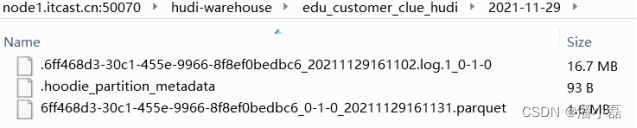
查看HDFS文件系统,同步全量数据存储Hudi目录:
7.3.3.4 客户申诉表
同步客户申诉表【customer_appeal】数据到Hudi表,按照上述步骤编写DDL和DML语句执行。
第一步、输入表InputTablecreate table tbl_customer_appeal_mysql ( id string PRIMARY KEY NOT ENFORCED, customer_relationship_first_id string, employee_id string, employee_name string, employee_department_id string, employee_tdepart_id string, appeal_status string, audit_id string, audit_name string, audit_department_id string, audit_department_name string, audit_date_time string, create_date_time string, update_date_time string, deleted string, tenant string )WITH ( 'connector' = 'mysql-cdc', 'hostname' = 'node1.itcast.cn', 'port' = '3306', 'username' = 'root', 'password' = '123456', 'server-time-zone' = 'Asia/Shanghai', 'debezium.snapshot.mode' = 'initial', 'database-name' = 'itcast_nev', 'table-name' = 'customer_appeal' );第二步、输出表OutputTable
create table edu_customer_appeal_hudi (
  id string PRIMARY KEY NOT ENFORCED,
  customer_relationship_first_id STRING,
  employee_id STRING,
  employee_name STRING,
  employee_department_id STRING,
  employee_tdepart_id STRING,
  appeal_status STRING,
  audit_id STRING,
  audit_name STRING,
  audit_department_id STRING,
  audit_department_name STRING,
  audit_date_time STRING,
  create_date_time STRING,
  update_date_time STRING,
  deleted STRING,
  tenant STRING,
  part STRING
)
PARTITIONED BY (part)
WITH(
  'connector'='hudi',
  'path'= 'hdfs://node1.itcast.cn:8020/ehualu/hudi-warehouse/edu_customer_appeal_hudi',
  'table.type'= 'MERGE_ON_READ',
  'hoodie.datasource.write.recordkey.field'= 'id',
  'write.precombine.field'= 'create_date_time',
  'write.tasks'= '1',
  'write.rate.limit'= '2000',
  'compaction.tasks'= '1',
  'compaction.async.enabled'= 'true',
  'compaction.trigger.strategy'= 'num_commits',
  'compaction.delta_commits'= '1',
  'changelog.enabled'= 'true'
);
第三步、插入查询语句
insert into edu_customer_appeal_hudi
select *, CAST(CURRENT_DATE AS STRING) AS part from tbl_customer_appeal_mysql;
查看HDFS文件系统,同步全量数据存储Hudi目录:

7.3.3.5 客户访问咨询记录表
同步客服访问咨询记录表【web_chat_ems】数据到Hudi表中,按照上述步骤编写DDL和DML语句并执行。
第一步、输入表InputTablecreate table tbl_web_chat_ems_mysql ( id string PRIMARY KEY NOT ENFORCED, create_date_time string, session_id string, sid string, create_time string, seo_source string, seo_keywords string, ip string, area string, country string, province string, city string, origin_channel string, `user` string, manual_time string, begin_time string, end_time string, last_customer_msg_time_stamp string, last_agent_msg_time_stamp string, reply_msg_count string, msg_count string, browser_name string, os_info string )WITH( 'connector' = 'mysql-cdc', 'hostname' = 'node1.itcast.cn', 'port' = '3306', 'username' = 'root', 'password' = '123456', 'server-time-zone' = 'Asia/Shanghai', 'debezium.snapshot.mode' = 'initial', 'database-name' = 'itcast_nev', 'table-name' = 'web_chat_ems' );第二步、输出表OutputTable
create table edu_web_chat_ems_hudi (
  id string PRIMARY KEY NOT ENFORCED,
  create_date_time string,
  session_id string,
  sid string,
  create_time string,
  seo_source string,
  seo_keywords string,
  ip string,
  area string,
  country string,
  province string,
  city string,
  origin_channel string,
  `user` string,
  manual_time string,
  begin_time string,
  end_time string,
  last_customer_msg_time_stamp string,
  last_agent_msg_time_stamp string,
  reply_msg_count string,
  msg_count string,
  browser_name string,
  os_info string,
  part STRING
)
PARTITIONED BY (part)
WITH(
  'connector'='hudi',
  'path'= 'hdfs://node1.itcast.cn:8020/ehualu/hudi-warehouse/edu_web_chat_ems_hudi',
  'table.type'= 'MERGE_ON_READ',
  'hoodie.datasource.write.recordkey.field'= 'id',
  'write.precombine.field'= 'create_date_time',
  'write.tasks'= '1',
  'write.rate.limit'= '2000',
  'compaction.tasks'= '1',
  'compaction.async.enabled'= 'true',
  'compaction.trigger.strategy'= 'num_commits',
  'compaction.delta_commits'= '1',
  'changelog.enabled'= 'true'
);
第三步、插入查询语句
insert into edu_web_chat_ems_hudi
select *, CAST(CURRENT_DATE AS STRING) AS part from tbl_web_chat_ems_mysql;
查看HDFS文件系统,同步全量数据存储Hudi目录:
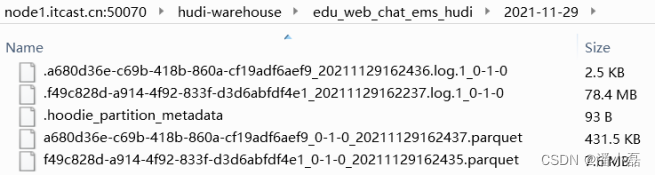
采集同步到Hudi表中,此时5个Flink job依然在Standalone集群上运行,如果各个表中有业务数据产生,同样实时获取,存储到Hudi表中

7.4 Presto 即席分析
使用Presto 分析Hudi表数据,最终将结果直接存储到MySQL数据库表中,示意图如下。

第一、Hive 中创建表,关联Hudi表
第二、Presto集成Hive,加载Hive表数据
第三、Presto集成MySQL,读取或者保存数据7.4.1 Presto 是什么
Presto是一款Facebook开源的MPP架构的OLAP查询引擎,可针对不同数据源执行大容量数据集的一款分布式SQL执行引擎。适用于交互式分析查询,数据量支持GB到PB字节。
1、清晰的架构,是一个能够独立运行的系统,不依赖于任何其他外部系统。例如调度,presto自身提供了对集群的监控,可以根据监控信息完成调度。
2、简单的数据结构,列式存储,逻辑行,大部分数据都可以轻易的转化成presto所需要的这种数据结构。
3、丰富的插件接口,完美对接外部存储系统,或者添加自定义的函数。

Presto采用典型的master-slave模型,由一个Coordinator节点,一个Discovery Server节点,多个Worker节点组成,Discovery Server通常内嵌于Coordinator节点中。
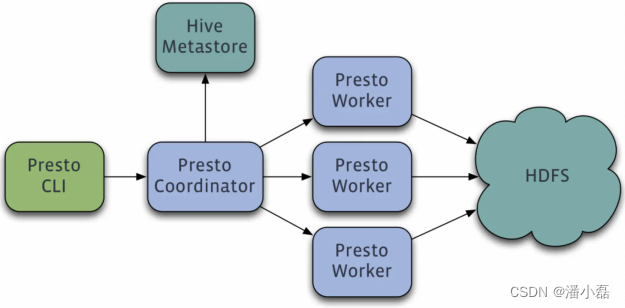
1、coordinator(master)负责meta管理,worker管理,query的解析和调度
2、worker则负责计算和读写
3、discovery server, 通常内嵌于coordinator节点中,也可以单独部署,用于节点心跳。在下文中,默认discovery和coordinator共享一台机器。
Presto 数据模型:采取三层表结构
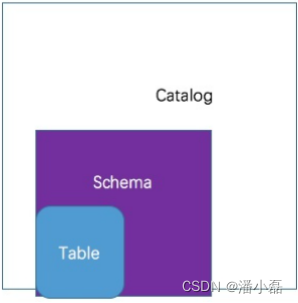
1、catalog 对应某一类数据源,例如hive的数据,或mysql的数据
2、schema 对应mysql中的数据库
3、table 对应mysql中的表7.4.2 Presto 安装部署
采用单节点部署安装Presto,服务器名称:node1.itcast.cn,IP地址:192.168.88.100。
1、JDK8安装java -version
2、上传解压Presto安装包
创建安装目录mkdir -p /export/serveryum安装上传文件插件lrzsz
yum install -y lrzsz
上传安装包到node1的/export/server目录
presto-server-0.245.1.tar.gz解压、重命名
tar -xzvf presto-server-0.245.1.tar.gz -C /export/server
ln -s presto-server-0.245.1 presto
创建配置文件存储目录
mkdir -p /export/server/presto/etc3、配置presto
etc/config.properties
vim /export/server/presto/etc/config.properties
内容:
coordinator=true
node-scheduler.include-coordinator=true
http-server.http.port=8090
query.max-memory=6GB
query.max-memory-per-node=2GB
query.max-total-memory-per-node=2GB
discovery-server.enabled=true
discovery.uri=http://192.168.88.100:8090
etc/jvm.config
vim /export/server/presto/etc/jvm.config
内容:
-server
-Xmx3G
-XX:+UseG1GC
-XX:G1HeapRegionSize=32M
-XX:+UseGCOverheadLimit
-XX:+ExplicitGCInvokesConcurrent
-XX:+HeapDumpOnOutOfMemoryError
-XX:+ExitOnOutOfMemoryError
etc/node.properties
vim /export/server/presto/etc/node.properties 内容: node.environment=hudipresto node.id=presto-node1 node.data-dir=/export/server/presto/dataetc/catalog/hive.properties mkdir -p /export/server/presto/etc/catalog vim /export/server/presto/etc/catalog/hive.properties 内容: connector.name=hive-hadoop2 hive.metastore.uri=thrift://192.168.88.100:9083 hive.parquet.use-column-names=true hive.config.resources=/export/server/presto/etc/catalog/core-site.xml,/export/server/presto/etc/catalog/hdfs-site.xmletc/catalog/mysql.properties vim /export/server/presto/etc/catalog/mysql.properties 内容: connector.name=mysql connection-url=jdbc:mysql://node1.itcast.cn:3306 connection-user=root connection-password=1234564、启动服务
进入Presto安装目录,执行 $PRESTO_HOME/bin中脚本/export/server/presto/bin/launcher start使用jps查看进程是否存在,进程名称:PrestoServer。
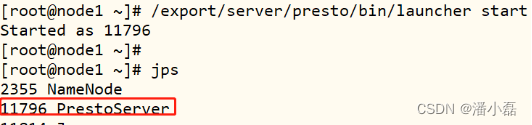
此外WEB UI界面:http://192.168.88.100:8090/ui/
Presto CLI命令行客户端
下载CLI客户端presto-cli-0.241-executable.jar上传presto-cli-0.245.1-executable.jar到/export/server/presto/bin
mv presto-cli-0.245.1-executable.jar presto
chmod +x presto
CLI客户端启动
/export/server/presto/bin/presto --server 192.168.88.100:80907.4.3 Hive 创建表
为了让Presto分析Hudi表中数据,需要将Hudi表映射关联到Hive表中。接下来,再Hive中创建5张传智教育客户业务数据表,映射关联到Hudi表。
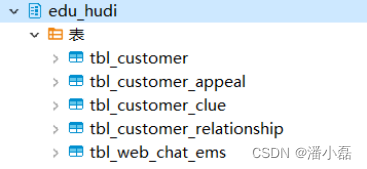
启动HDFS服务、HiveMetaStore和HiveServer服务,运行Beeline命令行:-- 启动HDFS服务 hadoop-daemon.sh start namenode hadoop-daemon.sh start datanode -- Hive服务 /export/server/hive/bin/start-metastore.sh /export/server/hive/bin/start-hiveserver2.sh -- 启动Beeline客户端 /export/server/hive/bin/beeline -u jdbc:hive2://node1.itcast.cn:10000 -n root -p 123456设置Hive本地模式,方便测试使用:
-- 设置Hive本地模式
set hive.exec.mode.local.auto=true;
set hive.exec.mode.local.auto.tasks.max=10;
set hive.exec.mode.local.auto.inputbytes.max=50000000;
7.4.3.1 创建数据库
-- 创建数据库
CREATE DATABASE IF NOT EXISTS edu_hudi ;
-- 使用数据库
USE edu_hudi ;
7.4.3.2 客户信息表
编写DDL语句创建表:
CREATE EXTERNAL TABLE edu_hudi.tbl_customer(
  id string,
  customer_relationship_id string,
  create_date_time string,
  update_date_time string,
  deleted string,
  name string,
  idcard string,
  birth_year string,
  gender string,
  phone string,
  wechat string,
  qq string,
  email string,
  area string,
  leave_school_date string,
  graduation_date string,
  bxg_student_id string,
  creator string,
  origin_type string,
  origin_channel string,
  tenant string,
  md_id string
)PARTITIONED BY (day_str string)
ROW FORMAT SERDE
  'org.apache.hadoop.hive.ql.io.parquet.serde.ParquetHiveSerDe'
STORED AS INPUTFORMAT
  'org.apache.hudi.hadoop.HoodieParquetInputFormat'
OUTPUTFORMAT
  'org.apache.hadoop.hive.ql.io.parquet.MapredParquetOutputFormat'
LOCATION
  '/ehualu/hudi-warehouse/edu_customer_hudi' ;
由于是分区表,所以添加分区:
ALTER TABLE edu_hudi.tbl_customer ADD IF NOT EXISTS PARTITION(day_str='2022-09-23')
location '/ehualu/hudi-warehouse/edu_customer_hudi/2022-09-23' ;
7.4.3.3 客户意向表
编写DDL语句创建表:
CREATE EXTERNAL TABLE edu_hudi.tbl_customer_relationship(
  id string,
  create_date_time string,
  update_date_time string,
  deleted string,
  customer_id string,
  first_id string,
  belonger string,
  belonger_name string,
  initial_belonger string,
  distribution_handler string,
  business_scrm_department_id string,
  last_visit_time string,
  next_visit_time string,
  origin_type string,
  itcast_school_id string,
  itcast_subject_id string,
  intention_study_type string,
  anticipat_signup_date string,
  `level` string,
  creator string,
  current_creator string,
  creator_name string,
  origin_channel string,
  `comment` string,
  first_customer_clue_id string,
  last_customer_clue_id string,
  process_state string,
  process_time string,
  payment_state string,
  payment_time string,
  signup_state string,
  signup_time string,
  notice_state string,
  notice_time string,
  lock_state string,
  lock_time string,
  itcast_clazz_id string,
  itcast_clazz_time string,
  payment_url string,
  payment_url_time string,
  ems_student_id string,
  delete_reason string,
  deleter string,
  deleter_name string,
  delete_time string,
  course_id string,
  course_name string,
  delete_comment string,
  close_state string,
  close_time string,
  appeal_id string,
  tenant string,
  total_fee string,
  belonged string,
  belonged_time string,
  belonger_time string,
  transfer string,
  transfer_time string,
  follow_type string,
  transfer_bxg_oa_account string,
  transfer_bxg_belonger_name string
)PARTITIONED BY (day_str string)
ROW FORMAT SERDE
  'org.apache.hadoop.hive.ql.io.parquet.serde.ParquetHiveSerDe'
STORED AS INPUTFORMAT
  'org.apache.hudi.hadoop.HoodieParquetInputFormat'
OUTPUTFORMAT
  'org.apache.hadoop.hive.ql.io.parquet.MapredParquetOutputFormat'
LOCATION
  '/ehualu/hudi-warehouse/edu_customer_relationship_hudi' ;
由于是分区表,所以添加分区:
ALTER TABLE edu_hudi.tbl_customer_relationship ADD IF NOT EXISTS PARTITION(day_str='2022-09-23')
location '/ehualu/hudi-warehouse/edu_customer_relationship_hudi/2022-09-23' ;
7.4.3.4 客户线索表
编写DDL语句创建表:
CREATE EXTERNAL TABLE edu_hudi.tbl_customer_clue(
  id string,
  create_date_time string,
  update_date_time string,
  deleted string,
  customer_id string,
  customer_relationship_id string,
  session_id string,
  sid string,
  status string,
  `user` string,
  create_time string,
  platform string,
  s_name string,
  seo_source string,
  seo_keywords string,
  ip string,
  referrer string,
  from_url string,
  landing_page_url string,
  url_title string,
  to_peer string,
  manual_time string,
  begin_time string,
  reply_msg_count string,
  total_msg_count string,
  msg_count string,
  `comment` string,
  finish_reason string,
  finish_user string,
  end_time string,
  platform_description string,
  browser_name string,
  os_info string,
  area string,
  country string,
  province string,
  city string,
  creator string,
  name string,
  idcard string,
  phone string,
  itcast_school_id string,
  itcast_school string,
  itcast_subject_id string,
  itcast_subject string,
  wechat string,
  qq string,
  email string,
  gender string,
  `level` string,
  origin_type string,
  information_way string,
  working_years string,
  technical_directions string,
  customer_state string,
  valid string,
  anticipat_signup_date string,
  clue_state string,
  scrm_department_id string,
  superior_url string,
  superior_source string,
  landing_url string,
  landing_source string,
  info_url string,
  info_source string,
  origin_channel string,
  course_id string,
  course_name string,
  zhuge_session_id string,
  is_repeat string,
  tenant string,
  activity_id string,
  activity_name string,
  follow_type string,
  shunt_mode_id string,
  shunt_employee_group_id string
)
PARTITIONED BY (day_str string)
ROW FORMAT SERDE
  'org.apache.hadoop.hive.ql.io.parquet.serde.ParquetHiveSerDe'
STORED AS INPUTFORMAT
  'org.apache.hudi.hadoop.HoodieParquetInputFormat'
OUTPUTFORMAT
  'org.apache.hadoop.hive.ql.io.parquet.MapredParquetOutputFormat'
LOCATION
  '/ehualu/hudi-warehouse/edu_customer_clue_hudi' ;
由于是分区表,所以添加分区:
ALTER TABLE edu_hudi.tbl_customer_clue ADD IF NOT EXISTS PARTITION(day_str='2022-09-23')
location '/ehualu/hudi-warehouse/edu_customer_clue_hudi/2022-09-23' ;
7.4.3.5 客户申诉表
编写DDL语句创建表:
CREATE EXTERNAL TABLE edu_hudi.tbl_customer_appeal(
  id string,
  customer_relationship_first_id STRING,
  employee_id STRING,
  employee_name STRING,
  employee_department_id STRING,
  employee_tdepart_id STRING,
  appeal_status STRING,
  audit_id STRING,
  audit_name STRING,
  audit_department_id STRING,
  audit_department_name STRING,
  audit_date_time STRING,
  create_date_time STRING,
  update_date_time STRING,
  deleted STRING,
  tenant STRING
)
PARTITIONED BY (day_str string)
ROW FORMAT SERDE
  'org.apache.hadoop.hive.ql.io.parquet.serde.ParquetHiveSerDe'
STORED AS INPUTFORMAT
  'org.apache.hudi.hadoop.HoodieParquetInputFormat'
OUTPUTFORMAT
  'org.apache.hadoop.hive.ql.io.parquet.MapredParquetOutputFormat'
LOCATION
  '/ehualu/hudi-warehouse/edu_customer_appeal_hudi' ;
由于是分区表,所以添加分区:
ALTER TABLE edu_hudi.tbl_customer_appeal ADD IF NOT EXISTS PARTITION(day_str='2022-09-23')
location '/ehualu/hudi-warehouse/edu_customer_appeal_hudi/2022-09-23' ;
7.4.3.6 客户访问咨询记录表
编写DDL语句创建表:
CREATE EXTERNAL TABLE edu_hudi.tbl_web_chat_ems (
  id string,
  create_date_time string,
  session_id string,
  sid string,
  create_time string,
  seo_source string,
  seo_keywords string,
  ip string,
  area string,
  country string,
  province string,
  city string,
  origin_channel string,
  `user` string,
  manual_time string,
  begin_time string,
  end_time string,
  last_customer_msg_time_stamp string,
  last_agent_msg_time_stamp string,
  reply_msg_count string,
  msg_count string,
  browser_name string,
  os_info string
)
PARTITIONED BY (day_str string)
ROW FORMAT SERDE
  'org.apache.hadoop.hive.ql.io.parquet.serde.ParquetHiveSerDe'
STORED AS INPUTFORMAT
  'org.apache.hudi.hadoop.HoodieParquetInputFormat'
OUTPUTFORMAT
  'org.apache.hadoop.hive.ql.io.parquet.MapredParquetOutputFormat'
LOCATION
  '/ehualu/hudi-warehouse/edu_web_chat_ems_hudi' ;
由于是分区表,所以添加分区:
ALTER TABLE edu_hudi.tbl_web_chat_ems ADD IF NOT EXISTS PARTITION(day_str='2022-09-23')
location '/ehualu/hudi-warehouse/edu_web_chat_ems_hudi/2022-09-23' ;
7.4.4 离线指标分析
使用Presto分析Hudi表数据,需要将集成jar包:hudi-presto-bundle-0.9.0.jar,放入到Presto插件目录:/export/server/presto/plugin/hive-hadoop2中:

启动Presto Client 客户端命令行,查看Hive中创建数据库:
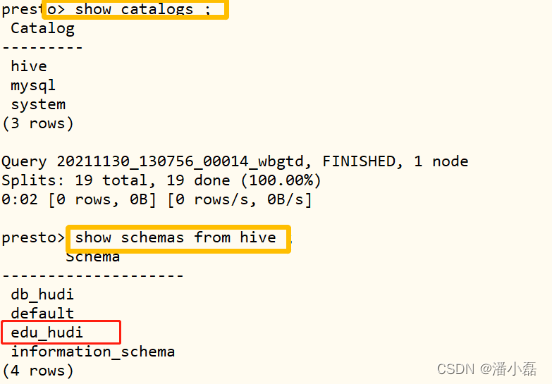
使用数据库:edu_hudi,查看有哪些表:
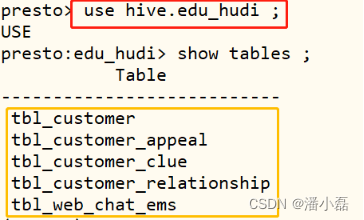
接下来,按照业务指标需求,使用Presto,分析Hudi表数据,将指标直接保存MySQL数据库。

首先在MySQL数据库中,创建database,专门存储分析指标表:-- 创建数据库 CREATE DATABASE `itcast_rpt` /*!40100 DEFAULT CHARACTER SET utf8 */;7.4.4.1 每日报名量
对客户意向表数据统计分析:每日客户报名量,先创建MySQL表,再编写SQL,最后保存数据。
MySQL表:itcast_rpt.stu_applyCREATE TABLE IF NOT EXISTS `itcast_rpt`.`stu_apply` ( `report_date` longtext, `report_total` bigint(20) NOT NULL ) ENGINE=InnoDB DEFAULT CHARSET=utf8;指标SQL语句:
WITH tmp AS (
  SELECT
    format_datetime(from_unixtime(cast(payment_time as bigint) / 1000),'yyyy-MM-dd')AS day_value, customer_id
  FROM hive.edu_hudi.tbl_customer_relationship
  WHERE
    day_str = '2022-09-23' AND payment_time IS NOT NULL AND payment_state = 'PAID' AND deleted = 'false'
)
SELECT day_value, COUNT(customer_id) AS total FROM tmp GROUP BY day_value ;
分析结果保存MySQL表:
INSERT INTO mysql.itcast_rpt.stu_apply (report_date, report_total)
SELECT day_value, total FROM (
  SELECT day_value, COUNT(customer_id) AS total FROM (
    SELECT
      format_datetime(from_unixtime(cast(payment_time as bigint) / 1000), 'yyyy-MM-dd')AS day_value, customer_id
    FROM hive.edu_hudi.tbl_customer_relationship
    WHERE day_str = '2022-09-23' AND payment_time IS NOT NULL AND payment_state = 'PAID' AND deleted = 'false'
  ) GROUP BY day_value
) ;
查看数据库表中数据:

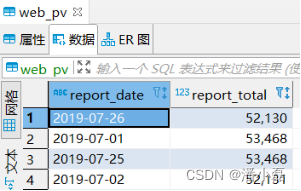
7.4.4.2 每日访问量
对客户意向表数据统计分析:每日客户访问量,先创建MySQL表,再编写SQL,最后保存数据。
MySQL表:itcast_rpt.web_pvCREATE TABLE IF NOT EXISTS `itcast_rpt`.`web_pv` ( `report_date` longtext, `report_total` bigint(20) NOT NULL ) ENGINE=InnoDB DEFAULT CHARSET=utf8; 指标SQL语句: WITH tmp AS ( SELECT id, format_datetime(from_unixtime(cast(create_time as bigint) / 1000), 'yyyy-MM-dd')AS day_value FROM hive.edu_hudi.tbl_web_chat_ems WHERE day_str = '2022-09-23' ) SELECT day_value, COUNT(id) AS total FROM tmp GROUP BY day_value ;分析结果保存MySQL表:
INSERT INTO mysql.itcast_rpt.web_pv (report_date, report_total)
SELECT day_value, COUNT(id) AS total FROM (
  SELECT
    id, format_datetime(from_unixtime(cast(create_time as bigint) / 1000), 'yyyy-MM-dd') AS day_value
  FROM hive.edu_hudi.tbl_web_chat_ems
  WHERE day_str = '2022-09-23'
) GROUP BY day_value ;
查看数据库表中数据:
7.4.4.3 每日意向数
对客户意向表数据统计分析:每日客户意向数,先创建MySQL表,再编写SQL,最后保存数据。
MySQL表:itcast_rpt.stu_intentionCREATE TABLE IF NOT EXISTS `itcast_rpt`.`stu_intention` ( `report_date` longtext, `report_total` bigint(20) NOT NULL ) ENGINE=InnoDB DEFAULT CHARSET=utf8;指标SQL语句:
WITH tmp AS (
  SELECT
    id, format_datetime(from_unixtime(cast(create_date_time as bigint) / 1000), 'yyyy-MM-dd')AS day_value
  FROM hive.edu_hudi.tbl_customer_relationship
  WHERE day_str = '2022-09-23' AND create_date_time IS NOT NULL AND deleted = 'false'
)
SELECT day_value, COUNT(id) AS total FROM tmp GROUP BY day_value ;
分析结果保存MySQL表:
INSERT INTO mysql.itcast_rpt.stu_intention (report_date, report_total)
SELECT day_value, COUNT(id) AS total FROM (
  SELECT
    id, format_datetime(from_unixtime(cast(create_date_time as bigint) / 1000), 'yyyy-MM-dd')AS day_value
  FROM hive.edu_hudi.tbl_customer_relationship
  WHERE day_str = '2022-09-23' AND create_date_time IS NOT NULL AND deleted = 'false'
) GROUP BY day_value ;
查看数据库表中数据:

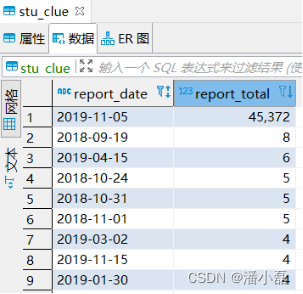
7.4.4.4 每日线索量
对客户意向表数据统计分析:每日客户线索量,先创建MySQL表,再编写SQL,最后保存数据。
MySQL表:itcast_rpt.stu_clueCREATE TABLE IF NOT EXISTS `itcast_rpt`.`stu_clue` ( `report_date` longtext, `report_total` bigint(20) NOT NULL ) ENGINE=InnoDB DEFAULT CHARSET=utf8;指标SQL语句:
WITH tmp AS (
  SELECT
    id, format_datetime(from_unixtime(cast(create_date_time as bigint) / 1000), 'yyyy-MM-dd')AS day_value
  FROM hive.edu_hudi.tbl_customer_clue
  WHERE day_str = '2022-09-23' AND clue_state IS NOT NULL AND deleted = 'false'
)
SELECT day_value, COUNT(id) AS total FROM tmp GROUP BY day_value ;
分析结果保存MySQL表:
INSERT INTO mysql.itcast_rpt.stu_clue (report_date, report_total)
SELECT day_value, COUNT(id) AS total FROM (
  SELECT
    id, format_datetime(from_unixtime(cast(create_date_time as bigint) / 1000), 'yyyy-MM-dd')AS day_value
  FROM hive.edu_hudi.tbl_customer_clue
  WHERE day_str = '2022-09-23' AND clue_state IS NOT NULL AND deleted = 'false'
) GROUP BY day_value ;
查看数据库表中数据:
7.5 Flink SQL 流式分析
使用Flink SQL流式查询Hudi表今日实时数据,统计离线指标对应今日实时指标,最后使用FineBI实时大屏展示。

基于Flink SQL Connector与Hudi和MySQL集成,编写SQL流式查询分析,在SQL Clientk客户端命令行执行DDL语句和SELECT语句。7.5.1 业务需求
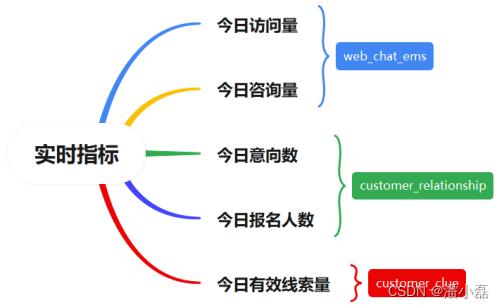
总共有5个指标,涉及到3张业务表:客户访问记录表、客户线索表和客户意向表,其中每个指标实时数据存储到MySQL数据库中一张表。

每个实时指标统计,分为三个步骤:
第1步、创建输入表,流式加载Hudi表数据;
第2步、创建输出表,实时保存数据至MySQL表;
第3步、依据业务,编写SQL语句,查询输入表数据,并将结果插入输出表;

7.5.2 创建MySQL表
每个实时指标存储到MySQL数据库一张表,首先创建5个指标对应的5张表,名称不一样,字段一样,DDL语句如下:
指标1:今日访问量CREATE TABLE `itcast_rpt`.`realtime_web_pv` ( `report_date` varchar(255) NOT NULL, `report_total` bigint(20) NOT NULL, PRIMARY KEY (`report_date`) ) ENGINE=InnoDB DEFAULT CHARSET=utf8;指标2:今日咨询量
CREATE TABLE `itcast_rpt`.`realtime_stu_consult` (
  `report_date` varchar(255) NOT NULL,
  `report_total` bigint(20) NOT NULL,
  PRIMARY KEY (`report_date`)
) ENGINE=InnoDB DEFAULT CHARSET=utf8;
指标3:今日意向数
CREATE TABLE `itcast_rpt`.`realtime_stu_intention` (
  `report_date` varchar(255) NOT NULL,
  `report_total` bigint(20) NOT NULL,
  PRIMARY KEY (`report_date`)
) ENGINE=InnoDB DEFAULT CHARSET=utf8;
指标4:今日报名人数
CREATE TABLE `itcast_rpt`.`realtime_stu_apply` (
  `report_date` varchar(255) NOT NULL,
  `report_total` bigint(20) NOT NULL,
  PRIMARY KEY (`report_date`)
) ENGINE=InnoDB DEFAULT CHARSET=utf8;
指标5:今日有效线索量
CREATE TABLE `itcast_rpt`.`realtime_stu_clue` (
  `report_date` varchar(255) NOT NULL,
  `report_total` bigint(20) NOT NULL,
  PRIMARY KEY (`report_date`)
) ENGINE=InnoDB DEFAULT CHARSET=utf8;
7.5.3 实时指标分析
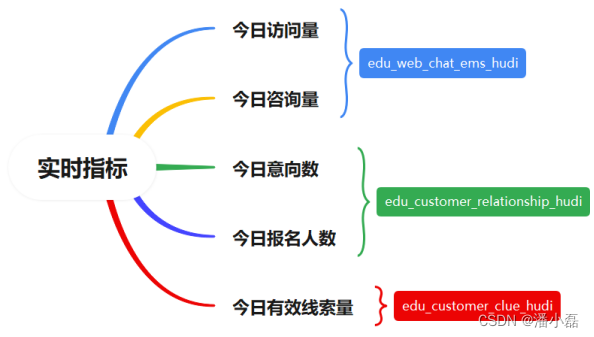
1、今日访问量和今日咨询量,流式加载表:edu_web_chat_ems_hudi 数据

今日意向数和今日报名人数,流式加载表:edu_customer_relationship_hudi 数据

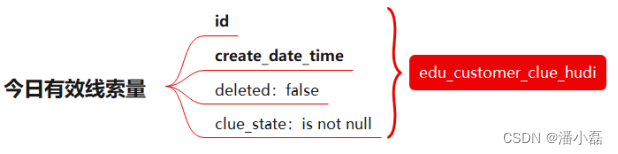
3、今日有效线索量,流式加载表:edu_customer_clue_hudi 数据
启动HDFS服务和Standalone集群,运行SQL Client客户端,设置属性:-- 启动HDFS服务 hadoop-daemon.sh start namenode hadoop-daemon.sh start datanode -- 启动Flink Standalone集群 export HADOOP_CLASSPATH=`/export/server/hadoop/bin/hadoop classpath` /export/server/flink/bin/start-cluster.sh -- 启动SQL Client /export/server/flink/bin/sql-client.sh embedded \ -j /export/server/flink/lib/hudi-flink-bundle_2.12-0.9.0.jar shell -- 设置属性 set execution.result-mode=tableau; set execution.checkpointing.interval=3sec; -- 流处理模式 SET execution.runtime-mode = streaming;7.5.3.1 今日访问量
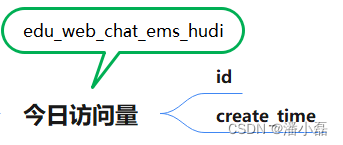
首先创建输入表:流式加载,Hudi表数据:CREATE TABLE edu_web_chat_ems_hudi ( id string PRIMARY KEY NOT ENFORCED, create_date_time string, session_id string, sid string, create_time string, seo_source string, seo_keywords string, ip string, area string, country string, province string, city string, origin_channel string, `user` string, manual_time string, begin_time string, end_time string, last_customer_msg_time_stamp string, last_agent_msg_time_stamp string, reply_msg_count string, msg_count string, browser_name string, os_info string, part STRING ) PARTITIONED BY (part) WITH( 'connector'='hudi', 'path'= 'hdfs://node1.itcast.cn:8020/ehualu/hudi-warehouse/edu_web_chat_ems_hudi', 'table.type'= 'MERGE_ON_READ', 'hoodie.datasource.write.recordkey.field'= 'id', 'write.precombine.field'= 'create_date_time', 'read.streaming.enabled' = 'true', 'read.streaming.check-interval' = '5', 'read.tasks' = '1' );统计结果,存储至视图View:
CREATE VIEW IF NOT EXISTS view_tmp_web_pv AS
SELECT day_value, COUNT(id) AS total FROM (
  SELECT
    FROM_UNIXTIME(CAST(create_time AS BIGINT) / 1000, 'yyyy-MM-dd') AS day_value, id
  FROM edu_web_chat_ems_hudi
  WHERE part = CAST(CURRENT_DATE AS STRING)
) GROUP BY  day_value;
保存MySQL数据库:
– SQL Connector MySQLCREATE TABLE realtime_web_pv_mysql ( report_date STRING, report_total BIGINT, PRIMARY KEY (report_date) NOT ENFORCED ) WITH ( 'connector' = 'jdbc', 'url' = 'jdbc:mysql://node1.itcast.cn:3306/itcast_rpt', 'driver' = 'com.mysql.cj.jdbc.Driver', 'username' = 'root', 'password' = '123456', 'table-name' = 'realtime_web_pv' );– INSERT INTO 插入
INSERT INTO realtime_web_pv_mysql SELECT day_value, total FROM view_tmp_web_pv;7.5.3.2 今日咨询量
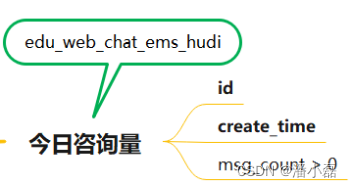
由于今日访问量与今日咨询量,都是查询Hudi中表:edu_web_chat_emes_hudi,所以前面流式加载增量加载数据以后,此处就不需要。
统计结果,存储至视图View:CREATE VIEW IF NOT EXISTS view_tmp_stu_consult AS SELECT day_value, COUNT(id) AS total FROM ( SELECT FROM_UNIXTIME(CAST(create_time AS BIGINT) / 1000, 'yyyy-MM-dd') AS day_value, id FROM edu_web_chat_ems_hudi WHERE part = CAST(CURRENT_DATE AS STRING) AND msg_count > 0 ) GROUP BY day_value;保存MySQL数据库:
– SQL Connector MySQLCREATE TABLE realtime_stu_consult_mysql ( report_date STRING, report_total BIGINT, PRIMARY KEY (report_date) NOT ENFORCED ) WITH ( 'connector' = 'jdbc', 'url' = 'jdbc:mysql://node1.itcast.cn:3306/itcast_rpt', 'driver' = 'com.mysql.cj.jdbc.Driver', 'username' = 'root', 'password' = '123456', 'table-name' = 'realtime_stu_consult' );– INSERT INTO 插入
INSERT INTO realtime_stu_consult_mysql SELECT day_value, total FROM view_tmp_stu_consult;7.5.3.3 今日意向数
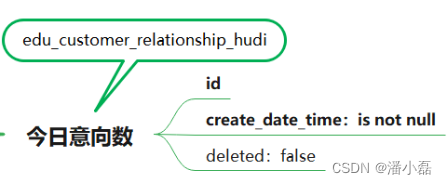
首先创建输入表:流式加载,Hudi表数据:create table edu_customer_relationship_hudi( id string PRIMARY KEY NOT ENFORCED, create_date_time string, update_date_time string, deleted string, customer_id string, first_id string, belonger string, belonger_name string, initial_belonger string, distribution_handler string, business_scrm_department_id string, last_visit_time string, next_visit_time string, origin_type string, itcast_school_id string, itcast_subject_id string, intention_study_type string, anticipat_signup_date string, `level` string, creator string, current_creator string, creator_name string, origin_channel string, `comment` string, first_customer_clue_id string, last_customer_clue_id string, process_state string, process_time string, payment_state string, payment_time string, signup_state string, signup_time string, notice_state string, notice_time string, lock_state string, lock_time string, itcast_clazz_id string, itcast_clazz_time string, payment_url string, payment_url_time string, ems_student_id string, delete_reason string, deleter string, deleter_name string, delete_time string, course_id string, course_name string, delete_comment string, close_state string, close_time string, appeal_id string, tenant string, total_fee string, belonged string, belonged_time string, belonger_time string, transfer string, transfer_time string, follow_type string, transfer_bxg_oa_account string, transfer_bxg_belonger_name string, part STRING ) PARTITIONED BY (part) WITH( 'connector'='hudi', 'path'= 'hdfs://node1.itcast.cn:8020/hudi-warehouse/edu_customer_relationship_hudi', 'table.type'= 'MERGE_ON_READ', 'hoodie.datasource.write.recordkey.field'= 'id', 'write.precombine.field'= 'create_date_time', 'read.streaming.enabled' = 'true', 'read.streaming.check-interval' = '5', 'read.tasks' = '1' );统计结果,存储至视图View:
CREATE VIEW IF NOT EXISTS view_tmp_stu_intention AS
SELECT day_value, COUNT(id) AS total FROM (
  SELECT
    FROM_UNIXTIME(CAST(create_date_time AS BIGINT) / 1000, 'yyyy-MM-dd') AS day_value, id
  FROM edu_customer_relationship_hudi
  WHERE part = CAST(CURRENT_DATE AS STRING) AND create_date_time IS NOT NULL AND deleted = 'false'
) GROUP BY  day_value;
保存MySQL数据库:
-- SQL Connector MySQL
CREATE TABLE realtime_stu_intention_mysql (
  report_date STRING,
  report_total BIGINT,
  PRIMARY KEY (report_date) NOT ENFORCED
) WITH (
  'connector' = 'jdbc',
  'url' = 'jdbc:mysql://node1.itcast.cn:3306/itcast_rpt',
  'driver' = 'com.mysql.cj.jdbc.Driver',
  'username' = 'root',
  'password' = '123456',
  'table-name' = 'realtime_stu_intention'
);
– INSERT INTO 插入
INSERT INTO  realtime_stu_intention_mysql SELECT day_value, total
FROM view_tmp_stu_intention;
7.5.3.4 今日报名人数
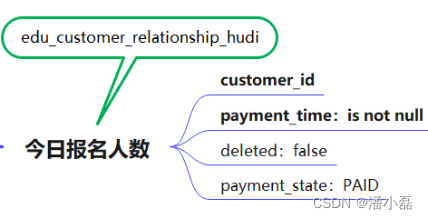
由于今日意向量与今日报名人数,都是查询Hudi中表:edu_customer_relationship_hudi,所以前面流式加载增量加载数据以后,此处就不需要。
统计结果,存储至视图View:CREATE VIEW IF NOT EXISTS view_tmp_stu_apply AS SELECT day_value, COUNT(id) AS total FROM ( SELECT FROM_UNIXTIME(CAST(payment_time AS BIGINT) / 1000, 'yyyy-MM-dd') AS day_value, id FROM edu_customer_relationship_hudi WHERE part = CAST(CURRENT_DATE AS STRING) AND payment_time IS NOT NULL AND payment_state = 'PAID' AND deleted = 'false' ) GROUP BY day_value;保存MySQL数据库:
– SQL Connector MySQLCREATE TABLE realtime_stu_apply_mysql ( report_date STRING, report_total BIGINT, PRIMARY KEY (report_date) NOT ENFORCED ) WITH ( 'connector' = 'jdbc', 'url' = 'jdbc:mysql://node1.itcast.cn:3306/itcast_rpt', 'driver' = 'com.mysql.cj.jdbc.Driver', 'username' = 'root', 'password' = '123456', 'table-name' = 'realtime_stu_apply' );– INSERT INTO 插入
INSERT INTO realtime_stu_apply_mysql SELECT day_value, total FROM view_tmp_stu_apply;7.5.3.5 今日有效线索量

首先创建输入表:流式加载,Hudi表数据:create table edu_customer_clue_hudi( id string PRIMARY KEY NOT ENFORCED, create_date_time string, update_date_time string, deleted string, customer_id string, customer_relationship_id string, session_id string, sid string, status string, `user` string, create_time string, platform string, s_name string, seo_source string, seo_keywords string, ip string, referrer string, from_url string, landing_page_url string, url_title string, to_peer string, manual_time string, begin_time string, reply_msg_count string, total_msg_count string, msg_count string, `comment` string, finish_reason string, finish_user string, end_time string, platform_description string, browser_name string, os_info string, area string, country string, province string, city string, creator string, name string, idcard string, phone string, itcast_school_id string, itcast_school string, itcast_subject_id string, itcast_subject string, wechat string, qq string, email string, gender string, `level` string, origin_type string, information_way string, working_years string, technical_directions string, customer_state string, valid string, anticipat_signup_date string, clue_state string, scrm_department_id string, superior_url string, superior_source string, landing_url string, landing_source string, info_url string, info_source string, origin_channel string, course_id string, course_name string, zhuge_session_id string, is_repeat string, tenant string, activity_id string, activity_name string, follow_type string, shunt_mode_id string, shunt_employee_group_id string, part STRING ) PARTITIONED BY (part) WITH( 'connector'='hudi', 'path'= 'hdfs://node1.itcast.cn:8020/hudi-warehouse/edu_customer_clue_hudi', 'table.type'= 'MERGE_ON_READ', 'hoodie.datasource.write.recordkey.field'= 'id', 'write.precombine.field'= 'create_date_time', 'read.streaming.enabled' = 'true', 'read.streaming.check-interval' = '5', 'read.tasks' = '1' ); 统计结果,存储至视图View: CREATE VIEW IF NOT EXISTS view_tmp_stu_clue AS SELECT day_value, COUNT(id) AS total FROM ( SELECT FROM_UNIXTIME(CAST(create_date_time AS BIGINT) / 1000, 'yyyy-MM-dd') AS day_value, id FROM edu_customer_clue_hudi WHERE part = CAST(CURRENT_DATE AS STRING) AND clue_state IS NOT NULL AND deleted = 'false' ) GROUP BY day_value; 保存MySQL数据库: -- SQL Connector MySQL CREATE TABLE realtime_stu_clue_mysql ( report_date STRING, report_total BIGINT, PRIMARY KEY (report_date) NOT ENFORCED ) WITH ( 'connector' = 'jdbc', 'url' = 'jdbc:mysql://node1.itcast.cn:3306/itcast_rpt', 'driver' = 'com.mysql.cj.jdbc.Driver', 'username' = 'root', 'password' = '123456', 'table-name' = 'realtime_stu_clue' );– INSERT INTO 插入
INSERT INTO realtime_stu_clue_mysql SELECT day_value, total FROM view_tmp_stu_clue; -
相关阅读:
【livevideostack】【笔记】七牛云QRTC自研传输协议(QRTP)对音画质量的提升
76. 最小覆盖子串
二:OpenCV图片叠加逻辑运算
现货白银MACD实战分析例子
centos7内存过高排查
形态的两种相似性
深入理解C++智能指针系列(一)
运维学习之部署Alertmanager-0.24.0
如何编写一个投票功能的智能合约
CSS笔记——浮动float与定位position及ClearFix解决方案
- 原文地址:https://blog.csdn.net/weixin_43850384/article/details/127117783