-
业务组件化 —— 创建、发布、使用业务组件
目录
1.2.2 添加 rollup.config.install.js
1.3.2 添加 rollup.config.deploy.js
业务组件 —— 开发过程中,整个 功能/业务模块 被抽出成一个组件,并发布;
使用场景 —— 若其他系统中有类似的 功能/业务模块,直接采用 npm 安装引入即可;
1. 创建 功能/业务组件
新建 package 文件夹(与 src 同级),该文件夹包含:
- 功能/业务组件列表(lyrelion/components)
- 打包方法(build)
关于功能/业务组件:
- 组件命名采用 中划线 的方式,例如 c-common-base-anchor
- 每个组件,都有自己的 页面 views、公共接口 service、公共方法 utils、公共数据类型接口 types、入口文件 index.ts、package.json 等文件/文件夹
1.1 开发组件
1.1.1 添加基本结构
在 package/lyrelion/components 目录下,新增 功能/业务组件 文件夹(例如:c-example-module-crud)
在 c-example-module-crud 目录下,新增 src 文件夹,在 src 下,开发具体的 功能/业务
最终,每个 功能/业务组件 的结构,都类似这样:

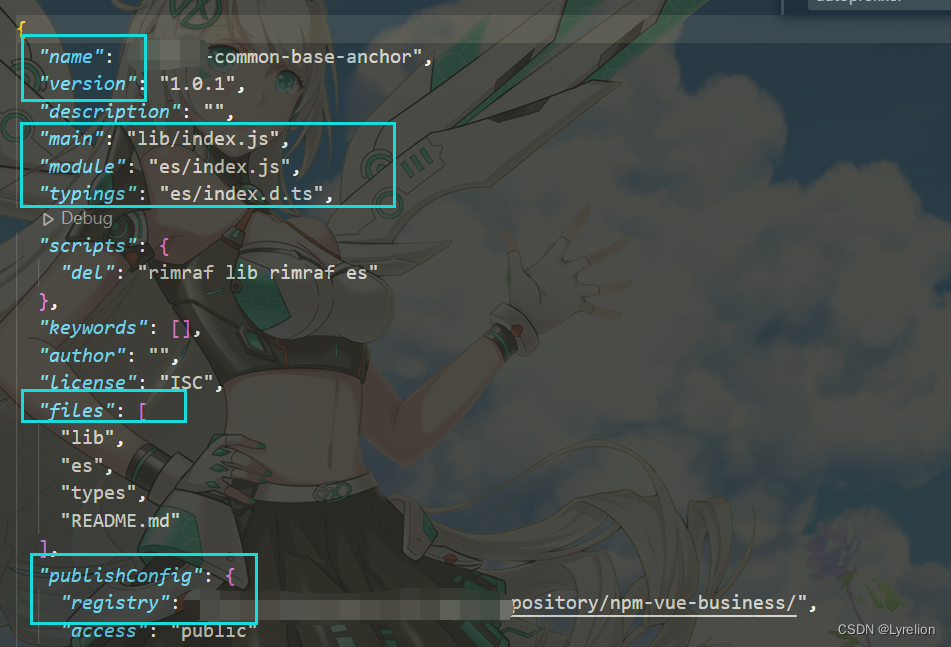
1.1.2 组件内的 package.json
该文件需要修改以下内容:
- 名称 name
- 版本号 version
- 要打包的文件 files
- 组件发布地址 publishConfig.registry
1.1.3 组件内的 index.ts
需要进行以下操作:
- 引入组件的入口文件 —— xxx.vue,并修改名字
- 注册组件 install
- 导出组件 export
- import { App } from 'vue';
- import CcommonBaseAnchor from './src/view/anchor-point.vue';
- CcommonBaseAnchor.install = (app: App): void => {
- app.component(CcommonBaseAnchor.name, CcommonBaseAnchor);
- };
- export { CcommonBaseAnchor };
1.1.4 在 src 下开发组件时要注意
组件中如果使用了公共的 hooks 方法、services 服务的话,也需要将他们引入哦

1.2 打包组件
1.2.1 修改项目 package.json
此处的项目指的是组件库所处的项目,也就是 package 所处的项目 microApp
在项目根目录下的 package.json 中,新增下方的 scripts
"installc": "rollup -c package/build/rollup.config.install.js",也就是说,当执行 npm run installc 时,会执行 一个 js 文件(该文件是对 rollup 制定的打包配置)
1.2.2 添加 rollup.config.install.js
上面说过 package 下的 build,用于存放打包配置
新建 rollup.config.install.js 文件,添加下方内容:
- /* eslint-disable import/no-dynamic-require */
- import fs from 'fs';
- import path from 'path';
- import vue from 'rollup-plugin-vue';
- import json from '@rollup/plugin-json';
- import images from '@rollup/plugin-image';
- import postcss from 'rollup-plugin-postcss';
- import { terser } from 'rollup-plugin-terser';
- import typescript from 'rollup-plugin-typescript2';
- import resolve, { nodeResolve } from '@rollup/plugin-node-resolve';
- import commonjs from '@rollup/plugin-commonjs'; // 将CommonJS模块转换为 ES2015 供 Rollup 处理
- import alias from '@rollup/plugin-alias';
- // 路径分隔符 - windows和linux分隔符不同
- const { sep } = require('path');
- /**
- * 获取命令行中 -- 后面的字符串,确定要对哪个组件进行操作
- * 比如 npm run installc -- --anchor,就会在这里输出 anchor
- */
- let cPartPath = process.argv[4];
- if (!cPartPath) {
- cPartPath = 'lyrelion';
- } else {
- cPartPath = cPartPath.replace('--', '');
- }
- console.log('安装包含' + cPartPath + '路径的组件');
- const config = {
- // 获取 lyrelion 文件夹路径,作为处理的根路径
- root: path.resolve(__dirname, '../lyrelion', ''),
- src: path.resolve(__dirname, '../../', 'src/*'),
- // 路径分隔符 - windows和linux分隔符不同
- sep,
- // 判断环境,生产环境下,开启代码压缩
- isDev: process.env.NODE_ENV !== 'production',
- // 要编译的组件数组,做为全局变量使用
- buildComponentsMessage: [],
- // 要编译的组件数组,做为全局变量使用
- buildComponentsConfig: [],
- };
- /**
- * 初始化 rollup 插件
- * @param {*} componentSourcePath
- * @returns
- */
- function initPlugins(componentSourcePath) {
- // 公共插件配置
- const plugins = [
- vue({
- css: false,
- compileTemplate: true,
- }),
- images({ include: ['**/*.png', '**/*.jpg'] }),
- postcss({
- extensions: ['.css', '.scss'],
- extract: true,
- }),
- resolve(),
- // css(),
- commonjs(),
- /*
- * babel({
- * runtimeHelpers: true,
- * }),
- */
- json(),
- // 支持TS
- typescript({
- tsconfig: 'tsconfig-build.json',
- tsconfigOverride: {
- compilerOptions: {
- declaration: true,
- types: ['lyrelion-common-base', 'lyrelion-common-ou', 'lyrelion-common-bpm'],
- // declarationDir: path.join(__dirname, `../lyrelion/${folder}/types`),
- },
- include: ['types',
- path.resolve(componentSourcePath, 'src'),
- path.resolve(componentSourcePath, '*/*.ts'),
- path.resolve(componentSourcePath, '*/*.d.ts'),
- ],
- },
- }),
- nodeResolve({
- extensions: ['.js', '.jsx', '.ts', '.tsx'],
- modulesOnly: true,
- }),
- alias({
- '@/*': ['./src/*'],
- }),
- ];
- return plugins;
- }
- // 公用方法
- const commonFunction = {
- /**
- * 字符串转大驼峰
- * @param {*} string
- */
- stringToCamel(string) {
- const arr = string.split(sep);
- let resStr = arr.reduce((prev, cur) => {
- const str = prev + cur.slice(0, 1).toUpperCase() + cur.slice(1);
- return str;
- });
- resStr = resStr.slice(0, 1).toUpperCase() + resStr.slice(1);
- return resStr;
- },
- /**
- * 字符串转中划线拼接
- * @param {*} string
- */
- stringToDash(string) {
- const arrList = string.split(sep);
- let resStr = '';
- arrList.forEach((one) => {
- if (resStr && one) {
- resStr = resStr + '-' + one;
- } else {
- resStr = one;
- }
- });
- return resStr;
- },
- };
- function create(componentSourcePath, camelName) {
- console.log('componentSourcePath:' + componentSourcePath);
- /*
- * 获取包的 package.json 文件
- * @rollup/plugin-json 使 rollup 可以使用 require 的方式将 json 文件作为模块加载
- * 它返回 json 对象
- */
- // eslint-disable-next-line global-require
- const pkg = require(path.resolve(componentSourcePath, 'package.json'));
- // eslint-disable-next-line global-require
- const tsconfigJson = require(path.resolve(__dirname, 'tsconfig-build.json'));
- tsconfigJson.compilerOptions.declarationDir = path.resolve(componentSourcePath, 'types');
- tsconfigJson.include = [path.resolve(componentSourcePath, 'src')];
- // 初始化 rollup 插件
- const plugins = initPlugins(componentSourcePath);
- /* 如果时生产环境,开启代码压缩 */
- if (!config.isDev) plugins.push(terser());
- // 返回 rollup 的配置对象
- return {
- // 打包入口:拼接绝对路径
- input: path.resolve(componentSourcePath, 'index.ts'),
- /*
- * 配置打包出口
- * 分别打包两种模块类型 cjs 和 es
- * 路径使用业务组件的 package.json 中配置的 main 和 module
- */
- output: [
- {
- name: camelName,
- file: path.resolve(componentSourcePath, pkg.main),
- format: 'umd',
- sourcemap: true,
- globals: {
- vue: 'Vue',
- 'vue-i18n': 'VueI18n',
- appConfig: 'appConfig',
- '@lyrelion/u-common-base': '@lyrelion/u-common-base',
- },
- palyrelion: {
- vue: 'https://unpkg.com/vue@next',
- },
- },
- {
- exports: 'auto',
- file: path.join(componentSourcePath, pkg.module),
- format: 'es',
- globals: {
- vue: 'Vue',
- 'vue-i18n': 'VueI18n',
- appConfig: 'appConfig',
- '@lyrelion/u-common-base': '@lyrelion/u-common-base',
- },
- },
- ],
- // 配置插件
- plugins: [
- ...plugins,
- ],
- // 指出应将哪些模块视为外部模块
- external: [
- 'vue',
- 'vue-i18n',
- 'echarts',
- 'echarts-liquidfill',
- '@lyrelion/c-common-base-table',
- '@lyrelion/c-common-base-col',
- '@lyrelion/c-common-base-paging',
- '@lyrelion/c-common-base-button',
- '@lyrelion/c-common-base-code',
- '@lyrelion/c-common-base-upload',
- '@lyrelion/c-common-ou-form',
- '@lyrelion/c-common-base-tree',
- '@lyrelion/s-common-base',
- '@lyrelion/u-common-base',
- 'crypto-js',
- 'jsonwebtoken',
- 'axios',
- 'js-cookie',
- 'element-plus',
- ],
- };
- }
- /**
- * 遍历编译所有组件
- * @param {*} folder
- */
- function readDirRecur(folder) {
- const files = fs.readdirSync(folder);
- if (files.length > 0) {
- files.forEach((file) => {
- const fullPath = folder + sep + file;
- const isFile = fs.statSync(fullPath);
- if (isFile && isFile.isDirectory()) {
- readDirRecur(fullPath);
- } else if (fullPath.endsWith('package.json')) {
- // 业务组件源文件位置,例如:D:\lyrelionPlatform\microapp8\package\lyrelion\components\c-common-base-button
- const componentSourcePath = path.resolve(fullPath, '../');
- // 业务组件中间位置,例如:D:\lyrelionPlatform\microapp8\package\lyrelion
- const lyrelionRoot = path.resolve(__dirname, '../', 'lyrelion');
- const arrList = componentSourcePath.split(sep);
- // 中划线拼接 name,例如:demo-button
- const dashName = arrList[arrList.length - 1];
- // 大驼峰 name,例如:DemoButton
- const camelName = commonFunction.stringToCamel(dashName);
- // 包含输入路径
- if (cPartPath && componentSourcePath.indexOf(cPartPath) > -1) {
- // 排除lyrelion\types目录
- if (fullPath.indexOf(`lyrelion${sep}types`) === -1) {
- config.buildComponentsMessage.push({
- componentSourcePath,
- camelName,
- });
- }
- }
- }
- });
- }
- }
- console.log(`1/2:遍历路径中包含${cPartPath}的组件`);
- readDirRecur(config.root);
- console.log(`2/2:共找到${config.buildComponentsMessage.length}个要编译的组件`);
- if (config.buildComponentsMessage && config.buildComponentsMessage.length > 0) {
- // 第二步:编译组件
- config.buildComponentsMessage.forEach((componentMessage) => {
- config.buildComponentsConfig.push(create(componentMessage.componentSourcePath, componentMessage.camelName));
- });
- module.exports = config.buildComponentsConfig;
- /*
- * 第三步:复制组件到 node_modules 目录下
- * console.log('4/5:开始复制组件到 node_modules 目录下');
- * config.buildComponentsMessage.forEach((componentMessage) => {
- * fsExtra.copy(componentMessage.componentSourcePath, componentMessage.componentClassPath, (err) => {});
- * });
- */
- // console.log('5/5:组件编译完成,并复制到 node_modules 路径下');
- } else {
- console.log(`没有找到${cPartPath}路径下的组件,路径用${sep}分隔`);
- }
1.2.3 打包全部组件
在项目根目录下,执行下方命令,会打包 package 下的所有组件
npm run installc

1.2.4 打包指定组件
打包指定组件(也可以打包 组件名中包含某个字符串 的组件),和打包全部组件的区别:增加了文件名
npm run installc -- --example
example 可以是指定组件的文件夹完整名称,也可以是指定组件的文件夹名中的某部分字符串(只要检测到对应的字符串,就会打包)
1.2.5 打包失败的几种原因 ★★★
在 vue 文件中,使用了 scss 语法,或者样式中的注释是 // xxx
使用了 package 下面不存在的文件,比如 hooks
1.3 将打包好的组件拷贝到 node_modules 中
1.3.1 修改项目 package.json
此处的项目指的是组件库所处的项目,也就是 package 所处的项目 microApp
在项目根目录下的 package.json 中,新增下方的 scripts
"deployc": "node package/build/rollup.config.deploy.js"也就是说,当执行 npm run deployc 时,会执行 一个 js 文件(该文件复制 打包文件 到依赖中)
1.3.2 添加 rollup.config.deploy.js
上面说过 package 下的 build,用于存放打包配置
新建 rollup.config.deploy.js 文件,添加下方内容:
- /* eslint-disable import/no-dynamic-require */
- const fs = require('fs');
- const fsExtra = require('fs-extra');
- const path = require('path');
- // 路径分隔符 - windows和linux分隔符不同
- const { sep } = require('path');
- let cPartPath = process.argv[2];
- if (!cPartPath) {
- cPartPath = 'lyrelion';
- } else {
- cPartPath = cPartPath.replace('--', '');
- }
- console.log('安装包含' + cPartPath + '路径的组件');
- const config = {
- // 获取 lyrelion 文件夹路径,作为处理的根路径
- root: path.resolve(__dirname, '../lyrelion', ''),
- src: path.resolve(__dirname, '../../', 'src/*'),
- // 路径分隔符 - windows和linux分隔符不同
- sep,
- // 判断环境,生产环境会开启代码压缩
- isDev: process.env.NODE_ENV !== 'production',
- // 要编译的组件数组,做为全局变量使用
- buildComponentsMessage: [],
- // 要编译的组件数组,做为全局变量使用
- buildComponentsConfig: [],
- };
- // 公用方法
- const commonFunction = {
- /**
- * 字符串转大驼峰
- * @param {*} string
- */
- stringToCamel(string) {
- const arr = string.split(sep);
- let resStr = arr.reduce((prev, cur) => {
- const str = prev + cur.slice(0, 1).toUpperCase() + cur.slice(1);
- return str;
- });
- resStr = resStr.slice(0, 1).toUpperCase() + resStr.slice(1);
- return resStr;
- },
- /**
- * 字符串转中划线拼接
- * @param {*} string
- */
- stringToDash(string) {
- const arrList = string.split(sep);
- let resStr = '';
- arrList.forEach((one) => {
- if (resStr && one) {
- resStr = resStr + '-' + one;
- } else {
- resStr = one;
- }
- });
- return resStr;
- },
- };
- /**
- * 遍历编译所有组件
- * @param {*} folder
- */
- function readDirRecur(folder) {
- const files = fs.readdirSync(folder);
- if (files.length > 0) {
- files.forEach((file) => {
- const fullPath = folder + sep + file;
- const isFile = fs.statSync(fullPath);
- if (isFile && isFile.isDirectory()) {
- readDirRecur(fullPath);
- } else if (fullPath.endsWith('package.json')) {
- // 业务组件源文件位置 D:\lyrelionPlatform\microapp8\package\lyrelion\components\c-common-base-button
- const componentSourcePath = path.resolve(fullPath, '../');
- // 中间位置:D:\lyrelionPlatform\microapp8\package\lyrelion
- const lyrelionRoot = path.resolve(__dirname, '../', 'lyrelion');
- const arrList = componentSourcePath.split(sep);
- // 中划线拼接name,例如:example-demo-button
- const dashName = arrList[arrList.length - 1];
- // 大驼峰name,例如:DemoButton
- const camelName = commonFunction.stringToCamel(dashName);
- // 业务组件编译后根位置D:\lyrelionPlatform\microApp\node_modules\@lyrelion
- let componentClassRootPath = path.resolve(__dirname, '../../', 'node_modules', '@lyrelion');
- if (fullPath.indexOf(`lyrelion${sep}types`) > -1) {
- componentClassRootPath = path.resolve(__dirname, '../../', 'node_modules', '@types');
- }
- // 业务组件编译后组件绝对位置 D:\lyrelionPlatform\microApp\node_modules\@lyrelion\demo-button
- const componentClassPath = path.resolve(componentClassRootPath, dashName);
- if (cPartPath && componentSourcePath.indexOf(cPartPath) > -1) {
- config.buildComponentsMessage.push({
- componentSourcePath,
- componentClassPath,
- camelName,
- });
- }
- }
- });
- }
- }
- console.log(`1/4:遍历路径中包含${cPartPath}的组件`);
- readDirRecur(config.root);
- console.log(`2/4:共找到${config.buildComponentsMessage.length}个要部署的组件`);
- if (config.buildComponentsMessage && config.buildComponentsMessage.length > 0) {
- // 第三步:复制组件到 node_modules 目录下
- console.log('3/4:开始复制组件到node_modules目录下');
- config.buildComponentsMessage.forEach((componentMessage) => {
- console.log(componentMessage.componentClassPath);
- fsExtra.removeSync(componentMessage.componentClassPath, (err) => {});
- fsExtra.copy(componentMessage.componentSourcePath, componentMessage.componentClassPath, (err) => {});
- });
- console.log('4/4:组件复制到 node_modules 路径下,完成');
- } else {
- console.log(`没有找到${cPartPath}路径下的组件,路径用${sep}分隔`);
- }
1.3.3 拷贝组件
在项目根目录下,执行下方命令,会把 package 文件下的内容都放到 node_modules 中
npm run deployc
拷贝指定组件(也可以拷贝 组件名中包含某个字符串 的组件),和拷贝全部组件的区别:增加了文件名
npm run deployc -- --example
2. 使用 Lerna 管理组件发布
使用管理工具 Lerna 来管理组件包,全局安装 Lerna 命令如下
npm i -g lerna
安装不上的话,考虑切换 cnpm 吧,我切换了 yarn/npm 两个源感觉都下载不下载...
2.1 发布组件的过程
2.1.1 发布组件前,需要提交代码
项目根目录下,执行下方命令
lerna publish
注意:需要在执行 lerna publish 前,把所有修改过的文件提交,否则会报错

2.1.2 选择组件版本
执行完 lerna publish 命令后,会出现选择版本的提示
选择正确版本,并回车

2.1.3 确认发布
选择完版本后,会出现 是否确认 的提示
如下图,输入 y 之后,就会执行发布包的操作了

2.1.4 发布成功效果
出现以下信息,代表发布好了

2.1.5 检查制品库 Nexus
检查 制品库(Nexus)- Browser 中,是否已经出现最新的包

2.1.6 检查 Gitlab 中的 Tag
检查 Gitlab 仓库 中,是否已经有对应版本的 Tag
使用 Tag,可以标记提交历史上的重要提交

2.2 移除本地打包生成的 lib、es 目录
lerna exec -- yarn del

3. 使用业务组件的两种方式
3.1 使用正在开发的组件(package 中的直接引用)
适用于正在开发中的组件,想实时看效果的
在路由文件中,引入开发环境的业务组件路径
import CdemoCrudList from 'package/xxx/components/c-example-module-crud/src/view/list.vue';使用组件,配置业务组件的跳转路径
- // 示例路由
- const demoRoutes = [
- ....
- // 组件化开发-demo-增删改查
- {
- name: 'CdemoCrudList',
- path: '/layout/demo/crud/list', // 路径
- component: CdemoCrudList,
- },
- .....
- ]

3.2 使用制品库的组件(制品库中的安装使用)
适用于已经开发好的组件,存在于制品库中的
在项目根目录下的 package.json 中添加依赖,依赖名称要与包名一致

在路由文件中,引入制品库组件
import { CdemoCrudList, CdemoCrudView } from '@xxx/c-example-module-crud';使用组件,配置业务组件的跳转路径
- // 示例路由
- const demoRoutes = [
- ....
- // 组件化开发-demo-增删改查
- {
- name: 'CdemoCrudList',
- path: '/layout/demo/crud/list', // 路径
- component: CdemoCrudList,
- },
- .....
- ]

-
相关阅读:
ppt 插入柱状图及基础功能调整
网络编程:组播发送接收
python判断语句
E. Binary Inversions——前缀+后缀
我用了多年的前端框架,强烈推荐!
服务器存储面临的两大难题
封装了几个CAPL发送诊断相关函数,具有较高的可复用性
Redis7.0 编译安装以及简单创建Cluster测试服务器的方法 步骤
Managing Test Files with create_files and delete_files Bash Scripts
计算机软件分类、编程知识体系、编程工作岗位
- 原文地址:https://blog.csdn.net/Lyrelion/article/details/127104984