-
【Linux基础】基础I/O(一)
1. 文件操作
1.1 写入文件
#includeint main() { FILE *fp = fopen("./log.txt", "w"); if (fp == NULL) { perror("fopen"); return 1; } const char* message = "I am ricky\n"; int cnt = 5; while (cnt--) fputs(message, fp); fclose(fp); return 0; } - 1
- 2
- 3
- 4
- 5
- 6
- 7
- 8
- 9
- 10
- 11
- 12
- 13
- 14
- 15
- 16
- 17
- 18
- 19
- 20
1.2 读取文件
#includeint main() { FILE* fp = fopen("./log.txt", "w"); if (fp == NULL) { perror("fopen"); return 1; } const char* message = "I am ricky\n"; int cnt = 5; while (cnt--) fputs(message, fp); fclose(fp); return 0; } - 1
- 2
- 3
- 4
- 5
- 6
- 7
- 8
- 9
- 10
- 11
- 12
- 13
- 14
- 15
- 16
- 17
- 18
- 19
- 20
1.3 打开文件的方式
- r:Open text file for reading. The stream is positioned at the beginning of the file.
- r+:Open for reading and writing. The stream is positioned at the beginning of the file.
- w:Truncate(缩短) file to zero length or create text file for writing. The stream is positioned at the beginning of the file.
- w+:Open for reading and writing. The file is created if it does not exist, otherwise it is truncated. The stream is positioned at the beginning of the file.
- a:Open for appending (writing at end of file). The file is created if it does not exist. The stream is positioned at the end of the file.
- a+:Open for reading and appending (writing at end of file). The file is created if it does not exist. The initial file position for reading is at the beginning of the file, but output is always appended to the end of the file.
1.4 stdin、stdout、stderr

发现这三个流的类型都是
FILE*,故同样可以使用文件操作来操作这三个流,如:#includeint main() { const char* msg = "hello, this is ricky\n"; fputs(msg, stdout); return 0; } - 1
- 2
- 3
- 4
- 5
- 6
- 7
- 8
- 9

stdin:键盘、stdout:显示器、stderr:显示器
虽然stdout和stderr对应的设备都是显示器,都可以输出到显示器,但在使用
>输出重定向的时候会有区别-
stdout

-
stderr

因而
>输出重定向的本质是把stdout的内容重定向到文件中所有的这些文件操作最终都是要访问硬件的,而OS是硬件的管理者,因此所有的语言对“文件”的操作都必须贯穿操作系统,但是我们都知道OS不相信任何人,因而访问操作系统需要通过系统调用接口,故几乎所有的语言fopen、fclose、fread、fwrite、fgets、fputs、fgetc、fputc等底层一定需要使用OS提供的系统调用
2. 系统文件I/O
2.1 打开文件
头文件:
#include、#include、#includeint open(const char *pathname, int flags, mode_t mode);#include#include #include #include #include int main() { int fd = open("./log.txt", O_WRONLY | O_CREAT, 0644); if (fd < 0) printf("open failed\n"); close(fd); return 0; } - 1
- 2
- 3
- 4
- 5
- 6
- 7
- 8
- 9
- 10
- 11
- 12
- 13
- 14
- 15
- 16
flags:传递标志位

这些都是只有一个比特位为1的数据,而且不会重复,这样就能很好的确定标志位是多少
返回值:
- 0:标准输入
- 1:标准输出
- 2:标准错误
- 3及之后的:打开的文件
所有的文件操作,表现上都是进程执行对应的函数,即进程对文件的操作,要想操作文件就必须先打开文件,然后将文件相关的属性信息加载到内存,操作系统中存在大量的进程(进程 : 打开的文件 = 1 : n)一个进程可以打开多个文件,因此系统中可能存在更多的打开的文件,那么操作系统就要把打开的文件在内存中管理起来(先描述,再组织)——struct file { //包含了打开文件的相关属性:连接属性… }
2.2 写入文件
头文件
#includessize_t write(int fd, const void *buf, size_t count);#include#include #include #include #include int main() { int fd = open("./log.txt", O_WRONLY | O_CREAT, 0644); if (fd < 0) printf("open failed\n"); const char* str = "I am ricky!\n"; int cnt = 5; while (cnt--) write(fd, str, strlen(str)); close(fd); return 0; } - 1
- 2
- 3
- 4
- 5
- 6
- 7
- 8
- 9
- 10
- 11
- 12
- 13
- 14
- 15
- 16
- 17
- 18
- 19
- 20
- 21
注意:使用write写入文件时,不需要写入’\0’,以’\0’作为字符串的结束只是C的规定
2.3 读取文件
头文件
#includessize_t read(int fd, void *buf, size_t count);#include#include #include #include #include int main() { int fd = open("./log.txt", O_RDONLY); if (fd < 0) { perror("open"); return 1; } char buffer[1024]; ssize_t s = read(fd, buffer, sizeof(buffer) - 1); if (s > 0) { buffer[s] = '\0'; printf("%s", buffer); } close(fd); return 0; } - 1
- 2
- 3
- 4
- 5
- 6
- 7
- 8
- 9
- 10
- 11
- 12
- 13
- 14
- 15
- 16
- 17
- 18
- 19
- 20
- 21
- 22
- 23
- 24
- 25
- 26
注意:如果要把读出来的内容当作一个字符串来处理,需要在最后加上’\0’,并且读取的时候要少读一个来放’\0’
2.4 关闭文件
头文件:
#includeint close(int fd);3. 文件描述符fd
3.1 简述
当程序运行起来变成进程之后,默认情况下OS会帮助进程打开三个标准输入输出
- 0:标准输入——键盘
- 1:标准输出——显示器
- 2:标准错误——显示器
open的返回值是系统给的,进程与打开文件的比是1 : n,操作系统内一定是打开了多个文件,因而OS必须对打开的文件进行管理,如果一个文件没有被打开,那么这个文件存储在磁盘里也要占磁盘空间,文件是属性,属性也是数据,磁盘文件 = 文件内容 + 文件属性,文件操作 = 对文件内容操作 + 对文件的属性操作
OS对打开的文件进行管理先描述再组织:
struct file { \\文件的相关属性信息 }在进程PCB的
task struct中存在struct files_struct* files指向struct files_struct,让文件与进程之间产生关系struct files_struct结构内包含一个数组struct file* fd_array[]为一个指针数组,依次指向打开文件的struct file
文件描述符的分配规则:给新文件分配的fd,是从fd_array中找一个最小的、没有被使用的,作为新的fd
如果我们
close(0),则新打开的文件的fd = 03.2 关闭fd=1的情况
close(0)与close(2)之后再printf打印都可以正常打印,但close(1)之后却没有输出,只在文件中显示#include#include #include int main() { close(1); int fd = open("./log.txt", O_CREAT | O_WRONLY, 0644); printf("fd: %d\n", fd); printf("hello world\n"); printf("hello world\n"); printf("hello world\n"); printf("hello world\n"); printf("hello world\n"); printf("hello world\n"); printf("hello world\n"); printf("hello world\n"); printf("hello world\n"); printf("hello world\n"); printf("hello world\n"); return 0; } - 1
- 2
- 3
- 4
- 5
- 6
- 7
- 8
- 9
- 10
- 11
- 12
- 13
- 14
- 15
- 16
- 17
- 18
- 19
- 20
- 21
- 22
- 23
- 24
- 25
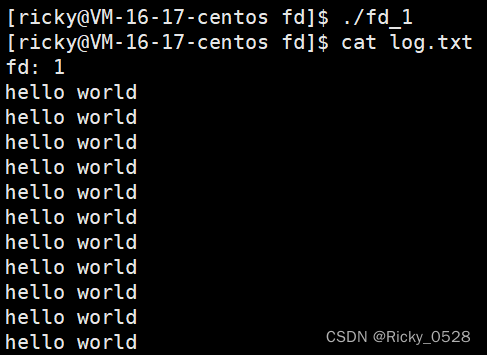
C中的printf本质是向标准输出打印,即stdout,而stdout是FILE*类型的
FILE在C语言层面上就是结构体,其中一定包含了一个整数,是对应在系统层面的,即这个文件打开对应的fd
stdout对应的fd=1,将其close之后重新指向“log.txt"文件
而语言层面的printf本底层是使用系统调用,他只会去操作fd=1对应的文件,在这里由stdout变成”log.txt",即完成了一次输出重定向
3.3 关闭fd=0的情况
输入重定向,将从键盘读入重定向为从文件读入
stdin的FILE结构体内对应的fd=0,这里将fd=0指向了“log.txt"
#include#include #include int main() { close(0); int fd = open("./log.txt", O_RDONLY); char line[128]; while (fgets(line, sizeof(line) - 1, stdin)) printf("%s", line); return 0; } - 1
- 2
- 3
- 4
- 5
- 6
- 7
- 8
- 9
- 10
- 11
- 12
- 13
- 14
- 15

3.4 验证C库FILE结构体内部封装了fd
#include#include #include int main() { printf("stdin -> %d\n", stdin->_fileno); printf("stdout -> %d\n", stdout->_fileno); printf("stderr -> %d\n", stderr->_fileno); FILE* fp = fopen("./log.txt", "r"); if (fp == NULL) { perror("fopen"); return 0; } printf("fp -> %d\n", fp->_fileno); return 0; } - 1
- 2
- 3
- 4
- 5
- 6
- 7
- 8
- 9
- 10
- 11
- 12
- 13
- 14
- 15
- 16
- 17
- 18
- 19

3.5 dup2系统调用
头文件
unistd.h,int dup2(int oldfd, int newfd);
#include#include #include int main() { int fd = open("./log.txt", O_WRONLY | O_TRUNC); if (fd < 0) { perror("open"); return 1; } dup2(fd, 1); // 将本来应该显示到显示器的内容,写入到文件 printf("hello printf\n"); fprintf(stdout, "hello fprintf\n"); fputs("hello fputs\n", stdout); return 0; } - 1
- 2
- 3
- 4
- 5
- 6
- 7
- 8
- 9
- 10
- 11
- 12
- 13
- 14
- 15
- 16
- 17
- 18
- 19
- 20
3.6 stdout与stderr的区别
#include#include #include int main() { const char* msg1 = "hello stdout\n"; write(1, msg1, strlen(msg1)); const char* msg2 = "hello stderr\n"; write(2, msg2, strlen(msg2)); return 0; } - 1
- 2
- 3
- 4
- 5
- 6
- 7
- 8
- 9
- 10
- 11
- 12
- 13
- 14
上面这段代码,如果运行的话会正常输出

但是如果使用输出重定向的话,就只会有fd=1被重定向到文件里

其实重定向的本质是重定向标准输出

./redir > log.txt 2>&1:将stdout和stderr都重定向到“log.txt",2>$1就是将1拷贝到2,1在>之后指向"log.txt",拷贝后2也指向"log.txt"3.7 缓冲区
#include#include #include int main() { close(1); int fd = open("./log.txt", O_CREAT | O_WRONLY, 0644); printf("fd: %d\n", fd); fprintf(stdout, "hello world\n"); fprintf(stdout, "hello world\n"); fprintf(stdout, "hello world\n"); fprintf(stdout, "hello world\n"); fprintf(stdout, "hello world\n"); close(fd); return 0; } - 1
- 2
- 3
- 4
- 5
- 6
- 7
- 8
- 9
- 10
- 11
- 12
- 13
- 14
- 15
- 16
- 17
- 18
- 19
- 20
- 21

加上了
close(fd)发现文件中不会被写入printf、fprintf的字符串,不加的时候能够写入因为stdout是FILE*类型的,而FILE结构体内部维护了与C缓冲区相关的内容,那些输出的字符串会暂时保存在该缓冲区当中,然后通过fd=1刷新到文件
进程退出的时候,会刷新FILE内部的数据到OS缓冲区
用户到OS的刷新策略:
- 立即刷新(不缓冲)
- 行刷新(行缓冲——‘\n’)如:显示器打印
- 缓冲区满了才刷新(全缓冲)如:往磁盘文件中写入
stdout由显示器重定向到文件,所以刷新方式也由行缓冲变为了全缓冲
因此在
close(1)之前内容还在C语言缓冲区没有被写满,因此还没有刷新到OS缓冲区然后在进程退出之前执行了
close(1),将系统的文件描述符关闭,内容没有刷新的地方但如果在
close(1)之前执行fflush(stdout),将缓冲区内容刷新到操作系统内部,就没有影响了#include#include #include int main() { const char* msg1 = "hello stdout\n"; write(1, msg1, strlen(msg1)); const char* msg2 = "hello stderr\n"; write(2, msg2, strlen(msg2)); printf("hello printf\n"); fprintf(stdout, "hello fprintf\n"); close(1); return 0; } - 1
- 2
- 3
- 4
- 5
- 6
- 7
- 8
- 9
- 10
- 11
- 12
- 13
- 14
- 15
- 16
- 17
- 18
- 19

在使用
>重定向之后stdout就变成了文件"log.txt",即fd=1指向的是"log.txt",write(1, ...)为系统调用接口没有C语言缓冲区而
printf、fprintf指向文件的时候行缓冲策略会变成全缓冲不会立即刷新,内容会暂存在C缓冲区中,在进程退出之前close(1),缓冲区内容就无法刷新到文件中总结:
stdout是FILE*类型的,FILE为一个结构体,里面维护了文件描述符fd以及C缓冲区buffer,其中缓冲区的刷新策略与目标文件的类别有关
内容会先拷贝到buffer当中,然后再由fd刷新到系统当中
3.8 FILE
#include#include #include int main() { const char* msg1 = "hello stdout\n"; write(1, msg1, strlen(msg1)); printf("hello printf\n"); fprintf(stdout, "hello fprintf\n"); fputs("hello fputs\n", stdout); fork(); return 0; } - 1
- 2
- 3
- 4
- 5
- 6
- 7
- 8
- 9
- 10
- 11
- 12
- 13
- 14
- 15
- 16
- 17

重定向到文件中重复出现的是使用C接口的时候,而系统调用接口并不受影响,即刷新策略变了
正常指向程序时,因为
fork()在最后执行,因此在显示器上打印出四条语句是正常的而重定向到文件时,
printf、fprintf、fputs的刷新策略就变成了全缓冲,都会先暂存在FILE中的C缓冲区中,注意是C语言提供的缓冲区即是父进程的缓冲区,
fork()之后发生了写时拷贝,父子进程都向文件中刷新,故出现了重复刷新如果要解决这个问题,可以在
fork()之前先强制刷新缓冲区的内容,即fflush(stdout)write()这个系统调用接口不会出现这样的情况,因此它是没有缓冲区的,这也验证了这个缓冲区是用户级别的 -
相关阅读:
tomcat之静态资源访问
如何用 Prometheus Operator 监控 K8s 集群外服务?
Java小树的参天成长(this关键字以及使用方法)
电脑截图怎么转换成文字?学会这个方法,轻松实现
x11截屏源码(ubuntu18.04)
我测试用的mark down教程
马来西亚市场最全开发攻略
语音处理:Python实现Wav序列的声道拆分与合并
Running job: job_1709516801756_0003
测试工程师的简历到底怎么写?
- 原文地址:https://blog.csdn.net/weixin_52665939/article/details/126865022
