-
Linux基础-网络配置
🏡博客主页: Passerby_Wang的博客_CSDN博客-系统运维,云计算,Linux基础领域博主
🌐所属专栏:『Linux基础』🌌上期文章: Linux基础-进程管理
📰如觉得博主文章写的不错或对你有所帮助的话,还望大家多多支持呀! 关注、点赞、收藏、评论。
目录
1)光标移动到“Set system hostname”后回车确认,在“Hostname”栏中输入主机名,光标移到OK,回车确认;
3)光标移动到“Quit”后,向下移动到OK,回车退出页面。
1)光标移动到“Edit a connection”后回车确认,进入设置页面,选择网卡名称“ens33”回车确认;
2)光标移动到“IPv4 CONFIGURATION(IPv4配置)”后回车,选择“Manual(手动)”后,回车确认;
1)光标移动到“Activate a connection”后回车确认,找到“ens33”网卡,回车断开连接;
3)光标移动到“Quit”后,向下移动到OK,回车退出页面。
1)配置文件位置/etc/hostname,修改配置文件后,重新登录可看到命令行提示中的新主机名称
1)配置文件/etc/sysconfig/network-scripts/ifcfg-网卡名
一、图形化配置
1、命令行输入nmtui
- [root@wangwu ~]# nmtui
- #如报错需要安装程序,命令如下
- #yum install -y NetworkManager-tui
2、图形页面
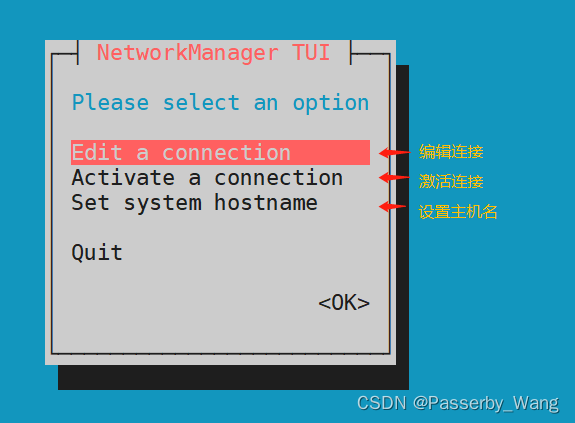
3、修改主机名
1)光标移动到“Set system hostname”后回车确认,在“Hostname”栏中输入主机名,光标移到OK,回车确认;

2)设置成功,回车确认;

3)光标移动到“Quit”后,向下移动到OK,回车退出页面。

4)验证
命令
hostname
功能
查看主机名
实例
- [root@wangwu ~]# hostname
- wangwu1
4、修改网卡信息
1)光标移动到“Edit a connection”后回车确认,进入设置页面,选择网卡名称“ens33”回车确认;

2)光标移动到“IPv4 CONFIGURATION(IPv4配置)”后回车,选择“Manual(手动)”后,回车确认;

3)光标移动到“Show”回车后,依次填写“Addresses(IP)”、“Gateway(网关)”、“DNS servers(DNS)”,使用空格勾选“Automatically connect(自动连接)”、“Available to all users(对所有用户有效)”,确认无误后,光标移到OK,回车确认。


5、启用网卡
1)光标移动到“Activate a connection”后回车确认,找到“ens33”网卡,回车断开连接;

2)再次回车启用连接,光标移动到“Back”,回车退出;

3)光标移动到“Quit”后,向下移动到OK,回车退出页面。

4)验证
命令
ifconfig
功能
配置和显示Linux内核中网络接口的网络参数
实例
- [root@wangwu ~]# ifconfig
- ens33: flags=4163
- inet 192.168.8.168 netmask 255.255.255.0 broadcast 192.168.8.254
- inet6 fe80::e97a:8402:cb2c:8e3e prefixlen 64 scopeid 0x20<link>
- ether 00:0c:29:75:69:ad txqueuelen 1000 (Ethernet)
- RX packets 2192 bytes 231020 (225.6 KiB)
- RX errors 0 dropped 0 overruns 0 frame 0
- TX packets 2246 bytes 828014 (808.6 KiB)
- TX errors 0 dropped 0 overruns 0 carrier 0 collisions 0
- ... ... ...
- #如报错,需安装相关网络工具 yum -y install net-tools
二、命令行配置
1、修改主机名
1)命令
hostnamectl
2)功能
显示和永久修改主机名
3)实例
[root@wangwu1 ~]# hostnamectl set-hostname wangwu4)验证
- [root@wangwu ~]# hostname
- wangwu1
2、查看网络连接
1)命令
nmcil
2)格式
nmcli connection show
nmcli connection show "网卡名"
3)实例
- [root@wangwu ~]# nmcli connection show
- #名称 UUID 类型 设备
- NAME UUID TYPE DEVICE
- ens33 df0f74ad-c1d9-4796-be06-47e7f0fe8409 ethernet ens33
- ... ... ...
3、修改网络配置
1)命令
nmcil
2)格式
nmcli connection modify “网卡名” 参数 值
3)常用参数
ipv4 method auto|manual 自动|手动
ipv4.addresses IP地址/掩码长度
ipv4.gateway网关地址
ipv4.dns DNS地址
connection.autoconnect yes|no 是否自动连接
4)实例
[root@wangwu ~]# nmcli connection modify ens33 ipv4.method manual ipv4.addresses 192.168.6.168/24 ipv4.gateway 192.168.6.254 connection.autoconnect yes ipv4.dns 114.114.114.1144、激活/禁用网络连接、加载配置文件
1)命令
nmcil
2)格式
nmcli connection down "网卡名"
nmcli connection up "网卡名"
nmcli connection reload #重新加载网络配置文件
3)实例
[root@wangwu ~]# nmcli connection down ens33
[root@wangwu ~]# nmcli connection up ens33
4)验证
- [root@wangwu ~]# ifconfig
- ens33: flags=4163
- inet 192.168.8.168 netmask 255.255.255.0 broadcast 192.168.8.254
- inet6 fe80::e97a:8402:cb2c:8e3e prefixlen 64 scopeid 0x20<link>
- ether 00:0c:29:75:69:ad txqueuelen 1000 (Ethernet)
- RX packets 2192 bytes 231020 (225.6 KiB)
- RX errors 0 dropped 0 overruns 0 frame 0
- TX packets 2246 bytes 828014 (808.6 KiB)
- TX errors 0 dropped 0 overruns 0 carrier 0 collisions 0
- ... ... ...
三、配置文件配置
1、设置主机名
1)配置文件位置/etc/hostname,修改配置文件后,重新登录可看到命令行提示中的新主机名称
2)实例
- [root@wangwu ~]# vim /etc/hostname
- wangwu
2、修改修改网络配置
1)配置文件/etc/sysconfig/network-scripts/ifcfg-网卡名
2)实例
- [root@wangwu ~]# vim /etc/sysconfig/network-scripts/ifcfg-ens33
- TYPE=Ethernet #网卡类型:以太网
- PROXY_METHOD=none #代理方式:关闭
- BROWSER_ONLY=no #仅限浏览器:否
- BOOTPROTO=static #网卡协议:static(静态主机配置协议)
- DEFROUTE=yes #默认路由:是
- IPV4_FAILURE_FATAL=no #是否开启IPV4致命错误检测:否
- IPV6INIT=yes #IPV6是否自动初始化: 是
- IPV6_AUTOCONF=yes #IPV6是否自动配置:是
- IPV6_DEFROUTE=yes #IPV6地址生成模型
- IPV6_FAILURE_FATAL=no #是否开启IPV4致命错误检测:否
- IPV6_ADDR_GEN_MODE=stable-privacy #IPV6地址生成模型
- NAME=ens33 #网卡名称
- UUID=df0f74ad-c1d9-4796-be06-47e7f0fe8409 #识别码
- DEVICE=ens33 #设备名称(与网卡名称一致)
- ONBOOT=yes #开机自启
- IPADDR=192.168.6.168 #IP地址
- PREFIX=24 #子网掩码
- GATEWAY=192.168.6.254 #网关
- DNS1=114.114.114.114 #DNS地址
3)重启
[root@wangwu ~]# /etc/init.d/network restart3、指定DNS服务器
1)配置文件/etc/resolv.conf
2)实例
- [root@wangwu ~]# vim /etc/resolv.conf
- # Generated by NetworkManager
- search localdomain #默认域后缀
- nameserver 192.168.154.2 #设置DNS地址
四、其他常用的网络工具
1、ip address
1)功能
临时设置网络信息
2)格式
ip address show #显示网卡详细信息
ip address add IP/掩码 dev 网卡名 #临时设定ip
ip address del dev 网卡名 IP/掩码 #删除ip
3)实例
- [root@wangwu ~]# ip address show
- 1: ens33:
- link/ether 00:0c:29:75:69:ad brd ff:ff:ff:ff:ff:ff
- inet 192.168.6.168/24 brd 192.168.6.254 scope global noprefixroute dynamic ens33
- valid_lft 1442sec preferred_lft 1442sec
- inet6 fe80::e97a:8402:cb2c:8e3e/64 scope link noprefixroute
- valid_lft forever preferred_lft forever
- ... ... ...
- [root@wangwu ~]# ip address add 192.168.1.1/24 dev ens33
- [root@wangwu ~]# ip address show
- 1: ens33:
- link/ether 00:0c:29:75:69:ad brd ff:ff:ff:ff:ff:ff
- inet 192.168.6.168/24 brd 192.168.6.254 scope global noprefixroute dynamic ens33
- valid_lft 1303sec preferred_lft 1303sec
- inet 192.168.1.1/24 scope global ens33
- valid_lft forever preferred_lft forever
- inet6 fe80::e97a:8402:cb2c:8e3e/64 scope link noprefixroute
- valid_lft forever preferred_lft forever
- ... ... ...
- [root@wangwu ~]# ip address del dev ens33 192.168.1.1/24
- [root@wangwu ~]# ip address show
- 1: ens33:
- link/ether 00:0c:29:75:69:ad brd ff:ff:ff:ff:ff:ff
- inet 192.168.6.168/24 brd 192.168.6.254 scope global noprefixroute dynamic ens33
- valid_lft 1442sec preferred_lft 1442sec
- inet6 fe80::e97a:8402:cb2c:8e3e/64 scope link noprefixroute
- valid_lft forever preferred_lft forever
- ... ... ...
2、ping 命令
1)功能
确定网络和各外部主机的状态
2)格式
ping 选项 ip|域名
3)常用选项
-c:发送次数
-i:发送间隔时间,单位秒
-w:执行时间单位秒
-s:数据包大小,单位字节
-R:记录路由信息
4)实例
- [root@wangwu ~]# ping 192.168.6.168
- PING 192.168.6.168 (192.168.6.168) 56(84) bytes of data.
- 64 bytes from 192.168.6.168: icmp_seq=1 ttl=64 time=0.033 ms
- 64 bytes from 192.168.6.168: icmp_seq=2 ttl=64 time=0.080 ms
- 64 bytes from 192.168.6.168: icmp_seq=3 ttl=64 time=0.071 ms
- ^C
- --- 192.168.6.168 ping statistics ---
- 3 packets transmitted, 3 received, 0% packet loss, time 2004ms
- rtt min/avg/max/mdev = 0.033/0.061/0.080/0.021 ms
- #ping通(网络连接正常)
- [root@wangwu ~]# ping 192.168.6.168
- PING 192.168.6.168 (192.168.6.168) 56(84) bytes of data.
- From 192.168.6.168 icmp_seq=2 Destination Host Unreachable
- From 192.168.6.168 icmp_seq=3 Destination Host Unreachable
- From 192.168.6.168 icmp_seq=4 Destination Host Unreachable
- ^C
- --- 192.168.6.168 ping statistics ---
- 6 packets transmitted, 0 received, +3 errors, 100% packet loss, time 5847ms
- #ping不通(网络连接异常)
- [root@wangwu ~]# ping -c 3 -i 0.5 -s 1024 192.168.6.168 #发送3次,间隔0.5秒,1024字节
- PING 192.168.6.168 (192.168.6.168) 1024(1052) bytes of data.
- 1032 bytes from 192.168.6.168: icmp_seq=1 ttl=64 time=0.028 ms
- 1032 bytes from 192.168.6.168: icmp_seq=2 ttl=64 time=0.077 ms
- 1032 bytes from 192.168.6.168: icmp_seq=3 ttl=64 time=0.043 ms
- --- 192.168.6.168 ping statistics ---
- 3 packets transmitted, 3 received, 0% packet loss, time 1004ms
- rtt min/avg/max/mdev = 0.028/0.049/0.077/0.021 ms
-
- [root@wangwu ~]# ping -w 3 -R www.baidu.com #执行3秒,记录路由信息
- PING www.a.shifen.com (220.181.38.149) 56(124) bytes of data.
- 64 bytes from 220.181.38.149 (220.181.38.149): icmp_seq=1 ttl=128 time=8.66 ms
- 64 bytes from 220.181.38.149 (220.181.38.149): icmp_seq=2 ttl=128 time=7.49 ms
- 64 bytes from 220.181.38.149 (220.181.38.149): icmp_seq=3 ttl=128 time=5.77 ms
- --- www.a.shifen.com ping statistics ---
- 3 packets transmitted, 3 received, 0% packet loss, time 2005ms
- rtt min/avg/max/mdev = 5.776/7.313/8.665/1.186 ms
3、ethtool命令
1)功能
查询和控制网络设备驱动程序和硬件设置
2)格式
ethtool网卡名 #查询网卡基本设置
ethtool -i 网卡名 #显示网卡驱动的信息
ethtool -p 网卡名 秒数 #用于区别对应网卡的物理位置,Led灯持续闪烁
3)实例
- [root@wangwu ~]# ethtool ens33
- Settings for ens33:
- Supported ports: [ TP ]
- Supported link modes: 10baseT/Half 10baseT/Full
- 100baseT/Half 100baseT/Full
- 1000baseT/Full
- Supported pause frame use: No
- Supports auto-negotiation: Yes #支持自动协商
- Supported FEC modes: Not reported
- Advertised link modes: 10baseT/Half 10baseT/Full
- 100baseT/Half 100baseT/Full
- 1000baseT/Full
- Advertised pause frame use: No
- Advertised auto-negotiation: Yes #使用自动协商
- Advertised FEC modes: Not reported
- Speed: 1000Mb/s #当前速率 1000Mb/s
- Duplex: Full #工作模式为全双工
- Port: Twisted Pair
- PHYAD: 0
- Transceiver: internal
- Auto-negotiation: on
- MDI-X: off (auto)
- Supports Wake-on: d
- Wake-on: d
- Current message level: 0x00000007 (7)
- drv probe link
- Link detected: yes #网卡连接正常
- #如报错,需安装相关网络工具 yum -y install ethtool
- [root@wangwu ~]# ethtool -i ens33
- driver: e1000
- version: 7.3.21-k8-NAPI
- firmware-version:
- expansion-rom-version:
- bus-info: 0000:02:01.0
- supports-statistics: yes
- supports-test: yes
- supports-eeprom-access: yes
- supports-register-dump: yes
- supports-priv-flags: no
- [root@wangwu ~]# ethtool -p ens33 10
- #ens33网口Led灯闪烁10秒
-
相关阅读:
SNAT和DNAT原理及应用
SpringBoot学习_day7
PR Lumetri颜色
上半年亏损之下,卫龙第三次冲刺港股IPO
酒店神秘顾客如何审核资料
Nginx(一)介绍Nginx、正向代理和实现反向代理的两个实例
项目管理之jira 9.1安装
C++算法:接雨水
基于模板匹配的图像拼接技术研究-含Matlab代码
浏览器缓存 四种缓存分类 两种缓存类型
- 原文地址:https://blog.csdn.net/Passerby_Wang/article/details/126622492