-
Word控件Spire.Doc 【段落处理】教程(八):如何在 C#、VB.NET 中的 Word 中创建多级列表编号
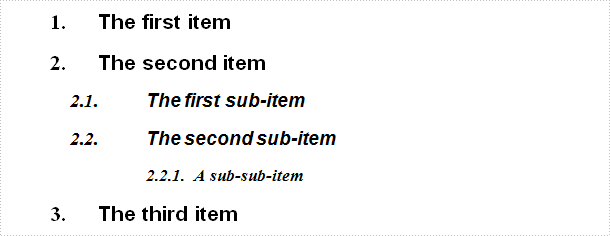
多级列表编号允许您使用嵌套编号格式化和组织文本。多级列表最常见的形式是标题编号,它用大纲列表概括整篇文章,经常出现在技术、学术和商业文档中。在本文中,您将学习如何在 C#、VB.NET 中使用 Spire.Doc 生成多级列表编号。
Spire.Doc for.NET 最新下载
 https://www.evget.com/product/3368/download
详细步骤:
第 1 步 : 创建一个新的 Word 文档,添加一个部分。
Document document = new Document();
Section section = document.AddSection();
第 2 步:定义新的多级列表样式。设置其名称为levelstyle,设置ListType 为Numbered,设置level 属性的参数。此列表级别独立于样式运行并控制数字格式。
ListStyle listStyle = new ListStyle(document, ListType.Numbered);
listStyle.Name = "levelstyle";
listStyle.Levels[0].PatternType = ListPatternType.Arabic;
listStyle.Levels[1].NumberPrefix = "\x0000.";
listStyle.Levels[1].PatternType = ListPatternType.Arabic;
listStyle.Levels[2].NumberPrefix = "\x0000.\x0001.";
listStyle.Levels[2].PatternType = ListPatternType.Arabic;
document.ListStyles.Add(listStyle);
第 3 步:创建一个段落,将文本附加到段落并使用 Heading1 应用段落样式。将定义的列表样式“levelstyle”应用于此段落。
Paragraph paragraph = section.AddParagraph();
paragraph.AppendText("The first item");
paragraph.ApplyStyle(BuiltinStyle.Heading1);
paragraph.ListFormat.ApplyStyle("levelstyle");
第 4 步:重复第 3 步以向该文档添加更多段落。在这里,您需要将不同的 ListLevelNumber 设置为 1 或 2,以确保将子段落和子段落分配给不同的列表模板。
paragraph = section.AddParagraph();
paragraph.AppendText("The second item");
paragraph.ApplyStyle(BuiltinStyle.Heading1);
paragraph.ListFormat.ApplyStyle("levelstyle");

paragraph = section.AddParagraph();
paragraph.AppendText("The first sub-item");
paragraph.ApplyStyle(BuiltinStyle.Heading2);
paragraph.ListFormat.ListLevelNumber = 1;
paragraph.ListFormat.ApplyStyle("levelstyle");

paragraph = section.AddParagraph();
paragraph.AppendText("The second sub-item");
paragraph.ApplyStyle(BuiltinStyle.Heading2);
paragraph.ListFormat.ContinueListNumbering();
paragraph.ListFormat.ApplyStyle("levelstyle");

paragraph = section.AddParagraph();
paragraph.AppendText("A sub-sub-item");
paragraph.ApplyStyle(BuiltinStyle.Heading5);
paragraph.ListFormat.ListLevelNumber = 2;
paragraph.ListFormat.ApplyStyle("levelstyle");

paragraph = section.AddParagraph();
paragraph.AppendText("The third item");
paragraph.ApplyStyle(BuiltinStyle.Heading1);
paragraph.ListFormat.ApplyStyle("levelstyle");
第 5 步:保存文件。
document.SaveToFile(@"result.docx", FileFormat.Docx);
结果:
完整代码:
[C#]
using Spire.Doc;
using Spire.Doc.Documents;
namespace CreatList
{
class Program
{

static void Main(string[] args)
{
Document document = new Document();
Section section = document.AddSection();

ListStyle listStyle = new ListStyle(document, ListType.Numbered);
listStyle.Name = "levelstyle";
listStyle.Levels[0].PatternType = ListPatternType.Arabic;
listStyle.Levels[1].NumberPrefix = "\x0000.";
listStyle.Levels[1].PatternType = ListPatternType.Arabic;
listStyle.Levels[2].NumberPrefix = "\x0000.\x0001.";
listStyle.Levels[2].PatternType = ListPatternType.Arabic;
document.ListStyles.Add(listStyle);

Paragraph paragraph = section.AddParagraph();
paragraph.AppendText("The first item");
paragraph.ApplyStyle(BuiltinStyle.Heading1);
paragraph.ListFormat.ApplyStyle("levelstyle");

paragraph = section.AddParagraph();
paragraph.AppendText("The second item");
paragraph.ApplyStyle(BuiltinStyle.Heading1);
paragraph.ListFormat.ApplyStyle("levelstyle");

paragraph = section.AddParagraph();
paragraph.AppendText("The first sub-item");
paragraph.ApplyStyle(BuiltinStyle.Heading2);
paragraph.ListFormat.ListLevelNumber = 1;
paragraph.ListFormat.ApplyStyle("levelstyle");

paragraph = section.AddParagraph();
paragraph.AppendText("The second sub-item");
paragraph.ApplyStyle(BuiltinStyle.Heading2);
paragraph.ListFormat.ContinueListNumbering();
paragraph.ListFormat.ApplyStyle("levelstyle");

paragraph = section.AddParagraph();
paragraph.AppendText("A sub-sub-item");
paragraph.ApplyStyle(BuiltinStyle.Heading5);
paragraph.ListFormat.ListLevelNumber = 2;
paragraph.ListFormat.ApplyStyle("levelstyle");

paragraph = section.AddParagraph();
paragraph.AppendText("The third item");
paragraph.ApplyStyle(BuiltinStyle.Heading1);
paragraph.ListFormat.ApplyStyle("levelstyle");

document.SaveToFile(@"result.docx", FileFormat.Docx);

}
}
}
[VB.NET]
Imports Spire.Doc Imports Spire.Doc.Documents Namespace CreatList Class Program Private Shared Sub Main(args As String()) Dim document As New Document() Dim section As Section = document.AddSection() Dim listStyle As New ListStyle(document, ListType.Numbered) listStyle.Name = "levelstyle" listStyle.Levels(0).PatternType = ListPatternType.Arabic listStyle.Levels(1).NumberPrefix = vbNullChar & "." listStyle.Levels(1).PatternType = ListPatternType.Arabic listStyle.Levels(2).NumberPrefix = vbNullChar & "." & ChrW(1) & "." listStyle.Levels(2).PatternType = ListPatternType.Arabic document.ListStyles.Add(listStyle) Dim paragraph As Paragraph = section.AddParagraph() paragraph.AppendText("The first item") paragraph.ApplyStyle(BuiltinStyle.Heading1) paragraph.ListFormat.ApplyStyle("levelstyle") paragraph = section.AddParagraph() paragraph.AppendText("The second item") paragraph.ApplyStyle(BuiltinStyle.Heading1) paragraph.ListFormat.ApplyStyle("levelstyle") paragraph = section.AddParagraph() paragraph.AppendText("The first sub-item") paragraph.ApplyStyle(BuiltinStyle.Heading2) paragraph.ListFormat.ListLevelNumber = 1 paragraph.ListFormat.ApplyStyle("levelstyle") paragraph = section.AddParagraph() paragraph.AppendText("The second sub-item") paragraph.ApplyStyle(BuiltinStyle.Heading2) paragraph.ListFormat.ContinueListNumbering() paragraph.ListFormat.ApplyStyle("levelstyle") paragraph = section.AddParagraph() paragraph.AppendText("A sub-sub-item") paragraph.ApplyStyle(BuiltinStyle.Heading5) paragraph.ListFormat.ListLevelNumber = 2 paragraph.ListFormat.ApplyStyle("levelstyle") paragraph = section.AddParagraph() paragraph.AppendText("The third item") paragraph.ApplyStyle(BuiltinStyle.Heading1) paragraph.ListFormat.ApplyStyle("levelstyle") document.SaveToFile("result.docx", FileFormat.Docx) End Sub End Class End Namespace -
相关阅读:
Bricks WordPress 网站生成器中存在 RCE 漏洞,黑客正在积极利用
【牛客刷题-SQL大厂面试真题】NO5.某宝店铺分析(电商模式)
【OpenMV】AprilTag标记跟踪 NCC模板匹配 测距与测量物体大小
苹果AppleMacOs系统Sonoma本地部署无内容审查(NSFW)大语言量化模型Causallm
为什么 C# 可能是最好的第一编程语言
Vue3:分析elementplus表格第一列序号hover变多选框实现思路
springcloud入门
嵌入式Linux 开发经验:注册一个 misc 设备
减小windows或linux虚拟机导出ova体积大小
【英语:基础进阶_核心词汇扩充】E2.常见词后缀拓词
- 原文地址:https://blog.csdn.net/m0_67129275/article/details/126578635