-
springboot实现websocket
一、maven依赖
- <dependency>
- <groupId>org.springframework.bootgroupId>
- <artifactId>spring-boot-starter-websocketartifactId>
- dependency>
二、websocket配置类
- @ServerEndpoint("/websocket/{userId}")
- @Component
- public class WebSocketServer {
- static Log log = LogFactory.get(WebSocketServer.class);
- /**
- * 静态变量,用来记录当前在线连接数。应该把它设计成线程安全的。
- */
- private static int onlineCount = 0;
- /**
- * concurrent包的线程安全Set,用来存放每个客户端对应的MyWebSocket对象。
- */
- private static ConcurrentHashMap
- /**
- * 与某个客户端的连接会话,需要通过它来给客户端发送数据
- */
- private Session session;
- /**
- * 接收userId
- */
- private String userId = "";
- /**
- * 连接建立成功调用的方法
- */
- @OnOpen
- public void onOpen(Session session, @PathParam("userId") String userId) {
- this.session = session;
- this.userId = userId;
- if (webSocketMap.containsKey(userId)) {
- webSocketMap.remove(userId);
- webSocketMap.put(userId, this);
- //加入set中
- } else {
- webSocketMap.put(userId, this);
- //加入set中
- addOnlineCount();
- //在线数加1
- }
- log.info("用户连接:" + userId + ",当前在线人数为:" + getOnlineCount());
- try {
- sendMessage("连接成功");
- } catch (IOException e) {
- log.error("用户:" + userId + ",网络异常!!!!!!");
- }
- }
- /**
- * 连接关闭调用的方法
- */
- @OnClose
- public void onClose() {
- if (webSocketMap.containsKey(userId)) {
- webSocketMap.remove(userId);
- //从set中删除
- subOnlineCount();
- }
- log.info("用户退出:" + userId + ",当前在线人数为:" + getOnlineCount());
- }
- /**
- * 收到客户端消息后调用的方法
- *
- * @param message 客户端发送过来的消息
- */
- @OnMessage
- public void onMessage(String message, Session session) {
- log.info("用户消息:" + userId + ",报文:" + message);
- //可以群发消息
- //消息保存到数据库、redis
- if (StringUtils.isNotBlank(message)) {
- try {
- //解析发送的报文
- JSONObject jsonObject = JSON.parseObject(message);
- //追加发送人(防止串改)
- jsonObject.put("fromUserId", this.userId);
- String toUserId = jsonObject.getString("toUserId");
- //传送给对应toUserId用户的websocket
- if (StringUtils.isNotBlank(toUserId) && webSocketMap.containsKey(toUserId)) {
- log.info("请求的userId:" + toUserId + "在该服务器上");
- webSocketMap.get(toUserId).sendMessage(jsonObject.toJSONString());
- } else {
- log.error("请求的userId:" + toUserId + "不在该服务器上");
- //否则不在这个服务器上,发送到mysql或者redis
- }
- } catch (Exception e) {
- e.printStackTrace();
- }
- }
- }
- /**
- * @param session
- * @param error
- */
- @OnError
- public void onError(Session session, Throwable error) {
- log.error("用户错误:" + this.userId + ",原因:" + error.getMessage());
- error.printStackTrace();
- }
- /**
- * 实现服务器主动推送
- */
- public void sendMessage(String message) throws IOException {
- this.session.getBasicRemote().sendText(message);
- }
- /**
- * 发送自定义消息
- */
- public static void sendInfo(String message, @PathParam("userId") String userId) throws IOException {
- log.info("发送消息到:" + userId + ",报文:" + message);
- if (StringUtils.isNotBlank(userId) && webSocketMap.containsKey(userId)) {
- webSocketMap.get(userId).sendMessage(message);
- } else {
- log.error("用户" + userId + ",不在线!");
- }
- }
- public static synchronized int getOnlineCount() {
- return onlineCount;
- }
- public static synchronized void addOnlineCount() {
- WebSocketServer.onlineCount++;
- }
- public static synchronized void subOnlineCount() {
- WebSocketServer.onlineCount--;
- }
- }
- /**
- * 开启WebSocket支持
- * @author
- */
- @Configuration
- public class WebSocketConfig {
- @Bean
- public ServerEndpointExporter serverEndpointExporter() {
- return new ServerEndpointExporter();
- }
- }
三、controller
- @RestController
- public class DemoController {
- @GetMapping("index")
- public ResponseEntity
index() { - return ResponseEntity.ok("请求成功");
- }
- @GetMapping("page")
- public ModelAndView page() {
- return new ModelAndView("websocket");
- }
- @RequestMapping("/push/{toUserId}")
- public ResponseEntity
pushToWeb(String message, @PathVariable String toUserId) throws IOException { - WebSocketServer.sendInfo(message, toUserId);
- return ResponseEntity.ok("MSG SEND SUCCESS");
- }
- }
以上代码完成了websocket的接入,可以用在线的websocket测试网站测试
四、在线websocket测试网站
websocket在线测试
1、下面是测试连接的页面
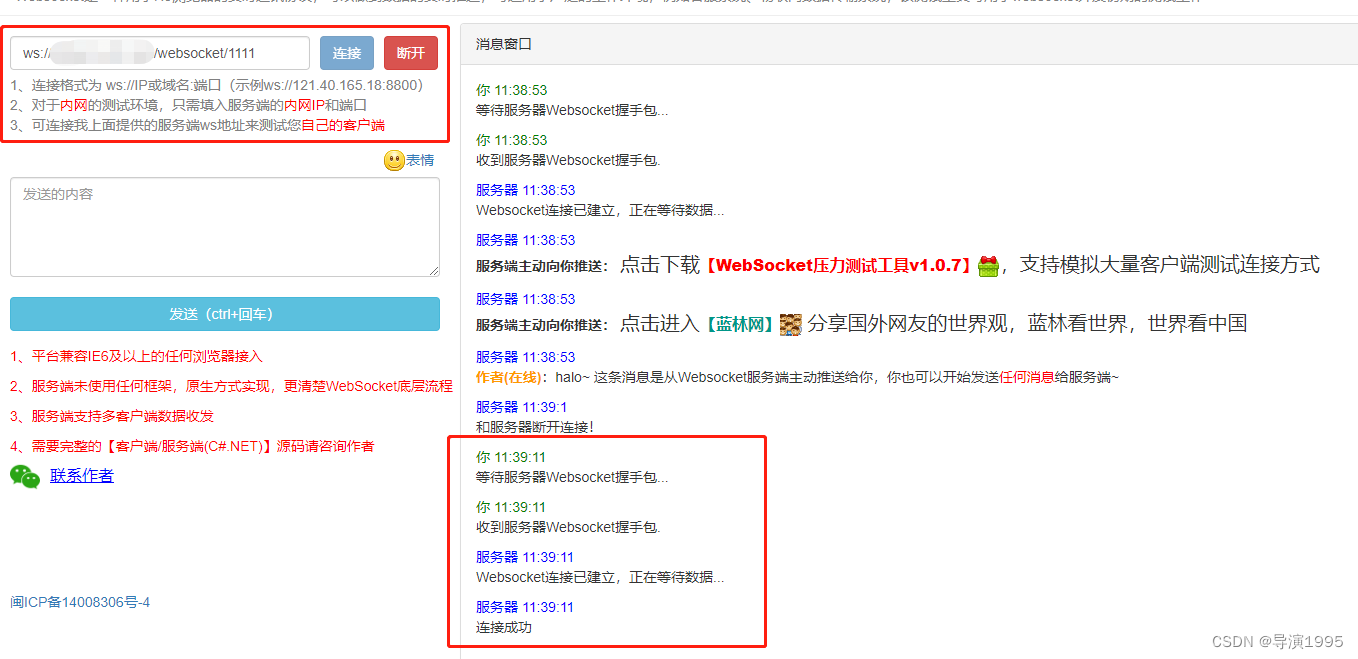
本地调试的话,用ws://ip:port/websocket/{{userId}} 连接
2、发送消息

发送内容{"toUserId":"1111","body":"测试消息"},服务器受到消息后,会带上fromUserId返回
五、 nginx配置
如果使用了nginx,需要进行配置实现websocket协议的转发
- location /websocket/ {
- proxy_pass http://127.0.0.1:7017/websocket/;
- proxy_http_version 1.1;
- proxy_set_header Upgrade $http_upgrade;
- proxy_set_header Connection "upgrade";
- }
上面的配置放在 server配置里
六、遇到的问题
本地启动项目可以正常测试,但是准备打个jar包扔到服务器的时候,使用maven install出现问题,解决方案:删除 spring-boot-starter-test 依赖和 test测试类代码,或者install时忽略test文件夹。
-
相关阅读:
visionpro学习课程-CogPMAlignTool大总结
2021.03青少年软件编程(Python)等级考试试卷(三级)
windows系统安装php,运行php
基于内存的分布式NoSQL数据库Redis(六)AOF设计
22/5/21
Apache 网站服务基础
认知战壳吉桔:认知战战略不是从思潮开始,而在策划!
Camunda 使用restapi
springboot2 shardingjdbc4.x 分表
SQL Server高级编程
- 原文地址:https://blog.csdn.net/xrq1995/article/details/126581698
