-
Flutter-自定义之钟表
效果图
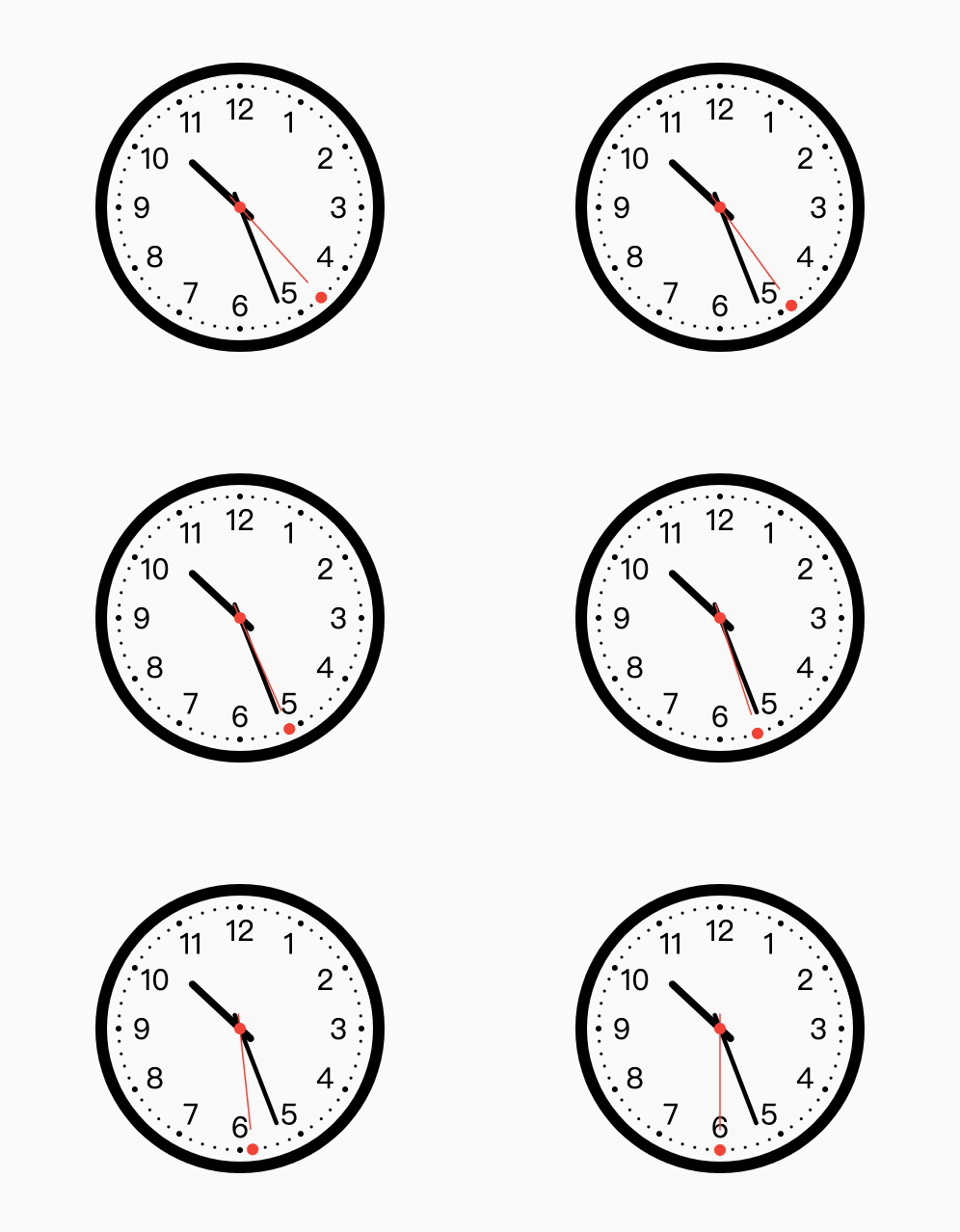
绘制控件(四大角色)
- CustomPaint
- CustomPainter
- Canvas
- Paint
CustomPaint
英文翻译:自定义绘制;CustomPaint可以实现很多酷炫的动画和效果。CustomPaint 提供了让用户自定义widget的能力,它暴露了一个canvas,可以通过这个canvas来绘制widget,CustomPaint会先调用painter绘制背景,然后再绘制child,最后调用foregroundPainter来绘制前景,CustomPaint的定义如下
CustomPaint({Key key, CustomPainter painter, CustomPainter foregroundPainter, Size size: Size.zero, bool isComplex: false, bool willChange: false, Widget child })- 1
- 2
- 3
- 4
- 5
- 6
- 7
- 8
- painter:负责绘制背景的painter
- foregroundPainter : 负责绘制前景的painter
- size : 控件大小
- isComplex : 是否复杂绘制,需要用cache来提高绘制效率
- willChange : 和isComplex配合使用,当启用缓存时,该属性代表在下一帧中绘制是否会改变
- child : 子widget
CustomPainter
CustomPaint的绘制过程都将会交给CustomPainter来完成,CustomPainter是个抽象接口,在子类继承CustomPainter的时候必须要重写它的paint 跟 shouldRepaint接口。
class MyCustomPainter extends CustomPainter { //绘制自定义的效果 @override void paint(Canvas canvas, Size size) { } //判断是否需要重新绘制ui 通常在当前实例和旧实例属性不一致时返回true。 @override bool shouldRepaint(MyCustomPainter oldDelegate) { return this != oldDelegate; } }- 1
- 2
- 3
- 4
- 5
- 6
- 7
- 8
- 9
- paint : 每当CustomPaint需要重绘的时候都会调用此接口
- shouldRepaint : 当CustomPaint被重新设置了一个新的painter后会回调此方法,CustomPaint会根据shouldRepaint的返回值来判断是否需要重新绘制ui,譬如新的painter跟旧的painter绘制的内容不一样时,此时shouldRepaint需要返回true来通知CustomPaint重新绘制。
Canvas
- Canvas:画布,真正的绘制是由canvas跟paint来完成的,画布提供了各种绘制的接口来绘制图形。 常用的绘制接口有更多请查看官方文档
小知识点:
- canvas.save(); 画布将当前的状态保存
- canvas.restore(); 画布取出原来所保存的状态
Paint
- Paint:画笔,是用来在画布上面绘制图形。画笔属性:颜色、线宽、绘制模式、抗锯齿等等。
常用属性有:
- isAntiAlias : 设置画笔是否扛锯齿
- color : 颜色
- strokeWidth : 设置画笔画线宽度
- style :绘制模式,画线或充满
以上简单介绍了Flutter绘制API,下面开始真正来实现钟表的效果。
实现开始
四大步骤
- 1、效果功能分析。
- 2、功能拆解。
- 3、功能参数。
- 4、功能代码实现。
1、效果功能分析
钟表(参考自己家的钟表)
2、功能拆解
- 绘制边框API:
void drawCircle(Offset c, double radius, Paint paint)- 1
- 绘制刻度:
void drawPoints(PointMode pointMode, Listpoints, Paint paint) - 1
- 绘制数字:
TextPainter( textAlign: TextAlign.center, textDirection: TextDirection.ltr, text: TextSpan(), ) ..layout() ..paint(canvas, offset);- 1
- 2
- 3
- 4
- 5
- 6
- 绘制时针:
void drawLine(Offset p1, Offset p2, Paint paint)- 1
- 绘制分针:
void drawLine(Offset p1, Offset p2, Paint paint)- 1
- 绘制秒针:
void drawLine(Offset p1, Offset p2, Paint paint)- 1
- 绘制中间圆圈:
void drawCircle(Offset c, double radius, Paint paint)- 1
- 绘制移动小球:
void drawCircle(Offset c, double radius, Paint paint)- 1
- 移动指针:
Timer.periodic(Duration(seconds: 1), (timer) { setState(() { dateTime = DateTime.now(); }); });- 1
- 2
- 3
- 4
- 5
3、功能参数
- 钟表的半径
- 边框的颜色
- 刻度的颜色
- 数字的颜色
- 时针的颜色
- 分针的颜色
- 秒针的颜色
- 走秒小球颜色
- 中间圆颜色
4、功能代码实现
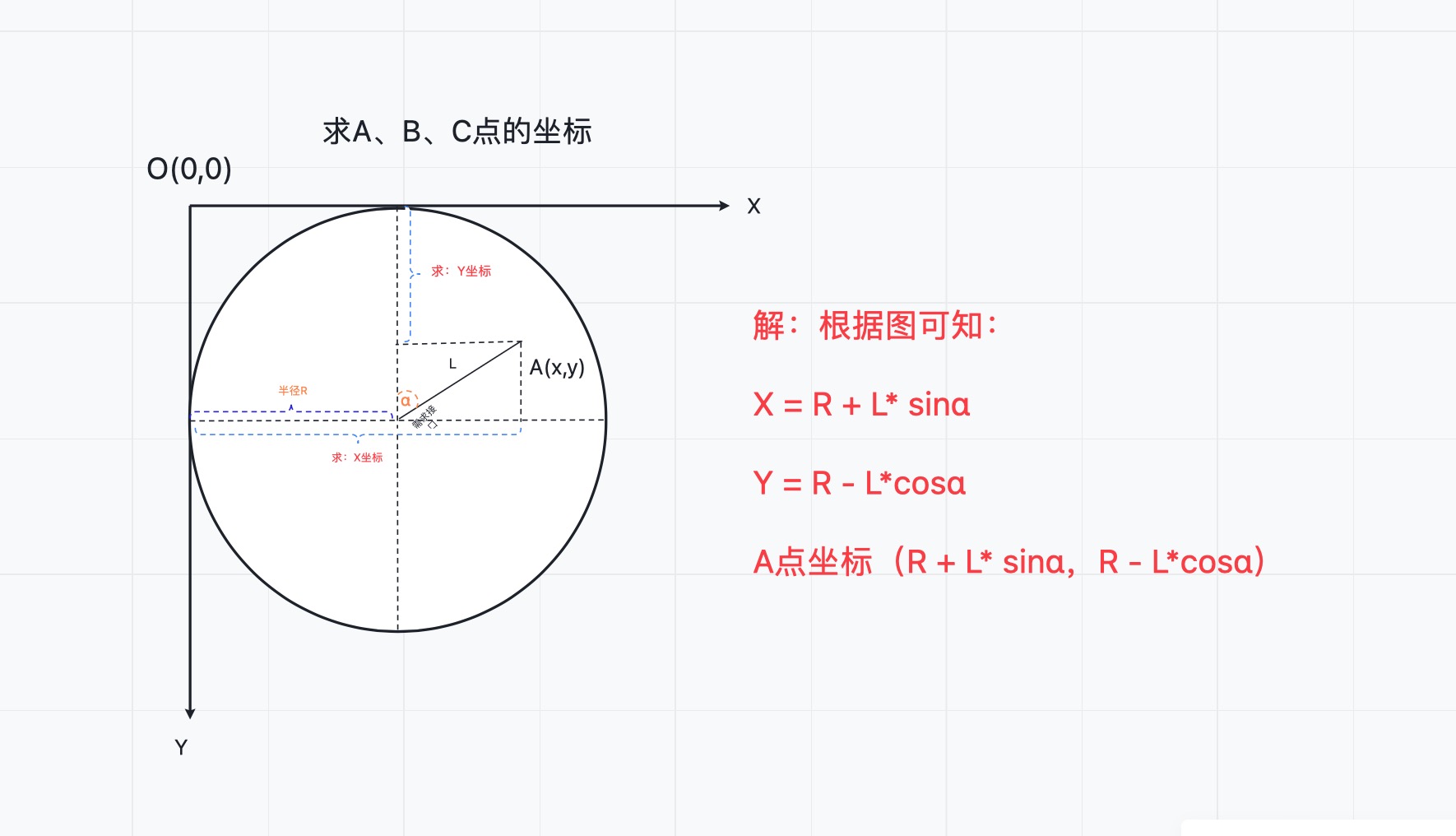
从功能拆解可以看出,所有的功能未知数就是位置的计算,我们可以先计算下点的坐标。
如图:

我们一起来回顾下上学时期的数学几何知识吧!
-
先求A点
-
再求B点

-
再求C点
同上计算出也是:
C点坐标(R + L*sinα,R - L*cosα)- 1
所以说在园中,随便一个点的坐标都是:
(R + Lsinα,R - Lcosα)
上面计算过程中使用了之前学习的诱导公式,这里列举出来:
诱导公式

到这里基本需要计算的知识点已经完毕了,剩下就是对API的使用,因为代码不多,这里直接把完整的代码贴出来,注释很详细。
完整代码
import 'dart:async'; import 'dart:math'; import 'dart:ui'; import 'package:flutter/material.dart'; ///时钟 class ClockView extends StatefulWidget { const ClockView({ Key key, this.radius = 150, this.borderColor = Colors.black, this.scaleColor = Colors.black, this.numberColor = Colors.black, this.moveBallColor = Colors.red, this.hourHandColor = Colors.black, this.minuteHandColor = Colors.black, this.secondHandColor = Colors.red, this.middleCircleColor = Colors.red, }) : super(key: key); //钟表的半径 final double radius; //边框的颜色 final Color borderColor; //刻度的颜色 final Color scaleColor; //数字的颜色 final Color numberColor; //走秒小球颜色 final Color moveBallColor; //时针的颜色 final Color hourHandColor; //分针的颜色 final Color minuteHandColor; //秒针的颜色 final Color secondHandColor; //中间圆颜色 final Color middleCircleColor; @override StatecreateState() { return ClockViewState(); } } class ClockViewState extends State { //当前时间 DateTime dateTime; //定时器 Timer timer; @override void initState() { super.initState(); dateTime = DateTime.now(); timer = Timer.periodic(Duration(seconds: 1), (timer) { setState(() { dateTime = DateTime.now(); }); }); } @override void dispose() { //取消定时器 if (timer.isActive) { timer?.cancel(); } super.dispose(); } @override Widget build(BuildContext context) { return CustomPaint( painter: ClockPainter( dateTime, radius: widget.radius, borderColor: this.widget.borderColor, scaleColor: this.widget.scaleColor, numberColor: this.widget.numberColor, moveBallColor: this.widget.moveBallColor, hourHandColor: this.widget.hourHandColor, minuteHandColor: this.widget.minuteHandColor, secondHandColor: this.widget.secondHandColor, middleCircleColor: this.widget.middleCircleColor, ), size: Size(widget.radius * 2, widget.radius * 2), ); } } class ClockPainter extends CustomPainter { //边框的颜色 final Color borderColor; //刻度的颜色 final Color scaleColor; //数字的颜色 final Color numberColor; //中间圆颜色 final Color middleCircleColor; //走秒小球颜色 final Color moveBallColor; //时针的颜色 final Color hourHandColor; //分针的颜色 final Color minuteHandColor; //秒针的颜色 final Color secondHandColor; //边框画笔的宽度 double borderWidth; //刻度画笔的宽度 double scaleWidth; //数字画笔的宽度 double numberWidth; //时针画笔的宽度 double hourHandWidth; //分针画笔的宽度 double minuteHandWidth; //秒针画笔的宽度 double secondHandWidth; //中间圆的宽度 double middleCircleWidth; //小刻度的位置集合 List scaleOffset = []; //大刻度的位置集合 每5个小刻度是一个大刻度 List bigScaleOffset = []; //钟表的半径 final double radius; //当前时间 final DateTime dateTime; //边框画笔 Paint borderPaint; //刻度画笔 Paint scalePaint; //大刻度画笔 Paint biggerScalePaint; //数字画笔 TextPainter textPainter; //时针画笔 Paint hourPaint; //分针画笔 Paint minutePaint; //秒针画笔 Paint secondPaint; //中间圆画笔 Paint centerPaint; //移动小球画笔 Paint moveBallPaint; ClockPainter( this.dateTime, { this.radius, this.borderColor, this.scaleColor, this.numberColor, this.moveBallColor, this.hourHandColor, this.minuteHandColor, this.secondHandColor, this.middleCircleColor, }) { //根据自己的审美设置这些画笔的宽度 borderWidth = 8 * (radius / 100); scaleWidth = 2 * (radius / 100); numberWidth = 20 * (radius / 100); hourHandWidth = 5 * (radius / 100); minuteHandWidth = 3 * (radius / 100); secondHandWidth = 1 * (radius / 100); middleCircleWidth = 4 * (radius / 100); //边框画笔 borderPaint = createPaint(borderColor, borderWidth, style: PaintingStyle.stroke); //刻度画笔 scalePaint = createPaint(numberColor, scaleWidth); //大刻度 biggerScalePaint = createPaint(numberColor, scaleWidth * 2); //时针画笔 hourPaint = createPaint(hourHandColor, hourHandWidth); //分针画笔 minutePaint = createPaint(minuteHandColor, minuteHandWidth); //秒针画笔 secondPaint = createPaint(secondHandColor, secondHandWidth); //中间圆 centerPaint = createPaint(middleCircleColor, middleCircleWidth); //移动小球画笔 moveBallPaint = createPaint(moveBallColor, scaleWidth * 2); //数字 textPainter = TextPainter( textAlign: TextAlign.center, textDirection: TextDirection.ltr, ); //计算出 小刻度和大刻度 final l = radius - borderWidth * 2; for (var i = 0; i < 60; i++) { Offset offset = pointOffset(radius, l, 360 / 60 * i); //小刻度 scaleOffset.add(offset); //大刻度 if (i % 5 == 0) { bigScaleOffset.add(offset); } } } @override void paint(Canvas canvas, Size size) { //绘制边框 drawBorder(canvas); //绘制刻度 drawScale(canvas); //绘制数字 drawNumber(canvas); //绘制时针 drawHour(canvas); //绘制分针 drawMinute(canvas); //绘制秒针 drawSecond(canvas); //绘制中间圆圈 drawMiddleCircle(canvas); //绘制移动小球 drawMoveBall(canvas); } //判断是否需要重绘 @override bool shouldRepaint(CustomPainter oldDelegate) { return true; } ///绘制边框 void drawBorder(Canvas canvas) { canvas.drawCircle( Offset(radius, radius), radius - borderWidth / 2, borderPaint); } ///绘制刻度 void drawScale(Canvas canvas) { //小刻度 canvas.drawPoints(PointMode.points, scaleOffset, scalePaint); //大刻度 canvas.drawPoints(PointMode.points, bigScaleOffset, biggerScalePaint); } ///绘制数字 void drawNumber(Canvas canvas) { double l = radius - borderWidth * 4; for (var i = 0; i < bigScaleOffset.length; i++) { textPainter.text = TextSpan( text: "${i == 0 ? 12 : i}", style: TextStyle(color: numberColor, fontSize: numberWidth), ); Offset offset = pointOffset(radius, l, i * 360 / 12); textPainter.layout(); textPainter.paint( canvas, Offset( offset.dx - (textPainter.width / 2), offset.dy - (textPainter.height / 2), )); } } ///绘制时针 void drawHour(Canvas canvas) { final hour = dateTime.hour; double angle = 360 / 12 * hour + dateTime.minute / 60 * 30; Offset hourHand1 = pointOffset(radius, radius * 0.1, angle + 180); Offset hourHand2 = pointOffset(radius, radius * 0.45, angle); canvas.drawLine(hourHand1, hourHand2, hourPaint); } ///绘制分针 void drawMinute(Canvas canvas) { final minute = dateTime.minute; double angle = 360 / 60 * minute + dateTime.second / 60 * 6; Offset minuteHand1 = pointOffset(radius, radius * 0.1, angle + 180); Offset minuteHand2 = pointOffset(radius, radius * 0.7, angle); canvas.drawLine(minuteHand1, minuteHand2, minutePaint); } ///绘制秒针 void drawSecond(Canvas canvas) { final second = dateTime.second; double angle = 360 / 60 * second; Offset secondHand1 = pointOffset(radius, radius * 0.1, angle + 180); Offset secondHand2 = pointOffset(radius, radius * 0.7, angle); canvas.drawLine(secondHand1, secondHand2, secondPaint); } ///绘制中间圆圈 void drawMiddleCircle(Canvas canvas) { canvas.drawCircle(Offset(radius, radius), middleCircleWidth, centerPaint); } ///绘制移动小球 void drawMoveBall(Canvas canvas) { final second = dateTime.second; canvas.drawCircle(scaleOffset[second], middleCircleWidth, moveBallPaint); } } ///创建Paint Paint createPaint(Color color, double strokeWidth, {PaintingStyle style = PaintingStyle.fill}) { return Paint() ..color = color ..isAntiAlias = true ..style = style ..strokeCap = StrokeCap.round ..strokeWidth = strokeWidth; } ///圆中万能求点公式 Offset pointOffset(double radius, double l, double angle) { return Offset( radius + l * sin(degToRad(angle)), radius - l * cos(degToRad(angle)), ); } ///角度转换为弧度 num degToRad(num deg) => deg * (pi / 180.0); - 1
- 2
- 3
- 4
- 5
- 6
- 7
- 8
- 9
- 10
- 11
- 12
- 13
- 14
- 15
- 16
- 17
- 18
- 19
- 20
- 21
- 22
- 23
- 24
- 25
- 26
- 27
- 28
- 29
- 30
- 31
- 32
- 33
- 34
- 35
- 36
- 37
- 38
- 39
- 40
- 41
- 42
- 43
- 44
- 45
- 46
- 47
- 48
- 49
- 50
- 51
- 52
- 53
- 54
- 55
- 56
- 57
- 58
- 59
- 60
- 61
- 62
- 63
- 64
- 65
- 66
- 67
- 68
- 69
- 70
- 71
- 72
- 73
- 74
- 75
- 76
- 77
- 78
- 79
- 80
- 81
- 82
- 83
- 84
- 85
- 86
- 87
- 88
- 89
- 90
- 91
- 92
- 93
- 94
- 95
- 96
- 97
- 98
- 99
- 100
- 101
- 102
- 103
- 104
- 105
- 106
- 107
- 108
- 109
- 110
- 111
- 112
- 113
- 114
- 115
- 116
- 117
- 118
- 119
- 120
- 121
- 122
- 123
- 124
- 125
- 126
- 127
- 128
- 129
- 130
- 131
- 132
- 133
- 134
- 135
- 136
- 137
- 138
- 139
- 140
- 141
- 142
- 143
- 144
- 145
- 146
- 147
- 148
- 149
- 150
- 151
- 152
- 153
- 154
- 155
- 156
- 157
- 158
- 159
- 160
- 161
- 162
- 163
- 164
- 165
- 166
- 167
- 168
- 169
- 170
- 171
- 172
- 173
- 174
- 175
- 176
- 177
- 178
- 179
- 180
- 181
- 182
- 183
- 184
- 185
- 186
- 187
- 188
- 189
- 190
- 191
- 192
- 193
- 194
- 195
- 196
- 197
- 198
- 199
- 200
- 201
- 202
- 203
- 204
- 205
- 206
- 207
- 208
- 209
- 210
- 211
- 212
- 213
- 214
- 215
- 216
- 217
- 218
- 219
- 220
- 221
- 222
- 223
- 224
- 225
- 226
- 227
- 228
- 229
- 230
- 231
- 232
- 233
- 234
- 235
- 236
- 237
- 238
- 239
- 240
- 241
- 242
- 243
- 244
- 245
- 246
- 247
- 248
- 249
- 250
- 251
- 252
- 253
- 254
- 255
- 256
- 257
- 258
- 259
- 260
- 261
- 262
- 263
- 264
- 265
- 266
- 267
- 268
- 269
- 270
- 271
- 272
- 273
- 274
- 275
- 276
- 277
- 278
- 279
- 280
- 281
- 282
- 283
- 284
- 285
- 286
- 287
- 288
- 289
- 290
- 291
- 292
- 293
- 294
- 295
- 296
- 297
- 298
- 299
- 300
- 301
- 302
- 303
- 304
- 305
- 306
- 307
- 308
- 309
- 310
- 311
- 312
- 313
- 314
- 315
- 316
- 317
- 318
- 319
- 320
- 321
- 322
- 323
- 324
- 325
- 326
- 327
- 328
- 329
- 330
- 331
- 332
- 333
- 334
- 335
- 336
- 337
- 338
- 339
- 340
- 341
- 342
- 343
- 344
- 345
- 346
- 347
- 348
- 349
- 350
- 351
- 352
- 353
- 354
- 355
- 356
- 357
- 358
- 359
- 360
- 361
- 362
- 363
到这里就结束了,欢迎同学们的关注哦!
-
相关阅读:
【C语言编码练习】01要点:数组输入、除法类型转换
简要归纳UE5 Lumen全局光照原理
阿里云刘洋:基于eBPF的Kubernetes可观测最佳实践
css 占位隐藏
【SpringBoot】SpringBoot自定义banner,成千上万种可供选择,当然也可以自定义生成哦
[02] Multi-sensor KIT: DSP 矩阵运算-加法,减法和逆矩阵,放缩,乘法和转置矩阵
物联网通信-末端监控点环网组网设计
mq配置、springboot+rabbitmq实现生产消费
2023 香山杯 --- Crypto wp
域名解析信息易语言代码
- 原文地址:https://blog.csdn.net/u014741977/article/details/126572965
