-
SpringBoot结合JWT+Shiro+Redis实现token无状态登录授权
SpringBoot结合JWT+Shiro+Redis实现token无状态登录授权
文章目录
一、引言
在微服务中我们一般采用的是无状态登录,而传统的session方式,在前后端分离的微服务架构下,如继续使用则必将要解决跨域sessionId问题、集群session共享问题等等。这显然是费力不讨好的,而整合shiro,却很不恰巧的与我们的期望有所违背,原因:
(1)shiro默认的拦截跳转都是跳转url页面,而前后端分离后,后端并无权干涉页面跳转。
(2)shiro默认使用的登录拦截校验机制恰恰就是使用的session。
这当然不是我们想要的,因此如需使用shiro,我们就需要对其进行改造,那么要如何改造呢?我们可以在整合shiro的基础上自定义登录校验,继续整合JWT,或者oauth2.0等,使其成为支持服务端无状态登录,即token登录。二、相关说明
2.1. Shiro + JWT实现无状态鉴权机制
1. 首先post用户名与密码到login进行登入,如果成功在请求头Header返回一个加密的Authorization,失败的话直接返回未登录,以后访问都带上这个Authorization即可。
2. 鉴权流程主要是要重写shiro的入口过滤器BasicHttpAuthenticationFilter,在此基础上进行拦截、token验证授权等操作
2.2. 关于AccessToken及RefreshToken概念说明
1. AccessToken:用于接口传输过程中的用户授权标识,客户端每次请求都需携带,出于安全考虑通常有效时长较短。
2. RefreshToken:与AccessToken为共生关系,一般用于刷新AccessToken,保存于服务端,客户端不可见,有效时长较长。
2.3. 关于Redis中保存RefreshToken信息(做到JWT的可控性)
1. 登录认证通过后返回AccessToken信息(在AccessToken中保存当前的时间戳和帐号),同时在Redis中设置一条以帐号为Key,Value为当前时间戳(登录时间)的RefreshToken,现在认证时必须AccessToken没失效以及Redis存在所对应的RefreshToken,且RefreshToken时间戳和AccessToken信息中时间戳一致才算认证通过,这样可以做到JWT的可控性,如果重新登录获取了新的AccessToken,旧的AccessToken就认证不了,因为Redis中所存放的的RefreshToken时间戳信息只会和最新的AccessToken信息中携带的时间戳一致,这样每个用户就只能使用最新的AccessToken认证。
2. Redis的RefreshToken也可以用来判断用户是否在线,如果删除Redis的某个RefreshToken,那这个RefreshToken所对应的AccessToken之后也无法通过认证了,就相当于控制了用户的登录,可以剔除用户
2.4. 关于根据RefreshToken自动刷新AccessToken
1. 本身AccessToken的过期时间为5分钟,RefreshToken过期时间为30分钟,当登录后时间过了5分钟之后,当前AccessToken便会过期失效,再次带上AccessToken访问JWT会抛出TokenExpiredException异常说明Token过期,开始判断是否要进行AccessToken刷新,首先redis查询RefreshToken是否存在,以及时间戳和过期AccessToken所携带的时间戳是否一致,如果存在且一致就进行AccessToken刷新。
2. 刷新后新的AccessToken过期时间依旧为5分钟,时间戳为当前最新时间戳,同时也设置RefreshToken中的时间戳为当前最新时间戳,刷新过期时间重新为30分钟过期,最终将刷新的AccessToken存放在Response的Header中的Authorization字段返回。
3. 同时前端进行获取替换,下次用新的AccessToken进行访问即可。
三、项目准备配置
项目结构:
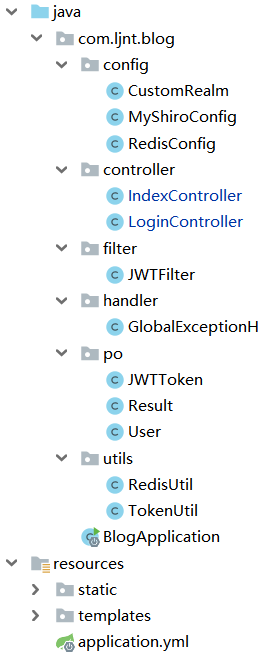
pom.xml
该项目要用到的组件有java-jwt、json、shiro-spring、spring-boot-starter-data-redis等。
4.0.0 org.springframework.boot spring-boot-starter-parent 2.2.2.RELEASE com.ljnt blog 0.0.1-SNAPSHOT blog Demo project for Spring Boot 1.8 org.springframework.boot spring-boot-starter-data-jpa org.springframework.boot spring-boot-starter-thymeleaf org.springframework.boot spring-boot-starter-web org.springframework.boot spring-boot-devtools runtime true org.springframework.boot spring-boot-starter-test test org.junit.vintage junit-vintage-engine com.auth0 java-jwt 3.9.0 org.json json 20190722 org.apache.shiro shiro-spring 1.4.0 org.springframework.boot spring-boot-starter-data-redis org.springframework.boot spring-boot-maven-plugin - 1
- 2
- 3
- 4
- 5
- 6
- 7
- 8
- 9
- 10
- 11
- 12
- 13
- 14
- 15
- 16
- 17
- 18
- 19
- 20
- 21
- 22
- 23
- 24
- 25
- 26
- 27
- 28
- 29
- 30
- 31
- 32
- 33
- 34
- 35
- 36
- 37
- 38
- 39
- 40
- 41
- 42
- 43
- 44
- 45
- 46
- 47
- 48
- 49
- 50
- 51
- 52
- 53
- 54
- 55
- 56
- 57
- 58
- 59
- 60
- 61
- 62
- 63
- 64
- 65
- 66
- 67
- 68
- 69
- 70
- 71
- 72
- 73
- 74
- 75
- 76
- 77
- 78
- 79
- 80
- 81
- 82
- 83
- 84
- 85
- 86
- 87
- 88
- 89
- 90
- 91
- 92
- 93
- 94
- 95
- 96
- 97
- 98
- 99
- 100
- 101
- 102
- 103
- 104
- 105
- 106
- 107
- 108
- 109
- 110
- 111
- 112
- 113
- 114
application.yml
主要是配置redis,需要用到模板、数据库、日志的,请看注释
server: port: 8181 #spring: # thymeleaf: # mode: HTML5 # # datasource: # driver-class-name: com.mysql.jdbc.Driver # url: jdbc:mysql://localhost:3306/blog?useSSL=false&characterEncoding=utf-8 # username: root # password: redis: host: localhost port: 6379 jedis: pool: max-active: -1 max-wait: 3000ms timeout: 3000ms #logging: # level: # root: info # com.ljnt: debug # file: log/imcoding.log- 1
- 2
- 3
- 4
- 5
- 6
- 7
- 8
- 9
- 10
- 11
- 12
- 13
- 14
- 15
- 16
- 17
- 18
- 19
- 20
- 21
- 22
- 23
- 24
- 25
- 26
四、实现颁发token
实现颁发token需要用到JWT和Redis,所以我们需要配置Redis和实现工具类。
4.1. 配置Redis:RedisConfig
/** * @ Program : com.ljnt.redis.config.RedisConfig * @ Description : Redis配置类 * @ Author : lj * @ CreateDate : 2020-2-6 21:23 */ @Configuration public class RedisConfig { @Bean public RedisTemplate- 1
- 2
- 3
- 4
- 5
- 6
- 7
- 8
- 9
- 10
- 11
- 12
- 13
- 14
- 15
- 16
- 17
- 18
- 19
- 20
- 21
- 22
- 23
- 24
- 25
- 26
- 27
- 28
- 29
- 30
- 31
- 32
- 33
- 34
- 35
- 36
- 37
- 38
- 39
- 40
- 41
- 42
- 43
- 44
- 45
- 46
- 47
- 48
- 49
- 50
- 51
- 52
- 53
- 54
- 55
- 56
- 57
- 58
- 59
- 60
- 61
- 62
- 63
- 64
- 65
- 66
- 67
- 68
- 69
- 70
- 71
- 72
- 73
- 74
- 75
- 76
- 77
- 78
- 79
- 80
- 81
- 82
- 83
- 84
- 85
- 86
- 87
- 88
- 89
- 90
- 91
- 92
- 93
- 94
- 95
4.2. 编写工具类
RedisUtil,这里主要用到redisTemplate的一些方法,代码没有全部给出来,可以根据redisTemplate方法去编写或者看我的源码。。
/** * @ Program : com.ljnt.redis.utils.RedisUtil * @ Description : redis工具类 * @ Author : lj * @ CreateDate : 2020-2-6 22:08 */ @Component public class RedisUtil { @Autowired private static RedisTemplate- 1
- 2
- 3
- 4
- 5
- 6
- 7
- 8
- 9
- 10
- 11
- 12
- 13
- 14
- 15
- 16
- 17
- 18
- 19
- 20
- 21
- 22
- 23
- 24
- 25
- 26
- 27
- 28
- 29
- 30
- 31
- 32
- 33
- 34
- 35
- 36
- 37
- 38
- 39
- 40
- 41
- 42
- 43
- 44
- 45
- 46
- 47
- 48
- 49
- 50
- 51
- 52
- 53
- 54
- 55
- 56
- 57
- 58
TokenUtil,主要实现token的签发、验证和数据解析。
/** * @ Program : com.ljnt.blog.utils.TokenUtil * @ Description : token工具类(生成、验证) * @ Author : lj * @ CreateDate : 2020-1-31 22:15 */ public class TokenUtil { //这里的token属性配置最好写在配置文件中,这里为了方面直接写成静态属性 public static final long EXPIRE_TIME= 5*60*1000;//token到期时间5分钟,毫秒为单位 public static final long REFRESH_EXPIRE_TIME=30*60;//RefreshToken到期时间为30分钟,秒为单位 private static final String TOKEN_SECRET="ljdyaishijin**3nkjnj??"; //密钥盐 /** * @Description :生成token * @author : lj * @param : [user] * @return : java.lang.String * @exception : * @date : 2020-1-31 22:49 */ public static String sign(String account,Long currentTime){ String token=null; try { Date expireAt=new Date(currentTime+EXPIRE_TIME); token = JWT.create() .withIssuer("auth0")//发行人 .withClaim("account",account)//存放数据 .withClaim("currentTime",currentTime) .withExpiresAt(expireAt)//过期时间 .sign(Algorithm.HMAC256(TOKEN_SECRET)); } catch (IllegalArgumentException|JWTCreationException je) { } return token; } /** * @Description :token验证 * @author : lj * @param : [token] * @return : java.lang.Boolean * @exception : * @date : 2020-1-31 22:59 */ public static Boolean verify(String token) throws Exception{ JWTVerifier jwtVerifier=JWT.require(Algorithm.HMAC256(TOKEN_SECRET)).withIssuer("auth0").build();//创建token验证器 DecodedJWT decodedJWT=jwtVerifier.verify(token); System.out.println("认证通过:"); System.out.println("account: " + decodedJWT.getClaim("account").asString()); System.out.println("过期时间: " + decodedJWT.getExpiresAt()); return true; } public static String getAccount(String token){ try{ DecodedJWT decodedJWT=JWT.decode(token); return decodedJWT.getClaim("account").asString(); }catch (JWTCreationException e){ return null; } } public static Long getCurrentTime(String token){ try{ DecodedJWT decodedJWT=JWT.decode(token); return decodedJWT.getClaim("currentTime").asLong(); }catch (JWTCreationException e){ return null; } } }- 1
- 2
- 3
- 4
- 5
- 6
- 7
- 8
- 9
- 10
- 11
- 12
- 13
- 14
- 15
- 16
- 17
- 18
- 19
- 20
- 21
- 22
- 23
- 24
- 25
- 26
- 27
- 28
- 29
- 30
- 31
- 32
- 33
- 34
- 35
- 36
- 37
- 38
- 39
- 40
- 41
- 42
- 43
- 44
- 45
- 46
- 47
- 48
- 49
- 50
- 51
- 52
- 53
- 54
- 55
- 56
- 57
- 58
- 59
- 60
- 61
- 62
- 63
- 64
- 65
- 66
- 67
- 68
- 69
- 70
- 71
- 72
- 73
- 74
- 75
- 76
- 77
- 78
4.3. 编写登录接口:LoginController
登录成功颁发token,生成RefreshToken保存在redis,返回在Header的Authorization中。
/** * @ Program : com.ljnt.blog.controller.LoginController * @ Description : * @ Author : lj * @ CreateDate : 2020-1-31 23:38 */ @Controller public class LoginController { @Autowired RedisUtil redisUtil; @PostMapping("/login") @ResponseBody public Result login(String username, String password, HttpServletResponse response) throws JsonProcessingException { User user=new User(); user.setUsername(username); user.setPassword(password); //去数据库拿密码验证用户名密码,这里直接验证 if(username.equals("admin")){ if (!password.equals("admin")){ return new Result(400,"密码错误"); } }else if (username.equals("user")){ if (!password.equals("user")){ return new Result(400,"密码错误"); } }else{ return new Result(400,"无此用户"); } Long currentTimeMillis = System.currentTimeMillis(); String token= TokenUtil.sign(username,currentTimeMillis); redisUtil.set(username,currentTimeMillis,TokenUtil.REFRESH_EXPIRE_TIME); response.setHeader("Authorization", token); response.setHeader("Access-Control-Expose-Headers", "Authorization"); return new Result().OK(); }; }- 1
- 2
- 3
- 4
- 5
- 6
- 7
- 8
- 9
- 10
- 11
- 12
- 13
- 14
- 15
- 16
- 17
- 18
- 19
- 20
- 21
- 22
- 23
- 24
- 25
- 26
- 27
- 28
- 29
- 30
- 31
- 32
- 33
- 34
- 35
- 36
- 37
五、实现Shiro授权
5.1. 重写过滤器:JWTFilter
这里是本项目的核心类,重写shiro的入口过滤器BasicHttpAuthenticationFilter,重写主要是做三件事情:
-
判断请求接口是否需要进行登录认证授权,如果需要则该请求就必须在Header中添加token字段存AccessToken,无需授权即游客直接访问。
-
需要授权的接口就调用getSubject(request, response).login(token),将AccessToken提交给shiro中的CustomRealm进行认证。
-
AccessToken刷新:判断RefreshToken是否过期,未过期就返回新的AccessToken及RefreshToken并让请求继续正常访问。
/**
-
@ Program : com.ljnt.blog.filter.JWTFilter
-
@ Description : 自定义jwt过滤器,对token进行处理
-
@ Author : lj
-
@ CreateDate : 2020-2-4 17:28
*/
public class JWTFilter extends BasicHttpAuthenticationFilter {/**
- 判断是否允许通过
- @param request
- @param response
- @param mappedValue
- @return
*/
@Override
protected boolean isAccessAllowed(ServletRequest request, ServletResponse response, Object mappedValue) {
System.out.println(“isAccessAllowed方法”);
try{
return executeLogin(request,response);
}catch (Exception e){
System.out.println(“错误”+e);
// throw new ShiroException(e.getMessage());
responseError(response,“shiro fail”);
return false;
}
}
/**
- 是否进行登录请求
- @param request
- @param response
- @return
*/
@Override
protected boolean isLoginAttempt(ServletRequest request, ServletResponse response) {
System.out.println(“isLoginAttempt方法”);
String token=((HttpServletRequest)request).getHeader(“token”);
if (token!=null){
return true;
}
return false;
}
/**
-
创建shiro token
-
@param request
-
@param response
-
@return
*/
@Override
protected AuthenticationToken createToken(ServletRequest request, ServletResponse response) {
System.out.println(“createToken方法”);
String jwtToken = ((HttpServletRequest)request).getHeader(“token”);
if(jwtToken!=null)
return new JWTToken(jwtToken);return null;
}
/**
- isAccessAllowed为false时调用,验证失败
- @param request
- @param response
- @return
- @throws Exception
*/
@Override
protected boolean onAccessDenied(ServletRequest request, ServletResponse response) throws Exception {
System.out.println(“onAccessDenied”);
this.sendChallenge(request,response);
responseError(response,“token verify fail”);
return false;
}
/**
- shiro验证成功调用
- @param token
- @param subject
- @param request
- @param response
- @return
- @throws Exception
*/
@Override
protected boolean onLoginSuccess(AuthenticationToken token, Subject subject, ServletRequest request, ServletResponse response) throws Exception {
System.out.println(“onLoginSuccess:”);
String jwttoken= (String) token.getPrincipal();
if (jwttoken!=null){
try{
if(TokenUtil.verify(jwttoken)){
//判断Redis是否存在所对应的RefreshToken
String account = TokenUtil.getAccount(jwttoken);
Long currentTime=TokenUtil.getCurrentTime(jwttoken);
if (RedisUtil.hasKey(account)) {
Long currentTimeMillisRedis = (Long) RedisUtil.get(account);
if (currentTimeMillisRedis.equals(currentTime)) {
return true;
}
}
}
return false;
}catch (Exception e){
Throwable throwable = e.getCause();
System.out.println(“token验证:”+e.getClass());
if (e instanceof TokenExpiredException){
System.out.println(“TokenExpiredException”);
if (refreshToken(request, response)) {
return true;
}else {
return false;
}
}
}
}
return true;
}
/**
-
拦截器的前置方法,此处进行跨域处理
-
@param request
-
@param response
-
@return
-
@throws Exception
*/
@Override
protected boolean preHandle(ServletRequest request, ServletResponse response) throws Exception {
HttpServletRequest httpServletRequest= (HttpServletRequest) request;
HttpServletResponse httpServletResponse= (HttpServletResponse) response;
httpServletResponse.setHeader(“Access-Control-Allow-Origin”,httpServletRequest.getHeader(“Origin”));
httpServletResponse.setHeader(“Access-Control-Allow-Methods”,“GET,POST,OPTIONS,PUT,DELETE”);
httpServletResponse.setHeader(“Access-Control-Allow-Headers”,httpServletRequest.getHeader(“Access-Control-Resquest-Headers”));
if (httpServletRequest.getMethod().equals(RequestMethod.OPTIONS.name())){
httpServletResponse.setStatus(HttpStatus.OK.value());
}//如果不带token,不去验证shiro
if (!isLoginAttempt(request,response)){
responseError(httpServletResponse,“no token”);
return false;
}
return super.preHandle(request,response);
}
/**
- 刷新AccessToken,进行判断RefreshToken是否过期,未过期就返回新的AccessToken且继续正常访问
- @param request
- @param response
- @return
*/
private boolean refreshToken(ServletRequest request, ServletResponse response) {
String token = ((HttpServletRequest)request).getHeader(“token”);
String account = TokenUtil.getAccount(token);
Long currentTime=TokenUtil.getCurrentTime(token);
// 判断Redis中RefreshToken是否存在
if (RedisUtil.hasKey(account)) {
// Redis中RefreshToken还存在,获取RefreshToken的时间戳
Long currentTimeMillisRedis = (Long) RedisUtil.get(account);
// 获取当前AccessToken中的时间戳,与RefreshToken的时间戳对比,如果当前时间戳一致,进行AccessToken刷新
if (currentTimeMillisRedis.equals(currentTime)) {
// 获取当前最新时间戳
Long currentTimeMillis =System.currentTimeMillis();
RedisUtil.set(account, currentTimeMillis,
TokenUtil.REFRESH_EXPIRE_TIME);
// 刷新AccessToken,设置时间戳为当前最新时间戳
token = TokenUtil.sign(account, currentTimeMillis);
HttpServletResponse httpServletResponse = (HttpServletResponse) response;
httpServletResponse.setHeader(“Authorization”, token);
httpServletResponse.setHeader(“Access-Control-Expose-Headers”, “Authorization”);
return true;
}
}
return false;
}
private void responseError(ServletResponse response,String msg){
HttpServletResponse httpResponse = (HttpServletResponse) response; httpResponse.setStatus(401); httpResponse.setCharacterEncoding("UTF-8"); httpResponse.setContentType("application/json;charset=UTF-8"); try { String rj = new ObjectMapper().writeValueAsString(new Result(401,msg)); httpResponse.getWriter().append(rj); } catch (IOException e) { e.printStackTrace(); }- 1
- 2
- 3
- 4
- 5
- 6
- 7
- 8
- 9
- 10
}
}
-
这里解析一下该类的执行流程:
首先需要授权的请求经过preHandle进行跨域处理后进入isAccessAllowed方法,isAccessAllowed方法直接调用BasicHttpAuthenticationFilter类的父类AuthenticatingFilter中executeLogin方法,executeLogin方法源码如下:
protected boolean executeLogin(ServletRequest request, ServletResponse response) throws Exception { AuthenticationToken token = this.createToken(request, response); if (token == null) { String msg = "createToken method implementation returned null. A valid non-null AuthenticationToken must be created in order to execute a login attempt."; throw new IllegalStateException(msg); } else { try { Subject subject = this.getSubject(request, response); subject.login(token); return this.onLoginSuccess(token, subject, request, response); } catch (AuthenticationException var5) { return this.onLoginFailure(token, var5, request, response); } } }- 1
- 2
- 3
- 4
- 5
- 6
- 7
- 8
- 9
- 10
- 11
- 12
- 13
- 14
- 15
该方法会先调用createToken方法创建token,然后调用this.getSubject(request, response)进行shiro授权,刚好符合我们的需求,我们就直接调用该方法,但是我们需要重写createToken方法,因为我们要创建一个能够使用我们前面颁发的token并且符合Shiro对token的要求,因此需要创建一个实体类JWTToken实现AuthenticationToken接口
import org.apache.shiro.authc.AuthenticationToken; /** * @ Program : com.ljnt.blog.po.JWTToken * @ Description : 配置token实体bean进行拓展,使其适应shiro框架 * @ Author : lj * @ CreateDate : 2020-2-4 17:56 */ public class JWTToken implements AuthenticationToken { private String token; public JWTToken(String token) { this.token = token; } @Override public Object getPrincipal() { return token; } @Override public Object getCredentials() { return token; } }- 1
- 2
- 3
- 4
- 5
- 6
- 7
- 8
- 9
- 10
- 11
- 12
- 13
- 14
- 15
- 16
- 17
- 18
- 19
- 20
- 21
- 22
- 23
- 24
- 25
executeLogin方法后,授权成功会进入onLoginSuccess方法,该方法进行token的检验,token的检验失败进入onAccessDenied。
5.2. Shiro配置:MyShiroConfig
该类主要配置shiro的过滤器,配置过滤规则,配置shiro自定义Realm,关闭shiro自带的session等等
/** * @ Program : com.ljnt.blog.config.MyShiroConfig * @ Description : Shrio配置类 * @ Author : lj * @ CreateDate : 2020-2-4 13:48 */ @Configuration public class MyShiroConfig { @Bean public ShiroFilterFactoryBean shiroFilterFactoryBean(SecurityManager securityManager){ ShiroFilterFactoryBean shiroFilterFactoryBean=new ShiroFilterFactoryBean(); Map- 1
- 2
- 3
- 4
- 5
- 6
- 7
- 8
- 9
- 10
- 11
- 12
- 13
- 14
- 15
- 16
- 17
- 18
- 19
- 20
- 21
- 22
- 23
- 24
- 25
- 26
- 27
- 28
- 29
- 30
- 31
- 32
- 33
- 34
- 35
- 36
- 37
- 38
- 39
- 40
- 41
- 42
- 43
- 44
- 45
- 46
- 47
- 48
- 49
- 50
- 51
- 52
- 53
- 54
- 55
- 56
- 57
- 58
- 59
- 60
- 61
- 62
- 63
- 64
- 65
- 66
- 67
- 68
- 69
- 70
- 71
- 72
- 73
- 74
- 75
- 76
- 77
5.3. 自定义Realm
在这里进行用户身份验证和授权。
/** * @ Program : com.ljnt.blog.config.CustomRealm * @ Description : 自定义Realm,实现Shiro认证 * @ Author : lj * @ CreateDate : 2020-2-4 18:15 */ @Component public class CustomRealm extends AuthorizingRealm { @Override public boolean supports(AuthenticationToken token) { return token instanceof JWTToken; } /** * 用户授权 * @param principalCollection * @return */ @Override protected AuthorizationInfo doGetAuthorizationInfo(PrincipalCollection principalCollection) { System.out.println("用户授权"); String username=TokenUtil.getAccount(principalCollection.toString()); SimpleAuthorizationInfo info= new SimpleAuthorizationInfo(); //正确的业务流程是到数据库拿该用户的权限再去进行授权的,这里只是简单的直接授权 if (username.equals("admin")){ Setrole=new HashSet<>(); role.add("admin"); info.setRoles(role); }else { Set role=new HashSet<>(); role.add("user"); info.setRoles(role); } return info; } /** * 用户身份认证 * @param authenticationToken * @return * @throws AuthenticationException */ @Override protected AuthenticationInfo doGetAuthenticationInfo(AuthenticationToken authenticationToken) throws AuthenticationException { System.out.println("身份认证"); String token= (String) authenticationToken.getCredentials(); String username= TokenUtil.getAccount(token); System.out.println(username); //这里要去数据库查找是否存在该用户,这里直接放行 if (username==null){ throw new AuthenticationException("认证失败!"); } return new SimpleAuthenticationInfo(token,token,"MyRealm"); } } - 1
- 2
- 3
- 4
- 5
- 6
- 7
- 8
- 9
- 10
- 11
- 12
- 13
- 14
- 15
- 16
- 17
- 18
- 19
- 20
- 21
- 22
- 23
- 24
- 25
- 26
- 27
- 28
- 29
- 30
- 31
- 32
- 33
- 34
- 35
- 36
- 37
- 38
- 39
- 40
- 41
- 42
- 43
- 44
- 45
- 46
- 47
- 48
- 49
- 50
- 51
- 52
- 53
- 54
- 55
- 56
六、自定义全局异常处理
@ResponseBody返回json数据
@ControllerAdvice @ResponseBody public class GlobalExceptionHandler { //日志,这里不说日志 // private final Logger logger = LoggerFactory.getLogger(GlobalExceptionHandler.class); /** * 捕捉所有Shiro异常 */ @ExceptionHandler(ShiroException.class) public Result handle401(ShiroException e) { return new Result(401, "无权访问(Unauthorized):" + e.getMessage()); } /** * 单独捕捉Shiro(UnauthorizedException)异常 该异常为访问有权限管控的请求而该用户没有所需权限所抛出的异常 */ @ExceptionHandler(UnauthorizedException.class) public Result handle401(UnauthorizedException e) { Result result = new Result(); return new Result(401, "无权访问(Unauthorized):当前Subject没有此请求所需权限(" + e.getMessage() + ")"); } /** * 单独捕捉Shiro(UnauthenticatedException)异常 * 该异常为以游客身份访问有权限管控的请求无法对匿名主体进行授权,而授权失败所抛出的异常 */ @ExceptionHandler(UnauthenticatedException.class) public Result handle401(UnauthenticatedException e) { return new Result(401, "无权访问(Unauthorized):当前Subject是匿名Subject,请先登录(This subject is anonymous.)"); } /** * 捕捉校验异常(BindException) */ @ExceptionHandler(BindException.class) public Result validException(BindException e) { ListfieldErrors = e.getBindingResult().getFieldErrors(); Map fieldErrors) { Map errorList = new ArrayList (); StringBuffer errorMsg = new StringBuffer("校验异常(ValidException):"); for (FieldError error : fieldErrors) { errorList.add(error.getField() + "-" + error.getDefaultMessage()); errorMsg.append(error.getField() + "-" + error.getDefaultMessage() + "."); } map.put("errorList", errorList); map.put("errorMsg", errorMsg); return map; } } - 1
- 2
- 3
- 4
- 5
- 6
- 7
- 8
- 9
- 10
- 11
- 12
- 13
- 14
- 15
- 16
- 17
- 18
- 19
- 20
- 21
- 22
- 23
- 24
- 25
- 26
- 27
- 28
- 29
- 30
- 31
- 32
- 33
- 34
- 35
- 36
- 37
- 38
- 39
- 40
- 41
- 42
- 43
- 44
- 45
- 46
- 47
- 48
- 49
- 50
- 51
- 52
- 53
- 54
- 55
- 56
- 57
- 58
- 59
- 60
- 61
- 62
- 63
- 64
- 65
- 66
- 67
- 68
- 69
- 70
- 71
- 72
- 73
- 74
- 75
- 76
- 77
- 78
- 79
- 80
- 81
- 82
- 83
- 84
- 85
- 86
- 87
- 88
- 89
Result实体:
import org.json.JSONObject; /** * @ Program : com.ljnt.blog.po.Result * @ Description : 返回消息实体 * @ Author : lj * @ CreateDate : 2020-2-12 22:19 */ public class Result { private boolean success=false; private Integer code=null; private String msg=null; private Object res=new JSONObject(); /** * 成功响应 */ public Result OK() { this.success = true; this.code = 200; if (this.msg==null) { this.msg = "success."; } return this; } /** * 请求成功,但业务逻辑处理不通过 */ public Result NO() { this.success = false; this.code = 400; return this; } public Result() { super(); } public Result(int code) { super(); this.success = false; this.code = code; } public Result(int code, String msg) { super(); this.success = false; this.code = code; this.msg = msg; } public Result(int code, String msg, Object res) { super(); this.success = true; this.code = code; this.msg = msg; this.res = res; } public boolean isSuccess() { return success; } public void setSuccess(boolean success) { this.success = success; } public Integer getCode() { return code; } public void setCode(Integer code) { this.code = code; } public String getMsg() { return msg; } public void setMsg(String msg) { this.msg = msg; } public Object getRes() { return res; } public void setRes(Object res) { this.res = res; } @Override public String toString() { return "Result{" + "success=" + success + ", code=" + code + ", msg='" + msg + ''' + ", res=" + res + '}'; } }- 1
- 2
- 3
- 4
- 5
- 6
- 7
- 8
- 9
- 10
- 11
- 12
- 13
- 14
- 15
- 16
- 17
- 18
- 19
- 20
- 21
- 22
- 23
- 24
- 25
- 26
- 27
- 28
- 29
- 30
- 31
- 32
- 33
- 34
- 35
- 36
- 37
- 38
- 39
- 40
- 41
- 42
- 43
- 44
- 45
- 46
- 47
- 48
- 49
- 50
- 51
- 52
- 53
- 54
- 55
- 56
- 57
- 58
- 59
- 60
- 61
- 62
- 63
- 64
- 65
- 66
- 67
- 68
- 69
- 70
- 71
- 72
- 73
- 74
- 75
- 76
- 77
- 78
- 79
- 80
- 81
- 82
- 83
- 84
- 85
- 86
- 87
- 88
- 89
- 90
- 91
- 92
- 93
- 94
- 95
- 96
- 97
- 98
- 99
- 100
七、编写请求接口
@Controller public class IndexController { @RequestMapping("/") public String index() { return "index"; } @PostMapping("/user") @RequiresRoles(logical = Logical.OR,value = {"user","admin"}) @ResponseBody public Result user(){ return new Result(200,"成功访问user接口!"); }; @PostMapping("/admin") @RequiresRoles(logical = Logical.OR,value = {"admin"}) @ResponseBody public Object admin() { return new Result(200,"成功访问admin接口!"); }; }- 1
- 2
- 3
- 4
- 5
- 6
- 7
- 8
- 9
- 10
- 11
- 12
- 13
- 14
- 15
- 16
- 17
- 18
- 19
- 20
- 21
- 22
八、验证
登录user

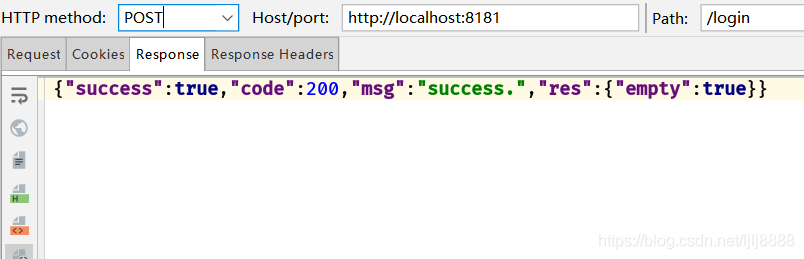

带上token去访问/user接口


不带token访问

带user的token去访问/admin接口

5分钟后AccessToken过期带token访问/user,首次能访问成功并返回刷新的token


再次带上原来的token去访问/user

带上刷新的token去访问/user
,t_70)
不带token访问
带user的token去访问/admin接口
5分钟后AccessToken过期带token访问/user,首次能访问成功并返回刷新的token
再次带上原来的token去访问/user
带上刷新的token去访问/user
Github:https://github.com/lijian-github/SpringBoot_Shiro_JWT_Redis
-
相关阅读:
【强化学习】Offline RL
Ceph入门到精通-进入维保模式设置命令set noout
LVS-DR模式
set_data_check做等长线
使用Get-ADOrganizationalUnit导出指定OU下子OU列表
【深入浅出 Yarn 架构与实现】6-1 NodeManager 功能概述
浅析电子签章应用安全与技术
6.Dropout应用
常用的"小脚本"-json数据处理
基于ESP8266+BY8301语音模块的与山地车捉迷藏的小项目
- 原文地址:https://blog.csdn.net/m0_67402125/article/details/126515449