-
Android Service介绍
一、什么是Service
1、Service与Activity
Service是后台运行,Activity是前台展示。

2、Service定义

3、Service应用
可以应用到后台下载、地图定位、后台播放音乐等。

4、Service分类
startService时Service才启动,与Activity的启停无关;bindService是与Activity绑定,一同启动和停止。

二、Service的基本用法
1、创建与配置Service
- 新建Android工程,在功能目录右键新建Service(其中Exported代表应用程序组件能否调用Service或与其进行交互,默认为true;Enabled代表Service能否被实例化,默认为true)
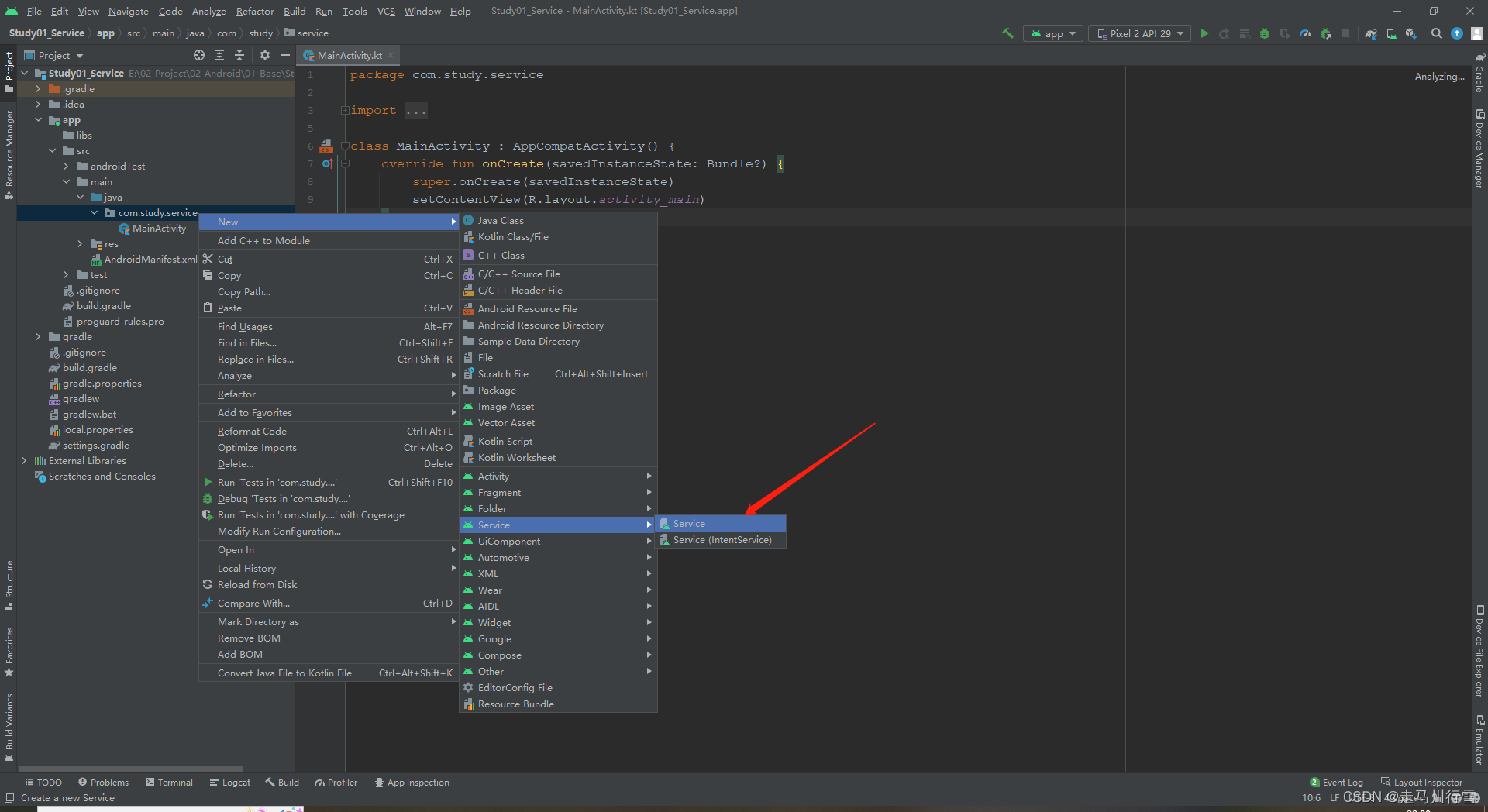

- 重写onBind、onCreate、onStartCommand和onDestory方法
- package com.study.service
- import android.app.Service
- import android.content.Intent
- import android.os.IBinder
- /**
- * 自定义Service.
- */
- class MyService : Service() {
- override fun onBind(intent: Intent): IBinder {
- TODO("Return the communication channel to the service.")
- }
- //Service创建时调用
- override fun onCreate() {
- super.onCreate()
- }
- //启动Service时调用
- override fun onStartCommand(intent: Intent?, flags: Int, startId: Int): Int {
- return super.onStartCommand(intent, flags, startId)
- }
- //Service销毁时调用
- override fun onDestroy() {
- super.onDestroy()
- }
- }
- 在AndroidManifest.xml中配置Service
- <service
- android:name=".MyService"
- android:enabled="true"
- android:exported="true" />
2、启动和停止Service

3、startService生命周期

4、代码示例
activity_main.xml
- "1.0" encoding="utf-8"?>
- <androidx.constraintlayout.widget.ConstraintLayout xmlns:android="http://schemas.android.com/apk/res/android"
- xmlns:app="http://schemas.android.com/apk/res-auto"
- xmlns:tools="http://schemas.android.com/tools"
- android:layout_width="match_parent"
- android:layout_height="match_parent"
- tools:context=".MainActivity">
- <androidx.appcompat.widget.AppCompatButton
- android:id="@+id/btn_start"
- android:layout_width="wrap_content"
- android:layout_height="wrap_content"
- android:text="启动服务"
- app:layout_constraintBottom_toBottomOf="parent"
- app:layout_constraintEnd_toEndOf="parent"
- app:layout_constraintHorizontal_bias="0.498"
- app:layout_constraintStart_toStartOf="parent"
- app:layout_constraintTop_toTopOf="parent"
- app:layout_constraintVertical_bias="0.336" />
- <androidx.appcompat.widget.AppCompatButton
- android:id="@+id/btn_stop"
- android:layout_width="wrap_content"
- android:layout_height="wrap_content"
- android:text="停止服务"
- app:layout_constraintBottom_toBottomOf="parent"
- app:layout_constraintEnd_toEndOf="parent"
- app:layout_constraintStart_toStartOf="parent"
- app:layout_constraintTop_toTopOf="parent" />
- androidx.constraintlayout.widget.ConstraintLayout>
MainActivity.kt
- package com.study.service
- import android.content.Intent
- import androidx.appcompat.app.AppCompatActivity
- import android.os.Bundle
- import android.view.View
- import androidx.appcompat.widget.AppCompatButton
- class MainActivity : AppCompatActivity() {
- private lateinit var btnStart : AppCompatButton
- private lateinit var btnStop : AppCompatButton
- override fun onCreate(savedInstanceState: Bundle?) {
- super.onCreate(savedInstanceState)
- setContentView(R.layout.activity_main)
- btnStart = findViewById(R.id.btn_start)
- btnStop = findViewById(R.id.btn_stop)
- btnStart.setOnClickListener {
- //启动Service
- val intent = Intent(this, MyService::class.java)
- startService(intent)
- }
- btnStop.setOnClickListener {
- //停止Service
- val intent = Intent(this, MyService::class.java)
- stopService(intent)
- }
- }
- }
MyService.kt
- package com.study.service
- import android.app.ActivityManager
- import android.app.Service
- import android.content.Context
- import android.content.Intent
- import android.os.IBinder
- import android.util.Log
- /**
- * 自定义Service.
- */
- class MyService : Service() {
- override fun onBind(intent: Intent): IBinder {
- TODO("Return the communication channel to the service.")
- }
- //Service创建时调用
- override fun onCreate() {
- Log.e("MyService", "onCreate: Service已创建")
- super.onCreate()
- }
- //启动Service时调用
- override fun onStartCommand(intent: Intent?, flags: Int, startId: Int): Int {
- Log.e("MyService", "onCreate: Service已启动")
- Thread {
- var i = 0
- while (isRunning()) {
- Log.e("MyService", (++i).toString())
- Thread.sleep(1000)
- }
- }.start()
- return super.onStartCommand(intent, flags, startId)
- }
- //Service销毁时调用
- override fun onDestroy() {
- Log.e("MyService", "onCreate: Service已停止")
- super.onDestroy()
- }
- /**
- * 判断Service是否正在运行.
- */
- private fun isRunning(): Boolean {
- //获取Activity管理器
- val activityManager = getSystemService(Context.ACTIVITY_SERVICE) as ActivityManager
- //获取所有正在运行的Service
- val runningService =
- activityManager.getRunningServices(60) as ArrayList
- runningService.forEach {
- if (it.service.className == "com.study.service.MyService")
- return true
- }
- return false
- }
- }
三、Service的基本用法实例(实现后台音乐播放和停止)
activity_main.xml
- "1.0" encoding="utf-8"?>
- <androidx.constraintlayout.widget.ConstraintLayout xmlns:android="http://schemas.android.com/apk/res/android"
- xmlns:app="http://schemas.android.com/apk/res-auto"
- xmlns:tools="http://schemas.android.com/tools"
- android:layout_width="match_parent"
- android:layout_height="match_parent"
- tools:context=".MainActivity">
- <androidx.appcompat.widget.AppCompatButton
- android:id="@+id/btn_stop"
- android:layout_width="115dp"
- android:layout_height="52dp"
- android:text="暂停"
- app:layout_constraintBottom_toBottomOf="parent"
- app:layout_constraintEnd_toEndOf="parent"
- app:layout_constraintHorizontal_bias="0.498"
- app:layout_constraintStart_toStartOf="parent"
- app:layout_constraintTop_toTopOf="parent"
- app:layout_constraintVertical_bias="0.461" />
- <androidx.appcompat.widget.AppCompatButton
- android:id="@+id/btn_start"
- android:layout_width="118dp"
- android:layout_height="59dp"
- android:text="播放"
- app:layout_constraintBottom_toBottomOf="parent"
- app:layout_constraintEnd_toEndOf="parent"
- app:layout_constraintHorizontal_bias="0.498"
- app:layout_constraintStart_toStartOf="parent"
- app:layout_constraintTop_toTopOf="parent"
- app:layout_constraintVertical_bias="0.322" />
- androidx.constraintlayout.widget.ConstraintLayout>
MainActivity.kt
- package com.study.service
- import android.content.Intent
- import android.os.Bundle
- import androidx.appcompat.app.AppCompatActivity
- import androidx.appcompat.widget.AppCompatButton
- /**
- * 控制页面.
- */
- class MainActivity : AppCompatActivity() {
- private lateinit var btnStart: AppCompatButton
- private lateinit var btnStop: AppCompatButton
- override fun onCreate(savedInstanceState: Bundle?) {
- super.onCreate(savedInstanceState)
- setContentView(R.layout.activity_main)
- btnStart = findViewById(R.id.btn_start)
- btnStop = findViewById(R.id.btn_stop)
- btnStart.setOnClickListener {
- //启动音乐播放服务
- startService(Intent(this, MusicService::class.java))
- }
- btnStop.setOnClickListener {
- //关闭音乐播放服务
- stopService(Intent(this, MusicService::class.java))
- }
- }
- override fun onStart() {
- //启动页面播放音乐
- startService(Intent(this, MusicService::class.java))
- super.onStart()
- }
- }
MusicService.kt
- package com.study.service
- import android.app.Service
- import android.content.Intent
- import android.media.MediaPlayer
- import android.os.IBinder
- /**
- * 音乐播放服务.
- */
- class MusicService : Service() {
- companion object {
- //静态对象:记录当前播放状态
- var isPlay: Boolean = false
- }
- //音乐播放对象
- private lateinit var mediaPlayer: MediaPlayer
- override fun onBind(intent: Intent?): IBinder? {
- TODO("Not yet implemented")
- }
- override fun onCreate() {
- //创建MediaPlayer对象,并加载音频文件
- mediaPlayer = MediaPlayer.create(this, R.raw.music)
- super.onCreate()
- }
- override fun onStartCommand(intent: Intent?, flags: Int, startId: Int): Int {
- //判断音乐是否播放中
- if (!mediaPlayer.isPlaying) {
- //播放音乐
- mediaPlayer.start()
- //记录播放状态
- isPlay = mediaPlayer.isPlaying
- }
- return super.onStartCommand(intent, flags, startId)
- }
- override fun onDestroy() {
- //停止播放
- mediaPlayer.stop()
- //记录播放状态
- isPlay = mediaPlayer.isPlaying
- //释放资源
- mediaPlayer.release()
- super.onDestroy()
- }
- }
四、Bound Service(绑定Service)
之前的startService,Activity与Service之前没有太大的联系,无法进行通信和交换数据;而boundService,Activity与Service之间可以进行数据交互和方法调用。
 1、boundService生命周期
2、boundService基本步骤

3、boundService实例(模拟双色球)
activity_main.xml
- "1.0" encoding="utf-8"?>
- <androidx.constraintlayout.widget.ConstraintLayout xmlns:android="http://schemas.android.com/apk/res/android"
- xmlns:app="http://schemas.android.com/apk/res-auto"
- xmlns:tools="http://schemas.android.com/tools"
- android:layout_width="match_parent"
- android:layout_height="match_parent"
- tools:context=".MainActivity">
- <androidx.appcompat.widget.AppCompatTextView
- android:id="@+id/tv6"
- android:layout_width="wrap_content"
- android:layout_height="wrap_content"
- android:text="00"
- app:layout_constraintBottom_toBottomOf="parent"
- app:layout_constraintHorizontal_bias="0.85"
- app:layout_constraintLeft_toLeftOf="parent"
- app:layout_constraintRight_toRightOf="parent"
- app:layout_constraintTop_toTopOf="parent"
- app:layout_constraintVertical_bias="0.323" />
- <androidx.appcompat.widget.AppCompatTextView
- android:id="@+id/tv5"
- android:layout_width="wrap_content"
- android:layout_height="wrap_content"
- android:text="00"
- app:layout_constraintBottom_toBottomOf="parent"
- app:layout_constraintHorizontal_bias="0.726"
- app:layout_constraintLeft_toLeftOf="parent"
- app:layout_constraintRight_toRightOf="parent"
- app:layout_constraintTop_toTopOf="parent"
- app:layout_constraintVertical_bias="0.323" />
- <androidx.appcompat.widget.AppCompatTextView
- android:id="@+id/tv4"
- android:layout_width="wrap_content"
- android:layout_height="wrap_content"
- android:text="00"
- app:layout_constraintBottom_toBottomOf="parent"
- app:layout_constraintHorizontal_bias="0.61"
- app:layout_constraintLeft_toLeftOf="parent"
- app:layout_constraintRight_toRightOf="parent"
- app:layout_constraintTop_toTopOf="parent"
- app:layout_constraintVertical_bias="0.323" />
- <androidx.appcompat.widget.AppCompatTextView
- android:id="@+id/tv3"
- android:layout_width="wrap_content"
- android:layout_height="wrap_content"
- android:text="00"
- app:layout_constraintBottom_toBottomOf="parent"
- app:layout_constraintHorizontal_bias="0.498"
- app:layout_constraintLeft_toLeftOf="parent"
- app:layout_constraintRight_toRightOf="parent"
- app:layout_constraintTop_toTopOf="parent"
- app:layout_constraintVertical_bias="0.323" />
- <androidx.appcompat.widget.AppCompatTextView
- android:id="@+id/tv2"
- android:layout_width="wrap_content"
- android:layout_height="wrap_content"
- android:text="00"
- app:layout_constraintBottom_toBottomOf="parent"
- app:layout_constraintHorizontal_bias="0.374"
- app:layout_constraintLeft_toLeftOf="parent"
- app:layout_constraintRight_toRightOf="parent"
- app:layout_constraintTop_toTopOf="parent"
- app:layout_constraintVertical_bias="0.323" />
- <androidx.appcompat.widget.AppCompatTextView
- android:id="@+id/tv7"
- android:layout_width="wrap_content"
- android:layout_height="wrap_content"
- android:text="00"
- app:layout_constraintBottom_toBottomOf="parent"
- app:layout_constraintHorizontal_bias="0.255"
- app:layout_constraintLeft_toLeftOf="parent"
- app:layout_constraintRight_toRightOf="parent"
- app:layout_constraintTop_toTopOf="parent"
- app:layout_constraintVertical_bias="0.323" />
- <androidx.appcompat.widget.AppCompatTextView
- android:id="@+id/tv1"
- android:layout_width="wrap_content"
- android:layout_height="wrap_content"
- android:text="00"
- app:layout_constraintBottom_toBottomOf="parent"
- app:layout_constraintHorizontal_bias="0.128"
- app:layout_constraintLeft_toLeftOf="parent"
- app:layout_constraintRight_toRightOf="parent"
- app:layout_constraintTop_toTopOf="parent"
- app:layout_constraintVertical_bias="0.323" />
- <androidx.appcompat.widget.AppCompatButton
- android:id="@+id/btn_start"
- android:layout_width="wrap_content"
- android:layout_height="wrap_content"
- android:text="生成随机数"
- app:layout_constraintBottom_toBottomOf="parent"
- app:layout_constraintEnd_toEndOf="parent"
- app:layout_constraintStart_toStartOf="parent"
- app:layout_constraintTop_toTopOf="parent" />
- androidx.constraintlayout.widget.ConstraintLayout>
BinderService.kt
- package com.study.bindservice
- import android.app.Service
- import android.content.Intent
- import android.os.Binder
- import android.os.IBinder
- import kotlin.random.Random
- /**
- * 随机数生成服务.
- */
- class BinderService : Service() {
- //1. 创建MyBinder内部类
- class MyBinder : Binder() {
- //1.1. 获取Service方法
- fun getService(): BinderService {
- //1.2. 返回当前Service
- return BinderService()
- }
- }
- override fun onBind(intent: Intent?): IBinder {
- //2. 返回MyBinder Service对象
- return MyBinder()
- }
- override fun onDestroy() {
- //3. 销毁Service
- super.onDestroy()
- }
- //返回随机数方法.
- fun getRandomNumber(): List
{ - val resArr = mutableListOf
() - var strNumber = ""
- for (i in 0 until 7) {
- val number = Random.nextInt(33) + 1
- strNumber = if (number < 10) {
- "0$number"
- } else {
- number.toString()
- }
- resArr.add(strNumber)
- }
- return resArr
- }
- }
MainActivity.kt
- package com.study.bindservice
- import android.content.ComponentName
- import android.content.Intent
- import android.content.ServiceConnection
- import android.os.Bundle
- import android.os.IBinder
- import androidx.appcompat.app.AppCompatActivity
- import androidx.appcompat.widget.AppCompatButton
- import androidx.appcompat.widget.AppCompatTextView
- class MainActivity : AppCompatActivity() {
- private lateinit var btnStart: AppCompatButton
- private lateinit var binderService: BinderService
- private val tvId =
- mutableListOf(R.id.tv1, R.id.tv2, R.id.tv3, R.id.tv4, R.id.tv5, R.id.tv6, R.id.tv7)
- override fun onCreate(savedInstanceState: Bundle?) {
- super.onCreate(savedInstanceState)
- setContentView(R.layout.activity_main)
- btnStart = findViewById(R.id.btn_start)
- btnStart.setOnClickListener {
- val number = binderService.getRandomNumber()
- number.forEachIndexed { index, it ->
- val textViewCompat = findViewById
(tvId[index]) - textViewCompat.text = it
- }
- }
- }
- //4. 创建ServiceConnection对象
- private var conn = object : ServiceConnection {
- //Service与绑定它的组件连接成功时调用
- override fun onServiceConnected(name: ComponentName?, service: IBinder?) {
- //4.1 获取后台service
- binderService = (service as BinderService.MyBinder).getService()
- }
- //Service与绑定它的组件断开连接时调用
- override fun onServiceDisconnected(name: ComponentName?) {
- }
- }
- //5. 绑定服务
- override fun onStart() {
- super.onStart()
- val intent = Intent(this, BinderService::class.java)
- bindService(intent, conn, BIND_AUTO_CREATE)
- }
- //6. 解除绑定
- override fun onStop() {
- super.onStop()
- unbindService(conn)
- }
- }
五、IntentService
IntentService在Android8.0以后已被弃用,目前官方推荐使用Jetpack组件。
1、为什么要使用IntentService
它可以自动开启线程来执行耗时任务,并且在耗时任务执行完毕之后可以自动停止服务。

2、IntentService实例
activity_main.xml
- "1.0" encoding="utf-8"?>
- <androidx.constraintlayout.widget.ConstraintLayout xmlns:android="http://schemas.android.com/apk/res/android"
- xmlns:app="http://schemas.android.com/apk/res-auto"
- xmlns:tools="http://schemas.android.com/tools"
- android:layout_width="match_parent"
- android:layout_height="match_parent"
- tools:context=".MainActivity">
- <androidx.appcompat.widget.AppCompatButton
- android:id="@+id/btn_intent_service"
- android:layout_width="wrap_content"
- android:layout_height="wrap_content"
- android:text="启动IntentService"
- app:layout_constraintBottom_toBottomOf="parent"
- app:layout_constraintEnd_toEndOf="parent"
- app:layout_constraintStart_toStartOf="parent"
- app:layout_constraintTop_toTopOf="parent"
- app:layout_constraintVertical_bias="0.528" />
- <androidx.appcompat.widget.AppCompatButton
- android:id="@+id/btn_service"
- android:layout_width="wrap_content"
- android:layout_height="wrap_content"
- android:text="启动Service"
- app:layout_constraintBottom_toBottomOf="parent"
- app:layout_constraintEnd_toEndOf="parent"
- app:layout_constraintStart_toStartOf="parent"
- app:layout_constraintTop_toTopOf="parent"
- app:layout_constraintVertical_bias="0.288" />
- androidx.constraintlayout.widget.ConstraintLayout>
MainActivity.kt
- package com.study.intent.service
- import android.content.Intent
- import android.os.Bundle
- import androidx.appcompat.app.AppCompatActivity
- import androidx.appcompat.widget.AppCompatButton
- class MainActivity : AppCompatActivity() {
- override fun onCreate(savedInstanceState: Bundle?) {
- super.onCreate(savedInstanceState)
- setContentView(R.layout.activity_main)
- val btnService = findViewById
(R.id.btn_service) - val btnIntentService = findViewById
(R.id.btn_intent_service) - //启动普通Service
- btnService.setOnClickListener {
- startService(Intent(this, MyService::class.java))
- }
- //启动IntentService
- btnIntentService.setOnClickListener {
- startService(Intent(this, MyIntentService::class.java))
- }
- }
- }
MyService.kt
- package com.study.intent.service
- import android.app.Service
- import android.content.Intent
- import android.os.IBinder
- import android.util.Log
- /**
- * 普通Service.
- */
- class MyService: Service() {
- companion object{
- const val TAG = "MyService"
- }
- override fun onBind(intent: Intent?): IBinder? {
- TODO("Not yet implemented")
- }
- override fun onCreate() {
- Log.e(TAG, "onCreate: Service已创建")
- super.onCreate()
- }
- override fun onStartCommand(intent: Intent?, flags: Int, startId: Int): Int {
- Log.e(TAG, "onStartCommand: Service已启动")
- //进行耗时操作(需要在子线程中进行)
- Thread {
- val endTime = System.currentTimeMillis() + 20 * 1000
- while (System.currentTimeMillis() < endTime) {
- synchronized(this) {
- endTime - System.currentTimeMillis()
- }
- }
- //不能自动停止服务,需要代码停止
- stopSelf()
- }.start()
- return super.onStartCommand(intent, flags, startId)
- }
- override fun onDestroy() {
- Log.e(TAG, "onDestroy: Service已销毁")
- super.onDestroy()
- }
- }
MyIntentService.kt
- package com.study.intent.service
- import android.app.IntentService
- import android.content.Intent
- import android.util.Log
- /**
- * IntentService.
- */
- class MyIntentService(name: String?) : IntentService(name) {
- companion object {
- const val TAG = "MyIntentService"
- }
- //默认的构造方法.
- constructor() : this("")
- override fun onHandleIntent(intent: Intent?) {
- //自动开启线程执行耗时任务
- Log.e(TAG, "onHandleIntent: Service已启动")
- val endTime = System.currentTimeMillis() + 20 * 1000
- while (System.currentTimeMillis() < endTime) {
- synchronized(this) {
- endTime - System.currentTimeMillis()
- }
- }
- }
- override fun onDestroy() {
- //自动销毁
- Log.e(TAG, "onDestroy: Service已销毁")
- super.onDestroy()
- }
- }
-
相关阅读:
试题:最大的矩形(给定直方图里面积最大的矩形)
2023品牌新媒体矩阵营销洞察报告:流量内卷下,如何寻找增长新引擎?
山东大学项目实训(二十七)—— 微信小程序开发总结,一年时间真的可以改变一个人很多
docker安装RabbitMQ及安装延迟插件
mysql索引入门-黑马
Tomcat 学习笔记及常见问题解决
Go语言实践案例之猜谜游戏| 青训营
flask 框架web开发视频笔记
营丘福稻品牌山东大米 国稻种芯·中国水稻节:淄博高青招牌
Java 项目防止 SQL 注入的四种方案
- 原文地址:https://blog.csdn.net/weixin_43192102/article/details/126368969
