-
WPF(11)WPF之DataGrid的CellTemplateSelector使用
系列文章目录
WPF(1)WPF工程创建
WPF(2)WPF之Image组件
WPF(3)WPF之Button组件
WPF(5)WPF之DataGrid控件
WPF(6)WPF之TextBox控件
WPF(7)WPF之ProgressBar控件
WPF(8)WPF之GroupBox控件(登录界面示例)
WPF(9)WPF之常用弹窗的工具类
WPF(10)WPF之OpenFileDialog
WPF(11)WPF之DataGrid的CellTemplateSelector使用
本文主要记录的是在DataGrid中如何根据数据类型的不同展示不同的数据格式。
例如:

在此项目数据格式可能是TextBox,可能是CheckBox 也可能是ComboBox.以上的数据展示格式都是为了能够方便用户的使用,问题的根就在这里,如何让程序通过数据帮我们选择不同的控件,也就是展示数据的方式呢?数据中是通过读取项目文档获取的,至于有缩多少参数,参数是什么类型的都要自己取获取并解析。本文对于数据解析处理的记录的内容不是很多。主要是处理如何展示数据。
DataTemplateSelector
数据模板选择器是本文的核心,所有的内容都是围改内容展开的。顾名思义,就是通过数据帮助我我们选择模板。这也是我们问题的根源。
数据模型
我们先根据数据展示的类型定制不同的数据模板。对于模板数据的共有部分进行了父类的封装。
父类BasePModel:using System; using System.Collections.Generic; using System.Linq; using System.Text; using System.Threading.Tasks; using GalaSoft.MvvmLight; using HuaSheCityRoadBridge.DataContracts.Enums; namespace HuaSheCityRoadBridge.DataContracts.ParameterObjects { public class BasePModel:ObservableObject { public DataSourceType DataSourceType { get; set; } = DataSourceType.Temporary; public string ParameterType { get; set; } public string TypeName { get; protected set; } private long id; public long Id { get { return id; } set { id = value; } } private string guid; public string Guid { get { return guid; } set { guid = value; } } private string displayname; public string Displayname { get { return displayname.Trim(new char[] { '_' }); } private set { displayname = value; RaisePropertyChanged(); } } private string name; public string Name { get { return name; } set { name = value; Displayname = name; RaisePropertyChanged(); } } } }- 1
- 2
- 3
- 4
- 5
- 6
- 7
- 8
- 9
- 10
- 11
- 12
- 13
- 14
- 15
- 16
- 17
- 18
- 19
- 20
- 21
- 22
- 23
- 24
- 25
- 26
- 27
- 28
- 29
- 30
- 31
- 32
- 33
- 34
- 35
- 36
- 37
- 38
- 39
- 40
- 41
- 42
- 43
- 44
- 45
- 46
- 47
- 48
- 49
- 50
- 51
- 52
- 53
- 54
- 55
- 56
- 57
- 58
- 59
- 60
子类TextBoxPModel封装
using System; using System.Collections.Generic; using System.Linq; using System.Text; using System.Threading.Tasks; using GalaSoft.MvvmLight; using HuaSheCityRoadBridge.DataContracts.Enums; namespace HuaSheCityRoadBridge.DataContracts.ParameterObjects { public class TextBoxPModel :BasePModel { public TextBoxPModel() { TypeName = "TextBox"; } private string content; public string Content { get { return content; } set { content = value; RaisePropertyChanged(); } } } }- 1
- 2
- 3
- 4
- 5
- 6
- 7
- 8
- 9
- 10
- 11
- 12
- 13
- 14
- 15
- 16
- 17
- 18
- 19
- 20
- 21
- 22
- 23
- 24
- 25
- 26
- 27
子类ComboBoxPModel封装
using System; using System.Collections.Generic; using System.Linq; using System.Text; using System.Threading.Tasks; using GalaSoft.MvvmLight; using System.Collections.ObjectModel; using HuaSheCityRoadBridge.DataContracts.Enums; namespace HuaSheCityRoadBridge.DataContracts.ParameterObjects { public class ComboBoxPModel : BasePModel { public ComboBoxPModel() { TypeName = "ComboBox"; } private ObservableCollection<object> itemSource; public ObservableCollection<object> ItemSource { get { return itemSource; } set { itemSource = value; RaisePropertyChanged(); } } private object selectedItem; public object SelectedItem { get { return selectedItem; } set { selectedItem = value; RaisePropertyChanged(); } } } }- 1
- 2
- 3
- 4
- 5
- 6
- 7
- 8
- 9
- 10
- 11
- 12
- 13
- 14
- 15
- 16
- 17
- 18
- 19
- 20
- 21
- 22
- 23
- 24
- 25
- 26
- 27
- 28
- 29
- 30
- 31
- 32
- 33
- 34
- 35
- 36
子类CheckBoxPModel封装
using System; using System.Collections.Generic; using System.Linq; using System.Text; using System.Threading.Tasks; using GalaSoft.MvvmLight; using HuaSheCityRoadBridge.DataContracts.Enums; namespace HuaSheCityRoadBridge.DataContracts.ParameterObjects { public class CheckBoxPModel :BasePModel { public CheckBoxPModel() { TypeName = "CheckBox"; } private bool isCheck; public bool IsCheck { get { return isCheck; } set { isCheck = value; RaisePropertyChanged(); intValue = isCheck ? 1 : 0; } } private int intValue; public int IntValue { get { return intValue; } set { intValue = value; IsCheck = intValue == 0; } } } }- 1
- 2
- 3
- 4
- 5
- 6
- 7
- 8
- 9
- 10
- 11
- 12
- 13
- 14
- 15
- 16
- 17
- 18
- 19
- 20
- 21
- 22
- 23
- 24
- 25
- 26
- 27
- 28
- 29
- 30
- 31
- 32
- 33
- 34
- 35
- 36
- 37
- 38
- 39
- 40
- 41
- 42
- 43
定义模板选择器ParameterDataTemplateSelector
该类继承了DataTemplateSelector,并实现了SelectTemplate虚方法。通过该虚方法,根据我们每一个控件设置的TypeName去选择合适的模板类型。
using HuaSheCityRoadBridge.DataContracts.ParameterObjects; using System; using System.Collections.Generic; using System.Linq; using System.Reflection; using System.Text; using System.Threading.Tasks; using System.Windows; using System.Windows.Controls; namespace HuaSheCityRoadBridge.UIControl.TemplateSelectors { public class ParameterDataTemplateSelector : DataTemplateSelector { public DataTemplate TemplateTextBox { get; set; } public DataTemplate TemplateCheckBox { get; set; } public DataTemplate TemplateComboBox { get; set; } public override DataTemplate SelectTemplate(object item, DependencyObject container) { if (item is BasePModel) { BasePModel basePModel = item as BasePModel; switch (basePModel.TypeName) { case "TextBox": return TemplateTextBox; case "CheckBox": return TemplateCheckBox; case "ComboBox": return TemplateComboBox; default: return null; } } return null; } } }- 1
- 2
- 3
- 4
- 5
- 6
- 7
- 8
- 9
- 10
- 11
- 12
- 13
- 14
- 15
- 16
- 17
- 18
- 19
- 20
- 21
- 22
- 23
- 24
- 25
- 26
- 27
- 28
- 29
- 30
- 31
- 32
- 33
- 34
- 35
- 36
- 37
- 38
- 39
- 40
定义数据模板
以下的内容使用的是WPF 资源字典,名称未Generic.xaml。
<ResourceDictionary xmlns="http://schemas.microsoft.com/winfx/2006/xaml/presentation" xmlns:x="http://schemas.microsoft.com/winfx/2006/xaml" xmlns:pdt="clr-namespace:HuaSheCityRoadBridge.UIControl.TemplateSelectors"> <pdt:ParameterDataTemplateSelector x:Key="ParameterDataTemplateSelector"> <pdt:ParameterDataTemplateSelector.TemplateTextBox> <DataTemplate> <TextBox Text="{Binding Content}" Width="90" IsReadOnly="False"/> DataTemplate> pdt:ParameterDataTemplateSelector.TemplateTextBox> <pdt:ParameterDataTemplateSelector.TemplateCheckBox> <DataTemplate> <CheckBox Width="90" VerticalAlignment="Center" IsChecked="{Binding IsChecked}" /> DataTemplate> pdt:ParameterDataTemplateSelector.TemplateCheckBox> <pdt:ParameterDataTemplateSelector.TemplateComboBox> <DataTemplate> <ComboBox Width="90" VerticalContentAlignment="Center" ItemsSource="{Binding ItemSource}" SelectedItem="{Binding SelectedItem}" DisplayMemberPath="Name" /> DataTemplate> pdt:ParameterDataTemplateSelector.TemplateComboBox> pdt:ParameterDataTemplateSelector> ResourceDictionary>- 1
- 2
- 3
- 4
- 5
- 6
- 7
- 8
- 9
- 10
- 11
- 12
- 13
- 14
- 15
- 16
- 17
- 18
- 19
- 20
- 21
- 22
- 23
- 24
- 25
- 26
- 27
- 28
【注】模板选择器和模板
以上的两部分内容是定义在新建的WPF 自定义控件库中的,为了方便后期的重用

模板中的代码时定义在Generic.xaml中的

数据构造部分

数据使用部分
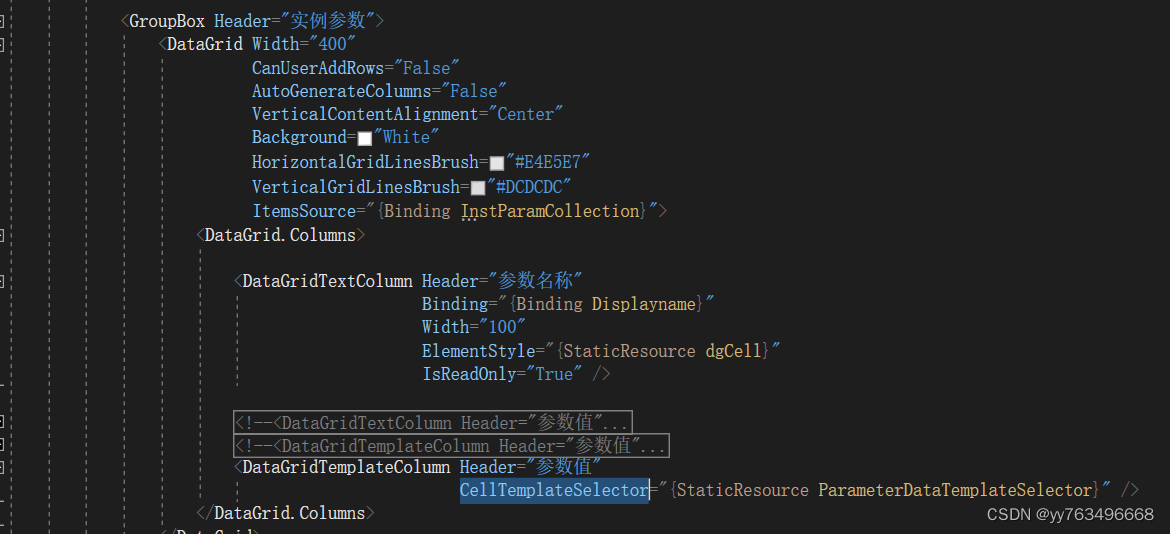
同时需要在xaml页面中引入资源文件<Window.Resources> <ResourceDictionary> <ResourceDictionary.MergedDictionaries> <ResourceDictionary Source="/HuaSheCityRoadBridge.UIControl;Component/Themes/Generic.xaml" /> ResourceDictionary.MergedDictionaries> ResourceDictionary> Window.Resources>- 1
- 2
- 3
- 4
- 5
- 6
- 7
以上的代码就是解决此问题的所有内容了。
-
相关阅读:
operator-sdk入门(mac)
银行业务测试
uni-app 在已有的数据对象中动态添加更多的数据对象
学习Maven Web 应用
Scala---方法与函数
vue数组中的变更方法和替换方法
使用DIV+CSS技术设计的非遗文化网页与实现制作(web前端网页制作课作业)
Mycat+分库分表
穿越时空的创新:解析云原生与Web3.0的奇妙渊源
Spring Boot自定义注解+AOP,使用guava的RateLimiter实现接口的限流
- 原文地址:https://blog.csdn.net/yy763496668/article/details/126421112
