-
看看Vue
Vue基础
Vue简介
- 渐进式JavaScript框架
- 简化Dom操作
- 响应式数据驱动
第一个Vue
- 导入开发版本的Vue.js
- 创建Vue实例对象,设置el属性和data属性
- 使用简洁的的模板语法把数据渲染到页面上
el挂载点
Vue实例的作用范围是什么?
在el命中的元素内部
是否可以使用其他的选择器?
id选择器、 class选择器、标签选择器。一般使用id选择器,是唯一的不会命中多个元素。
是否可以设置其他的dom元素?
可以使用其他的双标签(比如
),但不要把id挂载到 body / html 上。data数据对象
- Vue要用到的数据定义在data中
- data中可以写复杂类型的数据
- 渲染复杂类型数据时,遵守js的语法即可(对象的点语法,数组类型的索引语法)。
本地应用-通过Vue实现常见的网页效果,Vue指令
v-text指令
作用:设置标签的内容,默认会替换标签中全部内容,使用差值表达式可以替换局部\指定内容。
v-html指令
作用:设置innerHTML,内容中有html会被解析为标签。
v-on指令
作用:为元素绑定事件 可以将 'v-on:' 简写成 '@',绑定的方法写在methods属性中。
v-show指令
作用:根据真假切换元素的显示状态,其原理是修改元素的display,实现显示、隐藏,指令后面的内容最终都会解析成布尔值,true显示、false隐藏,数据改变之后,对应元素的显示状态对同步更新。
v-if指令
作用:根据表达式的真假切换元素的显示状态。本质是通过操作dom元素来切换显示状态。表达式的值为true,元素存在于dom树中,为false,从dom中移除。频繁的切换使用v-show,反之使用v-if,v-show切换消耗小。
v-model
作用:便捷的设置和获取表单元素的值,绑定的数据会和表单元素值相关联,双向关联。
MVVM模型
M:模型(Model):data中的数据
V:视图(View):模板代码
VM:视图模型(ViewModel):Vue实例
data中所有的属性,最后都出现在了vm身上。
vm身上所有的属性及Vue原型上所有属性,在Vue模板中都可以直接使用。
记事本Demo
- html>
- <html lang="en">
- <head>
- <meta charset="UTF-8">
- <meta http-equiv="X-UA-Compatible" content="IE=edge">
- <meta name="viewport" content="width=device-width, initial-scale=1.0">
- <title>Documenttitle>
- <script src="../JS/vue.js">script>
- head>
- <body>
- <section id="todoapp">
- <header class="header">
- <h1>记事本h1>
- <input v-model="inputValue" @keyup.enter="add" autofocus="autofocus" autocomplete="off" placeholder="请输入"
- class="new-todo">
- header>
- <section class="main">
- <ul class="todo-list">
- <li class="todo" v-for="(item,index) in list">
- <div class="view">
- <span class="index">{{ index+1 }}.span>
- <label>{{ item }}label>
- <button class="destory" @click="remove(index)">button>
- div>
- li>
- ul>
- section>
- <footer class="footer">
- <span class="todo-count"> <strong>{{ list.length }}strong> items left span>
- <button class="clear-completed" @click="clear">Clearbutton>
- footer>
- section>
- <script>
- // 创建Vue对象
- var app = new Vue({
- // 挂载容器todoapp
- el: "#todoapp",
- // 定义一个数组,初始值
- data: {
- list: ["小行星", "放放风"],
- inputValue: "好好学习"
- },
- methods: {
- add: function () {
- //向数组中添加push输入的值
- this.list.push(this.inputValue);
- },
- remove: function (index) {
- //根据索引删除1行
- this.list.splice(index, 1);
- },
- clear: function () {
- //将数组置为空
- this.list = [];
- }
- }
- })
- script>
- body>
- html>
效果
实现新增,删除 ,计数,清空

天气预报Demo
页面
- html>
- <html lang="en">
- <head>
- <meta charset="UTF-8" />
- <meta name="viewport" content="width=device-width, initial-scale=1.0" />
- <meta http-equiv="X-UA-Compatible" content="ie=edge" />
- <title>天知道title>
- <script src="../JS/vue.js">script>
- <link rel="stylesheet" href="css/reset.css" />
- <link rel="stylesheet" href="css/index.css" />
- head>
- <body>
- <div class="wrap" id="app">
- <div class="search_form">
- <div class="logo"><img src="img/logo.png" alt="logo" />div>
- <div class="form_group">
- <input type="text" class="input_txt" placeholder="请输入查询的天气" v-model="city" @keyup.enter="queryWeather" />
- <button class="input_sub" @click="queryWeather">
- 搜 索
- button>
- div>
- <div class="hotkey">
- <a href="javascript:;" v-for="city in hotCitys" @click="clickSearch(city)">{{ city }}a>
- div>
- div>
- <ul class="weather_list">
- <li v-for="(item,index) in forecastList" :key="item.date" :style="{transitionDelay:index*100+'ms'}">
- <div class="info_type">
- <span class="iconfont">{{ item.type }}span>
- div>
- <div class="info_temp">
- <b>{{ item.low}}b>
- ~
- <b>{{ item.high}}b>
- div>
- <div class="info_date">
- <span>{{ item.date }}span>
- div>
- li>
- ul>
- div>
- <script src="https://unpkg.com/axios/dist/axios.min.js">script>
- <script>
- new Vue({
- el: "#app",
- data: {
- city: "武汉",
- forecastList: [],
- hotCitys: ["北京", "上海", "广州", "深圳"]
- },
- methods: {
- queryWeather() {
- this.forecastList = [];
- axios
- // 使用get方式传参
- .get(`http://wthrcdn.etouch.cn/weather_mini?city=${this.city}`)
- .then(res => {
- console.log(res);
- // 拿到forecast中的数据
- this.forecastList = res.data.data.forecast;
- })
- .catch(err => {
- console.log(err);
- })
- .finally(() => { });
- },
- clickSearch(city) {
- this.city = city;
- this.queryWeather();
- }
- }
- });
- script>
- body>
- html>
样式CSS
- body{
- font-family:'Microsoft YaHei';
- }
- .wrap{
- position: fixed;
- left:0;
- top:0;
- width:100%;
- height:100%;
- /* background: radial-gradient(#f3fbfe, #e4f5fd, #8fd5f4); */
- /* background:#8fd5f4; */
- /* background: linear-gradient(#6bc6ee, #fff); */
- background:#fff;
- }
- .search_form{
- width:640px;
- margin:100px auto 0;
- }
- .logo img{
- display:block;
- margin:0 auto;
- }
- .form_group{
- width:640px;
- height:40px;
- margin-top:45px;
- }
- .input_txt{
- width:538px;
- height:38px;
- padding:0px;
- float:left;
- border:1px solid #41a1cb;
- outline:none;
- text-indent:10px;
- }
- .input_sub{
- width:100px;
- height:40px;
- border:0px;
- float: left;
- background-color: #41a1cb;
- color:#fff;
- font-size:16px;
- outline:none;
- cursor: pointer;
- position: relative;
- }
- .input_sub.loading::before{
- content:'';
- position: absolute;
- left: 0;
- top: 0;
- width: 100%;
- height: 100%;
- background: url('../img/loading.gif');
- }
- .hotkey{
- margin:3px 0 0 2px;
- }
- .hotkey a{
- font-size:14px;
- color:#666;
- padding-right:15px;
- }
- .weather_list{
- height:200px;
- text-align:center;
- margin-top:50px;
- font-size:0px;
- }
- .weather_list li{
- display:inline-block;
- width:140px;
- height:200px;
- padding:0 10px;
- overflow: hidden;
- position: relative;
- background:url('../img/line.png') right center no-repeat;
- background-size: 1px 130px;
- }
- .weather_list li:last-child{
- background:none;
- }
- .info_date{
- width:100%;
- height:40px;
- line-height:40px;
- color:#999;
- font-size:14px;
- left:0px;
- bottom:0px;
- margin-top: 15px;
- }
- .info_date b{
- float: left;
- margin-left:15px;
- }
- .info_type span{
- color:#fda252;
- font-size:30px;
- line-height:80px;
- }
- .info_temp{
- font-size:14px;
- color:#fda252;
- }
- .info_temp b{
- font-size:13px;
- }
- .tem .iconfont {
- font-size: 50px;
- }
- body,ul,h1,h2,h3,h4,h5,h6{
- margin: 0;
- padding: 0;
- }
- h1,h2,h3,h4,h5,h6{
- font-size:100%;
- font-weight:normal;
- }
- a{
- text-decoration:none;
- }
- ul{
- list-style:none;
- }
- img{
- border:0px;
- }
- /* 清除浮动,解决margin-top塌陷 */
- .clearfix:before,.clearfix:after{
- content:'';
- display:table;
- }
- .clearfix:after{
- clear:both;
- }
- .clearfix{
- zoom:1;
- }
- .fl{
- float:left;
- }
- .fr{
- float:right;
- }
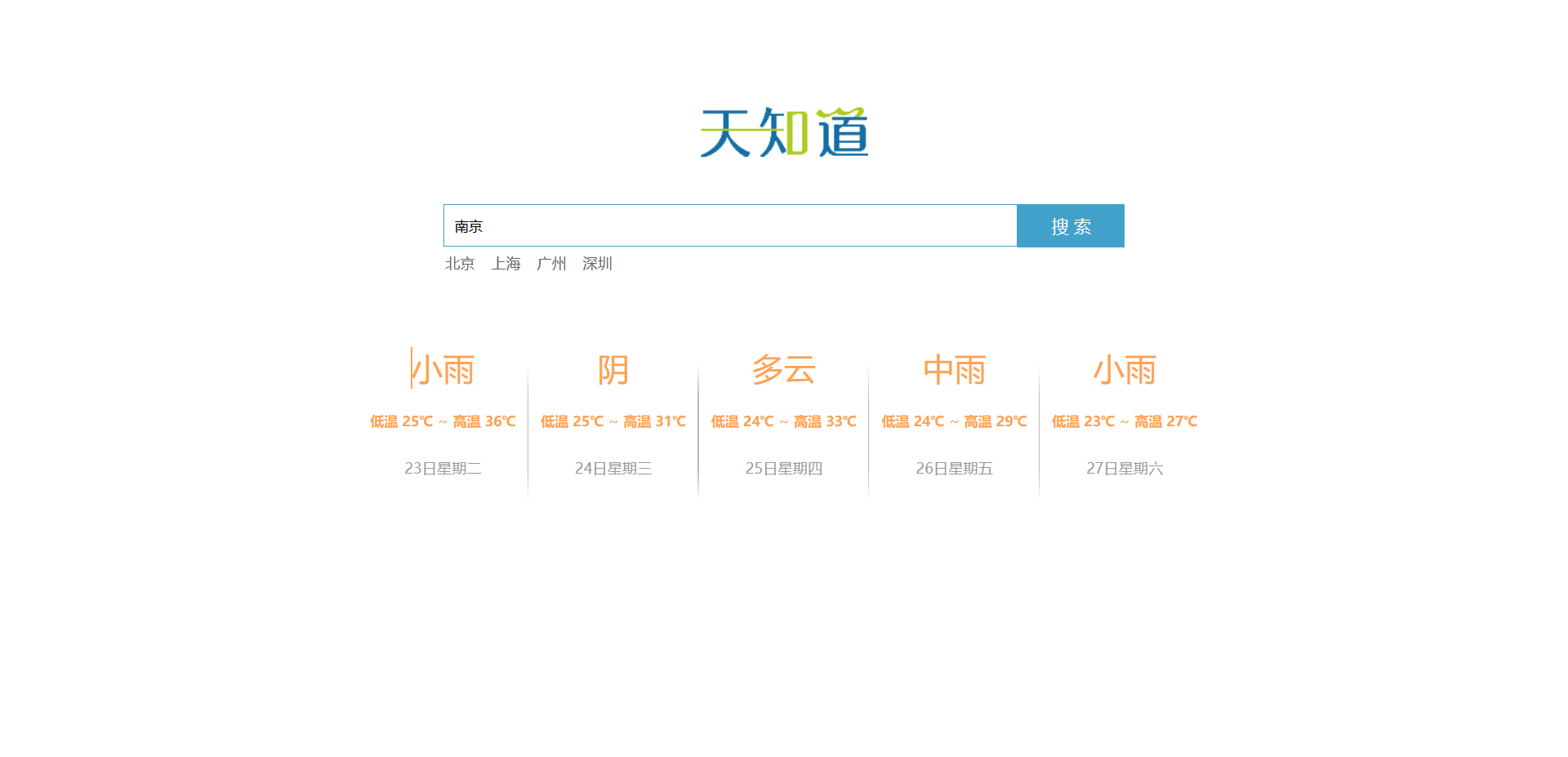
效果
实现点击搜索查询,回车查询
-
相关阅读:
深度学习零基础教程
LINUX下看门狗的使用
rh358 002 fact变量获取 ansible配置网络 service_facts
QT+OSG/osgEarth编译之十八:geos+Qt编译(一套代码、一套框架,跨平台编译,版本:geos-3.11.0)
【32-业务开发-基础业务-规格参数-保存数据-查询数据-更新操作之数据回显展示-更新操作-前后端项目交互整合与测试-总结收获】
Head First设计模式中的典型设计模式解析与案例分析
基于工程车辆/物流车辆/消防车辆远程通信的车队管理解决方案
【kubernetes】使用virtual-kubelet扩展k8s
ubuntu20.04桌面蓝屏问题解决
TS中null和undefined特殊性
- 原文地址:https://blog.csdn.net/Ipkiss_Yongheng/article/details/126465315
