-
【云原生】springcloud07—Consul的服务注册与发现

前 言
🍉 作者简介:半旧518,长跑型选手,立志坚持写10年博客,专注于java后端
☕专栏简介:深入、全面、系统的介绍springcloud与springcloud Alibaba微服务常用技术栈
🌰 文章简介:本文将介绍订单服务注册Consul,建议收藏备用,创作不易,敬请三连哦
🥒文章推荐:
微服务架构与springcloud 01——微服务入门
微服务架构与springcloud02——父工程构建及支付模块实现
微服务架构与springcloud03——项目热部署与消费者订单模块
微服务架构与springcloud04——Eureka服务注册与发现
springcloud05——Zookeeper实现支付微服务
【云原生】springcloud06——订单服务注册zookeeper
大厂面试真题|面经1.Consul 简介
(1)官网与文档
Consul官网:https://www.consul.io/
Consul中文文档:https://www.springcloud.cc/spring-cloud-consul.html
(2)简介
Consul是一种服务网格解决方案,提供具有服务发现,配置和分段功能的全功能控制平面。这些功能中的每一个都可以根据需要单独使用,也可以一起使用以构建完整的服务网格。Consul需要一个数据平面,并支持代理和本机集成模型。Consul附带了一个简单的内置代理,因此一切都可以直接使用,还支持Envoy等第三方代理集成。
(3)特点
- 服务发现:Consul的客户端可以注册服务,例如 api或mysql,其他客户端可以使用Consul来发现给定服务的提供者。使用DNS或HTTP,应用程序可以轻松找到它们依赖的服务。
- 健康检测:领事客户端可以提供任意数量的运行状况检查,这些检查可以与给定服务(“ Web服务器是否返回200 OK”)或本地节点(“内存利用率低于90%”)相关。操作员可以使用此信息来监视群集的运行状况,服务发现组件可以使用此信息将流量从不正常的主机发送出去。
- KV存储:应用程序可以将Consul的分层键/值存储用于多种目的,包括动态配置,功能标记,协调,领导者选举等。简单的HTTP API使其易于使用。
- 安全的服务通信:领事可以为服务生成并分发TLS证书,以建立相互TLS连接。 意图 可用于定义允许哪些服务进行通信。可以使用可以实时更改的意图轻松管理服务分段,而不必使用复杂的网络拓扑和静态防火墙规则。
- 多数据中心:Consul开箱即用地支持多个数据中心。这意味着Consul的用户不必担心会构建其他抽象层以扩展到多个区域。
Consul旨在对DevOps社区和应用程序开发人员友好,使其非常适合现代,灵活的基础架构。
2.下载安装 consul
官网下载即可.
启动。
consul agent -dev- 1
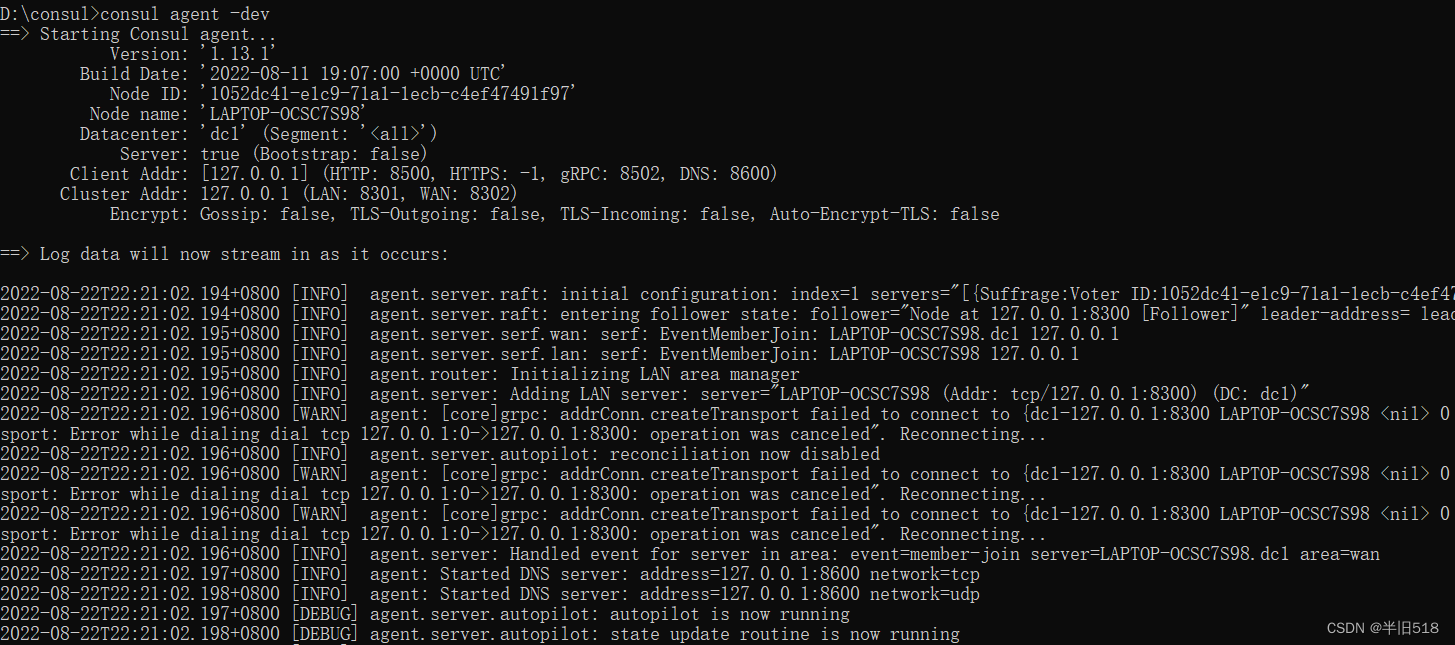
访问:http://localhost:8500

3.服务提供者注册进consul
(1)建工程
新建服务提供者cloud-provider-consul-payment8006。

(2)写pom
pom复制8004。(用spring-cloud-starter-consul-discovery的依赖替换Zookeeper的依赖)<project xmlns="http://maven.apache.org/POM/4.0.0" xmlns:xsi="http://www.w3.org/2001/XMLSchema-instance" xsi:schemaLocation="http://maven.apache.org/POM/4.0.0 http://maven.apache.org/xsd/maven-4.0.0.xsd"> <parent> <artifactId>cloud2020artifactId> <groupId>com.wangzhou.springcloudgroupId> <version>1.0-SNAPSHOTversion> parent> <modelVersion>4.0.0modelVersion> <groupId>groupId> <artifactId>cloud-provider-consul-payment8006artifactId> <properties> <maven.compiler.source>8maven.compiler.source> <maven.compiler.target>8maven.compiler.target> properties> <dependencies> <dependency> <groupId>org.springframework.bootgroupId> <artifactId>spring-boot-starter-webartifactId> dependency> <dependency> <groupId>org.projectlombokgroupId> <artifactId>lombokartifactId> <optional>trueoptional> dependency> <dependency> <groupId>org.springframework.bootgroupId> <artifactId>spring-boot-starter-testartifactId> <scope>testscope> dependency> <dependency> <groupId>com.wangzhou.springcloudgroupId> <artifactId>cloud-api-commonsartifactId> <version>${project.version}version> dependency> <dependency> <groupId>org.springframework.cloudgroupId> <artifactId>spring-cloud-starter-consul-discoveryartifactId> dependency> dependencies> project>- 1
- 2
- 3
- 4
- 5
- 6
- 7
- 8
- 9
- 10
- 11
- 12
- 13
- 14
- 15
- 16
- 17
- 18
- 19
- 20
- 21
- 22
- 23
- 24
- 25
- 26
- 27
- 28
- 29
- 30
- 31
- 32
- 33
- 34
- 35
- 36
- 37
- 38
- 39
- 40
- 41
- 42
- 43
- 44
- 45
- 46
- 47
- 48
- 49
- 50
- 51
- 52
(3)写yml
# consul服务端口号 server: port: 8006 spring: application: name: consul-provider-payment cloud: # consul注册地址 consul: host: 127.0.0.1 port: 8500 discovery: service-name: ${spring.application.name} # 出掉去前端页面查看时爆红叉 heartbeat: enabled: true- 1
- 2
- 3
- 4
- 5
- 6
- 7
- 8
- 9
- 10
- 11
- 12
- 13
- 14
- 15
- 16
- 17
- 18
- 19
(4)主启动
@SpringBootApplication @EnableDiscoveryClient public class PaymentMain8006 { public static void main(String[] args) { SpringApplication.run(PaymentMain8006.class, args); } }- 1
- 2
- 3
- 4
- 5
- 6
- 7
- 8
(5)Controller
@Slf4j @RestController public class PaymentController { @Value("${server.port}") //获取端口号 private String serverPort; @RequestMapping("/payment/consul") public String paymentConsul(){ return "springcloud with Consul:" + serverPort + "\t" + UUID.randomUUID().toString(); } }- 1
- 2
- 3
- 4
- 5
- 6
- 7
- 8
- 9
- 10
- 11
(6)功能测试
启动8006服务。
访问http://localhost:8500/ui/dc1/services,可以看到微服务注册成功。

点点可以看到更多。

访问http://localhost:8006/payment/consul。

4.服务消费者进consul
(1)建模块
新建模块cloud-consumer-consul-order80

(2)写pom
<project xmlns="http://maven.apache.org/POM/4.0.0" xmlns:xsi="http://www.w3.org/2001/XMLSchema-instance" xsi:schemaLocation="http://maven.apache.org/POM/4.0.0 http://maven.apache.org/xsd/maven-4.0.0.xsd"> <parent> <artifactId>cloud2020artifactId> <groupId>com.wangzhou.springcloudgroupId> <version>1.0-SNAPSHOTversion> parent> <modelVersion>4.0.0modelVersion> <groupId>com.wangzhou.springcloudgroupId> <artifactId>cloud-consumer-consul-order80artifactId> <version>1.0-SNAPSHOTversion> <properties> <maven.compiler.source>8maven.compiler.source> <maven.compiler.target>8maven.compiler.target> properties> <dependencies> <dependency> <groupId>org.springframework.cloudgroupId> <artifactId>spring-cloud-starter-consul-discoveryartifactId> dependency> <dependency> <groupId>com.wangzhou.springcloudgroupId> <artifactId>cloud-api-commonsartifactId> <version>${project.version}version> dependency> <dependency> <groupId>org.springframework.bootgroupId> <artifactId>spring-boot-starter-webartifactId> dependency> <dependency> <groupId>org.springframework.bootgroupId> <artifactId>spring-boot-starter-actuatorartifactId> dependency> <dependency> <groupId>org.springframework.bootgroupId> <artifactId>spring-boot-devtoolsartifactId> <scope>runtimescope> <optional>trueoptional> dependency> <dependency> <groupId>org.projectlombokgroupId> <artifactId>lombokartifactId> <optional>trueoptional> dependency> <dependency> <groupId>org.springframework.bootgroupId> <artifactId>spring-boot-starter-testartifactId> <scope>testscope> dependency> dependencies> project>- 1
- 2
- 3
- 4
- 5
- 6
- 7
- 8
- 9
- 10
- 11
- 12
- 13
- 14
- 15
- 16
- 17
- 18
- 19
- 20
- 21
- 22
- 23
- 24
- 25
- 26
- 27
- 28
- 29
- 30
- 31
- 32
- 33
- 34
- 35
- 36
- 37
- 38
- 39
- 40
- 41
- 42
- 43
- 44
- 45
- 46
- 47
- 48
- 49
- 50
- 51
- 52
- 53
- 54
- 55
- 56
- 57
- 58
- 59
- 60
- 61
- 62
- 63
- 64
- 65
(3)写yml
server: port: 80 spring: application: name: cloud-consumer-consul-order cloud: # consul注册地址 consul: host: 127.0.0.1 port: 8500 discovery: service-name: ${spring.application.name} # 出掉去前端页面查看时爆红叉 heartbeat: enabled: true- 1
- 2
- 3
- 4
- 5
- 6
- 7
- 8
- 9
- 10
- 11
- 12
- 13
- 14
- 15
- 16
- 17
- 18
(4)主启动
@SpringBootApplication @EnableDiscoveryClient public class OrderConsulMain80 { public static void main(String[] args) { SpringApplication.run(OrderConsulMain80.class, args); } }- 1
- 2
- 3
- 4
- 5
- 6
- 7
- 8
- 9
(5) 业务类
config.Applicationcontextconfig
public class Applicationcontextconfig { @Bean @LoadBalanced //负载均衡 public RestTemplate getRestTemplate() { return new RestTemplate(); } }- 1
- 2
- 3
- 4
- 5
- 6
- 7
- 8
- 9
controller
public class OrderController { public static final String INVOKE_URL="http://cloud-provider-payment"; @Resource private RestTemplate restTemplate; @GetMapping("/consumer/payment/consul") public String paymentInfo(){ String result = restTemplate.getForObject(INVOKE_URL + "/payment/consul", String.class); return result; } }- 1
- 2
- 3
- 4
- 5
- 6
- 7
- 8
- 9
- 10
- 11
- 12
- 13
(6)测试
http://localhost:8500/ui/dc1/services

http://localhost/consumer/payment/consul

5 Eureka、zookeeper、consul
(1)从一般角度

(2)CAP角度来看
CAP理论是分布式架构中重要理论
一致性(Consistency) (所有节点在同一时间具有相同的数据)
可用性(Availability) (保证每个请求不管成功或者失败都有响应)
分隔容忍(Partition tolerance) (系统中任意信息的丢失或失败不会影响系统的继续运作)
关于 P 的理解,我觉得是在整个系统中某个部分,挂掉了,或者宕机了,并不影响整个系统的运作或者说使用,而可用性是,某个系统的某个节点挂了,但是并不影响系统的接受或者发出请求,CAP 不可能都取,只能取其中2个原因是 如果C是第一需求的话,那么会影响A的性能,因为要数据同步,不然请求结果会有差异,但是数据同步会消耗时间,期间可用性就会降低。如果A是第一需求,那么只要有一个服务在,就能正常接受请求,但是对与返回结果变不能保证,原因是,在分布式部署的时候,数据一致的过程不可能想切线路那么快。
再如果,同时满足一致性和可用性,那么分区容错就很难保证了,也就是单点,也是分布式的基本核心,好了,明白这些理论,就可以在相应的场景选取服务注册与发现了)


Eureka是AP,Zookeeper,Consul是CP。在双十一时,商品的点赞数可用不是很一致,允许牺牲数据不一致性,但是主要需要保证高可用,商品需要可买,使用AP的Eureka更合适。

对zookeeper和Consul,一定要保证数据一致。能用就用,用不了就不用,不存在中间地带。

工欲善其事,必先利其器”。要想成为工作上的数据库高手,面试时的题霸,独步江湖,就必须拿到一份"武林秘籍"。

我个人强推牛客网:找工作神器|大厂java面经汇总|超全笔试题库推荐理由:
1.刷题题库,题目特别全面,刷爆笔试再也不担心

链接: 找工作神器|大厂java面经汇总|超全笔试题库
2.超全面试题、成体系、高质量,还有AI模拟面试黑科技

链接: 工作神器|大厂java面经汇总|超全笔试题库
3.超多面经,大厂面经很多
4.内推机会,大厂招聘特别多

链接: 找工作神器|大厂java面经汇总|超全笔试题库
5.大厂真题,直接拿到大厂真实题库,而且和许多大厂都有直接合作,题目通过率高有机会获得大厂内推资格。
链接: 找工作神器|大厂java面经汇总|超全笔试题库 -
相关阅读:
在Java中使用SFTP传输文件
自己制作智能语音机器人(基于jetson nano)
一个关于 i++ 和 ++i 的面试题打趴了所有人
Qt Q_PROPERTY理解
Tomcat启动后的日志输出为乱码
低代码-业务流程引擎
[qemu逃逸] XNUCA2019-vexx
Java集合框架
举个栗子~Tableau 技巧(238):可灵活对比的雷达图(Radar Chart)
Java - LinkedHashMap原理分析
- 原文地址:https://blog.csdn.net/qq_41708993/article/details/126474381
