-
青柠起始页样式书写+清新风格登录界面——Html+Css+JavaScript
青柠起始页样式书写——Html+Css+JavaScript
效果展示


清新风格登录界面 首先是制作青柠其实起始页的html
构思一个结构

下面呈现代码DOCTYPE html> <html lang="en"> <head> <meta charset="UTF-8"> <meta http-equiv="X-UA-Compatible" content="IE=edge"> <meta name="viewport" content="width=device-width, initial-scale=1.0"> <title>Lime Start Pagetitle> <link rel="shortcut icon" href="./images/icon.png" type="image/x-icon"> <link rel="stylesheet" href="./css/reset.css"> <link href="https://cdn.bootcdn.net/ajax/libs/font-awesome/4.7.0/css/font-awesome.min.css" rel="stylesheet"> <link rel="stylesheet" href="./css/hello.css"> head> //启动就加载两个函数 <body onload="time(),helloFloat()"> <div id="app"> //设置的背景图片 <div id="bg" class="bg"> <img id="image" alt=""> div> //设置登录按钮 <div id="login"> <a href="./login.html"> //从图标库引入图标 <i class="fa fa-user-circle-o" aria-hidden="true">i> a> div> //主体内容区 <main id="main"> //问候弹窗 <div id="hello" class="hello">div> //时间显示标签 <div class="timecontainer"> <div class="time">div> div> //搜索框的容器 <div class="search" id="searchbox"> //搜索框 autocomplete="off"设置为off 意为关闭自动填充的下拉选项 <input id="search" autocomplete="off" type="text" class="search-input" value="Search"> //搜索的放大镜图标 暂未设置 <i class="search-icon">i> div> //聚焦搜索框时,底部弹出的诗句 <div id="poem" class="hide"> <div class="poemBg">div> <span>「未觉池塘春草梦,阶前梧叶已秋声。」span> <p id="author">—— 偶成p> <button id="poemMenu" type="button"> <i class="fa fa-ellipsis-h" aria-hidden="true">i> button> div> main> //底部的一些信息切换 <footer> <div class="copy"> © 2022 div> <div class="info"> <ul> <li> <a href="#" class="Ruoxin">Haoran Chena> <span>&span> <a href="#" class="Shangzhen">Mei Mua> <span>|span> <a href="#">abouta> li> <li> <a href="">a> li> ul> div> footer> //切换日夜场景按钮 <div id="switch"> <i id="switchBtn" class="fa fa-sun-o" aria-hidden="true">i> div> div> body> <script src="./js/hello.js">script> html>- 1
- 2
- 3
- 4
- 5
- 6
- 7
- 8
- 9
- 10
- 11
- 12
- 13
- 14
- 15
- 16
- 17
- 18
- 19
- 20
- 21
- 22
- 23
- 24
- 25
- 26
- 27
- 28
- 29
- 30
- 31
- 32
- 33
- 34
- 35
- 36
- 37
- 38
- 39
- 40
- 41
- 42
- 43
- 44
- 45
- 46
- 47
- 48
- 49
- 50
- 51
- 52
- 53
- 54
- 55
- 56
- 57
- 58
- 59
- 60
- 61
- 62
- 63
- 64
- 65
- 66
- 67
- 68
- 69
- 70
- 71
- 72
- 73
- 74
- 75
- 76
- 77
- 78
- 79
- 80
- 81
- 82
- 83
- 84
- 85
接下来就是构建css代码
#app { position: relative; } body { background-color: black; } .bg { position: fixed; background-size: cover; transition: all .2s; } .bg img { width: 100vw; object-fit: cover; } /* 用户登录 */ #login { position: absolute; top: 10px; right: 1%; z-index: 10; font-size: 22px; } #login a { color: rgba(0, 0, 0, .5); } main { position: relative; height: 100vh; } .hello { padding: 0 20px; height: 40px; line-height: 40px; text-align: center; position: absolute; top: -40px; left: 50%; transform: translateX(-50%); color: #ececec; letter-spacing: 1px; border-radius: 20px; /* 背景色 */ background-color: rgba(25, 25, 25, .25); box-shadow: rgb(0 0 0 / 20%) 0 0 10px; -webkit-backdrop-filter: blur(10px); backdrop-filter: blur(10px); animation: fly 7s; } @keyframes fly { 0% { top: -40px; } 20% { top: 60px } 50% { top: 60px; } 80% { top: -40px; } } .timecontainer { position: fixed; top: 115px; left: 50%; transform: translateX(-50%); padding: 10px; text-align: center; cursor: pointer; transition: .25s; } .time { font-size: 36px; color: #fff; transition: .25s; text-shadow: 0 0 20px rgb(0 0 0 / 35%); } .timecontainer:hover { animation: timeAni 1s; } @keyframes timeAni { 0% { transform: translateX(-50%) scale(1); } 70% { transform: translateX(-50%) scale(1.2); } 100% { transform: translateX(-50%) scale(1.1); } } footer { position: fixed; bottom: 0; left: 50%; transform: translateX(-50%); } #searchbox { background-color: rgba(0, 0, 0, .35); } #searchbox:hover { background-color: rgba(15, 15, 15, .6); } .search { position: absolute; top: 200px; left: 50%; transform: translateX(-50%); max-width: 80%; width: 230px; height: 43px; border-radius: 30px; color: #fff; background-color: rgba(255, 255, 255, .25); box-shadow: rgb(0 0 0 / 20%) 0 0 10px; -webkit-backdrop-filter: blur(10px); backdrop-filter: blur(10px); overflow: hidden; transition: color .25s, background-color .25s, box-shadow .25s, left .25s, opacity .25s, top .25s, width .25s; } .search:hover { box-shadow: rgb(0 0 0 / 30%) 0 0 10px; width: 530px; } input { outline: 0; border: none; width: 100%; height: 100%; padding: 0 20px; color: inherit; background-color: transparent; font-size: 14px; font-family: "Microsoft Yahei Light", "Microsoft Yahei", "PingFang SC", "Helvetica Neue", Helvetica, Tahoma, Arial, sans-serif; text-align: center; } /* 诗句 */ #poem { width: 530px; padding: 15px 50px; margin: 0px; position: absolute; left: 50%; bottom: 125px; transform: translateX(-50%); border-radius: 15px; color: rgba(255, 255, 255, 9); font-size: small; text-align: center; cursor: default; transition: .5s; overflow: hidden; } .hide { opacity: 0; pointer-events: none; } #poem .poemBg { opacity: 0; position: absolute; left: 0; top: 0; z-index: -1; width: 100%; height: 100%; background-color: rgba(0, 0, 0, .1); backdrop-filter: blur(30px); transition: .25s; } #poem span { transition: .25s; text-shadow: 0 0 20px rgb(0 0 0 / 80%); } #poem p { opacity: 0; transition: .25s; margin-top: 8px; } #poem button { opacity: 0; position: absolute; top: 6px; right: 6px; padding: 0 10px; border: none; border-radius: 10px; background-color: transparent; color: rgba(255, 255, 255, .6); cursor: pointer; transition: .25s; } #poem i { font-size: 22px; } /* 诗歌hover部分 */ #poem:hover span { text-shadow: 0 0 20px transparent; } #poem:hover .poemBg, #poem:hover p, #poem:hover button { opacity: 1; } #poem:hover button:hover { background-color: rgba(255, 255, 255, .05); color: #70C000; } /* main结束 */ footer { display: flex; font-size: 12px; padding: 10px; } .copy { margin-right: 10px; color: rgba(255, 255, 255, .6); } .info li { margin-right: 10px; } .info a, .info span { transition: .3s; color: rgba(255, 255, 255, .6); } .info li a:hover { color: #fff; } #switch { position: fixed; font-size: 50px; bottom: 2%; right: 1%; } #switch .fa:hover { transform: scale(1.1); } #switch .fa { transition: all.3s; color: rgba(255, 207, 72, .75); }- 1
- 2
- 3
- 4
- 5
- 6
- 7
- 8
- 9
- 10
- 11
- 12
- 13
- 14
- 15
- 16
- 17
- 18
- 19
- 20
- 21
- 22
- 23
- 24
- 25
- 26
- 27
- 28
- 29
- 30
- 31
- 32
- 33
- 34
- 35
- 36
- 37
- 38
- 39
- 40
- 41
- 42
- 43
- 44
- 45
- 46
- 47
- 48
- 49
- 50
- 51
- 52
- 53
- 54
- 55
- 56
- 57
- 58
- 59
- 60
- 61
- 62
- 63
- 64
- 65
- 66
- 67
- 68
- 69
- 70
- 71
- 72
- 73
- 74
- 75
- 76
- 77
- 78
- 79
- 80
- 81
- 82
- 83
- 84
- 85
- 86
- 87
- 88
- 89
- 90
- 91
- 92
- 93
- 94
- 95
- 96
- 97
- 98
- 99
- 100
- 101
- 102
- 103
- 104
- 105
- 106
- 107
- 108
- 109
- 110
- 111
- 112
- 113
- 114
- 115
- 116
- 117
- 118
- 119
- 120
- 121
- 122
- 123
- 124
- 125
- 126
- 127
- 128
- 129
- 130
- 131
- 132
- 133
- 134
- 135
- 136
- 137
- 138
- 139
- 140
- 141
- 142
- 143
- 144
- 145
- 146
- 147
- 148
- 149
- 150
- 151
- 152
- 153
- 154
- 155
- 156
- 157
- 158
- 159
- 160
- 161
- 162
- 163
- 164
- 165
- 166
- 167
- 168
- 169
- 170
- 171
- 172
- 173
- 174
- 175
- 176
- 177
- 178
- 179
- 180
- 181
- 182
- 183
- 184
- 185
- 186
- 187
- 188
- 189
- 190
- 191
- 192
- 193
- 194
- 195
- 196
- 197
- 198
- 199
- 200
- 201
- 202
- 203
- 204
- 205
- 206
- 207
- 208
- 209
- 210
- 211
- 212
- 213
- 214
- 215
- 216
- 217
- 218
- 219
- 220
- 221
- 222
- 223
- 224
- 225
- 226
- 227
- 228
- 229
- 230
- 231
- 232
- 233
- 234
- 235
- 236
- 237
- 238
- 239
- 240
- 241
- 242
- 243
- 244
- 245
- 246
- 247
- 248
- 249
- 250
- 251
- 252
- 253
- 254
- 255
- 256
- 257
- 258
- 259
- 260
- 261
- 262
- 263
- 264
- 265
- 266
- 267
- 268
- 269
- 270
- 271
- 272
- 273
- 274
- 275
- 276
- 277
- 278
- 279
- 280
- 281
- 282
- 283
- 284
- 285
- 286
- 287
- 288
- 289
- 290
- 291
- 292
- 293
- 294
这样初步样式就算成型了

接下来就用JavaScript来设置交互获取时间的步骤
创建一个时间对象 获取小时 根据时区增加时间 获取分钟 拼接加载到页面中- 1
- 2
- 3
- 4
function time() { var timer = new Date(); var hour = timer.getHours(); var min = timer.getMinutes(); if (hour < 10) { hour = "0" + hour + ":"; } else { hour = hour + ":"; } if (min < 10) { min = "0" + min + ""; } else { min = min + ""; } document.querySelector(".time").innerHTML = hour + '' + min; setTimeout(time, 1000); }- 1
- 2
- 3
- 4
- 5
- 6
- 7
- 8
- 9
- 10
- 11
- 12
- 13
- 14
- 15
- 16
- 17
紧接着实现弹窗问候语,同时背景也根据时间的变化而产生变化,例如早上 中文 下午 傍晚 夜晚 背景图不同,对应氛围
先获取元素 获得时间对象 创建字符串 判断时间输出不同时间的问候语- 1
- 2
- 3
- 4
function helloFloat() { // 获得元素 var hello = document.getElementById('hello') var image = document.getElementById('image') // 获得时间对象 var gettime = new Date(); var hours = gettime.getHours(); var str1 = "Good morning! 尊敬的用户!" var str2 = "Good afternoon! 尊敬的用户!" var str3 = "Good night! 尊敬的用户!" // 判断 if (hours > 6 && hours <= 11) { hello.innerHTML = str1; image.src = "images/day.png" switchBtn.className = 'fa fa-sun-o' } else if (hours > 11 && hours <= 20) { hello.innerHTML = str2 if (hours >= 17) { image.src = "images/afternoon.png" } else { image.src = "images/day.png" } switchBtn.className = 'fa fa-sun-o' } else { hello.innerHTML = str3 image.src = "images/night.png" switchBtn.className = 'fa fa-moon-o' switchBtn.style.color = 'rgba(32,33,36,.25)' } }- 1
- 2
- 3
- 4
- 5
- 6
- 7
- 8
- 9
- 10
- 11
- 12
- 13
- 14
- 15
- 16
- 17
- 18
- 19
- 20
- 21
- 22
- 23
- 24
- 25
- 26
- 27
- 28
- 29
- 30
接下来是输入框的交互
用户聚焦输入框,背景会有两个效果1、放大 2、高斯模糊- 1
- 2
同时,底部的诗句美文显现
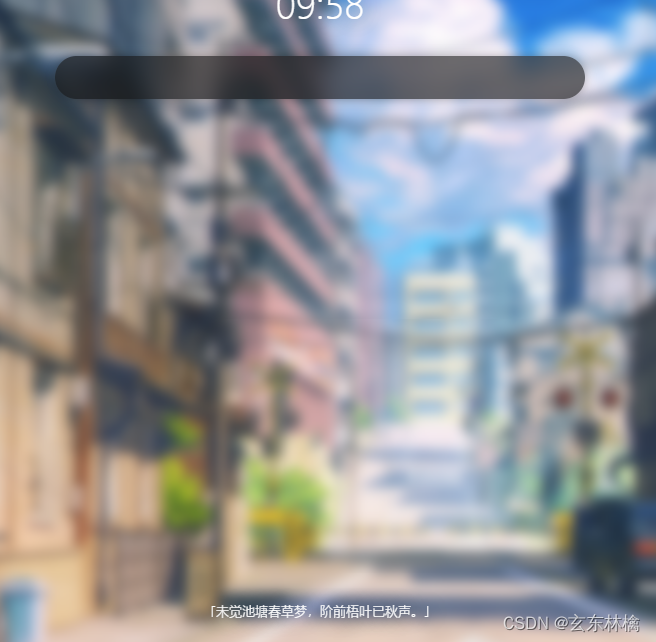
鼠标移动到诗句时,会显示出处,且背景不完全透明 css的hover

// 输入框 let search = document.getElementById('search') let bg = document.getElementById('bg') let value = document.getElementById('search').value let poem = document.getElementById('poem') // value = "Search" search.onfocus = function () { if (search.value == 'Search') { search.value = '' // 背景高斯模糊 bg.style.WebkitFilter = "blur(6px)"; // 背景放大 bg.style.transform = "scale(1.05)"; // 修改诗歌的类名 poem.className = 'poem' } } search.onblur = function () { if (search.value == '') { search.value = 'Search' bg.style.WebkitFilter = "blur(0px)"; bg.style.transform = "scale(1)"; poem.className = 'hide' } } //输入框 结束- 1
- 2
- 3
- 4
- 5
- 6
- 7
- 8
- 9
- 10
- 11
- 12
- 13
- 14
- 15
- 16
- 17
- 18
- 19
- 20
- 21
- 22
- 23
- 24
- 25
- 26
单击页面右下角的图标页面的日夜场景切换
 切换到夜
切换到夜

// 页面开关灯 var switchBtn = document.getElementById('switchBtn'); var timer = new Date(); var hours = timer.getHours(); var flag = true;//默认是 true白天点击黑夜 if (hours > 6 && hours <= 20) { flag = false; } switchBtn.onclick = function () { flag = !flag; if (flag) { image.src = "images/night.png" switchBtn.className = 'fa fa-moon-o' switchBtn.style.color = 'rgba(32,33,36,.25)' } else { if (hours > 6 && hours <= 11) { image.src = "images/day.png" } else { if (hours >= 17) { image.src = "images/afternoon.png" } else { image.src = "images/day.png" } } switchBtn.className = 'fa fa-sun-o' switchBtn.style.color = 'rgba(255,207,72,.75)' } } // 页面开关灯 结束- 1
- 2
- 3
- 4
- 5
- 6
- 7
- 8
- 9
- 10
- 11
- 12
- 13
- 14
- 15
- 16
- 17
- 18
- 19
- 20
- 21
- 22
- 23
- 24
- 25
- 26
- 27
- 28
- 29
下面是登录界面的制作

login.htmlDOCTYPE html> <html lang="en"> <head> <meta charset="UTF-8"> <meta http-equiv="X-UA-Compatible" content="IE=edge"> <meta name="viewport" content="width=device-width, initial-scale=1.0"> <title>logintitle> <link rel="shortcut icon" href="./images/icon.png" type="image/x-icon"> <link href="https://cdn.bootcdn.net/ajax/libs/font-awesome/4.7.0/css/font-awesome.min.css" rel="stylesheet"> <link rel="stylesheet" href="./css/login.css"> head> <body> <div class="container"> <div class="register-box"> <h2 class="register-title"> <span>没有账号,去span>注册 h2> <div class="input-box"> <input type="text" placeholder="用户名"> <input id="input" type="password" placeholder="密码"> <i class="fa fa-eye-slash fa1" aria-hidden="true">i> <input id="input1" type="password" placeholder="确认密码"> <i class="fa fa-eye-slash fa2" aria-hidden="true">i> div> <button>注册button> div> <div class="login-box slide-up"> <div class="center"> <h2 class="login-title"> <span>已有账号,去span>登录 h2> <div class="input-box"> <input type="text" placeholder="用户名"> <input id="input2" type="password" placeholder="密码"> <i class="fa fa-eye-slash fa3" aria-hidden="true">i> div> <button>登录button> div> div> div> <div id="lemon"> <a href="./hello.html"> <i class="fa fa-lemon-o" aria-hidden="true">i> a> div> body> <script src="./js/login.js">script> html>- 1
- 2
- 3
- 4
- 5
- 6
- 7
- 8
- 9
- 10
- 11
- 12
- 13
- 14
- 15
- 16
- 17
- 18
- 19
- 20
- 21
- 22
- 23
- 24
- 25
- 26
- 27
- 28
- 29
- 30
- 31
- 32
- 33
- 34
- 35
- 36
- 37
- 38
- 39
- 40
- 41
- 42
- 43
- 44
- 45
- 46
- 47
- 48
- 49
- 50
- 51
Css
* { margin: 0; padding: 0; } body { min-height: 100vh; /* 弹性布局 居中 */ display: flex; justify-content: center; align-items: center; background-color: #94bfb560; } .container { background-color: #222; width: 350px; height: 550px; border-radius: 15px; overflow: hidden; position: relative; } .container::after { content: ""; position: absolute; top: 0; left: 0; bottom: 0; right: 0; background: url("../images/bg.jpg") no-repeat; background-size: 500px; background-position: left bottom; opacity: 0.8; } /* 注册区域(登录区域很多样式和注册区域的一样,故而一些统一的样式写在了一起) */ .register-box { width: 70%; position: absolute; z-index: 1; top: 50%; left: 50%; transform: translate(-50%, -50%); transition: 0.3s ease; } .register-title, .login-title { color: #fff; font-size: 27px; text-align: center; } .register-title span, .login-title span { color: rgba(0, 0, 0, 0.4); display: none; } .register-box .input-box, .login-box .input-box { background-color: #fff; border-radius: 15px; overflow: hidden; margin-top: 50px; opacity: 1; visibility: visible; transition: 0.6s ease; } .input-box { position: relative; } .input-box .fa { position: absolute; z-index: 100; right: 10px; } .fa1{ top: 60px; } .fa2{ top: 110px; } .fa3{ top: 60px; } .register-box input, .login-box input { width: 100%; height: 30px; border: none; border-bottom: 1px solid rgba(0, 0, 0, 0.1); font-size: 12px; padding: 8px 0; text-indent: 15px; outline: none; } .register-box input:last-child, .login-box input:last-child { border-bottom: none; } .register-box input::placeholder, .login-box input::placeholder { color: rgba(0, 0, 0, 0.4); } .register-box button, .login-box button { width: 100%; padding: 15px 45px; margin: 15px 0; background: rgba(0, 0, 0, 0.4); border: none; border-radius: 15px; color: rgba(255, 255, 255, 0.8); font-size: 13px; font-weight: bold; cursor: pointer; opacity: 1; visibility: visible; transition: 0.3s ease; } .register-box button:hover, .login-box button:hover { background-color: rgba(0, 0, 0, 0.8); } /* 登录区域 */ .login-box { position: absolute; inset: 0; top: 20%; z-index: 2; background-color: #fff; transition: 0.3s ease; } .login-box::before { content: ""; background-color: #fff; width: 200%; height: 250px; border-radius: 50%; position: absolute; top: -20px; left: 50%; transform: translateX(-50%); } .login-box .center { width: 70%; position: absolute; z-index: 3; left: 50%; top: 40%; transform: translate(-50%, -50%); } .login-title { color: #000; } .login-box .input-box { border: 1px solid rgba(0, 0, 0, 0.1); } .login-box button { background-color: #75a297; } /* 注册、登录区域收起 */ .login-box.slide-up { top: 90%; } .login-box.slide-up .center { top: 10%; transform: translate(-50%, 0%); } .login-box.slide-up .login-title, .register-box.slide-up .register-title { font-size: 16px; cursor: pointer; } .login-box.slide-up .login-title span, .register-box.slide-up .register-title span { margin-right: 5px; display: inline-block; } .login-box.slide-up .input-box, .login-box.slide-up .button, .register-box.slide-up .input-box, .register-box.slide-up .button { opacity: 0; visibility: hidden; } .register-box.slide-up { top: 6%; transform: translate(-50%, 0%); } /* 返回青柠起始页 */ #lemon{ position: fixed; bottom: 0px; right: 0px; font-size: 40px; padding: 20px; transition: all .25s; } #lemon a { color: yellow; } #lemon:hover{ transform: scale(1.1); }- 1
- 2
- 3
- 4
- 5
- 6
- 7
- 8
- 9
- 10
- 11
- 12
- 13
- 14
- 15
- 16
- 17
- 18
- 19
- 20
- 21
- 22
- 23
- 24
- 25
- 26
- 27
- 28
- 29
- 30
- 31
- 32
- 33
- 34
- 35
- 36
- 37
- 38
- 39
- 40
- 41
- 42
- 43
- 44
- 45
- 46
- 47
- 48
- 49
- 50
- 51
- 52
- 53
- 54
- 55
- 56
- 57
- 58
- 59
- 60
- 61
- 62
- 63
- 64
- 65
- 66
- 67
- 68
- 69
- 70
- 71
- 72
- 73
- 74
- 75
- 76
- 77
- 78
- 79
- 80
- 81
- 82
- 83
- 84
- 85
- 86
- 87
- 88
- 89
- 90
- 91
- 92
- 93
- 94
- 95
- 96
- 97
- 98
- 99
- 100
- 101
- 102
- 103
- 104
- 105
- 106
- 107
- 108
- 109
- 110
- 111
- 112
- 113
- 114
- 115
- 116
- 117
- 118
- 119
- 120
- 121
- 122
- 123
- 124
- 125
- 126
- 127
- 128
- 129
- 130
- 131
- 132
- 133
- 134
- 135
- 136
- 137
- 138
- 139
- 140
- 141
- 142
- 143
- 144
- 145
- 146
- 147
- 148
- 149
- 150
- 151
- 152
- 153
- 154
- 155
- 156
- 157
- 158
- 159
- 160
- 161
- 162
- 163
- 164
- 165
- 166
- 167
- 168
- 169
- 170
- 171
- 172
- 173
- 174
- 175
- 176
- 177
- 178
- 179
- 180
- 181
- 182
- 183
- 184
- 185
- 186
- 187
- 188
- 189
- 190
- 191
- 192
- 193
- 194
- 195
- 196
- 197
- 198
- 199
- 200
- 201
- 202
- 203
- 204
- 205
- 206
- 207
- 208
- 209
- 210
- 211
- 212
- 213
- 214
- 215
- 216
- 217
- 218
- 219
- 220
- 221
- 222
- 223
- 224
- 225
- 226
js单击切换动效

// 获取要操作的元素 let login_title = document.querySelector('.login-title'); let register_title = document.querySelector('.register-title'); let login_box = document.querySelector('.login-box'); let register_box = document.querySelector('.register-box'); // 绑定标题点击事件 login_title.addEventListener('click', () => { // 判断是否收起,收起才可以点击 if (login_box.classList.contains('slide-up')) { register_box.classList.add('slide-up'); login_box.classList.remove('slide-up'); } }) register_title.addEventListener('click', () => { if (register_box.classList.contains('slide-up')) { login_box.classList.add('slide-up'); register_box.classList.remove('slide-up'); } })- 1
- 2
- 3
- 4
- 5
- 6
- 7
- 8
- 9
- 10
- 11
- 12
- 13
- 14
- 15
- 16
- 17
- 18
- 19
- 20
- 21
- 22
单击小眼睛显示密码

// 输入的密码框 let input = document.getElementById('input') let input1 = document.getElementById('input1') let input2 = document.getElementById('input2') var flag = false; eyes.onclick = function () { flag = !flag if (flag) { input.type = 'text'; eyes.className = 'fa fa-eye fa1' } else{ input.type = 'password'; eyes.className = 'fa fa-eye-slash fa1' } } eyes1.onclick = function () { console.log("aaaaa"); flag = !flag if (flag) { input1.type = 'text'; eyes1.className = 'fa fa-eye fa2' } else{ input1.type = 'password'; eyes1.className = 'fa fa-eye-slash fa2' } } eyes2.onclick = function () { console.log("aaaaa"); flag = !flag if (flag) { input2.type = 'text'; eyes2.className = 'fa fa-eye fa3' } else{ input2.type = 'password'; eyes2.className = 'fa fa-eye-slash fa3' } }- 1
- 2
- 3
- 4
- 5
- 6
- 7
- 8
- 9
- 10
- 11
- 12
- 13
- 14
- 15
- 16
- 17
- 18
- 19
- 20
- 21
- 22
- 23
- 24
- 25
- 26
- 27
- 28
- 29
- 30
- 31
- 32
- 33
- 34
- 35
- 36
- 37
- 38
- 39
-
相关阅读:
Prompts(二)
架构思考(七)
分布式机器学习(Parameter Server)
【知识梳理】多级页表的原理分析【地址形成过程】【扩充思考】
前端(十六)——Web应用的安全性研究
工程安全监测中的振弦采集仪技术解析与应用
记录电脑快捷键
Linux常用命令——bunzip2命令
【算法分析与设计】贪心算法(下)
Web前端—移动Web第四天(媒体查询、Bootstrap、综合案例-alloyTeam)
- 原文地址:https://blog.csdn.net/u013430418/article/details/126459063
