-
【Unity3D】导航系统
1 导航系统简介
导航系统用于智能避障并寻找目标物体,如:王者荣耀中,当玩家跑到敌方塔的攻击范围内,敌方塔就会发射火团攻击玩家,当玩家逃跑时,火团会智能跟随玩家,其中智能跟随就使用到了导航系统。
1)导航系统使用流程
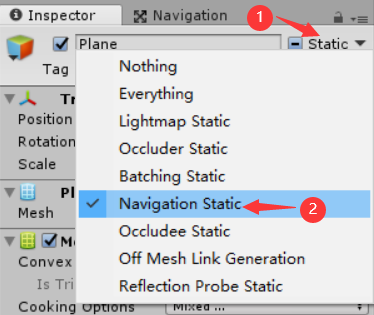
- 将地面、路障等静态对象的 Static 属性设置为 Navigation Static;
- 在 Navigation 窗口烘焙(Bake)导航网格;
- 给导航角色添加 NavMeshAgent 组件;
- 给导航角色添加脚本组件,并在脚本组件中设置导航目标位置(navMeshAgent.SetDestination)。
2)烘焙导航网格面板属性
依次选择【Window→Navigation】打开导航窗口,再选择 Bake 选项卡,烘焙导航网格面板属性如下:

- Agent Radius:角色半径
- Agent Height:角色高度
- Max Slope:角色能爬的最大坡度
- Step Height:角色爬台阶时每步能跨的最大高度
3)NavMeshAgent 组件面板属性

- Base Offset:导航角色与网格中心的偏移量
- Speed:导航过程中最大速度
- Angular Speed:拐弯时角速度
- Acceleration:加速度
- Stopping Distance:离目标多远停下
- Auto Braking:当角色快达到目标时,自动减速
- Radius:导航角色半径
- Height:导航角色高度
- Quality:导航质量,质量越高,导航算法越优,导航路径越短
- Priority:导航角色优先级(多个导航角色过独木桥时,谁先过)
- Auto Traverse Off Mesh Link:自动跨越分离路面
- Auto Repath:自动重新规划路径
- Area Mask:分层剔除,设置导航角色可以走哪些层
4)NavMeshAgent 组件常用属性和方法
- // 设置导航目标
- public bool SetDestination(Vector3 target)
- // 停止导航(过时)
- public void Stop()
- // 恢复导航(过时)
- public void Resume()
- // 计算到指定位置的导航路径,如果路径不存在,返回false,说明通过导航不能到达该位置
- // 如果路径存在,path里会存储到指定位置的所有拐点信息,获取拐点:Vector3[] corners = path.corners
- public bool CalculatePath(Vector3 targetPosition, NavMeshPath path)
- // 完成分离路面导航,继续走剩下的路
- public void CompleteOffMeshLink()
- // 停止还是恢复
- isStopped
- // 期望导航速度
- desiredVelocity
- // 当前导航速度
- velocity
- // 停止距离,距离目标多远时停下来
- stoppingDistance
- // 导航剩余距离
- remainingDistance
- // 通过导航更新位置
- updatePosition
- // 通过导航更新旋转
- updateRotation
- // 分层剔除,设置导航角色可以走哪些层,int类型(32位),-1表示全选,2^n表示只选第n层(n从0开始)
- areaMask
- // 角色当前是否正处于分离路面导航状态
- isOnOffMeshLink
- // 当前分离路面连接数据,包含startPos、endPos、activated、linkType等属性
- currentOffMeshLinkData
2 应用
1)游戏界面

2)设置 Navigation Static
选中地面、斜坡、台阶、路障等静态对象,将 Static 属性设置为 Navigation Static,如下:
3)烘焙导航网格
依次选择【Window→Navigation】打开导航窗口,再选择 Bake 选项卡,设置 Max Slope、Step Height 属性分别为 45、1.1,如下:

点击 Bake 烘焙导航网格,导航网格显示如下:

其中,蓝色和浅绿色表示导航可以走的区域。
4)添加 NavMeshAgent 组件
给胶囊体添加 NavMeshAgent 组件。
5)添加脚本组件
NavigationController.cs
- using UnityEngine;
- using UnityEngine.AI;
- public class NavigationController : MonoBehaviour {
- private NavMeshAgent navMeshAgent;
- private Transform target;
- private void Awake() {
- navMeshAgent = GetComponent
(); - target = GameObject.Find("Target").transform;
- }
- private void Update() {
- navMeshAgent.SetDestination(target.position);
- }
- }
说明:NavigationController 脚本组件挂在胶囊体上。
TargetController.cs
- using UnityEngine;
- public class TargetController : MonoBehaviour {
- private CharacterController character;
- private float speedRate = 4f;
- private void Awake() {
- character = GetComponent
(); - }
- private void Update () {
- float hor = Input.GetAxis("Horizontal");
- float ver = Input.GetAxis("Vertical");
- Vector3 speed = new Vector3(hor, 0, ver) * speedRate;
- character.SimpleMove(speed);
- }
- }
说明:TargetController 脚本组件挂在球体上,并且球体上需要挂载 CharacterController 组件,其 Slope Limit、Step Offset 属性分别设置为 45、1.1。
6)运行效果

-
相关阅读:
oracle的redo与postgreSQL的WAL以及MySQL的binlog区别
【微服务全家桶】-高级篇-1-Sentinel
Windows安装Visual Studio2019+OpenCV配置
电阻电路的等效变化(Ⅱ)
OP 与 OS 设置
c语言中文件的定义
肖sir__设计测试用例方法之判定表06_(黑盒测试)
Tested采访扎克伯格:揭秘四款VR原型机更多细节
等待 chrome.storage.local.get() 完成
应用软件安全编程--05预防 XML 注入
- 原文地址:https://blog.csdn.net/m0_37602827/article/details/126453511
