-
如何优雅的加密配置文件中的敏感信息
为什么要加密配置文件信息
我们平时的项目中,会在配置文件中配置一些敏感信息,比如配置数据库账号、密码等信息。如果我们将配置文件与代码一起打包,别人拿到jar包后很有可能反编译jar,从而获取里面的配置文件信息。如果有人对数据库信息恶意破坏,那么就会产生不可估量的损失。

如上图,我们将jar包反编译会看到
application-*.yml相关文件的信息,里面就包含一些敏感用户名密码信息。因此我们需要将这些敏感信息进行加密。
以
SpringBoot工程中的数据库地址,密码为例。开源插件推荐
我们可以自己开发加密功能,这里我引入一个开源插件。

就是这个大佬的项目。
该项目github地址:
“
https://github.com/ulisesbocchio/jasypt-spring-boot
”使用介绍
具体的使用方式可以参考项目里面的说明
README.md,下面我们简单来使用一下:- <dependency>
- <groupId>com.github.ulisesbocchio</groupId>
- <artifactId>jasypt-spring-boot-starter</artifactId>
- <version>2.1.0</version>
- </dependency>
引入框架后,我们配置文件数据库信息就可以用加密的形式来配置。

这里使用了
ENC(*)用于识别是否需要加密。同时还要在
application文件中中配置密钥:
当然更加安全的方法是将密匙加载在环境变量中:
这样在启动系统时,执行如下命令即可:
java -jar -Djasypt.encryptor.password=${JASYPT_PASSWORD} xxx.jar那么加密的数据是怎么获取的呢,我们需要将真实的地址和密码行进加密,加密代码如下:

运行上述代码即可获取加密后的数据库信息。

此框架的逻辑是,在加载配置文件时,做拦截操作,当发现有ENC包裹的字符串,会对其进行解密操作。
源码分析
我们看源码中
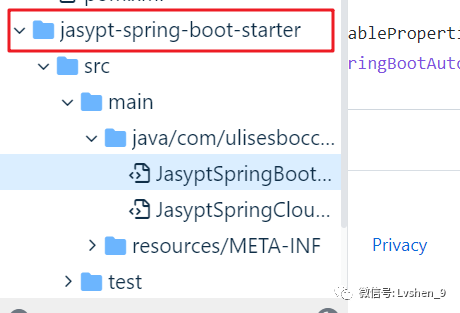
JasyptSpringBootAutoConfiguration类,系统在启动时会加载这个类。- /**
- * @author Ulises Bocchio
- */
- @Configuration
- @Import(EnableEncryptablePropertiesConfiguration.class)
- public class JasyptSpringBootAutoConfiguration {
- }
这里加载了类
EnableEncryptablePropertiesConfiguration。我们来看这个类的代码。- @Configuration
- @Import({EncryptablePropertyResolverConfiguration.class, CachingConfiguration.class})
- @Slf4j
- public class EnableEncryptablePropertiesConfiguration {
- @Bean
- public static EnableEncryptablePropertiesBeanFactoryPostProcessor enableEncryptablePropertySourcesPostProcessor(final ConfigurableEnvironment environment, EncryptablePropertySourceConverter converter) {
- return new EnableEncryptablePropertiesBeanFactoryPostProcessor(environment, converter);
- }
- }
这里类
EnableEncryptablePropertiesConfiguration注册了一个类EnableEncryptablePropertiesBeanFactoryPostProcessor。
如上图,
EnableEncryptablePropertiesBeanFactoryPostProcessor类用于加载配置文件。这个类中的构造器中传入了两个参数:
environment和converter。其中converter就是对配置文件做解析处理用的。在
EncryptablePropertySourceConverter类中,- @SuppressWarnings({"unchecked", "rawtypes"})
- private <T> PropertySource<T> instantiatePropertySource(PropertySource<T> propertySource) {
- PropertySource<T> encryptablePropertySource;
- if (needsProxyAnyway(propertySource)) {
- encryptablePropertySource = proxyPropertySource(propertySource);
- } else if (propertySource instanceof SystemEnvironmentPropertySource) {
- encryptablePropertySource = (PropertySource<T>) new EncryptableSystemEnvironmentPropertySourceWrapper((SystemEnvironmentPropertySource) propertySource, propertyResolver, propertyFilter);
- } else if (propertySource instanceof MapPropertySource) {
- encryptablePropertySource = (PropertySource<T>) new EncryptableMapPropertySourceWrapper((MapPropertySource) propertySource, propertyResolver, propertyFilter);
- } else if (propertySource instanceof EnumerablePropertySource) {
- encryptablePropertySource = new EncryptableEnumerablePropertySourceWrapper<>((EnumerablePropertySource) propertySource, propertyResolver, propertyFilter);
- } else {
- encryptablePropertySource = new EncryptablePropertySourceWrapper<>(propertySource, propertyResolver, propertyFilter);
- }
- return encryptablePropertySource;
- }
从上面代码看,我们发现
EncryptableMapPropertySourceWrapper类和EncryptableEnumerablePropertySourceWrapper类出现频繁,这两个类其实就是用于解密的类。这两个类都重写了
getProperty方法- @Override
- public Object getProperty(String name) {
- return encryptableDelegate.getProperty(name);
- }
我们来看看里面的
getProperty()方法。最终调到
EncryptablePropertySource#getProperty中- default Object getProperty(EncryptablePropertyResolver resolver, EncryptablePropertyFilter filter, PropertySource<T> source, String name) {
- Object value = source.getProperty(name);
- if (value != null && filter.shouldInclude(source, name) && value instanceof String) {
- String stringValue = String.valueOf(value);
- return resolver.resolvePropertyValue(stringValue);
- }
- return value;
- }
我们在来看看
resolver.resolvePropertyValue(stringValue)方法:这里对配置文件中的value做了筛选:
- @Override
- public boolean isEncrypted(String property) {
- if (property == null) {
- return false;
- }
- final String trimmedValue = property.trim();
- return (trimmedValue.startsWith(prefix) &&
- trimmedValue.endsWith(suffix));
- }
筛选的是以ENC包裹的值。
- private String prefix = "ENC(";
- private String suffix = ")";
在
resolver.resolvePropertyValue(stringValue)方法中,做了几件事:“
1.获取ENC包裹的字符value
2.截取括号里面的值
3.占位符替换
4.解码
”我们调试看看,启动系统:
这里会将配置文件中ENC包裹的value值进行解码:

解码操作:

将解码后的值写回到缓存
ConcurrentMapCache中:
这样
spring后面读取的value就是解码后的value了。今天的文章就写到这里了,如果对你有帮助,欢迎点赞+转发。
-
相关阅读:
解决nacos集群搭建,服务注册失败
(13)Latex:基于ΤΕΧ的自动排版系统——写论文必备
【计算机基础知识10】解析黑窗口CMD:认识CMD及常见命令
225. 用队列实现栈-C语言
第1章 算法和数据结构
业务架构·应用架构·数据架构实战~战略驱动的业务架构设计
Linux文件-内存映射mmap
产品代码都给你看了,可别再说不会DDD(三):战略设计
java计算机毕业设计ssm兴趣班和延时班管理系统(源码+系统+mysql数据库+Lw文档)
如何用树莓派搭建一台永久运行的个人服务器?
- 原文地址:https://blog.csdn.net/wujialv/article/details/126437113
