-
Netty再学习1
Netty再学习1
Netty工作原理

- Netty抽象出两组线程池BossGroup专门负责接收客户端的连接,WorkerGroup转么负责网络的读写
- BossGroup和WorkGroup类型都是NioEventLoopGroup
- NioEventLoop相当于一个事件循环组,这个组中含有多个事件循环,每个事件循环是NioEventLoop
- NioEventLoop表示一个不断循环执行处理任务的线程,每个NioEventLoop都有一个Selector,用于监听绑定在其上的socket的网络通讯
- NioEventLoopGroup可以有多个线程,即可以含有多个NioEventLoop
- 每个Boss NioEventLoop循环执行步骤有3步
(1)循环accept事件
(2)处理accept事件,与client建立连接,生成NioSocketChannel,并将其注册到某个worker NioEventLoop上的Selector
(3)处理任务队列的任务,即runAllTasks - 每个Worker NioEventLoop循环执行的步骤
(1)轮询read,write事件
(2)处理io事件,即read,write事件,在对应NioSocketChannel处理
(3)处理任务对立的任务,即runAllTasks - 每个Worker NioEventLoop处理业务时,会使用pipeline(管道),pipeline中包含了channel,即通过pipeline可以获取到对应通道,管道中维护了很多的处理器
Netty导入依赖
<dependency> <groupId>io.nettygroupId> <artifactId>netty-allartifactId> <version>4.1.20.Finalversion> dependency>- 1
- 2
- 3
- 4
- 5
public class NettyServer { public static void main(String[] args) { // 负责监听,并将NioEventLoop事件注册到workGroup EventLoopGroup bossGroup = new NioEventLoopGroup(); // 负责接收NioEventLoop和网络读写 EventLoopGroup workGroup = new NioEventLoopGroup(); try { // 辅助类 ServerBootstrap serverBootstrap = new ServerBootstrap(); serverBootstrap.group(bossGroup,workGroup) .channel(NioServerSocketChannel.class) .option(ChannelOption.SO_BACKLOG,128) // 线程数 .childOption(ChannelOption.SO_KEEPALIVE,true) // 存活 .childHandler(new ChannelInitializer<SocketChannel>() { @Override protected void initChannel(SocketChannel socketChannel) throws Exception { socketChannel.pipeline().addLast(new NettyServerHandler()); } }); ChannelFuture future = serverBootstrap.bind("localhost", 6668).sync();// 启动服务器 System.out.println("服务器启动了 \r\n"+new Date()); future.channel().closeFuture().sync(); // 监听关闭 } catch (Exception e) { e.printStackTrace(); }finally { // 优雅关闭 bossGroup.shutdownGracefully(); workGroup.shutdownGracefully(); } } } public class NettyServerHandler extends ChannelInboundHandlerAdapter { /** * 负责事件读取 * @param ctx * @param msg * @throws Exception */ @Override public void channelRead(ChannelHandlerContext ctx, Object msg) throws Exception { // 我中有您 ,您中有我 Channel channel = ctx.channel(); ChannelPipeline pipeline = ctx.pipeline(); // pipeline.channel() // channel.pipeline() // 读取消息 ByteBuf buf = (ByteBuf) msg; System.out.println(channel.remoteAddress() + "客户端:-->" + buf.toString(CharsetUtil.UTF_8)); } /** * 读取完之后做的事 * @param ctx * @throws Exception */ @Override public void channelReadComplete(ChannelHandlerContext ctx) throws Exception { ctx.writeAndFlush(Unpooled.copiedBuffer("恭喜您诞生了",CharsetUtil.UTF_8)); } /** * 出现异常处理 * @param ctx * @param cause * @throws Exception */ @Override public void exceptionCaught(ChannelHandlerContext ctx, Throwable cause) throws Exception { cause.printStackTrace(); ctx.close(); } } public class NettyClient { public static void main(String[] args) { NioEventLoopGroup bossGroup = new NioEventLoopGroup(); try { Bootstrap bootstrap = new Bootstrap(); bootstrap.group(bossGroup) .channel(NioSocketChannel.class) .handler(new ChannelInitializer<SocketChannel>() { @Override protected void initChannel(SocketChannel socketChannel) throws Exception { socketChannel.pipeline().addLast(new NettyClientHandler()); } }); ChannelFuture future = bootstrap.connect("localhost", 6668).sync(); System.out.println("客户端+:" + future.channel().remoteAddress() + "上线了"); future.channel().closeFuture().sync(); } catch (Exception e) { e.printStackTrace(); }finally { bossGroup.shutdownGracefully(); } } } public class NettyClientHandler extends ChannelInboundHandlerAdapter { /** * 向服务端发送消息 * @param ctx * @throws Exception */ @Override public void channelActive(ChannelHandlerContext ctx) throws Exception { ctx.writeAndFlush(Unpooled.copiedBuffer("hello server", CharsetUtil.UTF_8)); } /** * 读取服务端发送来的消息 * @param ctx * @param msg * @throws Exception */ @Override public void channelRead(ChannelHandlerContext ctx, Object msg) throws Exception { ByteBuf buf = (ByteBuf) msg; System.out.println("服务端" + ctx.channel().remoteAddress() + "-->" + buf.toString(CharsetUtil.UTF_8)); } /** * 处理异常 * @param ctx * @param cause * @throws Exception */ @Override public void exceptionCaught(ChannelHandlerContext ctx, Throwable cause) throws Exception { cause.printStackTrace(); ctx.close(); } }- 1
- 2
- 3
- 4
- 5
- 6
- 7
- 8
- 9
- 10
- 11
- 12
- 13
- 14
- 15
- 16
- 17
- 18
- 19
- 20
- 21
- 22
- 23
- 24
- 25
- 26
- 27
- 28
- 29
- 30
- 31
- 32
- 33
- 34
- 35
- 36
- 37
- 38
- 39
- 40
- 41
- 42
- 43
- 44
- 45
- 46
- 47
- 48
- 49
- 50
- 51
- 52
- 53
- 54
- 55
- 56
- 57
- 58
- 59
- 60
- 61
- 62
- 63
- 64
- 65
- 66
- 67
- 68
- 69
- 70
- 71
- 72
- 73
- 74
- 75
- 76
- 77
- 78
- 79
- 80
- 81
- 82
- 83
- 84
- 85
- 86
- 87
- 88
- 89
- 90
- 91
- 92
- 93
- 94
- 95
- 96
- 97
- 98
- 99
- 100
- 101
- 102
- 103
- 104
- 105
- 106
- 107
- 108
- 109
- 110
- 111
- 112
- 113
- 114
- 115
- 116
- 117
- 118
- 119
- 120
- 121
- 122
- 123
- 124
- 125
- 126
- 127
- 128
- 129
- 130
- 131
- 132
- 133
- 134
- 135
- 136
- 137
- 138
- 139
Netty模型之任务队列
- 用户程序自定义的普通任务 (提交到TaskQueue)
例如 在channelReadComplete 方法中 有一个耗时操作,可以加入到任务队列中
@Override public void channelReadComplete(ChannelHandlerContext ctx) throws Exception { // 启动任务队列 ctx.channel().eventLoop().execute(new Runnable() { @Override public void run() { try { Thread.sleep(10*1000); ctx.writeAndFlush(Unpooled.copiedBuffer("🐱11111",CharsetUtil.UTF_8)); } catch (InterruptedException e) { e.printStackTrace(); } } }); System.out.println("go on----"); }- 1
- 2
- 3
- 4
- 5
- 6
- 7
- 8
- 9
- 10
- 11
- 12
- 13
- 14
- 15
- 16
提交两个任务队列
@Override public void channelReadComplete(ChannelHandlerContext ctx) throws Exception { // 启动任务队列 ctx.channel().eventLoop().execute(new Runnable() { @Override public void run() { try { Thread.sleep(10*1000); ctx.writeAndFlush(Unpooled.copiedBuffer("🐱11111",CharsetUtil.UTF_8)); } catch (InterruptedException e) { e.printStackTrace(); } } }); // 启动任务队列 ctx.channel().eventLoop().execute(new Runnable() { @Override public void run() { try { Thread.sleep(20*1000); ctx.writeAndFlush(Unpooled.copiedBuffer("🐱2222",CharsetUtil.UTF_8)); } catch (InterruptedException e) { e.printStackTrace(); } } }); System.out.println("go on----"); }- 1
- 2
- 3
- 4
- 5
- 6
- 7
- 8
- 9
- 10
- 11
- 12
- 13
- 14
- 15
- 16
- 17
- 18
- 19
- 20
- 21
- 22
- 23
- 24
- 25
- 26
- 27
- 28
- 29
第二条消息,会在30s之后发送,因为两个任务队列同属于一个线程
- 用户自定义定时任务(提交到ScheduleTaskQueue)
@Override public void channelReadComplete(ChannelHandlerContext ctx) throws Exception { // 启动任务队列 ctx.channel().eventLoop().schedule(new Runnable() { @Override public void run() { ctx.writeAndFlush(Unpooled.copiedBuffer("🐱11111",CharsetUtil.UTF_8)); } },5, TimeUnit.SECONDS); System.out.println("go on----"); }- 1
- 2
- 3
- 4
- 5
- 6
- 7
- 8
- 9
- 10
- 11
- 非当前Reactor线程调用Channel的各种方法
例如 在推送系统的业务线程里面,根据用户的标识,找到对应的Channel引用,然后调用Write类方法向该用户推送消息,就会进入到这种场景。最终的Write会提交到任务对立中后被异步消费
Netty模型方案再说明
- Netty抽象出两组线程池,BossGroup专门负责接收客户端连接,WorkerGroup专门负责网络读写操作
- NioEventLoop表示一个不断循环执行处理任务的线程,每个NioEventLoop都有一个selector,用于监听绑定在其上的socket网络通道
- NioEventLoop内部采用串形化设计,从消息的读取->解码->解码->编码->发送,始终由IO线程NioEventLoop负责
- NioEventLoopGroup下包含多个NioEventLoop
- 每个NioEventLoop中包含一个Selector,一个TaskQueue
- 每个NioEventLoop的Selector上可以注册监听多个NioChannel
- 每个NioChannel只会绑定在唯一的NioEventLoop上
- 每个NioChannel都绑定有一个自己的ChannelPipeline
Netty之异步模型
- 异步的概念和同步相对。当一个异步过程调用发出后,调用者不能立刻得到结果。实际处理这个调用的组件在完成后,通过状态、通知和回调来通知调用者
- netty中的IO操作是异步的,包括Bind、Write、Connect等操作会简单的返回一个ChannelFuture
- 调用者并不能立刻获得结果,而是通过Future-Listener机制,用户可以方便的主动获取或通知机制或得IO操作的结果
- Netty的异步模型是建立在future和callback的之上的。callback就是回调。重点说Future,他的核心思想是:假设一个方法fun,计算过程可能非常耗时,等待fun返回显然不合适。那么可以在调用fun的时候,立马返回一个Future,后续可以通过Future去监控方法fun的处理过程(即:Future-Listener机制)
Future说明
(1)表示异步的执行结果,可以通过它提供的方法来检测执行是否完成,比如检索计算等
(2)ChannelFuture是一个接口:public interface ChannelFuture extends Future我们可以添加监听器,当监听的事件发生时,就会通知到监听器 

说明:
(1)在使用Netty进行编程时,拦截操作和转换出入站数据只需要您提供callback或者利用future即可。这使得链式操作简单、高效,并有利于编写可重用的,通用的代码
(2)Netty框架的目标就是让您的业务逻辑从网络基础应用编程分离出来,解脱出来
Future-Listener 机制
(1)当Future对象刚刚创建时,处于非完成状态,调用者可以通过返回 ChannelFuture来获取操作执行的状态,注册监听函数来执行完成后的操作
(2)常见有如下操作
- 通过isDone方法来判断当前操作是否完成
- 通过isSuccess方法来判断已完成的当前操作是否成功
- 通过getCause方法来获取已完成的当前操作失败的原因
- 通过isCancelled方法来判断已完成的当前操作是否被取消
- 通过addListener方法来注册监听器,当操作已完成(isDone方法返回完成),见会通知指定的监听器,如果Future对象已完成,则通知指定的监听器
(3)举例说明
绑定端口是异步操作,当绑定操作处理完,将会调用相应的监听器逻辑ChannelFuture future = serverBootstrap.bind("localhost", 6668).sync();// 启动服务器 future.addListener(new ChannelFutureListener() { @Override public void operationComplete(ChannelFuture channelFuture) throws Exception { if (channelFuture.isSuccess()) { System.out.println(new Date()+"绑定端口成功"); }else{ System.out.println("绑定端口失败"); } } }); System.out.println("服务器启动了 \r\n"+new Date()); future.channel().closeFuture().sync(); // 监听关闭- 1
- 2
- 3
- 4
- 5
- 6
- 7
- 8
- 9
- 10
- 11
- 12
- 13
小结:相比传统阻塞IO,执行IO操作后线程会被阻塞,直到操作完成;异步处理的好处是不会造成线程阻塞,线程在IO操作期间可以执行别的程序,在高并发情形下会更稳定和更高的吞吐量
Netty模型之Http服务器
实例:Netty服务器在6668端口监听,浏览器发出请求“http://localhost:6668”,服务器可以回复“Hello!我是服务器”,并对特定请求资源进行过滤
public class TestServer { public static void main(String[] args) { EventLoopGroup bossGroup = new NioEventLoopGroup(1); EventLoopGroup workerGroup = new NioEventLoopGroup(); try{ ServerBootstrap serverBootstrap = new ServerBootstrap(); serverBootstrap.group(bossGroup, workerGroup) .channel(NioServerSocketChannel.class) .childHandler(new TestServerInitializer()); ChannelFuture channelFuture = serverBootstrap.bind(7777).sync(); channelFuture.channel().closeFuture().sync(); } catch (InterruptedException e) { e.printStackTrace(); } finally { bossGroup.shutdownGracefully(); workerGroup.shutdownGracefully(); } } } public class TestServerInitializer extends ChannelInitializer<SocketChannel> { @Override protected void initChannel(SocketChannel socketChannel) throws Exception { // 向管道中加入处理器 // 得到管道 ChannelPipeline pipeline = socketChannel.pipeline(); // 加入一个netty提供的httpServerCodec codec => [coder - decoder] http编解码器 // 1. httpServerCodec 是netty提供的处理http的编解码器 pipeline.addLast("MyHttpServerCodec", new HttpServerCodec()); // 2. 增加一个自定义的handler pipeline.addLast("MyTestHttpServerHandler", new TestHttpServerHandler()); } } public class TestHttpServerHandler extends SimpleChannelInboundHandler<HttpObject> { // 读取客户端数据 @Override protected void channelRead0(ChannelHandlerContext ctx, HttpObject msg) throws Exception { // 判断msg是不是httpRequest请求 if(msg instanceof HttpRequest){ HttpRequest httpRequest = (HttpRequest) msg; // 获取uri URI uri = new URI(httpRequest.uri()); if("/favicon.ico".equals(uri.getPath())){ System.out.println("请求了 favicon.ico,不做响应"); return; } System.out.println("msg类型="+msg.getClass()); System.out.println("客户端地址="+ctx.channel().remoteAddress()); // 回复信息给浏览器 [http协议] ByteBuf content = Unpooled.copiedBuffer("hello,我是服务器", CharsetUtil.UTF_8); // 构造一个http响应,即httpResponse FullHttpResponse response = new DefaultFullHttpResponse(HttpVersion.HTTP_1_1, HttpResponseStatus.OK, content); response.headers().set(HttpHeaderNames.CONTENT_TYPE, "text/plain;charset=utf-8"); response.headers().set(HttpHeaderNames.CONTENT_LENGTH, content.readableBytes()); // 将构建好的response返回 ctx.writeAndFlush(response); } } }- 1
- 2
- 3
- 4
- 5
- 6
- 7
- 8
- 9
- 10
- 11
- 12
- 13
- 14
- 15
- 16
- 17
- 18
- 19
- 20
- 21
- 22
- 23
- 24
- 25
- 26
- 27
- 28
- 29
- 30
- 31
- 32
- 33
- 34
- 35
- 36
- 37
- 38
- 39
- 40
- 41
- 42
- 43
- 44
- 45
- 46
- 47
- 48
- 49
- 50
- 51
- 52
- 53
- 54
- 55
- 56
- 57
- 58
- 59
- 60
- 61
- 62
- 63
- 64
- 65
- 66
- 67
- 68
Netty模型梳理
Pipeline和ChannelPipeline
在Netty中每个channel都有且只有一个ChannelPipeline与之对应,他们的组成关系如下
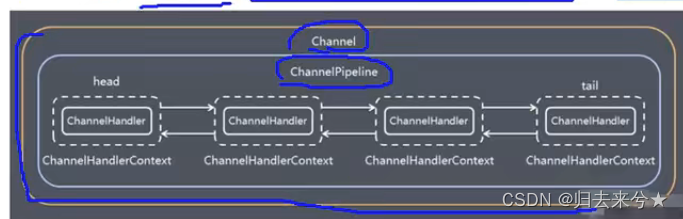
- 一个Channel包含了一个ChannelPipeline,而ChannelPipeline中又维护了一个由ChannelHandlerContext组成的双向链表,并且每个ChannelHandlerContext中又关联着一个ChannelHandler
- 入站事件和出站事件在一个双向链表中,入站事件会从链表head往后传递到最后一个入站的handler,出站事件会从链表tail往前传递到最前一个出站的handler,两种类型handler互不干扰
ChannelHandlerContext
- 保存了Channel相关的所有上下文信息,同时关联着一个ChannelHandler对象
- 即ChannelHandlerContext中包含了一个具体的时间处理器channelHandler,同时ChannelHandlerContext中也绑定了对应的pipeline和Channel的信息,方便对ChannelHandler进行调用
- 常用方法
ChannelFuture close()
ChannelOutboundInvoker flush()
ChannelFuture writeAndFlush(Object msg) :将数据写到ChannelPipeline中当前ChannelHandler的下一个ChannelHandler开始处理(出站)
ChannelOption
- Netty在创建channel实例后,一般都需要设置ChannelOption参数
- ChannelOption参数如下
ChannelOption.SO_BACKLOG
对应TCP/IP协议listen函数中的backlog参数,用来初始化服务器可连接队列大小。服务端处理客户端连接请求是顺序处理的,所以同一时间只能处理一个客户端连接。多个客户端来的时候,服务端将不能处理的客户端连接请求放到队列中处理,backlog参数指定了队列大小
ChannelOption.SO_KEEPALIVE
一直保持连接活跃状态
EventLoopGroup和其他实现类NioEventLoopGroup - EventLoopGroup是一组EventLoop的抽象,Netty为了更好的利用多核cpu资源,一般会有多个EventLoop同时工作,每个EventLoop维护着一个Selector实例
- EventLoopGroup提供next接口,可以从组里面按照一定规则获取其中一个EventLoop来处理任务。在Netty服务端编程中,我们一般需要提供两个EventLoopGroup,例如:BossEventLoopGroup和WorkerEventGroup
3.通常一个服务端端口记一个ServerSockerChannel对应一个Selector和一个EventLoop线程。BossEventLoop负责SocketChannel交给WorkerEventLoopGroup进行Io处理
Unpooled类
- Netty提供了一个专门用来操作缓冲区(即Netty的数据容器)的工具类
- 常用方法
public static ByteBuf copiedBuffer(CharSequence string,Charset charset);
Netty模型之群聊
server
public class GroupChatServer { private int port; // 监听端口 public GroupChatServer(int port){ this.port = port; } // 编写run方法,处理客户端请求 public void run() throws InterruptedException { // 创建两个线程组 EventLoopGroup bossGroup = new NioEventLoopGroup(1); EventLoopGroup workerGroup = new NioEventLoopGroup(); // 默认线程数=cpu核数*2 try { ServerBootstrap bootstrap = new ServerBootstrap(); bootstrap.group(bossGroup, workerGroup) .channel(NioServerSocketChannel.class) .option(ChannelOption.SO_BACKLOG, 128) .childOption(ChannelOption.SO_KEEPALIVE, true) .childHandler(new ChannelInitializer<SocketChannel>() { @Override protected void initChannel(SocketChannel ch) throws Exception { ChannelPipeline pipeline = ch.pipeline(); // 获取到pipeline pipeline.addLast("decoder", new StringDecoder()); // 向pipeline中加入解码器 pipeline.addLast("encoder", new StringEncoder()); // 向pipeline中加入编码器 pipeline.addLast(new GroupChatServerHandler()); // 向pipeline中加入自定义的业务处理handler } }); System.out.println("netty服务端启动"); ChannelFuture channelFuture = bootstrap.bind(port).sync(); // 绑定端口,并启动 channelFuture.channel().closeFuture().sync(); // 监听关闭 }finally { bossGroup.shutdownGracefully(); workerGroup.shutdownGracefully(); } } public static void main(String[] args) throws InterruptedException { new GroupChatServer(7000).run(); // 启动 } } public class GroupChatServerHandler extends SimpleChannelInboundHandler<String> { // 定义一个channel组,管理所有的channel // GlobalEventExecutor.INSTANCE 是一个全局的事件执行器,是一个单例 private static ChannelGroup channelGroup = new DefaultChannelGroup(GlobalEventExecutor.INSTANCE); SimpleDateFormat sdf = new SimpleDateFormat("yyyy-MM-dd hh:mm:ss"); // 表示连接建立,一旦连接,第一个被执行 // 将当前channel加入到channelGroup中 @Override public void handlerAdded(ChannelHandlerContext ctx) throws Exception { Channel channel = ctx.channel(); // 将该客户加入聊天的消息推送给其他在线客户端 // 该方法会将channelGroup中所有的channel遍历,并发送消息 channelGroup.writeAndFlush(sdf.format(new Date())+" [客户端]"+channel.remoteAddress()+"加入聊天\n"); channelGroup.add(channel); } // 表示channel处于一个活动的状态 @Override public void channelActive(ChannelHandlerContext ctx) throws Exception { System.out.println(sdf.format(new Date())+" "+ctx.channel().remoteAddress()+"上线了~"); } // 表示channel中有读事件 @Override protected void channelRead0(ChannelHandlerContext ctx, String msg) throws Exception { // 获取到当前channel Channel channel = ctx.channel(); // 遍历一下channelGroup,给自己发送的消息和给其他客户端发送的消息不一样 channelGroup.forEach(ch ->{ if(ch != channel){ // 不是当前channel,直接转发 ch.writeAndFlush(sdf.format(new Date())+" [客户]"+channel.remoteAddress()+"发送消息:"+ msg + "\n"); }else{ ch.writeAndFlush(sdf.format(new Date())+" [自己]发送了消息:"+msg+"\n"); } }); } // 表示channel处于一个非活动状态 @Override public void channelInactive(ChannelHandlerContext ctx) throws Exception { System.out.println(sdf.format(new Date())+" "+ctx.channel().remoteAddress()+"离线了~"); } // 断开连接,将xx客户离开的信息推送给当前在线的客户 // 触发此方法后,会自动将断开连接的channel从channelGroup中移除 @Override public void handlerRemoved(ChannelHandlerContext ctx) throws Exception { Channel channel = ctx.channel(); channelGroup.writeAndFlush(sdf.format(new Date())+" [客户端]"+channel.remoteAddress()+"离开了\n"); System.out.println("channelGroup size = "+channelGroup.size()); } // 发生异常,关闭通道 @Override public void exceptionCaught(ChannelHandlerContext ctx, Throwable cause) throws Exception { ctx.close(); } }- 1
- 2
- 3
- 4
- 5
- 6
- 7
- 8
- 9
- 10
- 11
- 12
- 13
- 14
- 15
- 16
- 17
- 18
- 19
- 20
- 21
- 22
- 23
- 24
- 25
- 26
- 27
- 28
- 29
- 30
- 31
- 32
- 33
- 34
- 35
- 36
- 37
- 38
- 39
- 40
- 41
- 42
- 43
- 44
- 45
- 46
- 47
- 48
- 49
- 50
- 51
- 52
- 53
- 54
- 55
- 56
- 57
- 58
- 59
- 60
- 61
- 62
- 63
- 64
- 65
- 66
- 67
- 68
- 69
- 70
- 71
- 72
- 73
- 74
- 75
- 76
- 77
- 78
- 79
- 80
- 81
- 82
- 83
- 84
- 85
- 86
- 87
- 88
- 89
- 90
- 91
- 92
- 93
- 94
- 95
- 96
- 97
- 98
- 99
- 100
- 101
- 102
- 103
- 104
- 105
- 106
- 107
- 108
- 109
client
public class GroupChatClient { private final String host; private final int port; public GroupChatClient(String host, int port){ this.host = host; this.port = port; } public void run() throws InterruptedException { EventLoopGroup group = new NioEventLoopGroup(); try { Bootstrap bootstrap = new Bootstrap(); bootstrap.group(group) .channel(NioSocketChannel.class) .handler(new ChannelInitializer<SocketChannel>() { @Override protected void initChannel(SocketChannel ch) throws Exception { ChannelPipeline pipeline = ch.pipeline(); pipeline.addLast("decoder", new StringDecoder()); // 向pipeline中加入解码器 pipeline.addLast("encoder", new StringEncoder()); // 向pipeline中加入编码器 pipeline.addLast(new GroupChatClientHandler()); // 向pipeline中加入自定义的业务处理handler } }); ChannelFuture channelFuture = bootstrap.connect(host, port).sync(); Channel channel = channelFuture.channel(); System.out.println("-----"+channel.localAddress()+"-----"); // 客户端要输入的信息,创建一个扫描器 Scanner scanner = new Scanner(System.in); while(scanner.hasNextLine()){ String msg = scanner.nextLine(); channel.writeAndFlush(msg+"\r\n"); } }finally { group.shutdownGracefully(); } } public static void main(String[] args) throws InterruptedException { new GroupChatClient("127.0.0.1", 7000).run(); } } public class GroupChatClientHandler extends SimpleChannelInboundHandler<String> { @Override protected void channelRead0(ChannelHandlerContext ctx, String msg) throws Exception { System.out.println(msg.trim()); } }- 1
- 2
- 3
- 4
- 5
- 6
- 7
- 8
- 9
- 10
- 11
- 12
- 13
- 14
- 15
- 16
- 17
- 18
- 19
- 20
- 21
- 22
- 23
- 24
- 25
- 26
- 27
- 28
- 29
- 30
- 31
- 32
- 33
- 34
- 35
- 36
- 37
- 38
- 39
- 40
- 41
- 42
- 43
- 44
- 45
- 46
- 47
- 48
- 49
- 50
- 51
- 52
- 53
- 54
- 55
私聊实现思路:在 GroupChatServerHandler 中维护一个Map
key:userId value:channelNetty模型之心跳检测机制
案例要求:
当服务器超过3s没有读时,就提示度空闲
读服务器超过5s没有写操作时,就提示写空闲
当服务器超过7s没有读或写操作时,就提示读写空闲public class MyServer { public static void main(String[] args) throws InterruptedException { EventLoopGroup bossGroup = new NioEventLoopGroup(1); EventLoopGroup workerGroup = new NioEventLoopGroup(); try{ ServerBootstrap serverBootstrap = new ServerBootstrap(); serverBootstrap.group(bossGroup, workerGroup) .channel(NioServerSocketChannel.class) .handler(new LoggingHandler(LogLevel.INFO)) // 在bossGroup增加一个日志处理器 .childHandler(new ChannelInitializer<SocketChannel>() { @Override protected void initChannel(SocketChannel ch) throws Exception { ChannelPipeline pipeline = ch.pipeline(); // IdleStateHandler:netty提供的处理空闲状态的处理器 // long readerIdleTime, 表示多长时间没有读,就会发送一个心跳检测包检测是否连接 // long writerIdleTime, 表示多长时间没有写,就会发送一个心跳检测包检测是否连接 // long allIdleTime 表示多长时间没有读写,就会发送一个心跳检测包检测是否连接 // 当IdleStateEvent触发后,就会传递给管道下一个handler去处理(通过调用下一个handler的useEventTriggered,在该方法中 // 去处理IdleStateEvent(读空闲,写空闲,读写空闲)) pipeline.addLast(new IdleStateHandler(3, 5, 7, TimeUnit.SECONDS)); // 加入一个对空闲检测进一步处理的handler(自定义) pipeline.addLast(new MyServerHandler()); } }); ChannelFuture channelFuture = serverBootstrap.bind(7000).sync(); channelFuture.channel().closeFuture().sync(); }finally { bossGroup.shutdownGracefully(); workerGroup.shutdownGracefully(); } } } public class MyServerHandler extends ChannelInboundHandlerAdapter { /* * @param ctx 上下文 * @param evt 事件 */ @Override public void userEventTriggered(ChannelHandlerContext ctx, Object evt) throws Exception { if(evt instanceof IdleStateEvent){ // 将evt向下转型 IdleStateEvent IdleStateEvent event = (IdleStateEvent) evt; String eventType = null; switch (event.state()){ case READER_IDLE: eventType = "读空闲"; break; case WRITER_IDLE: eventType = "写空闲"; break; case ALL_IDLE: eventType = "读写空闲"; break; } System.out.println(ctx.channel().remoteAddress()+"--超时时间--"+eventType); System.out.println("服务器做相应处理..."); } } }- 1
- 2
- 3
- 4
- 5
- 6
- 7
- 8
- 9
- 10
- 11
- 12
- 13
- 14
- 15
- 16
- 17
- 18
- 19
- 20
- 21
- 22
- 23
- 24
- 25
- 26
- 27
- 28
- 29
- 30
- 31
- 32
- 33
- 34
- 35
- 36
- 37
- 38
- 39
- 40
- 41
- 42
- 43
- 44
- 45
- 46
- 47
- 48
- 49
- 50
- 51
- 52
- 53
- 54
- 55
- 56
- 57
- 58
- 59
- 60
- 61
- 62
- 63
- 64
Netty模型之WebSocket编程实现服务器和客户端长连接
要求: 1. Http协议是无状态的,浏览器和服务器之间的请求响应一次,下次会重新创建连接 2. 要求:实现基于webSocket的长连接的全双工交互 3. 改变Http协议多次请求的约束,实现长连接了,服务器可以发送消息给浏览器 4. 客户端浏览器和服务器端会相互感知,同样浏览器关闭了,服务也会感知- 1
- 2
- 3
- 4
- 5
public class MyServer { public static void main(String[] args) throws InterruptedException { EventLoopGroup bossGroup = new NioEventLoopGroup(1); EventLoopGroup workerGroup = new NioEventLoopGroup(); try{ ServerBootstrap serverBootstrap = new ServerBootstrap(); serverBootstrap.group(bossGroup, workerGroup) .channel(NioServerSocketChannel.class) .handler(new LoggingHandler(LogLevel.INFO)) // 在bossGroup增加一个日志处理器 .childHandler(new ChannelInitializer<SocketChannel>() { @Override protected void initChannel(SocketChannel ch) throws Exception { ChannelPipeline pipeline = ch.pipeline(); // 因为基于http协议,使用http的编解码器 pipeline.addLast(new HttpServerCodec()); // 是以块方式写,添加ChunkedWriteHandler处理器 pipeline.addLast(new ChunkedWriteHandler()); // http数据在传输过程中是分段的,HttpObjectAggregator可以将多个段聚合 // 这就是为什么,当浏览器发送大量数据时,会发出多次http请求 pipeline.addLast(new HttpObjectAggregator(8192)); // 对应websocket,它的数据是以帧的形式传递 // 浏览器请求时 ws://localhost:7000/hello 表示请求的uri // WebSocketServerProtocolHandler核心功能是将http协议升级为ws协议,保持长连接 // 是通过一个状态码 101 将http协议升级成ws协议的 pipeline.addLast(new WebSocketServerProtocolHandler("/hello")); pipeline.addLast(new MyTextWebSocketFrameHandler()); } }); ChannelFuture channelFuture = serverBootstrap.bind(7000).sync(); channelFuture.channel().closeFuture().sync(); }finally { bossGroup.shutdownGracefully(); workerGroup.shutdownGracefully(); } } } // TextWebSocketFrame 类型,表示一个文本帧 public class MyTextWebSocketFrameHandler extends SimpleChannelInboundHandler<TextWebSocketFrame> { @Override protected void channelRead0(ChannelHandlerContext ctx, TextWebSocketFrame msg) throws Exception { System.out.println("服务器端收到消息:"+msg.text()); // 回复消息 ctx.channel().writeAndFlush(new TextWebSocketFrame("服务器时间"+ LocalDateTime.now()+" "+msg.text())); } @Override public void handlerAdded(ChannelHandlerContext ctx) throws Exception { System.out.println("handlerAdded被调用"+ctx.channel().id().asLongText()); } @Override public void handlerRemoved(ChannelHandlerContext ctx) throws Exception { System.out.println("handlerRemoved被调用"+ctx.channel().id().asLongText()); } @Override public void exceptionCaught(ChannelHandlerContext ctx, Throwable cause) throws Exception { System.out.println("异常发生"+cause.getMessage()); ctx.close(); } }- 1
- 2
- 3
- 4
- 5
- 6
- 7
- 8
- 9
- 10
- 11
- 12
- 13
- 14
- 15
- 16
- 17
- 18
- 19
- 20
- 21
- 22
- 23
- 24
- 25
- 26
- 27
- 28
- 29
- 30
- 31
- 32
- 33
- 34
- 35
- 36
- 37
- 38
- 39
- 40
- 41
- 42
- 43
- 44
- 45
- 46
- 47
- 48
- 49
- 50
- 51
- 52
- 53
- 54
- 55
- 56
- 57
- 58
- 59
- 60
- 61
- 62
- 63
- 64
- 65
- 66
- 67
- 68
DOCTYPE html> <html lang="en"> <head> <meta charset="UTF-8"> <title>Titletitle> head> <body> <form onsubmit="return false"> <textarea name="message" style="width:300px;height:300px;">textarea> <input type="button" value="发送消息" onclick="send(this.form.message.value)"> <textarea id="responseText" style="width:300px;height:300px;">textarea> <input type="button" value="清空内容" onclick="document.getElementById('responseText').value=''"> form> <script> var socket; // 判断当前浏览器是否支持websocket if(window.WebSocket){ socket = new WebSocket("ws://localhost:7000/hello"); socket.onopen = function(ev){ var rt = document.getElementById("responseText"); rt.value = "连接开启了..."; } socket.onclose = function(ev){ var rt = document.getElementById("responseText"); rt.value = rt.value + '\n' + "连接关闭了..."; } socket.onmessage = function(ev){ // 相当于消息监听器,可以接收服务器端回送的消息 var rt = document.getElementById("responseText"); rt.value = rt.value + '\n' + ev.data; } }else{ alert("当前浏览器不支持websocket"); } // 发送消息到服务器 function send(msg) { if(!window.socket){ return; } if(socket.readyState === WebSocket.OPEN){ // 通过Socket发送消息 socket.send(msg); }else{ alert("连接没有开启"); } } script> body> html>- 1
- 2
- 3
- 4
- 5
- 6
- 7
- 8
- 9
- 10
- 11
- 12
- 13
- 14
- 15
- 16
- 17
- 18
- 19
- 20
- 21
- 22
- 23
- 24
- 25
- 26
- 27
- 28
- 29
- 30
- 31
- 32
- 33
- 34
- 35
- 36
- 37
- 38
- 39
- 40
- 41
- 42
- 43
- 44
- 45
- 46
- 47
- 48
- 49
- 50
- 51
-
相关阅读:
会员管理系统几种消费模式的简要介绍
【1805. 字符串中不同整数的数目】
昇思25天学习打卡营第3天|onereal
Spring Boot 整合 MyBatis
基于ArcGIS水文分析、HEC-RAS模拟技术在洪水危险性及风险评估
【K8S系列】Service基础入门
k8s的service自动发现服务:实战版
Android 组件提供的状态保存(saveInstanceState)与恢复(restoreInstanceState)
C. 3SUM Closure
MySQL的索引下推
- 原文地址:https://blog.csdn.net/zhouhe_/article/details/126375800
