-
使用Http请求实现数据的批量导入
前言
通过HTTP请求的方式,实现数据批量导入到ES的指定索引中,可以将json参数写入body中或者已文件的形式进行上传。
导入前必须要先创建索引,创建如下索引:- 请求方式:PUT
- 请求地址:http…/索引名称
- 请求参数:json
# PUT http://192.168.80.121:9200/cars # 请求参数 { "settings": { "number_of_shards": 2, "number_of_replicas": 1 }, "mappings": { "properties": { "color": { "type": "keyword" }, "make": { "type": "keyword" }, "price": { "type": "float" }, "sold": { "type": "keyword" } } } }- 1
- 2
- 3
- 4
- 5
- 6
- 7
- 8
- 9
- 10
- 11
- 12
- 13
- 14
- 15
- 16
- 17
- 18
- 19
- 20
- 21
- 22
- 23
- 24
- 25
1、JSON参数请求导入
第一步:发起请求
- 请求方式:POST
- 请求地址:http…/索引名称/_bulk
- 请求参数:json
# POST http://192.168.80.121:9200/cars/_bulk # 请求参数,每个数据之间需要留空格,最后一行也要留空格 {"index": {"_index": "cars", "_type": "_doc", "_id": 1}} { "price" : 10000, "color" : "red", "make" : "honda", "sold" : "2022-10-28" } {"index": {"_index": "cars", "_type": "_doc", "_id": 2}} { "price" : 20000, "color" : "red", "make" : "honda", "sold" : "2022-11-05" } {"index": {"_index": "cars", "_type": "_doc", "_id": 3}} { "price" : 30000, "color" : "green", "make" : "ford", "sold" : "2022-05-18" } {"index": {"_index": "cars", "_type": "_doc", "_id": 4}} { "price" : 15000, "color" : "blue", "make" : "toyota", "sold" : "2022-07-02" } {"index": {"_index": "cars", "_type": "_doc", "_id": 5}} { "price" : 12000, "color" : "green", "make" : "toyota", "sold" : "2022-08-19" } {"index": {"_index": "cars", "_type": "_doc", "_id": 6}} { "price" : 20000, "color" : "red", "make" : "honda", "sold" : "2022-11-05" } {"index": {"_index": "cars", "_type": "_doc", "_id": 7}} { "price" : 80000, "color" : "red", "make" : "bmw", "sold" : "2022-01-01" } {"index": {"_index": "cars", "_type": "_doc", "_id": 8}} { "price" : 25000, "color" : "blue", "make" : "ford", "sold" : "2022-02-12" }- 1
- 2
- 3
- 4
- 5
- 6
- 7
- 8
- 9
- 10
- 11
- 12
- 13
- 14
- 15
- 16
- 17
- 18
- 19
- 20
- 21
- 22
- 23
- 24
- 25
- 26
- 27
- 28
第二步:验证
如果存在数据,则表示导入成功
# 请求: http://192.168.80.121:9200/cars/_search- 1
- 2
第二步:效果
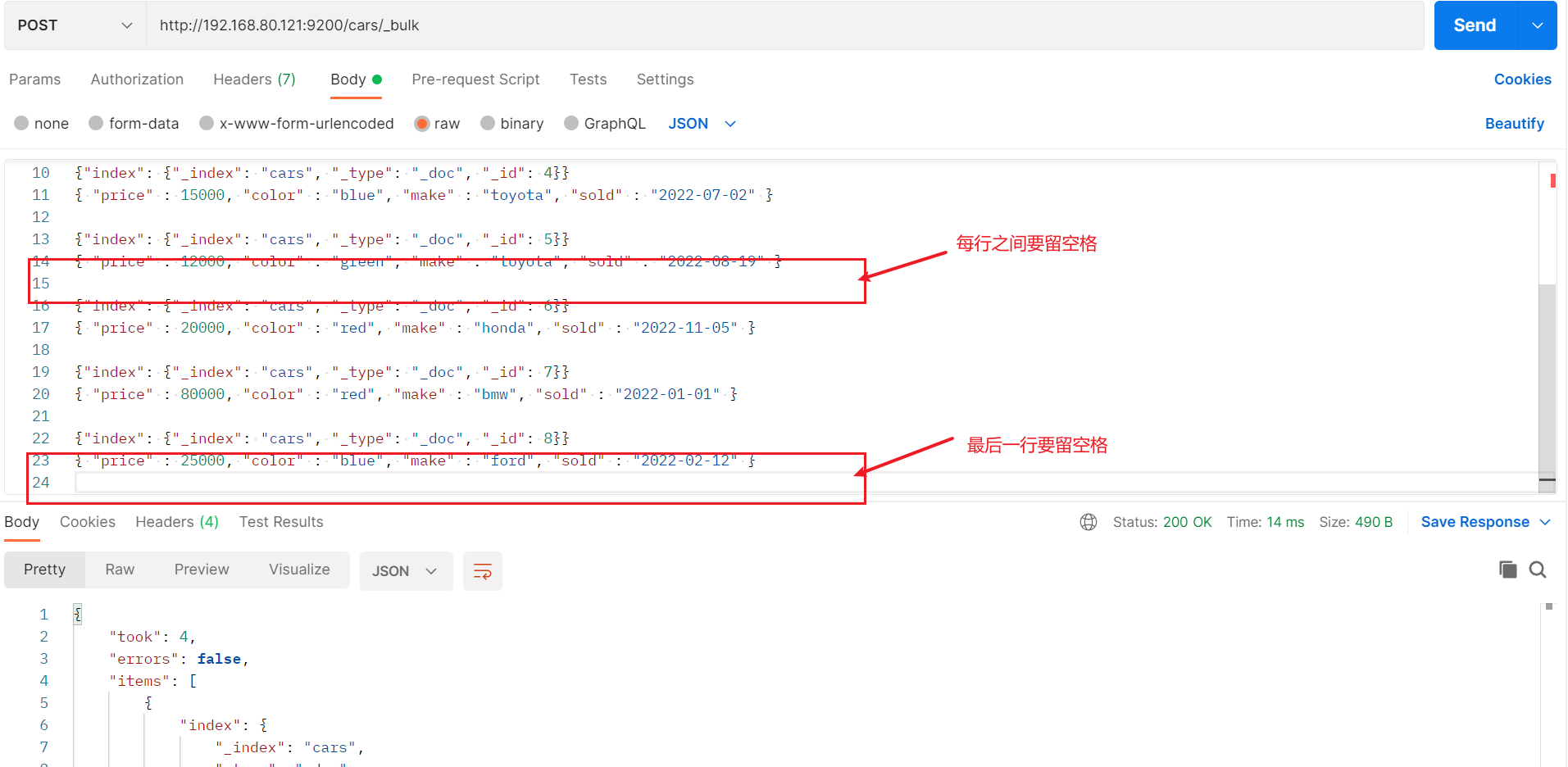
2、上传文件请求导入
第一步:创建json文件
// 每个数据之间需要留空格,最后一行也要留空格 {"index": {"_index": "cars", "_type": "_doc", "_id": 1}} { "price" : 10000, "color" : "red", "make" : "honda", "sold" : "2022-10-28" } {"index": {"_index": "cars", "_type": "_doc", "_id": 2}} { "price" : 20000, "color" : "red", "make" : "honda", "sold" : "2022-11-05" } {"index": {"_index": "cars", "_type": "_doc", "_id": 3}} { "price" : 30000, "color" : "green", "make" : "ford", "sold" : "2022-05-18" } {"index": {"_index": "cars", "_type": "_doc", "_id": 4}} { "price" : 15000, "color" : "blue", "make" : "toyota", "sold" : "2022-07-02" } {"index": {"_index": "cars", "_type": "_doc", "_id": 5}} { "price" : 12000, "color" : "green", "make" : "toyota", "sold" : "2022-08-19" } {"index": {"_index": "cars", "_type": "_doc", "_id": 6}} { "price" : 20000, "color" : "red", "make" : "honda", "sold" : "2022-11-05" } {"index": {"_index": "cars", "_type": "_doc", "_id": 7}} { "price" : 80000, "color" : "red", "make" : "bmw", "sold" : "2022-01-01" } {"index": {"_index": "cars", "_type": "_doc", "_id": 8}} { "price" : 25000, "color" : "blue", "make" : "ford", "sold" : "2022-02-12" }- 1
- 2
- 3
- 4
- 5
- 6
- 7
- 8
- 9
- 10
- 11
- 12
- 13
- 14
- 15
- 16
- 17
- 18
- 19
- 20
- 21
- 22
- 23
- 24
- 25
第二步:创建json文件
- 请求方式:POST
- 请求地址:http…/索引名称/_bulk
- 请求参数:file
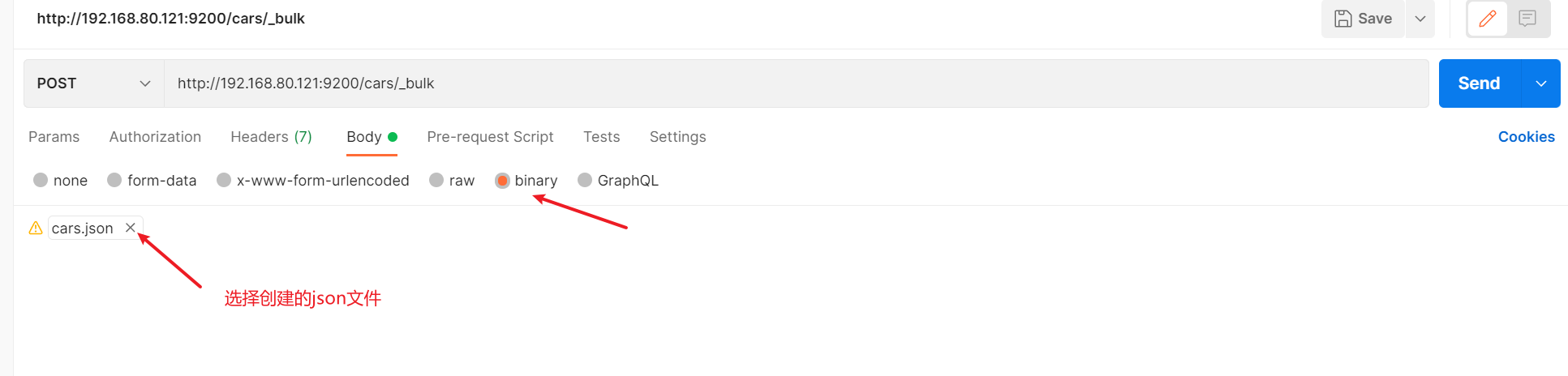
第三步:验证
如果存在数据,则表示导入成功
# 请求: http://192.168.80.121:9200/cars/_search- 1
- 2
-
相关阅读:
做抖音小店这几点都没搞懂,难怪你的店铺始终没有销量!
甲骨文宣布: 也做 PostgreSQL!
大数据学习1.1-Centos8网络配置
【爬虫】基于matlab实现火车票信息爬虫
A. Tile Painting
消息中间件篇之RabbitMQ-消息不丢失
04_学习springdoc与oauth结合_简述
软考高级系统架构设计师系列案例考点专题四:嵌入式系统
复习单片机:定时器/计数器部分(内含:1.51 单片机定时器原理 +2.51 单片机定时/计数器结构+3.定时器配置+4.代码部分+5.实验现象)
数据测试实践
- 原文地址:https://blog.csdn.net/zhuocailing3390/article/details/126336906