数据背景
- 陌陌作为聊天平台每天都会有大量的用户在线,会出现大量的聊天数据,通过对聊天数据的统计分析,可以更好的对用户构建精准的用户画像,为用户提供更好的服务以及实现高ROI的平台运营推广,给公司的发展决策提供精确的数据支撑。
- 本实验所选用的数据均为虚拟数据,不会侵犯到用户隐私及敏感信息。
数据准备
需求分析
- 统计今日总消息量
- 统计今日每小时消息量、发送和接收用户数
- 统计今日各地区发送消息数据量
- 统计今日发送消息和接收消息的用户数
- 统计今日发送消息最多的Top10用户
- 统计今日接收消息最多的Top10用户
- 统计发送人的手机型号分布情况
- 统计发送人的设备操作系统分布情况
创建数据库及表
create database db_msg;
use db_msg;
create table db_msg.tb_msg_source(
msg_time string comment "消息发送时间"
, sender_name string comment "发送人昵称"
, sender_account string comment "发送人账号"
, sender_sex string comment "发送人性别"
, sender_ip string comment "发送人ip地址"
, sender_os string comment "发送人操作系统"
, sender_phonetype string comment "发送人手机型号"
, sender_network string comment "发送人网络类型"
, sender_gps string comment "发送人的GPS定位"
, receiver_name string comment "接收人昵称"
, receiver_ip string comment "接收人IP"
, receiver_account string comment "接收人账号"
, receiver_os string comment "接收人操作系统"
, receiver_phonetype string comment "接收人手机型号"
, receiver_network string comment "接收人网络类型"
, receiver_gps string comment "接收人的GPS定位"
, receiver_sex string comment "接收人性别"
, msg_type string comment "消息类型"
, distance string comment "双方距离"
, message string comment "消息内容"
)
row format delimited fields terminated by '\t';
- 1
- 2
- 3
- 4
- 5
- 6
- 7
- 8
- 9
- 10
- 11
- 12
- 13
- 14
- 15
- 16
- 17
- 18
- 19
- 20
- 21
- 22
- 23
- 24
加载数据
- 将数据传入HS2服务器目录/root/hivedata中

load data local inpath '/root/hivedata/data1.tsv' into table db_msg.tb_msg_source;
load data local inpath '/root/hivedata/data2.tsv' into table db_msg.tb_msg_source;
select * from tb_msg_source limit 10;

select count(*) as cnt from tb_msg_source;
ETL数据清洗
- ETL(Extract-Transform-Load缩写),用来描述将数据从来源端经过抽取(Extract)、转换(Transform)、加载(Load)至目的端的过程。ETL一词较常用在数据仓库中。
- 在本次需求中我们需要过滤的脏数据主要有如下几个问题:
select
   msg_time,
   sender_name,
   sender_gps
from db_msg.tb_msg_source
where length(sender_gps) = 0
limit 10;

- 需求中,需要统计每天、每个小时的消息量,但是数据中没有天和小时字段,只有整体时间字段,不好处理。
select
   msg_time
from db_msg.tb_msg_source
limit 10;

- 需求中,需要对经度和维度构建地区的可视化地图,但是数据中GPS经纬度为一个字段不好处理。
select
   sender_gps
from db_msg.tb_msg_source
limit 10;

create table db_msg.tb_msg_etl as
select
*,
substr(msg_time,0,10) as dayinfo,
substr(msg_time,12,2) as hourinfo,
split(sender_gps,",")[0] as sender_lng,
split(sender_gps,",")[1] as sender_lat
from db_msg.tb_msg_source
where length(sender_gps) > 0 ;
select
    msg_time,dayinfo,hourinfo,sender_gps,sender_lng,sender_lat
from db_msg.tb_msg_etl
limit 10;
需求指标统计
create table if not exists tb_rs_total_msg_cnt
comment "今日消息总量"
as
select
dayinfo,
count(*) as total_msg_cnt
from db_msg.tb_msg_etl
group by dayinfo;
select * from tb_rs_total_msg_cnt;

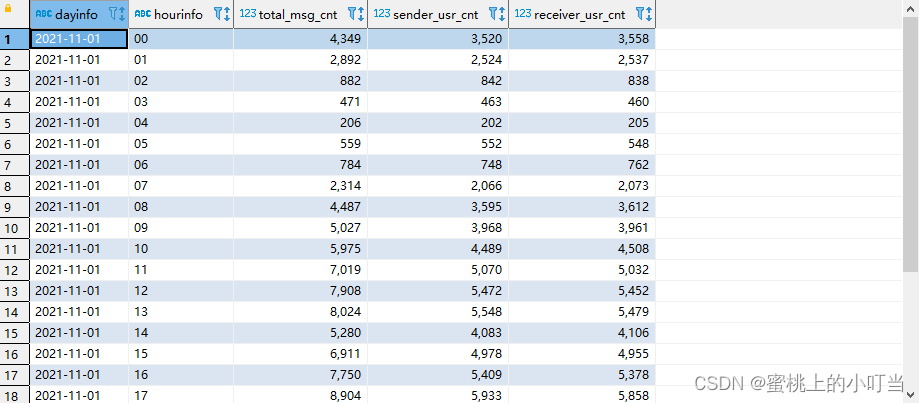
create table if not exists tb_rs_hour_msg_cnt
comment "每小时消息量趋势"
as
select
  dayinfo,
  hourinfo,
  count(*) as total_msg_cnt,
  count(distinct sender_account) as sender_usr_cnt,
  count(distinct receiver_account) as receiver_usr_cnt
from db_msg.tb_msg_etl
group by dayinfo, hourinfo;
select * from tb_rs_hour_msg_cnt;
create table if not exists tb_rs_loc_cnt
comment "今日各地区发送消息总量"
as
select
dayinfo,
sender_gps,
cast(sender_lng as double) as longitude,
cast(sender_lat as double) as latitude,
count(*) as total_msg_cnt
from db_msg.tb_msg_etl
group by dayinfo,sender_gps,sender_lng,sender_lat;
select * from tb_rs_loc_cnt;

create table if not exists tb_rs_usr_cnt
comment "今日发送消息人数、接受消息人数"
as
select
dayinfo,
count(distinct sender_account) as sender_usr_cnt,
count(distinct receiver_account) as receiver_usr_cnt
from db_msg.tb_msg_etl
group by dayinfo;
select * from tb_rs_usr_cnt;

create table if not exists tb_rs_susr_top10
comment "发送消息条数最多的Top10用户"
as
select
  dayinfo,
  sender_name as username,
  count(*) as sender_msg_cnt
from db_msg.tb_msg_etl
group by dayinfo,sender_name
order by sender_msg_cnt desc
limit 10;
select * from tb_rs_susr_top10;

create table if not exists tb_rs_sender_phone
comment "发送人的手机型号分布"
as
select
  dayinfo,
  sender_phonetype,
  count(distinct sender_account) as cnt
from tb_msg_etl
group by dayinfo,sender_phonetype;
select * from tb_rs_sender_phone;

create table if not exists tb_rs_sender_os
comment "发送人的OS分布"
as
select
  dayinfo,
  sender_os,
  count(distinct sender_account) as cnt
from tb_msg_etl
group by dayinfo,sender_os;
select * from tb_rs_sender_os;

