-
MYSQLg高级-------分库分表之核心Sharding-JDBC
Sharding-JDBC
1.Sharding-JDBC 简介
1 、是轻量级的java框架,是增强版的JDBC驱动


2 、Sharding-JDBC
( 1 )主要目的是:简化对分库分表之后数据相关操作2. Sharding-JDBC 实现水平分表
1 、搭建环境
( 1 ) 技术:SpringBoot 2.2.1+ MyBatisPlus + Sharding-JDBC + Druid连接池
( 2 ) 创建SpringBoot工程

( 3 ) 修改工程SpringBoot版本 2.2.2
<parent> <groupId>org.springframework.boot</groupId> <artifactId>spring-boot-starter-parent</artifactId> <version>2.2.2.RELEASE</version> <relativePath/> <!-- lookup parent from repository --> </parent>- 1
- 2
- 3
- 4
- 5
- 6
( 4 ) 引入需要的依赖
<?xml version="1.0" encoding="UTF-8"?> <project xmlns="http://maven.apache.org/POM/4.0.0" xmlns:xsi="http://www.w3.org/2001/XMLSchema-instance" xsi:schemaLocation="http://maven.apache.org/POM/4.0.0 https://maven.apache.org/xsd/maven-4.0.0.xsd"> <modelVersion>4.0.0</modelVersion> <parent> <groupId>org.springframework.boot</groupId> <artifactId>spring-boot-starter-parent</artifactId> <version>2.2.2.RELEASE</version> <relativePath/> <!-- lookup parent from repository --> </parent> <groupId>com.atyanwc</groupId> <artifactId>shardingjdbcdemo</artifactId> <version>0.0.1-SNAPSHOT</version> <name>shardingjdbcdemo</name> <description>Demo project for Spring Boot</description> <properties> <java.version>1.8</java.version> </properties> <dependencies> <dependency> <groupId>org.springframework.boot</groupId> <artifactId>spring-boot-starter</artifactId> </dependency> <dependency> <groupId>org.springframework.boot</groupId> <artifactId>spring-boot-starter-test</artifactId> </dependency> <dependency> <groupId>com.alibaba</groupId> <artifactId>druid-spring-boot-starter</artifactId> <version>1.1.14</version> </dependency> <dependency> <groupId>mysql</groupId> <artifactId>mysql-connector-java</artifactId> </dependency> <dependency> <groupId>org.apache.shardingsphere</groupId> <artifactId>shardingsphere-jdbc-core-spring-boot-starter</artifactId> <version>5.0.0</version> </dependency> <dependency> <groupId>com.baomidou</groupId> <artifactId>mybatis-plus-boot-starter</artifactId> <version>3.3.1</version> </dependency> <dependency> <groupId>org.projectlombok</groupId> <artifactId>lombok</artifactId> </dependency> </dependencies> <build> <plugins> <plugin> <groupId>org.springframework.boot</groupId> <artifactId>spring-boot-maven-plugin</artifactId> <configuration> <excludes> <exclude> <groupId>org.projectlombok</groupId> <artifactId>lombok</artifactId> </exclude> </excludes> </configuration> </plugin> </plugins> </build> </project>- 1
- 2
- 3
- 4
- 5
- 6
- 7
- 8
- 9
- 10
- 11
- 12
- 13
- 14
- 15
- 16
- 17
- 18
- 19
- 20
- 21
- 22
- 23
- 24
- 25
- 26
- 27
- 28
- 29
- 30
- 31
- 32
- 33
- 34
- 35
- 36
- 37
- 38
- 39
- 40
- 41
- 42
- 43
- 44
- 45
- 46
- 47
- 48
- 49
- 50
- 51
- 52
- 53
- 54
- 55
- 56
- 57
- 58
- 59
- 60
- 61
- 62
- 63
- 64
- 65
- 66
- 67
- 68
- 69
- 70
- 71
- 72
- 73
- 74
- 75
2 、按照水平分表的方式,创建数据库和数据库表
( 1 )创建数据库course_db
( 2 )在数据库创建两张表 course_1 和 course_
( 3 )约定规则:如果添加课程id是偶数把数据添加course_1,如果奇数添加到course_create database course_db; use course_db; create table course_1 ( cid bigint(20) primary key , cname varchar(50) not null, user_id bigint(20) not null , status varchar(10) not null ) engine = InnoDB; create table course_2 ( cid bigint(20) primary key , cname varchar(50) not null, user_id bigint(20) not null , status varchar(10) not null ) engine = InnoDB;- 1
- 2
- 3
- 4
- 5
- 6
- 7
- 8
- 9
- 10
- 11
- 12
- 13
- 14
- 15
- 16
- 17

3 、编写代码实现对分库分表后数据的操作
( 1 )创建实体类,mapper

实体类:@Data public class Course { private Long cid; private String cname; private Long user_id; private String status; }- 1
- 2
- 3
- 4
- 5
- 6
- 7
- 8
- 9
- 10
Mapper
@Repository public interface CourseMapper extends BaseMapper<Course> { }- 1
- 2
- 3
- 4
测试
@Autowired private CourseMapper courseMapper; @Test void contextLoads() { }- 1
- 2
- 3
- 4
- 5
- 6
- 7
4 、配置 Sharding-JDBC 分片策略


( 1 )在项目application.properties配置文件中进行配置
有错的
# sharding-jdbc 水平分表策略 # 配置数据源,给数据源起别名 m1 起的名字随意单要和下面的一致 spring.shardingsphere.datasource.names=m1 # 一个实体类对应两张表,覆盖 spring.main.allow-bean-definition-overriding=true # 配置数据源的具体内容,包含连接池,驱动,地址,用户名,密码 druid单独配置 spring.shardingsphere.datasource.m1.type=com.alibaba.druid.pool.DruidDataSource spring.shardingsphere.datasource.m1.driver-class-name=com.mysql.cj.jdbc.Driver #高版本加入了时区 spring.shardingsphere.datasource.m1.url=jdbc:mysql://localhost:3306/course_db?serverTimezone=GMT%2B8 spring.shardingsphere.datasource.m1.username=root spring.shardingsphere.datasource.m1.password=root # 指定course表分布的情况,配置表在哪个数据库里,表的名称都是什么 course 表规则(暂时这么理解) m1.course_$->{1..2}=m1.course_1,m1.course_2 spring.shardingsphere.sharding.tables.course.actual-data-nodes=m1.course_$->{1..2} # 指定 course 表里面主键 cid 的生成策略| SNOWFLAKE 雪花算法生成一个唯一的字符串 spring.shardingsphere.sharding.tables.course.key-generator.column=cid spring.shardingsphere.sharding.tables.course.key-generator.type=SNOWFLAKE # 配置分表策略 约定 cid 值偶数添加到 course_1 表,如果 cid 是奇数添加到 course_2 表 spring.shardingsphere.sharding.tables.course.table-strategy.inline.sharding-column=cid #这部分理解起来比较复杂我这边就啰嗦下:course_$->{cid % 2 + 1} course_也是相当于对应表空间m1.course_1 #cid 是他的主键的iD cid % 2 + 1 举例说明下: 当cid =(偶数)4/2余0 0+1=1 那么他的数据就在 course_1 中,上面指定了2个 1.course_$->{1..2} #其余的结果就都匹配上面的 2 我理解的就是 不满足条件1 就都是条件2的东西 spring.shardingsphere.sharding.tables.course.table-strategy.inline.algorithm-expression=course_$->{cid % 2 + 1} # 打开 sql 输出日志 spring.shardingsphere.props.sql.show=true- 1
- 2
- 3
- 4
- 5
- 6
- 7
- 8
- 9
- 10
- 11
- 12
- 13
- 14
- 15
- 16
- 17
- 18
- 19
- 20
- 21
- 22
- 23
- 24
- 25
- 26
- 27
- 28
- 29
- 30
- 31
- 32
纠正版
<?xml version="1.0" encoding="UTF-8"?> <project xmlns="http://maven.apache.org/POM/4.0.0" xmlns:xsi="http://www.w3.org/2001/XMLSchema-instance" xsi:schemaLocation="http://maven.apache.org/POM/4.0.0 https://maven.apache.org/xsd/maven-4.0.0.xsd"> <modelVersion>4.0.0</modelVersion> <parent> <groupId>org.springframework.boot</groupId> <artifactId>spring-boot-starter-parent</artifactId> <version>2.1.4.RELEASE</version> <relativePath/> <!-- lookup parent from repository --> </parent> <groupId>com.atyanwc</groupId> <artifactId>shardingjdbcdemo</artifactId> <version>0.0.1-SNAPSHOT</version> <name>shardingjdbcdemo</name> <description>Demo project for Spring Boot</description> <properties> <java.version>1.8</java.version> </properties> <dependencies> <dependency> <groupId>org.springframework.boot</groupId> <artifactId>spring-boot-starter-web</artifactId> </dependency> <!--配置文件注入时使用后会有提示--> <dependency> <groupId>org.springframework.boot</groupId> <artifactId>spring-boot-configuration-processor</artifactId> <optional>true</optional> </dependency> <dependency> <groupId>org.junit.jupiter</groupId> <artifactId>junit-jupiter-api</artifactId> <scope>test</scope> </dependency> <dependency> <groupId>org.springframework.boot</groupId> <artifactId>spring-boot-starter</artifactId> </dependency> <dependency> <groupId>org.springframework.boot</groupId> <artifactId>spring-boot-starter-test</artifactId> </dependency> <dependency> <groupId>com.alibaba</groupId> <artifactId>druid-spring-boot-starter</artifactId> <version>1.1.14</version> </dependency> <dependency> <groupId>mysql</groupId> <artifactId>mysql-connector-java</artifactId> </dependency> <dependency> <groupId>org.apache.shardingsphere</groupId> <artifactId>sharding-jdbc-spring-boot-starter</artifactId> <version>4.0.0-RC1</version> </dependency> <dependency> <groupId>com.baomidou</groupId> <artifactId>mybatis-plus-boot-starter</artifactId> <version>3.3.1</version> </dependency> <dependency> <groupId>org.projectlombok</groupId> <artifactId>lombok</artifactId> </dependency> </dependencies> <build> <plugins> <plugin> <groupId>org.springframework.boot</groupId> <artifactId>spring-boot-maven-plugin</artifactId> <configuration> <excludes> <exclude> <groupId>org.projectlombok</groupId> <artifactId>lombok</artifactId> </exclude> </excludes> </configuration> </plugin> </plugins> <!--新增加入的 --> <resources> <resource> <!--指定根目录 到源文件夹 一般如下--> <directory>src/main/java</directory> <includes> <include>**/*.yml**/ *.yaml</include> <include>**/*.xml**/ *.properties</include> </includes> <filtering>false</filtering> </resource> <resource> <!--指定根目录 到源文件夹 一般如下--> <directory>src/main/resources</directory> <includes> <include>**/*.yml**/ *.yaml</include> <include>**/*.xml**/ *.properties</include> </includes> <filtering>false</filtering> </resource> </resources> <!--新增加入的 --> </build> </project>- 1
- 2
- 3
- 4
- 5
- 6
- 7
- 8
- 9
- 10
- 11
- 12
- 13
- 14
- 15
- 16
- 17
- 18
- 19
- 20
- 21
- 22
- 23
- 24
- 25
- 26
- 27
- 28
- 29
- 30
- 31
- 32
- 33
- 34
- 35
- 36
- 37
- 38
- 39
- 40
- 41
- 42
- 43
- 44
- 45
- 46
- 47
- 48
- 49
- 50
- 51
- 52
- 53
- 54
- 55
- 56
- 57
- 58
- 59
- 60
- 61
- 62
- 63
- 64
- 65
- 66
- 67
- 68
- 69
- 70
- 71
- 72
- 73
- 74
- 75
- 76
- 77
- 78
- 79
- 80
- 81
- 82
- 83
- 84
- 85
- 86
- 87
- 88
- 89
- 90
- 91
- 92
- 93
- 94
- 95
- 96
- 97
- 98
- 99
- 100
- 101
- 102
- 103
- 104
- 105
- 106
- 107
- 108
- 109
- 110
- 111
- 112
- 113
- 114
- 115
- 116
- 117
- 118
- 119
- 120
- 121
- 122
- 123
- 124
- 125
- 126
- 127
- 128
- 129
- 130
- 131
- 132
- 133
- 134
- 135
- 136
- 137
- 138
- 139
- 140
- 141
- 142
- 143
5 、编写测试代码
@RunWith(SpringRunner.class) @SpringBootTest public class ShardingjdbcdemoApplicationTests { //注入mapper @Autowired private CourseMapper courseMapper; //添加课程的方法 @Test public void addCourse() { for(int i= 1 ;i<= 10 ;i++) { Course course = new Course(); course.setCname("java"+i); course.setUserId(100L); course.setCstatus("Normal"+i); courseMapper.insert(course); } }- 1
- 2
- 3
- 4
- 5
- 6
- 7
- 8
- 9
- 10
- 11
- 12
- 13
- 14
- 15
- 16
- 17
- 18
- 19
( 1 )上面测试代码执行,报错了
这边我犯错了:研究了很久是jar冲突导致的这个问题大家可得注意了;
报错是这样的:*************************** APPLICATION FAILED TO START *************************** Description: Failed to configure a DataSource: 'url' attribute is not specified and no embedded datasource could be configured. Reason: Failed to determine a suitable driver class Action: Consider the following: If you want an embedded database (H2, HSQL or Derby), please put it on the classpath. If you have database settings to be loaded from a particular profile you may need to activate it (no profiles are currently active).- 1
- 2
- 3
- 4
- 5
- 6
- 7
- 8
- 9
- 10
- 11
- 12
- 13
- 14
- 15
- 16
扫描不到我尝试了网上全部的方式:
解决思路
( 2 )解决方案,在配置文件中添加一行配置
# 一个实体类对应两张表,覆盖 ```sql spring.main.allow-bean-definition-overriding=true- 1
- 2
- 3
新增数据
package com.atyanwc; import com.atyanwc.entity.Course; import com.atyanwc.mapper.CourseMapper; import org.junit.jupiter.api.Test; import org.springframework.beans.factory.annotation.Autowired; import org.springframework.boot.test.context.SpringBootTest; import org.springframework.test.context.junit4.SpringRunner; @RunWith(SpringRunner.class) @SpringBootTest class ShardingjdbcdemoApplicationTests { @Autowired private CourseMapper courseMapper; @Test public void addCourse() { for (int i = 0; i < 10; i++) { Course course = new Course(); course.setCname("yanwec"+i); course.setStatus("NBA"+i); course.setUser_id(11l); courseMapper.insert(course); } } }- 1
- 2
- 3
- 4
- 5
- 6
- 7
- 8
- 9
- 10
- 11
- 12
- 13
- 14
- 15
- 16
- 17
- 18
- 19
- 20
- 21
- 22
- 23
- 24
- 25
- 26
- 27
- 28
- 29
- 30
- 31
- 32
特别说明:
对于主键生成策略,本文配置只是针对user表,但实际car表在插入数据的时候,也被使用了雪花算法,虽然car使用了主键自增策略。配置文件的内容
#这部分理解起来比较复杂我这边就啰嗦下: course_$->{cid % 2 + 1} course_也是相当于对应表空间m1.course_1 #cid 是他的主键的iD cid % 2 + 1 举例说明下: 当cid =(偶数)4/2余0 0+1=1 那么他的数据就在 course_1 中 上面指定了2个 1.course_$->{1..2} #其余的结果就都匹配上面的 2 我理解的就是 不满足条件1 就都是条件2的东西- 1
- 2
- 3


@Test public void selectCid() { QueryWrapper<Course> wrapper = new QueryWrapper<>(); wrapper.eq("cid",765603805302620161L); Course byId = courseMapper.selectOne(wrapper); System.out.println("id"+byId); }- 1
- 2
- 3
- 4
- 5
- 6
- 7
- 8
- 9


根据配置文件去查的表
3.Sharding-JDBC 实现水平分库
1 、需求分析

2 、创建数据库和表
create database edu_db_1; create database edu_db_2; use edu_db_1; create table course_1 ( `cid` bigint(20) primary key, `cname` varchar(50) not null, `user_id` bigint(20) not null, `status` varchar(10) not null ); create table course_2 ( `cid` bigint(20) primary key, `cname` varchar(50) not null, `user_id` bigint(20) not null, `status` varchar(10) not null ); use edu_db_2; create table course_1 ( `cid` bigint(20) primary key, `cname` varchar(50) not null, `user_id` bigint(20) not null, `status` varchar(10) not null ); create table course_2 ( `cid` bigint(20) primary key, `cname` varchar(50) not null, `user_id` bigint(20) not null, `status` varchar(10) not null );- 1
- 2
- 3
- 4
- 5
- 6
- 7
- 8
- 9
- 10
- 11
- 12
- 13
- 14
- 15
- 16
- 17
- 18
- 19
- 20
- 21
- 22
- 23
- 24
- 25
- 26
- 27
- 28
- 29
- 30
- 31
- 32
- 33
- 34

3 、在 SpringBoot 配置文件配置数据库分片规则
shardingjdbc分片策略
# sharding-jdbc 水平分库分表策略 # 配置数据源,给数据源起别名 # 水平分库需要配置多个数据库 spring.shardingsphere.datasource.names=m1,m2 # 一个实体类对应两张表,覆盖 spring.main.allow-bean-definition-overriding=true # 配置第一个数据源的具体内容,包含连接池,驱动,地址,用户名,密码 spring.shardingsphere.datasource.m1.type=com.alibaba.druid.pool.DruidDataSource spring.shardingsphere.datasource.m1.driver-class-name=com.mysql.cj.jdbc.Driver spring.shardingsphere.datasource.m1.url=jdbc:mysql://localhost:3306/edu_db_1?serverTimezone=GMT%2B8 spring.shardingsphere.datasource.m1.username=root spring.shardingsphere.datasource.m1.password=root # 配置第二个数据源的具体内容,包含连接池,驱动,地址,用户名,密码 spring.shardingsphere.datasource.m2.type=com.alibaba.druid.pool.DruidDataSource spring.shardingsphere.datasource.m2.driver-class-name=com.mysql.cj.jdbc.Driver spring.shardingsphere.datasource.m2.url=jdbc:mysql://localhost:3306/edu_db_2?serverTimezone=GMT%2B8 spring.shardingsphere.datasource.m2.username=root spring.shardingsphere.datasource.m2.password=root # 指定数据库分布的情况和数据表分布的情况 # m1 m2 (库) course_1 course_2 (表) spring.shardingsphere.sharding.tables.course.actual-data-nodes=m$->{1..2}.course_$->{1..2} # 指定 course 表里面主键 cid 的生成策略 SNOWFLAKE spring.shardingsphere.sharding.tables.course.key-generator.column=cid spring.shardingsphere.sharding.tables.course.key-generator.type=SNOWFLAKE # 指定分库策略 约定 user_id 值偶数添加到 m1 库,如果 user_id 是奇数添加到 m2 库 # 默认写法(所有的表的user_id) #spring.shardingsphere.sharding.default-database-strategy.inline.sharding-column=user_id #spring.shardingsphere.sharding.default-database-strategy.inline.algorithm-expression=m$->{user_id % 2 + 1} # 指定只有course表的user_id spring.shardingsphere.sharding.tables.course.database-strategy.inline.sharding-column=user_id spring.shardingsphere.sharding.tables.course.database-strategy.inline.algorithm-expression=m$->{user_id % 2 + 1} # 指定分表策略 约定 cid 值偶数添加到 course_1 表,如果 cid 是奇数添加到 course_2 表 spring.shardingsphere.sharding.tables.course.table-strategy.inline.sharding-column=cid spring.shardingsphere.sharding.tables.course.table-strategy.inline.algorithm-expression=course_$->{cid % 2 + 1} # 打开 sql 输出日志 spring.shardingsphere.props.sql.show=true- 1
- 2
- 3
- 4
- 5
- 6
- 7
- 8
- 9
- 10
- 11
- 12
- 13
- 14
- 15
- 16
- 17
- 18
- 19
- 20
- 21
- 22
- 23
- 24
- 25
- 26
- 27
- 28
- 29
- 30
- 31
- 32
- 33
- 34
- 35
- 36
- 37
- 38
- 39
- 40
- 41
- 42
- 43
- 44
4 、编写测试方法
//======================测试水平分库===================== //添加操作 @Test public void addCourseDb() { Course course = new Course(); course.setCname("javademo1"); //分库根据user_id course.setUserId(111L); course.setCstatus("Normal1"); courseMapper.insert(course); } //查询操作 @Test public void findCourseDb() { QueryWrapper wrapper = new QueryWrapper<>(); //设置userid值 wrapper.eq("user_id",100L); //设置cid值 wrapper.eq("cid",465162909769531393L); Course course = courseMapper.selectOne(wrapper); System.out.println(course); }- 1
- 2
- 3
- 4
- 5
- 6
- 7
- 8
- 9
- 10
- 11
- 12
- 13
- 14
- 15
- 16
- 17
- 18
- 19
- 20
- 21
- 22
- 23

Sharding-JDBC 实现垂直分库
1 、需求分析
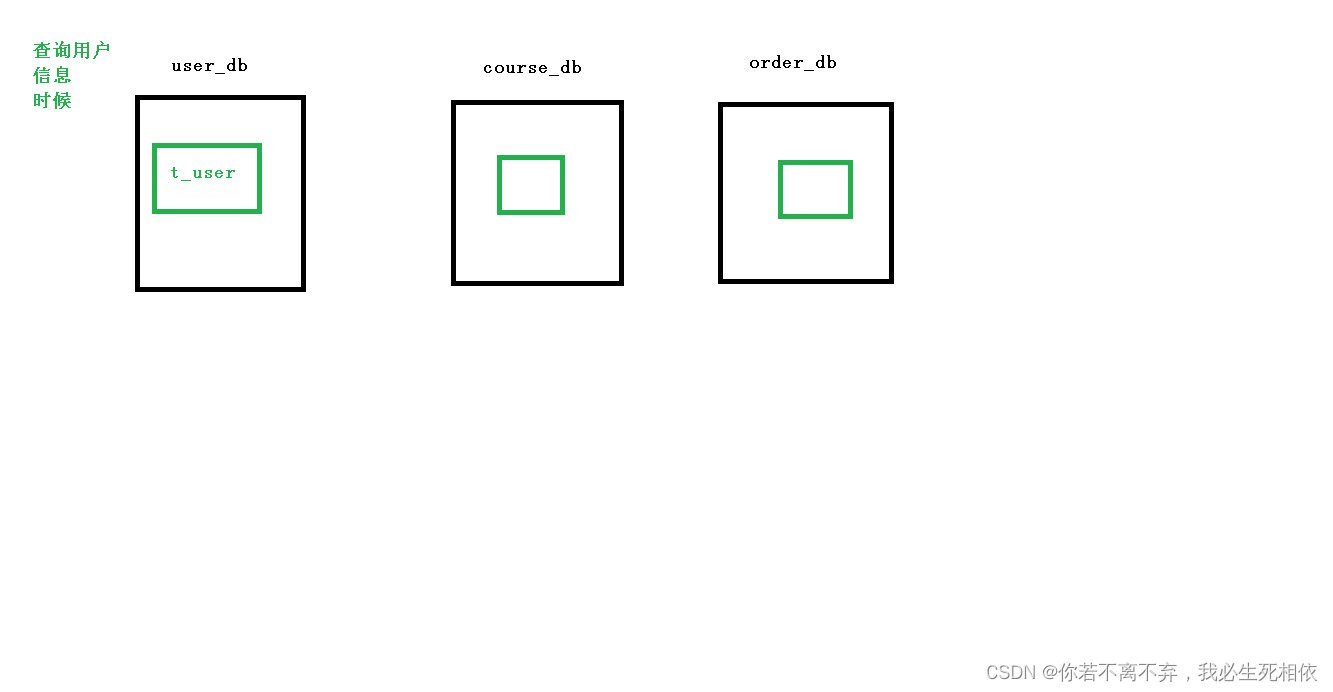
2 、创建数据库和表
create database user_db; use user_db; create table t_user( `user_id` bigint(20) primary key, `username` varchar(100) not null, `ustatus` varchar(100) not null );- 1
- 2
- 3
- 4
- 5
- 6
- 7
- 8
- 9
3 、编写操作代码
( 1 )创建user实体类和mapper
@Data @TableName(value = "t_user") //指定数据库 表 public class User { private Long userId; private String username; private String ustatus; }- 1
- 2
- 3
- 4
- 5
- 6
- 7
- 8
- 9
- 10
@Repository public interface UserMapper extends BaseMapper<User> { }- 1
- 2
- 3
- 4
- 5
- 6
- 7
( 2 )配置垂直分库策略
# sharding-jdbc 水平分库分表策略 # 配置数据源,给数据源起别名 # 水平分库需要配置多个数据库 # m0为用户数据库 spring.shardingsphere.datasource.names=m1,m2,m0 # 一个实体类对应两张表,覆盖 spring.main.allow-bean-definition-overriding=true # 配置第一个数据源的具体内容,包含连接池,驱动,地址,用户名,密码 spring.shardingsphere.datasource.m1.type=com.alibaba.druid.pool.DruidDataSource spring.shardingsphere.datasource.m1.driver-class-name=com.mysql.cj.jdbc.Driver spring.shardingsphere.datasource.m1.url=jdbc:mysql://localhost:3306/edu_db_1?serverTimezone=GMT%2B8 spring.shardingsphere.datasource.m1.username=root spring.shardingsphere.datasource.m1.password=root # 配置第二个数据源的具体内容,包含连接池,驱动,地址,用户名,密码 spring.shardingsphere.datasource.m2.type=com.alibaba.druid.pool.DruidDataSource spring.shardingsphere.datasource.m2.driver-class-name=com.mysql.cj.jdbc.Driver spring.shardingsphere.datasource.m2.url=jdbc:mysql://localhost:3306/edu_db_2?serverTimezone=GMT%2B8 spring.shardingsphere.datasource.m2.username=root spring.shardingsphere.datasource.m2.password=root # 配置user数据源的具体内容,包含连接池,驱动,地址,用户名,密码 spring.shardingsphere.datasource.m0.type=com.alibaba.druid.pool.DruidDataSource spring.shardingsphere.datasource.m0.driver-class-name=com.mysql.cj.jdbc.Driver spring.shardingsphere.datasource.m0.url=jdbc:mysql://localhost:3306/user_db?serverTimezone=GMT%2B8 spring.shardingsphere.datasource.m0.username=root spring.shardingsphere.datasource.m0.password=root # 配置user_db数据库里面t_user 专库专表 spring.shardingsphere.sharding.tables.t_user.actual-data-nodes=m$->{0}.t_user # 配置主键的生成策略 spring.shardingsphere.sharding.tables.t_user.key-generator.column=user_id spring.shardingsphere.sharding.tables.t_user.key-generator.type=SNOWFLAKE # 指定分表策略 spring.shardingsphere.sharding.tables.t_user.table-strategy.inline.sharding-column=user_id spring.shardingsphere.sharding.tables.t_user.table-strategy.inline.algorithm-expression=t_user # 指定course表分布的情况,配置表在哪个数据库里,表的名称都是什么 course 表规则(暂时这么理解) m1.course_$->{1..2}=m1.course_1,m1.course_2 spring.shardingsphere.sharding.tables.course.actual-data-nodes=m1.course_$->{1..2} # 指定 course 表里面主键 cid 的生成策略| SNOWFLAKE 雪花算法生成一个唯一的字符串 spring.shardingsphere.sharding.tables.course.key-generator.column=cid spring.shardingsphere.sharding.tables.course.key-generator.type=SNOWFLAKE # 配置分表策略 约定 cid 值偶数添加到 course_1 表,如果 cid 是奇数添加到 course_2 表 spring.shardingsphere.sharding.tables.course.table-strategy.inline.sharding-column=cid #这部分理解起来比较复杂我这边就啰嗦下: course_$->{cid % 2 + 1} course_也是相当于对应表空间m1.course_1 #cid 是他的主键的iD cid % 2 + 1 举例说明下: 当cid =(偶数)4/2余0 0+1=1 那么他的数据就在 course_1 中 上面指定了2个 1.course_$->{1..2} #其余的结果就都匹配上面的 2 我理解的就是 不满足条件1 就都是条件2的东西 spring.shardingsphere.sharding.tables.course.table-strategy.inline.algorithm-expression=course_$->{cid % 2 + 1} # 打开 sql 输出日志 spring.shardingsphere.props.sql.show=true- 1
- 2
- 3
- 4
- 5
- 6
- 7
- 8
- 9
- 10
- 11
- 12
- 13
- 14
- 15
- 16
- 17
- 18
- 19
- 20
- 21
- 22
- 23
- 24
- 25
- 26
- 27
- 28
- 29
- 30
- 31
- 32
- 33
- 34
- 35
- 36
- 37
- 38
- 39
- 40
- 41
- 42
- 43
- 44
- 45
- 46
- 47
- 48
- 49
- 50
- 51
- 52
- 53
- 54
( 3 )编写测试代码
//注入user的mapper @Autowired private UserMapper userMapper; //======================测试垂直分库================== //todo ==================================垂直分库========================================== @Test public void addDict() { User dict = new User(); dict.setUsername("Normal"); dict.setUstatus("启用11"); userMapper.insert(dict); } @Test public void deleteDict() { QueryWrapper<User> wrapper = new QueryWrapper<>(); wrapper.eq("user_id", 765723049042378753L); // userMapper.delete(wrapper); final User user = userMapper.selectOne(wrapper); System.out.println(user); } }- 1
- 2
- 3
- 4
- 5
- 6
- 7
- 8
- 9
- 10
- 11
- 12
- 13
- 14
- 15
- 16
- 17
- 18
- 19
- 20
- 21
- 22
- 23
- 24
- 25
- 26

Sharding-JDBC 操作公共表
1 、公共表
( 1 )存储固定数据的表,表数据很少发生变化,查询时候经常进行关联
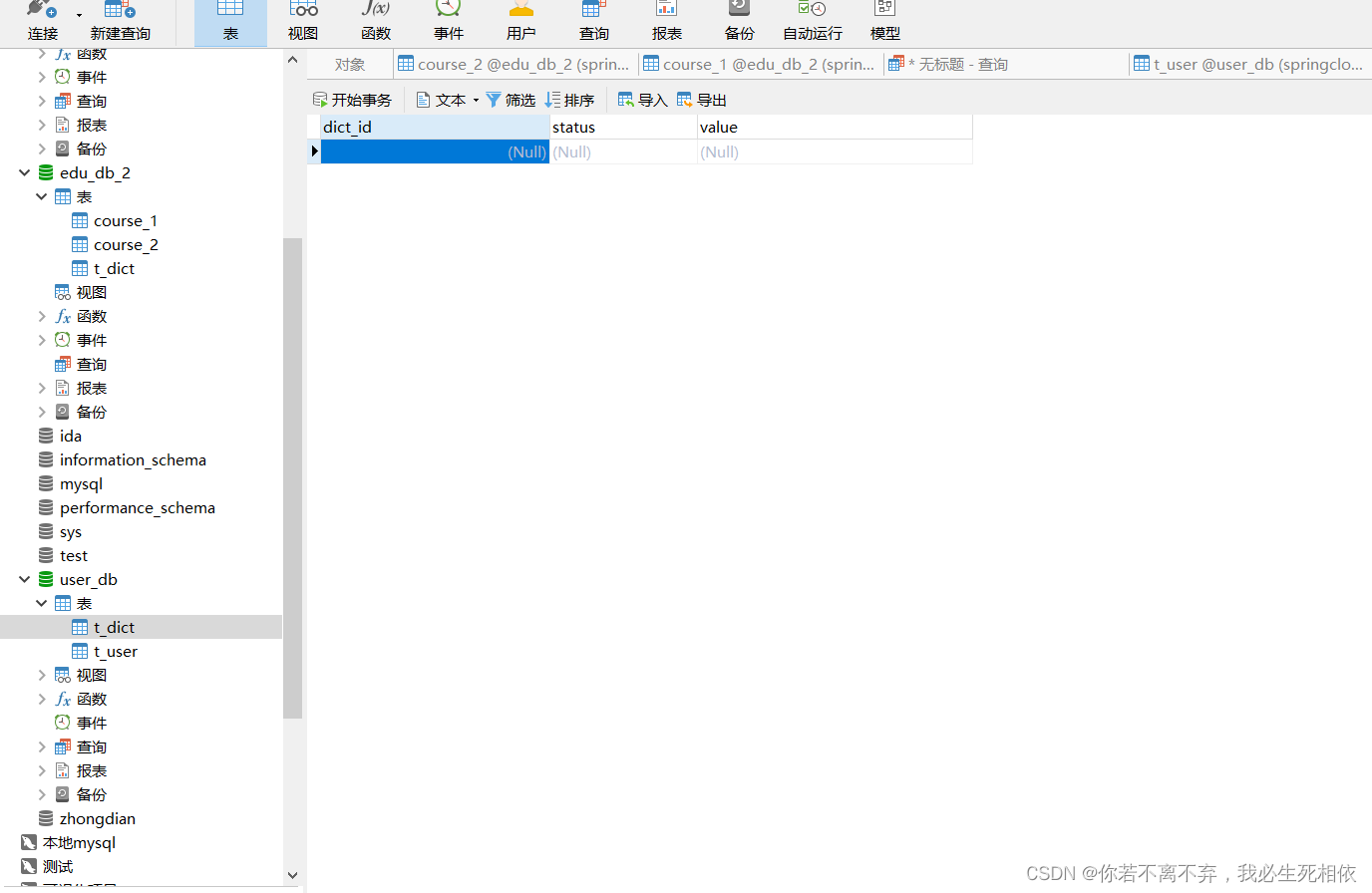
( 2 )在每个数据库中创建出相同结构公共表2 、在多个数据库都创建相同结构公共表
3个表分别添加
use user_db; #use edu_db_1; #use edu_db_2; create table t_dict( `dict_id` bigint(20) primary key, `status` varchar(100) not null, `value` varchar(100) not null );- 1
- 2
- 3
- 4
- 5
- 6
- 7
- 8
- 9
- 10

3 、在项目配置文件application.properties进行公共表配置
配置公共表
spring.shardingsphere.sharding.broadcast-tables=t_udict spring.shardingsphere.sharding.tables.t_udict.key-generator.column=dictid spring.shardingsphere.sharding.tables.t_udict.key-generator.type=SNOWFLAKE- 1
- 2
- 3
整体:
# sharding-jdbc 水平分库分表策略 # 配置数据源,给数据源起别名 # 水平分库需要配置多个数据库 # m0为用户数据库 spring.shardingsphere.datasource.names=m1,m2,m0 # 一个实体类对应两张表,覆盖 spring.main.allow-bean-definition-overriding=true # 配置第一个数据源的具体内容,包含连接池,驱动,地址,用户名,密码 spring.shardingsphere.datasource.m1.type=com.alibaba.druid.pool.DruidDataSource spring.shardingsphere.datasource.m1.driver-class-name=com.mysql.cj.jdbc.Driver spring.shardingsphere.datasource.m1.url=jdbc:mysql://localhost:3306/edu_db_1?serverTimezone=GMT%2B8 spring.shardingsphere.datasource.m1.username=root spring.shardingsphere.datasource.m1.password=root # 配置第二个数据源的具体内容,包含连接池,驱动,地址,用户名,密码 spring.shardingsphere.datasource.m2.type=com.alibaba.druid.pool.DruidDataSource spring.shardingsphere.datasource.m2.driver-class-name=com.mysql.cj.jdbc.Driver spring.shardingsphere.datasource.m2.url=jdbc:mysql://localhost:3306/edu_db_2?serverTimezone=GMT%2B8 spring.shardingsphere.datasource.m2.username=root spring.shardingsphere.datasource.m2.password=root # 配置user数据源的具体内容,包含连接池,驱动,地址,用户名,密码 spring.shardingsphere.datasource.m0.type=com.alibaba.druid.pool.DruidDataSource spring.shardingsphere.datasource.m0.driver-class-name=com.mysql.cj.jdbc.Driver spring.shardingsphere.datasource.m0.url=jdbc:mysql://localhost:3306/user_db?serverTimezone=GMT%2B8 spring.shardingsphere.datasource.m0.username=root spring.shardingsphere.datasource.m0.password=root # 配置user_db数据库里面t_user 专库专表 spring.shardingsphere.sharding.tables.t_user.actual-data-nodes=m0.t_user # 配置主键的生成策略 spring.shardingsphere.sharding.tables.t_user.key-generator.column=user_id spring.shardingsphere.sharding.tables.t_user.key-generator.type=SNOWFLAKE # 指定分表策略 spring.shardingsphere.sharding.tables.t_user.table-strategy.inline.sharding-column=user_id spring.shardingsphere.sharding.tables.t_user.table-strategy.inline.algorithm-expression=t_user # 指定数据库分布的情况和数据表分布的情况 # m1 m2 course_1 course_2 spring.shardingsphere.sharding.tables.course.actual-data-nodes=m$->{1..2}.course_$->{1..2} # 指定 course 表里面主键 cid 的生成策略 SNOWFLAKE spring.shardingsphere.sharding.tables.course.key-generator.column=cid spring.shardingsphere.sharding.tables.course.key-generator.type=SNOWFLAKE # 指定分库策略 约定 user_id 值偶数添加到 m1 库,如果 user_id 是奇数添加到 m2 库 # 默认写法(所有的表的user_id) #spring.shardingsphere.sharding.default-database-strategy.inline.sharding-column=user_id #spring.shardingsphere.sharding.default-database-strategy.inline.algorithm-expression=m$->{user_id % 2 + 1} # 指定只有course表的user_id spring.shardingsphere.sharding.tables.course.database-strategy.inline.sharding-column=user_id spring.shardingsphere.sharding.tables.course.database-strategy.inline.algorithm-expression=m$->{user_id % 2 + 1} # 指定分表策略 约定 cid 值偶数添加到 course_1 表,如果 cid 是奇数添加到 course_2 表 spring.shardingsphere.sharding.tables.course.table-strategy.inline.sharding-column=cid spring.shardingsphere.sharding.tables.course.table-strategy.inline.algorithm-expression=course_$->{cid % 2 + 1} # 公共表配置 spring.shardingsphere.sharding.broadcast-tables=t_dict # 配置主键的生成策略 spring.shardingsphere.sharding.tables.t_dict.key-generator.column=dict_id spring.shardingsphere.sharding.tables.t_dict.key-generator.type=SNOWFLAKE # 打开 sql 输出日志 spring.shardingsphere.props.sql.show=true- 1
- 2
- 3
- 4
- 5
- 6
- 7
- 8
- 9
- 10
- 11
- 12
- 13
- 14
- 15
- 16
- 17
- 18
- 19
- 20
- 21
- 22
- 23
- 24
- 25
- 26
- 27
- 28
- 29
- 30
- 31
- 32
- 33
- 34
- 35
- 36
- 37
- 38
- 39
- 40
- 41
- 42
- 43
- 44
- 45
- 46
- 47
- 48
- 49
- 50
- 51
- 52
- 53
- 54
- 55
- 56
- 57
- 58
- 59
- 60
- 61
- 62
- 63
- 64
- 65
- 66
- 67
- 68
- 69
- 70
- 71
4 、编写测试代码
( 1 )创建新实体类和mapper@Data @TableName("t_dict") public class Dict { private Long dictId; private String status; private String value; }- 1
- 2
- 3
- 4
- 5
- 6
- 7
@Repository public interface DictMapper extends BaseMapper<Dict> { }- 1
- 2
- 3
- 4
( 2 )编写添加和删除方法进行测试
//todo ==================================公共表========================================== @Autowired private DictMapper dictMapper; @Test public void addDict1() { Dict dict = new Dict(); dict.setStatus("Normal"); dict.setValue("启用"); dictMapper.insert(dict); } @Test public void deleteDict1() { QueryWrapper<Dict> wrapper = new QueryWrapper<>(); wrapper.eq("dict_id", 765734748386492417L); dictMapper.delete(wrapper); }- 1
- 2
- 3
- 4
- 5
- 6
- 7
- 8
- 9
- 10
- 11
- 12
- 13
- 14
- 15
- 16
- 17
- 18
- 19

全部删除了
-
相关阅读:
SKG 渠道中台借助 SAE + 大禹打造云原生 DevOPS,提效 60%
数组与链表算法-数组与多项式
物联网通信技术|课堂笔记|week10-2 11月1日|应用层协议|域名解析
C#语言实例源码系列-实现滚动字幕
h5st 4.3版本代码研究
Netty入门-Channel
node.js 1 开发环境搭建
SpringBoot快速部署(1)—docker不使用nginx
合宙Air724UG LuatOS-Air LVGL API控件-屏幕横屏竖屏切换(Rotation)
ping可视化工具——gping
- 原文地址:https://blog.csdn.net/qq_42055933/article/details/126313513
