-
Android学习笔记 36. 网络加载框架OkHttp的同步与异步请求
Android学习笔记
Android常用框架——网络加载框架OkHttp
36. 网络加载框架OkHttp的同步与异步请求
36.1 简介
官方地址
https://github.com/square/okhttp

android网络框架之OKhttp
一个处理网络请求的开源项目,是安卓端最火热的轻量级框架,由移动支付Square公司贡献(该公司还贡献了Picasso) 。
用于替代HttpUrlConnection和Apache HttpClient(android API23 6.0里已移除HttpClient,现在已经打不出来)
36.2 基本配置
引入依赖

最新4.10

同步
服务器
一个开源项目,测试各种请求
https://www.httpbin.org/

清单文件中加上网络权限

36.3 OkHttp基本用法
布局文件
<LinearLayout xmlns:android="http://schemas.android.com/apk/res/android" xmlns:app="http://schemas.android.com/apk/res-auto" xmlns:tools="http://schemas.android.com/tools" android:layout_width="match_parent" android:layout_height="match_parent" tools:context=".MainActivity" android:orientation="vertical" > <Button android:layout_width="wrap_content" android:layout_height="wrap_content" android:onClick="getSync" android:text="get同步请求" /> <Button android:layout_width="wrap_content" android:layout_height="wrap_content" android:onClick="getAsync" android:text="get异步请求" /> <Button android:layout_width="wrap_content" android:layout_height="wrap_content" android:onClick="postSync" android:text="post同步请求" /> <Button android:layout_width="wrap_content" android:layout_height="wrap_content" android:onClick="postAsync" android:text="post异步请求" /> LinearLayout>- 1
- 2
- 3
- 4
- 5
- 6
- 7
- 8
- 9
- 10
- 11
- 12
- 13
- 14
- 15
- 16
- 17
- 18
- 19
- 20
- 21
- 22
- 23
- 24
- 25
- 26
- 27
- 28
- 29
- 30
- 31
- 32
- 33
- 34
- 35
- 36
- 37
- 38
- 39

四个按钮
四个点击响应事件:

创建OkhttpClient实例对象
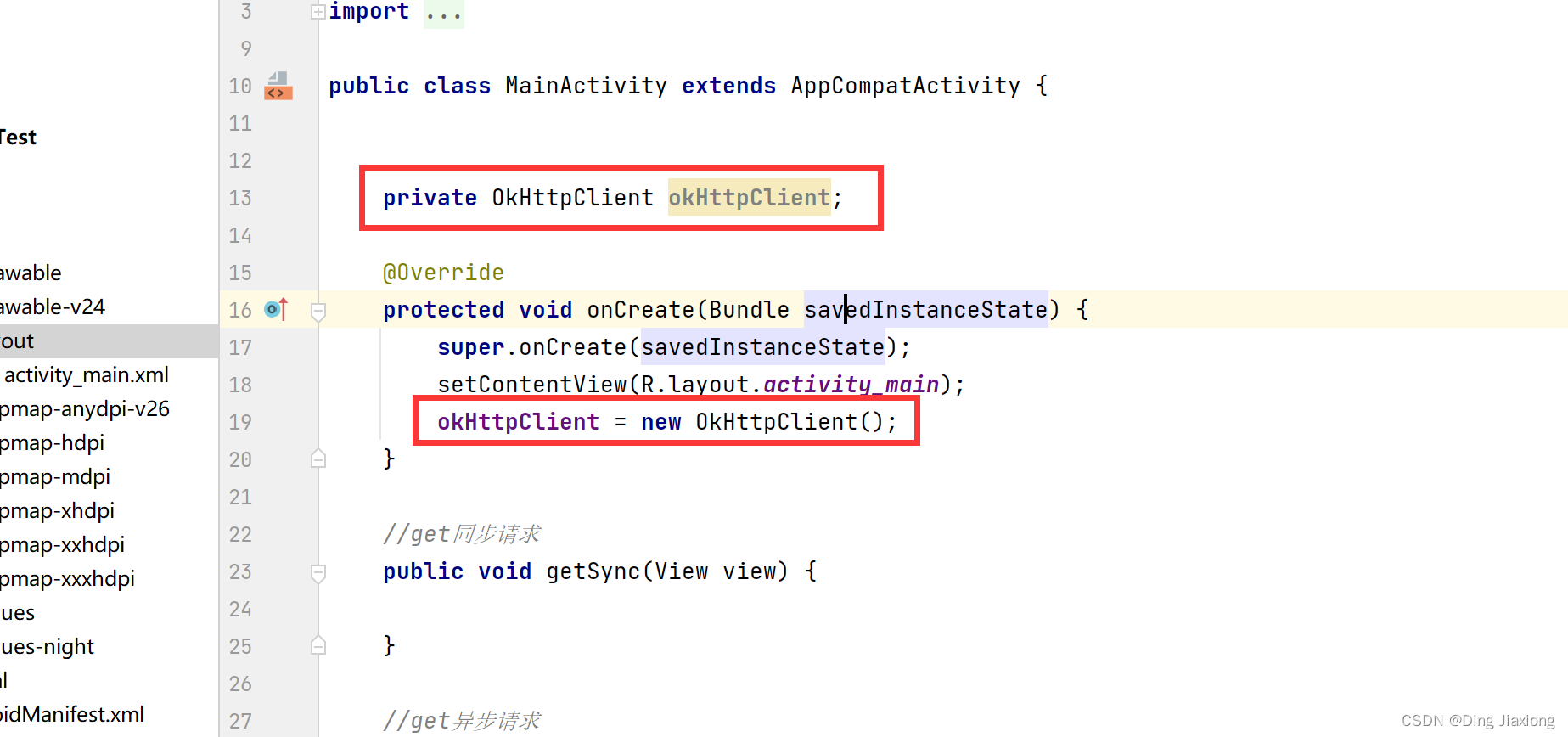
36.4 get同步请求
//get同步请求 public void getSync(View view) { new Thread(){ @Override public void run() { Request request = new Request.Builder().url("https://www.httpbin.org/get?a=1&b=2").build(); //准备好请求的Call对象 Call call = okHttpClient.newCall(request); try { Response response = call.execute(); Log.e("dingjiaxiong", "getSync: " + response.body().string() ); } catch (IOException e) { e.printStackTrace(); } } }.start();- 1
- 2
- 3
- 4
- 5
- 6
- 7
- 8
- 9
- 10
- 11
- 12
- 13
- 14
- 15
- 16
- 17
运行

36.5 get异步请求
//get异步请求(这个就不需要自己创建线程) public void getAsync(View view) { Request request = new Request.Builder().url("https://www.httpbin.org/get?a=1&b=2").build(); //准备好请求的Call对象 Call call = okHttpClient.newCall(request); call.enqueue(new Callback() { @Override public void onFailure(@NonNull Call call, @NonNull IOException e) { } @Override public void onResponse(@NonNull Call call, @NonNull Response response) throws IOException { if (response.isSuccessful()){ Log.e("dingjiaxiong", "get异步请求: " + response.body().string() ); } } }); }- 1
- 2
- 3
- 4
- 5
- 6
- 7
- 8
- 9
- 10
- 11
- 12
- 13
- 14
- 15
- 16
- 17
- 18
- 19
- 20
运行

36.6 post同步请求
//post同步请求 public void postSync(View view) { new Thread(new Runnable() { @Override public void run() { FormBody formBody = new FormBody.Builder().add("a", "1").add("b", "2").build(); Request request = new Request.Builder().url("https://www.httpbin.org/post") .post(formBody) .build(); Call call = okHttpClient.newCall(request); try { Response response = call.execute(); Log.e("dingjiaxiong", "postSync: " + response.body().string() ); } catch (IOException e) { e.printStackTrace(); } } }).start(); }- 1
- 2
- 3
- 4
- 5
- 6
- 7
- 8
- 9
- 10
- 11
- 12
- 13
- 14
- 15
- 16
- 17
- 18
- 19
- 20
- 21
- 22
- 23

36.7 post异步请求
//post异步请求 public void postAsync(View view) { FormBody formBody = new FormBody.Builder().add("a", "1").add("b", "2").build(); Request request = new Request.Builder().url("https://www.httpbin.org/post") .post(formBody) .build(); Call call = okHttpClient.newCall(request); call.enqueue(new Callback() { @Override public void onFailure(@NonNull Call call, @NonNull IOException e) { } @Override public void onResponse(@NonNull Call call, @NonNull Response response) throws IOException { Log.e("dingjiaxiong", "post异步请求: " + response.body().string() ); } }); }- 1
- 2
- 3
- 4
- 5
- 6
- 7
- 8
- 9
- 10
- 11
- 12
- 13
- 14
- 15
- 16
- 17
- 18
- 19
- 20
- 21
- 22
- 23

36.8 post请求数据格式
常用的编码方式
https://www.runoob.com/http/http-content-type.html


默认的form表单提交方式,数据被编码为名称/值对,默认类型;

数据被编码为一条消息,一般用于文件上传。

提交二进制数据,如果用于文件上传,只能上传一个文件。

提交json数据。
post上传两个文件测试:
@Test public void uploadFileTest() throws IOException { OkHttpClient okHttpClient = new OkHttpClient(); File file1 = new File("D:\\DingJiaxiong\\AndroidStudioProjects\\MyOkhttp\\app\\src\\test\\java\\com\\dingjiaxiong\\myokhttp\\1.txt"); File file2 = new File("D:\\DingJiaxiong\\AndroidStudioProjects\\MyOkhttp\\app\\src\\test\\java\\com\\dingjiaxiong\\myokhttp\\2.txt"); MultipartBody multipartBody = new MultipartBody.Builder() .addFormDataPart("file1", file1.getName(), RequestBody.create(file1, MediaType.parse("text/plain"))) .addFormDataPart("file2", file2.getName(), RequestBody.create(file2, MediaType.parse("text/plain"))) .build(); Request request = new Request.Builder().url("https://www.httpbin.org/post").post(multipartBody).build(); Call call = okHttpClient.newCall(request); Response response = call.execute(); System.out.println(response.body().string()); }- 1
- 2
- 3
- 4
- 5
- 6
- 7
- 8
- 9
- 10
- 11
- 12
- 13
- 14
- 15
- 16
- 17
- 18
- 19

上传json数据测试
@Test public void jsonTest() throws IOException { OkHttpClient okHttpClient = new OkHttpClient(); RequestBody requestBody = RequestBody.create("{\"a\":1,\"b\":2}", MediaType.parse("application/json")); Request request = new Request.Builder().url("https://www.httpbin.org/post").post(requestBody).build(); Call call = okHttpClient.newCall(request); Response response = call.execute(); System.out.println(response.body().string()); }- 1
- 2
- 3
- 4
- 5
- 6
- 7
- 8
- 9
- 10
- 11
- 12
- 13
- 14
- 15

-
相关阅读:
四款好看实用的数字孪生可视化解决方案推荐
java毕业生设计二手车交易市场网站计算机源码+系统+mysql+调试部署+lw
LeetCode770之基本计算器IV(相关话题:波兰表达式,多项式运算)
第48节—— redux 中的 compose——了解
信息学奥赛一本通:1175:除以13
这道面试题工作中经常碰到,但 99% 的程序员都答不上来
多线程之原子整数和原子引用
x86_64、AArch64、ARM32、LoongArch64、RISC-V
Linux系统编程05
【面试心得】系统调用
- 原文地址:https://blog.csdn.net/weixin_44226181/article/details/126296502
