-
Perl 6 - CPAN
Perl 学习交流QQ群,欢迎加入:909619846
一、关于 CPAN
CPAN(Comprehensive Perl Archive Network : 全面的Perl存档网络)
CPAN 安装工具
CPAN 安装工具有以下几种:
- CPAN.pm ( cpan)是原始客户端。
它随Perl一起提供,因此您已经拥有了它.它具有最多的功能.尽管实际上每个人都接受默认安装,但它具有许多配置选项以自定义其工作方式.它可以轻松地与 local :: lib 集成. - cpanminus (cpanm) 尝试进行零配置自动为大多数用户执行正确操作的客户端。
它还可以在资源有限的系统(例如 VPS )上很好地运行.
它不随Perl一起提供,但易于安装.它可以与 local :: lib 轻松集成.
它的最大局限性是缺乏配置.如果您想做一些不寻常的事情,它可能不支持. - CPANPLUS (cpanp)是一种尝试使Perl程序可以使用的CPAN API使用,而不是您在命令行中使用的应用。
cpanp shell更像是一种概念证明,我不知道使用它的任何真正优势.
其中 CPANM 是目前最常用的一种
- metacpan 对 cpanm 的描述
https://metacpan.org/dist/App-cpanminus/view/bin/cpanm
二、metacpan
使用示例
这里我们搜索 restful,第一个得到 Mojolicious::Plugin::RESTful - A Mojolicious Plugin for RESTful HTTP Actions
https://metacpan.org/pod/Mojolicious::Plugin::RESTful点击左边 Tools – Install Instructions
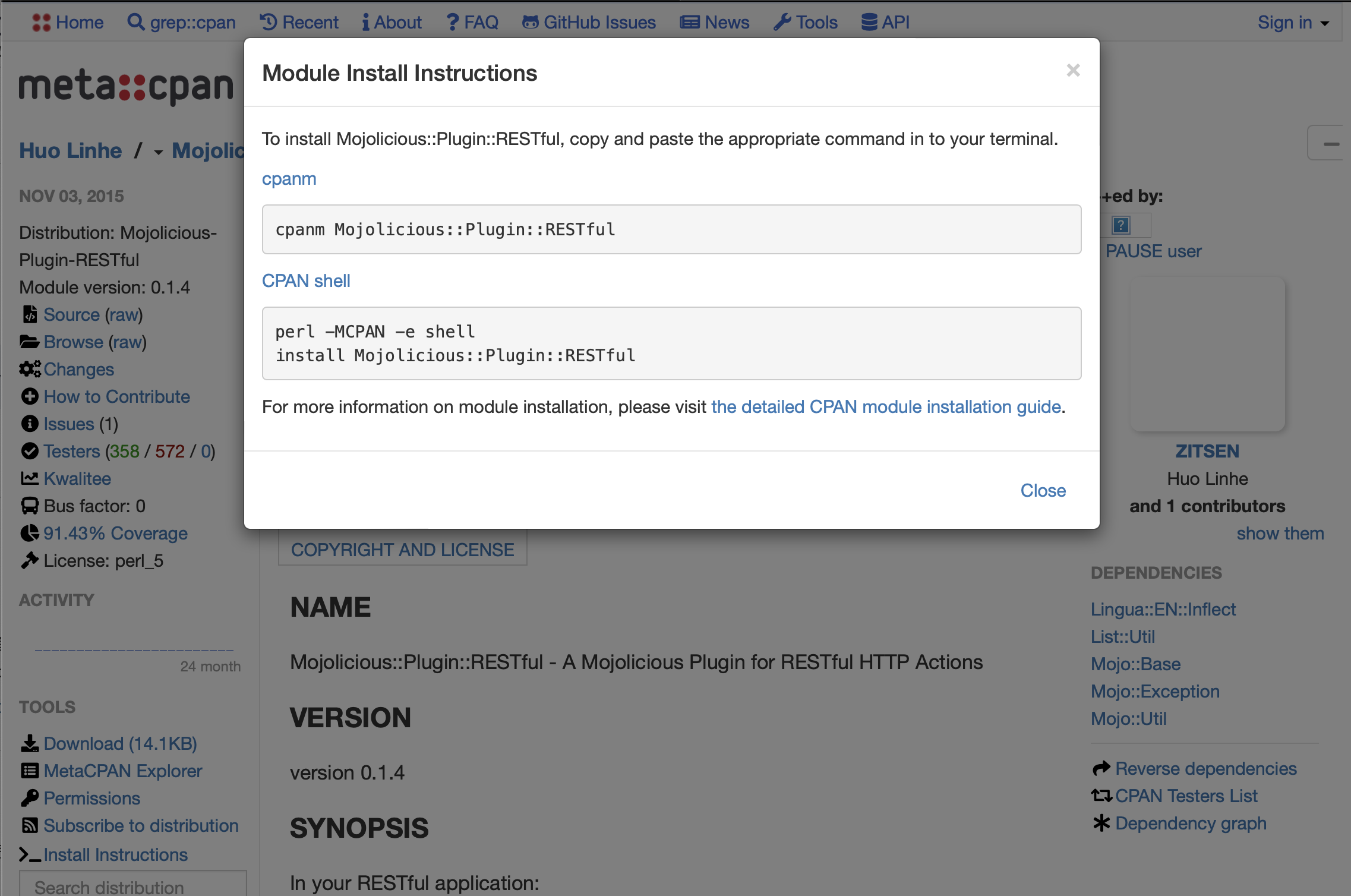
我们可以得到两种安装方式:
cpanm和cpan,下面具体介绍下这两个安装工具的使用
三、使用 CPAN
Mac 预装了 cpan,终端输入 cpan,第一次会提示你一些配置信息
第一次使用
$ cpan Loading internal logger. Log::Log4perl recommended for better logging CPAN.pm requires configuration, but most of it can be done automatically. If you answer 'no' below, you will enter an interactive dialog for each configuration option instead. Would you like to configure as much as possible automatically? [yes] yes Use of uninitialized value $what in concatenation (.) or string at /System/Library/Perl/5.30/App/Cpan.pm line 679, <STDIN> line 1. <install_help> Warning: You do not have write permission for Perl library directories. To install modules, you need to configure a local Perl library directory or escalate your privileges. CPAN can help you by bootstrapping the local::lib module or by configuring itself to use 'sudo' (if available). You may also resolve this problem manually if you need to customize your setup. What approach do you want? (Choose 'local::lib', 'sudo' or 'manual') [local::lib] Autoconfiguration complete. Attempting to bootstrap local::lib... Writing /Users/xx/.cpan/CPAN/MyConfig.pm for bootstrap... commit: wrote '/Users/xx/.cpan/CPAN/MyConfig.pm' Fetching with LWP: http://www.cpan.org/authors/01mailrc.txt.gz Reading '/Users/xx/.cpan/sources/authors/01mailrc.txt.gz' ............................................................................DONE Fetching with LWP: http://www.cpan.org/modules/02packages.details.txt.gz Reading '/Users/xx/.cpan/sources/modules/02packages.details.txt.gz' Database was generated on Wed, 10 Aug 2022 08:29:03 GMT .............. New CPAN.pm version (v2.34) available. [Currently running version is v2.22] You might want to try install CPAN reload cpan to both upgrade CPAN.pm and run the new version without leaving the current session. ..............................................................DONE Fetching with LWP: http://www.cpan.org/modules/03modlist.data.gz Reading '/Users/xx/.cpan/sources/modules/03modlist.data.gz' DONE Writing /Users/xx/.cpan/Metadata Fetching with LWP: http://www.cpan.org/authors/id/H/HA/HAARG/local-lib-2.000029.tar.gz Fetching with LWP: HASH(0x7fc8d6af25c8)authors/id/H/HA/HAARG/CHECKSUMS Fetching with LWP: HASH(0x7fc8d6af25c8)authors/id/H/HA/HAARG/CHECKSUMS.gz Fetching with LWP: http://www.cpan.org/authors/id/H/HA/HAARG/CHECKSUMS Checksum for /Users/xx/.cpan/sources/authors/id/H/HA/HAARG/local-lib-2.000029.tar.gz ok Configuring H/HA/HAARG/local-lib-2.000029.tar.gz with Makefile.PL Attempting to create directory /Users/xx/perl5 Checking if your kit is complete... Looks good Generating a Unix-style Makefile Writing Makefile for local::lib Writing MYMETA.yml and MYMETA.json HAARG/local-lib-2.000029.tar.gz /usr/bin/perl Makefile.PL --bootstrap -- OK Running make for H/HA/HAARG/local-lib-2.000029.tar.gz cp lib/local/lib.pm blib/lib/local/lib.pm cp lib/lib/core/only.pm blib/lib/lib/core/only.pm cp lib/POD2/DE/local/lib.pod blib/lib/POD2/DE/local/lib.pod cp lib/POD2/PT_BR/local/lib.pod blib/lib/POD2/PT_BR/local/lib.pod Manifying 4 pod documents HAARG/local-lib-2.000029.tar.gz /usr/bin/make -- OK Running make test for HAARG/local-lib-2.000029.tar.gz PERL_DL_NONLAZY=1 "/usr/bin/perl" "-I/Users/xx/perl5/lib/perl5" "-MExtUtils::Command::MM" "-MTest::Harness" "-e" "undef *Test::Harness::Switches; test_harness(0, 'blib/lib', 'blib/arch')" t/*.t t/bad_variables.t ...... ok t/carp-mismatch.t ...... ok t/classmethod.t ........ ok t/de-dup.t ............. ok t/lib-core-only.t ...... ok t/pipeline.t ........... ok t/shell.t .............. ok t/stackable.t .......... ok t/subroutine-in-inc.t .. ok t/taint-mode.t ......... ok All tests successful. Files=10, Tests=245, 5 wallclock secs ( 0.06 usr 0.03 sys + 2.21 cusr 1.59 csys = 3.89 CPU) Result: PASS HAARG/local-lib-2.000029.tar.gz /usr/bin/make test -- OK Running make install for HAARG/local-lib-2.000029.tar.gz Manifying 4 pod documents Installing /Users/xx/perl5/lib/perl5/POD2/PT_BR/local/lib.pod Installing /Users/xx/perl5/lib/perl5/POD2/DE/local/lib.pod Installing /Users/xx/perl5/lib/perl5/local/lib.pm Installing /Users/xx/perl5/lib/perl5/lib/core/only.pm Installing /Users/xx/perl5/man/man3/lib::core::only.3pm Installing /Users/xx/perl5/man/man3/POD2::DE::local::lib.3pm Installing /Users/xx/perl5/man/man3/local::lib.3pm Installing /Users/xx/perl5/man/man3/POD2::PT_BR::local::lib.3pm Appending installation info to /Users/xx/perl5/lib/perl5/darwin-thread-multi-2level/perllocal.pod HAARG/local-lib-2.000029.tar.gz /usr/bin/make install -- OK local::lib is installed. You must now add the following environment variables to your shell configuration files (or registry, if you are on Windows) and then restart your command line shell and CPAN before installing modules: PATH="/Users/xx/perl5/bin${PATH:+:${PATH}}"; export PATH; PERL5LIB="/Users/xx/perl5/lib/perl5${PERL5LIB:+:${PERL5LIB}}"; export PERL5LIB; PERL_LOCAL_LIB_ROOT="/Users/xx/perl5${PERL_LOCAL_LIB_ROOT:+:${PERL_LOCAL_LIB_ROOT}}"; export PERL_LOCAL_LIB_ROOT; PERL_MB_OPT="--install_base \"/Users/xx/perl5\""; export PERL_MB_OPT; PERL_MM_OPT="INSTALL_BASE=/Users/xx/perl5"; export PERL_MM_OPT; commit: wrote '/Users/xx/.cpan/CPAN/MyConfig.pm' You can re-run configuration any time with 'o conf init' in the CPAN shell Terminal does not support AddHistory. To fix enter> install Term::ReadLine::Perl cpan shell -- CPAN exploration and modules installation (v2.22) Enter 'h' for help. cpan[1]> # 这里进入了交互模式- 1
- 2
- 3
- 4
- 5
- 6
- 7
- 8
- 9
- 10
- 11
- 12
- 13
- 14
- 15
- 16
- 17
- 18
- 19
- 20
- 21
- 22
- 23
- 24
- 25
- 26
- 27
- 28
- 29
- 30
- 31
- 32
- 33
- 34
- 35
- 36
- 37
- 38
- 39
- 40
- 41
- 42
- 43
- 44
- 45
- 46
- 47
- 48
- 49
- 50
- 51
- 52
- 53
- 54
- 55
- 56
- 57
- 58
- 59
- 60
- 61
- 62
- 63
- 64
- 65
- 66
- 67
- 68
- 69
- 70
- 71
- 72
- 73
- 74
- 75
- 76
- 77
- 78
- 79
- 80
- 81
- 82
- 83
- 84
- 85
- 86
- 87
- 88
- 89
- 90
- 91
- 92
- 93
- 94
- 95
- 96
- 97
- 98
- 99
- 100
- 101
- 102
- 103
- 104
- 105
- 106
- 107
- 108
- 109
- 110
- 111
- 112
- 113
- 114
- 115
- 116
- 117
- 118
- 119
- 120
- 121
- 122
- 123
- 124
- 125
- 126
- 127
- 128
使用 cpan 安装第三方库
安装包位于目录:
~/.cpan/build
相关配置文件为:~/.cpan/FTPstats.yml方式一:进入交互模式,安装
$ cpan # $ perl -MCPAN -e shell 效果同上 ... cpan[1]> install Switch cpan[2]> exit # 退出交互模式- 1
- 2
- 3
- 4
- 5
- 6
方式二:直接使用 cpan install 安装
$ cpan install Switch $ cpan install XML::LibXML- 1
- 2
- 3
检查模块是否已安装
perl -e 'use XML::LibXML'- 1
不报错即代表安装成功
查看模块信息
$ cpan -i Switch- 1
四、使用 CPANM
mac 上使用 brew 安装 CPANM
$ brew install cpanminus- 1
安装成功校验
查看版本信息
$ cpanm -V cpanm (App::cpanminus) version 1.9018 (/usr/local/bin/cpanm) perl version 5.030003 (perl) %Config: archname=darwin-thread-multi-2level installsitelib=/Library/Perl/5.30 installsitebin=/usr/local/bin installman1dir=/usr/share/man/man1 installman3dir=/usr/share/man/man3 sitearchexp=/Library/Perl/5.30/darwin-thread-multi-2level sitelibexp=/Library/Perl/5.30 vendorarch=/Network/Library/Perl/5.30/darwin-thread-multi-2level vendorlibexp=/Network/Library/Perl/5.30 archlibexp=/System/Library/Perl/5.30/darwin-thread-multi-2level privlibexp=/System/Library/Perl/5.30 %ENV: @INC: FatPacked::140563055820376=HASH(0x7fd76302be58) /Library/Perl/5.30/darwin-thread-multi-2level /Library/Perl/5.30 /Network/Library/Perl/5.30/darwin-thread-multi-2level /Network/Library/Perl/5.30 /Library/Perl/Updates/5.30.3 /System/Library/Perl/5.30/darwin-thread-multi-2level /System/Library/Perl/5.30 /System/Library/Perl/Extras/5.30/darwin-thread-multi-2level /System/Library/Perl/Extras/5.30- 1
- 2
- 3
- 4
- 5
- 6
- 7
- 8
- 9
- 10
- 11
- 12
- 13
- 14
- 15
- 16
- 17
- 18
- 19
- 20
- 21
- 22
- 23
- 24
- 25
- 26
- 27
- 28
- 29
查看帮助
$ cpanm -h Usage: cpanm [options] Module [...] Options: -v,--verbose Turns on chatty output -q,--quiet Turns off the most output --interactive Turns on interactive configure (required for Task:: modules) -f,--force force install -n,--notest Do not run unit tests --test-only Run tests only, do not install -S,--sudo sudo to run install commands --installdeps Only install dependencies --showdeps Only display direct dependencies --reinstall Reinstall the distribution even if you already have the latest version installed --mirror Specify the base URL for the mirror (e.g. http://cpan.cpantesters.org/) --mirror-only Use the mirror's index file instead of the CPAN Meta DB -M,--from Use only this mirror base URL and its index file --prompt Prompt when configure/build/test fails -l,--local-lib Specify the install base to install modules -L,--local-lib-contained Specify the install base to install all non-core modules --self-contained Install all non-core modules, even if they're already installed. --auto-cleanup Number of days that cpanm's work directories expire in. Defaults to 7 Commands: --self-upgrade upgrades itself --info Displays distribution info on CPAN --look Opens the distribution with your SHELL -U,--uninstall Uninstalls the modules (EXPERIMENTAL) -V,--version Displays software version Examples: cpanm Test::More # install Test::More cpanm MIYAGAWA/Plack-0.99_05.tar.gz # full distribution path cpanm http://example.org/LDS/CGI.pm-3.20.tar.gz # install from URL cpanm ~/dists/MyCompany-Enterprise-1.00.tar.gz # install from a local file cpanm --interactive Task::Kensho # Configure interactively cpanm . # install from local directory cpanm --installdeps . # install all the deps for the current directory cpanm -L extlib Plack # install Plack and all non-core deps into extlib cpanm --mirror http://cpan.cpantesters.org/ DBI # use the fast-syncing mirror cpanm -M https://cpan.metacpan.org App::perlbrew # use only this secure mirror and its index You can also specify the default options in PERL_CPANM_OPT environment variable in the shell rc: export PERL_CPANM_OPT="--prompt --reinstall -l ~/perl --mirror http://cpan.cpantesters.org" Type `man cpanm` or `perldoc cpanm` for the more detailed explanation of the options.- 1
- 2
- 3
- 4
- 5
- 6
- 7
- 8
- 9
- 10
- 11
- 12
- 13
- 14
- 15
- 16
- 17
- 18
- 19
- 20
- 21
- 22
- 23
- 24
- 25
- 26
- 27
- 28
- 29
- 30
- 31
- 32
- 33
- 34
- 35
- 36
- 37
- 38
- 39
- 40
- 41
- 42
- 43
- 44
- 45
- 46
- 47
- 48
使用 cpanm 安装库
直接使用
cpanm xx:xxx就可以安装了,如cpanm Mojolicious::Plugin::RESTful- 1
你可以在 metacpan 上查看库的信息,然后进行安装
https://metacpan.org
2022-08-11(三)伊织
Perl 学习交流QQ群,欢迎加入:909619846
更多博主的 Perl 文章:https://so.csdn.net/so/search?q=Perl&t=blog&u=lovechris00
- CPAN.pm ( cpan)是原始客户端。
-
相关阅读:
戏说领域驱动设计(七)——限界上下文——延伸
【SQL刷题】Day10----SQL高级过滤函数专项练习
随机森林算法
什么是粉红喜马拉雅盐,比普通盐更好吗?
【蓝桥杯选拔赛真题78】python电话号码 第十五届青少年组蓝桥杯python选拔赛真题 算法思维真题解析
《重新定义团队》——Google如何工作
【大模型应用开发教程】02_LangChain介绍
前端入职配置新电脑!!!
[ vulhub漏洞复现篇 ] struts2远程代码执行漏洞s2-032(CVE-2016-3081)
C++>> 继承
- 原文地址:https://blog.csdn.net/lovechris00/article/details/126293674
