-
MyBatis学习笔记(二)
一、自定义映射 resultMap
1.1 resultMap 处理字段和属性的映射关系
若字段名和实体类中的属性名不一致,则可以通过resultMap设置自定义映射
<resultMap id="empResultMap" type="Emp"> <id column="emp_id" property="empId">id> <result column="emp_name" property="empName">result> <result column="age" property="age">result> <result column="gender" property="gender">result> resultMap> <select id="getEmpByEmpId" resultMap="empResultMap"> select * from t_emp where emp_id = #{empId} select>- 1
- 2
- 3
- 4
- 5
- 6
- 7
- 8
- 9
- 10
- 11
- 12
- 13
- 14
- 15
- 16
- 17
- 18
- 19
- 20
- 21
- 22
- 23
- 24
- 25
- 26
- 27
- 28
- 29
- 30
- 31
- 32
- 33
- 34
- 35
- 36
- 37
- 38
- 39
若字段名和实体类中的属性名不一致,但是字段名符合数据库的规则(使用_),实体类中的属性名符合Java的规则(使用驼峰),此时也可通过以下两种方式处理字段名和实体类中的属性的映射关系
-
可以通过为字段起别名的方式,保证和实体类中的属性名保持一致
-
可以在MyBatis的核心配置文件中设置一个全局配置信息mapUnderscoreToCamelCase,可以在查询表中数据时,自动将_类型的字段名转换为驼峰
例如:字段名user_name,设置了mapUnderscoreToCamelCase,此时字段名就会转换为userName
1.2 多对一映射处理
场景模拟:
查询员工信息以及员工所对应的部门信息
-
级联方式处理映射关系
<resultMap id="empAndDeptResultMapOne" type="Emp"> <id column="emp_id" property="empId">id> <result column="emp_name" property="empName">result> <result column="age" property="age">result> <result column="gender" property="gender">result> <result column="dept_id" property="dept.deptId">result> <result column="dept_name" property="dept.deptName">result> resultMap> <select id="getEmpAndDeptByEid" resultMap="empDeptMap"> select emp.*,dept.* from t_emp emp left join t_dept dept on emp.did = dept.did where emp.eid = #{eid} select>- 1
- 2
- 3
- 4
- 5
- 6
- 7
- 8
- 9
- 10
- 11
-
使用association处理映射关系
<resultMap id="empAndDeptResultMap" type="Emp"> <id column="emp_id" property="empId">id> <result column="emp_name" property="empName">result> <result column="age" property="age">result> <result column="gender" property="gender">result> <association property="dept" javaType="Dept"> <id column="dept_id" property="deptId">id> <result column="dept_name" property="deptName">result> association> resultMap> <select id="getEmpAndDeptByEid" resultMap="empDeptMap"> select emp.*,dept.* from t_emp emp left join t_dept dept on emp.did = dept.did where emp.eid = #{eid} select>- 1
- 2
- 3
- 4
- 5
- 6
- 7
- 8
- 9
- 10
- 11
- 12
- 13
- 14
- 15
- 16
- 17
- 18
-
分步查询
- 查询员工信息
/*** 通过分步查询查询员工信息 * @param eid * @return */ Emp getEmpByStep(@Param("eid") int eid); <resultMap id="empAndDeptByStepResultMap" type="Emp"> <id column="emp_id" property="empId">id> <result column="emp_name" property="empName">result> <result column="age" property="age">result> <result column="gender" property="gender">result> <association property="dept" select="com.cgg.mybatis.mapper.DeptMapper.getEmpAndDeptByStepTwo" column="dept_id"> association> resultMap>- 1
- 2
- 3
- 4
- 5
- 6
- 7
- 8
- 9
- 10
- 11
- 12
- 13
- 14
- 15
- 16
- 17
- 18
- 19
- 根据员工所对应的部门id查询部门信息
/*** 分步查询的第二步: 根据员工所对应的did查询部门信息 * @param did * @return */ Dept getEmpDeptByStep(@Param("did") int did); <select id="getEmpAndDeptByStepOne" resultMap="empAndDeptByStepResultMap"> select * from t_emp where emp_id = #{empId} select>- 1
- 2
- 3
- 4
- 5
- 6
- 7
1.3 一对多映射处理
-
collection
/*** 根据部门id查新部门以及部门中的员工信息 * @param did * @return */ Dept getDeptEmpByDid(@Param("did") int did); <resultMap id="deptAndEmpResultMap" type="Dept"> <id column="dept_id" property="deptId">id> <result column="dept_name" property="deptName">result> <collection property="emps" ofType="Emp"> <id column="emp_id" property="empId">id> <result column="emp_name" property="empName">result> <result column="age" property="age">result> <result column="gender" property="gender">result> collection> resultMap> <select id="getDeptAndEmpByDeptId" resultMap="deptAndEmpResultMap"> SELECT * FROM t_dept LEFT JOIN t_emp ON t_dept.dept_id = t_emp.dept_id WHERE t_dept.dept_id = #{deptId} select>- 1
- 2
- 3
- 4
- 5
- 6
- 7
- 8
- 9
- 10
- 11
- 12
- 13
- 14
- 15
- 16
- 17
- 18
- 19
- 20
- 21
- 22
- 23
-
分步查询
-
查询部门信息
/*** 分步查询部门和部门中的员工 * @param did * @return */ Dept getDeptByStep(@Param("did") int did); <resultMap id="deptAndEmpResultMapByStep" type="Dept"> <id column="dept_id" property="deptId">id> <result column="dept_name" property="deptName">result> <collection property="emps" select="com.cgg.mybatis.mapper.EmpMapper.getDeptAndEmpByStepTwo" column="dept_id">collection> resultMap> <select id="getDeptAndEmpByStepOne" resultMap="deptAndEmpResultMapByStep"> select * from t_dept where dept_id = #{deptId} select>- 1
- 2
- 3
- 4
- 5
- 6
- 7
- 8
- 9
- 10
- 11
- 12
- 13
- 14
-
根据部门id查询部门中的所有员工
/*** 根据部门id查询员工信息 * @param did * @return */ List<Emp> getEmpListByDid(@Param("did") int did); <select id="getEmpListByDid" resultType="Emp"> select * from t_emp where did = #{did} select>- 1
- 2
- 3
- 4
- 5
- 6
分步查询的优点:可以实现延迟加载
但是必须在核心配置文件中设置全局配置信息:
lazyLoadingEnabled:延迟加载的全局开关。当开启时,所有关联对象都会延迟加载
aggressiveLazyLoading:当开启时,任何方法的调用都会加载该对象的所有属性。否则,每个属
性会按需加载
此时就可以实现按需加载,获取的数据是什么,就只会执行相应的sql。此时可通过association和
collection中的fetchType属性设置当前的分步查询是否使用延迟加载, fetchType="lazy(延迟加
载)|eager(立即加载)"
-
二、动态 SQL
Mybatis框架的动态SQL技术是一种根据特定条件动态拼装SQL语句的功能,它存在的意义是为了解决 拼接SQL语句字符串时的痛点问题。
2.1 if
if标签可通过test属性的表达式进行判断,若表达式的结果为true,则标签中的内容会执行;反之标签中的内容不会执行
<select id="getEmpByCondition" resultType="Emp"> select * from t_emp where 1=1 <if test="empName != null and empName != ''"> and emp_name = #{empName} if> <if test="age != null and age != ''"> and age = #{age} if> <if test="gender != null and gender != ''"> and gender = #{gender} if> select>- 1
- 2
- 3
- 4
- 5
- 6
- 7
- 8
- 9
- 10
- 11
- 12
- 13
2.2 where
where和if一般结合使用:
-
若where标签中的if条件都不满足,则where标签没有任何功能,即不会添加where关键字
-
若where标签中的if条件满足,则where标签会自动添加where关键字,并将条件最前方多余的and去掉
注意:where标签不能去掉条件最后多余的and
<select id="getEmpByCondition" resultType="Emp"> select * from t_emp <where> <if test="empName != null and empName != ''"> emp_name = #{empName} if> <if test="age != null and age != ''"> and age = #{age} if> <if test="gender != null and gender != ''"> and gender = #{gender} if> where> select>- 1
- 2
- 3
- 4
- 5
- 6
- 7
- 8
- 9
- 10
- 11
- 12
- 13
- 14
2.3 trim
trim用于去掉或添加标签中的内容
常用属性:
prefix:在trim标签中的内容的前面添加某些内容
prefixOverrides:在trim标签中的内容的前面去掉某些内容
suffix:在trim标签中的内容的后面添加某些内容
suffixOverrides:在trim标签中的内容的后面去掉某些内容
<select id="getEmpByCondition" resultType="Emp"> select * from t_emp <trim prefix="where" prefixOverrides="and"> <if test="empName != null and empName != ''"> emp_name = #{empName} and if> <if test="age != null and age != ''"> age = #{age} and if> <if test="gender != null and gender != ''"> gender = #{gender} if> trim> select>- 1
- 2
- 3
- 4
- 5
- 6
- 7
- 8
- 9
- 10
- 11
- 12
- 13
- 14
2.4 choose、when、otherwise
choose、when、 otherwise相当于if…else if…else
<select id="getEmpByChoose" resultType="Emp"> select * from t_emp <where> <choose> <when test="empName != null and empName != ''"> emp_name = #{empName} when> <when test="age != null and age != ''"> age = #{age} when> <when test="gender != null and gender != ''"> gender = #{gender} when> choose> where> select>- 1
- 2
- 3
- 4
- 5
- 6
- 7
- 8
- 9
- 10
- 11
- 12
- 13
- 14
- 15
- 16
- 17
2.5 foreach
<insert id="insertMoreEmp"> insert into t_emp values <foreach collection="emps" item="emp" separator=","> (null,#{emp.empName},#{emp.age},#{emp.gender},null) foreach> insert> <delete id="deleteMoreEmp"> delete from t_emp where <foreach collection="empIds" item="empId" separator="or"> emp_id = #{empId} foreach> delete>- 1
- 2
- 3
- 4
- 5
- 6
- 7
- 8
- 9
- 10
- 11
- 12
- 13
- 14
- 15
- 16
- 17
- 18
2.6 SQL 片段
sql片段,可以记录一段公共sql片段,在使用的地方通过include标签进行引入
<sql id="empColumns"> eid,ename,age,sex,did sql> select <include refid="empColumns"> include> from t_emp- 1
- 2
- 3
- 4
- 5
- 6
- 7
- 8
- 9
- 10
- 11
- 12
- 13
- 14
- 15
- 16
- 17
- 18
- 19
- 20
- 21
- 22
- 23
- 24
- 25
- 26
- 27
- 28
- 29
- 30
三、MyBatis 的缓存
3.1 MyBatis 的一级缓存
一级缓存是SqlSession级别的,通过同一个SqlSession查询的数据会被缓存,下次查询相同的数据,就会从缓存中直接获取,不会从数据库重新访问,使一级缓存失效的四种情况:
- 不同的SqlSession对应不同的一级缓存
- 同一个SqlSession但是查询条件不同
- 同一个SqlSession两次查询期间执行了任何一次增删改操作
- 同一个SqlSession两次查询期间手动清空了缓存
3.2 MyBatis 的二级缓存
二级缓存是SqlSessionFactory级别,通过同一个SqlSessionFactory创建的SqlSession查询的结果会被缓存;此后若再次执行相同的查询语句,结果就会从缓存中获取
二级缓存开启的条件:
- 在核心配置文件中,设置全局配置属性cacheEnabled=“true”,默认为true,不需要设置
- 在映射文件中设置标签
- 二级缓存必须在SqlSession关闭或提交之后有效
- 查询的数据所转换的实体类类型必须实现序列化的接口
使二级缓存失效的情况:
两次查询之间执行了任意的增删改,会使一级和二级缓存同时失效
3.3 二级缓存的相关配置
在mapper配置文件中添加的cache标签可以设置一些属性:
- eviction属性:缓存回收策略,默认的是 LRU。
- LRU(Least Recently Used) – 最近最少使用的:移除最长时间不被使用的对象。
- FIFO(First in First out) – 先进先出:按对象进入缓存的顺序来移除它们。
- SOFT – 软引用:移除基于垃圾回收器状态和软引用规则的对象。
- WEAK – 弱引用:更积极地移除基于垃圾收集器状态和弱引用规则的对象。
- flushInterval属性:刷新间隔,单位毫秒
- 默认情况是不设置,也就是没有刷新间隔,缓存仅仅调用语句时刷新
- size属性:引用数目,正整数
- 代表缓存最多可以存储多少个对象,太大容易导致内存溢出
- readOnly属性:只读, true/false
- true:只读缓存;会给所有调用者返回缓存对象的相同实例。因此这些对象不能被修改。这提供了 很重要的性能优势。
- false:读写缓存;会返回缓存对象的拷贝(通过序列化)。这会慢一些,但是安全,因此默认是false。
3.4 MyBatis 缓存查询的顺序
先查询二级缓存,因为二级缓存中可能会有其他程序已经查出来的数据,可以拿来直接使用。
如果二级缓存没有命中,再查询一级缓存
如果一级缓存也没有命中,则查询数据库
SqlSession关闭之后,一级缓存中的数据会写入二级缓存
3.5 整合第三方缓存 EHCache
<dependency> <groupId>org.mybatis.cachesgroupId> <artifactId>mybatis-ehcacheartifactId> <version>1.2.1version> dependency> <dependency> <groupId>ch.qos.logbackgroupId> <artifactId>logback-classicartifactId> <version>1.2.3version> dependency>- 1
- 2
- 3
- 4
- 5
- 6
- 7
- 8
- 9
- 10
- 11
- 12
各jar包功能
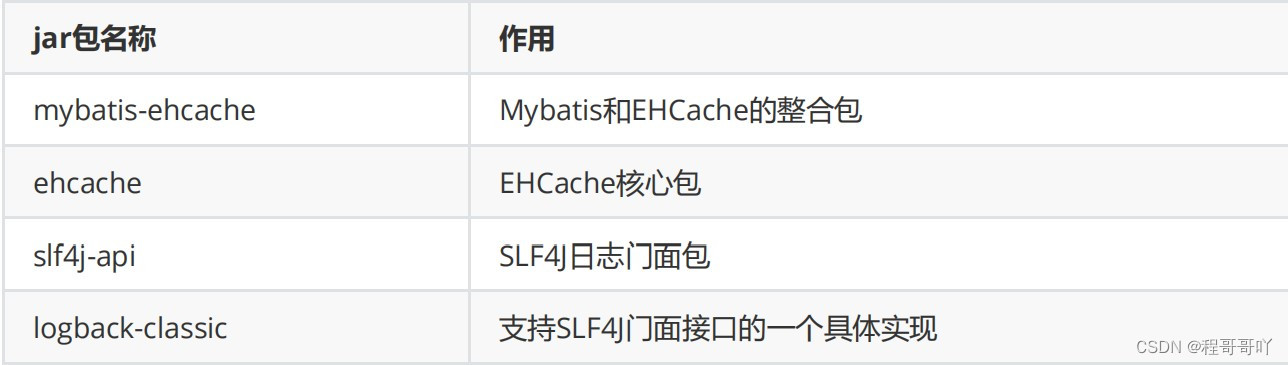
存在SLF4J时,作为简易日志的log4j将失效,此时我们需要借助SLF4J的具体实现logback来打印日
志。 创建logback的配置文件logback.xml
四、MyBatis 的逆向工程
正向工程:先创建Java实体类,由框架负责根据实体类生成数据库表。 Hibernate是支持正向工程的。
逆向工程:先创建数据库表,由框架负责根据数据库表,反向生成如下资源:
- Java实体类
- Mapper接口
- Mapper映射文件
4.1 创建逆向工程的步骤
- 添加依赖和插件
<dependencies> <dependency> <groupId>org.mybatisgroupId> <artifactId>mybatisartifactId> <version>3.5.7version> dependency> <dependency> <groupId>junitgroupId> <artifactId>junitartifactId> <version>4.12version> <scope>testscope> dependency> <dependency> <groupId>log4jgroupId> <artifactId>log4jartifactId> <version>1.2.17version> dependency> <dependency> <groupId>mysqlgroupId> <artifactId>mysql-connector-javaartifactId> <version>5.1.8version> dependency> <dependency> <groupId>com.github.pagehelpergroupId> <artifactId>pagehelperartifactId> <version>5.2.0version> dependency> dependencies> <build> <plugins> <plugin> <groupId>org.mybatis.generatorgroupId> <artifactId>mybatis-generator-maven-pluginartifactId> <version>1.3.0version> <dependencies> <dependency> <groupId>org.mybatis.generatorgroupId> <artifactId>mybatis-generator-coreartifactId> <version>1.3.2version> dependency> <dependency> <groupId>mysqlgroupId> <artifactId>mysql-connector-javaartifactId> <version>5.1.8version> dependency> dependencies> plugin> plugins> build>- 1
- 2
- 3
- 4
- 5
- 6
- 7
- 8
- 9
- 10
- 11
- 12
- 13
- 14
- 15
- 16
- 17
- 18
- 19
- 20
- 21
- 22
- 23
- 24
- 25
- 26
- 27
- 28
- 29
- 30
- 31
- 32
- 33
- 34
- 35
- 36
- 37
- 38
- 39
- 40
- 41
- 42
- 43
- 44
- 45
- 46
- 47
- 48
- 49
- 50
- 51
- 52
- 53
- 54
- 55
- 56
- 57
- 58
- 59
- 60
- 61
- 62
- 63
- 64
- 65
- 66
-
创建MyBatis的核心配置文件
-
创建逆向工程的配置文件
文件名必须是:generatorConfig.xml
DOCTYPE generatorConfiguration PUBLIC "-//mybatis.org//DTD MyBatis Generator Configuration 1.0//EN" "http://mybatis.org/dtd/mybatis-generator-config_1_0.dtd"> <generatorConfiguration> <context id="DB2Tables" targetRuntime="MyBatis3"> <jdbcConnection driverClass="com.mysql.jdbc.Driver" connectionURL="jdbc:mysql://localhost:3306/ssm" userId="root" password="123456"> jdbcConnection> <javaModelGenerator targetPackage="com.cgg.mybatis.pojo" targetProject=".\src\main\java"> <property name="enableSubPackages" value="true" /> <property name="trimStrings" value="true" /> javaModelGenerator> <sqlMapGenerator targetPackage="com.cgg.mybatis.mapper" targetProject=".\src\main\resources"> <property name="enableSubPackages" value="true" /> sqlMapGenerator> <javaClientGenerator type="XMLMAPPER" targetPackage="com.cgg.mybatis.mapper" targetProject=".\src\main\java"> <property name="enableSubPackages" value="true" /> javaClientGenerator> <table tableName="t_emp" domainObjectName="Emp"/> <table tableName="t_dept" domainObjectName="Dept"/> context> generatorConfiguration>- 1
- 2
- 3
- 4
- 5
- 6
- 7
- 8
- 9
- 10
- 11
- 12
- 13
- 14
- 15
- 16
- 17
- 18
- 19
- 20
- 21
- 22
- 23
- 24
- 25
- 26
- 27
- 28
- 29
- 30
- 31
- 32
- 33
- 34
- 35
- 36
- 37
-
执行MBG插件的generate目标

4.2 QBC 查询
@Test public void testMBG(){ SqlSession sqlSession = SqlSessionUtil.getSqlSession(); EmpMapper mapper = sqlSession.getMapper(EmpMapper.class); //根据id查询数据 /*Emp emp = mapper.selectByPrimaryKey(1); System.out.println(emp);*/ //查询所有数据 /*Listlist = mapper.selectByExample(null); list.forEach(System.out::println);*/ //根据条件查询数据 /*EmpExample example = new EmpExample(); example.createCriteria().andEmpNameEqualTo("张三").andAgeGreaterThanOrEqualTo(20); example.or().andGenderEqualTo("男"); Listlist = mapper.selectByExample(example); list.forEach(System.out::println);*/ Emp emp = new Emp(1, "小黑", null, "女"); //测试普通修改功能 //mapper.updateByPrimaryKey(emp); //测试选择性修改 mapper.updateByPrimaryKeySelective(emp); }- 1
- 2
- 3
- 4
- 5
- 6
- 7
- 8
- 9
- 10
- 11
- 12
- 13
- 14
- 15
- 16
- 17
- 18
- 19
- 20
- 21
- 22
五、分页插件
5.1 分页插件的使用步骤
-
添加依赖
-
配置分页插件
在MyBatis的核心配置文件中配置插件
<plugins> <plugin interceptor="com.github.pagehelper.PageInterceptor">plugin> plugins>- 1
- 2
- 3
- 4
5.2 分页插件的使用
-
在查询功能之前使用PageHelper.startPage(int pageNum, int pageSize)开启分页功能
pageNum:当前页的页码
pageSize:每页显示的条数
-
在查询获取list集合之后,使用PageInfo pageInfo = new PageInfo<>(List list, int navigatePages)获取分页相关数据
list:分页之后的数据
navigatePages:导航分页的页码数
-
分页相关数据
PageInfo{
pageNum=8, pageSize=4, size=2, startRow=29, endRow=30, total=30, pages=8,
list=Page{count=true, pageNum=8, pageSize=4, startRow=28, endRow=32, total=30,
pages=8, reasonable=false, pageSizeZero=false},
prePage=7, nextPage=0, isFirstPage=false, isLastPage=true, hasPreviousPage=true,
hasNextPage=false, navigatePages=5, navigateFirstPage4, navigateLastPage8,
navigatepageNums=[4, 5, 6, 7, 8]
}
pageNum:当前页的页码
pageSize:每页显示的条数
size:当前页显示的真实条数
total:总记录数
pages:总页数
prePage:上一页的页码
nextPage:下一页的页码
isFirstPage/isLastPage:是否为第一页/最后一页
hasPreviousPage/hasNextPage:是否存在上一页/下一页
navigatePages:导航分页的页码数
navigatepageNums:导航分页的页码,[1,2,3,4,5]
-
相关阅读:
java调用c函数
SpringMVC框架面试专题(初级-中级)-第七节
QT 如何防止 QTextEdit 自动滚动到最下方
<计算机网络自顶向下> TCP拥塞
Redis之分布式锁
java毕业设计“传情旧物”网站mybatis+源码+调试部署+系统+数据库+lw
机器学习(19)---XGBoost入门
Redlock 可能会导致不安全的原因
Python学习笔记-语言基础
悬浮窗开发设计实践
- 原文地址:https://blog.csdn.net/weixin_42200347/article/details/126286076


