-
jeecgboot入手
1.环境准备
http://boot.jeecg.org/jeecg/imgDragSort 在线环境
http://doc.jeecg.com 文档基础开发环境
JDK: 1.8+ (小于11)
Maven: 3.5+
MySql: 5.7+
Redis: 3.2 +
Node Js: 10.0 +
Npm: 5.6.0+
Yarn: 1.21.1+推荐IDE
后端使用 IntelliJ IDEA(Lombok Plugin 必装)
前端使用 IntelliJ IDEA 或 WebStorm配置镜像
npm config set registry https://registry.npm.taobao.org --global npm config set disturl https://npm.taobao.org/dist --global yarn config set registry https://registry.npm.taobao.org --global yarn config set disturl https://npm.taobao.org/dist --global- 1
- 2
- 3
- 4
- 5
安装 Lombok
http://www.javatiku.cn/idea/51.html热部署
IDEA2021.3.2中热部署插件JRebel安装
https://www.cnblogs.com/lyh233/p/14743752.html通过右侧父POM进行install
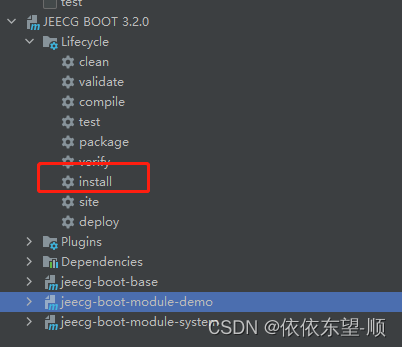
右键执行类jeecg-boot-module-system/org.jeecg.JeecgSystemApplication 启动项目启动之前配置:
- 执行Sql脚本: jeecg-boot/db/jeecgboot-mysql-5.7.sql
- 修改项目配置 (数据库、redis等),配置文件: jeecg-boot-module-system/src/main/resources/application-dev.yml
- 通过 http://localhost:8080/jeecg-boot/#/SwaggerModels/default 访问后台项目的swagger地址。

前端配置后台地址
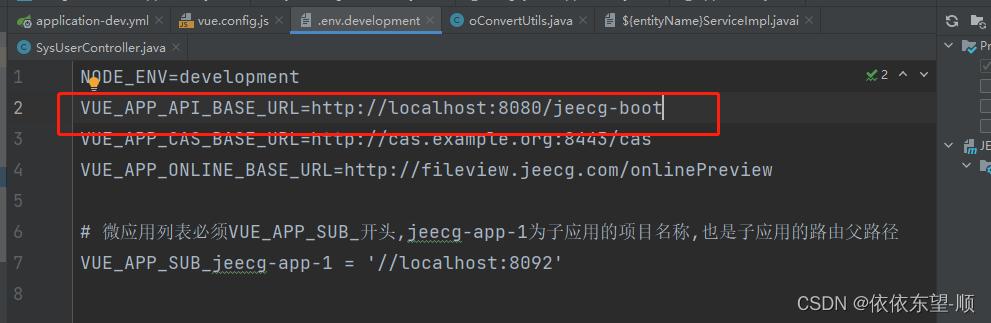
执行命令
yarn install- 1
启动前端项目 ant-design-vue-jeecg
npm run serve- 1
其他命令
# 下载依赖 yarn install # 启动 yarn run serve # 编译项目 yarn run build # Lints and fixes files yarn run lint- 1
- 2
- 3
- 4
- 5
- 6
- 7
- 8
- 9
- 10
- 11
2.项目结构说明
项目结构
├─jeecg-boot-parent(父POM: 项目依赖、modules组织)
│ ├─jeecg-boot-base(共通模块: 工具类、config、权限、查询过滤器、注解、接口等)
│ ├─jeecg-boot-module-demo 示例代码
│ ├─jeecg-boot-module-system (系统管理权限等功能) – 默认作为启动项目
│ ├─jeecg-boot-starter(微服务starter模块,不需要微服务可以删掉)
│ ├─jeecg-cloud-module(微服务生态模块,不需要微服务可以删掉) -
相关阅读:
jenkins 原理篇——pipeline流水线 声明式语法详解
Folly库实现阅读——FBString
嵌入式 QT多界面切换
微服务项目调用外部接口
shell编程之循环
easyexcel实现类似统计类型内容加样式导出
透过案例看清API接口的作用——演示1688商品详情接口
Java基础之多态(最简单最详细)
Okhttp 403 Forbidden
SpringBoot+Vue+Element-UI实现学生综合成绩测评系统
- 原文地址:https://blog.csdn.net/qq_41344974/article/details/126260815