-
wpf-窗口设计-常用小技巧
窗口
窗口标题居中
在Title后直接写TextBlock居中即可。
<Window ... Title="Demo" TextBlock.TextAlignment="Center" ...>- 1
窗口居中
public partial class WelcomeWindow : Window{ public WelcomeWindow(){ // 设置窗体居中 WindowStartupLocation = WindowStartupLocation.CenterScreen; InitializeComponent(); } }- 1
- 2
- 3
- 4
- 5
- 6
- 7
窗口取消最大化按钮
只保留最小化和关闭按钮
<Window ... ResizeMode="CanMinimize" ...>- 1
按钮
圆角按钮
先写资源,其中Border的CornerRadius控制了按钮的弧度
<Window.Resources> <ControlTemplate x:Key="roundCornerBtnTemplate" TargetType="Button"> <Border BorderThickness="1" BorderBrush="DarkGray" CornerRadius="5" Background="{TemplateBinding Background}"> <ContentPresenter VerticalAlignment="Center" HorizontalAlignment="Center"/> Border> ControlTemplate> Window.Resources>- 1
- 2
- 3
- 4
- 5
- 6
- 7
使用时:
<Button ...Template="{StaticResource roundCornerBtnTemplate}".../>- 1
穿过按钮点击下面的控件
举例:写一个按钮样式的菜单,点击菜单,出现下拉列表
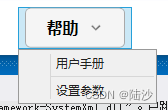
但是因为按钮本身可以点击,会禁掉菜单的效果,即无法出现下拉列表。此时,只要给button加个属性:IsHitTestVisible=“False”<Menu Background="Transparent" Height="42" Width="150" HorizontalAlignment="Left"> <MenuItem HorizontalContentAlignment="Stretch"> <MenuItem.Header> <Button x:Name="helpBtn" ... IsHitTestVisible="False"> ... Button> MenuItem.Header> <MenuItem Click="helpBtn_Click"> <MenuItem.Header> <TextBlock Text="用户手册" HorizontalAlignment="Center"/> MenuItem.Header> MenuItem> <Separator/> <MenuItem> <MenuItem.Header> <TextBlock Text="设置参数" HorizontalAlignment="Center"/> MenuItem.Header> MenuItem> MenuItem> Menu>- 1
- 2
- 3
- 4
- 5
- 6
- 7
- 8
- 9
- 10
- 11
- 12
- 13
- 14
- 15
- 16
- 17
- 18
- 19
- 20
- 21
-
相关阅读:
cesium文字实现避让功能
Express基础
以训辅教,以战促学 | 新版攻防世界平台正式上线运营!
Jupyter notebook无法显示pyecharts
协议栈对于源或目标IP地址为广播IP的ARP请求是如何处理的
Bootstrap学习(十一)
CSS基础教程
只看优点,这2款可视化产品你更心水谁?
vue3自定义指令看完就入门!
山东大学图书馆《乡村振兴战略下传统村落文化旅游设计》许少辉八一新著
- 原文地址:https://blog.csdn.net/pxy7896/article/details/126136581
