-
Flask框架学习:模板继承
什么叫模板继承呢?
在我的理解就是:在前端页面中肯定有很多页面中有很多相同的地方,比如页面顶部的导航栏,底部的页脚等部分,这时候如果每一个页面都重写一遍,会很麻烦,而且也没必要。这时候就可以做一个模板,叫做父模板,里面放上相同的部分,不同的部分先使用其他东西占位,然后在不同的页面中,继承这个父模板,不同的部分填充不同的内容。
模板页
首先做一个模板页面,模板是这样子的:

上下都是不变的东西,中间的部分是不同的,不同的页面继承这个模板页,然后在中间填充不同的内容。
导航栏的两个超链接:
<li><a href="/" >首页a>li> <li><a href="/about" >关于我们a>li>- 1
- 2
注意:这里的跳转路径是指定到某一个路由,不是某一个html页面。
相同部分的代码就是普通的
html代码,只有需要填充的区域代码写法不同:首先是标题title,其他页面需要继承模板页,所以模板页的标题不能写死,而是需要动态变化的,所以需要先用一个block占位:
写法是这样的,
title标签中间的内容由一个block占着,这个block叫做title,名字可以随意,后面会根据名字选择block来填充。<title>{% block title %}{% endblock %}title>- 1
然后是中间区域:
<div style="background-color:silver;height: 300px;width: 500px;margin: 10px"> 不同的部分 {% block body %} {% endblock %} div>- 1
- 2
- 3
- 4
- 5
- 6
这里也有一个
block,叫做body。注意:每一个block都需要一个{% endblock %}作为block的结束位置。完整代码:
DOCTYPE html> <html lang="en"> <head> <meta charset="UTF-8"> <title>{% block title %}{% endblock %}title> head> <body> <div style="background-color: beige;height: 200px;width: 300px"> 相同的导航栏 <ul> <li><a href="/" >首页a>li> <li><a href="/about" >关于我们a>li> ul> div> <div style="background-color:silver;height: 300px;width: 500px;margin: 10px"> <p>不同的部分p> {% block body %} {% endblock %} div> <div style="background-color: burlywood;height: 100px;width: 200px"> <footer style="background-color: darkgray">相同的页脚部分footer> div> body> html>- 1
- 2
- 3
- 4
- 5
- 6
- 7
- 8
- 9
- 10
- 11
- 12
- 13
- 14
- 15
- 16
- 17
- 18
- 19
- 20
- 21
- 22
- 23
- 24
- 25
- 26
- 27
- 28
- 29
- 30
- 31
继承模板的页面:
index.html现在新建一个页面:
index.html,它继承之前的模板页面:由于是继承了父模板,所以首先要指定这个模板继承哪一个模板。
{% extends '模板.html' %},表示继承叫做模板.html的页面。然后分别指定不同的block中填充不同的内容。{% extends '模板.html' %} {% block title %} 继承了模板页的 首页 {% endblock %} {% block body %} <p>首页中的内容p> {% endblock %}- 1
- 2
- 3
- 4
- 5
- 6
- 7
- 8
- 9
- 10
- 11
- 12
- 13
这个页面对应的路由是
/,对应的视图函数是:#根路径,渲染index.html页面 @app.route('/') def index(): return render_template('index.html')- 1
- 2
- 3
- 4
继承模板的页面:
about.html首先about页面对应的路由时
/about,对应的视图函数:#/about路径,渲染about.html页面 teams = ['小明','小红','小刚'] @app.route('/about') def about(): #以关键字参数的形式把teams传递到about.html页面中 return render_template('about.html',teams = teams)- 1
- 2
- 3
- 4
- 5
- 6
这里我们传递一个列表过去,在
about.html页面中加载出来。about.html
{% extends '模板.html' %} {% block title %} 继承模板页的 about页面 {% endblock %} {% block body %} <p>about页面中的内容</p> <p> 我们的团队成员有: {% for name in teams %} #拿到传递的参数列表,遍历 <li>{{ name }}</li> {% endfor %} </p> {% endblock %}- 1
- 2
- 3
- 4
- 5
- 6
- 7
- 8
- 9
- 10
- 11
- 12
- 13
- 14
- 15
- 16
对应的py文件:
模板继承练习.pyfrom flask import Flask,render_template app = Flask(__name__,template_folder='../templates') #根路径,渲染index.html页面 @app.route('/') def index(): return render_template('index.html') #/about路径,渲染about.html页面 teams = ['小明','小红','小刚'] @app.route('/about') def about(): return render_template('about.html',teams = teams) if __name__ == '__main__': app.run()- 1
- 2
- 3
- 4
- 5
- 6
- 7
- 8
- 9
- 10
- 11
- 12
- 13
- 14
- 15
- 16
- 17
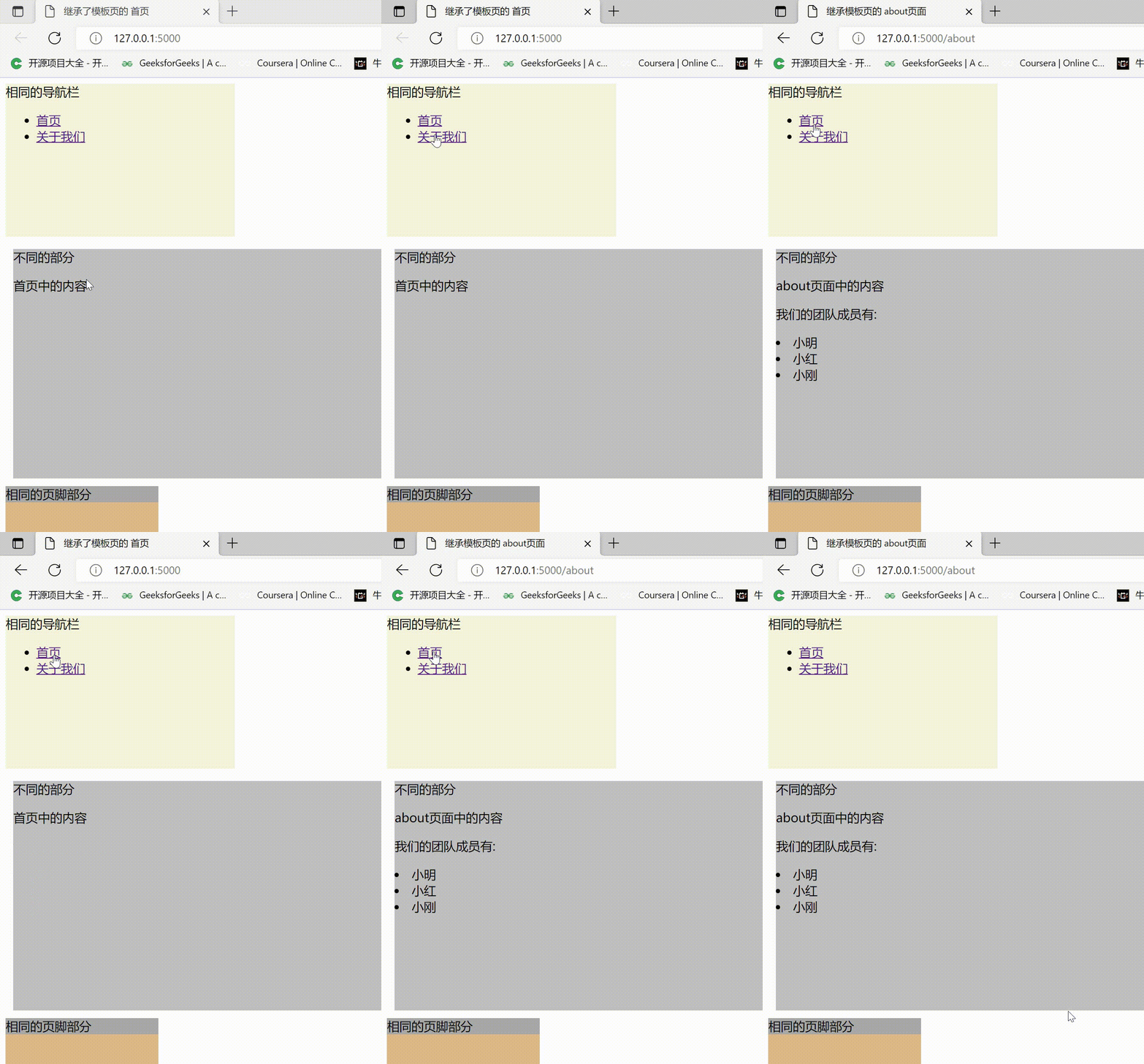
执行效果如下:
-
相关阅读:
WinPcap4.1.3安装失败解决方法,A newer version of winpcap...
甲壳素晶须/羟丁基壳聚糖温敏水凝胶/羟乙基壳聚糖/透明质酸双网络水凝胶的制备
shell脚本变量
VGG16 实现图像分类的 pytorch 实现、步骤精讲
编译原理:上下文无关文法 CFG
飞书公式总结
ps神经网络滤镜安装包,ps神经网络滤镜用不了
rabbitMQ系列之一 安装 docker
Apache Spark 的基本概念和在大数据分析中的应用
netstat 基本使用方法
- 原文地址:https://blog.csdn.net/weixin_42576837/article/details/126179493
