文件
什么是文件
文件是保存数据的地方
文件流
文件在程序中是以流的形式来操作的

流:数据在数据源(文件)和程序(内存)之间经历的路径
输入流:数据从数据源(文件)到程序(内存)的路径
输出流:数据从程序(内存)到数据源(文件)的路径

常用的文件操作
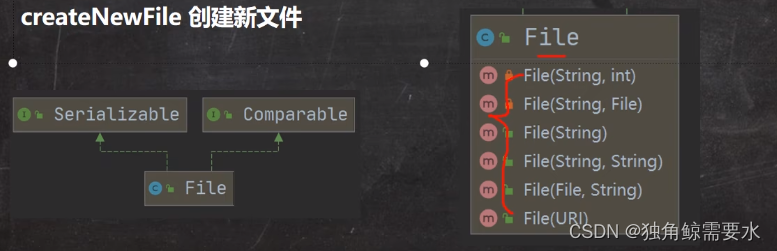
创建文件对象相关构造器和方法
相关方法:
new File(String pathname)				根据路径构建一个File对象
new File(File parent,String child)		根据父目录文件+子路径构建
new File(String parent,String child)	根据父目录+子路径构建

createNewFile	创建新文件
public class Date {
    public static void main(String[] args){

    }
    @Test
    public void creat01(){
        String filePath = "e:\\news1.txt";
        File file = new File(filePath);
        try {
            file.createNewFile();   只有执行了createNewFile 方法,才会真正的,在磁盘创建该文件
            System.out.println("news1.txt文件创建成功");
        } catch (IOException e) {
            e.printStackTrace();
        }
    }
    @Test
    public void creat02(){
        File parentFile = new File("e:\\");
        String filename = "news2.txt";
        File file = new File(parentFile, filename);
        try {
            file.createNewFile();
            System.out.println("news2.txt文件创建成功");
        } catch (IOException e) {
            e.printStackTrace();
        }
    }

    @Test
    public void creat03(){
        String parentPath = "e:\\";
        String fileName = "news3.txt";
        File file = new File(parentPath, fileName);
        try {
            file.createNewFile();
            System.out.println("news3.txt文件创建成功");
        } catch (IOException e) {
            e.printStackTrace();
        }
    }
}
- 1
- 2
- 3
- 4
- 5
- 6
- 7
- 8
- 9
- 10
- 11
- 12
- 13
- 14
- 15
- 16
- 17
- 18
- 19
- 20
- 21
- 22
- 23
- 24
- 25
- 26
- 27
- 28
- 29
- 30
- 31
- 32
- 33
- 34
- 35
- 36
- 37
- 38
- 39
- 40
- 41
- 42
获取文件的相关信息
getName		获取文件的名字
getAbsolutePath		获取文件的绝对路径
getParent	获取文件的父级目录
length		获取文件的大小
exists		这个文件是否存在
isFile		是不是一个文件
isDirectory		是不是一个目录
public class Date {
    public static void main(String[] args){

    }
    @Test
    public void info(){
        File file = new File("e:\\news1.txt");

        System.out.println("文件名字=" + file.getName());
        System.out.println("文件的绝对路径=" + file.getAbsolutePath());
        System.out.println("文件父级目录=" + file.getParent());
        System.out.println("文件大小(字节)=" + file.length());
        System.out.println("文件是否存在:" + file.exists());
        System.out.println("是不是一个文件:" + file.isFile());
        System.out.println("是不是一个目录:" + file.isDirectory());
    }
}
- 1
- 2
- 3
- 4
- 5
- 6
- 7
- 8
- 9
- 10
- 11
- 12
- 13
- 14
- 15
- 16
- 17
目录的操作和文件删除
mkdir创建一级目录、mkdirs创建多级目录、delete删除空目录或文件

public class Date {
    public static void main(String[] args) {


    }
    @Test	判断e:\\news1.txt是否存在,如果存在就删除
    public void m1(){

        String filePath = "e:\\news1.txt";
        File file = new File(filePath);
        if(file.exists()){
            if(file.delete()){
                System.out.println("删除成功");
            }else {
                System.out.println("删除失败");
            }
        }else {
            System.out.println("该文件不存在");
        }
    }
    @Test	判断e:\\demo02是否存在,存在就删除,否则提示不存在
    public void m2(){
        String filePath = "e:\\dome02";
        File file = new File(filePath);
        if(file.exists()){
            if(file.delete()){
                System.out.println("删除成功");
            }else {
                System.out.println("删除失败");
            }
        }else {
            System.out.println("该目录不存在");
        }
    }
    @Test	判断 e:\\dome03\\a\\b\\c目录是否存在,如果存在就提示已经存在,否则就创建
    public void m3(){
        String directoryPath = "e:\\dome03\\a\\b\\c";
        File file = new File(directoryPath);
        if(file.exists()){
            System.out.println("该目录存在");
        }else {
            if (file.mkdirs()){
                System.out.println("该目录创建成功");
            }else {
                System.out.println("该目录创建失败");
            }
        }
    }
}
- 1
- 2
- 3
- 4
- 5
- 6
- 7
- 8
- 9
- 10
- 11
- 12
- 13
- 14
- 15
- 16
- 17
- 18
- 19
- 20
- 21
- 22
- 23
- 24
- 25
- 26
- 27
- 28
- 29
- 30
- 31
- 32
- 33
- 34
- 35
- 36
- 37
- 38
- 39
- 40
- 41
- 42
- 43
- 44
- 45
- 46
- 47
- 48
- 49
IO流原理及流的分类
Java IO流原理
Java IO流原理

1、I/O是Input/Output的缩写,I/O技术是非常实用的技术,用于处理数据传输。如读/写文件,网络通讯等

2、Java程序中,对于数据的输入/输出操作以“流(stream)”的方式进行

3、java.io包下提供了各种“流”类和接口,用以获取不同类的数据,并通过方法输入或输出数据

4、输入input:读取外部数据(磁盘、光盘等存储设备的数据)到程序(内存)中

5、输出output:将程序(内存)数据输出到磁盘、光盘等存储设备中

流的分类
流的分类

按操作数据单位不同分为:字节流(8 bit)二进制文件,字符流(按字符)文本文件

按数据流的流向不同分为:输入流,输出流

按流的角色的不同分为:节点流,处理流/包装流


InputStream:字节输入流
InputStream抽象类是所有类字节输入流的超类

InputStream 常用的子类
1、FileInputStream:文件输入流

2、BufferedInputStream:缓存字节输入流

3、ObjectInputStream:对象字节输入流

FileInputStream:文件输入流
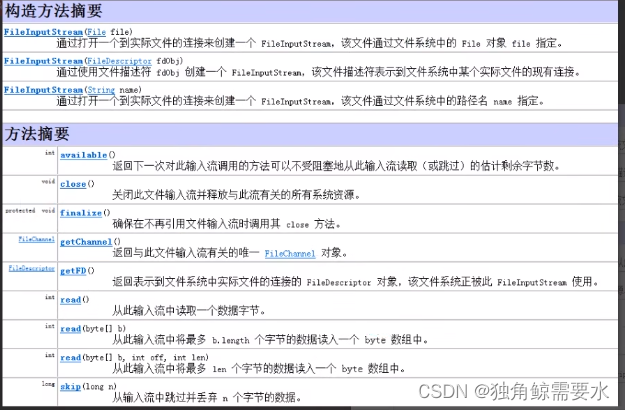
使用FileInputStream 读取hello.txt文件,并将文件内容显示到控制台

public class Date {
    public static void main(String[] args) {

    }
    @Test
    public void readFile01() throws IOException {

        int readData = 0;
        String filePath = "e:\\hello.txt";
        FileInputStream fileInputStream = new FileInputStream(filePath);
        while ((readData = fileInputStream.read()) != -1){
            System.out.print((char) readData);
        }
        fileInputStream.close();
    }

    @Test
    public void readFile02() throws IOException {

        byte[] buf = new byte[8];
        int readLen = 0;
        String filePath = "e:\\hello.txt";
        FileInputStream fileInputStream = new FileInputStream(filePath);
        while ((readLen = fileInputStream.read(buf)) != -1){
            System.out.print(new String(buf,0, readLen));
        }
        fileInputStream.close();
    }
}
- 1
- 2
- 3
- 4
- 5
- 6
- 7
- 8
- 9
- 10
- 11
- 12
- 13
- 14
- 15
- 16
- 17
- 18
- 19
- 20
- 21
- 22
- 23
- 24
- 25
- 26
- 27
- 28
- 29
- 30
- 31
- 32
OutputStream:字节输出流
FileOutputStream:文件输出流


使用FileOutputStream在a.txt文件中写入“hello,world”。如果文件不存在,会创建文件(前提是目录已经存在)

public class Date {
    public static void main(String[] args) {

    }
   @Test
    public void writeFile() throws IOException {
       String filePath = "e:\\a.txt";
       FileOutputStream fileOutputStream = new FileOutputStream(filePath);
       String str = "hello,world!";
       int num = str.length();
       fileOutputStream.write(str.getBytes(), 0, num);
       fileOutputStream.close();
    }
}
文件拷贝
public class Date {
public static void main(String[] args) throws IOException {
String srcFilePath = "e:\\0.jpeg";
String destFilePath = "d:\\0.jpeg";
FileInputStream fileInputStream = new FileInputStream(srcFilePath);
FileOutputStream fileOutputStream = new FileOutputStream(destFilePath);
byte[] buf = new byte[1024];
int readLen = 0;
while ((readLen = fileInputStream.read(buf)) != -1) {
fileOutputStream.write(buf, 0, readLen);
}
System.out.println("拷贝成功");
if (fileInputStream != null && fileOutputStream != null) {
fileInputStream.close();
fileOutputStream.close();
}
}
}
- 1
- 2
- 3
- 4
- 5
- 6
- 7
- 8
- 9
- 10
- 11
- 12
- 13
- 14
- 15
- 16
- 17
- 18
- 19
- 20
- 21
- 22
FileReader和FileWrite介绍
FileReader和FileWrite是字符流,即按照字符流来操作IO
Filereader(字符输入流)

FileReader 相关方法
1)new Filereader(File/String)

2)read:	每次读取单个字符,返回该字符,如果到文件末尾返回-1

3)read(char[]):	批量读取多个字符到数组,返回读取到的字符数,如果到文件末尾返回-1

相关API:
1)new String(char[]):	将char[]转换成String

2)new String(char[],off,len):	将char[]的指定部分转换成String
使用FileReader从story.txt读取内容,并显示

public class Date {
    public static void main(String[] args) throws IOException {
        int data = 0;
        String filePath = "e:\\story.txt";
        FileReader fileReader = new FileReader(filePath);
        while ((data = fileReader.read()) != -1){
            System.out.print((char) data);
        }
        fileReader.close();
    }
}			一个字符一个字符读取,比较慢

或

public class Date {
    public static void main(String[] args) throws IOException {
        int readlen = 0;
        char[] buf = new char[8];
        String filePath = "e:\\story.txt";
        FileReader fileReader = new FileReader(filePath);
        while ((readlen = fileReader.read(buf)) != -1){
            System.out.print(new String(buf,0,readlen));
        }
        fileReader.close();
    }
}
- 1
- 2
- 3
- 4
- 5
- 6
- 7
- 8
- 9
- 10
- 11
- 12
- 13
- 14
- 15
- 16
- 17
- 18
- 19
- 20
- 21
- 22
- 23
- 24
- 25
- 26
- 27
- 28
FileWriter(字符输出流)

Filewriter 常用方法
1)new FileWriter(File/String):	覆盖模式,相当于流的指针在首段

2)new FileWirter(File/String,true):	追加模式,相当于流的指针在尾端

3)write(int):	写入单个字符

4)write(char[]):写入指定数组

5)write(char[],off,len):写入指定数组的指定部分

6)write(String) : 写入整个字符串

7)write(String,off,len):	写入字符串的指定部分


相关API:String类:toCharArray:	将String转换成char[]

注意:FileWriter使用后,必须要关闭(close)或者刷新(flush),否则写入不到指定的文件
- 1
- 2
- 3
- 4
- 5
- 6
- 7
- 8
- 9
- 10
- 11
- 12
- 13
- 14
- 15
- 16
- 17
- 18
- 19
public class Date {
    public static void main(String[] args) throws IOException {
        String filePath = "e:\\note.txt";
        FileWriter fileWriter = new FileWriter(filePath);

        fileWriter.write('q');
        char[] n = {'a','b','c'};
        fileWriter.write(n);
        fileWriter.write(n,0,1);
        fileWriter.write("风雨之后,定见彩虹");
        fileWriter.write("abcdefg",0,5);

        fileWriter.close();
    }
}
节点流和处理流
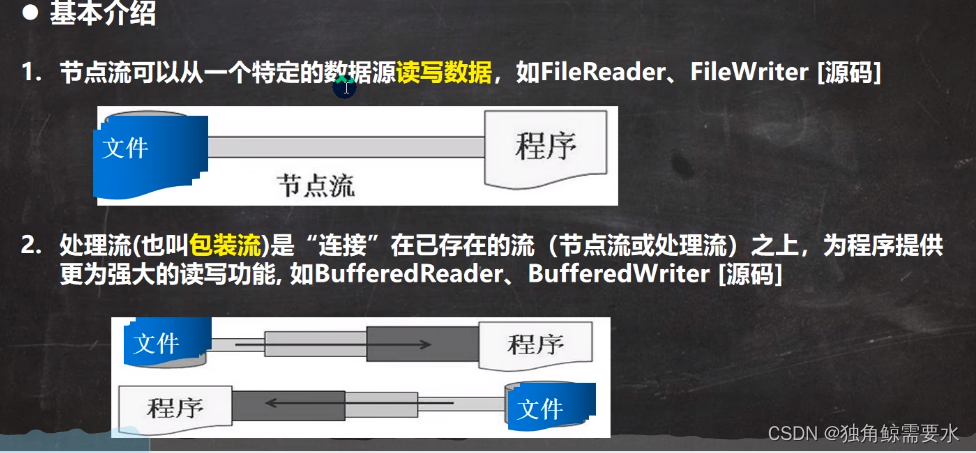

节点流和处理流的区别和联系

1、节点流是底层流/低级流,直接跟数据源相接

2、处理流(包装流)包装节点流,既可以消除不同节点流的实现差异,也可以提供更方便的方法来完成输入输出

3、处理流(也叫包装流对节点流进行包装,使用了修饰器设计模式,不会直接与数据源相连)

处理流的功能主要体现在以下两个方面:
1、性能的提高:主要以增加缓冲的方式来提高输入输出的效率

2、操作的便捷:处理流可能提供了一系列便捷的方法来一次输入输出大批量的数据,使用更加灵活方便
处理流:缓冲流(处理字符:文件等)—BufferedReader和BufferedWrite
BufferedReader 和 BufferedWrite 属于字符流,是按照字符来读取数据的
关闭时,只需要关闭外层流即可
BufferedReader

使用BufferedReader 读取文本文件,并显示在控制台

public class Date {
    public static void main(String[] args) throws IOException {

        String filePath = "e:\\story.txt";

        BufferedReader bufferedReader = new BufferedReader(new FileReader(filePath));

        String line;
        while ((line = bufferedReader.readLine())!= null) {
            System.out.println(line);
        }
        bufferedReader.close();
    }
}
BufferedWrite
使用BufferedWrite 将“北京,欢迎你”,追加写入到文件中

public class Date {
    public static void main(String[] args) throws IOException {

        String filePath = "e:\\story.txt";

        BufferedWriter bufferedWriter = new BufferedWriter(new FileWriter(filePath,true));
        bufferedWriter.write("北京,欢迎你");
        System.out.println();
        bufferedWriter.close();
    }
}
使用BufferedReader和BufferedWrite完成文件拷贝
public class Date {
    public static void main(String[] args) throws IOException {

        String srcFilePath = "e:\\hello.txt";
        String destFilePath = "e:\\1.txt";

        String line;

        BufferedReader bufferedReader = new BufferedReader(new FileReader(srcFilePath));
        BufferedWriter bufferedWriter = new BufferedWriter(new FileWriter(destFilePath));

        while ((line = bufferedReader.readLine()) != null) {
            bufferedWriter.write(line);
            bufferedWriter.newLine();
        }

        if(bufferedReader != null && bufferedWriter != null){
            bufferedReader.close();
            bufferedWriter.close();
        }
    }
}
- 1
- 2
- 3
- 4
- 5
- 6
- 7
- 8
- 9
- 10
- 11
- 12
- 13
- 14
- 15
- 16
- 17
- 18
- 19
- 20
- 21
- 22
处理流:缓冲流(处理字节:图片,声音等)—BufferedInputStream和BufferedOutputStream
BufferedInputStream
BufferedInputStream 是字节流,在创建BufferedInputStream 时,会创建一个内部缓冲区数组

BufferedOutputStream
BufferedOutputStream 是字节流,实现缓冲的输出流,可以将多个字节写入底层输出流。而不必对每次字节写入调用底层系统

字节处理流拷贝文件
编程完成图片/音乐的拷贝(要求使用Buffered...流)

public class Date {
    public static void main(String[] args) throws IOException {

        String srcFilePath = "e:\\0.jpeg";
        String destFilePath = "e:\\1.jpeg";

        byte[] buff = new byte[1024];
        int readLen = 0;

        BufferedInputStream bufferedInputStream = new BufferedInputStream(new FileInputStream(srcFilePath));
        BufferedOutputStream bufferedOutputStream = new BufferedOutputStream(new FileOutputStream(destFilePath));

        while ((readLen = bufferedInputStream.read(buff)) != -1) {
            bufferedOutputStream.write(buff,0,readLen);
        }
        if (bufferedInputStream != null && bufferedOutputStream != null) {
            bufferedInputStream.close();
            bufferedOutputStream.close();
        }
    }
}
- 1
- 2
- 3
- 4
- 5
- 6
- 7
- 8
- 9
- 10
- 11
- 12
- 13
- 14
- 15
- 16
- 17
- 18
- 19
- 20
- 21
- 22
- 23
处理流:对象流—ObjectInputStream和ObjectOutputStream
看一个需求:

1、将int num = 100 这个int数据保存到文件中,注意不是100数字,而是int 100,并且,能够从文件中直接恢复 int 100

2、将Dog dog = new Dog("小黄",3) 这个dog对象保存到文件中,并且能够从文件恢复

3、上面的要求,就是能够将基本数据类型或者对象进行序列化和反序列化操作

序列化和反序列化

1、序列化就是在保存数据时,保存数据的值和数据类型

2、反序列化就是在恢复数据时,恢复数据的值和数据类型

3、需要让某个对象支持序列化机制,则必须让其类是可序列化的,为了让某个类是可序列化的,该类必须实现如下两个接口之一:
>Serializable	这是一个标记接口
>Externalizable 	该接口有方法需要实现,因此一般不使用它
- 1
- 2
- 3
- 4
- 5
- 6
- 7
- 8
- 9
- 10
- 11
- 12
- 13
- 14
- 15
- 16
- 17
ObjectOutputStream
ObjectOutputStream 提供了反序列化功能

使用ObjectOutputStream 序列化 基本数据类型和一个 Dog对象(name,age),并保存到data.dat文件中

public class Date {
    public static void main(String[] args) throws IOException {

        String filePath = "e:\\data.dat";	序列化后,保存的文件格式不是纯文本,而是按照它的格式来保存的

        ObjectOutputStream objectOutputStream = new ObjectOutputStream(new FileOutputStream(filePath));

        objectOutputStream.writeInt(100); 		int-->Integer(Integer实现了 Serializable接口)
        objectOutputStream.writeBoolean(true);	Boolean实现了 Serializable接口
        objectOutputStream.writeChar('a');	Char实现了 Serializable接口
        objectOutputStream.writeDouble(1.1);	Double实现了 Serializable接口
        objectOutputStream.writeUTF("hahahahah");	String实现了 Serializable接口

        objectOutputStream.writeObject(new Dog("旺财",10));
        objectOutputStream.close();
        System.out.println("数据以序列化形式保存完毕");
    }
}
class Dog implements Serializable{
    private String name;
    private int age;
    public Dog(String name, int age) {
        this.name = name;
        this.age = age;
    }

    public String getName() {
        return name;
    }

    public void setName(String name) {
        this.name = name;
    }

    public int getAge() {
        return age;
    }

    public void setAge(int age) {
        this.age = age;
    }

    @Override
    public String toString() {
        return "Dog{" +
                "name='" + name + '\'' +
                ", age=" + age +
                '}';
    }
}

- 1
- 2
- 3
- 4
- 5
- 6
- 7
- 8
- 9
- 10
- 11
- 12
- 13
- 14
- 15
- 16
- 17
- 18
- 19
- 20
- 21
- 22
- 23
- 24
- 25
- 26
- 27
- 28
- 29
- 30
- 31
- 32
- 33
- 34
- 35
- 36
- 37
- 38
- 39
- 40
- 41
- 42
- 43
- 44
- 45
- 46
- 47
- 48
- 49
- 50
- 51
- 52
ObjectInputStream
ObjectInputStream 提供了序列化功能
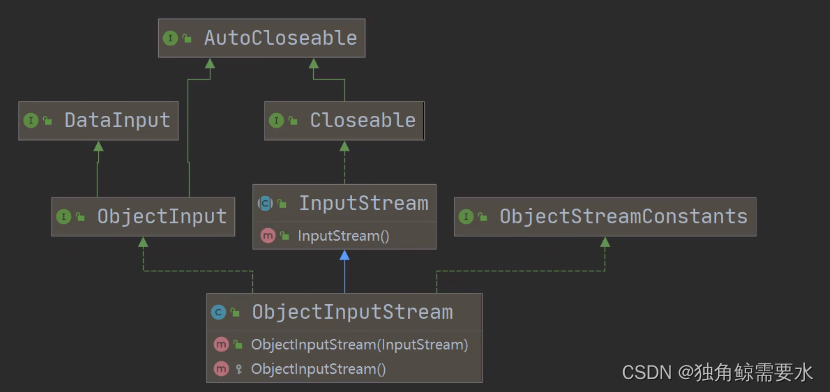
使用ObjectInputStream 读取 data.dat并反序列化恢复数据
public class Date {
public static void main(String[] args) throws IOException, ClassNotFoundException {
String filePath = "e:\\data.dat";
ObjectInputStream objectinputStream = new ObjectInputStream(new FileInputStream(filePath));
System.out.println(objectinputStream.readInt());
System.out.println(objectinputStream.readBoolean());
System.out.println(objectinputStream.readChar());
System.out.println(objectinputStream.readDouble());
System.out.println(objectinputStream.readUTF());
Object dog = objectinputStream.readObject();
System.out.println("运行类型="+dog.getClass());
System.out.println("dog = " + dog);
Dog dog1 = (Dog)dog;
System.out.println("dog名字:"+dog1.getName());
System.out.println("dog年龄:"+dog1.getAge());
objectinputStream.close();
}
}
class Dog implements Serializable{
private String name;
private int age;
public Dog(String name, int age) {
this.name = name;
this.age = age;
}
public String getName() {
return name;
}
public void setName(String name) {
this.name = name;
}
public int getAge() {
return age;
}
public void setAge(int age) {
this.age = age;
}
@Override
public String toString() {
return "Dog{" +
"name='" + name + '\'' +
", age=" + age +
'}';
}
}
- 1
- 2
- 3
- 4
- 5
- 6
- 7
- 8
- 9
- 10
- 11
- 12
- 13
- 14
- 15
- 16
- 17
- 18
- 19
- 20
- 21
- 22
- 23
- 24
- 25
- 26
- 27
- 28
- 29
- 30
- 31
- 32
- 33
- 34
- 35
- 36
- 37
- 38
- 39
- 40
- 41
- 42
- 43
- 44
- 45
- 46
- 47
- 48
- 49
- 50
- 51
- 52
- 53
- 54
- 55
- 56
- 57
- 58
节点流和处理流的注意事项和细节说明
1)、读写顺序要一致

2)、要求实现序列化或反序列化对象,需要实现Serializable

3)、序列化的类中建议添加SerialVersionUID,为了提高版本的兼容性,不会因为加了一个属性当成了新的类
	private static final long serialVersionUID = 1L;

4)、序列化对象时,默认将里面所有属性都进行序列化,但除了static或transient修饰的成员

5)、序列化对象时,要求里面属性的类型也需要实现序列化接口

6)、序列化具备可继承性,也就是如果某类以及实现了序列化,则它的所有子类也已经默认实现了序列化
标准输入输出流
							类型				默认设备		编译类型			运行类型
System.in  标准输入			InputStream			键盘		InputStream		BufferedInputStream
System.out 标准输入			PrintStream			显示器		PrintStream		PrintStream
转换流InputStreamReader和OutputStreamWrite(字节流转成字符流)
默认情况下,读取文件是按照utf-8编码,一旦文件编码是其他的,会导致乱码
介绍:
1、InputStreamReader :Reader的子类,可以将InputStream(字节流)包装成Reader(字符流)

2、OutputStreamWrite :Write的子类,实现将OutputStream(字节流)包装成Writer(字符流)

3、当处理纯文本数据时,如果使用字符流效率更高,并且可以有效解决中文问题,所以建议将字节流转换成字符流

4、可以在使用时指定编码格式(比如 utf-8,gbk,gb2312,ISO8859-1等)
InputStreamReader
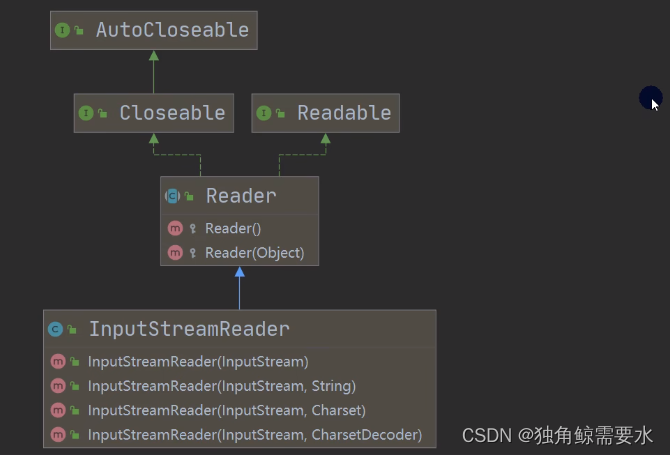
将字节流FileInputStream 包装成(转换成)字符流InputStreamReader,对文件进行读取(按照utf-8格式),进而在包装成BufferedReader

public class Date {
    public static void main(String[] args) throws IOException {

        String filePath = "e:\\a.txt";

        把FileInputStream 转成 InputStreamReader
        指定编码GBK
        InputStreamReader inputStreamReader = new InputStreamReader(new FileInputStream(filePath),"gbk");

		把InputStreamReader 传入 BufferedReader
        BufferedReader bufferedReader = new BufferedReader(inputStreamReader);

		或
		BufferedReader bufferedReader1 = new BufferedReader(new InputStreamReader(new FileInputStream(filePath), "GBK"));


        读取
        String s = bufferedReader.readLine();
        System.out.println("读取内容:" + s);

		关闭外层流
        bufferedReader.close();
    }
}
- 1
- 2
- 3
- 4
- 5
- 6
- 7
- 8
- 9
- 10
- 11
- 12
- 13
- 14
- 15
- 16
- 17
- 18
- 19
- 20
- 21
- 22
- 23
- 24
- 25
- 26
OutputStreamWrite

将字节流FIleOutputStream 包装成(转换成)字符流OutputStreamWrite,对文件进行写入(按照GBK格式,也可以指定其他格式,比如utf-8)

public class Date {
    public static void main(String[] args) throws IOException {

        String filePath = "e:\\a1.txt";
        OutputStreamWriter outputStreamWriter = new OutputStreamWriter(new FileOutputStream(filePath),"gbk");
        outputStreamWriter.write("wawawa,wawaw哇");
        outputStreamWriter.close();
    }
}
打印流—PrintStream(字节流)和PrintWriter(字符流)
打印流只有输出流,没有输入流
PrintStream

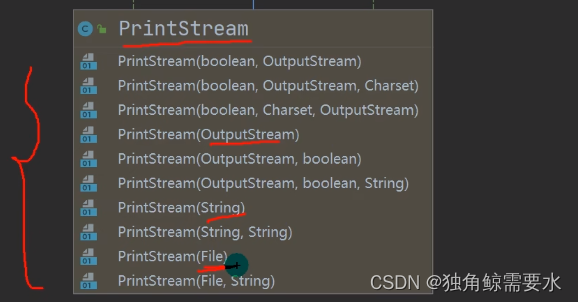
演示PrintStream	(字节打印流)

public class Date {
    public static void main(String[] args) throws IOException {

        PrintStream out = System.out;
        out.print("hello"); 	在默认情况下,输出数据的位置是 标准输出,即显示器
        out.write("hi".getBytes());	 print底层使用的是write,所以我们可以直接调用write进行打印/输出
        out.close();

        System.setOut(new PrintStream("e:\\f1.txt")); 	输出位置修改到"e:\\f1.txt"
        System.out.println("哈哈哈哈哈"); 	输出到"e:\\f1.txt"
    }
}
PrintWriter


演示PrintWriter

public class Date {
    public static void main(String[] args) throws IOException {

        PrintWriter printWriter = new PrintWriter(System.out);	System.out是标准输出,所以会打印打显示器上
        printWriter.print("你好");
        printWriter.close();

        PrintWriter printWriter1 = new PrintWriter(new FileWriter("e:\\f2.txt"));
        printWriter1.print("你好");
        printWriter1.close();
    }
}
Properties类
传统方法解决问题

传统方法
mysql02.properties文件
ip=192.168.123
user=root
pwd=12345
==========================================================================================
public class Date {
public static void main(String[] args) throws IOException {
BufferedReader br = new BufferedReader(new FileReader("src\\mysql02.properties"));
String line = "";
while ((line = br.readLine()) != null) {
String[] split = line.split("=");
if("ip".equals(split[0])){
System.out.println(split[0] + "值是:" + split[1]);
}
}
br.close();
}
}
- 1
- 2
- 3
- 4
- 5
- 6
- 7
- 8
- 9
- 10
- 11
- 12
- 13
- 14
- 15
- 16
- 17
- 18
- 19
- 20
- 21
- 22
- 23
- 24
Properties读文件


使用Properties类完成对 mysql.Properties 的读取
public class Date {
public static void main(String[] args) throws IOException {
Properties properties = new Properties();
properties.load(new FileReader("src\\mysql02.properties"));
properties.list(System.out);
String user = properties.getProperty("user");
String pwd = properties.getProperty("pwd");
System.out.println("用户名=" + user);
System.out.println("密码是=" + pwd);
}
}
Properties修改文件
使用Properties类添加key-val到新文件 mysql02.properties中

public class Date {
    public static void main(String[] args) throws IOException {

        Properties properties = new Properties();
        properties.setProperty("charset","utf-8");
        properties.setProperty("user","汤姆"); 中文是Unicode码值
        properties.setProperty("pwd","abc111");

        properties.store(new FileOutputStream("src\\mysql03.properties"),null);第二个参数null,为注释
        System.out.println("配置文件成功");
    }
}
如果改文件没有key,就是创建

如果该文件有key,就是修改