-
SpringBoot中localeResolver使用教程
SpringBoot 中 localeResolver 的实现原理
WebMvcAutoConfiguration 类中
1、WebMvcAutoConfiguration 是SpringBoot中的 Web方面的自动配置类。
2、当用户没有创建自己的 localeResolver 时,这个配置方法就会生效,从而产生一个localeResolver。(配置自己的localeResolver时,Bean名必须为localeResolver)。
3、spring.web.locale-resolver、spring.mvc.locale-resolver 的配置属性都有两个值可供选择。(fixed、accept_header)。
4、选择属性值 fixed,表示 Locale 区域对象是 固定的。
5、当属性值为fixed,应该搭配spring.web.locale、spring.mvc.locale 这两个配置属性一起使用,给出固定的Locale 区域对象。
6、假如属性值为fixed,又没有搭配上面两个属性之一,则因为上面两个属性没有默认值,则Locale 区域对象将会使用运行主机的默认语言环境生成一个Locale 区域对象。
6、从以下的方法的执行流程可以看出,spring.web.locale-resolver 优先级比 spring.mvc.locale-resolver 高一些。
7、因为spring.web.locale-resolver、spring.mvc.locale-resolver 它们的 默认值 都为 accept_header,所以,只要不更改配置,默认就不是固定的Locale 区域对象。就会继续执行最下面的部分。8、此时spring.web.locale、spring.mvc.locale 这两个配置属性,假如存在,就会成为AcceptHeaderLocaleResolver 的默认的Locale 区域对象。 并在请求响应的请求头中没有Accept-Language这个属性时,成为AcceptHeaderLocaleResolver返回的Locale 区域对象。
9、AcceptHeaderLocaleResolver 会根据请求响应的请求头中的Accept-Language属性,来返回特定的Locale 区域对象。
@Bean @ConditionalOnMissingBean( name = {"localeResolver"} //假如SpringBoot中没有这个 localeResolver Bean,就加载这个自动配置Bean ) public LocaleResolver localeResolver() { //假如配置文件中有 spring.web.locale-resolver=fixed,就表示是固定的 Locale 配置 //(这个属性默认值为 ACCEPT_HEADER,WebProperties 类中) if (this.webProperties.getLocaleResolver() == org.springframework.boot.autoconfigure.web.WebProperties.LocaleResolver.FIXED) { return new FixedLocaleResolver(this.webProperties.getLocale()); //假如配置文件中有 spring.mvc.locale-resolver=fixed,就表示是固定的 Locale 配置 //(这个属性默认值为 ACCEPT_HEADER,WebMvcProperties 类中) } else if (this.mvcProperties.getLocaleResolver() == org.springframework.boot.autoconfigure.web.servlet.WebMvcProperties.LocaleResolver.FIXED) { return new FixedLocaleResolver(this.mvcProperties.getLocale()); } else { //使用请求对象的请求头中的Accept-Language属性来生成Locale AcceptHeaderLocaleResolver localeResolver = new AcceptHeaderLocaleResolver(); Locale locale = this.webProperties.getLocale() != null ? this.webProperties.getLocale() : this.mvcProperties.getLocale(); localeResolver.setDefaultLocale(locale); return localeResolver; } }- 1
- 2
- 3
- 4
- 5
- 6
- 7
- 8
- 9
- 10
- 11
- 12
- 13
- 14
- 15
- 16
- 17
- 18
- 19
- 20
- 21
FixedLocaleResolver 类中的resolveLocale 方法
public Locale resolveLocale(HttpServletRequest request) { Locale locale = this.getDefaultLocale(); //获取默认的配置的 Locale if (locale == null) { locale = Locale.getDefault(); //根据主机的语言环境生成一个 Locale } return locale; }- 1
- 2
- 3
- 4
- 5
- 6
- 7
AcceptHeaderLocaleResolver 类中的resolveLocale方法
public Locale resolveLocale(HttpServletRequest request) { Locale defaultLocale = this.getDefaultLocale(); //获取默认的配置的 Locale if (defaultLocale != null && request.getHeader("Accept-Language") == null) { //默认配置的Locale 不为空,且请求头中没有Accept-Language 属性 return defaultLocale; } else { Locale requestLocale = request.getLocale(); //根据 Accept-Language 标头,返回客户端将接受内容的首选。如果客户端请求未提供 Accept-Language 标头,则此方法返回服务器的默认语言环境 List<Locale> supportedLocales = this.getSupportedLocales(); //获取支持的Locale 队列 if (!supportedLocales.isEmpty() && !supportedLocales.contains(requestLocale)) { //Locale 不为空,且不包含请求对象中获取的Locale Locale supportedLocale = this.findSupportedLocale(request, supportedLocales); if (supportedLocale != null) { return supportedLocale; } else { return defaultLocale != null ? defaultLocale : requestLocale; } } else { return requestLocale; } } }- 1
- 2
- 3
- 4
- 5
- 6
- 7
- 8
- 9
- 10
- 11
- 12
- 13
- 14
- 15
- 16
- 17
- 18
- 19
方式一,什么都不用配置,使用默认的 LocaleResolver 的实现逻辑
从上面的AcceptHeaderLocaleResolver 方法,返回的LocaleResolver 的逻辑可知,我们最终会得到AcceptHeaderLocaleResolver,这样根据请求对象中的请求头中的Accept-Language属性,来返回Locale 区域对象的 LocaleResolver 。
所以,在这种情况下,我们只需要配置了,相关的国际化相关的 properties 文件,和指出配置文件的位置,即可。
效果展示

方式二,使用自己创建的 LocaleResolver 来创建自己的逻辑,去实现国际化
实现逻辑
逻辑为:我们将根据请求中的lang参数,进而形成不同区域的Locale对象,来判断页面中的数据,究竟是显示(zh_CN)中文还是(en_US)英文。

创建 地域解析器
public class MyLocaleResolver implements LocaleResolver { @Override public Locale resolveLocale(HttpServletRequest httpServletRequest) { //获取请求中的语言参数 String language = httpServletRequest.getParameter("lang"); System.out.println("DeBug===>"+language); Locale locale=Locale.getDefault(); //如果没有就使用默认的(根据主机的语言环境生成一个 Locale )。 //如果请求的链接中携带了 国际化的参数 if (!StringUtils.isEmpty(language)){ //zh_CN String[] s = language.split("_"); //国家,地区 locale=new Locale(s[0],s[1]); } return locale; } @Override public void setLocale(HttpServletRequest httpServletRequest, HttpServletResponse httpServletResponse, Locale locale) { } }- 1
- 2
- 3
- 4
- 5
- 6
- 7
- 8
- 9
- 10
- 11
- 12
- 13
- 14
- 15
- 16
- 17
- 18
- 19
- 20
- 21
- 22
- 23
在 MyMvcConfig 类中,放入Bean。(方法名也就是Bean的名字,必须为localeResolver)
@Bean public LocaleResolver localeResolver(){ return new MyLocaleResolver(); }- 1
- 2
- 3
- 4
国际化配置文件

可视化配置

application.yml 配置文件中,指出 我们国际化相关文件的位置spring: messages: #我们的配置文件的真实位置 basename: i18n.login- 1
- 2
- 3
- 4
Html 页面
初始的 Html 页面DOCTYPE html> <html lang="en"> <head> <meta charset="UTF-8"> <title>Titletitle> head> <body> <form> <h3>Please Sign inh3> <input type="text" placeholder="username" > <br> <input type="password" placeholder="password"> <br> <input type="checkbox" value="rember-me" > Remeber me <br> <button type="submit"> Sign inbutton> <br> <a>中文a> <a>Englisha> form> body> html>- 1
- 2
- 3
- 4
- 5
- 6
- 7
- 8
- 9
- 10
- 11
- 12
- 13
- 14
- 15
- 16
- 17
- 18
- 19
- 20
- 21
- 22
- 23
- 24
- 25
thymeleaf 修饰后的 页面
DOCTYPE html> <html lang="en" xmlns:th="http://www.thymeleaf.org"> <head> <meta charset="UTF-8"> <title>Titletitle> head> <body> <form> <h3 th:text="#{login.tip}" >Please Sign inh3> <input type="text" th:placeholder="#{login.username}" > <br> <input type="password" th:placeholder="#{login.password}"> <br> <input type="checkbox" value="rember-me">[[#{login.remeber}]] <br> <button type="submit" th:text="#{login.btn}" > Sign inbutton> <br> <a th:href="@{/index.html(lang='zh_CN')}" >中文a> <a th:href="@{/index.html(lang='en_US')}">Englisha> form> body> html>- 1
- 2
- 3
- 4
- 5
- 6
- 7
- 8
- 9
- 10
- 11
- 12
- 13
- 14
- 15
- 16
- 17
- 18
- 19
- 20
- 21
- 22
- 23
- 24
- 25
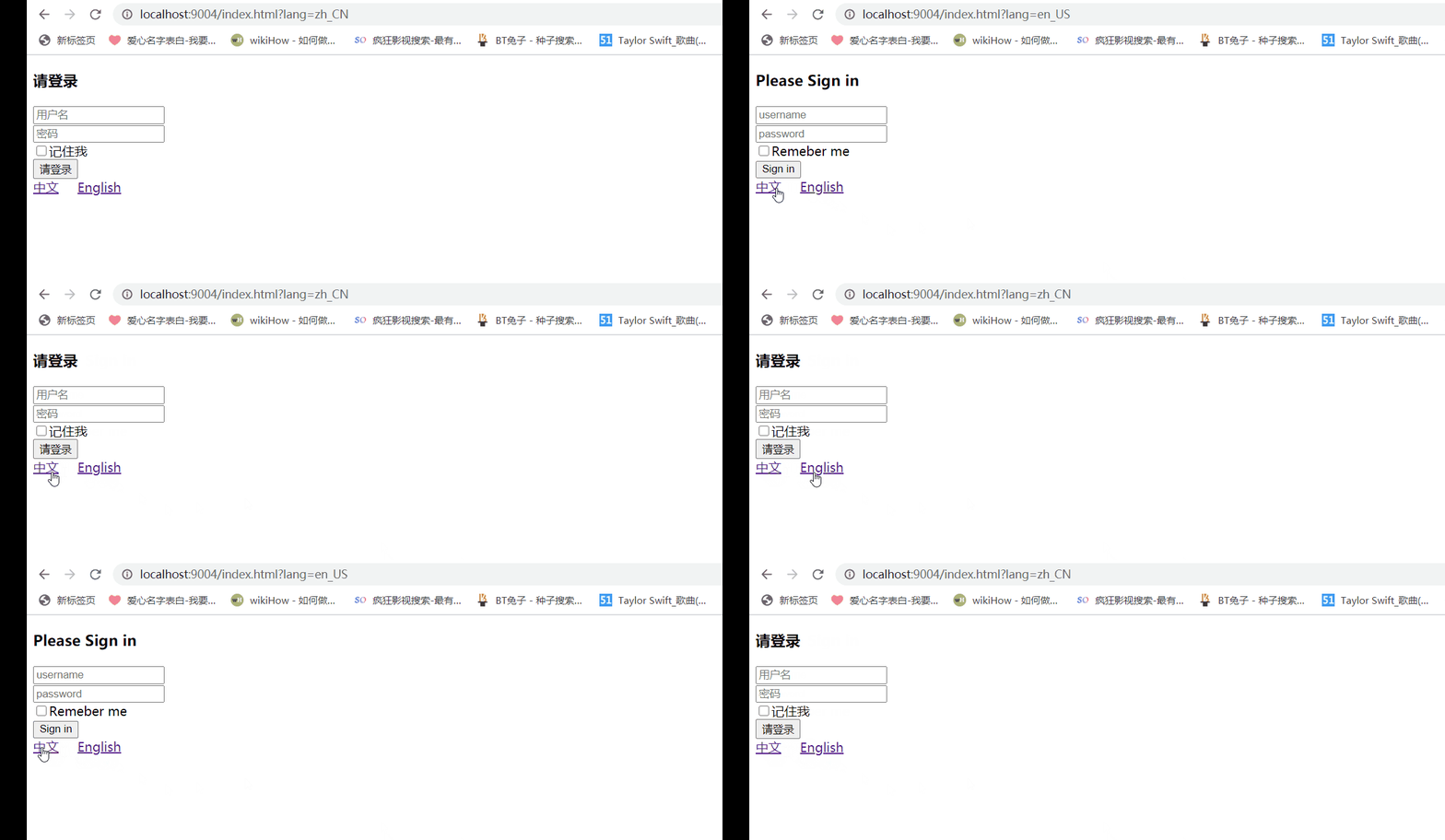
效果展示
参考目录
thymeleaf 官网中 关于 #{ } 使用 th:text 和外部化文本 的使用描述
https://www.thymeleaf.org/doc/tutorials/3.0/usingthymeleaf.html#using-thtext-and-externalizing-textTomcat 中 getLocales()方法的 描述
http://tomcat.apache.org/tomcat-5.5-doc/servletapi/javax/servlet/ServletRequest.html#getLocales()Tomcat 中 getLocale()方法的 描述
http://tomcat.apache.org/tomcat-5.5-doc/servletapi/javax/servlet/ServletRequest.html#getLocale() -
相关阅读:
深入分析MySQL索引与磁盘读取原理
浅淡 C++ 与 C++ 入门
Pytorch迁移学习训练病变分类模型
Java FileWriter类的简介说明
Java进阶路线目录索引(持续更新中)
HTML期末学生大作业-拯救宠物网页作业html+css
测试驱动开发 002:VSCode + CMake + Unity 环境搭建
JS响应替换|解决谷歌验证码混淆js还原替换后的跨域问题
【结构体内功修炼】结构体实现位段(二)
海思芯片pcie启动——pcie_mcc驱动框架的booter程序分析
- 原文地址:https://blog.csdn.net/Koikoi12/article/details/126030239
