-
python学习一(基础语句)
开发环境“pycharm”
python版本"3.7.3"
1.程序开始运行的地方
跟C语言不同,python代码是从上而下依次执行的,就跟bat脚本一样的。这里有一点需要注意,python的缩进符是会被判定为代码语句的。可以这么说,代码从没有缩进的代码开始执行。
例如:
print("hello world")执行结果如下:

如果在语句前边加入缩进符
print("hello world")结果为:

这里就会报错。pthon中的缩进符就跟C语言中的"{}"一样,如果在python中定义一个函数,那函数的内容代码,前边都需要有缩进符。
if __name__ == '__main__':上边这行代码的意思是,如果这个文件被别的文件当作模块调用了,那么此时name 就会变为文件的名字,否则默认是main,那么整个工程就会从这句话下面的没有缩进的代码开始执行。
所以,如果加了上边这行代码,程序就会从这里开始执行。
例如:
- def test():
- print("start here")
- if __name__ == '__main__':
- print("hello world")
- a = "this is"
- b = "test"
- print(a,b)
- test()
结果为:

可以看出程序先执行了下边的,最后才执行test。
但如果我这么写的话,
- print("inter start")
- def test():
- print("start here")
- if __name__ == '__main__':
- print("hello world")
- a = "this is"
- b = "test"
- print(a,b)
- test()
- print("end")
结果为:

这里可以看到,程序还是从没有缩进的代码开始执行。遇到函数则跳过,先执行if __name__ == '__main__':,结束后,再执行没有缩进的代码。
2.Pycharm调试与运行
学会程序的调试非常有助于我们平时的代码分析与改错。
Pycharm有3种方式进入到DEBUG状态。
第一种:

第二种:

第三种:

进入调试之前可以先代码前用鼠标左键点击一下,打一个初始断点。
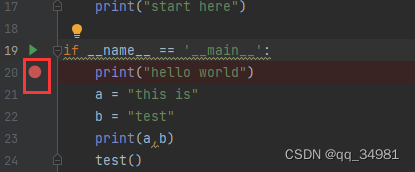
进入到调试界面后,界面如下:

调试的话,差不多就用到以上这些功能。可以使用F7进行单步调试(遇到函数则进入),或F8(遇到函数不进入)。
3.print()函数使用
print在平时编程和调试中使用的非常多。这里做一个总结。
- print("hello world")
- 结果:hello world
- dic = {'aaa': '111', 'bbb': 222, 'ccc': '333'} #打印数组完整内容
- print(dic.items())
- 结果:dict_items([('aaa', '111'), ('bbb', 222), ('ccc', '333')])
- print("a""b")
- 结果:ab
- print('*' * 50) #打印50个相同的字符
- 结果:**************************************************
- print("a","b") #,表示空格符
- 结果:a b
- a="aaa"
- b="bbb"
- print(a,b)
- 结果aaa bbb
- print("www", "xxxx", "com", sep=".") # 设置间隔符,sep即为间隔符
- 结果:www.xxxx.com
- print("this", end=".") # 设置输出文本末尾的字符,默认的\n
- print("is", end=".")
- print("test")
- 结果:this.is.test
- a = 10
- b = 20
- print("a = %d,b = %d" %(a,b)) #输出整数参数
- 结果:a = 10,b = 20
- a = 'hello'
- b = 'world'
- print("a = %s,b = %s" %(a,b)) #输出字符串参数
- 结果:a = hello,b = world
- arr='this' #字符串长度
- print("len = ",len(a))
- 结果:len = 4
- arr = ['this','is','test'] #数组长度
- print('len=',len(arr),sep='')
- 结果:len=3
- PI = 3.141592653
- print('%10.3f'%PI) #字段宽10,精度3
- 结果: 3.142
- #精度为3,所以只显示142,指定宽度为10,所以在左边需要补充5个空格,以达到10位的宽度
- PI=3.1415926
- print('%-10.3f' %PI) #左对齐,还是10个字符,但空格显示在右边。
- 结果:3.142
- PI=3.1415926
- print('%+f' % PI) #显示正负号,类型f的默认精度为6位小数。
- 结果:+3.141593
- PI=3.1415926
- print('%010.3f'%PI) #字段宽度为10,精度为3,不足处用0填充空白,0表示转换值若位数不够则用0填充
- 结果:000003.142
- print('{0},{0},{1},num{2:.2f}'.format('hello','world',1.2345)) #format以{}和: 代替%,format参数可以被多次调用
- 结果:hello,hello,world,num1.23
- a = 'this'
- b = 'is'
- c = 'test'
- d = 3.14 * 3.14
- print('{a} {b} {c},{d:.2f}')
- 结果:{a} {b} {c},{d:.2f}
- print(f'{a} {b} {c}') #f 表示输出参数
- 结果:this is test,9.86
列表:list
这里需要补充一下知识点,python中内置了一种数据类型“列表”:list。List是一种有序的集合,可以随时添加和删除其中的元素。
- a = ["this","is","a","test","array"]
- print(a)
- print(f"{a[0]},{a[1]},%s" %a[2],a[-2],a[-1])
- 结果是:['this', 'is', 'a', 'test', 'array']
- this,is,a test array
可以添加、删除
- a = ["this","is","a","test","array",123]
- print(f"arr len:{len(a)},data:{a}")
- a.append("add") #在list中追加元素到末尾
- print(f"arr len:{len(a)},data:{a}")
- a.insert(2,"and") #将元素插入指定的位置
- print(f"arr len:{len(a)},data:{a}")
- a.pop() #删除List末尾的元素
- print(f"arr len:{len(a)},data:{a}")
- a.pop(2) #删除指定位置的元素
- print(f"arr len:{len(a)},data:{a}")
- a[0] = "that" #将某个元素内容直接替换成别的内容
- print(f"arr len:{len(a)},data:{a}")
- 结果:
- arr len:6,data:['this', 'is', 'a', 'test', 'array', 123]
- arr len:7,data:['this', 'is', 'a', 'test', 'array', 123, 'add']
- arr len:8,data:['this', 'is', 'and', 'a', 'test', 'array', 123, 'add']
- arr len:7,data:['this', 'is', 'and', 'a', 'test', 'array', 123]
- arr len:6,data:['this', 'is', 'a', 'test', 'array', 123]
- arr len:6,data:['that', 'is', 'a', 'test', 'array', 123]
元组:tuple
另一种有序列表叫元组:tuple。tuple和list非常类似,但是tuple一旦初始化就不能修改。
- a = ("this","is","a","test","array",123)
- print(f"arr len:{len(a)},data:{a}")
- 结果:arr len:6,data:('this', 'is', 'a', 'test', 'array', 123)
注:如果只有一个元素的时候,定义必须加一个逗号‘,’,用来消除歧义
a = (1,)字典:dict
无序列表字典:dict。
list是有序的,而dict是无序的。也就是说,dict在创建后,内部的元素是无序排列的,如果用print打印的话,打印出来的值跟创建的顺序有可能是不同的。
- a = {"this","is","a","test","array",123}
- print(f"arr len:{len(a)},data:{a}")
- 结果:
- arr len:6,data:{'is', 'this', 'array', 'a', 'test', 123}
- 再次运行:
- arr len:6,data:{'this', 'is', 'test', 'array', 123, 'a'}
- 再次运行:
- arr len:6,data:{'test', 'array', 123, 'this', 'a', 'is'}
可以看到每次运行的结果都是不一样的。这也就是dict的无序属性。
那dict有什么用呢?顾名思义,dict就是字典的意思,也就是用来查询时使用。dict使用键-值(key-value)存储,具有极快的查找速度。
例如当需要根据名字查看年龄时
- # list
- name = ["tom","jack","pony","lisa"]
- age = [20,21,22,23]
- j = 0
- for i in name:
- if i == "pony":
- print(age[j])
- break
- j += 1
- else:
- print("no find")
- 结果:22
- #dict
- name = {'tom':20,'jack':21,'pony':22,'lisa':23}
- print(name['pony'])
- 结果:22
可以看到,使用dict进行查找的话,速度是相当快的。
如果查询的东西不在列表里,则会直接报错。
- name = {'tom':20,'jack':21,'pony':22,'lisa':23}
- print(name['ponys'])
- 结果:
- Traceback (most recent call last):
- File "d:/python/test_project/test.py", line 28, in
- print(name['ponys'])
- KeyError: 'ponys'
针对这种情况,可以通过in和get进行判断。
- #in
- if "pony" in name:
- print('age is %d' %name['pony'])
- else:
- print('no find pony')
- if "han" in name:
- print('age is %d' %name['han'])
- else:
- print('no find han')
- 结果:
- age is 22
- no find han
- #get
- print('pony rst:%s' %name.get('pony',-1))
- print('han rst:%s' %name.get('han',-1))
- 结果:
- pony rst:22
- han rst:-1
如果要替换内容,可以直接往key处写value值。如果要删除,可以调用pop(key)来实现。
- name = {'tom':20,'jack':21,'pony':22,'lisa':23}
- print('pony rst:%s' %name.get('pony',-1))
- #替换
- name['pony'] = 55
- print('pony rst:%s' %name.get('pony',-1))
- #删除
- name.pop("pony")
- print('pony rst:%s' %name.get('pony',-1))
- 结果:
- pony rst:22
- pony rst:55
- pony rst:-1
和list比较,dict有以下几个特点:
1.查找和插入的速度极快,不会随着key的增加而变慢
2.需要占用大量的内存,内存浪费多
而list相反:
1.查找和插入的时间随着元素的增加而增加
2.占用空间小,浪费内存很少
所有,dict是用空间来换取时间的一种方法。
注:dict的key必须是不可变对象。在python中,字符串、整数等都是不可变的,因此可以作为key,而list是可变的,不能作为Key.
set
set和dict类似,也是一组key的集合,但不存储value。由于key不能重复,所以,在set中,没有重复的key。
要创建一个set,需要提供一个List作为输入集合
- #set
- s = set([1,2,3])
- print(s)
- 结果:
- {1, 2, 3}
注:传入的参数[1,2,3]是一个List,而显示的{1,2,3}也只是表示这个set内部有1,2,3这三个元素,显示的顺序也不表示set是有序的。
重复的元素在set中会被自动过滤,可以通过add(key)方法添加元素到set中。通过remove(key)方法删除元素
- #set
- s = set([1,2,3,3,2,3])
- print(s)
- s.add(4)
- print(f"s rst:{s}")
- s.add(4)
- print(f"s rst:{s}")
- s.remove(2)
- print("s rst:%s" %s)
- 结果:
- {1, 2, 3}
- s rst:{1, 2, 3, 4}
- s rst:{1, 2, 3, 4}
- s rst:{1, 3, 4}
4.input
有时候需要通过读取用户输入信息,此时可以调用input函数进行输入信息获取。
- a = input("num:")
- print("user input:%s" %a)
- 输入:
- num:hello
- 结果:
- user input:hello
注:input返回的数据类型是str,如果需要将输入的值做判断,则需要将str转换成Int型。
- a = input("num:")
- print("user input:%s" %a)
- a = int(a)
- if(a > 100):
- print(a)
- else:
- print("not correct")
- 输入:123
- 结果:123
- 输入:0
- 结果:not correct
5.if else
要注意语句后跟‘:’,跟随执行的代码要加缩进

6.for
for 循环
- for i in range(5): #从0-4
- print(i)
- 结果:
- 0
- 1
- 2
- 3
- 4
- for i in range(1,5) #range(star,stop)
- print(i)
- 结果:
- 1
- 2
- 3
- 4
- for i in range(1,5,2) #range(start,stop,step)
- print(i)
- 结果:
- 1
- 3
- arr = 'this' #字符串单个输出
- for i in arr:
- print(i)
- 结果:
- t
- h
- i
- s
- arr = ['this','is'] #字符串数组单个输出
- for i in arr:
- print(i)
- 结果:
- this
- is
- dic = {'aaa': '111', 'bbb': 222, 'ccc': '333'}
- for k in dic:
- print(k)
- 结果:
- aaa
- bbb
- ccc
- dic = {'aaa': '111', 'bbb': 222, 'ccc': '333'}
- for k in dic.items(): #.items 遍历各个元素
- print(k)
- 结果:
- ('aaa', '111')
- ('bbb', 222)
- ('ccc', '333')
- dic = {'aaa': '111', 'bbb': 222, 'ccc': '333'}
- for k,value in dic.items(): # for 循环默认取的是字典的key赋值给变量名k
- print(k,value)
- 结果:
- aaa 111
- bbb 222
- ccc 333
else与break语句连用
break语句会在循环执行后运行。那为什么还要再加一个else呢?
看如下代码:
- dic = {'aaa': '111', 'bbb': '222', 'ccc': '333'}
- for k,value in dic.items(): # for 循环默认取的是字典的key赋值给变量名k
- if(k == 'ccc'):
- print('find it')
- else:
- print('no find')
- 结果:
- find it
- no find
添加break语句
- dic = {'aaa': '111', 'bbb': '222', 'ccc': '333'}
- for k,value in dic.items(): # for 循环默认取的是字典的key赋值给变量名k
- if(k == 'ccc'):
- print('find it')
- break;
- else:
- print('no find')
- 结果:
- find it
也就是说,for与else连用,只有当有break语句的时候才会有效果。
7.while语句
while与for比较类型,不同的是,while是只要满足条件,就一直循环,条件不满足时则退出循环。
- # 计算0-100的和
- i = 0
- rst = 0
- while i < 101:
- rst += i
- i += 1
- print(f"the sum of 0-100:{rst}")
- 结果:the sum of 0-100:5050
8.switch语句
python中没有switch语句,可以通过dict实现该函数
- def one():
- print('one')
- def two():
- print('two')
- def three():
- print('three')
- def none():
- print('none')
- def num_to_string(num: object) -> object:
- numbers = {
- 0 : "zero",
- 1 : one,
- 2 : two,
- 3 : three
- }
- return numbers.get(num, none) #根据num值来获取对应的内容,如果没有匹配到,则执行none
- if __name__ == '__main__':
- print(num_to_string(0))
- num_to_string(1)()
- num_to_string(2)()
- num_to_string(3)()
- num_to_string(4)()
- 结果:
- zero
- one
- two
- three
- none
9.type 类型
返回参数中的类型
例如:
- print(type(1)) #整型
- print(type('sgsdfas')) #字符串型
- print(type([2])) #列表型
- print(type({0:'zero'})) #字典型
- 结果:
- <class 'int'>
- <class 'str'>
- <class 'list'>
- <class 'dict'>
10.join 方法
将序列中的元素以指定的字符连接生成一个新的字符串
例如:
- str = '-'
- seq = {'a','b','c'}
- print(str.join(seq))
- 结果:
- a-c-b
11.self
self在python中代表的是类的实例,而非类。self只有在类的方法中有,独立的方法或函数中可以没有。self在定义类的方法时是必须有的。类中的方法的第一个参数必须是self,否则无法调用。
例如:
- class test:
- def prt(self,data):
- print(self,data)
- print(self.__class__)
- t = test()
- t.prt("hello")
- 结果:
- <__main__.test object at 0x0000026F2867BC18> hello
- <class '__main__.test'>
12.关键字
def 定义函数
import 引用,相当于C语言中的extern
class 创建一个类
13.Slice
切片(slice)广泛应用于数据截取中。
- l_t = list(range(100))
- print('l_t[1:5]:%s' %l_t[1:5]) #获取第1-5个数,从0开始
- print('l_t[:10]:%s' %l_t[:10]) #获取前10个数
- print('l_t[-10:]:%s' %l_t[-10:]) #获取后10个数
- print('l_t[40:-40]:%s' %l_t[40:-40]) #从第10个数开始到倒数第10个数(不包括倒数第10个)
- print("l_t[:20:2]:%s" %l_t[:20:2]) #从前20个数,每2个取一个数
- print("l_t[::5]:%s" %l_t[::5]) #所有数,每5个取一个
- 结果:
- l_t[1:5]:[1, 2, 3, 4]
- l_t[:10]:[0, 1, 2, 3, 4, 5, 6, 7, 8, 9]
- l_t[-10:]:[90, 91, 92, 93, 94, 95, 96, 97, 98, 99]
- l_t[40:-40]:[40, 41, 42, 43, 44, 45, 46, 47, 48, 49, 50, 51, 52, 53, 54, 55, 56, 57, 58, 59]
- l_t[:20:2]:[0, 2, 4, 6, 8, 10, 12, 14, 16, 18]
- l_t[::5]:[0, 5, 10, 15, 20, 25, 30, 35, 40, 45, 50, 55, 60, 65, 70, 75, 80, 85, 90, 95]
14.列表生成式
- tl = ['A','B','C']
- tl = [a.lower() for a in tl] #大写转小写
- print(tl)
- tl = [a.upper() for a in tl] #小写转大写
- print(tl)
- tl = [a for a in range(1,10)] #创建一个列表,从1-9
- print(tl)
- tl = list(range(1,10)) #创建一个列表,从1-9
- print(tl)
- tl = [a for a in range(1,10) if a % 2 == 0] #创建一个偶数列表
- print(tl)
- tl = [a if a % 2 == 0 else -a for a in range(1,10)] #创建一个负奇数,正偶数列表
- print(tl)
- name = ['tom','jack','lisa']
- age = ['18','22','25']
- tl = [a + ':' + b for a in name for b in age] #创建一个列表,双重循环组成的排列组合,两个都必须是字符串类型
- print(tl)
- 结果:
- ['a', 'b', 'c']
- ['A', 'B', 'C']
- [1, 2, 3, 4, 5, 6, 7, 8, 9]
- [1, 2, 3, 4, 5, 6, 7, 8, 9]
- [2, 4, 6, 8]
- [-1, 2, -3, 4, -5, 6, -7, 8, -9]
- ['tom:18', 'tom:22', 'tom:25', 'jack:18', 'jack:22', 'jack:25', 'lisa:18', 'lisa:22', 'lisa:25']
-
相关阅读:
SpringSecurity - 启动流程分析(三)
namespace“cv“成员没有“putText“
牛客刷题<18>3-8译码器
java 枚举
异步请求与中断 ( XHR,Axios,Fetch对比 )
本地部署AutoGPT
Go语言中的IO
【Python】不是内部或外部命令,cmd指令报错,path环境配置
记CVE-2022-39227-Python-JWT漏洞
vscode离线下载对应版本的插件,避免版本兼容问题
- 原文地址:https://blog.csdn.net/qq_26226375/article/details/123430156
