-
SpringBoot学习(一)
SpringBoot
一、SpringBoot介绍
Spring Boot 基于 Spring 开发,Spirng Boot 本身并不提供 Spring 框架的核心特性以及扩展功能,只是用于快速、敏捷地开发新一代基于 Spring 框架的应用程序。也就是说,它并不是用来替代 Spring 的解决方案,而是和 Spring 框架紧密结合用于提升 Spring 开发者体验的工具。Spring Boot 以约定大于配置的核心思想,默认帮我们进行了很多设置,多数 Spring Boot 应用只需要很少的 Spring 配置。同时它集成了大量常用的第三方库配置(例如 Redis、MongoDB、Jpa、RabbitMQ、Quartz 等等),Spring Boot 应用中这些第三方库几乎可以零配置的开箱即用。
简单来说就是SpringBoot其实不是什么新的框架,它默认配置了很多框架的使用方式,就像maven整合了所有的jar包,spring boot整合了所有的框架 。
Spring Boot 出生名门,从一开始就站在一个比较高的起点,又经过这几年的发展,生态足够完善,Spring Boot 已经当之无愧成为 Java 领域最热门的技术。
Spring Boot的主要优点:
- 创建独立的 Spring 应用
- 直接嵌入Tomcat,Jetty或Undertow(无需部署WAR文件)
- 提供固执己见的“入门”依赖项,以简化构建配置
- 尽可能自动配置 Spring 和第三方库
- 提供生产就绪功能,如指标、运行状况检查和外部化配置
- 绝对无需生成代码,也无需进行 XML 配置
微服务架构
微服务架构:打破all in one的架构方式,把每个功能元素独立出来,把独立出来的功能元素动态组合。优点:1.节省了调用资源。2.每个功能元素的服务都是一个可替换的、可独立升级的软件代码。[外链图片转存失败,源站可能有防盗链机制,建议将图片保存下来直接上传(img-OIN019Q4-1658828323020)(https://martinfowler.com/articles/microservices/images/sketch.png)]
csdn翻译链接:微服务的架构思想(Microservices)—csdn_
Martin Fowler原文链接:微服务的架构思想(Microservices)— Martin Fowler
二、配置文件
2.1、yaml介绍
yaml语法:
1空格不能省略
2、以缩进来控制层级关系,只要是左边对齐的一列数据都是同一个层级的。
3、属性和值的大小写都是十分敏感的。
4、""双引号不会转义字符串里面的特殊字符:特殊字符会作为本身想表达的意思。
例:“张三\n李四” 会表示出 张三 然后是一个换行 然后才是 李四;
‘’ 单引号会转义字符串里面的特殊字符
例:‘张三\n李四’ 表示出来的就是一个字符串 张三\n李四yaml使用:
1.对象、Map(键值对)
student: name: yechen age: 3- 1
- 2
- 3
行内写法:
student: {name: yechen,age: 3}- 1
2.数组( List、set )
pets: - cat - dog - pig- 1
- 2
- 3
- 4
行内写法:
pets: [cat,dog,pig]- 1
2.2、注入配置文件
yaml注入配置文件
@ConfigurationProperties- 1
1、在springboot项目中的resources目录下新建一个文件 application.yml
2、编写一个实体类 Dog;
@Component //注册bean到容器中 public class Dog { private String name; private Integer age; //有参无参构造、get、set方法、toString()方法 }- 1
- 2
- 3
- 4
- 5
- 6
- 7
3、我们在编写一个复杂一点的实体类:Person 类
@Component //注册bean到容器中 public class Person { private String name; private Integer age; private Boolean happy; private Date birth; private Map<String,Object> maps; private List<Object> lists; private Dog dog; //有参无参构造、get、set方法、toString()方法 }- 1
- 2
- 3
- 4
- 5
- 6
- 7
- 8
- 9
- 10
- 11
- 12
4、我们来使用yaml配置的方式进行注入,大家写的时候注意区别和优势,我们编写一个yaml配置!
person: name: qinjiang age: 3 happy: false birth: 2000/01/01 maps: {k1: v1,k2: v2} lists: - code - girl - music dog: name: 旺财 age: 1- 1
- 2
- 3
- 4
- 5
- 6
- 7
- 8
- 9
- 10
- 11
- 12
- 13
5、注入到我们的类中!在person类中添加
@ConfigurationProperties(prefix = "person")- 1
@ConfigurationProperties作用:
将配置文件中配置的每一个属性的值,映射到这个组件中;告诉SpringBoot将本类中的所有属性和配置文件中相关的配置进行绑定。参数 prefix = “person” : 将配置文件中的person下面的所有属性一一对应。6、编写测试类测试
@SpringBootTest class Springboot02ConfigApplicationTests { @Autowired private Person person; @Test void contextLoads() { System.out.println(person); } }- 1
- 2
- 3
- 4
- 5
- 6
- 7
- 8
- 9
- 10
加载指定的配置文件
**@PropertySource :**加载指定的配置文件;
@configurationProperties:默认从全局配置文件中获取值;
1、我们去在resources目录下新建一个person.properties文件
name=yechen- 1
2、然后在我们的代码中指定加载person.properties文件
@PropertySource(value = "classpath:person.properties") @Component //注册bean public class Person { //使用SPEL表达式取出值 @Value("${name}") private String name; ...... }- 1
- 2
- 3
- 4
- 5
- 6
- 7
- 8
- 9
3、测试。。。
@configurationProperties和@Value对比

1、@ConfigurationProperties只需要写一次即可 , @Value则需要每个字段都添加
2、松散绑定:这个什么意思呢? 比如我的yml中写的last-name,这个和lastName是一样的, - 后面跟着的字母默认是大写的。这就是松散绑定。可以测试一下
3、JSR303数据校验 , 这个就是我们可以在字段是增加一层过滤器验证 , 可以保证数据的合法性
4、复杂类型封装,yml中可以封装对象 , 使用value就不支持
2.3、JSR303校验
Springboot中可以用
@Validated来校验数据,如果数据异常则会统一抛出异常,方便异常中心统一处理。@Component //注册bean @ConfigurationProperties(prefix = "person") @Validated //数据校验 public class Person { @NotNull(message="名字不能为空") private String userName; @Max(value=120,message="年龄最大不能查过120") private int age; @Email(message="邮箱格式错误") private String email; }- 1
- 2
- 3
- 4
- 5
- 6
- 7
- 8
- 9
- 10
- 11
常用的:
空检查 @Null 验证对象是否为null @NotNull 验证对象是否不为null, 无法查检长度为0的字符串 @NotBlank 检查约束字符串是不是Null还有被Trim的长度是否大于0,只对字符串,且会去掉前后空格. @NotEmpty 检查约束元素是否为NULL或者是EMPTY. Booelan检查 @AssertTrue 验证 Boolean 对象是否为 true @AssertFalse 验证 Boolean 对象是否为 false 长度检查 @Size(min=, max=) 验证对象(Array,Collection,Map,String)长度是否在给定的范围之内 @Length(min=, max=) string is between min and max included. 日期检查 @Past 验证 Date 和 Calendar 对象是否在当前时间之前 @Future 验证 Date 和 Calendar 对象是否在当前时间之后 @Pattern 验证 String 对象是否符合正则表达式的规则 .......等等 除此以外,我们还可以自定义一些数据校验规则- 1
- 2
- 3
- 4
- 5
- 6
- 7
- 8
- 9
- 10
- 11
- 12
- 13
- 14
- 15
- 16
- 17
- 18
- 19
- 20
- 21
2.4、配置文件加载位置
官方外部配置文件说明参考文档

springboot 启动会扫描以下位置的application.properties或者application.yml文件作为Spring boot的默认配置文件:
优先级1:项目路径下的config文件夹配置文件 优先级2:项目路径下配置文件 优先级3:资源路径下的config文件夹配置文件 优先级4:资源路径下配置文件- 1
- 2
- 3
- 4
优先级由高到底,高优先级的配置会覆盖低优先级的配置;
SpringBoot会从这四个位置全部加载主配置文件;互补配置;
我们在最低级的配置文件中设置一个项目访问路径的配置来测试互补问题;
#配置项目的访问路径 server.servlet.context-path=/kuang- 1
- 2
2.5、多配置文件和yaml的多文档块
多配置文件
我们在主配置文件编写的时候,文件名可以是 application-{profile}.properties/yml , 用来指定多个环境版本;
application-test.properties 代表测试环境配置
application-dev.properties 代表开发环境配置
但是Springboot并不会直接启动这些配置文件,它默认使用application.properties主配置文件;
我们需要通过一个配置来选择需要激活的环境:
#比如在配置文件中指定使用dev环境,我们可以通过设置不同的端口号进行测试;#我们启动SpringBoot,就可以看到已经切换到dev下的配置了; spring.profiles.active=dev- 1
- 2
yaml的多文档块
和properties配置文件中一样,但是使用yml去实现不需要创建多个配置文件,更加方便了 !
server: port: 8081 #选择要激活那个环境块 spring: profiles: active: prod --- server: port: 8083 spring: profiles: dev #配置环境的名称 --- server: port: 8084 spring: profiles: prod #配置环境的名称- 1
- 2
- 3
- 4
- 5
- 6
- 7
- 8
- 9
- 10
- 11
- 12
- 13
- 14
- 15
- 16
- 17
- 18
注意:如果yml和properties同时都配置了端口,并且没有激活其他环境 , 默认会使用properties配置文件的!
2.6、自动配置
1、SpringBoot启动会加载大量的自动配置类
2、我们看我们需要的功能有没有在SpringBoot默认写好的自动配置类当中;
3、我们再来看这个自动配置类中到底配置了哪些组件;(只要我们要用的组件存在在其中,我们就不需要再手动配置了)
4、给容器中自动配置类添加组件的时候,会从properties类中获取某些属性。我们只需要在配置文件中指定这些属性的值即可;
**xxxxAutoConfigurartion:自动配置类;**给容器中添加组件
xxxxProperties:封装配置文件中相关属性;
注:自动配置类必须在一定的条件下才能生效。(@Conditional)
@Conditional以及其派生注解(Spring注解版原生的@Conditional作用)
作用:必须是@Conditional指定的条件成立,才给容器中添加组件,配置配里面的所有内容才生效;
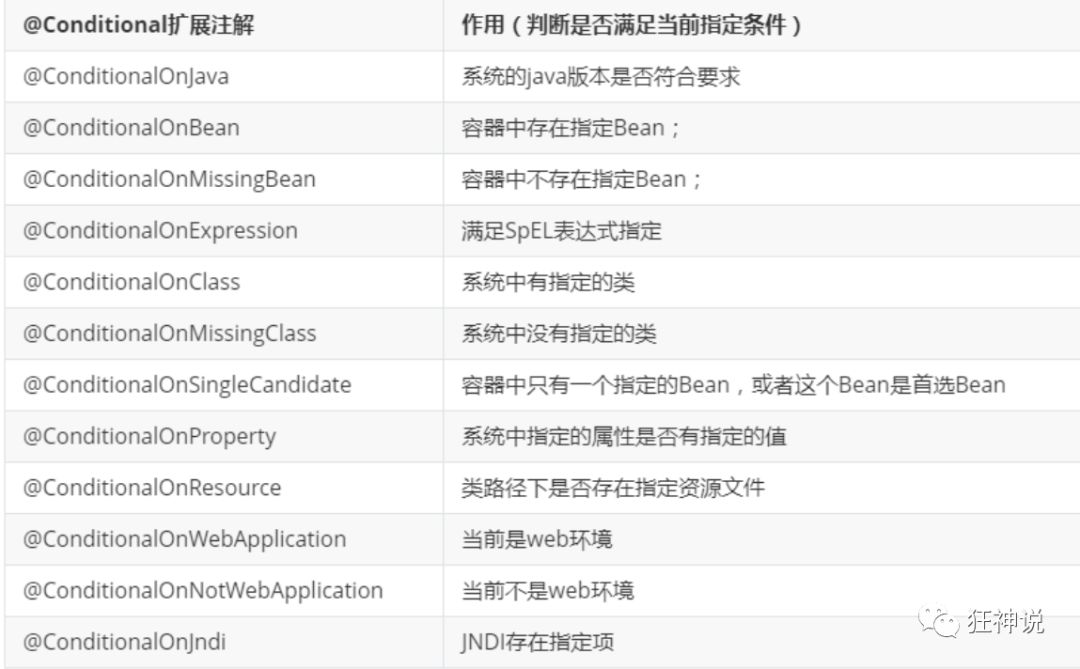
那么多的自动配置类,必须在一定的条件下才能生效;也就是说,我们加载了这么多的配置类,但不是所有的都生效了。
我们怎么知道哪些自动配置类生效?
我们可以通过启用 debug=true属性;来让控制台打印自动配置报告,这样我们就可以很方便的知道哪些自动配置类生效;
#开启springboot的调试类 debug=true- 1
- 2
Positive matches:(自动配置类启用的:正匹配)
Negative matches:(没有启动,没有匹配成功的自动配置类:负匹配)
Unconditional classes: (没有条件的类)
三、Web开发
3.1、导入静态资源
1.在springboot中,我们可以使用以下方式处理静态资源
-
webjars
- Webjars本质就是以jar包的方式引入我们的静态资源 。“classpath:/META-INF/resources/webjars/”---->“/webjars/**”
- 网站:https://www.webjars.org
-
public,static,/**,resources
2.优先级:resources > static > public
另外,可以在配置文件中修改默认的静态资源目录:
spring.mvc.static-path-pattern=...- 1
3.首页:静态资源文件夹下的所有 index.html 页面;被 /** 映射。
3.2、模板引擎Thymeleaf

模板引擎的作用就是我们来写一个页面模板,比如有些值呢,是动态的,我们写一些表达式。而这些值,从哪来呢,就是我们在后台封装一些数据。然后把这个模板和这个数据交给我们模板引擎,模板引擎按照我们这个数据帮你把这表达式解析、填充到我们指定的位置,然后把这个数据最终生成一个我们想要的内容给我们写出去,这就是我们这个模板引擎,不管是jsp还是其他模板引擎,都是这个思想。
Thymeleaf 官网:https://www.thymeleaf.org/
Thymeleaf 在Github 的主页:https://github.com/thymeleaf/thymeleaf
Spring官方文档:找到我们对应的版本
https://docs.spring.io/spring-boot/docs/2.2.5.RELEASE/reference/htmlsingle/#using-boot-starter
1.配置pom.xml
<dependency> <groupId>org.springframework.bootgroupId> <artifactId>spring-boot-starter-thymeleafartifactId> dependency>- 1
- 2
- 3
- 4
- 5
2.编写TestController
@Controller public class TestController { @RequestMapping("/t1") public String test1(Model model){ //存入数据 model.addAttribute("msg","Hello,Thymeleaf"); //classpath:/templates/test.html return "test"; } }- 1
- 2
- 3
- 4
- 5
- 6
- 7
- 8
- 9
- 10
3.要使用thymeleaf,需要在html文件中导入命名空间的约束,方便提示。
xmlns:th="http://www.thymeleaf.org"- 1
4.编写测试页面 test.html 放在 templates 目录下
DOCTYPE html> <html lang="en" xmlns:th="http://www.thymeleaf.org"> <head> <meta charset="UTF-8"> <title>狂神说title> head> <body> <h1>测试页面h1> <div th:text="${msg}">div> body> html>- 1
- 2
- 3
- 4
- 5
- 6
- 7
- 8
- 9
- 10
- 11
- 12
- 13
5.测试成功
Thymeleaf语法:
1、我们可以使用任意的 th:attr 来替换Html中原生属性的值!
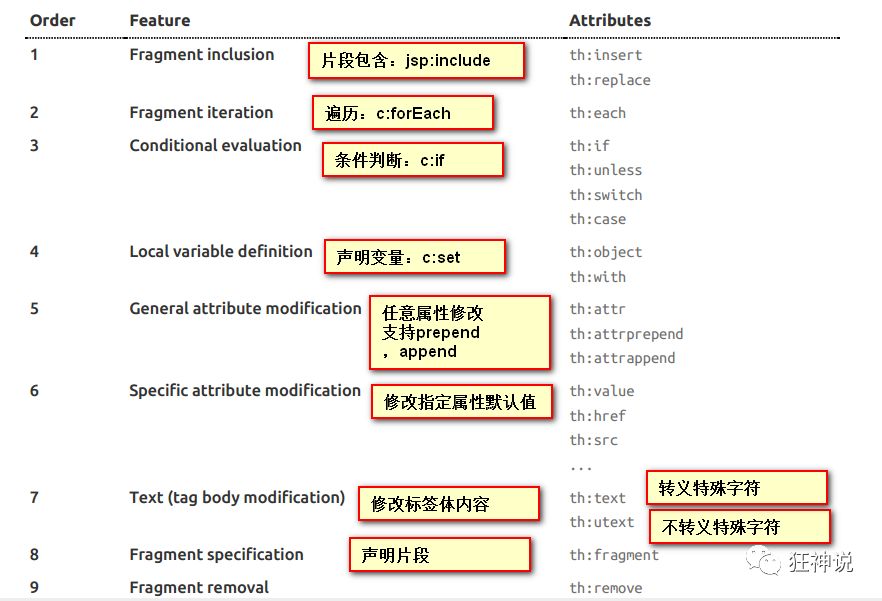
2、可以使用的表达式
Simple expressions:(表达式语法) Variable Expressions: ${...}:获取变量值;OGNL; 1)、获取对象的属性、调用方法 2)、使用内置的基本对象:#18 #ctx : the context object. #vars: the context variables. #locale : the context locale. #request : (only in Web Contexts) the HttpServletRequest object. #response : (only in Web Contexts) the HttpServletResponse object. #session : (only in Web Contexts) the HttpSession object. #servletContext : (only in Web Contexts) the ServletContext object. 3)、内置的一些工具对象: #execInfo : information about the template being processed. #uris : methods for escaping parts of URLs/URIs #conversions : methods for executing the configured conversion service (if any). #dates : methods for java.util.Date objects: formatting, component extraction, etc. #calendars : analogous to #dates , but for java.util.Calendar objects. #numbers : methods for formatting numeric objects. #strings : methods for String objects: contains, startsWith, prepending/appending, etc. #objects : methods for objects in general. #bools : methods for boolean evaluation. #arrays : methods for arrays. #lists : methods for lists. #sets : methods for sets. #maps : methods for maps. #aggregates : methods for creating aggregates on arrays or collections.- 1
- 2
- 3
- 4
- 5
- 6
- 7
- 8
- 9
- 10
- 11
- 12
- 13
- 14
- 15
- 16
- 17
- 18
- 19
- 20
- 21
- 22
- 23
- 24
- 25
- 26
- 27
其他高级表达式:
Selection Variable Expressions: *{...}:选择表达式:和${}在功能上是一样; Message Expressions: #{...}:获取国际化内容 Link URL Expressions: @{...}:定义URL; Fragment Expressions: ~{...}:片段引用表达式 Literals(字面量) Text literals: 'one text' , 'Another one!' ,… Number literals: 0 , 34 , 3.0 , 12.3 ,… Boolean literals: true , false Null literal: null Literal tokens: one , sometext , main ,… Text operations:(文本操作) String concatenation: + Literal substitutions: |The name is ${name}| Arithmetic operations:(数学运算) Binary operators: + , - , * , / , % Minus sign (unary operator): - Boolean operations:(布尔运算) Binary operators: and , or Boolean negation (unary operator): ! , not Comparisons and equality:(比较运算) Comparators: > , < , >= , <= ( gt , lt , ge , le ) Equality operators: == , != ( eq , ne ) Conditional operators:条件运算(三元运算符) If-then: (if) ? (then) If-then-else: (if) ? (then) : (else) Default: (value) ?: (defaultvalue) Special tokens: No-Operation: _- 1
- 2
- 3
- 4
- 5
- 6
- 7
- 8
- 9
- 10
- 11
- 12
- 13
- 14
- 15
- 16
- 17
- 18
- 19
- 20
- 21
- 22
- 23
- 24
- 25
- 26
- 27
- 28
- 29
- 30
- 31
- 32
- 33
- 34
- 35
3.3、装配扩展SpringMVC
扩展使用SpringMVC
如果您希望保留Spring Boot MVC功能,并且希望添加其他MVC配置(拦截器、格式化程序、视图控制器和其他功能),则可以添加自己的@configuration类,类型为webmvcconfiguer,但不添加@EnableWebMvc。如果希望提供RequestMappingHandlerMapping、RequestMappingHandlerAdapter或ExceptionHandlerExceptionResolver的自定义实例,则可以声明WebMVCregistrationAdapter实例来提供此类组件。- 1
例如新建一个包叫config,写一个类MyMvcConfig;
//应为类型要求为WebMvcConfigurer,所以我们实现其接口 //可以使用自定义类扩展MVC的功能 @Configuration public class MyMvcConfig implements WebMvcConfigurer { @Override public void addViewControllers(ViewControllerRegistry registry) { // 浏览器发送/test , 就会跳转到test页面; registry.addViewController("/test").setViewName("test"); } }- 1
- 2
- 3
- 4
- 5
- 6
- 7
- 8
- 9
- 10
- 11
全面接管SpringMVC
如果您想完全控制Spring MVC,可以添加自己的@Configuration,并用@EnableWebMvc进行注释。
3.4、页面国际化
在resources资源文件下新建一个i18n目录,存放国际化配置文件
创建login.properties,login_zh_CN.properties和login_zh_CN.properties三个文件。
使用视图编写信息:(新版idea的properties可视化:在idea的Plugins中下载一个 Resource Bundle Editor)
login.properties :默认
login.btn=登录 login.password=密码 login.remember=记住我 login.tip=请登录 login.username=用户名- 1
- 2
- 3
- 4
- 5
英文:
login.btn=Sign in login.password=Password login.remember=Remember me login.tip=Please sign in login.username=Username- 1
- 2
- 3
- 4
- 5
中文:
login.btn=登录 login.password=密码 login.remember=记住我 login.tip=请登录 login.username=用户名- 1
- 2
- 3
- 4
- 5
导入静态资源:https://blog.csdn.net/ln82799/article/details/120855879
将关键的值修改
[[#{login.tip}]]th:if="${not #strings.isEmpty(msg)}"th:placeholder="#{login.username}"…<img class="mb-4" th:src="@{/img/bootstrap-solid.svg}" alt="" width="72" height="72"> <h1 class="h3 mb-3 font-weight-normal">[[#{login.tip}]]h1> <p style="color:red" th:text="${msg}" th:if="${not #strings.isEmpty(msg)}">p> <input type="text" class="form-control" name="username" th:placeholder="#{login.username}" required="" autofocus=""> <input type="password" class="form-control" name="password" th:placeholder="#{login.password}" required=""> <div class="checkbox mb-3"> <label> <input type="checkbox" value="remember-me">[[#{login.remember}]] label> div> <button class="btn btn-lg btn-primary btn-block" type="submit" >[[#{login.btn}]]button>- 1
- 2
- 3
- 4
- 5
- 6
- 7
- 8
- 9
- 10
- 11
修改一下前端页面的跳转连接:
<a class="btn btn-sm" th:href="@{/index.html(l='zh_CN')}">中文a><a class="btn btn-sm" th:href="@{/index.html(l='en_US')}">Englisha>- 1
我们去写一个处理的组件类!
package com.rui.component; import org.springframework.util.StringUtils; import org.springframework.web.servlet.LocaleResolver; import javax.servlet.http.HttpServletRequest; import javax.servlet.http.HttpServletResponse; import java.util.Locale; //可以在链接上携带区域信息 public class MyLocaleResolver implements LocaleResolver { //解析请求 @Override public Locale resolveLocale(HttpServletRequest request) { String language = request.getParameter("l"); Locale locale = Locale.getDefault(); // 如果没有获取到就使用系统默认的 //如果请求链接不为空 if (!StringUtils.isEmpty(language)){ //分割请求参数 String[] split = language.split("_"); //国家,地区 locale = new Locale(split[0],split[1]); } return locale; } @Override public void setLocale(HttpServletRequest httpServletRequest, HttpServletResponse httpServletResponse, Locale locale) { } }- 1
- 2
- 3
- 4
- 5
- 6
- 7
- 8
- 9
- 10
- 11
- 12
- 13
- 14
- 15
- 16
- 17
- 18
- 19
- 20
- 21
- 22
- 23
- 24
- 25
- 26
- 27
- 28
- 29
- 30
- 31
- 32
为了让我们的区域化信息能够生效,我们需要再配置一下这个组件!在我们自己的MvcConofig下添加bean;
@Bean public LocaleResolver localeResolver(){ return new MyLocaleResolver(); }- 1
- 2
- 3
- 4
测试…
-
相关阅读:
最快的ebpf开发环境搭建方式
5 分钟,教你用 Docker 部署一个 Python 应用
【数据结构】带头节点双向循环链表
Hadoop
【Axure高保真原型】知识图谱原型模板
UE AIPerception感知非Pawn对象
ESP8266,手机与电脑之间的TCP通讯
css3带你实现3D转换效果
FFmpeg工作流程及视频文件分析
Flutter框架实现登录注册功能,不连接数据库
- 原文地址:https://blog.csdn.net/qq_52143183/article/details/125999847
