-
React 封装弹出框组件
React 封装弹出框组件
效果图



文件目录
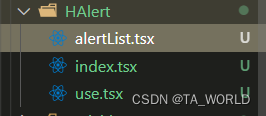
alertList.tsx 用于容纳弹出框的容器
import React from "react"; export const HAlertList = () => { return ({ position:'fixed', top: '6%', left: '50%', transform: `translate(-50%)` }} >) }- 1
- 2
- 3
- 4
- 5
- 6
- 7
- 8
- 9
- 10
- 11
- 12
- 13
- 14
- 15
将该组件置于项目根目录下的
index.tsxexport const root = ReactDOM.createRoot( document.getElementById('root') as HTMLElement ); root.render( //<> );- 1
- 2
- 3
- 4
- 5
- 6
- 7
- 8
- 9
- 10
- 11
- 12
- 13
- 14
- 15
index.tsx 用于创建单个alert
规定传入的参数及类型
export interface HAlertProps { status:'success' | 'error', text:string }- 1
- 2
- 3
- 4
传入一个状态
success或者error,用于区别样式export const HAlert = (props:HAlertProps) => { return ({props.text} ) } const AlertContainer = styled.div<{ status:string }>` width: 65vw; height: 30px; background-color: ${props => props.status === 'success' ? '#a8dda8' : '#ff4b4b'}; text-align: center; margin-bottom: 10px; `- 1
- 2
- 3
- 4
- 5
- 6
- 7
- 8
- 9
- 10
- 11
- 12
- 13
- 14
- 15
- 16
- 17
- 18
此处使用
emotion(css-in-js)的技术,即使用js编写css样式
当HTML文档中识别到AlertContainer标签时,会转变为具有对应样式的div标签use.tsx 函数式调用alert组件
import React, { useState } from 'react' import ReactDOM from 'react-dom/client' import { HAlertProps, HAlert } from './index' export class AlertList { static list: HAlertProps[] = [] static el: ReactDOM.Root | null = null static showAlert = (props: HAlertProps) => { let container: ReactDOM.Root if (AlertList.el) { container = AlertList.el } else { AlertList.el = container = ReactDOM.createRoot( document.getElementById('alert-list') as HTMLElement ) } AlertList.list.push(props) container.render( <> {AlertList.list.map((value: HAlertProps, index: number) => { return})} ) setTimeout(() => { AlertList.list.shift() container.render( <> {AlertList.list.map((value: HAlertProps, index: number) => { return })} ) }, 2000) } } - 1
- 2
- 3
- 4
- 5
- 6
- 7
- 8
- 9
- 10
- 11
- 12
- 13
- 14
- 15
- 16
- 17
- 18
- 19
- 20
- 21
- 22
- 23
- 24
- 25
- 26
- 27
- 28
- 29
- 30
- 31
- 32
- 33
- 34
- 35
- 36
- 37
- 38
使用类编写对用的函数,是因为类是存储数据比较好的办法,
AlertList .list存储着弹出框容器中所有弹出框的信息,AlertList.el为弹出框容器的节点
showAlert的逻辑:- 查看
AlertList.el是否有值,如果没有则创建创建节点 - 将该
HAlert组件的信息存入AlertList .list中 - 渲染弹出框列表
- 开启定时器(此处写的不是特别好),每隔2s取消一个
HAlert
-
相关阅读:
docker centos install
第十二章 哈希表与字符串哈希
Unity 拷贝文本
《痞子衡嵌入式半月刊》 第 73 期
解码四大区块链发展先导区:共通、发展与未来
AI绘图—对中文拟合度很高,值得一试
Spring Boot集成JWT快速入门demo
vcomp100.dll丢失怎样修复?5个靠谱的修复方法分享
蓝桥杯嵌入式LCD屏幕
从零搭建react + webpack项目
- 原文地址:https://blog.csdn.net/qq_56303170/article/details/126004127
