-
【小程序项目开发-- 京东商城】uni-app之商品列表页面 (上)

👋👋欢迎来到👋👋
🎩魔术之家!!🎩该文章收录专栏
✨ 2022微信小程序京东商城实战 ✨专栏内容
✨ 京东商城uni-app项目搭建 ✨
✨ 京东商城uni-app 配置tabBar & 窗口样式 ✨
✨ 京东商城uni-app开发之分包配置 ✨
✨ 京东商城uni-app开发之轮播图 ✨
✨ 京东商城uni-app之分类导航区域 ✨
✨ 京东商城uni-app 首页楼层商品 ✨
✨ 京东商城uni-app 商品分类页面(上) ✨
✨ 京东商城uni-app 商品分类页面(下) ✨
✨ 京东商城uni-app之自定义搜索组件(上) ✨
✨ 京东商城uni-app之自定义搜索组件(中) ✨
✨京东商城uni-app之自定义搜索组件(下) – 搜索历史 ✨一、前言介绍
主要是有三种方式进入到商品页面
- 商品楼层点击(传参
query查询) - 分类页面点击(传参
cid分类) - 搜索页面点击(传参
query查询)
添加商品页面编译模式
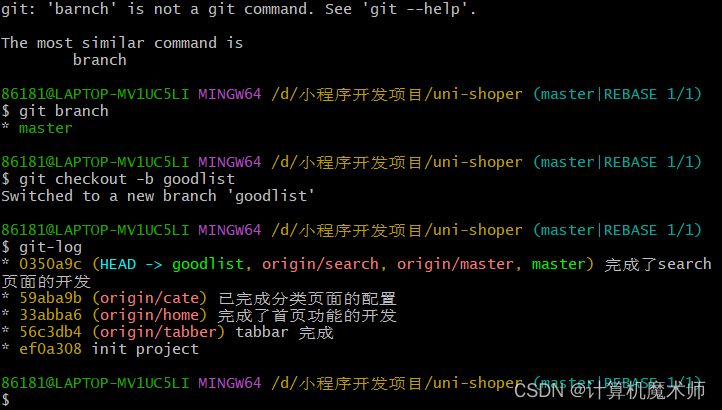
二、创建goodlist 分支(选读*)
git checkout -b goodlist- 1
三、商品列表搜索数据请求
商品列表搜索
-
请求路径:https://请求域名/api/public/v1/goods/search
-
请求方法:GET
-
请求参数
参数名 参数说明 备注 query 查询关键词 cid 分类ID 可选 pagenum 页数索引 可选默认第一页 pagesize 每页长度 可选默认20条 - 响应数据
{ "message": { "total": 2058, "pagenum": "1", "goods": [ { "goods_id": 57332, "cat_id": 998, "goods_name": "400毫升 海鲜食品冷藏冰包 注水冰袋医用冰袋户外冷藏保鲜熟食冷藏反复使用(10个装)", "goods_price": 14, "goods_number": 100, "goods_weight": 100, "goods_big_logo": "http://image4.suning.cn/uimg/b2c/newcatentries/0070083251-000000000168369396_1_800x800.jpg", "goods_small_logo": "http://image4.suning.cn/uimg/b2c/newcatentries/0070083251-000000000168369396_1_400x400.jpg", "add_time": 1516662792, "upd_time": 1516662792, "hot_mumber": 0, "is_promote": false, "cat_one_id": 962, "cat_two_id": 981, "cat_three_id": 998 }, { "goods_id": 57194, "cat_id": 992, "goods_name": "亿力洗车工具汽车美容用品海绵刷不伤车漆擦车海棉清洁海绵", "goods_price": 29, "goods_number": 100, "goods_weight": 100, "goods_big_logo": "", "goods_small_logo": "", "add_time": 1516662312, "upd_time": 1516662312, "hot_mumber": 0, "is_promote": false, "cat_one_id": 962, "cat_two_id": 980, "cat_three_id": 992 } ] }, "meta": { "msg": "获取成功", "status": 200 } }- 1
- 2
- 3
- 4
- 5
- 6
- 7
- 8
- 9
- 10
- 11
- 12
- 13
- 14
- 15
- 16
- 17
- 18
- 19
- 20
- 21
- 22
- 23
- 24
- 25
- 26
- 27
- 28
- 29
- 30
- 31
- 32
- 33
- 34
- 35
- 36
- 37
- 38
- 39
- 40
- 41
- 42
- 43
- 44
- 45
- 46
- data 定义数据存贮参数
<script> export default { data() { return { title:'', // queryobject queryObj: { query: '', cid:"", // 页面 pagenum: 1, // 数据条数 pagesize: 10 } }; }, onLoad(options){ console.log(options) this.title = options.name this.queryObj.query = options.query || '' this.queryObj.cid = options.cat_id || '' },- 1
- 2
- 3
- 4
- 5
- 6
- 7
- 8
- 9
- 10
- 11
- 12
- 13
- 14
- 15
- 16
- 17
- 18
- 19
- 20
- 21
- 22
四、调取接口获取列表数据
- data定义数据存贮
- onload 加载函数
- 定义数据调取函数
<script> export default { data() { return { goodlist: [], // 总的商品数 total: 0 }; }, onLoad(options){ this.getGoodlist() }, methods: { async getGoodlist(){ const {data:res} = await uni.$http.get('/api/public/v1/goods/search',this.queryObj) console.log(res) if (res.meta.status != 200) return uni.$showMsg("数据调取失败") this.goodlist = res.message.goods this.total = res.message.total } }- 1
- 2
- 3
- 4
- 5
- 6
- 7
- 8
- 9
- 10
- 11
- 12
- 13
- 14
- 15
- 16
- 17
- 18
- 19
- 20
- 21
五、渲染商品列表页面
- 由于有些图片无法显示,定义一个默认图片
// 默认图片 defaultimg: "your image url"- 1
- 2
- wxml 结构
<template> <view> <!-- 列表页 --> <view class="goods-list"> <view class="good-item"> <block v-for="(item,i) in goodlist" v-bind:key="i"> <!-- 左侧盒子 --> <view class="good-item-left"> <!-- 没有得话就用默认图片 --> <image :src="item.goods_big_logo || defaultimg" mode=""></image> </view> <!-- 右侧盒子 --> <view class="good-item-right"> <view class="good-item-name">{{item.goods_name}}</view> <view class="good-item-info"> <view class="good-price">¥ {{item.goods_price}}</view> </view> </view> </block> </view> </view> </view> </template>- 1
- 2
- 3
- 4
- 5
- 6
- 7
- 8
- 9
- 10
- 11
- 12
- 13
- 14
- 15
- 16
- 17
- 18
- 19
- 20
- 21
- 22
- 23
- 24
- 25
- 效果

- 样式美化
<style lang="scss"> .goods-list { .good-item { display: flex; border-bottom: 2px solid #f1f1f1; .good-item-left { image { height: 200rpx; width: 200rpx; display: block; } padding: 20rpx; } .good-item-right { display: flex; flex-direction: column; justify-content: space-between; padding: 20rpx; .good-item-name { font-size: 14px; } .good-item-info { .good-price { font-size: 16px; color: #c00000; } } } } } </style>- 1
- 2
- 3
- 4
- 5
- 6
- 7
- 8
- 9
- 10
- 11
- 12
- 13
- 14
- 15
- 16
- 17
- 18
- 19
- 20
- 21
- 22
- 23
- 24
- 25
- 26
- 27
- 28
- 29
- 30
- 31
- 32
- 33
- 34
- 35
- 36
- 37
- 效果:

六、将商品item组件封装为自定义组件
-
在component文件下创建my_goods组件

-
将对应结构和样式迁移过去
<template> <view> <view class="good-item"> <view class="good-item-left"> <image :src="good.goods_big_logo || defaultimg" mode="">image> view> <view class="good-item-right"> <view class="good-item-name">{{good.goods_name}}view> <view class="good-item-info"> <view class="good-price">¥ {{good.goods_price}}view> view> view> view> view> template> <script> export default { name: "my-goods", props: { good: { type: Object, default: {} } }, data() { return { // 默认图片 defaultimg: "https://ts1.cn.mm.bing.net/th/id/R-C.e74289455bec048b0ba2feb90e3b74f2?rik=fYpAtit%2bc2W4ZA&riu=http%3a%2f%2fimage.woshipm.com%2fwp-files%2f2017%2f04%2ftAd0ldHk60s3GAI6TNqd.jpg&ehk=RWuC%2f9spxWPWcW3w4axPrb3YP9Nt3JXlajvJWKRXV5k%3d&risl=&pid=ImgRaw&r=0" }; } } script> <style lang="scss"> .good-item { display: flex; border-bottom: 2px solid #f1f1f1; .good-item-left { image { height: 200rpx; width: 200rpx; display: block; } padding: 20rpx; } .good-item-right { display: flex; flex-direction: column; justify-content: space-between; padding: 20rpx; .good-item-name { font-size: 14px; } .good-item-info { .good-price { font-size: 16px; color: #c00000; } } } } style>- 1
- 2
- 3
- 4
- 5
- 6
- 7
- 8
- 9
- 10
- 11
- 12
- 13
- 14
- 15
- 16
- 17
- 18
- 19
- 20
- 21
- 22
- 23
- 24
- 25
- 26
- 27
- 28
- 29
- 30
- 31
- 32
- 33
- 34
- 35
- 36
- 37
- 38
- 39
- 40
- 41
- 42
- 43
- 44
- 45
- 46
- 47
- 48
- 49
- 50
- 51
- 52
- 53
- 54
- 55
- 56
- 57
- 58
- 59
- 60
- 61
- 62
- 63
- 64
- 65
- 66
- 67
- 68
- 69
- 70
- 71
- 72
- 73
七、使用过滤器处理商品价格
让商品价格以小数点显示
- 定义 filter
filters: { tofixed(num){ // 返回两位数值 return Number(num).toFixed(2) } },- 1
- 2
- 3
- 4
- 5
- 6
- 使用过滤器
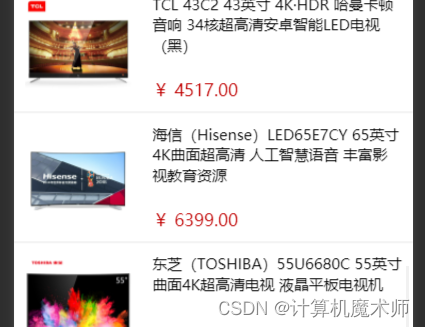
<view class="good-price">¥ {{good.goods_price | tofixed }}</view>- 1
- 效果
🤞到这里,如果还有什么疑问🤞 🎩欢迎私信博主问题哦,博主会尽自己能力为你解答疑惑的!🎩 🥳如果对你有帮助,你的赞是对博主最大的支持!!🥳- 1
- 2
- 3
- 商品楼层点击(传参
-
相关阅读:
javaweb学生量化设计和实现计与开发
建设基础设施Terraform
Android 8.1 MTK root权限版本
2309C++测试miniz简单压缩
webgl 系列 —— 绘制猫
是谁制造了TikTok的商业化困境?
golang关于数量的总结
SpringBoot整合定时任务遇到的多实例问题
给微软.Net runtime运行时提交的几个Issues
MyBatis-动态SQL
- 原文地址:https://blog.csdn.net/weixin_66526635/article/details/125815203
