-
pytest合集(3)— 测试用例
一、测试用例编写规范
- 测试文件名必须以“test_”开头或者以”_test”结尾
- 测试类命名以Test开头
- 测试方法必须以“test_”开头
- 测试用例包pakege必须要有__init__.py文件
- 使用assert断言
二、测试用例收集规则
Conventions for Python test discovery
pytestimplements the following standard test discovery:-
If no arguments are specified then collection starts from testpaths (if configured) or the current directory. Alternatively, command line arguments can be used in any combination of directories, file names or node ids.
-
Recurse into directories, unless they match norecursedirs.
-
In those directories, search for
test_*.pyor*_test.pyfiles, imported by their test package name. -
From those files, collect test items:
-
testprefixed test functions or methods outside of class -
testprefixed test functions or methods insideTestprefixed test classes (without an__init__method)
-
For examples of how to customize your test discovery Changing standard (Python) test discovery.
Within Python modules,
pytestalso discovers tests using the standard unittest.TestCase subclassing technique.说明:
(1)未指定参数,pytest会从当前目录及其子目录下所有以test_*.py或*_test.py文件中,收集以"test_"开头的函数。
(2)命令行参数可以在目录、文件名或节点ID的任意组合中使用。
(3)可以读取pytest.ini配置文件。
(4)兼容unittest的测试用例。
三、测试用例执行顺序
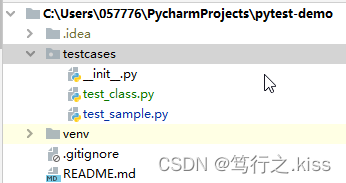
(1)编写测试用例文件 test_class.py和test_sample.py如下:
# content of test_sample.py
def func(x):
    return x + 1


def test_answer():
    assert func(3) == 5
# content of test_class.py class TestClass: def test_one(self): x = "this" assert "h" in x def test_two(self): x = "hello" assert hasattr(x, "check")测试用例目录结构如下:
(2)执行测试用例

Microsoft Windows [版本 10.0.19044.1766]
(c) Microsoft Corporation。保留所有权利。(venv) C:\Users\057776\PycharmProjects\pytest-demo>pytest
================================ test session starts ================================
platform win32 -- Python 3.8.8, pytest-6.2.3, py-1.10.0, pluggy-0.13.1
rootdir: C:\Users\057776\PycharmProjects\pytest-demo
plugins: html-3.1.1, metadata-1.11.0, rerunfailures-9.1.1, assume-2.2.0, requests-mock-1.7.0
collected 3 itemstestcases\test_class.py .F [ 66%]
testcases\test_sample.py F [100%]=================================== FAILURES ===================================
__________________________________ TestClass.test_two __________________________________self = <testcases.test_class.TestClass object at 0x000001A6855B9400>
def test_two(self):
x = "hello"
> assert hasattr(x, "check")
E AssertionError: assert False
E + where False = hasattr('hello', 'check')testcases\test_class.py:20: AssertionError
____________________________________ test_answer ____________________________________def test_answer():
> assert func(3) == 5
E assert 4 == 5
E + where 4 = func(3)testcases\test_sample.py:18: AssertionError
=============================== short test summary info ===============================
FAILED testcases/test_class.py::TestClass::test_two - AssertionError: assert False
FAILED testcases/test_sample.py::test_answer - assert 4 == 5
============================== 2 failed, 1 passed in 0.51s ==============================(venv) C:\Users\057776\PycharmProjects\pytest-demo>
collected 3 items :
分析运行结果可知,根据测试用例收集规则,一共收集到了3条测试用例,分别对应 testcases\test_class.py 和 testcases\test_sample.py 文件中的 3个函数 test_one,test_two,test_answer。
reference:
-
相关阅读:
Leetcode 1124. 表现良好的最长时间段
Vuex从了解到实际运用,彻底搞懂什么是Vuex(一)
前端测试:自动化测试知识扫盲
WEB前端常规技术面试题之HTML+CSS基础
使用nginx部署多个前端项目
Flutter Android 热修复方案(3.22.0)
idea中的.idea文件夹以及*.iml文件(新版idea没有*.iml文件了),新旧版idea打开同一个项目会不会出现不兼容
应用配置文件 student-system.yaml 生成 Deployment报错,有没有厉害的解决一下的
BioVendor游离轻链(κ和λ)Elisa 试剂盒的化学性质
SpringBoot集成Activiti7
- 原文地址:https://blog.csdn.net/panc_guizaijianchi/article/details/125623714